




Updated April 23, 2026
Bridging CLI Simplicity & .NET : Using Curl DotNet with IronPDF
Jacob Mellor has bridged this gap with CurlDotNet, a library created to bring the familiarity of cURL to the .NET ecosystem.
Read More

String manipulation is a fundamental aspect of programming, and one common task is reversing an input string. In C#, there are several ways to accomplish this task, such as using a while loop, each with its advantages, disadvantages, and best use cases. In this article, we will explore various methods to reverse a string or character array in C#, along with code examples for different scenarios and edge cases. Also, we will introduce an outstanding PDF generation library called IronPDF from Iron Software.
C# provides several built-in functions for string manipulation, and one of them is Array.Reverse(), which can be used to reverse an array of characters or a char array representing a string. Here's a code example of the reverse method:
public class Program
{
    // Main method: entry point of the program
    public static void Main()
    {
        string original = "AwesomeIronPDF"; // String variable
        char[] charArray = original.ToCharArray(); // Convert string to character array
        Array.Reverse(charArray); // Reverse the character array
        string reversed = new string(charArray); // Create a new reversed string
        Console.WriteLine(reversed); // Output: FDPnorIemosewA
    }
}Public Class Program
' Main method: entry point of the program
Public Shared Sub Main()
Dim original As String = "AwesomeIronPDF" ' String variable
Dim charArray() As Char = original.ToCharArray() ' Convert string to character array
Array.Reverse(charArray) ' Reverse the character array
Dim reversed As New String(charArray) ' Create a new reversed string
Console.WriteLine(reversed) ' Output: FDPnorIemosewA
End Sub
End ClassStringBuilderAnother approach to reverse a string in C# is by utilizing the StringBuilder class, which provides efficient string manipulation operations. Here's how you can use StringBuilder to reverse a string:
public class Program
{
    // Main method: entry point of the program
    public static void Main()
    {
        string someText = "AwesomeIronPDF"; // String variable
        StringBuilder sb = new StringBuilder(); // Create a StringBuilder instance
        for (int i = someText.Length - 1; i >= 0; i--)
        {
            sb.Append(someText[i]); // Append characters in reverse order
        }
        string reversed = sb.ToString(); // Convert StringBuilder to string
        Console.WriteLine(reversed); // Output: FDPnorIemosewA
    }
}Public Class Program
' Main method: entry point of the program
Public Shared Sub Main()
Dim someText As String = "AwesomeIronPDF" ' String variable
Dim sb As New StringBuilder() ' Create a StringBuilder instance
For i As Integer = someText.Length - 1 To 0 Step -1
sb.Append(someText.Chars(i)) ' Append characters in reverse order
Next i
Dim reversed As String = sb.ToString() ' Convert StringBuilder to string
Console.WriteLine(reversed) ' Output: FDPnorIemosewA
End Sub
End ClassA recursive approach can also be used to reverse a string in C#. This method involves recursively swapping characters from both ends of the string until the entire string is reversed. Here's an implementation:
public class Program
{
    // Main method: entry point of the program
    public static void Main()
    {
        string someText = "AwesomeIronPDF"; // Random string
        string reversed = ReverseString(someText); // Reverse a string
        Console.WriteLine(reversed); // Output: FDPnorIemosewA
    }

    // Recursive method to reverse a string
    public static string ReverseString(string str)
    {
        if (str.Length <= 1)
            return str;
        return ReverseString(str.Substring(1)) + str[0]; // Recursive call and string concatenation
    }
}Public Class Program
' Main method: entry point of the program
Public Shared Sub Main()
Dim someText As String = "AwesomeIronPDF" ' Random string
Dim reversed As String = ReverseString(someText) ' Reverse a string
Console.WriteLine(reversed) ' Output: FDPnorIemosewA
End Sub
' Recursive method to reverse a string
Public Shared Function ReverseString(ByVal str As String) As String
If str.Length <= 1 Then
Return str
End If
Return ReverseString(str.Substring(1)) + str.Chars(0) ' Recursive call and string concatenation
End Function
End ClassWhen reversing strings, it's essential to consider edge cases to ensure robustness and correctness. Some edge cases to consider include:
IronPDF excels in HTML to PDF conversion, ensuring precise preservation of original layouts and styles. It's perfect for creating PDFs from web-based content such as reports, invoices, and documentation. With support for HTML files, URLs, and raw HTML strings, IronPDF easily produces high-quality PDF documents.
using IronPdf;

class Program
{
    // Main method: entry point of the program
    static void Main(string[] args)
    {
        var renderer = new ChromePdfRenderer(); // Create a PDF renderer

        // 1. Convert HTML String to PDF
        var htmlContent = "<h1>Hello, IronPDF!</h1><p>This is a PDF from an HTML string.</p>";
        var pdfFromHtmlString = renderer.RenderHtmlAsPdf(htmlContent); // Render HTML to PDF
        pdfFromHtmlString.SaveAs("HTMLStringToPDF.pdf"); // Save the PDF file

        // 2. Convert HTML File to PDF
        var htmlFilePath = "path_to_your_html_file.html"; // Specify the path to your HTML file
        var pdfFromHtmlFile = renderer.RenderHtmlFileAsPdf(htmlFilePath); // Render HTML file to PDF
        pdfFromHtmlFile.SaveAs("HTMLFileToPDF.pdf"); // Save the PDF file

        // 3. Convert URL to PDF
        var url = "http://ironpdf.com"; // Specify the URL
        var pdfFromUrl = renderer.RenderUrlAsPdf(url); // Render URL to PDF
        pdfFromUrl.SaveAs("URLToPDF.pdf"); // Save the PDF file
    }
}Imports IronPdf
Friend Class Program
' Main method: entry point of the program
Shared Sub Main(ByVal args() As String)
Dim renderer = New ChromePdfRenderer() ' Create a PDF renderer
' 1. Convert HTML String to PDF
Dim htmlContent = "<h1>Hello, IronPDF!</h1><p>This is a PDF from an HTML string.</p>"
Dim pdfFromHtmlString = renderer.RenderHtmlAsPdf(htmlContent) ' Render HTML to PDF
pdfFromHtmlString.SaveAs("HTMLStringToPDF.pdf") ' Save the PDF file
' 2. Convert HTML File to PDF
Dim htmlFilePath = "path_to_your_html_file.html" ' Specify the path to your HTML file
Dim pdfFromHtmlFile = renderer.RenderHtmlFileAsPdf(htmlFilePath) ' Render HTML file to PDF
pdfFromHtmlFile.SaveAs("HTMLFileToPDF.pdf") ' Save the PDF file
' 3. Convert URL to PDF
Dim url = "http://ironpdf.com" ' Specify the URL
Dim pdfFromUrl = renderer.RenderUrlAsPdf(url) ' Render URL to PDF
pdfFromUrl.SaveAs("URLToPDF.pdf") ' Save the PDF file
End Sub
End ClassStart by creating a Console application from Visual Studio.
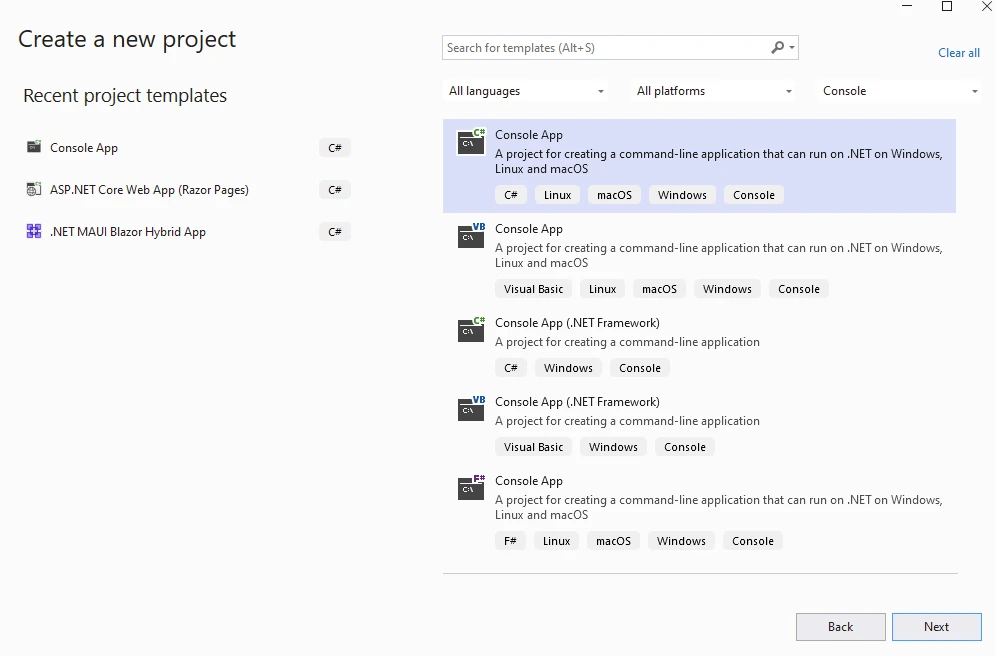
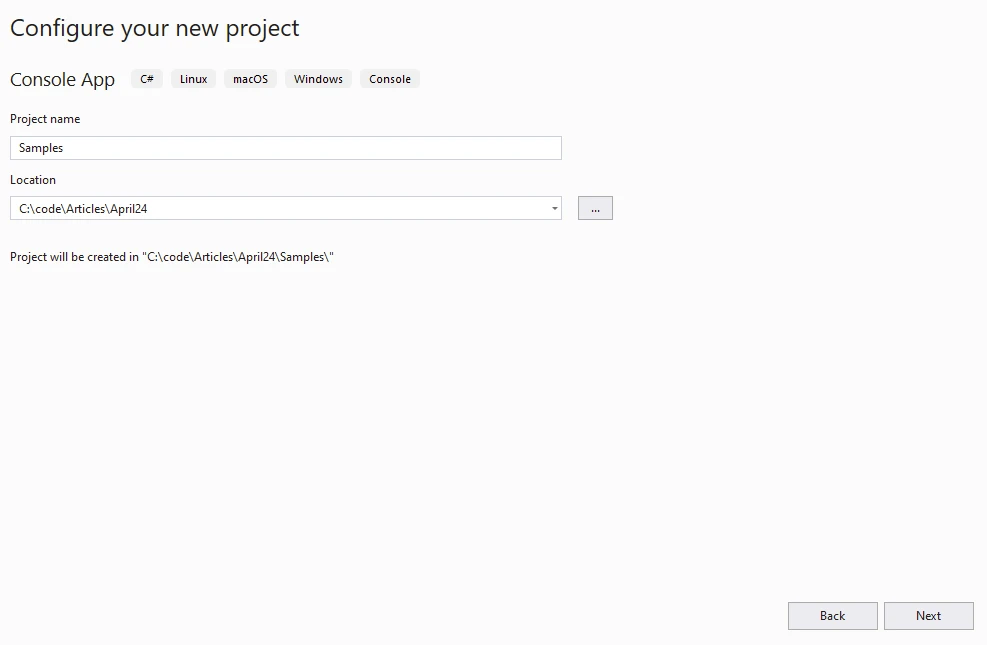
Provide the Project name and Location.
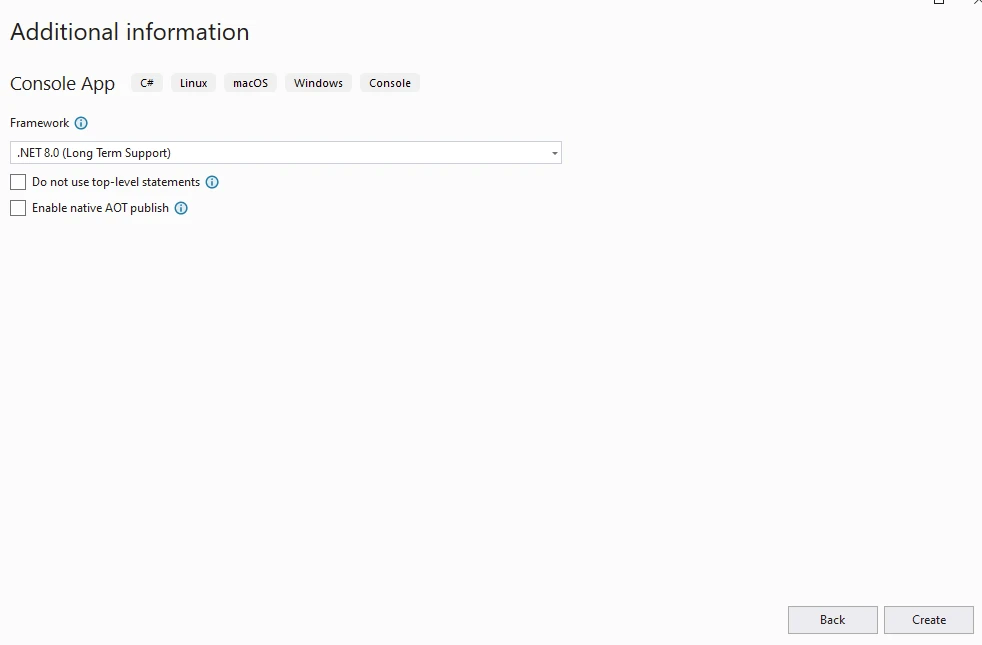
Select the .NET version.
Install IronPDF to the created project.
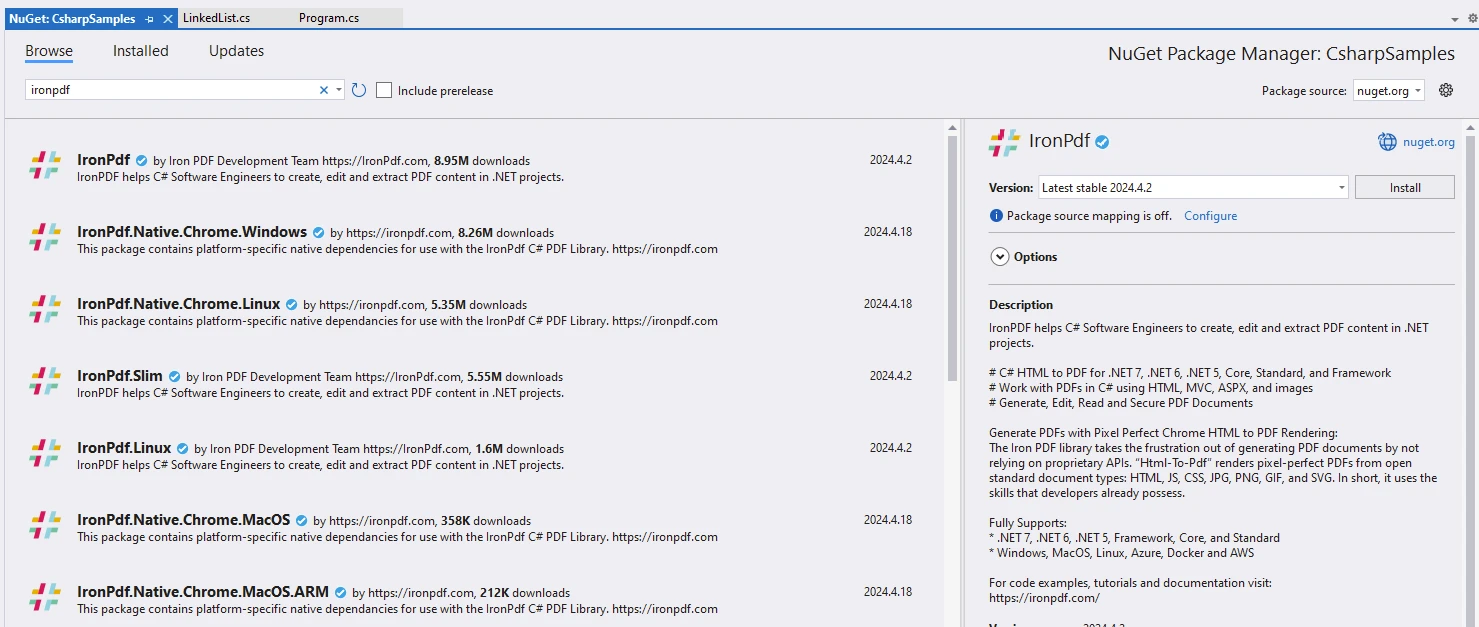
It can also be done using the command line below.
Write the below code to demonstrate String Reverse.
public class Program
{
    // Main method: entry point of the program
    public static void Main()
    {
        var content = "<h1>Demonstrate IronPDF with C# LinkedList</h1>";
        content += "<h2>1. Using Array.Reverse Method</h2>";
        string someText = "AwesomeIronPDF"; // New string variable
        content += $"<p>Input String: {someText}</p>";
        char[] charArray = someText.ToCharArray(); // Convert string to character array
        Array.Reverse(charArray); // Reverse the character array
        string reversed1 = new string(charArray); // Create a new reversed string
        Console.WriteLine(reversed1); // Output: FDPnorIemosewA
        content += $"<p>Output: {reversed1}</p>";
        content += "<h2>2. Using StringBuilder</h2>";
        StringBuilder sb = new StringBuilder(); // Create a StringBuilder instance
        content += $"<p>Input String: {someText}</p>";
        for (int i = someText.Length - 1; i >= 0; i--)
        {
            sb.Append(someText[i]); // Append characters in reverse order
        }
        string reversed2 = sb.ToString(); // Convert StringBuilder to string
        Console.WriteLine(reversed2); // Output: FDPnorIemosewA
        content += $"<p>Output: {reversed2}</p>";
        content += "<h2>3. Using Recursive Approach</h2>";
        content += $"<p>Input String: {someText}</p>";
        string reversed3 = ReverseString(someText); // Reverse a string
        Console.WriteLine(reversed3); // Output: FDPnorIemosewA
        content += $"<p>Output: {reversed3}</p>";
        // Create Renderer
        var renderer = new ChromePdfRenderer(); // Create a PDF renderer
        // Create a PDF from HTML string
        var pdf = renderer.RenderHtmlAsPdf(content); // Render HTML to PDF
        // Save to a file or Stream
        pdf.SaveAs("reverseString.pdf"); // Save the PDF file
    }

    // Recursive method to reverse a string
    public static string ReverseString(string str)
    {
        if (str.Length <= 1)
            return str;
        return ReverseString(str.Substring(1)) + str[0]; // Recursive call and string concatenation
    }
}Public Class Program
' Main method: entry point of the program
Public Shared Sub Main()
Dim content = "<h1>Demonstrate IronPDF with C# LinkedList</h1>"
content &= "<h2>1. Using Array.Reverse Method</h2>"
Dim someText As String = "AwesomeIronPDF" ' New string variable
content &= $"<p>Input String: {someText}</p>"
Dim charArray() As Char = someText.ToCharArray() ' Convert string to character array
Array.Reverse(charArray) ' Reverse the character array
Dim reversed1 As New String(charArray) ' Create a new reversed string
Console.WriteLine(reversed1) ' Output: FDPnorIemosewA
content &= $"<p>Output: {reversed1}</p>"
content &= "<h2>2. Using StringBuilder</h2>"
Dim sb As New StringBuilder() ' Create a StringBuilder instance
content &= $"<p>Input String: {someText}</p>"
For i As Integer = someText.Length - 1 To 0 Step -1
sb.Append(someText.Chars(i)) ' Append characters in reverse order
Next i
Dim reversed2 As String = sb.ToString() ' Convert StringBuilder to string
Console.WriteLine(reversed2) ' Output: FDPnorIemosewA
content &= $"<p>Output: {reversed2}</p>"
content &= "<h2>3. Using Recursive Approach</h2>"
content &= $"<p>Input String: {someText}</p>"
Dim reversed3 As String = ReverseString(someText) ' Reverse a string
Console.WriteLine(reversed3) ' Output: FDPnorIemosewA
content &= $"<p>Output: {reversed3}</p>"
' Create Renderer
Dim renderer = New ChromePdfRenderer() ' Create a PDF renderer
' Create a PDF from HTML string
Dim pdf = renderer.RenderHtmlAsPdf(content) ' Render HTML to PDF
' Save to a file or Stream
pdf.SaveAs("reverseString.pdf") ' Save the PDF file
End Sub
' Recursive method to reverse a string
Public Shared Function ReverseString(ByVal str As String) As String
If str.Length <= 1 Then
Return str
End If
Return ReverseString(str.Substring(1)) + str.Chars(0) ' Recursive call and string concatenation
End Function
End Class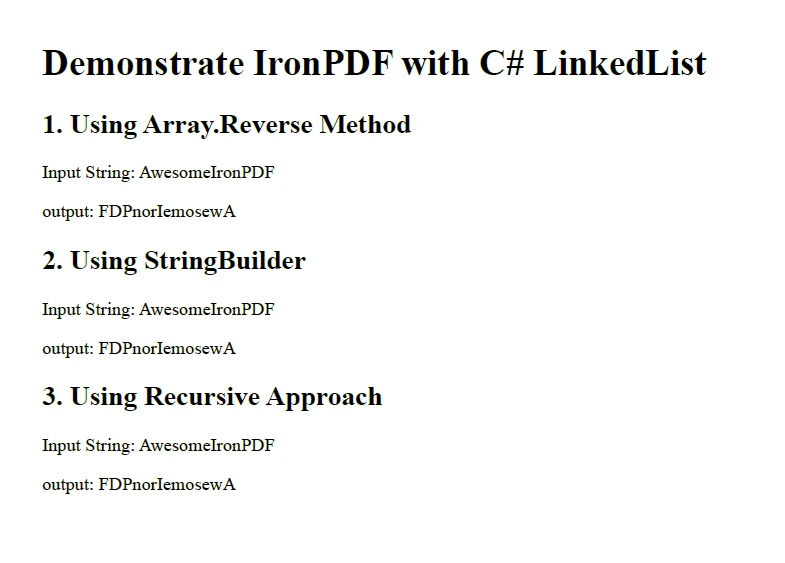
IronPDF library requires a license to execute applications. More info can be found on the IronPDF Licensing Information page.
A trial license can be obtained from the IronPDF Trial License page.
Paste the Key in the appSettings.json file below.
{
  "IronPdf.License.LicenseKey": "The Key Goes Here"
}Reversing a string in C# is a common programming task with various approaches and considerations. Whether you prefer built-in functions, StringBuilder, or recursive methods, each approach has its advantages, disadvantages, and best use cases. By understanding these methods and considering edge cases, you can effectively reverse strings in C# in a manner that suits your specific requirements. Choose the method that best fits your requirements based on performance, memory usage, and handling of special characters.
With the IronPDF library for C# PDF operations, developers can gain advanced skills to develop modern applications.

Jacob Mellor is Chief Technology Officer at Iron Software and a visionary engineer pioneering C# PDF technology. As the original developer behind Iron Software's core codebase, he has shaped the company's product architecture since its inception, transforming it alongside CEO Cameron Rimington into a 50+ person company serving NASA, Tesla, and global government agencies.



IronPDF is a part of IRONSUITE
10 .NET API products for your office documents











When you need your PDF to look like HTML, fast.


