Cuando se trabaja con la conversión de HTML a PDF en .NET, un HTML limpio y bien estructurado puede hacer una diferencia significativa en la calidad del PDF final. Formatear correctamente HTML sin procesar garantiza la legibilidad, el renderizado correcto y la consistencia. Es aquí donde un formateador de HTML, o un embellecedor de HTML, entra en juego.
En este artículo, exploraremos cómo usar un embellecedor de HTML en .NET antes de convertir HTML a PDF usando IronPDF. Hablaremos de los beneficios de la embellecimiento, presentaremos bibliotecas que pueden ayudar y proporcionaremos un ejemplo práctico de código.
¿Qué es un Pretificador HTML?
Un embellecedor de HTML es una herramienta que reformatea código HTML sin procesar o minificado a un formato legible y bien estructurado. Este proceso implica:
- Sangrar correctamente los elementos anidados
- Cerrar etiquetas sin cerrar
- Formatear los atributos de manera consistente
- Eliminar espacios en blanco innecesarios
El uso de un embellecedor de HTML antes de convertir a PDF asegura que el contenido permanezca estructurado y visualmente coherente, reduciendo problemas de renderizado en el PDF generado.
IronPDF: Una potente solución PDF
IronPDF es una biblioteca de .NET completa y rica en funciones diseñada para una conversión de HTML a PDF sin interrupciones. Permite a los desarrolladores convertir HTML, URLs o incluso cadenas de HTML sin procesar en PDFs de alta calidad con un esfuerzo mínimo. A diferencia de muchas otras bibliotecas de PDF, IronPDF admite completamente los estándares web modernos, incluidos HTML5, CSS3 y JavaScript, asegurando que los PDFs renderizados mantengan su diseño e interpretación previstos. Lo que lo convierte en una opción ideal para proyectos que requieren una salida PDF precisa desde estructuras HTML complejas.
Algunas de las características clave de IronPDF incluyen:
Al integrar IronPDF con un embellecedor de HTML, aseguras que tus documentos no sólo sean visualmente atractivos sino también libres de problemas de renderizado, haciendo que tu flujo de trabajo sea más suave y eficiente.
Pretendiendo HTML en .NET
Hay varias bibliotecas disponibles en .NET para embellecer HTML no formateado o feo, incluyendo:
1. Paquete de agilidad HTML
- Una biblioteca popular para analizar y modificar código HTML en C#.
- Se puede usar para formatear y limpiar el código HTML antes de procesarlo.
2. Ángulo afilado
- Un analizador moderno de HTML for .NET que proporciona capacidades detalladas de manipulación de documentos.
- Puede formatear HTML de manera que sea más legible.
- Formatea y sangra HTML desordenado para mejorar la legibilidad.
- Herramienta en línea que funciona directamente en el navegador, sin necesidad de instalación.
HtmlAgilityPack es una biblioteca popular de .NET que proporciona una manera rápida y eficiente de analizar y manipular documentos HTML. Puede manejar HTML mal formado o mal estructurado, lo que lo convierte en una gran elección para scrapeo web y extracción de datos. Aunque no está explícitamente diseñado como un "embellecedor", se puede usar para limpiar y formatear código HTML analizándolo y guardándolo con la sangría adecuada.
Aquí te mostramos cómo puedes usar HtmlAgilityPack para embellecer HTML antes de pasarlo a IronPDF:
using IronPdf;
using HtmlAgilityPack;
using System.IO;

class Program
{
    static void Main()
    {
        string htmlContent = "<html><body><h1>Hello World!</h1><p>This is a test.</p></body></html>";

        // Load the HTML content into an HtmlDocument
        HtmlDocument doc = new HtmlDocument();
        doc.LoadHtml(htmlContent);

        // Prettify the HTML by saving it with indentation
        // Saves the formatted HTML with the prettified indenting
        string prettyHtml = doc.DocumentNode.OuterHtml;
        doc.Save("pretty.html"); // Save the pretty HTML to a file
    }
}
using IronPdf;
using HtmlAgilityPack;
using System.IO;

class Program
{
    static void Main()
    {
        string htmlContent = "<html><body><h1>Hello World!</h1><p>This is a test.</p></body></html>";

        // Load the HTML content into an HtmlDocument
        HtmlDocument doc = new HtmlDocument();
        doc.LoadHtml(htmlContent);

        // Prettify the HTML by saving it with indentation
        // Saves the formatted HTML with the prettified indenting
        string prettyHtml = doc.DocumentNode.OuterHtml;
        doc.Save("pretty.html"); // Save the pretty HTML to a file
    }
}
Imports IronPdf
Imports HtmlAgilityPack
Imports System.IO
Friend Class Program
Shared Sub Main()
Dim htmlContent As String = "<html><body><h1>Hello World!</h1><p>This is a test.</p></body></html>"
' Load the HTML content into an HtmlDocument
Dim doc As New HtmlDocument()
doc.LoadHtml(htmlContent)
' Prettify the HTML by saving it with indentation
' Saves the formatted HTML with the prettified indenting
Dim prettyHtml As String = doc.DocumentNode.OuterHtml
doc.Save("pretty.html") ' Save the pretty HTML to a file
End Sub
End Class
Imports IronPdf
Imports HtmlAgilityPack
Imports System.IO

Friend Class Program
	Shared Sub Main()
		Dim htmlContent As String = "<html><body><h1>Hello World!</h1><p>This is a test.</p></body></html>"

		' Load the HTML content into an HtmlDocument
		Dim doc As New HtmlDocument()
		doc.LoadHtml(htmlContent)

		' Prettify the HTML by saving it with indentation
		' Saves the formatted HTML with the prettified indenting
		Dim prettyHtml As String = doc.DocumentNode.OuterHtml
		doc.Save("pretty.html") ' Save the pretty HTML to a file
	End Sub
End Class
Archivo HTML de salida

Utilización de AngleSharp como embellecedor de HTML

AngleSharp es una biblioteca de .NET diseñada para analizar y manipular documentos HTML, XML y SVG. Ofrece un enfoque moderno y flexible para la manipulación del DOM y el formateo. La clase HtmlFormatter de AngleSharp se puede usar para formatear contenido HTML, proporcionando una salida agradable y legible.
using AngleSharp.Html.Parser;
using System;

class Program
{
    static void Main()
    {
        string htmlContent = "<html><body><h1>Hello World!</h1><p>This is a test.</p></body></html>";

        // Parse the HTML content using HtmlParser
        var parser = new HtmlParser();
        var document = parser.ParseDocument(htmlContent);

        // Format the HTML using AngleSharp’s HtmlFormatter
        var prettyHtml = document.ToHtml();
    }
}
using AngleSharp.Html.Parser;
using System;

class Program
{
    static void Main()
    {
        string htmlContent = "<html><body><h1>Hello World!</h1><p>This is a test.</p></body></html>";

        // Parse the HTML content using HtmlParser
        var parser = new HtmlParser();
        var document = parser.ParseDocument(htmlContent);

        // Format the HTML using AngleSharp’s HtmlFormatter
        var prettyHtml = document.ToHtml();
    }
}
Imports AngleSharp.Html.Parser
Imports System
Friend Class Program
Shared Sub Main()
Dim htmlContent As String = "<html><body><h1>Hello World!</h1><p>This is a test.</p></body></html>"
' Parse the HTML content using HtmlParser
Dim parser = New HtmlParser()
Dim document = parser.ParseDocument(htmlContent)
' Format the HTML using AngleSharp's HtmlFormatter
Dim prettyHtml = document.ToHtml()
End Sub
End Class
Imports AngleSharp.Html.Parser
Imports System

Friend Class Program
	Shared Sub Main()
		Dim htmlContent As String = "<html><body><h1>Hello World!</h1><p>This is a test.</p></body></html>"

		' Parse the HTML content using HtmlParser
		Dim parser = New HtmlParser()
		Dim document = parser.ParseDocument(htmlContent)

		' Format the HTML using AngleSharp's HtmlFormatter
		Dim prettyHtml = document.ToHtml()
	End Sub
End Class
Resultado HTML
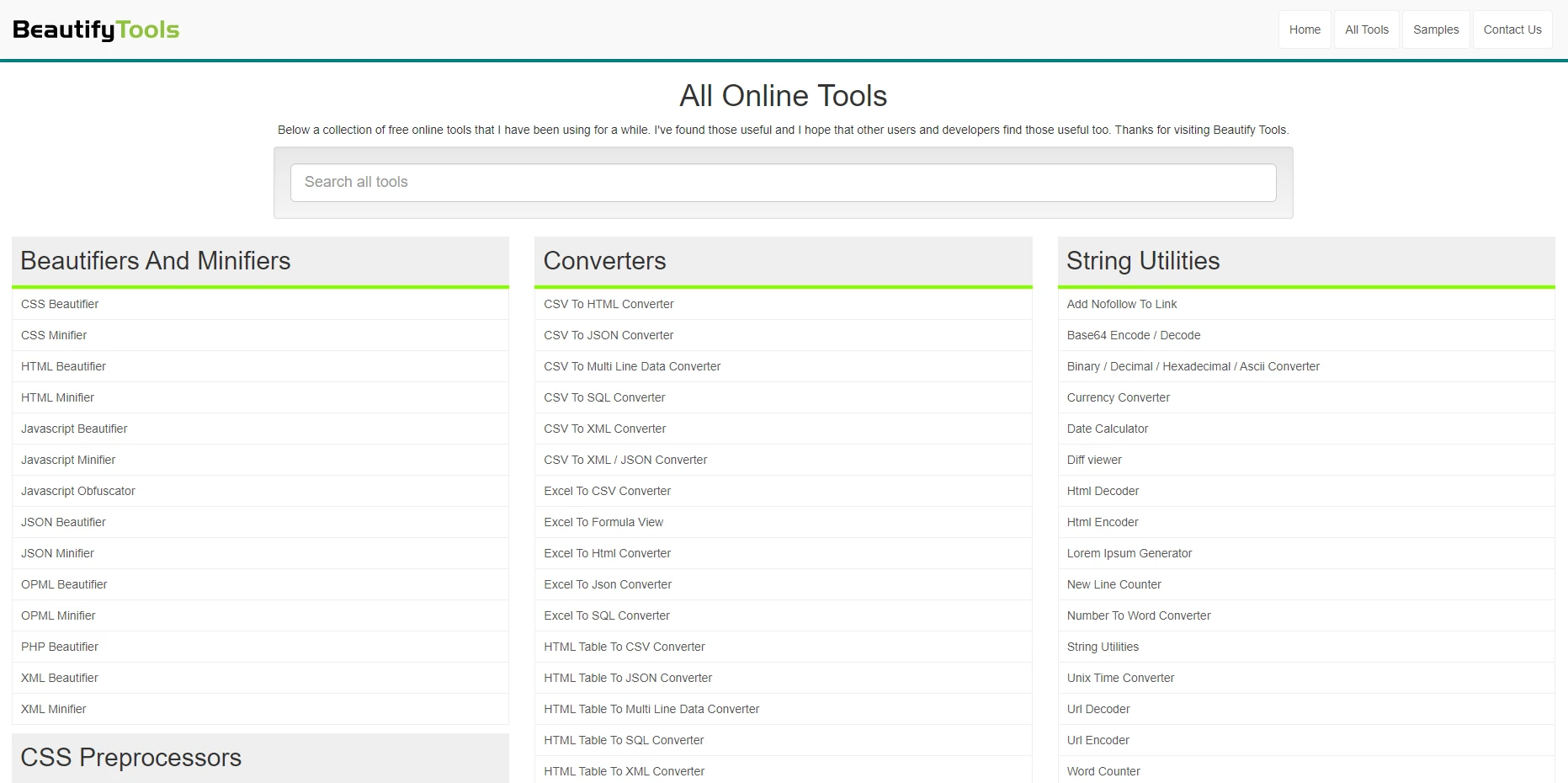
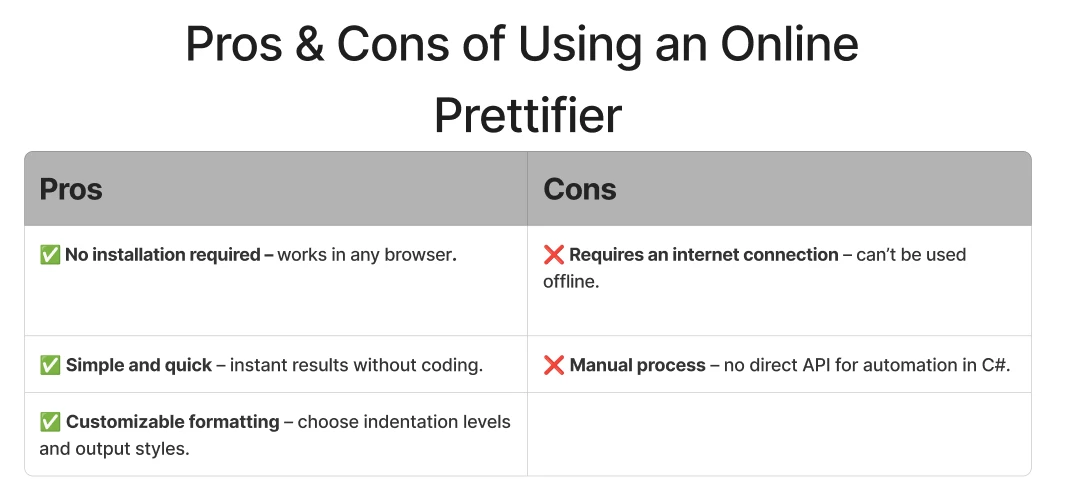
BeautifyTools.com ofrece un formateador de HTML en línea fácil de usar que te permite formatear y embellecer código HTML desordenado. Esto es útil si deseas una forma rápida y gratuita de limpiar tu HTML sin instalar ninguna biblioteca o escribir código.
Cómo utilizar el embellecedor HTML en línea
- Ir al Sitio Web
Abre BeautifyTools.com Embellecedor de HTML en tu navegador web.
-
Paste Your HTML
Copia tu HTML sin procesar o minificado y pégalo en el cuadro de entrada.
-
Ajustar la Configuración (Opcional)
- Elige el nivel de sangría (Espacios: 2, 4, etc.).
- Habilita/deshabilita los saltos de línea y opciones de formateo.
-
Hacer clic en "Embellecer HTML"
La herramienta procesará tu HTML y mostrará el resultado embellecido en el cuadro de salida.
-
Copiar el HTML Formateado
Haz clic en "Copiar al Portapapeles" o copia manualmente el HTML formateado para usarlo en tu proyecto.

Pros y contras de utilizar un embellecedor en línea
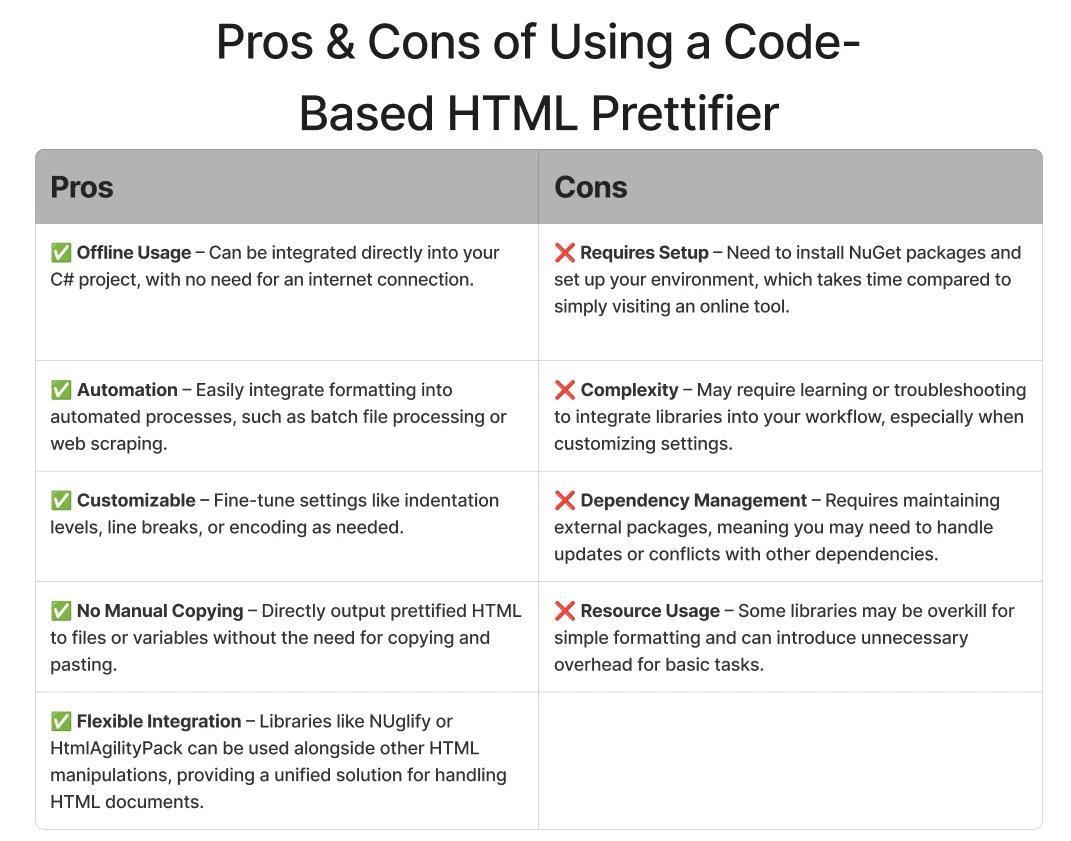
Pros y contras de usar un prettificador HTML basado en código
Convertir HTML Pretificado a PDF con IronPDF
Una vez que hemos embellecido nuestro HTML, podemos usar IronPDF para convertirlo en un PDF de alta calidad. Aquí tienes un ejemplo simple usando AngleSharp:
using AngleSharp.Html.Parser;
using System.IO;
using IronPdf;
using System;

class Program
{
    static void Main()
    {
        string htmlContent = "<html><body><h1>Hello World!</h1><p>This was formatted using AngleSharp.</p><p>Then it was converted using IronPDF.</p></body></html>";

        // Parse the HTML content using HtmlParser
        var parser = new HtmlParser();
        var document = parser.ParseDocument(htmlContent);

        // Format the HTML using PrettyMarkupFormatter
        using (var writer = new StringWriter())
        {
            document.ToHtml(writer, new PrettyMarkupFormatter()); // Format the HTML
            var prettyHtml = writer.ToString();

            // Save the formatted HTML to a file
            string outputPath = "formatted.html";
            File.WriteAllText(outputPath, prettyHtml);
            Console.WriteLine(prettyHtml);
        }

        // Convert the formatted HTML to PDF using IronPdf
        var renderer = new ChromePdfRenderer();
        var pdf = renderer.RenderHtmlFileAsPdf("formatted.html");
        pdf.SaveAs("output.pdf");
    }
}
using AngleSharp.Html.Parser;
using System.IO;
using IronPdf;
using System;

class Program
{
    static void Main()
    {
        string htmlContent = "<html><body><h1>Hello World!</h1><p>This was formatted using AngleSharp.</p><p>Then it was converted using IronPDF.</p></body></html>";

        // Parse the HTML content using HtmlParser
        var parser = new HtmlParser();
        var document = parser.ParseDocument(htmlContent);

        // Format the HTML using PrettyMarkupFormatter
        using (var writer = new StringWriter())
        {
            document.ToHtml(writer, new PrettyMarkupFormatter()); // Format the HTML
            var prettyHtml = writer.ToString();

            // Save the formatted HTML to a file
            string outputPath = "formatted.html";
            File.WriteAllText(outputPath, prettyHtml);
            Console.WriteLine(prettyHtml);
        }

        // Convert the formatted HTML to PDF using IronPdf
        var renderer = new ChromePdfRenderer();
        var pdf = renderer.RenderHtmlFileAsPdf("formatted.html");
        pdf.SaveAs("output.pdf");
    }
}
Imports AngleSharp.Html.Parser
Imports System.IO
Imports IronPdf
Imports System
Module Program
Sub Main()
Dim htmlContent As String = "<html><body><h1>Hello World!</h1><p>This was formatted using AngleSharp.</p><p>Then it was converted using IronPDF.</p></body></html>"
' Parse the HTML content using HtmlParser
Dim parser = New HtmlParser()
Dim document = parser.ParseDocument(htmlContent)
' Format the HTML using PrettyMarkupFormatter
Using writer As New StringWriter()
document.ToHtml(writer, New PrettyMarkupFormatter()) ' Format the HTML
Dim prettyHtml = writer.ToString()
' Save the formatted HTML to a file
Dim outputPath As String = "formatted.html"
File.WriteAllText(outputPath, prettyHtml)
Console.WriteLine(prettyHtml)
End Using
' Convert the formatted HTML to PDF using IronPdf
Dim renderer = New ChromePdfRenderer()
Dim pdf = renderer.RenderHtmlFileAsPdf("formatted.html")
pdf.SaveAs("output.pdf")
End Sub
End Module
Imports AngleSharp.Html.Parser
Imports System.IO
Imports IronPdf
Imports System

Module Program
    Sub Main()
        Dim htmlContent As String = "<html><body><h1>Hello World!</h1><p>This was formatted using AngleSharp.</p><p>Then it was converted using IronPDF.</p></body></html>"

        ' Parse the HTML content using HtmlParser
        Dim parser = New HtmlParser()
        Dim document = parser.ParseDocument(htmlContent)

        ' Format the HTML using PrettyMarkupFormatter
        Using writer As New StringWriter()
            document.ToHtml(writer, New PrettyMarkupFormatter()) ' Format the HTML
            Dim prettyHtml = writer.ToString()

            ' Save the formatted HTML to a file
            Dim outputPath As String = "formatted.html"
            File.WriteAllText(outputPath, prettyHtml)
            Console.WriteLine(prettyHtml)
        End Using

        ' Convert the formatted HTML to PDF using IronPdf
        Dim renderer = New ChromePdfRenderer()
        Dim pdf = renderer.RenderHtmlFileAsPdf("formatted.html")
        pdf.SaveAs("output.pdf")
    End Sub
End Module
Explicación
El código anterior muestra cómo embellecer HTML usando AngleSharp y luego convertirlo a un PDF usando IronPDF. Así es como funciona:
- Definir el Contenido HTML en bruto:
El programa comienza con una cadena HTML simple que contiene un <h1> encabezado y dos párrafos.
- Analizar el HTML con AngleSharp:
Inicializa una instancia de HtmlParser y analiza el HTML en bruto en un objeto IDocument estructurado.
- Format the HTML using PrettyMarkupFormatter:
- Se usa la clase
PrettyMarkupFormatter para formatear e indentar el HTML correctamente.
- Se utiliza un
StringWriter para capturar el HTML formateado como una cadena.
- Después del formateo, el HTML formateado se guarda en un archivo llamado "formatted.html".
- Convertir el HTML Formateado a PDF usando IronPDF:
- Se crea una instancia de
ChromePdfRenderer para manejar la conversión.
- El archivo HTML formateado se carga y se convierte en un
PdfDocument.
- El PDF resultante se guarda como "output.pdf".
-
Salida Final:
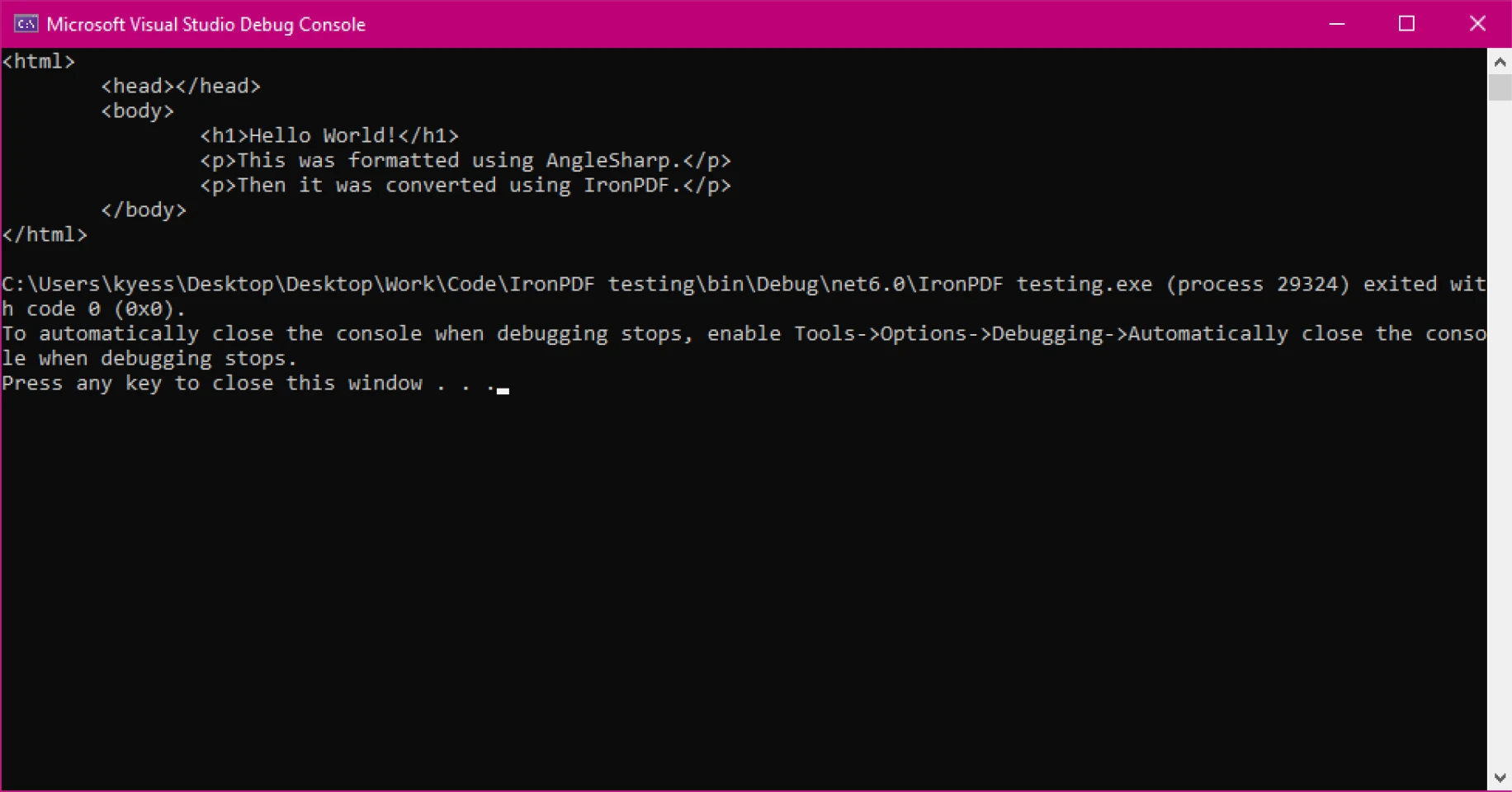
- El HTML embellecido se muestra en la consola.
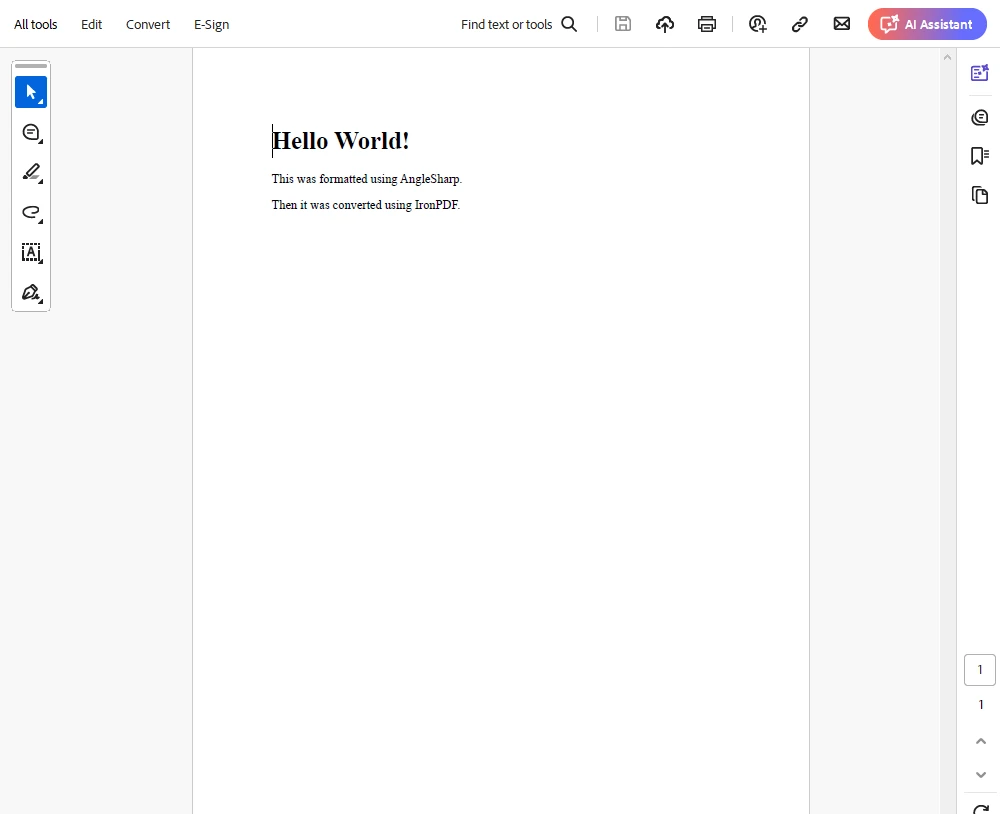
- El programa produce dos archivos de salida:
- formatted.html (una versión bien estructurada del HTML)
- output.pdf (el documento PDF final generado a partir del HTML formateado).
Este enfoque asegura que el HTML esté ordenadamente estructurado antes de convertirlo a PDF, lo que mejora la legibilidad y evita problemas potenciales de renderizado en la salida del PDF.
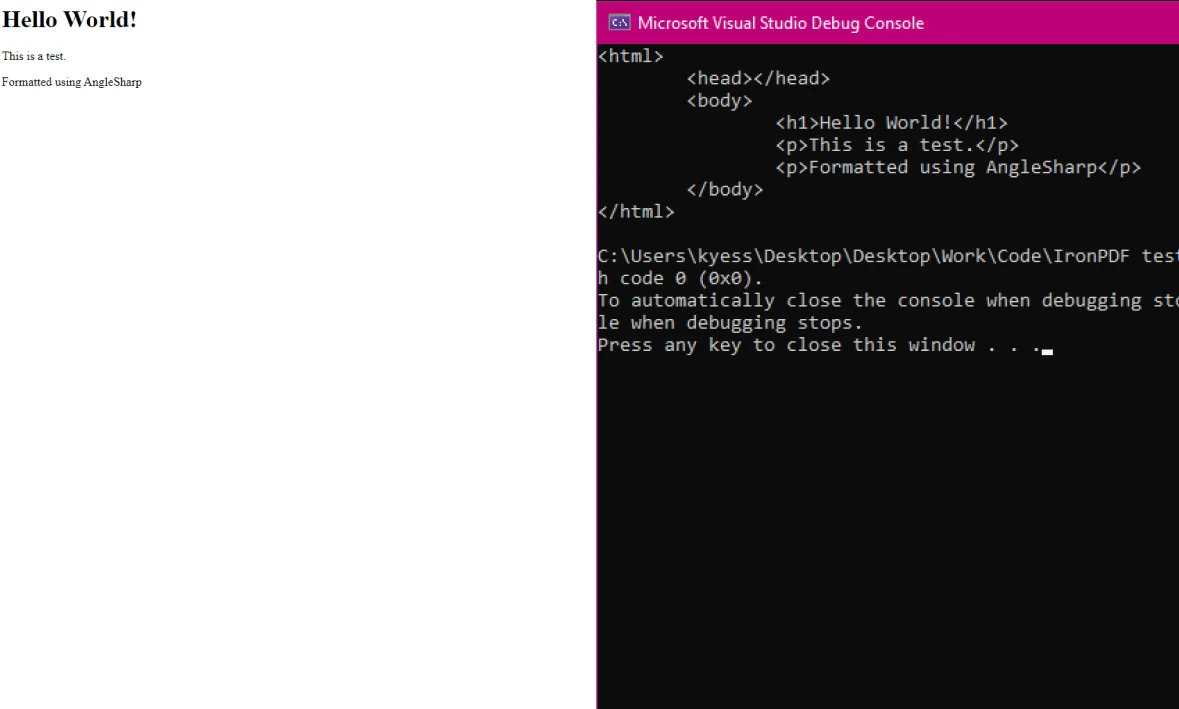
Salida de Consola
Salida de PDF
¿Por qué utilizar un prettificador con IronPDF?
1. Mejor legibilidad y depuración
El HTML formateado es más fácil de leer, depurar y mantener. Esto es especialmente útil al trabajar con contenido dinámico o grandes plantillas HTML.
2. Mejora de la coherencia del estilo
El HTML embellecido mantiene un espaciado y estructura consistentes, lo que lleva a un renderizado más predecible en IronPDF.
3. Reducción de los problemas de renderización
HTML minificado o no estructurado puede a veces causar problemas inesperados en la generación de PDF. La embellecimiento ayuda a prevenir elementos faltantes o diseños rotos.
4. Simplifica los flujos de trabajo automatizados
Si tu aplicación genera PDFs programáticamente, garantizar que HTML esté limpio y bien formado antes de la conversión mejora la estabilidad y precisión.
Conclusión
Usar un embellecedor de HTML con IronPDF en .NET es una forma simple pero efectiva de mejorar la conversión de PDF. Al estructurar tu HTML correctamente, aseguras un mejor renderizado, mantenibilidad mejorada y menos dolores de cabeza en la depuración.
Con bibliotecas como HtmlAgilityPack, AngleSharp y HTML Beautifier, embellecer HTML antes de la generación de PDF se convierte en una tarea sin esfuerzo. Si trabajas frecuentemente con conversiones de HTML a PDF, considera integrar un embellecedor de HTML en tu flujo de trabajo para obtener resultados óptimos.
¡Pruébalo hoy mismo y ve cómo mejora tu experiencia con IronPDF! Descarga la prueba gratuita y comienza a explorar todo lo que IronPDF tiene para ofrecer dentro de tus propios proyectos.























