IronPDF Live Coding Recap: PDFs Pixel-Perfect en proyectos .NET del mundo real
En una sesión en vivo reciente, Regan Pun (Ingeniero de Software) de Iron Software se unió a Craig Beaumont (Líder de Ventas) para mostrar cómo los desarrolladores pueden construir soluciones PDF precisas y listas para producción usando IronPDF. El seminario web cubrió toda la gama de características principales desde la renderización de HTML a PDF hasta la firma digital, mostrando lo fácil que es integrar una funcionalidad PDF potente en cualquier aplicación .NET.
Recapitulación rápida: Generación de archivos PDF Pixel-Perfect
Regan comenzó la demostración configurando una arquitectura limpia con una biblioteca de clases, una API Web y un frontend Blazor para demostrar la conversión de HTML a PDF.
Con un solo método, RenderHtmlAsPdfAsync(), IronPDF convierte archivos HTML en documentos PDF nítidos y precisos. Mostró cómo la salida es casi idéntica a lo que generaría Chrome, haciendo de IronPDF una gran elección para desarrolladores que necesitan renderización perfecta.
Características Clave Demonstradas:
- Renderización basada en Chrome para un diseño preciso
- Márgenes, encabezados y pies de página personalizados
- Carga automática de fuentes para evitar problemas de renderización
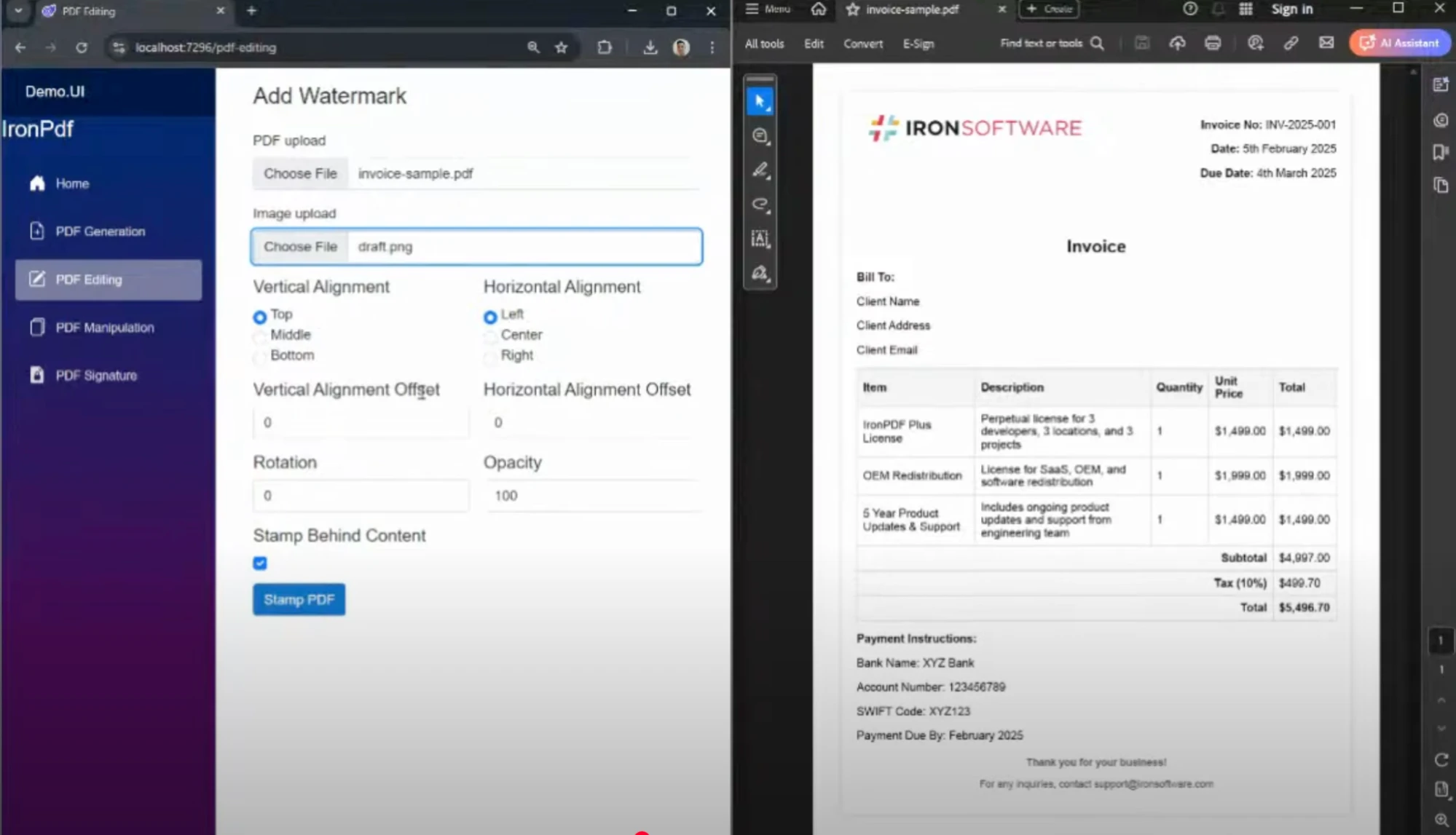
A continuación, Regan mostró cómo estampar marcas de agua (imágenes o texto) en páginas PDF con control total sobre:
- Posicionamiento (arriba/abajo, izquierda/derecha)
- Opacidad y rotación
- Capa (encima/debajo del contenido)
Esto es especialmente útil para generar documentos de borrador, etiquetas confidenciales o seguimiento visual de documentos.
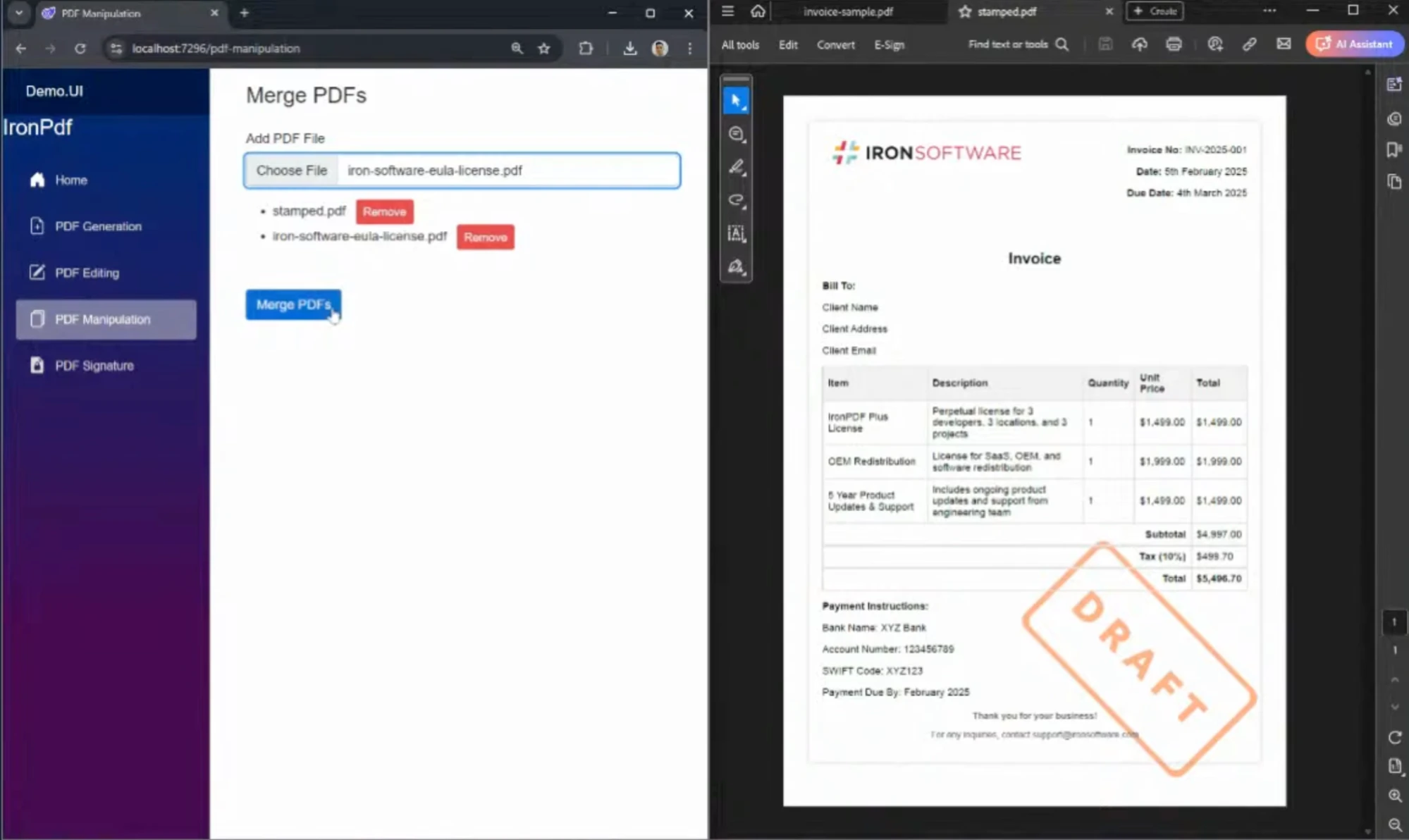
Usando la función de combinación de IronPDF, Regan demostró cómo combinar archivos como facturas y términos y condiciones (ULAs) en un solo PDF, todo en solo unas pocas líneas de C#. Esta característica es perfecta para industrias como legal, finanzas, o adquisiciones que manejan embalajes de documentos.
Aquí tienes un ejemplo de cómo combinar múltiples PDFs en C#:
// This example demonstrates how to merge multiple PDF files into one using IronPDF.
using IronPdf;

// Create a new PDF document
var newPdf = PdfDocument.Merge("file1.pdf", "file2.pdf", "file3.pdf");

// Save the combined PDF document
newPdf.SaveAs("MergedDocument.pdf");
// This example demonstrates how to merge multiple PDF files into one using IronPDF.
using IronPdf;

// Create a new PDF document
var newPdf = PdfDocument.Merge("file1.pdf", "file2.pdf", "file3.pdf");

// Save the combined PDF document
newPdf.SaveAs("MergedDocument.pdf");
' This example demonstrates how to merge multiple PDF files into one using IronPDF.
Imports IronPdf
' Create a new PDF document
Private newPdf = PdfDocument.Merge("file1.pdf", "file2.pdf", "file3.pdf")
' Save the combined PDF document
newPdf.SaveAs("MergedDocument.pdf")
' This example demonstrates how to merge multiple PDF files into one using IronPDF.
Imports IronPdf

' Create a new PDF document
Private newPdf = PdfDocument.Merge("file1.pdf", "file2.pdf", "file3.pdf")

' Save the combined PDF document
newPdf.SaveAs("MergedDocument.pdf")
Firma digitalmente documentos PDF
Para completar la demostración, Regan mostró cómo agregar firmas digitales usando certificados PFX. El PDF firmado fue validado y renderizado correctamente en Adobe Acrobat, mostrando detalles como el nombre del firmante, ubicación y motivo de aprobación.
Esta característica admite industrias con necesidades de cumplimiento estricto tales como:
- Salud (HIPAA)
- Finanzas
- Gobierno
Aquí está cómo se puede firmar digitalmente un documento PDF con IronPDF:
// This example demonstrates how to digitally sign a PDF document using a PFX certificate.
using IronPdf;

// Load your existing PDF document
PdfDocument pdf = PdfDocument.FromFile("sample.pdf");

// Specify the path to the PFX certificate and provide the password
string pfxCertificatePath = "certificate.pfx";
string pfxPassword = "password";

// Sign the PDF document
pdf.SignPdf(pfxCertificatePath, pfxPassword, "Signer's Name", "Signer's Location", "Reason for Signing");

// Save the signed PDF
pdf.SaveAs("SignedDocument.pdf");
// This example demonstrates how to digitally sign a PDF document using a PFX certificate.
using IronPdf;

// Load your existing PDF document
PdfDocument pdf = PdfDocument.FromFile("sample.pdf");

// Specify the path to the PFX certificate and provide the password
string pfxCertificatePath = "certificate.pfx";
string pfxPassword = "password";

// Sign the PDF document
pdf.SignPdf(pfxCertificatePath, pfxPassword, "Signer's Name", "Signer's Location", "Reason for Signing");

// Save the signed PDF
pdf.SaveAs("SignedDocument.pdf");
' This example demonstrates how to digitally sign a PDF document using a PFX certificate.
Imports IronPdf
' Load your existing PDF document
Private pdf As PdfDocument = PdfDocument.FromFile("sample.pdf")
' Specify the path to the PFX certificate and provide the password
Private pfxCertificatePath As String = "certificate.pfx"
Private pfxPassword As String = "password"
' Sign the PDF document
pdf.SignPdf(pfxCertificatePath, pfxPassword, "Signer's Name", "Signer's Location", "Reason for Signing")
' Save the signed PDF
pdf.SaveAs("SignedDocument.pdf")
' This example demonstrates how to digitally sign a PDF document using a PFX certificate.
Imports IronPdf

' Load your existing PDF document
Private pdf As PdfDocument = PdfDocument.FromFile("sample.pdf")

' Specify the path to the PFX certificate and provide the password
Private pfxCertificatePath As String = "certificate.pfx"
Private pfxPassword As String = "password"

' Sign the PDF document
pdf.SignPdf(pfxCertificatePath, pfxPassword, "Signer's Name", "Signer's Location", "Reason for Signing")

' Save the signed PDF
pdf.SaveAs("SignedDocument.pdf")
Casos de uso en distintos sectores
Craig destacó cómo IronPDF se usa activamente en:
- Finanzas y Contabilidad – Generar informes y estados preparados para auditoría
- Salud – Crear documentos médicos con cumplimiento HIPAA
- Gobierno y Legal – Certificar y archivar PDFs oficiales
- E-Commerce – Crear facturas y recibos a partir de plantillas HTML
IronPDF es confiado por organizaciones como la NASA por su seguridad, rendimiento y cumplimiento con estándares como PDF/A.
Códigos destacados
- HTML a PDF con renderización basada en Chrome
- Combinar y manipular PDFs dinámicamente
- Agregar marcas de agua con imágenes con control preciso
- Firmar digitalmente PDFs con validación
¿Preparado para verlo por ti mismo?
IronPDF brinda a los desarrolladores de .NET las herramientas para crear, editar y asegurar PDFs fácilmente en el escritorio, la web o la nube. Ya sea que estés automatizando facturas o creando informes empresariales, IronPDF está listo para ofrecer resultados de grado de producción.
Prueba IronPDF Gratis por 30 Días
Conviértete en un Socio Afiliado























