Déconstructeurs en C# sont des méthodes qui vous aident à décomposer un objet en plusieurs valeurs. Il s'agit d'un outil très différent des destructeurs, qui sont utilisés pour nettoyer les ressources avant qu'un objet ne soit ramassé par les éboueurs. Un déconstructeur vous permet d'extraire facilement des valeurs d'un objet. Comprendre les déconstructeurs est très utile pour les développeurs qui travaillent avec des structures de données complexes et qui ont besoin d'accéder rapidement et proprement à des parties d'un objet. Nous allons explorer ce qu'est un déconstructeur et son utilisation avec la bibliothèque IronPDF.
Qu'est-ce qu'un Deconstructor?
Un déconstructeur en C# est défini au sein d'une classe, et il traite spécifiquement de la décomposition de l'objet en parties. Vous définissez un déconstruiseur en utilisant la méthode public void Deconstruct. Cette méthode utilise des paramètres pour renvoyer les composants de l'objet. Chaque paramètre correspond à une donnée de l'objet. Il est crucial de distinguer cela des destructeurs, qui sont généralement définis en utilisant protected override void Finalize.
Exemple d'un déconstructeur de base
Considérez une classe simple Person. Cette classe peut avoir un déconstructeur qui divise l'objet en nom et en âge. Voici comment vous pouvez le définir :
public class Person
{
    public string Name { get; set; }
    public int Age { get; set; }

    // Deconstructor method to split Person object into its properties
    public void Deconstruct(out string name, out int age)
    {
        name = this.Name;
        age = this.Age;
    }
}
public class Person
{
    public string Name { get; set; }
    public int Age { get; set; }

    // Deconstructor method to split Person object into its properties
    public void Deconstruct(out string name, out int age)
    {
        name = this.Name;
        age = this.Age;
    }
}
Public Class Person
Public Property Name() As String
Public Property Age() As Integer
' Deconstructor method to split Person object into its properties
Public Sub Deconstruct(<System.Runtime.InteropServices.Out()> ByRef name As String, <System.Runtime.InteropServices.Out()> ByRef age As Integer)
name = Me.Name
age = Me.Age
End Sub
End Class
Public Class Person
	Public Property Name() As String
	Public Property Age() As Integer

	' Deconstructor method to split Person object into its properties
	Public Sub Deconstruct(<System.Runtime.InteropServices.Out()> ByRef name As String, <System.Runtime.InteropServices.Out()> ByRef age As Integer)
		name = Me.Name
		age = Me.Age
	End Sub
End Class
Dans l'exemple ci-dessus, la classe Person a une méthode Deconstruct qui affiche les propriétés Name et Age. La traduction doit rester professionnelle, tout en préservant la précision technique et en expliquant les caractéristiques et les avantages de ces outils de développement.
Utilisation des déconstructeurs dans le code
Application Pratique
Pour utiliser un déconstructeur, vous utilisez généralement la syntaxe de déconstruction de tuple. Voici comment vous pouvez utiliser le déconstruiseur pour la classe Person :
public static void Main()
{
    // Create a new Person instance
    Person person = new Person { Name = "Iron Developer", Age = 30 };

    // Use the deconstructor to assign values to the tuple elements
    (string name, int age) = person;

    // Output the extracted values
    Console.WriteLine($"Name: {name}, Age: {age}");
}
public static void Main()
{
    // Create a new Person instance
    Person person = new Person { Name = "Iron Developer", Age = 30 };

    // Use the deconstructor to assign values to the tuple elements
    (string name, int age) = person;

    // Output the extracted values
    Console.WriteLine($"Name: {name}, Age: {age}");
}
Public Shared Sub Main()
' Create a new Person instance
Dim person As New Person With {
.Name = "Iron Developer",
.Age = 30
}
' Use the deconstructor to assign values to the tuple elements
'INSTANT VB TODO TASK: VB has no equivalent to C# deconstruction declarations:
(String name, Integer age) = person
' Output the extracted values
Console.WriteLine($"Name: {name}, Age: {age}")
End Sub
Public Shared Sub Main()
	' Create a new Person instance
	Dim person As New Person With {
		.Name = "Iron Developer",
		.Age = 30
	}

	' Use the deconstructor to assign values to the tuple elements
'INSTANT VB TODO TASK: VB has no equivalent to C# deconstruction declarations:
	(String name, Integer age) = person

	' Output the extracted values
	Console.WriteLine($"Name: {name}, Age: {age}")
End Sub
La méthode public static void Main dans cet exemple crée un nouveau Person, puis utilise le déconstruiseur pour extraire Name et Age. Cette méthode est implicitement appelée lors de l'exécution du programme, ce qui simplifie l'extraction des données des objets.
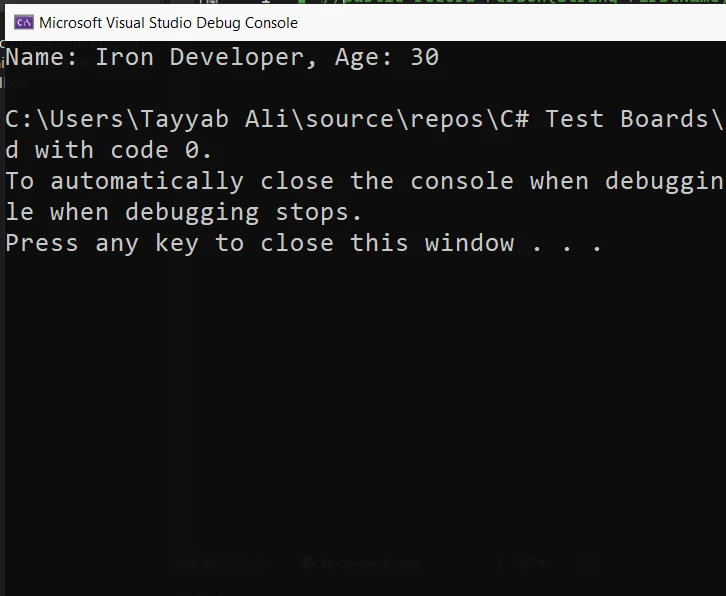
Déconstruction de tuple
La déconstruction de tuple est un moyen pratique d'extraire des valeurs d'un tuple et de les affecter à des variables individuelles. Cette fonctionnalité vous permet de décomposer un tuple en ses éléments constitutifs en une seule déclaration, ce qui rend votre code plus propre et plus lisible.
Exemple
Voici comment déconstruire un tuple en C# :
using System;

public class Program
{
    public static void Main()
    {
        // Create an instance of the Book class
        var book = new Book
        {
            Title = "C# Programming",
            Author = "Jon Skeet",
            Pages = 300
        };

        // Deconstruct the book object to get properties directly
        var (title, author, pages) = DeconstructBook(book);

        // Output the deconstructed properties
        Console.WriteLine($"Title: {title}, Author: {author}, Pages: {pages}");
    }

    // Deconstructor method for a Book class
    private static (string title, string author, int pages) DeconstructBook(Book book)
    {
        return (book.Title, book.Author, book.Pages);
    }
}

public class Book
{
    public string Title { get; set; }
    public string Author { get; set; }
    public int Pages { get; set; }
}
using System;

public class Program
{
    public static void Main()
    {
        // Create an instance of the Book class
        var book = new Book
        {
            Title = "C# Programming",
            Author = "Jon Skeet",
            Pages = 300
        };

        // Deconstruct the book object to get properties directly
        var (title, author, pages) = DeconstructBook(book);

        // Output the deconstructed properties
        Console.WriteLine($"Title: {title}, Author: {author}, Pages: {pages}");
    }

    // Deconstructor method for a Book class
    private static (string title, string author, int pages) DeconstructBook(Book book)
    {
        return (book.Title, book.Author, book.Pages);
    }
}

public class Book
{
    public string Title { get; set; }
    public string Author { get; set; }
    public int Pages { get; set; }
}
Imports System
Public Class Program
Public Shared Sub Main()
' Create an instance of the Book class
Dim book As New Book With {
.Title = "C# Programming",
.Author = "Jon Skeet",
.Pages = 300
}
' Deconstruct the book object to get properties directly
'INSTANT VB TODO TASK: VB has no equivalent to C# deconstruction declarations:
var(title, author, pages) = DeconstructBook(book)
' Output the deconstructed properties
Console.WriteLine($"Title: {title}, Author: {author}, Pages: {pages}")
End Sub
' Deconstructor method for a Book class
Private Shared Function DeconstructBook(ByVal book As Book) As (title As String, author As String, pages As Integer)
Return (book.Title, book.Author, book.Pages)
End Function
End Class
Public Class Book
Public Property Title() As String
Public Property Author() As String
Public Property Pages() As Integer
End Class
Imports System

Public Class Program
	Public Shared Sub Main()
		' Create an instance of the Book class
		Dim book As New Book With {
			.Title = "C# Programming",
			.Author = "Jon Skeet",
			.Pages = 300
		}

		' Deconstruct the book object to get properties directly
'INSTANT VB TODO TASK: VB has no equivalent to C# deconstruction declarations:
		var(title, author, pages) = DeconstructBook(book)

		' Output the deconstructed properties
		Console.WriteLine($"Title: {title}, Author: {author}, Pages: {pages}")
	End Sub

	' Deconstructor method for a Book class
	Private Shared Function DeconstructBook(ByVal book As Book) As (title As String, author As String, pages As Integer)
		Return (book.Title, book.Author, book.Pages)
	End Function
End Class

Public Class Book
	Public Property Title() As String
	Public Property Author() As String
	Public Property Pages() As Integer
End Class
Dans cet exemple, la classe Book contient trois propriétés : Title, Author, et Pages. La méthode DeconstructBook() prend une instance de la classe Book et renvoie un tuple contenant les valeurs de ces propriétés. L'instruction de décontraction dans la méthode Main() assigne ensuite ces valeurs aux variables title, author, et pages, respectivement. De cette façon, vous pouvez facilement accéder aux valeurs individuelles sans avoir besoin de référencer directement l'objet Book.
Plongée dans la mécanique de Deconstructor
Caractéristiques principales et comportement
Les déconstructeurs permettent d'extraire explicitement des informations d'un objet. Ils doivent être appelés explicitement pour récupérer des données. Cela permet de garantir que les informations sont accessibles directement et immédiatement. Les déconstructeurs simplifient le processus de décomposition d'un objet en ses parties. Ils sont particulièrement utiles pour la recherche de motifs et l'extraction de valeurs.
Héritage et déconstructeurs
Si une classe de base possède un déconstructeur, elle peut être étendue ou remplacée par une classe dérivée. Cette traduction suit la chaîne d'héritage, ce qui permet d'appliquer des méthodes d'extension qui peuvent personnaliser davantage le processus de déconstruction. Cela est particulièrement utile lorsque la classe dérivée comprend des propriétés supplémentaires qui doivent être extraites en plus de celles héritées de la classe de base.
IronPDF avec Deconstructors
IronPDF est une bibliothèque .NET qui facilite la création, l'édition et la gestion de fichiers PDF à l'aide de C#. IronPDF utilise un moteur de rendu Chrome pour cette conversion. Elle garantit la précision et la netteté des PDF. Elle permet aux développeurs de se concentrer sur la conception de leur contenu en HTML sans se préoccuper des détails complexes de la génération de PDF. IronPDF prend en charge la conversion de HTML directement en PDF. Le logiciel peut également transformer des formulaires web, des URL et des images en documents PDF. Pour l'édition, vous pouvez ajouter du texte, des images, des en-têtes et des pieds de page à vos PDF. Il vous permet également de sécuriser vos PDF à l'aide de mots de passe et de signatures numériques.
Exemple de Code
Le code suivant montre comment vous pourriez utiliser IronPDF en C# pour générer un PDF à partir d'un contenu HTML, puis utiliser un déconstructeur pour traiter le document PDF résultant pour d'autres opérations telles que la lecture des propriétés sans avoir besoin de plusieurs appels de méthode ou de variables temporaires. Il s'agit d'un modèle d'utilisation de base qui met l'accent sur les aspects de génération et de déconstruction :
using IronPdf;

public class PdfGenerator
{
    public static void Main()
    {
        // Set your License Key
        License.LicenseKey = "License-Key";

        // Create an instance of the PDF renderer
        var renderer = new ChromePdfRenderer();

        // Generate a PDF from HTML content
        var pdfDocument = renderer.RenderHtmlAsPdf("<h1>Hello, IronPDF!</h1>");

        // Deconstruct the PDF document to get properties directly
        var (pageCount, author) = DeconstructPdf(pdfDocument);

        // Output the deconstructed properties
        Console.WriteLine($"Page Count: {pageCount}, Author: {author}");
    }

    // Deconstructor method for a PdfDocument
    private static (int pageCount, string author) DeconstructPdf(PdfDocument document)
    {
        return (document.PageCount, document.MetaData.Author);
    }
}
using IronPdf;

public class PdfGenerator
{
    public static void Main()
    {
        // Set your License Key
        License.LicenseKey = "License-Key";

        // Create an instance of the PDF renderer
        var renderer = new ChromePdfRenderer();

        // Generate a PDF from HTML content
        var pdfDocument = renderer.RenderHtmlAsPdf("<h1>Hello, IronPDF!</h1>");

        // Deconstruct the PDF document to get properties directly
        var (pageCount, author) = DeconstructPdf(pdfDocument);

        // Output the deconstructed properties
        Console.WriteLine($"Page Count: {pageCount}, Author: {author}");
    }

    // Deconstructor method for a PdfDocument
    private static (int pageCount, string author) DeconstructPdf(PdfDocument document)
    {
        return (document.PageCount, document.MetaData.Author);
    }
}
Imports IronPdf
Public Class PdfGenerator
Public Shared Sub Main()
' Set your License Key
License.LicenseKey = "License-Key"
' Create an instance of the PDF renderer
Dim renderer = New ChromePdfRenderer()
' Generate a PDF from HTML content
Dim pdfDocument = renderer.RenderHtmlAsPdf("<h1>Hello, IronPDF!</h1>")
' Deconstruct the PDF document to get properties directly
'INSTANT VB TODO TASK: VB has no equivalent to C# deconstruction declarations:
var(pageCount, author) = DeconstructPdf(pdfDocument)
' Output the deconstructed properties
Console.WriteLine($"Page Count: {pageCount}, Author: {author}")
End Sub
' Deconstructor method for a PdfDocument
Private Shared Function DeconstructPdf(ByVal document As PdfDocument) As (pageCount As Integer, author As String)
Return (document.PageCount, document.MetaData.Author)
End Function
End Class
Imports IronPdf

Public Class PdfGenerator
	Public Shared Sub Main()
		' Set your License Key
		License.LicenseKey = "License-Key"

		' Create an instance of the PDF renderer
		Dim renderer = New ChromePdfRenderer()

		' Generate a PDF from HTML content
		Dim pdfDocument = renderer.RenderHtmlAsPdf("<h1>Hello, IronPDF!</h1>")

		' Deconstruct the PDF document to get properties directly
'INSTANT VB TODO TASK: VB has no equivalent to C# deconstruction declarations:
		var(pageCount, author) = DeconstructPdf(pdfDocument)

		' Output the deconstructed properties
		Console.WriteLine($"Page Count: {pageCount}, Author: {author}")
	End Sub

	' Deconstructor method for a PdfDocument
	Private Shared Function DeconstructPdf(ByVal document As PdfDocument) As (pageCount As Integer, author As String)
		Return (document.PageCount, document.MetaData.Author)
	End Function
End Class
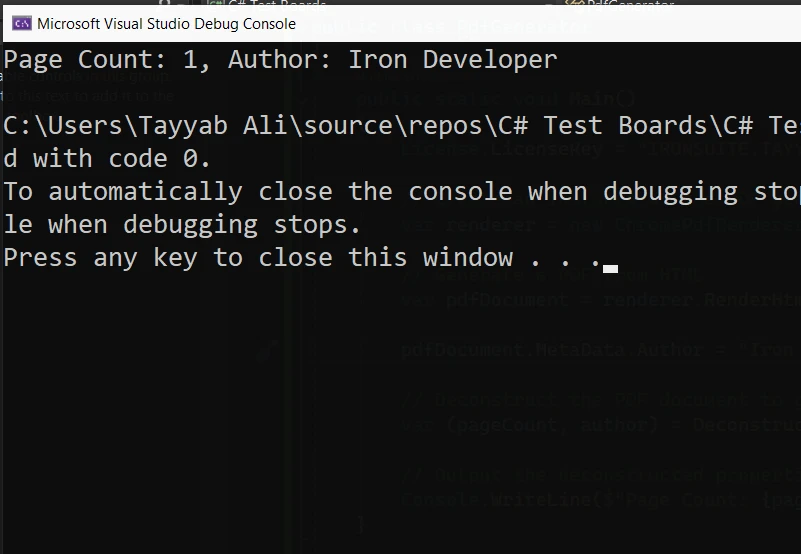
Cet exemple en C# abstrait le processus de récupération des propriétés d'un document PDF, illustrant comment vous pouvez utiliser un déconstructeur dans des scénarios pratiques pour simplifier la structure de votre code et améliorer la lisibilité. N'oubliez pas qu'IronPDF ne prend pas intrinsèquement en charge les déconstructeurs ; il s'agit d'une mise en œuvre personnalisée à des fins de démonstration.
Conclusion
En résumé, les déconstructeurs en C# sont des outils puissants qui permettent aux développeurs de manipuler efficacement les données au sein des objets. En comprenant comment mettre en œuvre et utiliser les déconstructeurs, vous pouvez gérer des données complexes plus efficacement, en veillant à ce que tous les composants d'un objet soient accessibles en cas de besoin. Que vous ayez affaire à des objets simples ou complexes, la maîtrise des déconstructeurs améliorera considérablement votre efficacité en matière de codage et votre précision dans la gestion des structures de données.
Explorez les options de tarification et d'octroi de licences d'IronPDF à partir de $999.























