


NHibernate C#(開発者向けの動作方法)

NHibernate は、.NETフレームワークで使用するために設計された強力なオブジェクト関係マッピング(ORM)フレームワークです。 これは、.NETアプリケーションのオブジェクト指向の世界とデータベースのリレーショナルワールドの間のギャップを効率的に埋める方法を開発者に提供します。 NHibernateを使用することで、データアクセスレイヤーの実装に必要な定型コードの量を大幅に削減し、.NETアプリケーションをよりクリーンで保守しやすいものにすることができます。
データベース相互作用を簡素化するORMの役割
NHibernateのようなORMフレームワークは、開発者がSQLステートメントではなくオブジェクトとそのプロパティの観点でデータを操作することで、リレーショナルデータベースとの相互作用を簡素化します。 この抽象化により、開発者はアプリケーションのビジネスロジックに集中でき、基盤となるSQLコマンドやデータベーススキーマを意識する必要が少なくなります。 例えば、NHibernateはすべてのSQL生成と実行を処理し、挿入、削除、更新などの操作を簡単なオブジェクト変換とオブジェクト操作で実行できるようにします。
.NETプロジェクトでNHibernateをセットアップする
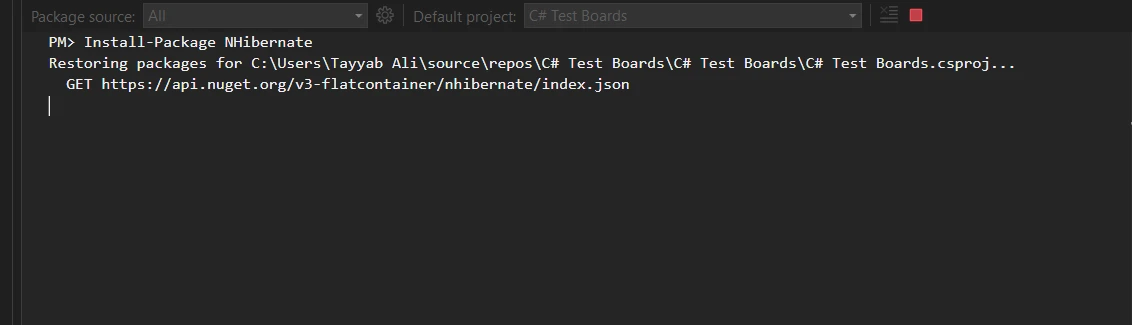
.NETプロジェクトでNHibernateを始めるための最初のステップは、NHibernateパッケージをインストールすることです。 これは、Visual StudioのNuGetパッケージマネージャーを介して、次のコマンドを使用して簡単に行えます:
Install-Package NHibernate
XML設定ファイルでNHibernateを設定する
NHibernateをインストールしたら、次のステップはそれを設定することです。 これは、データベースサーバーの設定と、オブジェクトとデータベーステーブルのマッピングの詳細を記したHibernateマッピングファイルを作成することを含みます。 メインのXMLファイルは通常hibernate.cfg.xmlと名付けられ、データベース接続文字列、方言、その他のデータベース固有の設定を含みます。
<?xml version="1.0" encoding="utf-8" ?>
<hibernate-configuration xmlns="urn:nhibernate-configuration-2.2">
  <session-factory>
    <property name="connection.provider">
      NHibernate.Connection.DriverConnectionProvider
    </property>
    <property name="connection.driver_class">
      NHibernate.Driver.SqlClientDriver
    </property>
    <property name="connection.connection_string">
      Server=myServerAddress;Database=myDataBase;User Id=myUsername;Password=myPassword;
    </property>
    <property name="dialect">
      NHibernate.Dialect.MsSql2012Dialect
    </property>
    <property name="show_sql">true</property>
    <mapping resource="Employee.hbm.xml"/>
  </session-factory>
</hibernate-configuration>
<?xml version="1.0" encoding="utf-8" ?>
<hibernate-configuration xmlns="urn:nhibernate-configuration-2.2">
<session-factory>
<property name="connection.provider">
NHibernate.Connection.DriverConnectionProvider
</property>
<property name="connection.driver_class">
NHibernate.Driver.SqlClientDriver
</property>
<property name="connection.connection_string">
Server=myServerAddress;Database=myDataBase;User Id=myUsername;Password=myPassword;
</property>
<property name="dialect">
NHibernate.Dialect.MsSql2012Dialect
</property>
<property name="show_sql">true</property>
<mapping resource="Employee.hbm.xml"/>
</session-factory>
</hibernate-configuration>NHibernateのコアコンポーネントを理解する
NHibernateの主要コンポーネントの1つは、ファクトリーデザインパターンを使用して設計されたセッションファクトリーです。 このコンポーネントは、データベースへの接続を管理し、トランザクション操作を保持するセッションオブジェクトを作成します。 セッションファクトリーは作成するのにコストがかかるため、通常、アプリケーションのライフタイムで一度作成され、パフォーマンス最適化のための重要な要素となります。
NHibernateの主要なクラスとメソッド
NHibernateは、いくつかの重要なクラスとメソッドを中心に展開されています。 例えば、ISessionインターフェイスは、データクエリおよび操作セッションの作成を促進することで、NHibernateにおいて基本的な役割を果たします。 OpenSessionのようなメソッドは、開発者がトランザクションを開始し、SQLコマンドを実行し、SQL文またはNHibernateのHQL(Hibernate Query Language)を使用してデータベースをクエリするのに役立ちます。
NHibernateを使用してエンティティをデータベーステーブルにマッピングする
NHibernateでのエンティティマッピングは、通常XMLで書かれたマッピングファイルを通じて実現されます。 これらのファイルは、エンティティクラスにちなんで名付けられることが多く(例: Employee.hbm.xml)、エンティティのプロパティがデータベーステーブルのカラムにどのようにマッピングされるかを定義します。 典型的なマッピングファイルには、クラス名、テーブル名、各プロパティに関する詳細(主キー、カラム名、データ型を含む)が含まれます。
マッピングファイルで使用されるプロパティと属性の詳細な考察
これらのマッピングファイルでは、各プロパティに対して様々な属性(例: not-null制約やユニーク制約)を指定できます。 NHibernateは、1対多や多対1の関係のような複雑なマッピングも可能にし、オブジェクト指向フレームワーク内でリレーショナルデータ構造を表現するための強力なツールセットを提供します。
NHibernateでのSQLコマンドとトランザクションの実行
NHibernateは、基盤となるSQLコマンドを抽象化することで、CRUD(作成、読み取り、更新、削除)操作を簡素化します。 開発者は明示的なSQLコードを書くことなく、ISessionインターフェイスが提供するメソッドを使用してこれらの操作を行うことができます。 例えば、データベースに新しいエンティティを追加するには、オブジェクトの新しいインスタンスを作成し、プロパティを設定し、Saveメソッドを使用するだけです。
ITransactionを使用したトランザクション管理
NHibernateのトランザクションはITransactionインターフェイスを通じて管理され、データの完全性と一貫性を確保します。 BeginTransactionメソッドを使用することで、開発者はすべての操作がデータベースへのコミット前に正常に完了することを確保したり、問題が発生した場合にはロールバックを行い、データの安定性を維持することができます。
完全なコード例
この例は、NHibernateの設定とマッピングファイルのセットアップを含み、NHibernateを使用して作成、読み取り、更新、削除操作を実行する方法を示しています。
using NHibernate;
using NHibernate.Cfg;
using System;

// Define the Employee class with virtual properties
public class Employee
{
    public virtual int Id { get; set; }
    public virtual string FirstName { get; set; }
    public virtual string LastName { get; set; }
}

class Program
{
    private static ISessionFactory sessionFactory;

    static void Main()
    {
        // Initialize the SessionFactory using NHibernate configuration
        sessionFactory = new Configuration().Configure().BuildSessionFactory();

        // Perform database operations
        CreateEmployee();
        ReadEmployee(1);
        UpdateEmployee(1, "UpdatedName");
        DeleteEmployee(1);
    }

    static void CreateEmployee()
    {
        using (var session = sessionFactory.OpenSession())
        using (var transaction = session.BeginTransaction())
        {
            var newEmployee = new Employee
            {
                FirstName = "Iron",
                LastName = "Software"
            };
            session.Save(newEmployee); // Save the new Employee object to the database
            transaction.Commit(); // Commit the transaction to finalize the insertion
            Console.WriteLine("Employee created: " + newEmployee.Id);
        }
    }

    static void ReadEmployee(int id)
    {
        using (var session = sessionFactory.OpenSession())
        {
            // Retrieve the Employee object by its Id
            var employee = session.Get<Employee>(id);
            Console.WriteLine("Read Employee: " + employee.FirstName + " " + employee.LastName);
        }
    }

    static void UpdateEmployee(int id, string newFirstName)
    {
        using (var session = sessionFactory.OpenSession())
        using (var transaction = session.BeginTransaction())
        {
            // Get the Employee object by its Id
            var employee = session.Get<Employee>(id);
            employee.FirstName = newFirstName; // Update the employee's first name
            session.Update(employee); // Update the Employee object in the database
            transaction.Commit(); // Commit the transaction to save changes
            Console.WriteLine("Employee updated: " + employee.FirstName);
        }
    }

    static void DeleteEmployee(int id)
    {
        using (var session = sessionFactory.OpenSession())
        using (var transaction = session.BeginTransaction())
        {
            // Retrieve the Employee object to be deleted
            var employee = session.Get<Employee>(id);
            session.Delete(employee); // Delete the Employee from the database
            transaction.Commit(); // Commit the transaction to finalize the deletion
            Console.WriteLine("Employee deleted");
        }
    }
}
using NHibernate;
using NHibernate.Cfg;
using System;
// Define the Employee class with virtual properties
public class Employee
{
public virtual int Id { get; set; }
public virtual string FirstName { get; set; }
public virtual string LastName { get; set; }
}
class Program
{
private static ISessionFactory sessionFactory;
static void Main()
{
// Initialize the SessionFactory using NHibernate configuration
sessionFactory = new Configuration().Configure().BuildSessionFactory();
// Perform database operations
CreateEmployee();
ReadEmployee(1);
UpdateEmployee(1, "UpdatedName");
DeleteEmployee(1);
}
static void CreateEmployee()
{
using (var session = sessionFactory.OpenSession())
using (var transaction = session.BeginTransaction())
{
var newEmployee = new Employee
{
FirstName = "Iron",
LastName = "Software"
};
session.Save(newEmployee); // Save the new Employee object to the database
transaction.Commit(); // Commit the transaction to finalize the insertion
Console.WriteLine("Employee created: " + newEmployee.Id);
}
}
static void ReadEmployee(int id)
{
using (var session = sessionFactory.OpenSession())
{
// Retrieve the Employee object by its Id
var employee = session.Get<Employee>(id);
Console.WriteLine("Read Employee: " + employee.FirstName + " " + employee.LastName);
}
}
static void UpdateEmployee(int id, string newFirstName)
{
using (var session = sessionFactory.OpenSession())
using (var transaction = session.BeginTransaction())
{
// Get the Employee object by its Id
var employee = session.Get<Employee>(id);
employee.FirstName = newFirstName; // Update the employee's first name
session.Update(employee); // Update the Employee object in the database
transaction.Commit(); // Commit the transaction to save changes
Console.WriteLine("Employee updated: " + employee.FirstName);
}
}
static void DeleteEmployee(int id)
{
using (var session = sessionFactory.OpenSession())
using (var transaction = session.BeginTransaction())
{
// Retrieve the Employee object to be deleted
var employee = session.Get<Employee>(id);
session.Delete(employee); // Delete the Employee from the database
transaction.Commit(); // Commit the transaction to finalize the deletion
Console.WriteLine("Employee deleted");
}
}
}Imports NHibernate
Imports NHibernate.Cfg
Imports System
' Define the Employee class with virtual properties
Public Class Employee
Public Overridable Property Id() As Integer
Public Overridable Property FirstName() As String
Public Overridable Property LastName() As String
End Class
Friend Class Program
Private Shared sessionFactory As ISessionFactory
Shared Sub Main()
' Initialize the SessionFactory using NHibernate configuration
sessionFactory = (New Configuration()).Configure().BuildSessionFactory()
' Perform database operations
CreateEmployee()
ReadEmployee(1)
UpdateEmployee(1, "UpdatedName")
DeleteEmployee(1)
End Sub
Private Shared Sub CreateEmployee()
Using session = sessionFactory.OpenSession()
Using transaction = session.BeginTransaction()
Dim newEmployee = New Employee With {
.FirstName = "Iron",
.LastName = "Software"
}
session.Save(newEmployee) ' Save the new Employee object to the database
transaction.Commit() ' Commit the transaction to finalize the insertion
Console.WriteLine("Employee created: " & newEmployee.Id)
End Using
End Using
End Sub
Private Shared Sub ReadEmployee(ByVal id As Integer)
Using session = sessionFactory.OpenSession()
' Retrieve the Employee object by its Id
Dim employee = session.Get(Of Employee)(id)
Console.WriteLine("Read Employee: " & employee.FirstName & " " & employee.LastName)
End Using
End Sub
Private Shared Sub UpdateEmployee(ByVal id As Integer, ByVal newFirstName As String)
Using session = sessionFactory.OpenSession()
Using transaction = session.BeginTransaction()
' Get the Employee object by its Id
Dim employee = session.Get(Of Employee)(id)
employee.FirstName = newFirstName ' Update the employee's first name
session.Update(employee) ' Update the Employee object in the database
transaction.Commit() ' Commit the transaction to save changes
Console.WriteLine("Employee updated: " & employee.FirstName)
End Using
End Using
End Sub
Private Shared Sub DeleteEmployee(ByVal id As Integer)
Using session = sessionFactory.OpenSession()
Using transaction = session.BeginTransaction()
' Retrieve the Employee object to be deleted
Dim employee = session.Get(Of Employee)(id)
session.Delete(employee) ' Delete the Employee from the database
transaction.Commit() ' Commit the transaction to finalize the deletion
Console.WriteLine("Employee deleted")
End Using
End Using
End Sub
End Classデータベースの移植性と相互運用可能機能
NHibernateは、データベースの移植性を考慮して設計されています。 方言設定のおかげで、NHibernateは最小限のコード変更でほとんどのSQLデータベースに適応できます。 これにより、データアクセスレイヤーを書き直すことなく、SQL ServerからMySQLやOracleに切り替えることができます。
SQL Serverのような様々なデータベースシステムにNHibernateを適応させる
NHibernateのXML設定ファイルは、開発者が自分のデータベースシステムに特有のSQL方言を指定することを可能にします。 これにより、NHibernateは、SQLをサポートするほぼすべてのリレーショナルデータベースで動作する柔軟なソリューションとなり、異なるデータベースシステム間でアプリケーションを移植可能にします。
IronPDFを使用したNHibernateの活用
IronPDFとの統合は、.NETアプリケーションを強化する強力な組み合わせです。 これにより、データベース操作をNHibernateで管理しながら、IronPDFを利用してデータからPDFドキュメントを生成することができます。 アプリケーションが、PDF形式で生成およびダウンロードする必要がある従業員レポートなどのユーザー特定の文書を提供する必要があるシナリオを考えてみてください。 NHibernateはデータベースからのデータの取得プロセスを効率的に管理し、IronPDFはこのデータをきちんとフォーマットされたPDFファイルに変換することができます。
IronPDFをインストールする
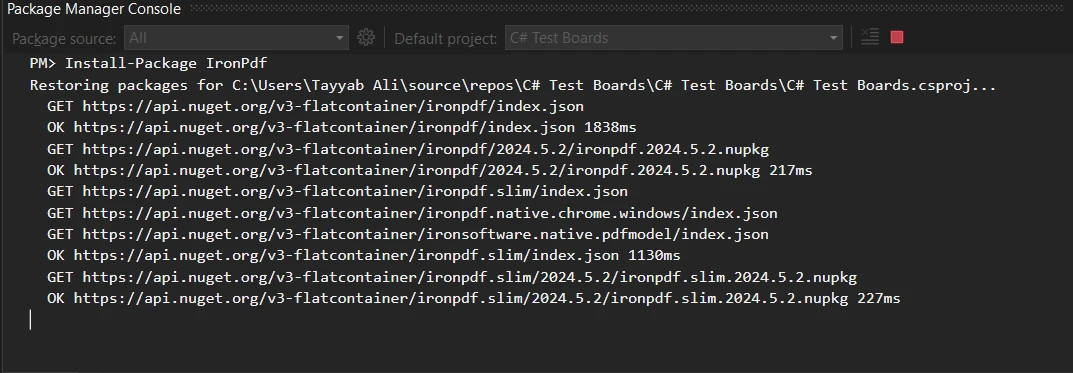
まず、IronPDFがプロジェクトに追加されていることを確認します。 これをNuGetパッケージマネージャーを通じて、IronPDFパッケージをインストールして含めることができます。
Install-Package IronPdf
コード例
これをあなたのアプリケーション内で実装する方法についてさらに詳しく見てみましょう。 NHibernateをセットアップし、データベースから従業員の詳細などの必要なデータを取得した後、PDFドキュメントをどのように表示するかを表現するHTMLテンプレートを用意します。 このHTMLテンプレートは、NHibernateから取得されたデータによって動的に埋められます。 例えば、従業員のレポートを生成する場合、テンプレートには従業員の名前、ID、およびその他の関連詳細のプレースホルダが含まれます。
以下に、NHibernateを使用してデータを取得し、IronPDFを使用してPDFに変換する方法を示す詳細なコード例を示します:
using IronPdf;
using NHibernate;

static void CreateEmployeeReport(int employeeId)
{
    // Open a session to interact with the database
    using (var session = OpenSession())
    {
        // Retrieve the employee object based on the provided ID
        var employee = session.Get<Employee>(employeeId);

        // Create an instance of the ChromePdfRenderer class from IronPDF
        var renderer = new ChromePdfRenderer();

        // Create the HTML content for the PDF, embedding employee data into the HTML
        var htmlTemplate = $@"
            <html>
            <head>
                <title>Employee Report</title>
            </head>
            <body>
                <h1>Employee Details</h1>
                <p>Name: {employee.FirstName} {employee.LastName}</p>
                <p>ID: {employee.Id}</p>
            </body>
            </html>";

        // Render the HTML string as a PDF document
        var pdf = renderer.RenderHtmlAsPdf(htmlTemplate);

        // Save the generated PDF to a file
        pdf.SaveAs("EmployeeReport.pdf");
    }
}
using IronPdf;
using NHibernate;
static void CreateEmployeeReport(int employeeId)
{
// Open a session to interact with the database
using (var session = OpenSession())
{
// Retrieve the employee object based on the provided ID
var employee = session.Get<Employee>(employeeId);
// Create an instance of the ChromePdfRenderer class from IronPDF
var renderer = new ChromePdfRenderer();
// Create the HTML content for the PDF, embedding employee data into the HTML
var htmlTemplate = $@"
<html>
<head>
<title>Employee Report</title>
</head>
<body>
<h1>Employee Details</h1>
<p>Name: {employee.FirstName} {employee.LastName}</p>
<p>ID: {employee.Id}</p>
</body>
</html>";
// Render the HTML string as a PDF document
var pdf = renderer.RenderHtmlAsPdf(htmlTemplate);
// Save the generated PDF to a file
pdf.SaveAs("EmployeeReport.pdf");
}
}Imports IronPdf
Imports NHibernate
Shared Sub CreateEmployeeReport(ByVal employeeId As Integer)
' Open a session to interact with the database
Using session = OpenSession()
' Retrieve the employee object based on the provided ID
Dim employee = session.Get(Of Employee)(employeeId)
' Create an instance of the ChromePdfRenderer class from IronPDF
Dim renderer = New ChromePdfRenderer()
' Create the HTML content for the PDF, embedding employee data into the HTML
Dim htmlTemplate = $"
<html>
<head>
<title>Employee Report</title>
</head>
<body>
<h1>Employee Details</h1>
<p>Name: {employee.FirstName} {employee.LastName}</p>
<p>ID: {employee.Id}</p>
</body>
</html>"
' Render the HTML string as a PDF document
Dim pdf = renderer.RenderHtmlAsPdf(htmlTemplate)
' Save the generated PDF to a file
pdf.SaveAs("EmployeeReport.pdf")
End Using
End Sub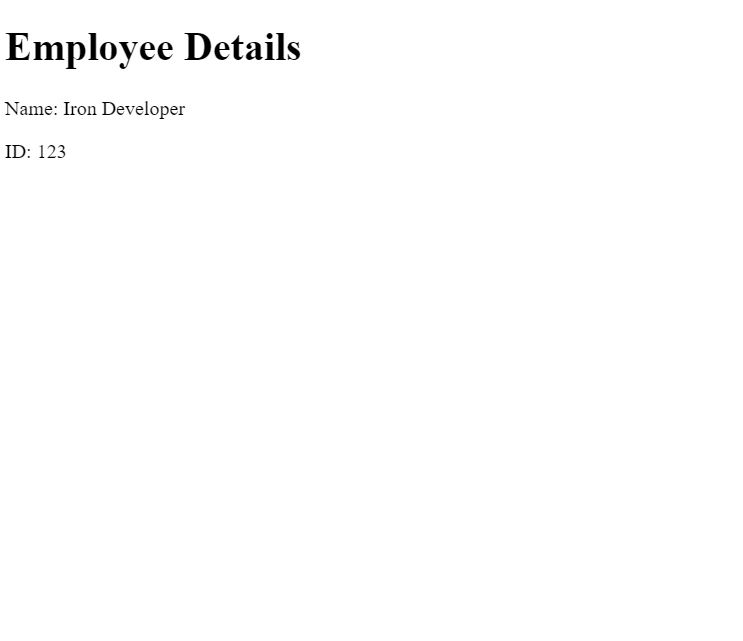
このコードでは、OpenSession()はNHibernateセッションを初期化するメソッドで、従業員データを取得するために使用されます。 その後、IronPDFのChromePdfRendererクラスが取得されたデータで埋められたHTMLテンプレートを取り、PDFとしてレンダリングします。 このPDFはローカルに保存されますが、Webインターフェースを介してユーザーに直接ストリーミングすることもできます。
結論
このチュートリアルでは、NHibernateが.NETアプリケーションでのデータベース操作を簡素化し、IronPDFとの統合が動的なPDFドキュメントの生成を可能にすることで機能性を強化する方法を探りました。 NHibernateは堅牢なデータ管理ツールを提供し、IronPDFはデータで満たされたHTMLテンプレートからプロ品質のPDFを作成するための便利な方法を提供します。
IronPDFは無料試用版が利用可能で、ライセンスは、アプリケーションに強力なPDF生成を統合するためのコスト効率の良いソリューションから始まります。 これらのツールを組み合わせることで、データ管理とドキュメント生成に包括的なソリューションを提供し、企業レベルおよび小規模プロジェクトの両方に理想的です。
よくある質問
C#でPDF生成ライブラリとNHibernateを統合するにはどうすればよいですか?
NHibernateは、データベース操作を扱いデータを取得するためにNHibernateを使用し、IronPDFがそのデータをPDFドキュメントに変換することによってIronPDFと統合できます。これにより、ユーザー固有のデータに基づく動的なPDFの生成が可能になります。
NHibernateにおけるセッションファクトリの目的は何ですか?
NHibernateでは、セッションファクトリはデータベース接続を管理し取引操作を行うためにセッションオブジェクトを作成する重要なコンポーネントです。作成にコストがかかるため通常はアプリケーションの寿命につき1回だけインスタンス化され、パフォーマンスが最適化されます。
NHibernateでCRUD操作がどのように実行されるか説明できますか?
NHibernateのCRUD操作は`ISession`インターフェースを通じて抽象化されており、Save、Update、およびDeleteなどのメソッドを提供します。これにより、開発者は直接SQLコマンドを書くことなくこれらの操作を行うことができます。
NHibernateを使用すること for .NET開発者への利点は何ですか?
NHibernateはデータアクセス層のボイラープレートコードを減らし、アプリケーションの保守性を向上させることで.NET開発者に利益をもたらします。また、データベースとのやり取りを抽象化し、開発者がビジネスロジックに集中しやすくします。
NHibernateはどのようにデータベースの移植性をサポートしますか?
NHibernateはそのダイアレクト設定を通じてデータベースの移植性をサポートします。これによりさまざまなSQLデータベースに適応でき、最小限のコードベースの変更でデータベースシステムを切り替えることが可能になります。
NHibernateのマッピングファイルの役割は何ですか?
NHibernateのマッピングファイルは、通常XMLファイルで、エンティティのプロパティがデータベーステーブルの列にどのようにマッピングされているかを定義します。また、主キー、列名、データ型などの重要な詳細を含んでおり、1対多の関係のような複雑なマッピングをサポートします。
NHibernateではトランザクションをどのように効果的に管理できるか?
NHibernateでは`ITransaction`インターフェースを使用してトランザクションが管理され、データの整合性が保証されます。開発者は`ISession`からのBeginTransactionメソッドを使用して操作を処理し、すべての操作が成功した場合のみデータをコミットし、問題が発生した場合はロールバックします。
NHibernateを.NETプロジェクトでセットアップするにはどうすればよいですか?
NHibernateをセットアップするには、Visual StudioのNuGetパッケージマネージャを使用してInstall-Package NHibernateコマンドを使用してNHibernateパッケージをインストールします。データベース設定とオブジェクトマッピングを定義する`hibernate.cfg.xml`のようなXMLマッピングファイルで構成します。










 無料で始めましょう
 無料で始めましょう
 無料ライブデモを予約
















