


PostSharp C#(開発者向けの仕組み)

ソフトウェア開発のダイナミックな世界では、コードベースを整理し、生産性を維持することが重要です。 開発者はしばしばアプリケーションの基本ロジックを複雑にするトランザクション管理、セキュリティ、ロギングなどの横断的な関心事を管理する際に課題に直面します。 コードのモジュール性と保守性を強化するために、AOP(アスペクト指向プログラミング)は、これらの関心事をビジネスロジックから分離することを可能にすることで解決策を提供します。 .NETにおけるAOPは、主要なフレームワークであるPostSharpを使用して効果的に実装され、PDF作成および操作には、.NETアプリケーション内でPDFを処理するための強力なライブラリであるIronPDFを使用します。 PostSharpとIronPDFを一緒に使用することにより、特にPDFを扱うアクティビティを管理する際に.NET開発を簡素化し、開発コストを削減できます。 この記事ではこの可能性について探ります
PostSharpはアスペクト指向プログラミング(AOP)を提供することで.NETプログラミングを簡素化することで知られているフレームワークです。 それは、横断的な関心事を基本アプリケーションロジックから分離することで、より明確で保守しやすいコードを開発者が作成できるようにします。 横断的な関心事は、他の機能に影響を与えるプログラムの特徴です; これには通常、パフォーマンス監視、エラーハンドリング、ロギング、安全性などが含まれます。
アスペクト指向プログラミング (AOP)
AOPプログラミングのパラダイムの目標は、異なる領域に関連する関心を分離することによってコードをよりモジュラーにすることです。 これはオブジェクト指向プログラミング(OOP)の追加機能であり、既存のコードを直接変更することなく、より多くの機能を追加することを可能にします。 アスペクトは、複数のクラスやメソッドに影響を与える振る舞いを含むモジュラーなコードの断片であり、これがPostSharp Aspectsとして知られているもので達成されます。
カスタマイズ性
個別のプロジェクト目標に対する柔軟性と適応を提供するために、開発者はアプリケーション要件に適したカスタム要素を構築できます。
パフォーマンス最適化
従来のランタイムインターセプションと対照的に、PostSharpはコンパイル時に中間言語(IL)ソースコードに機能を組み込むことにより、ランタイムオーバーヘッドを最小限に抑え、効率を最大化します。
PostSharp Diagnostics
開発者がパフォーマンスのボトルネック、エラー、および非効率性を特定して修正するのを支援するPostSharpのコンポーネントは、アプリケーションの振る舞いとパフォーマンスに関する洞察を提供するためのPostSharp Diagnosticsです。
アスペクトライブラリ
PostSharpはライブラリと拡張機能(例:PostSharp.Patterns.Diagnostics)を通じて、強化された診断や構造化ロギングなどの追加機能を提供します。
クロスプラットフォームサポート
PostSharpはクロスプラットフォーム互換性があり、Linux、macOS X、およびWindowsオペレーティングシステムを対象としたプロジェクトでその機能を使用することができます。
コード契約
コード契約との統合を通じて、PostSharpはメソッドの前提条件、後条件、および不変条件を定義できるようにすることで、コードの品質と信頼性を向上させます。
.NET Coreと.NET Frameworkのサポート
PostSharpは様々なプロジェクトタイプとフレームワークに対応しており、.NET Coreと.NET Frameworkの両方をサポートします。
Create and configure PostSharp C
C#プロジェクトで使用する前に、Visual StudioソリューションにPostSharpをインストールして設定する必要があります。 新規または既存のC#プロジェクトでPostSharpを設置して設定するための手順は次の通りです。
新しいVisual Studioプロジェクトを作成
Visual Studioでコンソールプロジェクトを作成するのは簡単です。 Visual Studio環境でコンソールアプリケーションを開始するための手順は次の通りです:
コンピュータにVisual Studioがインストールされていることを確認してください。
新しいプロジェクトを開始する
ファイルメニューから"新規"を選択し、次に"プロジェクト"を選択します。
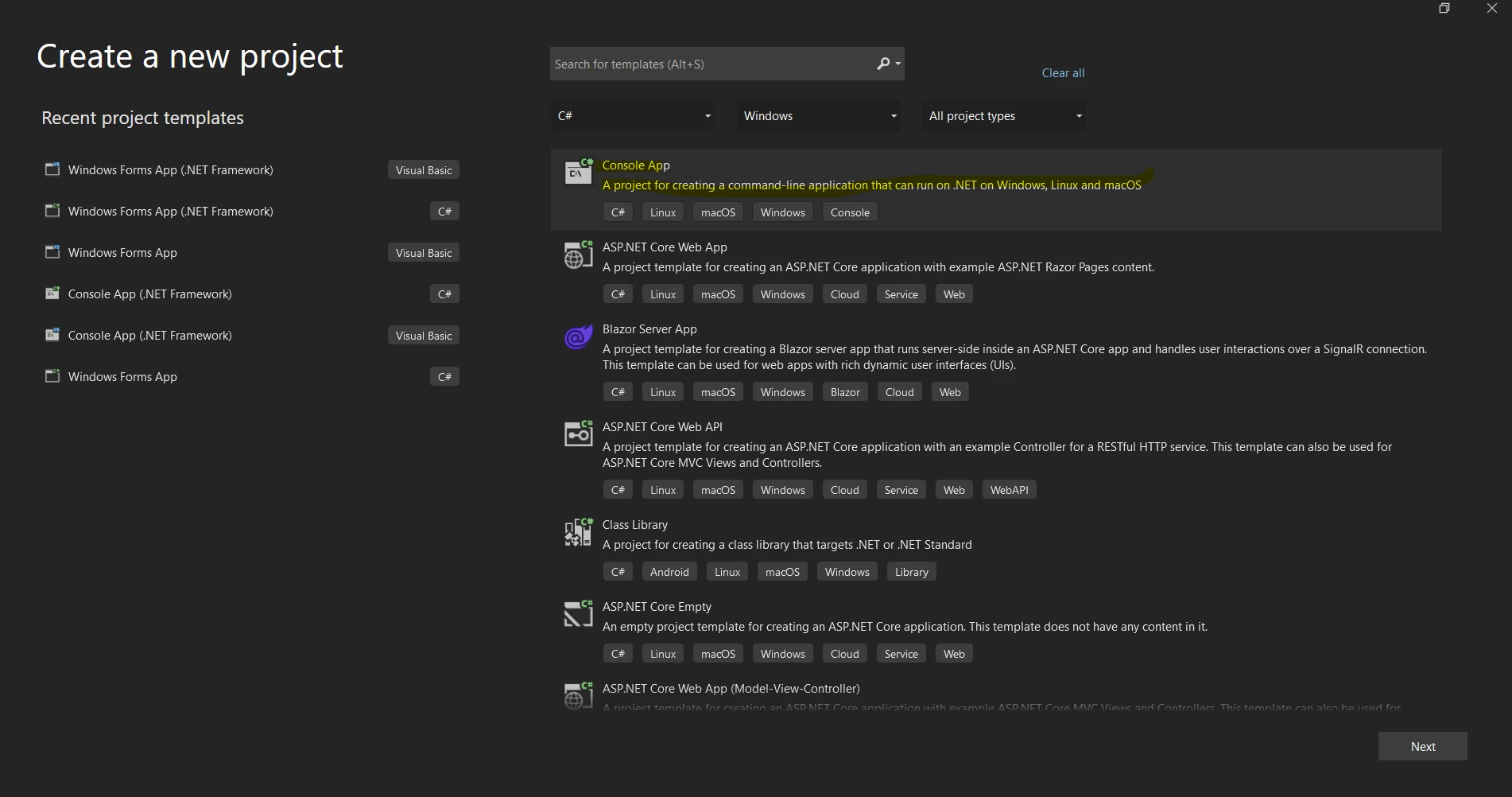
プロジェクトテンプレート参照のリストから"コンソールアプリ"または"コンソールアプリ (.NET Core)"テンプレートを選択することができます。
"名前"セクションにプロジェクトの名前を入力します。
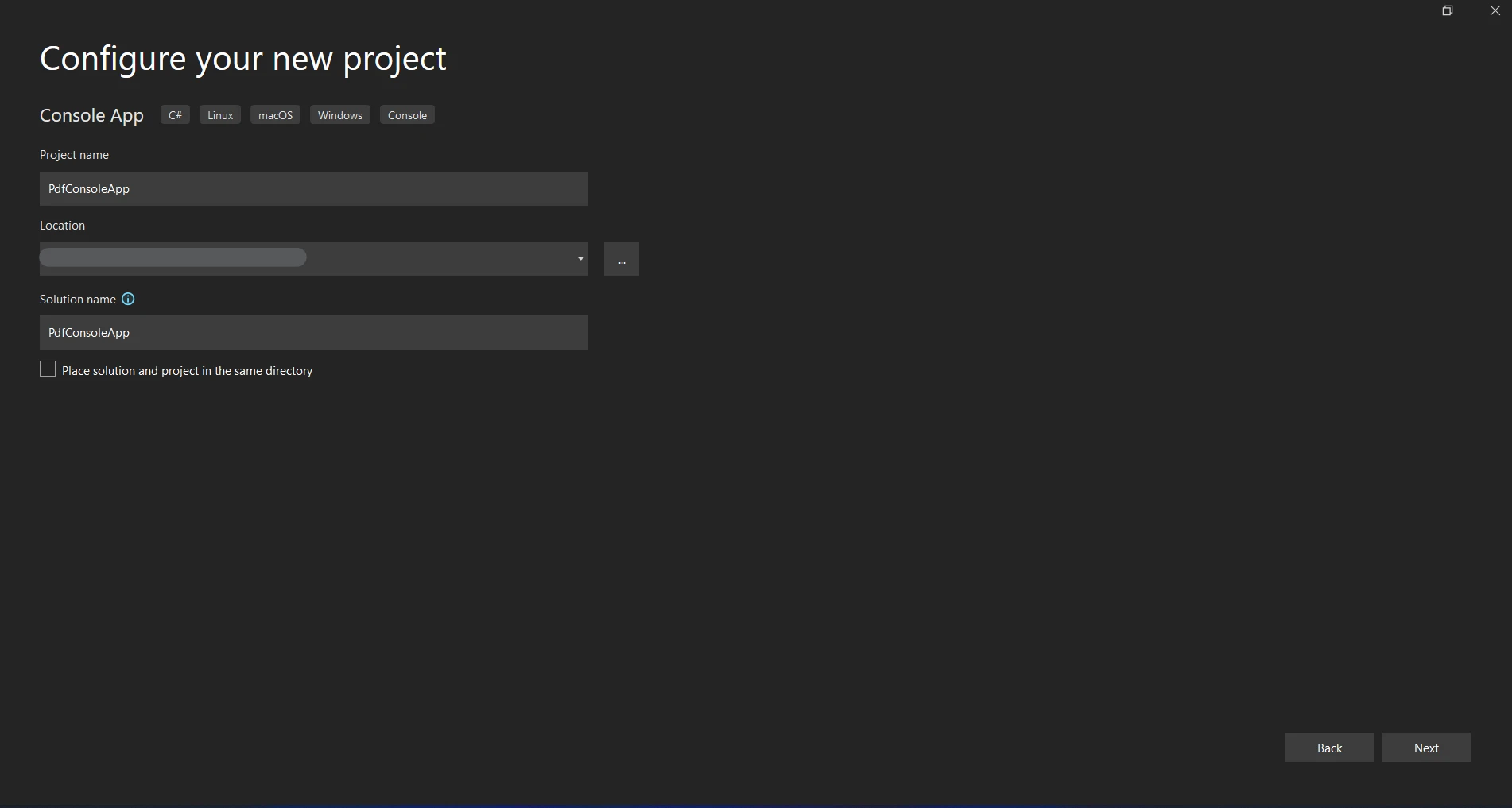
プロジェクトの保管場所を選択します。
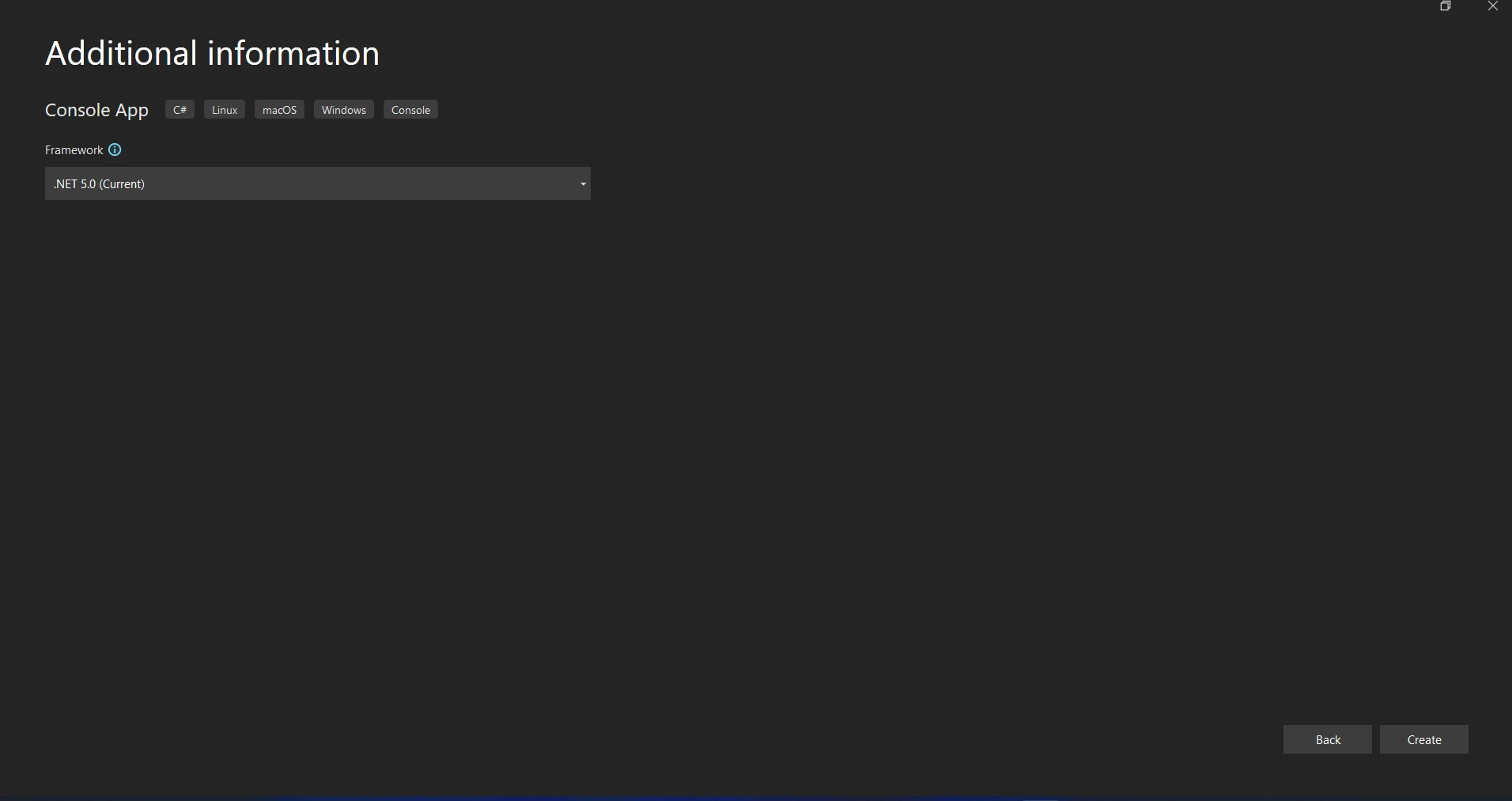
"作成"をクリックしてコンソールアプリケーションプロジェクトを開始します。
PostSharpのインストール
PostSharpはパッケージマネージャーコンソールを通じてインストールできます:
Install-Package PostSharp
PostSharpアスペクトを作成
あなたのアスペクトを定義するために、プロジェクトに新しいC#クラスファイルを追加します。 MethodInterceptionAspectまたは他の適切なアスペクト基底クラスを由来とすることで、カスタム属性またはアスペクトを実装することができます。 基本的なOnMethodBoundaryAspectロギングアスペクトのイラストがあります:
using PostSharp.Aspects;
using System;

// Define a logging aspect using OnMethodBoundaryAspect
[Serializable]
public class LoggingAspect : OnMethodBoundaryAspect
{
    // Executed before the method is invoked
    public override void OnEntry(MethodExecutionArgs args)
    {
        Console.WriteLine($"Entering method {args.Method.Name}.");
    }

    // Executed after the method has completed execution, both on success and failure
    public override void OnExit(MethodExecutionArgs args)
    {
        Console.WriteLine($"Exiting method {args.Method.Name}.");
    }

    // Executed when the method throws an exception
    public override void OnException(MethodExecutionArgs args)
    {
        Console.WriteLine($"Exception in method {args.Method.Name}: {args.Exception.Message}");
    }
}
using PostSharp.Aspects;
using System;
// Define a logging aspect using OnMethodBoundaryAspect
[Serializable]
public class LoggingAspect : OnMethodBoundaryAspect
{
// Executed before the method is invoked
public override void OnEntry(MethodExecutionArgs args)
{
Console.WriteLine($"Entering method {args.Method.Name}.");
}
// Executed after the method has completed execution, both on success and failure
public override void OnExit(MethodExecutionArgs args)
{
Console.WriteLine($"Exiting method {args.Method.Name}.");
}
// Executed when the method throws an exception
public override void OnException(MethodExecutionArgs args)
{
Console.WriteLine($"Exception in method {args.Method.Name}: {args.Exception.Message}");
}
}Imports PostSharp.Aspects
Imports System
' Define a logging aspect using OnMethodBoundaryAspect
<Serializable>
Public Class LoggingAspect
Inherits OnMethodBoundaryAspect
' Executed before the method is invoked
Public Overrides Sub OnEntry(ByVal args As MethodExecutionArgs)
Console.WriteLine($"Entering method {args.Method.Name}.")
End Sub
' Executed after the method has completed execution, both on success and failure
Public Overrides Sub OnExit(ByVal args As MethodExecutionArgs)
Console.WriteLine($"Exiting method {args.Method.Name}.")
End Sub
' Executed when the method throws an exception
Public Overrides Sub OnException(ByVal args As MethodExecutionArgs)
Console.WriteLine($"Exception in method {args.Method.Name}: {args.Exception.Message}")
End Sub
End Classアスペクトの動作をニーズに合わせて変更します; たとえば、メソッドのパラメータや戻り値をログに記録します。
アスペクトの適用
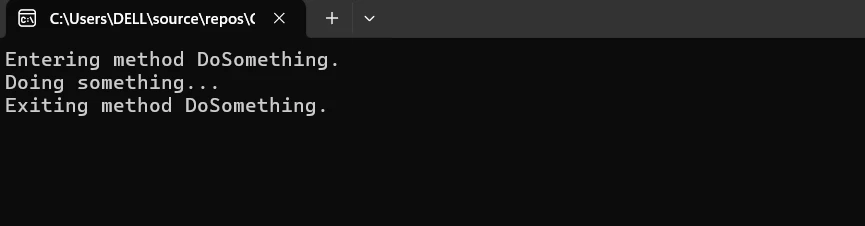
新たに定義したアスペクトを適用するには、横断的な振る舞いを使用したいメソッドやクラスにそれを使用します。 ターゲットメソッドまたはクラスのロギングコードに[LoggingAspect]属性を使用してください。
public class ExampleService
{
    [LoggingAspect]
    public void DoSomething()
    {
        Console.WriteLine("Doing something...");
    }
}
public class ExampleService
{
[LoggingAspect]
public void DoSomething()
{
Console.WriteLine("Doing something...");
}
}Imports System
Public Class ExampleService
<LoggingAspect>
Public Sub DoSomething()
Console.WriteLine("Doing something...")
End Sub
End ClassPostSharpの設定(オプション)
その機能をカスタマイズし、他のプログラムとの統合を促進するために、PostSharpは幅広い設定オプションを提供しています。 通常、設定は属性、XMLファイル、またはプログラムによって行われます。
ログ構成: 属性またはXML設定を使用して、ログレベル、ロギングターゲット、およびその他のロギングパラメーターを指定します。
パフォーマンス最適化: PostSharpのウィービングとコンパイルパラメーターを変更して効率を最大化します。
開始方法
PDF作成および操作のためにアスペクト指向プログラミング(AOP)を使用するには、C#プロジェクトにPostSharpとIronPDFを統合します。 このガイドに従って、PostSharpとIronPDFを効率的にセットアップして使用します。
開始方法
C#プロジェクトで、NServiceBusとRabbitMQおよびIronPDFを統合するためには、NServiceBusとRabbitMQ間のメッセージを構成し、IronPDFを使用してPDFを作成します。 ここにあなたが始めるのを助ける詳細なガイドがあります:
IronPDFとは何か - .NET PDFライブラリ?
IronPDFはPDFファイルを作成、読み取り、編集、変換するため for .NETライブラリです。 C#またはVB.NETアプリケーションでPDFファイルを扱うための強力でユーザーフレンドリーなツールを開発者に提供します。 以下はIronPDFの機能と能力の詳細な説明です:
IronPDF の機能
HTMLからのPDF生成 HTML、CSS、JavaScriptをPDFに変換します。 メディアクエリやレスポンシブデザインなどの最新のWeb標準をサポートしています。 HTMLおよびCSSを使用して動的なスタイリングのあるPDF請求書、レポート、文書の作成に役立ちます。
PDF編集 既存のPDFにテキスト、画像、およびその他のコンテンツを追加することができます。 PDFファイルからテキストや画像を抽出します。 複数のPDFを1つのファイルに結合します。PDFを分割して複数の文書を作成します。 ヘッダー、フッター、注釈、ウォーターマークを追加します。
PDF変換 Word、Excel、画像など、さまざまなファイル形式をPDFに変換し、また、PDFを画像(PNG、JPEGなど)に変換します。
パフォーマンスと信頼性 工業環境での高性能および信頼性に対応して設計されています。 大規模な文書を効果的に処理します。
IronPDFをインストールする
IronPDFパッケージをインストールして、.NETアプリケーションでPDFを扱うために必要なツールを入手してください:
Install-Package IronPdf
PDF生成のためのPostSharpアスペクトを作成する
次に、IronPDFを使用してPDF生成を管理するPostSharp機能を開発します。
アスペクトを定義する
プロジェクトに新しいC#クラスファイルをPdfGenerationAspect.cs(または適切な名前)として追加します。 OnMethodBoundaryAspect を継承することで、メソッドが呼ばれる前後にコードを実行するアスペクトを実装できます:
using PostSharp.Aspects;
using IronPdf;
using System;

// Define a PDF generation aspect using OnMethodBoundaryAspect
[Serializable]
public class PdfGenerationAspect : OnMethodBoundaryAspect
{
    // Executed before the method invocation
    public override void OnEntry(MethodExecutionArgs args)
    {
        Console.WriteLine($"Generating PDF for method {args.Method.Name}.");
    }

    // Executed upon the successful completion of the method
    public override void OnSuccess(MethodExecutionArgs args)
    {
        var htmlContent = args.Arguments.GetArgument(0) as string;
        var outputPath = args.Arguments.GetArgument(1) as string;

        // Create an instance of HtmlToPdf class
        var Renderer = new HtmlToPdf();

        // Convert HTML content to PDF
        var pdf = Renderer.RenderHtmlAsPdf(htmlContent);

        // Save the generated PDF to the specified path
        pdf.SaveAs(outputPath);

        Console.WriteLine($"PDF generated successfully at {outputPath}.");
    }

    // Executed when the method throws an exception
    public override void OnException(MethodExecutionArgs args)
    {
        Console.WriteLine($"Exception occurred in method {args.Method.Name}: {args.Exception.Message}");
    }
}
using PostSharp.Aspects;
using IronPdf;
using System;
// Define a PDF generation aspect using OnMethodBoundaryAspect
[Serializable]
public class PdfGenerationAspect : OnMethodBoundaryAspect
{
// Executed before the method invocation
public override void OnEntry(MethodExecutionArgs args)
{
Console.WriteLine($"Generating PDF for method {args.Method.Name}.");
}
// Executed upon the successful completion of the method
public override void OnSuccess(MethodExecutionArgs args)
{
var htmlContent = args.Arguments.GetArgument(0) as string;
var outputPath = args.Arguments.GetArgument(1) as string;
// Create an instance of HtmlToPdf class
var Renderer = new HtmlToPdf();
// Convert HTML content to PDF
var pdf = Renderer.RenderHtmlAsPdf(htmlContent);
// Save the generated PDF to the specified path
pdf.SaveAs(outputPath);
Console.WriteLine($"PDF generated successfully at {outputPath}.");
}
// Executed when the method throws an exception
public override void OnException(MethodExecutionArgs args)
{
Console.WriteLine($"Exception occurred in method {args.Method.Name}: {args.Exception.Message}");
}
}Imports PostSharp.Aspects
Imports IronPdf
Imports System
' Define a PDF generation aspect using OnMethodBoundaryAspect
<Serializable>
Public Class PdfGenerationAspect
Inherits OnMethodBoundaryAspect
' Executed before the method invocation
Public Overrides Sub OnEntry(ByVal args As MethodExecutionArgs)
Console.WriteLine($"Generating PDF for method {args.Method.Name}.")
End Sub
' Executed upon the successful completion of the method
Public Overrides Sub OnSuccess(ByVal args As MethodExecutionArgs)
Dim htmlContent = TryCast(args.Arguments.GetArgument(0), String)
Dim outputPath = TryCast(args.Arguments.GetArgument(1), String)
' Create an instance of HtmlToPdf class
Dim Renderer = New HtmlToPdf()
' Convert HTML content to PDF
Dim pdf = Renderer.RenderHtmlAsPdf(htmlContent)
' Save the generated PDF to the specified path
pdf.SaveAs(outputPath)
Console.WriteLine($"PDF generated successfully at {outputPath}.")
End Sub
' Executed when the method throws an exception
Public Overrides Sub OnException(ByVal args As MethodExecutionArgs)
Console.WriteLine($"Exception occurred in method {args.Method.Name}: {args.Exception.Message}")
End Sub
End ClassこのアスペクトはPDFの作成に成功した場合(OnException)します。
IronPDFを使用してPDFを作成する関数にPdfGenerationAspectアスペクトを追加します。 PDF生成のメソッドを持つクラスを定義します:
public class PdfService
{
    [PdfGenerationAspect] // Apply the PdfGenerationAspect here
    public void GeneratePdf(string htmlContent, string outputPath)
    {
        // Create an instance of HtmlToPdf class
        var Renderer = new HtmlToPdf();

        // Convert HTML content to PDF
        var pdf = Renderer.RenderHtmlAsPdf(htmlContent);

        // Save the generated PDF to the specified path
        pdf.SaveAs(outputPath);
    }
}
public class PdfService
{
[PdfGenerationAspect] // Apply the PdfGenerationAspect here
public void GeneratePdf(string htmlContent, string outputPath)
{
// Create an instance of HtmlToPdf class
var Renderer = new HtmlToPdf();
// Convert HTML content to PDF
var pdf = Renderer.RenderHtmlAsPdf(htmlContent);
// Save the generated PDF to the specified path
pdf.SaveAs(outputPath);
}
}Public Class PdfService
<PdfGenerationAspect>
Public Sub GeneratePdf(ByVal htmlContent As String, ByVal outputPath As String)
' Create an instance of HtmlToPdf class
Dim Renderer = New HtmlToPdf()
' Convert HTML content to PDF
Dim pdf = Renderer.RenderHtmlAsPdf(htmlContent)
' Save the generated PDF to the specified path
pdf.SaveAs(outputPath)
End Sub
End ClassIronPDFベストプラクティスを用いたHTMLからPDFの生成を呼び出すか作成する予定の場所がPdfServiceクラスにアクセス可能であることを確認してください。
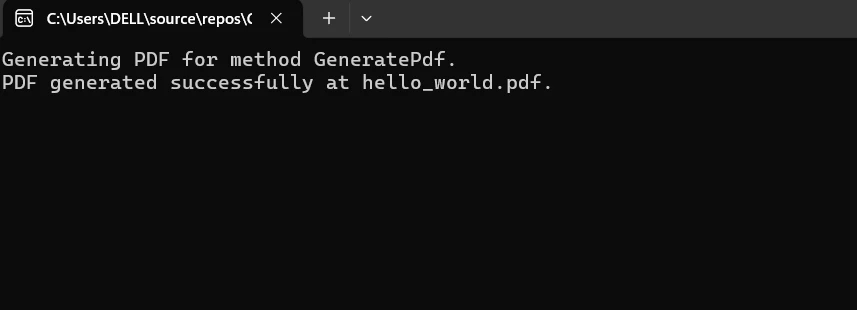
そして、PdfServiceクラスを使用して、アスペクトが適用されたPDFを作成します。 メインアプリケーションまたは他のクラスでGeneratePdf関数を使用します。 アスペクトクラス(PdfGenerationAspect)は、PDF生成中に発生した例外を処理し、関連するメッセージを記録し、実行時にメソッド呼び出しをインターセプトします。
class Program
{
    static void Main(string[] args)
    {
        // Create an instance of PdfService
        var pdfService = new PdfService();

        // Define HTML content and output PDF path
        string htmlContent = "<h1>Hello World</h1>";
        string outputPath = "hello_world.pdf";

        // Invoke PDF generation
        pdfService.GeneratePdf(htmlContent, outputPath);
    }
}
class Program
{
static void Main(string[] args)
{
// Create an instance of PdfService
var pdfService = new PdfService();
// Define HTML content and output PDF path
string htmlContent = "<h1>Hello World</h1>";
string outputPath = "hello_world.pdf";
// Invoke PDF generation
pdfService.GeneratePdf(htmlContent, outputPath);
}
}Friend Class Program
Shared Sub Main(ByVal args() As String)
' Create an instance of PdfService
Dim pdfService As New PdfService()
' Define HTML content and output PDF path
Dim htmlContent As String = "<h1>Hello World</h1>"
Dim outputPath As String = "hello_world.pdf"
' Invoke PDF generation
pdfService.GeneratePdf(htmlContent, outputPath)
End Sub
End Class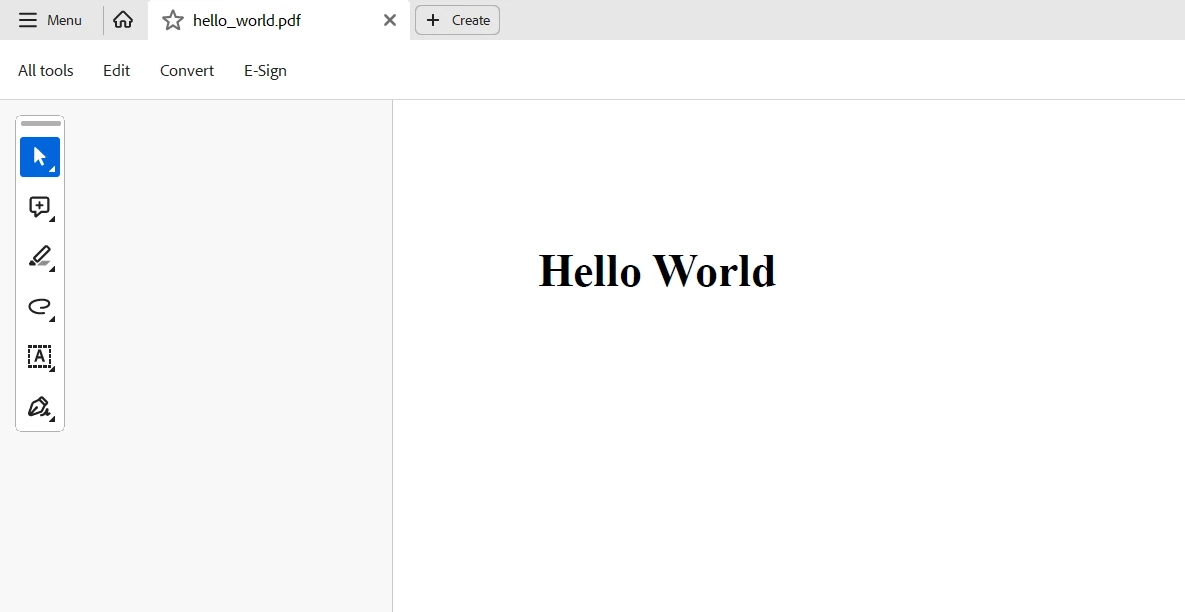
結論
要するに、C#アプリケーションでのPostSharpとIronPDFの組み合わせは、コードの保守性とPDFの生成および操作機能を強化する強力な相乗効果を生み出します。 PostSharpは、パフォーマンス監視、例外処理、ロギングなどの横断的な関心事を再利用可能なアスペクトにカプセル化するアスペクト指向プログラミング(AOP)を簡素化します。 このアプローチは、重要なビジネスロジックを反復的な定型コードから分離することにより、よりシンプルでモジュラーでクリーンなコードを促進します。
一方で、IronPDFは.NETアプリケーションでのPDFドキュメントの生成、変更、および操作に対する強力な機能を提供します。 開発者は、IronPDFのPDF作成ツールとPostSharpのAOP機能を組み合わせることで、コードの可読性を向上させ、エラー率を低減し、PDF関連の操作を迅速化できます。
最終的に、バーコードで作業し、PDFを作成し、OCRを行い、Excelと統合するには、.NETプログラミング用のツールキットにIronPDFとIron Softwareを含める必要があります。 始めの価格$999から、IronPDFライセンスオプションを探索し、機能を< a href="Iron" target="_blank">https://ironsoftware.com/">Iron Softwareの充実したスイートのパフォーマンス、互換性、ユーザビリティと組み合わせて、より多くのオンラインアプリや機能を提供し、より効果的な開発を可能にします。
開発者はプロジェクトの特定のニーズに合わせた明確なライセンスオプションがあれば、自信を持って最適なモデルを選ぶことができます。 これらの利点により、開発者はさまざまな課題に効率的かつ透明に取り組むことができます。
よくある質問
PostSharpを使用して.NETでアスペクト指向プログラミングをどのように利用できますか?
PostSharpを使用することで、.NETにおけるアスペクト指向プログラミング(AOP)を実装し、ログ、セキュリティ、トランザクション管理などの横断的関心ごとをコアビジネスロジックから分離することができます。これはOnMethodBoundaryAspectのようなアスペクトを通じて行われ、メソッドの前後の実行タスクをカスタマイズして処理できます。
IronPDFとの統合により、PostSharpはどのような利益をもたらしますか?
PostSharpをIronPDFと統合することで、PDF関連の操作を効率的に扱うことができるため、コードの保守性と生産性が向上します。PostSharpのAOP機能は、横断的関心事の管理を簡素化し、IronPDFはPDFの作成、変更、変換において強力な機能を提供します。
.NETライブラリを使用してHTMLをPDFに変換するにはどうすればよいですか?
IronPDFを使用して.NETでHTMLをPDFに変換することができます。HTML文字列にはRenderHtmlAsPdfメソッドを、HTMLファイルにはRenderHtmlFileAsPdfを利用します。この変換プロセスは簡素化されており、高性能と信頼性を提供します。
私のアプリケーションのパフォーマンス問題の診断にPostSharpはどのように役立ちますか?
PostSharp Diagnosticsは、パフォーマンスのボトルネック、エラー、非効率性を特定するのに役立つ強力な機能を持ち、アプリケーションの挙動とパフォーマンスに関する洞察を提供します。これにより、アプリケーションのパフォーマンスを最適化し、コードの質を向上させます。
Visual StudioプロジェクトでPostSharpを設定するにはどのようなステップが必要ですか?
Visual StudioプロジェクトでPostSharpをセットアップするには、まずPackage Manager Consoleを使ってインストールする必要があります。インストール後、OnMethodBoundaryAspectなどの基底クラスから派生することによって、ログや例外処理のようなメソッド実行アスペクトを管理するカスタムアスペクトを作成できます。
PostSharpは.NETアプリケーションのモジュール性をどのように向上させますか?
PostSharpは、開発者が横断的関心事をアスペクトと呼ばれる別モジュールにカプセル化することを可能にし、モジュール性を向上させます。この分離により、コアビジネスロジックがログやセキュリティのような補助コードと混在しないため、よりクリーンで保守しやすいコードになります。
.NETアプリケーションでIronPDFをPDF編集に使用できますか?
はい、IronPDFは.NETアプリケーションでのPDF編集に広範な機能を提供しています。PDFドキュメントの結合、分割、および変更を含み、ソフトウェアソリューション内でPDFコンテンツを効果的に管理できます。










 無料で始めましょう
 無料で始めましょう
 無料ライブデモを予約
















