




已更新 2026年4月23日
在 .NET 中用 Microsoft.Extensions.AI 簡化 LLM 整合
AI 正在改變軟體開發,但將大型語言模型 (LLM) 整合到 .NET 中一直很複雜。利用 IronPdf.AI 將 AI 整合推向更遠,為 .NET 應用程式帶來由 OpenAI 驅動的 PDF 解析、資料擷取和內容總結。
閱讀更多

PostSharp 是一個知名框架,通過提供面向方面程式設計(AOP)來簡化 .NET 編程。 它使開發者可以將橫切關注點與核心應用邏輯分離,從而建立更加清晰且易於維護的程式碼。 橫切關注點是影響程式其他功能的特徵; 這些通常包括性能監控、錯誤處理、記錄和安全性。
AOP 程式設計範式的目標是通過將與不同領域相關的關注點分離來使程式碼更加模塊化。 它是對物件導向程式設計(OOP)的增強,因為它使您可以在不直接更改現有程式碼的情況下新增更多功能。 這是通過使用稱為 PostSharp Aspects 的方面來實現的,這些方面是包含影響多個類或方法的行為的模塊化程式碼片段。
為了提供靈活性和對個別項目目標的適應性,開發者可以構建符合應用需求的自訂元素。
相較於傳統的運行時攔截,PostSharp 通過在編譯期間將功能包含在中介語言(IL)源程式碼中,最大化效率,從而減少運行時開銷。
PostSharp 診斷是 PostSharp 的一個組件,幫助開發者找到並修復性能瓶頸、錯誤和低效率,提供對應用行為和性能的洞察。
PostSharp 通過程式庫和擴展(例如,PostSharp.Patterns.Diagnostics)提供額外的功能,如增強的診斷和結構化日誌記錄。
PostSharp 具有跨平台相容性,允許開發者在針對 Linux、macOS X 和 Windows 作業系統的項目中使用其功能。
通過與程式碼合約的整合,PostSharp 改進了程式碼質量和可靠性,使開發者能為方法定義前置條件、後置條件和不變式。
PostSharp 相容多種型別的項目和框架,支持 .NET Core 和 .NET Framework。
您必須在 Visual Studio 解決方案中安裝和設置 PostSharp,然後才能在 C# 項目中使用它。 以下步驟將幫助您在新的或現有的 C# 項目中建立和設置 PostSharp。
在 Visual Studio 中建立控制台項目非常簡單。 按照以下步驟在 Visual Studio 環境中啟動一個控制台應用程式:
確保您的計算機上已安裝 Visual Studio。
從檔案選單中選擇"新建",然後選擇"項目"。
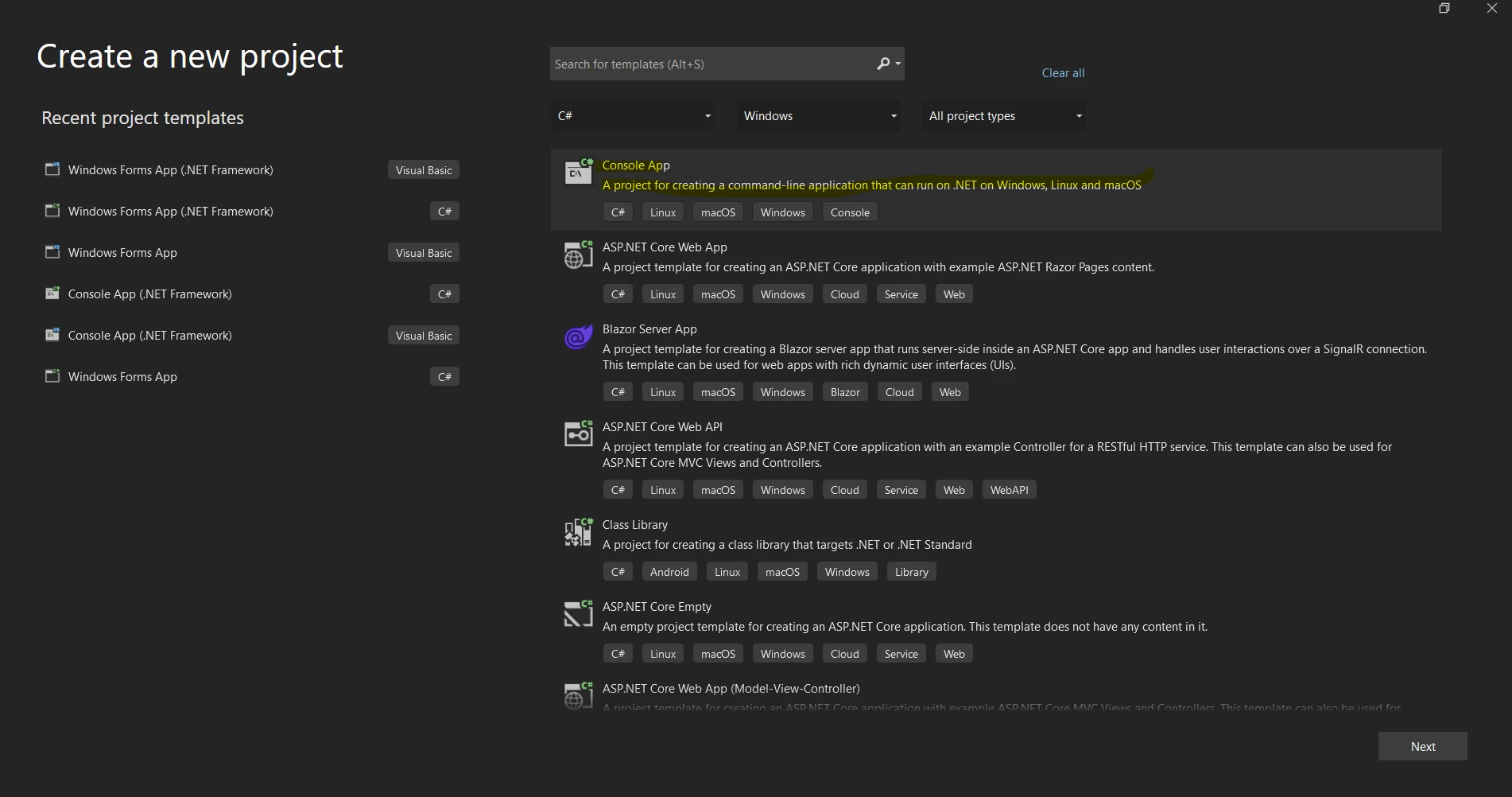
選擇可從項目範本引用列表中選擇"控制台應用"或"控制台應用(.NET Core)"範本。
在"名稱"部分輸入您的項目名稱。
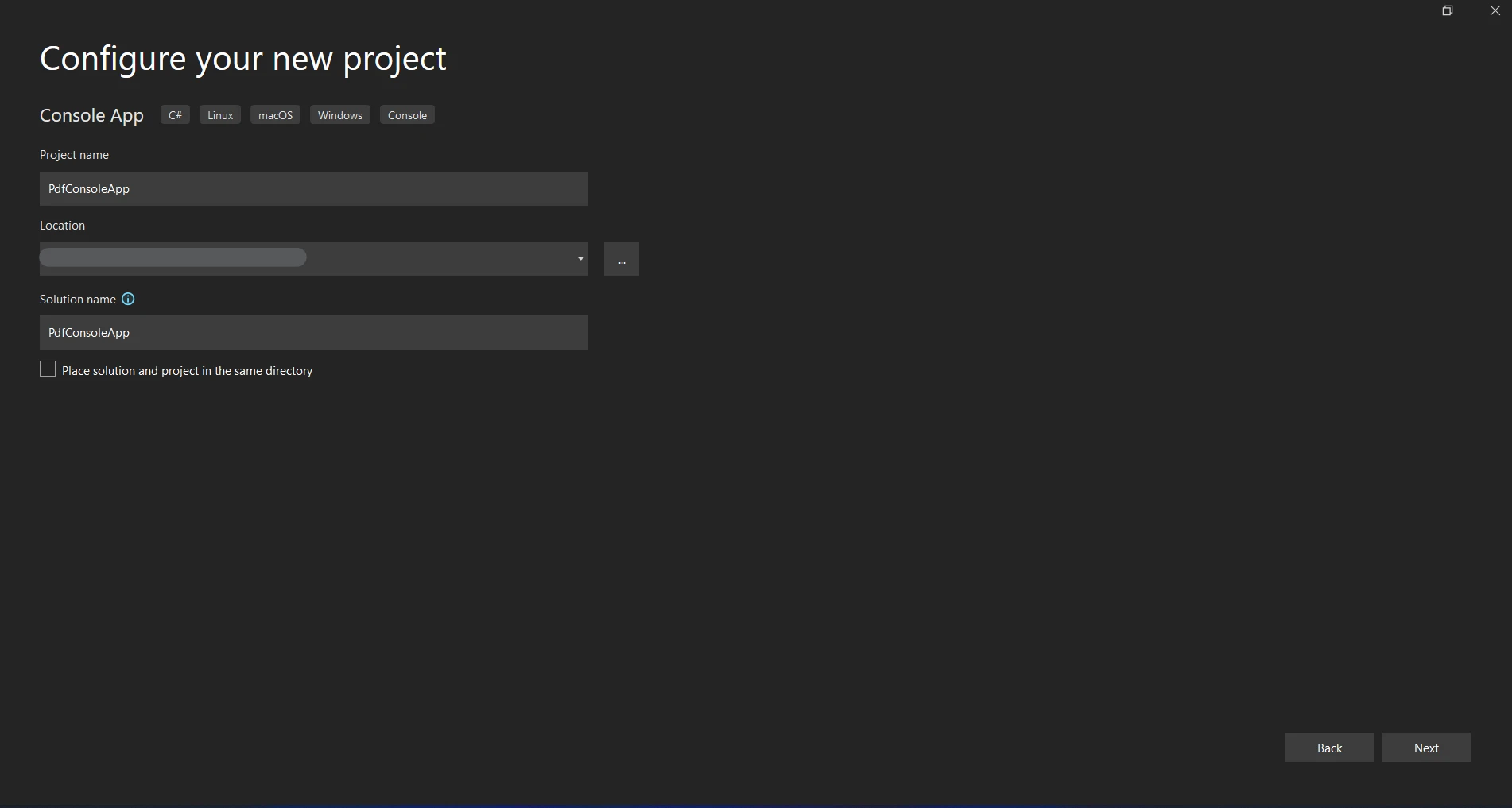
選擇一個項目儲存的位置。
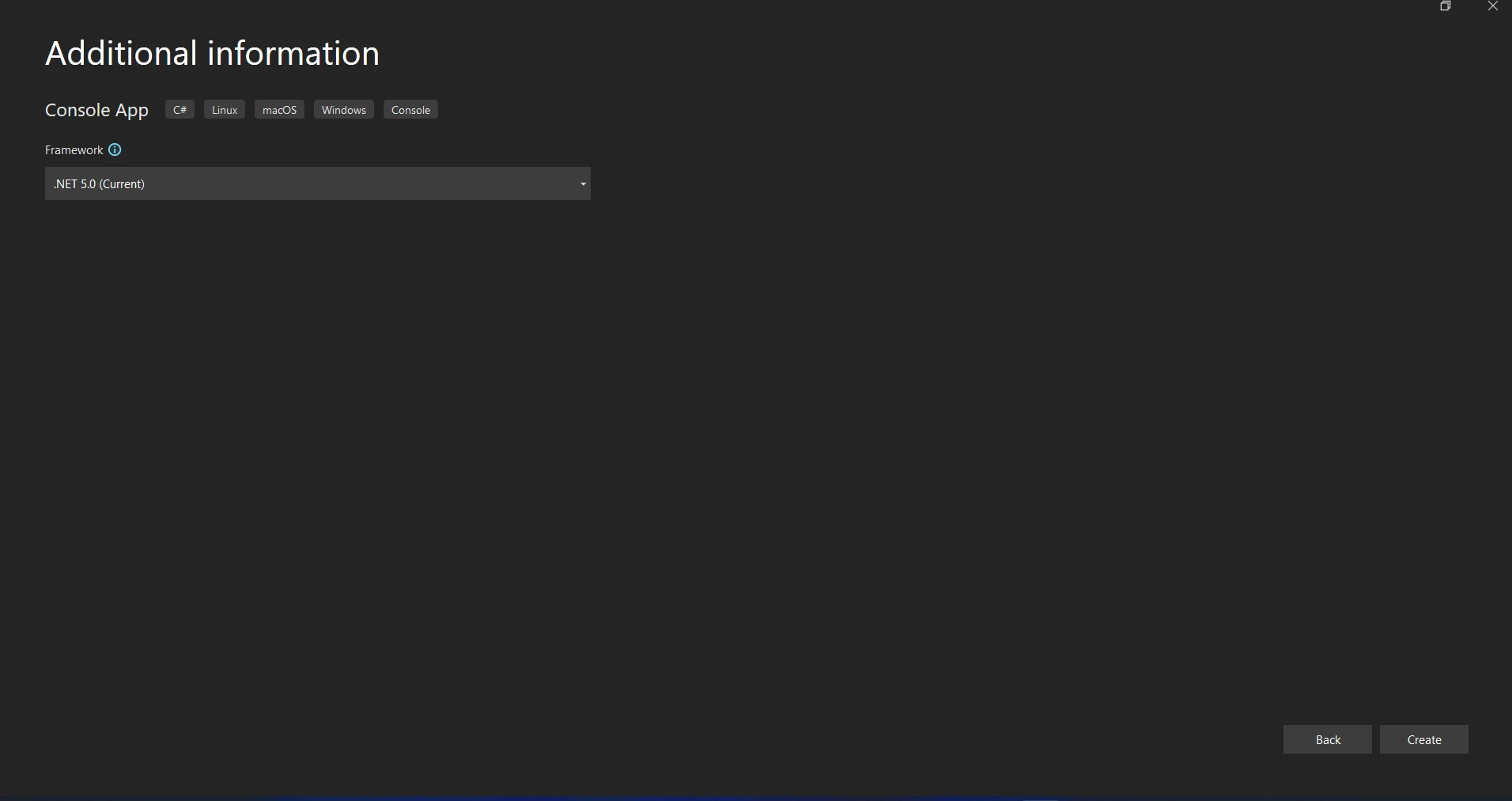
點擊"建立"以啟動控制台應用程式項目。
PostSharp 可通過套件管理器控制台安裝:
要定義您的方面(aspect),將一個新的 C# 類文件新增到項目中。 通過從一個 MethodInterceptionAspect 或其他適當的方面基類繼承,您可以實現您的自定義屬性或方面。 以下是基本 OnMethodBoundaryAspect 日誌記錄方面的例子:
using PostSharp.Aspects;
using System;

// Define a logging aspect using OnMethodBoundaryAspect
[Serializable]
public class LoggingAspect : OnMethodBoundaryAspect
{
    // Executed before the method is invoked
    public override void OnEntry(MethodExecutionArgs args)
    {
        Console.WriteLine($"Entering method {args.Method.Name}.");
    }

    // Executed after the method has completed execution, both on success and failure
    public override void OnExit(MethodExecutionArgs args)
    {
        Console.WriteLine($"Exiting method {args.Method.Name}.");
    }

    // Executed when the method throws an exception
    public override void OnException(MethodExecutionArgs args)
    {
        Console.WriteLine($"Exception in method {args.Method.Name}: {args.Exception.Message}");
    }
}Imports PostSharp.Aspects
Imports System
' Define a logging aspect using OnMethodBoundaryAspect
<Serializable>
Public Class LoggingAspect
Inherits OnMethodBoundaryAspect
' Executed before the method is invoked
Public Overrides Sub OnEntry(ByVal args As MethodExecutionArgs)
Console.WriteLine($"Entering method {args.Method.Name}.")
End Sub
' Executed after the method has completed execution, both on success and failure
Public Overrides Sub OnExit(ByVal args As MethodExecutionArgs)
Console.WriteLine($"Exiting method {args.Method.Name}.")
End Sub
' Executed when the method throws an exception
Public Overrides Sub OnException(ByVal args As MethodExecutionArgs)
Console.WriteLine($"Exception in method {args.Method.Name}: {args.Exception.Message}")
End Sub
End Class修改方面的行為以適應您的需求; 例如,記錄方法參數或返回值。
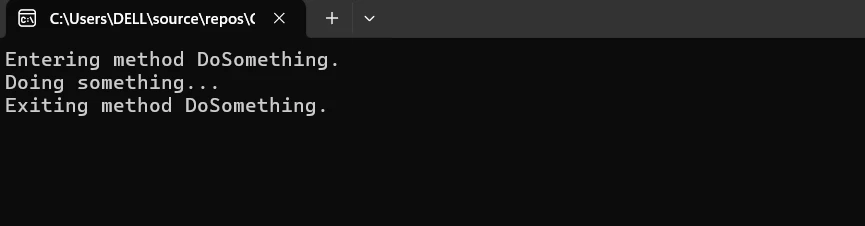
要應用您新定義的方面,請在您希望橫切行為啟動的方法或類中使用它。 在目標方法或類的日誌程式碼上使用 [LoggingAspect] 屬性。
public class ExampleService
{
    [LoggingAspect]
    public void DoSomething()
    {
        Console.WriteLine("Doing something...");
    }
}Imports System
Public Class ExampleService
<LoggingAspect>
Public Sub DoSomething()
Console.WriteLine("Doing something...")
End Sub
End Class為了自訂其功能並便於與其他程式的整合,PostSharp 提供了一系列配置選項。 一般來說,配置通過屬性、XML 文件或程式碼方式完成。
配置日誌: 使用屬性或 XML 配置來指定日誌等級、日誌目標和其他日誌參數。
性能優化: 修改 PostSharp 的織入和編譯參數以最大化效率。
要使用面向方面程式設計(AOP)建立和操作 PDF,將 PostSharp 和 IronPDF 整合到您的 C# 項目中。 按照本指南中的說明有效地設置和使用 PostSharp 與 IronPDF。
在一個 C# 項目中,整合 NServiceBus 與 RabbitMQ 及 IronPDF 涉及在 NServiceBus 和 RabbitMQ 之間配置訊息,以及使用 IronPDF 建立 PDF。 以下是讓您入門的詳細指南:
IronPDF 是一個用於建立、閱讀、編輯和轉換 PDF 文件的 .NET 程式庫。 它為開發者提供了一個穩健且使用者友好的工具,用於在 C# 或 VB.NET 應用程式中處理 PDF 文件。 以下是 IronPDF 的功能和能力的詳細說明:
從 HTML 生成 PDF 將 HTML、CSS 和 JavaScript 轉換為 PDF。 它支持如媒體查詢和響應式設計等現代網頁標準。 能用於建立具有動態樣式的 HTML 和 CSS 的 PDF 帳單、報告和文件。
PDF 編輯 您可以向現有的 PDF 新增文字、圖像和其他內容。 從 PDF 文件中提取文字和圖像。 將多個 PDF 合併為一個文件。 拆分 PDF 以建立多個文件。 新增頁眉、頁腳、註釋和水印。
PDF 轉換 轉換各種文件格式,包括 Word、Excel 和圖像為 PDF,也可以將 PDF 轉換為圖像(PNG、JPEG 等)。
性能和可靠性 專為工業環境中的高性能和可靠性而設計。 它能夠有效處理大型文件。
安裝 IronPDF 套件以獲得您需要的在 .NET 應用程式中處理 PDF 的工具:
現在讓我們開發一個使用 IronPDF 以管理 PDF 生成的 PostSharp 功能。
在您的項目中,新增一個名為 PdfGenerationAspect.cs(或其他合適名稱)的 C# 類文件。 通過從 OnMethodBoundaryAspect 繼承,您可以實現該方面以在方法被調用之前和之後執行程式碼:
using PostSharp.Aspects;
using IronPdf;
using System;

// Define a PDF generation aspect using OnMethodBoundaryAspect
[Serializable]
public class PdfGenerationAspect : OnMethodBoundaryAspect
{
    // Executed before the method invocation
    public override void OnEntry(MethodExecutionArgs args)
    {
        Console.WriteLine($"Generating PDF for method {args.Method.Name}.");
    }

    // Executed upon the successful completion of the method
    public override void OnSuccess(MethodExecutionArgs args)
    {
        var htmlContent = args.Arguments.GetArgument(0) as string;
        var outputPath = args.Arguments.GetArgument(1) as string;

        // Create an instance of HtmlToPdf class
        var Renderer = new HtmlToPdf();

        // Convert HTML content to PDF
        var pdf = Renderer.RenderHtmlAsPdf(htmlContent);

        // Save the generated PDF to the specified path
        pdf.SaveAs(outputPath);

        Console.WriteLine($"PDF generated successfully at {outputPath}.");
    }

    // Executed when the method throws an exception
    public override void OnException(MethodExecutionArgs args)
    {
        Console.WriteLine($"Exception occurred in method {args.Method.Name}: {args.Exception.Message}");
    }
}Imports PostSharp.Aspects
Imports IronPdf
Imports System
' Define a PDF generation aspect using OnMethodBoundaryAspect
<Serializable>
Public Class PdfGenerationAspect
Inherits OnMethodBoundaryAspect
' Executed before the method invocation
Public Overrides Sub OnEntry(ByVal args As MethodExecutionArgs)
Console.WriteLine($"Generating PDF for method {args.Method.Name}.")
End Sub
' Executed upon the successful completion of the method
Public Overrides Sub OnSuccess(ByVal args As MethodExecutionArgs)
Dim htmlContent = TryCast(args.Arguments.GetArgument(0), String)
Dim outputPath = TryCast(args.Arguments.GetArgument(1), String)
' Create an instance of HtmlToPdf class
Dim Renderer = New HtmlToPdf()
' Convert HTML content to PDF
Dim pdf = Renderer.RenderHtmlAsPdf(htmlContent)
' Save the generated PDF to the specified path
pdf.SaveAs(outputPath)
Console.WriteLine($"PDF generated successfully at {outputPath}.")
End Sub
' Executed when the method throws an exception
Public Overrides Sub OnException(ByVal args As MethodExecutionArgs)
Console.WriteLine($"Exception occurred in method {args.Method.Name}: {args.Exception.Message}")
End Sub
End Class此方面負責成功建立 PDF(OnSuccess)、記錄 PDF 生成的開始(OnException)。
將 PdfGenerationAspect 方面新增到一個使用 IronPDF 建立 PDF 的函式中。 定義一個具有 PDF 生成方法的類:
public class PdfService
{
    [PdfGenerationAspect] // Apply the PdfGenerationAspect here
    public void GeneratePdf(string htmlContent, string outputPath)
    {
        // Create an instance of HtmlToPdf class
        var Renderer = new HtmlToPdf();

        // Convert HTML content to PDF
        var pdf = Renderer.RenderHtmlAsPdf(htmlContent);

        // Save the generated PDF to the specified path
        pdf.SaveAs(outputPath);
    }
}Public Class PdfService
<PdfGenerationAspect>
Public Sub GeneratePdf(ByVal htmlContent As String, ByVal outputPath As String)
' Create an instance of HtmlToPdf class
Dim Renderer = New HtmlToPdf()
' Convert HTML content to PDF
Dim pdf = Renderer.RenderHtmlAsPdf(htmlContent)
' Save the generated PDF to the specified path
pdf.SaveAs(outputPath)
End Sub
End Class確保您撰寫或想要調用IronPDF 使用最佳實踐生成 HTML 到 PDF的方法的位位置能夠存取 PdfService 類。
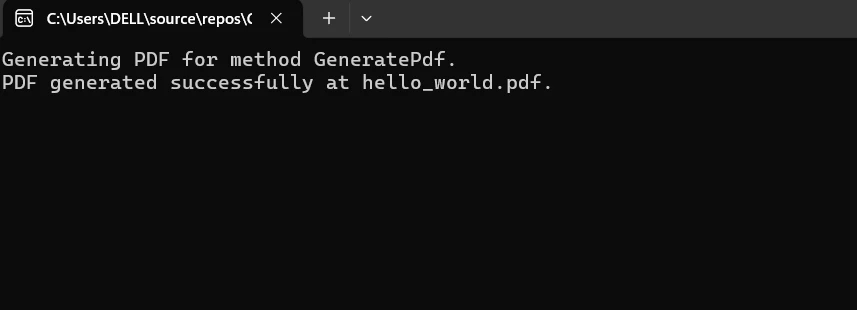
現在,運用 PdfService 類建立已應用方面的 PDF。 在主應用程式或其他類中建立 PdfService 的實例,並使用正確的 HTML 內容和輸出路徑運行 GeneratePdf 函式。 Aspect 類(PdfGenerationAspect)將處理在 PDF 生成過程中出現的任何異常,記錄相關資訊,並在執行時攔截方法調用。
class Program
{
    static void Main(string[] args)
    {
        // Create an instance of PdfService
        var pdfService = new PdfService();

        // Define HTML content and output PDF path
        string htmlContent = "<h1>Hello World</h1>";
        string outputPath = "hello_world.pdf";

        // Invoke PDF generation
        pdfService.GeneratePdf(htmlContent, outputPath);
    }
}Friend Class Program
Shared Sub Main(ByVal args() As String)
' Create an instance of PdfService
Dim pdfService As New PdfService()
' Define HTML content and output PDF path
Dim htmlContent As String = "<h1>Hello World</h1>"
Dim outputPath As String = "hello_world.pdf"
' Invoke PDF generation
pdfService.GeneratePdf(htmlContent, outputPath)
End Sub
End Class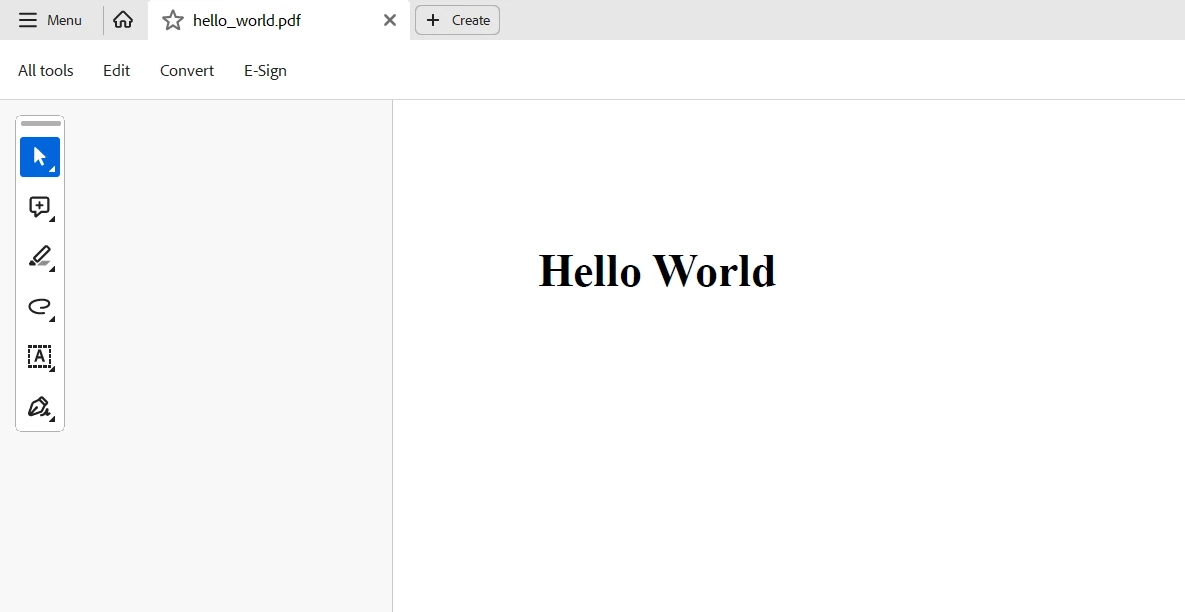
總之,PostSharp 和 IronPDF 在 C# 應用程式中結合創造了一種強大的協同效應,可增強程式碼可維護性和 PDF 生成及操作功能。 PostSharp 簡化了面向方面程式設計(AOP),使開發者能將性能監控、例外處理和記錄等橫切關注點封裝為可重用的方面。 通過將基本業務邏輯與重複的樣板程式碼分開,這種方法同樣促進了更簡單、更模塊化和更乾淨的程式碼。
反之,IronPDF 在 .NET 應用程式中提供生成、修改和操作 PDF 文件的強大功能。 開發者可以通過將 IronPDF 的 PDF 建立工具與 PostSharp 的 AOP 功能結合,提高程式碼可讀性,減少錯誤率,加速 PDF 相關運營。
最後,您可以使用 .NET 編程套件中的 IronPDF 和 Iron Software 來處理條碼、建立 PDF、進行 OCR 和整合 Excel。 IronPDF 的起始價為 $999,探索 IronPDF 授權選項,將其特性與Iron Software 功能豐富的套件性能、相容性和易用性結合,提供更多線上應用和功能、更有效的開發。
如果有清晰的授權選項針對具體項目需求定制,開發者可以自信地選擇最佳模型。 這些優勢使開發者能夠高效、透明地應對各種挑戰。

Jacob Mellor是Iron Software的首席技術官,一位在C# PDF技術上開創先河的遠見工程師。作為Iron Software核心程式碼庫的原開發者,他從創立以來就一直在塑造公司的產品架構,與首席執行官Cameron Rimington一起將公司轉變為服務於NASA、特斯拉和全球政府公司的50多名人員的公司。



IronPDF 是 IRONSUITE 的一部分
10 款適用於辦公室文件的 .NET API 產品

當您需要您的PDF看起來像HTML一樣快速。












