




已更新 2026年4月23日
在 .NET 中用 Microsoft.Extensions.AI 簡化 LLM 整合
AI 正在改變軟體開發,但將大型語言模型 (LLM) 整合到 .NET 中一直很複雜。利用 IronPdf.AI 將 AI 整合推向更遠,為 .NET 應用程式帶來由 OpenAI 驅動的 PDF 解析、資料擷取和內容總結。
閱讀更多

當兩位開發者合作時,他們將不可避免地討論程式碼風格。 每位開發者都有其獨特的撰寫源程式碼方式,因此一致性比選擇完美風格更重要。 像 StyleCop 這樣的工具透過規則集文件來強制執行程式碼一致性規則,確保團隊或專案的統一性。 一致性提高了可讀性,使除錯和維護更容易,創造出更高效的開發環境。
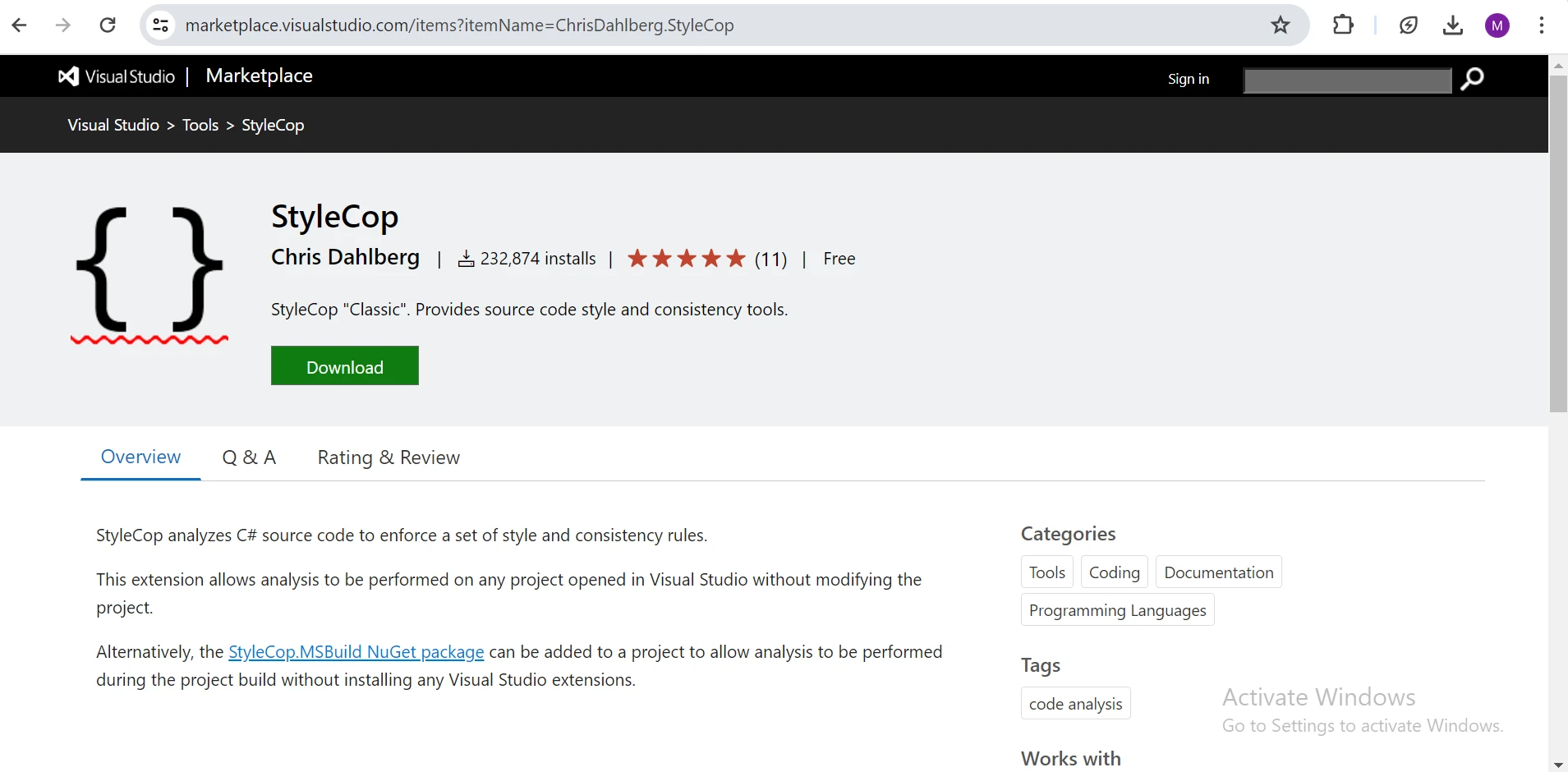
StyleCop 是一個開源的靜態分析工具,用於C#,它檢查程式碼是否遵循預定義的風格和一致性規則或格式規則。 它與Visual Studio無縫整合,並可以併入構建流程中,以確保開發團隊的程式碼一致性。 要配置StyleCop,您可以使用XML文件或JSON文件來定義專案應遵守的個別規則。 此XML檔頭允許您自定分析,根據專案需求修改特定規則。 StyleCop支持各種配置,是維持程式碼質量和一致性的一個靈活工具。
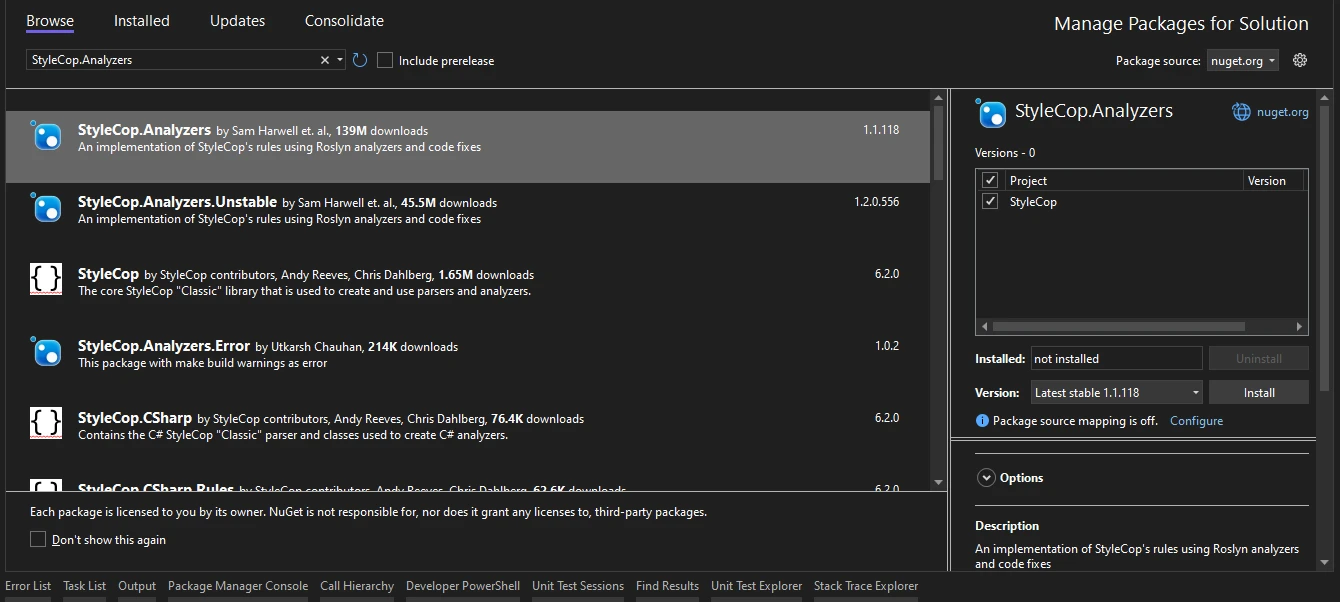
從Visual Studio中打開您的專案開始。 接下來,前往解決方案總管,右鍵點擊您的專案,選擇"管理NuGet套件"。 在NuGet套件管理器中,搜尋 "StyleCop.Analyzers" 並安裝它。
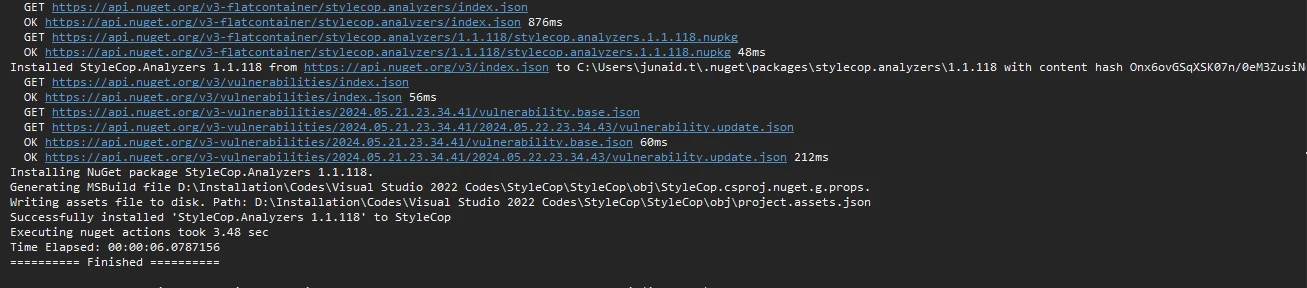
或者,若要使用NuGet套件管理器控制台安裝StyleCop Analyzers,使用以下命令:
上述命令將安裝StyleCop及其所有依賴項。 StyleCop 現在可以與命名空間宣告一起使用。
StyleCop 強制執行的一個常見規則是對公共可存取方法和類的文件註釋要求。 這確保您的程式碼有良好的文件和可理解性。
// Source code without StyleCop
public class Calculator
{
    public int Add(int a, int b)
    {
        return a + b;
    }
}Public Class Calculator
Public Function Add(a As Integer, b As Integer) As Integer
Return a + b
End Function
End Class如果不使用 StyleCop,則程式碼缺乏文件注釋,使其他開發者難以理解方法 Add 的用途以及參數 a 和 b。 這可能導致混淆和程式碼庫的可維護性下降。
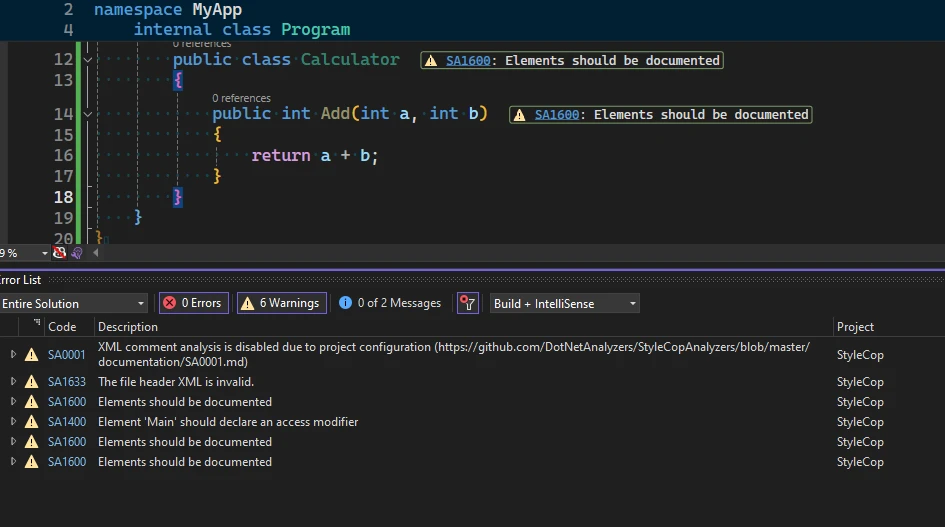
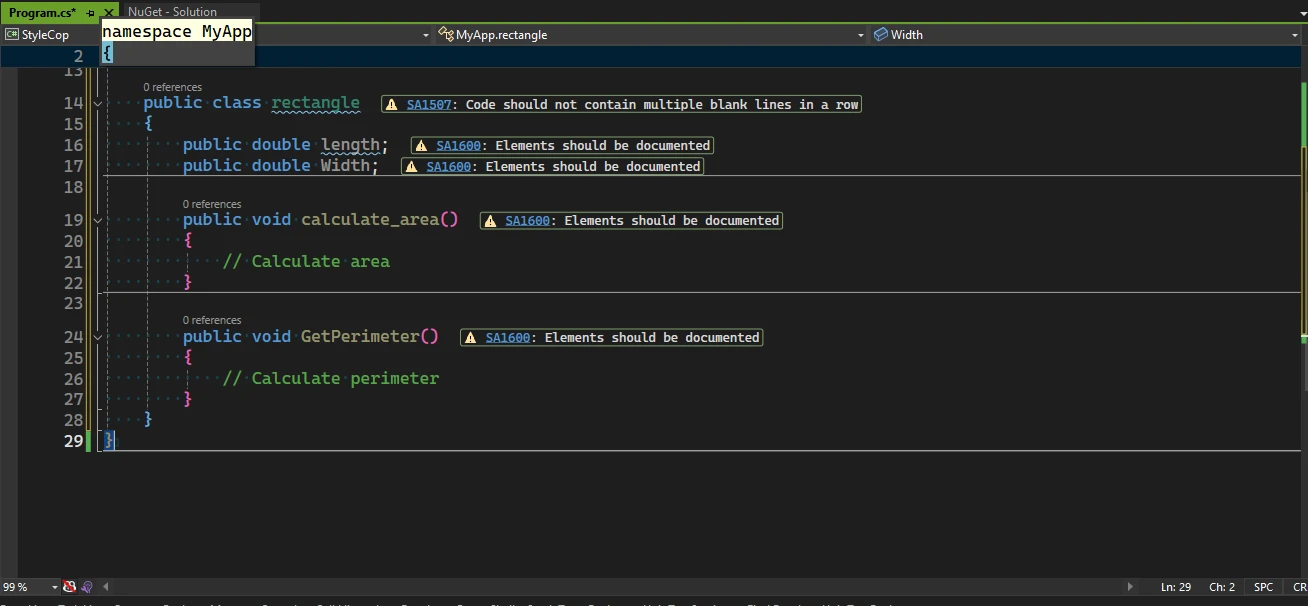
如果編碼約定被違反,StyleCop 在 Visual Studio的上述螢幕截圖中顯示警告。
// Code with StyleCop
/// <summary>
/// Provides methods for basic arithmetic operations.
/// </summary>
public class Calculator
{
    /// <summary>
    /// Adds two integers.
    /// </summary>
    /// <param name="a">The first integer.</param>
    /// <param name="b">The second integer.</param>
    /// <returns>The sum of the two integers.</returns>
    public int Add(int a, int b)
    {
        return a + b;
    }
}' Code with StyleCop
''' <summary>
''' Provides methods for basic arithmetic operations.
''' </summary>
Public Class Calculator
''' <summary>
''' Adds two integers.
''' </summary>
''' <param name="a">The first integer.</param>
''' <param name="b">The second integer.</param>
''' <returns>The sum of the two integers.</returns>
Public Function Add(a As Integer, b As Integer) As Integer
Return a + b
End Function
End Class使用StyleCop,文件注釋將新增到程式碼中,為<Calculator>``類及其<Add>方法的功能提供明確資訊。 開發者可以輕鬆理解該方法的作用,它接受的參數及返回值,從而提升程式碼的可讀性和可維護性。
public class rectangle
{
    public double length;
    public double Width;

    public void calculate_area()
    {
        // Calculate area
    }

    public void GetPerimeter()
    {
        // Calculate perimeter
    }
}Public Class Rectangle
Public Length As Double
Public Width As Double
Public Sub CalculateArea()
' Calculate area
End Sub
Public Sub GetPerimeter()
' Calculate perimeter
End Sub
End Class在此源程式碼中,類名(rectangle)和屬性名(length, Width)違反了風格和一致性規則。 方法名(calculate_area, GetPerimeter)有不一致的大小寫,導致命名約定警告。
探索 IronPDF 的功能 是一個領先的C# PDF程式庫,使開發人員能夠輕鬆地建立、編輯PDF文件 及 處理現有PDF 在其 .NET專案中。 無論您需要將HTML轉換為PDF、生成動態PDF文件,還是從PDF中提取文字和圖像,IronPDF提供了一個簡便的API來簡化過程。 它使用 .NET Chromium 引擎將 HTML 頁面渲染為 PDF 文件,使其成為軟體工程師在 C# 專案中的一個重要工具。 IronPDF 的相容性遍及 .NET Core(8、7、6、5 和 3.1+)、.NET Standard(2.0+)及 .NET Framework(4.6.2+),並支持各種專案型別,包括網頁(Blazor 和 WebForms)、桌面(WPF 和 MAUI)和控制台應用程式。 當您需要使 PDF 看起來像 HTML 時,IronPDF 提供了準確性、易用性和速度。
using IronPdf;

namespace YourNamespace
{
    public class PdfGenerator
    {
        public void generatePDF(string output)
        {
            // This code snippet does not adhere to StyleCop rules
            var renderer = new ChromePdfRenderer();
            PdfDocument pdf = renderer.RenderUrlAsPdf("<h1>Hello, World!</h1>");
            pdf.SaveAs(output);
        }
    }
}Imports IronPdf
Namespace YourNamespace
Public Class PdfGenerator
Public Sub generatePDF(ByVal output As String)
' This code snippet does not adhere to StyleCop rules
Dim renderer = New ChromePdfRenderer()
Dim pdf As PdfDocument = renderer.RenderUrlAsPdf("<h1>Hello, World!</h1>")
pdf.SaveAs(output)
End Sub
End Class
End Namespace在強制執行 StyleCop 規則之前,程式碼顯示了幾個違規情況:方法名稱 generatePDF 不符合 PascalCase 慣例,參數 output 在命名上缺乏清晰性。 此外,使用 var 來隱式型別化變數 pdf 減少了可讀性。 省略 HtmlToPdf 實例化的命名空間可能導致混淆,尤其是在較大的專案中。
using IronPdf;

namespace YourNamespace
{
    /// <summary>
    /// Provides PDF generation functionalities.
    /// </summary>
    public class PdfGenerator
    {
        /// <summary>
        /// Generates a PDF from a URL and saves it to the specified file path.
        /// </summary>
        /// <param name="outputFilePath">The file path where the PDF will be saved.</param>
        public void GeneratePdf(string outputFilePath)
        {
            // This code snippet adheres to StyleCop rules
            ChromePdfRenderer chromePdfRenderer = new ChromePdfRenderer();
            PdfDocument pdfDocument = chromePdfRenderer.RenderUrlAsPdf("<h1>Hello, World!</h1>");
            pdfDocument.SaveAs(outputFilePath);
        }
    }
}Imports IronPdf
Namespace YourNamespace
''' <summary>
''' Provides PDF generation functionalities.
''' </summary>
Public Class PdfGenerator
''' <summary>
''' Generates a PDF from a URL and saves it to the specified file path.
''' </summary>
''' <param name="outputFilePath">The file path where the PDF will be saved.</param>
Public Sub GeneratePdf(ByVal outputFilePath As String)
' This code snippet adheres to StyleCop rules
Dim chromePdfRenderer As New ChromePdfRenderer()
Dim pdfDocument As PdfDocument = chromePdfRenderer.RenderUrlAsPdf("<h1>Hello, World!</h1>")
pdfDocument.SaveAs(outputFilePath)
End Sub
End Class
End Namespace在應用 StyleCop 規則後,方法 GeneratePdf 遵循 PascalCase 慣例,提升了可讀性。 參數 outputFilePath 現在更具描述性,表明其用途。 使用明確型別化(ChromePdfRenderer 和 PdfDocument)增強了清晰性。
將 StyleCop 整合到您的 .NET 專案中可確保一致的編碼標準,通過客製化規則集文件來簡化開發過程。StyleCop 可以透過指令行運行,直接對源程式碼強制執行這些標準,增強可讀性和可維護性。 此外,使用如 IronPDF 這樣的程式庫提供了強大的 PDF 生成能力,非常適合建立動態文件。 IronPDF 為對其功能滿意的開發者提供了免費試用授權。

Jacob Mellor是Iron Software的首席技術官,一位在C# PDF技術上開創先河的遠見工程師。作為Iron Software核心程式碼庫的原開發者,他從創立以來就一直在塑造公司的產品架構,與首席執行官Cameron Rimington一起將公司轉變為服務於NASA、特斯拉和全球政府公司的50多名人員的公司。



IronPDF 是 IRONSUITE 的一部分
10 款適用於辦公室文件的 .NET API 產品

當您需要您的PDF看起來像HTML一樣快速。












