


Updated August 1, 2026
Java Scanner (How it Works for Developers)
In this article, we'll dive deep into the workings of the Java Scanner class and explore its usage through examples
Read More

In this article, we'll clarify a topic that often leads to confusion in the Java community: pass-by-value versus pass-by-reference. We'll also explore how IronPDF can supercharge your Java applications when working with PDFs. Stick around because we're about to clear up some common misconceptions and introduce you to a tool that might make your coding life much easier.
Java's parameter-passing mechanism isn't as straightforward as it seems. Many developers believe Java uses pass-by-reference for objects, but that's inaccurate. Now, let's talk PDFs. They're everywhere in modern applications, from generating reports to creating invoices. But let's be honest; working with PDFs in Java can be a real pain without the right tools. That's where IronPDF comes in, but more on that later.
In the Java programming language, parameter passing is always pass-by-value. When dealing with objects, the reference variable is passed by value. This means the method receives the same object reference value, but not the object itself.
The Java Language Specification clarifies that formal parameters in method declarations are always variables, not references. When a method is invoked, the actual parameter values become the initial values of the method's formal parameters in stack memory. These method parameter values are copies of the original reference values, pointing to the same object as the original references.
A common misconception is demonstrated by the public static void swap method:
public static void swap(Object a, Object b) {
    Object temp = a; // Store the reference of object 'a' in 'temp'
    a = b;           // Assign reference of object 'b' to 'a'
    b = temp;        // Assign reference of 'temp' (original 'a') to 'b'
}This doesn't affect the actual objects or original reference variables in the calling code. It only swaps the local copies of the reference values. Similarly, a method that receives an object reference as a parameter can modify the same actual object, but cannot make the original reference variable refer to a different object.
Java always passes by value, whether it's a primitive type or an object reference. The same variable in the calling code maintains the same value and continues to refer to the same actual object after the method call. The reference value passed to a method allows it to work with the same object, but any reassignment within the method only affects the local copy of the reference, not the original reference variable. You can modify the state of the same object through a method parameter, but you can't change which object the original reference points to.
Understanding this concept is important for writing reliable code. One common pitfall is assuming that modifying a parameter will affect the original object. While you can modify the object's state, you can't change which object the original reference points to. Here's a pro tip: if you need to modify multiple aspects of an object, consider creating a method within the object class itself.
Now, let's talk about IronPDF. It's a powerful library that brings robust PDF capabilities to your Java applications. Whether you're using Java SE or Jakarta EE, IronPDF has got you covered.
IronPDF has the best capability for PDF generation and manipulation. With just a few lines of code, you can create PDFs from HTML, merge existing PDFs, or extract text and images. The best part? It integrates seamlessly with your Java projects.
The core feature of IronPDF is its ability to convert HTML to PDF. I once had to create a report generator for a client, and IronPDF made it a breeze. Instead of wrestling with complex PDF libraries, I could use my HTML and CSS skills to design the report and then let IronPDF handle the conversion.
Remember our discussion about Java's parameter passing? IronPDF abstracts away many of the complexities you might encounter when dealing with PDFs in Java. You don't have to worry about managing object references or memory allocation for large PDF files.
For example, let's say you need to modify a PDF in multiple methods. With IronPDF, you can load the PDF once and pass it around without worrying about unintended modifications:
package IronPDF.ironpdf_java;

import com.ironsoftware.ironpdf.PdfDocument;
import java.io.IOException;
import java.nio.file.Paths;

public class App {
    public static void main(String[] args) {
        // Retrieve license key from environment variable
        String licenseKey = System.getenv("IRONPDF_LICENSE_KEY");
        if (licenseKey == null || licenseKey.isEmpty()) {
            throw new IllegalStateException("Environment variable IRONPDF_LICENSE_KEY not set");
        }
        License.setLicenseKey(licenseKey);

        // Load existing PDF document
        String src = "assets/Image based PDF.pdf";
        PdfDocument pdf = PdfDocument.fromFile(Paths.get(src));

        // Apply watermark to the PDF
        pdf.applyWatermark("<h1>Watermark</h1>");

        // Extract all text from the PDF
        String extractedText = pdf.extractAllText();

        // Save the modified PDF
        String dest = "assets/Compressed.pdf";
        pdf.saveAs(Paths.get(dest));
    }
}Each method can work on the same PdfDocument object without the risk of creating multiple copies or losing changes.
Let me share a real-world scenario. I was working on a Java application for a law firm that needed to generate legal documents as PDFs. The existing solution was slow and prone to formatting errors. Here's how we implemented IronPDF to solve these issues:
import com.ironsoftware.ironpdf.PdfDocument;
import java.io.IOException;
import java.time.LocalDate;
import java.time.format.DateTimeFormatter;

public class LegalDocumentGenerator {

    public static void main(String[] args) {
        // Retrieve license key from the environment
        String licenseKey = System.getenv("IRONPDF_LICENSE_KEY");
        if (licenseKey == null || licenseKey.isEmpty()) {
            throw new IllegalStateException("Environment variable IRONPDF_LICENSE_KEY not set");
        }
        License.setLicenseKey(licenseKey);

        // Create HTML content for the legal document
        String clientName = "Iron Dev";
        String caseNumber = "2024-001";
        String currentDate = LocalDate.now().format(DateTimeFormatter.ISO_LOCAL_DATE);
        String html = "<html><body>" +
                      "<h1>Legal Document</h1>" +
                      "<p>This is a sample legal document generated using IronPDF for Java.</p>" +
                      "<p>Client: " + clientName + "</p>" +
                      "<p>Date: " + currentDate + "</p>" +
                      "<p>Case Number: " + caseNumber + "</p>" +
                      "<h2>Terms and Conditions</h2>" +
                      "<p>Lorem ipsum dolor sit amet, consectetur adipiscing elit. Sed do eiusmod tempor incididunt ut labore et dolore magna aliqua. Ut enim ad minim veniam, quis nostrud exercitation ullamco laboris nisi ut aliquip ex ea commodo consequat.</p>" +
                      "</body></html>";

        try {
            // Convert HTML content to PDF
            PdfDocument pdf = PdfDocument.renderHtmlAsPdf(html);
            pdf.saveAs("legalDocument.pdf");
            System.out.println("PDF generated successfully: legalDocument.pdf");
        } catch (IOException e) {
            System.err.println("Error saving PDF: " + e.getMessage());
        }
    }
}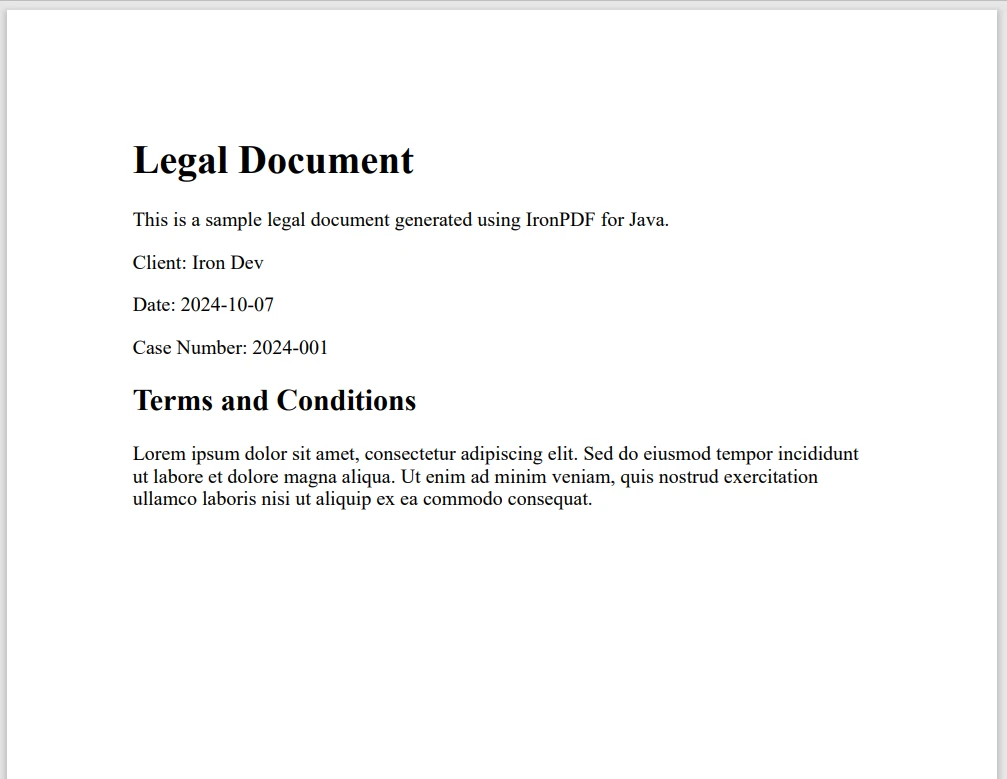
The results were impressive. Document generation time decreased by 60%, and the formatting was consistently perfect. The lawyers were thrilled, and our development team could focus on other features instead of troubleshooting PDF issues.
We've covered a lot of ground today, from debunking Java's pass-by-reference myth to exploring the power of IronPDF. Understanding Java's true parameter-passing mechanism will make you a better developer, helping you write more predictable and maintainable code.
As for IronPDF, it's a game-changer for Java developers working with PDFs. It simplifies complex tasks, improves performance, and integrates seamlessly with your existing Java knowledge. So, why not give it a try? IronPDF offers a free trial, allowing you to experience its capabilities firsthand. Its license starts at $999.

Curtis Chau holds a Bachelor’s degree in Computer Science (Carleton University) and specializes in front-end development with expertise in Node.js, TypeScript, JavaScript, and React. Passionate about crafting intuitive and aesthetically pleasing user interfaces, Curtis enjoys working with modern frameworks and creating well-structured, visually appealing manuals.

IronPDF is a part of IRONSUITE
10 .NET API products for your office documents











When you need your PDF to look like HTML, fast.

