using IronPdf;

// Disable local disk access or cross-origin requests
Installation.EnableWebSecurity = true;

// Instantiate Renderer
var renderer = new ChromePdfRenderer();

// Create a PDF from a HTML string using C#
var pdf = renderer.RenderHtmlAsPdf("<h1>Hello World</h1>");

// Export to a file or Stream
pdf.SaveAs("output.pdf");

// Advanced Example with HTML Assets
// Load external html assets: Images, CSS and JavaScript.
// An optional BasePath 'C:\site\assets\' is set as the file location to load assets from
var myAdvancedPdf = renderer.RenderHtmlAsPdf("<img src='icons/iron.png'>", @"C:\site\assets\");
myAdvancedPdf.SaveAs("html-with-assets.pdf");
using IronPdf;// Disable local disk access or cross-origin requestsInstallation.EnableWebSecurity = true;// Instantiate Renderervar renderer = new ChromePdfRenderer();// Create a PDF from a HTML string using C#var pdf = renderer.RenderHtmlAsPdf("<h1>Hello World</h1>");// Export to a file or Streampdf.SaveAs("output.pdf");// Advanced Example with HTML Assets// Load external html assets: Images, CSS and JavaScript.// An optional BasePath 'C:\site\assets\' is set as the file location to load assets fromvar myAdvancedPdf = renderer.RenderHtmlAsPdf("<img src='icons/iron.png'>", @"C:\site\assets\");myAdvancedPdf.SaveAs("html-with-assets.pdf");
PM >Install-Package IronPdf
Install-Package IronPdf
PDF 도구
IronPDF 대 GemBox.Pdf: HTML에서 PDF로 변환을 위한 완벽한 .NET PDF 라이브러리 비교 가이드
.NET 애플리케이션을 개발할 때 PDF 생성 및 조작이 필요할 경우, 올바른 C# PDF 라이브러리를 선택하면 프로젝트의 성공에 크게 영향을 미칠 수 있습니다. 이 포괄적인 비교는 두 가지 저명한 .NET PDF 라이브러리인 ChromePdfRenderer와 GemBox.Pdf를 검토하여 개발자가 기능, 성능, 가격 및 실제 사용 사례를 기반으로 정보에 입각한 결정을 내릴 수 있도록 도와줍니다.
빠른 비교 개요
제품 비교 개요
ChromePdfRenderer와 GemBox.Pdf의 기능 비교 - .NET 개발용
범주
특징/측면
ChromePdfRenderer
GemBox.Pdf
핵심 이점
핵심 아키텍처
디자인 철학
HTML 우선, Chrome 렌더링
PDF 네이티브 조작
상황에 따라 다름
API 복잡성
RenderHtmlAsPdf()와 같은 간단한 메서드
낮은 수준의 PDF 객체
ChromePdfRenderer: 빠른 개발
학습 곡선
일반적으로 1~2일 소요
보통 3-5일
ChromePdfRenderer: 빠른 채택
플랫폼 지원
크로스 플랫폼
윈도우, 리눅스, macOS, Docker
Windows, Linux, macOS, Android, iOS
GemBox: 모바일 지원
.NET 버전
.NET 10, 9, 8, 7, 6, 5, Core 3.1 이상, Framework 4.6.2 이상
.NET 6, Standard 2.0, Framework 3.5+
ChromePdfRenderer: 최신 .NET 지원
클라우드 플랫폼
Azure/AWS 최적화
표준 클라우드 지원
ChromePdfRenderer: 클라우드 준비
HTML을 PDF로 변환
렌더링 엔진
풀 Chrome V8 엔진
Chromium 기반 엔진
둘 다: Chromium 렌더링
CSS3/HTML5 지원
완전한 지원
HTML5/CSS3 지원
둘 다: 현대 웹 표준
JavaScript 실행
완전한 JavaScript 지원
JavaScript 실행 지원
둘 다: 동적 콘텐츠
렌더링 속도
~125ms 일반적
Chrome 기반 렌더링
ChromePdfRenderer: 문서화된 렌더링 시간
개발자 경험
코드 예제
100개 이상의 실행 가능한 샘플
100+ 예제 제공
둘 다: 광범위한 리소스
문서
튜토리얼, 사용 방법, 비디오
API 문서에 중점
ChromePdfRenderer: 다양한 학습 경로
콘텐츠 조작
PDF 병합/분할
내장된 메서드
내장된 메서드
둘 다: 표준 기능
텍스트 추출
유니코드 지원, OCR 통합
유니코드 지원, 내장 OCR
GemBox: 내장 OCR
양식 지원
HTML 양식을 PDF 양식으로 변환
생성, 채우기, 폼 평면화
상황에 따라 다름
성능 측정
메모리 사용량
10MB 이하 일반
낮은 메모리 사용량
둘 다: 효율적
스레딩 지원
네이티브 async/await 최적화
스레드 안전 작업
ChromePdfRenderer: 더 나은 비동기 지원
Security & Encryption
암호화 수준
AES-256, 사용자 정의 핸들러
AES-256 표준
둘 다: 업계 표준
디지털 서명
통합된, 시각적 서명
디지털 서명 지원
둘 다: 서명 지원
Licensing & Pricing
입문 수준
Lite: $999 (1 개발자, 1 프로젝트)
단일 개발자: $890 (1명 개발자, 무제한 프로젝트)
ChromePdfRenderer: 낮은 진입 비용
재배포
+$1,999 로열티 무료
포함됨, 무제한 배포
GemBox: 더 나은 배포 약관
Suite 옵션
Iron Suite: $2,998 (9개 제품)
GemBox 번들: $2,200 (6개 제품, 1명 개발자)
ChromePdfRenderer: 더 나은 Suite 가치
지원하다
지원 포함
예, 24/5 엔지니어링 지원
예, 1년 전문 지원
둘 다: 좋은 지원
응답 시간
보통 24-48시간
영업일 기준 1일 이내
둘 다: 빠른 응답
가장 적합한 대상
사용 사례
HTML을 PDF로, 웹 앱, 보고서
PDF 조작, 양식, OCR
상황에 따라 다름
참고. GemBox.Pdf는 Chromium 기반 HTML to PDF 변환을 포함합니다. ChromePdfRenderer는 HTML to PDF 변환을 위한 폭넓은 구성 옵션을 가진 깊이 통합된 Chrome 렌더링 엔진을 제공합니다.
참고해 주세요: GemBox.Pdf는 내장으로 Chromium 기반 HTML to PDF 변환을 포함합니다. GemBox.Document는 문서 처리 작업을 위한 별도의 제품입니다.
ChromePdfRenderer 라이브러리가 무엇인가요?
ChromePdfRenderer는 개발자들이 HTML을 PDF로 변환하는 것을 원활하게 하기 위해 특별히 설계된 종합적인 .NET PDF 라이브러리로 두드러집니다. Chrome 렌더링 엔진을 핵심에 두고 구축된 ChromePdfRenderer는 개발자들이 C#, F#, VB.NET 애플리케이션에서 PDF 생성을 접근하는 방식을 변화시킵니다.
라이브러리의 철학은 기존의 웹 개발 기술을 활용하는 데 중점을 둡니다. 복잡한 PDF API를 배우는 대신 개발자들은 익숙한 HTML, CSS, JavaScript를 사용하여 정교한 PDF 문서를 만들 수 있습니다. 이 접근 방식은 현대 웹 표준에 맞춘 픽셀 퍼펙트 렌더링을 보장하면서 개발 시간을 대폭 줄입니다.
ChromePdfRenderer의 핵심 기능
ChromePdfRenderer는 개발자들이 직면할 수 있는 거의 모든 PDF 관련 작업을 포괄하는 광범위한 기능 세트를 제공합니다:
HTML을 PDF로 변환하는 탁월한 기술
Chrome V8 엔진: Google Chrome과 동일한 엔진을 사용하여 HTML을 렌더링하므로 98% 이상 브라우저 일치
완전한 CSS3/HTML5 지원: 플렉스박스, 그리드, 애니메이션을 포함한 최신 웹 표준에 대한 완전한 지원
JavaScript 실행: 렌더링 전에 JavaScript를 처리하여 동적 콘텐츠를 완벽하게 캡처
이 예제는 복잡한 HTML 레이아웃에서 ChromePdfRenderer가 그라데이션, 테이블, 동적 JavaScript 콘텐츠 및 보안 설정, 메타데이터와 같은 고급 PDF 기능을 처리할 수 있는 능력을 보여줍니다. 라이브러리는 모든 것을 원활하게 처리하여 HTML 디자인을 정확하게 반영하는 전문적인 PDF를 생성합니다.
GemBox.Pdf 라이브러리는 무엇인가요?
GemBox.Pdf는 .NET에서 PDF 조작에 다른 접근 방식을 제공합니다. HTML을 PDF로 변환하는 데 중점을 두기보다는 GemBox.Pdf는 저수준의 PDF 작업 및 직접 PDF 조작에 특화되어 있습니다. 이는 개발자가 PDF 구조와 콘텐츠에 대한 정밀한 제어를 필요로 하는 시나리오에 특히 적합합니다.
이 라이브러리는 기존 PDF 문서를 작업하는 데 탁월하며 PDF 파일을 읽고, 편집하고, 세부적으로 조작할 수 있는 강력한 기능을 제공합니다. GemBox.Pdf는 Adobe Acrobat에 의존하지 않고 운영되어 다양한 환경에서 배포가 용이합니다.
GemBox.Pdf의 핵심 기능
GemBox.Pdf는 포괄적인 PDF 조작 기능을 제공합니다:
PDF 문서 작업
PDF 읽기 및 쓰기: PDF 구조와 콘텐츠에 직접 액세스
병합 및 분할: 여러 PDF를 결합하거나 특정 페이지를 추출
페이지 복제: 다른 PDF 문서 간에 페이지 가져오기
페이지 관리: 프로그램을 통해 페이지 추가, 제거 또는 재정렬
콘텐츠 추출 및 조작
텍스트 추출: 위치 정보와 함께 유니코드 텍스트 추출
이미지 추출: PDF 문서에서 임베디드 이미지 가져오기
OCR 지원: 스캔된 문서에 대한 내장 광학 문자 인식
콘텐츠 영구 삭제: 민감한 정보 영구 제거
양식 및 상호작용
인터랙티브 양식: PDF 양식 생성, 작성, 평면화 및 내보내기
양식 필드 관리: 모든 양식 필드 유형에 대한 프로그래밍 접근
주석: 하이퍼링크 및 기타 PDF 주석 추가
그래픽 및 시각적 요소
그리기 작업: 텍스트, 이미지 및 벡터 그래픽 추가
모양 및 경로: 복잡한 벡터 드로잉 생성
워터마크: 텍스트 및 이미지 워터마크 적용
콘텐츠 그룹: 콘텐츠를 논리적 그룹으로 조직
GemBox.Pdf 코드 예제: PDF 조작 및 양식
using GemBox.Pdf;using GemBox.Pdf.Content;using GemBox.Pdf.Forms;using GemBox.Pdf.Security;// Set license (use FREE-LIMITED-KEY for evaluation)ComponentInfo.SetLicense("FREE-LIMITED-KEY");// Create a new PDF document from scratchusing (var document = new PdfDocument()){ // Add a page with custom size var page = document.Pages.Add(); // Create formatted text with multiple styles using (var formattedText = new PdfFormattedText()) { formattedText.FontSize = 24; formattedText.FontFamily = new PdfFontFamily("Arial"); formattedText.Color = PdfColor.FromRgb(0.2, 0.2, 0.6); formattedText.AppendLine("GemBox.Pdf Document Example"); formattedText.FontSize = 12; formattedText.Color = PdfColor.FromRgb(0, 0, 0); formattedText.AppendLine("This document demonstrates PDF creation and manipulation features."); // Draw text to the page page.Content.DrawText(formattedText, new PdfPoint(50, 700)); } // Add a form to the document var form = document.Form; // Create text field var textField = form.Fields.AddText(page, 50, 600, 200, 30); textField.Name = "CustomerName"; textField.Value = "Enter your name"; textField.Format.Fill.Color = PdfColor.FromRgb(0.95, 0.95, 0.95); // Create checkbox var checkBox = form.Fields.AddCheck(page, 50, 550, 20, 20); checkBox.Name = "Agreement"; checkBox.Checked = false; // Add descriptive text next to checkbox using (var checkboxLabel = new PdfFormattedText()) { checkboxLabel.Append("I agree to the terms and conditions"); page.Content.DrawText(checkboxLabel, new PdfPoint(80, 555)); } // Create submit button var submitButton = form.Fields.AddButton(page, 50, 500, 100, 30); submitButton.Name = "Submit"; submitButton.Actions.Activate = PdfActionType.Named; // Add button appearance using (var buttonText = new PdfFormattedText()) { buttonText.Append("Submit Form"); buttonText.FontSize = 14; buttonText.Color = PdfColor.FromRgb(1, 1, 1); // Create button appearance stream var appearance = submitButton.Appearance.Normal; appearance.Fill.Color = PdfColor.FromRgb(0.2, 0.4, 0.8); appearance.Stroke.Color = PdfColor.FromRgb(0.1, 0.2, 0.4); appearance.Stroke.Width = 1; // Draw button background appearance.DrawRectangle(new PdfPoint(0, 0), new PdfSize(100, 30), true, true); // Draw button text appearance.DrawText(buttonText, new PdfPoint(20, 10)); } // Add a table using low-level graphics var tableTop = 400; var tableLeft = 50; var cellWidth = 150; var cellHeight = 30; // Draw table headers page.Content.DrawRectangle(new PdfPoint(tableLeft, tableTop), new PdfSize(cellWidth * 3, cellHeight), true, true); using (var headerText = new PdfFormattedText()) { headerText.FontSize = 12; headerText.Color = PdfColor.FromRgb(1, 1, 1); headerText.Append("Product"); page.Content.DrawText(headerText, new PdfPoint(tableLeft + 10, tableTop + 10)); headerText.Clear(); headerText.Append("Quantity"); page.Content.DrawText(headerText, new PdfPoint(tableLeft + cellWidth + 10, tableTop + 10)); headerText.Clear(); headerText.Append("Price"); page.Content.DrawText(headerText, new PdfPoint(tableLeft + cellWidth * 2 + 10, tableTop + 10)); } // Draw table data rows var rowData = new[] { new { Product = "PDF Library", Quantity = "1", Price = "$890" }, new { Product = "Support Plan", Quantity = "1", Price = "$299" }, new { Product = "Training", Quantity = "2", Price = "$500" } }; var currentY = tableTop - cellHeight; foreach (var row in rowData) { // Draw cell borders page.Content.DrawRectangle(new PdfPoint(tableLeft, currentY), new PdfSize(cellWidth, cellHeight), false, true); page.Content.DrawRectangle(new PdfPoint(tableLeft + cellWidth, currentY), new PdfSize(cellWidth, cellHeight), false, true); page.Content.DrawRectangle(new PdfPoint(tableLeft + cellWidth * 2, currentY), new PdfSize(cellWidth, cellHeight), false, true); // Draw cell content using (var cellText = new PdfFormattedText()) { cellText.FontSize = 11; cellText.Append(row.Product); page.Content.DrawText(cellText, new PdfPoint(tableLeft + 10, currentY + 10)); cellText.Clear(); cellText.Append(row.Quantity); page.Content.DrawText(cellText, new PdfPoint(tableLeft + cellWidth + 10, currentY + 10)); cellText.Clear(); cellText.Append(row.Price); page.Content.DrawText(cellText, new PdfPoint(tableLeft + cellWidth * 2 + 10, currentY + 10)); } currentY -= cellHeight; } // Apply security settings var securitySettings = document.SecuritySettings; securitySettings.DocumentOpenPassword = "user123"; securitySettings.PermissionsPassword = "owner123"; securitySettings.Permissions = PdfPermissions.AllowPrint | PdfPermissions.AllowFormFill; // Save the document document.Save("gembox-example.pdf");}// Example: Manipulating existing PDFusing (var existingDoc = PdfDocument.Load("existing-document.pdf")){ // Extract text from first page var page = existingDoc.Pages[0]; var text = page.Content.GetText();Console.WriteLine($"Extracted text: {text}"); // Add watermark to all pages foreach (var p in existingDoc.Pages) { using (var watermark = new PdfFormattedText()) { watermark.Append("CONFIDENTIAL"); watermark.FontSize = 50; watermark.Color = PdfColor.FromRgb(0.5, 0.5, 0.5); watermark.Opacity = 0.3; // Calculate center position var pageWidth = p.MediaBox.Width; var pageHeight = p.MediaBox.Height; var textWidth = watermark.Width; var textHeight = watermark.Height; var x = (pageWidth - textWidth) / 2; var y = (pageHeight - textHeight) / 2; // Draw watermark diagonally p.Content.SaveGraphicsState(); p.Content.SetTransform(1, 0, 0, 1, x, y); p.Content.SetTransform(0.7071, 0.7071, -0.7071, 0.7071, 0, 0); p.Content.DrawText(watermark, new PdfPoint(0, 0)); p.Content.RestoreGraphicsState(); } } existingDoc.Save("watermarked-document.pdf");}
using GemBox.Pdf;
using GemBox.Pdf.Content;
using GemBox.Pdf.Forms;
using GemBox.Pdf.Security;

// Set license (use FREE-LIMITED-KEY for evaluation)
ComponentInfo.SetLicense("FREE-LIMITED-KEY");

// Create a new PDF document from scratch
using (var document = new PdfDocument())
{
    // Add a page with custom size
    var page = document.Pages.Add();

    // Create formatted text with multiple styles
    using (var formattedText = new PdfFormattedText())
    {
        formattedText.FontSize = 24;
        formattedText.FontFamily = new PdfFontFamily("Arial");
        formattedText.Color = PdfColor.FromRgb(0.2, 0.2, 0.6);
        formattedText.AppendLine("GemBox.Pdf Document Example");

        formattedText.FontSize = 12;
        formattedText.Color = PdfColor.FromRgb(0, 0, 0);
        formattedText.AppendLine("This document demonstrates PDF creation and manipulation features.");

        // Draw text to the page
        page.Content.DrawText(formattedText, new PdfPoint(50, 700));
    }

    // Add a form to the document
    var form = document.Form;

    // Create text field
    var textField = form.Fields.AddText(page, 50, 600, 200, 30);
    textField.Name = "CustomerName";
    textField.Value = "Enter your name";
    textField.Format.Fill.Color = PdfColor.FromRgb(0.95, 0.95, 0.95);

    // Create checkbox
    var checkBox = form.Fields.AddCheck(page, 50, 550, 20, 20);
    checkBox.Name = "Agreement";
    checkBox.Checked = false;

    // Add descriptive text next to checkbox
    using (var checkboxLabel = new PdfFormattedText())
    {
        checkboxLabel.Append("I agree to the terms and conditions");
        page.Content.DrawText(checkboxLabel, new PdfPoint(80, 555));
    }

    // Create submit button
    var submitButton = form.Fields.AddButton(page, 50, 500, 100, 30);
    submitButton.Name = "Submit";
    submitButton.Actions.Activate = PdfActionType.Named;

    // Add button appearance
    using (var buttonText = new PdfFormattedText())
    {
        buttonText.Append("Submit Form");
        buttonText.FontSize = 14;
        buttonText.Color = PdfColor.FromRgb(1, 1, 1);

        // Create button appearance stream
        var appearance = submitButton.Appearance.Normal;
        appearance.Fill.Color = PdfColor.FromRgb(0.2, 0.4, 0.8);
        appearance.Stroke.Color = PdfColor.FromRgb(0.1, 0.2, 0.4);
        appearance.Stroke.Width = 1;

        // Draw button background
        appearance.DrawRectangle(new PdfPoint(0, 0), new PdfSize(100, 30), true, true);

        // Draw button text
        appearance.DrawText(buttonText, new PdfPoint(20, 10));
    }

    // Add a table using low-level graphics
    var tableTop = 400;
    var tableLeft = 50;
    var cellWidth = 150;
    var cellHeight = 30;

    // Draw table headers
    page.Content.DrawRectangle(new PdfPoint(tableLeft, tableTop),
        new PdfSize(cellWidth * 3, cellHeight), true, true);

    using (var headerText = new PdfFormattedText())
    {
        headerText.FontSize = 12;
        headerText.Color = PdfColor.FromRgb(1, 1, 1);
        headerText.Append("Product");
        page.Content.DrawText(headerText, new PdfPoint(tableLeft + 10, tableTop + 10));

        headerText.Clear();
        headerText.Append("Quantity");
        page.Content.DrawText(headerText, new PdfPoint(tableLeft + cellWidth + 10, tableTop + 10));

        headerText.Clear();
        headerText.Append("Price");
        page.Content.DrawText(headerText, new PdfPoint(tableLeft + cellWidth * 2 + 10, tableTop + 10));
    }

    // Draw table data rows
    var rowData = new[]
    {
        new { Product = "PDF Library", Quantity = "1", Price = "$890" },
        new { Product = "Support Plan", Quantity = "1", Price = "$299" },
        new { Product = "Training", Quantity = "2", Price = "$500" }
    };

    var currentY = tableTop - cellHeight;
    foreach (var row in rowData)
    {
        // Draw cell borders
        page.Content.DrawRectangle(new PdfPoint(tableLeft, currentY),
            new PdfSize(cellWidth, cellHeight), false, true);
        page.Content.DrawRectangle(new PdfPoint(tableLeft + cellWidth, currentY),
            new PdfSize(cellWidth, cellHeight), false, true);
        page.Content.DrawRectangle(new PdfPoint(tableLeft + cellWidth * 2, currentY),
            new PdfSize(cellWidth, cellHeight), false, true);

        // Draw cell content
        using (var cellText = new PdfFormattedText())
        {
            cellText.FontSize = 11;
            cellText.Append(row.Product);
            page.Content.DrawText(cellText, new PdfPoint(tableLeft + 10, currentY + 10));

            cellText.Clear();
            cellText.Append(row.Quantity);
            page.Content.DrawText(cellText, new PdfPoint(tableLeft + cellWidth + 10, currentY + 10));

            cellText.Clear();
            cellText.Append(row.Price);
            page.Content.DrawText(cellText, new PdfPoint(tableLeft + cellWidth * 2 + 10, currentY + 10));
        }

        currentY -= cellHeight;
    }

    // Apply security settings
    var securitySettings = document.SecuritySettings;
    securitySettings.DocumentOpenPassword = "user123";
    securitySettings.PermissionsPassword = "owner123";
    securitySettings.Permissions = PdfPermissions.AllowPrint | PdfPermissions.AllowFormFill;

    // Save the document
    document.Save("gembox-example.pdf");
}

// Example: Manipulating existing PDF
using (var existingDoc = PdfDocument.Load("existing-document.pdf"))
{
    // Extract text from first page
    var page = existingDoc.Pages[0];
    var text = page.Content.GetText();
    Console.WriteLine($"Extracted text: {text}");

    // Add watermark to all pages
    foreach (var p in existingDoc.Pages)
    {
        using (var watermark = new PdfFormattedText())
        {
            watermark.Append("CONFIDENTIAL");
            watermark.FontSize = 50;
            watermark.Color = PdfColor.FromRgb(0.5, 0.5, 0.5);
            watermark.Opacity = 0.3;

            // Calculate center position
            var pageWidth = p.MediaBox.Width;
            var pageHeight = p.MediaBox.Height;
            var textWidth = watermark.Width;
            var textHeight = watermark.Height;

            var x = (pageWidth - textWidth) / 2;
            var y = (pageHeight - textHeight) / 2;

            // Draw watermark diagonally
            p.Content.SaveGraphicsState();
            p.Content.SetTransform(1, 0, 0, 1, x, y);
            p.Content.SetTransform(0.7071, 0.7071, -0.7071, 0.7071, 0, 0);
            p.Content.DrawText(watermark, new PdfPoint(0, 0));
            p.Content.RestoreGraphicsState();
        }
    }

    existingDoc.Save("watermarked-document.pdf");
}
ImportsGemBox.PdfImportsGemBox.Pdf.ContentImportsGemBox.Pdf.FormsImportsGemBox.Pdf.Security' Set license (use FREE-LIMITED-KEY for evaluation)ComponentInfo.SetLicense("FREE-LIMITED-KEY")' Create a new PDF document from scratchUsing document As New PdfDocument() ' Add a page with custom size Dim page = document.Pages.Add() ' Create formatted text with multiple stylesUsing formattedText As New PdfFormattedText() formattedText.FontSize = 24 formattedText.FontFamily = New PdfFontFamily("Arial") formattedText.Color = PdfColor.FromRgb(0.2, 0.2, 0.6) formattedText.AppendLine("GemBox.Pdf Document Example") formattedText.FontSize = 12 formattedText.Color = PdfColor.FromRgb(0, 0, 0) formattedText.AppendLine("This document demonstrates PDF creation and manipulation features.") ' Draw text to the page page.Content.DrawText(formattedText, New PdfPoint(50, 700))EndUsing ' Add a form to the document Dim form = document.Form ' Create text field Dim textField = form.Fields.AddText(page, 50, 600, 200, 30) textField.Name = "CustomerName" textField.Value = "Enter your name" textField.Format.Fill.Color = PdfColor.FromRgb(0.95, 0.95, 0.95) ' Create checkbox Dim checkBox = form.Fields.AddCheck(page, 50, 550, 20, 20) checkBox.Name = "Agreement" checkBox.Checked = False ' Add descriptive text next to checkboxUsing checkboxLabel As New PdfFormattedText() checkboxLabel.Append("I agree to the terms and conditions") page.Content.DrawText(checkboxLabel, New PdfPoint(80, 555))EndUsing ' Create submit button Dim submitButton = form.Fields.AddButton(page, 50, 500, 100, 30) submitButton.Name = "Submit" submitButton.Actions.Activate = PdfActionType.Named ' Add button appearanceUsing buttonText As New PdfFormattedText() buttonText.Append("Submit Form") buttonText.FontSize = 14 buttonText.Color = PdfColor.FromRgb(1, 1, 1) ' Create button appearance stream Dim appearance = submitButton.Appearance.Normal appearance.Fill.Color = PdfColor.FromRgb(0.2, 0.4, 0.8) appearance.Stroke.Color = PdfColor.FromRgb(0.1, 0.2, 0.4) appearance.Stroke.Width = 1 ' Draw button background appearance.DrawRectangle(New PdfPoint(0, 0), New PdfSize(100, 30), True, True) ' Draw button text appearance.DrawText(buttonText, New PdfPoint(20, 10))EndUsing ' Add a table using low-level graphics Dim tableTop = 400 Dim tableLeft = 50 Dim cellWidth = 150 Dim cellHeight = 30 ' Draw table headers page.Content.DrawRectangle(New PdfPoint(tableLeft, tableTop), New PdfSize(cellWidth * 3, cellHeight), True, True)Using headerText As New PdfFormattedText() headerText.FontSize = 12 headerText.Color = PdfColor.FromRgb(1, 1, 1) headerText.Append("Product") page.Content.DrawText(headerText, New PdfPoint(tableLeft + 10, tableTop + 10)) headerText.Clear() headerText.Append("Quantity") page.Content.DrawText(headerText, New PdfPoint(tableLeft + cellWidth + 10, tableTop + 10)) headerText.Clear() headerText.Append("Price") page.Content.DrawText(headerText, New PdfPoint(tableLeft + cellWidth * 2 + 10, tableTop + 10))EndUsing ' Draw table data rows Dim rowData = { New With {.Product = "PDF Library", .Quantity = "1", .Price = "$890"}, New With {.Product = "Support Plan", .Quantity = "1", .Price = "$299"}, New With {.Product = "Training", .Quantity = "2", .Price = "$500"} } Dim currentY = tableTop - cellHeight For Each row In rowData ' Draw cell borders page.Content.DrawRectangle(New PdfPoint(tableLeft, currentY), New PdfSize(cellWidth, cellHeight), False, True) page.Content.DrawRectangle(New PdfPoint(tableLeft + cellWidth, currentY), New PdfSize(cellWidth, cellHeight), False, True) page.Content.DrawRectangle(New PdfPoint(tableLeft + cellWidth * 2, currentY), New PdfSize(cellWidth, cellHeight), False, True) ' Draw cell contentUsing cellText As New PdfFormattedText() cellText.FontSize = 11 cellText.Append(row.Product) page.Content.DrawText(cellText, New PdfPoint(tableLeft + 10, currentY + 10)) cellText.Clear() cellText.Append(row.Quantity) page.Content.DrawText(cellText, New PdfPoint(tableLeft + cellWidth + 10, currentY + 10)) cellText.Clear() cellText.Append(row.Price) page.Content.DrawText(cellText, New PdfPoint(tableLeft + cellWidth * 2 + 10, currentY + 10))EndUsing currentY -= cellHeight Next ' Apply security settings Dim securitySettings = document.SecuritySettings securitySettings.DocumentOpenPassword = "user123" securitySettings.PermissionsPassword = "owner123" securitySettings.Permissions = PdfPermissions.AllowPrintOrPdfPermissions.AllowFormFill ' Save the document document.Save("gembox-example.pdf")EndUsing' Example: Manipulating existing PDFUsing existingDoc = PdfDocument.Load("existing-document.pdf") ' Extract text from first page Dim page = existingDoc.Pages(0) Dim text = page.Content.GetText()Console.WriteLine($"Extracted text: {text}") ' Add watermark to all pages For Each p In existingDoc.PagesUsing watermark As New PdfFormattedText() watermark.Append("CONFIDENTIAL") watermark.FontSize = 50 watermark.Color = PdfColor.FromRgb(0.5, 0.5, 0.5) watermark.Opacity = 0.3 ' Calculate center position Dim pageWidth = p.MediaBox.Width Dim pageHeight = p.MediaBox.Height Dim textWidth = watermark.Width Dim textHeight = watermark.Height Dim x = (pageWidth - textWidth) / 2 Dim y = (pageHeight - textHeight) / 2 ' Draw watermark diagonally p.Content.SaveGraphicsState() p.Content.SetTransform(1, 0, 0, 1, x, y) p.Content.SetTransform(0.7071, 0.7071, -0.7071, 0.7071, 0, 0) p.Content.DrawText(watermark, New PdfPoint(0, 0)) p.Content.RestoreGraphicsState()EndUsing Next existingDoc.Save("watermarked-document.pdf")EndUsing
Imports GemBox.Pdf
Imports GemBox.Pdf.Content
Imports GemBox.Pdf.Forms
Imports GemBox.Pdf.Security

' Set license (use FREE-LIMITED-KEY for evaluation)
ComponentInfo.SetLicense("FREE-LIMITED-KEY")

' Create a new PDF document from scratch
Using document As New PdfDocument()
    ' Add a page with custom size
    Dim page = document.Pages.Add()

    ' Create formatted text with multiple styles
    Using formattedText As New PdfFormattedText()
        formattedText.FontSize = 24
        formattedText.FontFamily = New PdfFontFamily("Arial")
        formattedText.Color = PdfColor.FromRgb(0.2, 0.2, 0.6)
        formattedText.AppendLine("GemBox.Pdf Document Example")

        formattedText.FontSize = 12
        formattedText.Color = PdfColor.FromRgb(0, 0, 0)
        formattedText.AppendLine("This document demonstrates PDF creation and manipulation features.")

        ' Draw text to the page
        page.Content.DrawText(formattedText, New PdfPoint(50, 700))
    End Using

    ' Add a form to the document
    Dim form = document.Form

    ' Create text field
    Dim textField = form.Fields.AddText(page, 50, 600, 200, 30)
    textField.Name = "CustomerName"
    textField.Value = "Enter your name"
    textField.Format.Fill.Color = PdfColor.FromRgb(0.95, 0.95, 0.95)

    ' Create checkbox
    Dim checkBox = form.Fields.AddCheck(page, 50, 550, 20, 20)
    checkBox.Name = "Agreement"
    checkBox.Checked = False

    ' Add descriptive text next to checkbox
    Using checkboxLabel As New PdfFormattedText()
        checkboxLabel.Append("I agree to the terms and conditions")
        page.Content.DrawText(checkboxLabel, New PdfPoint(80, 555))
    End Using

    ' Create submit button
    Dim submitButton = form.Fields.AddButton(page, 50, 500, 100, 30)
    submitButton.Name = "Submit"
    submitButton.Actions.Activate = PdfActionType.Named

    ' Add button appearance
    Using buttonText As New PdfFormattedText()
        buttonText.Append("Submit Form")
        buttonText.FontSize = 14
        buttonText.Color = PdfColor.FromRgb(1, 1, 1)

        ' Create button appearance stream
        Dim appearance = submitButton.Appearance.Normal
        appearance.Fill.Color = PdfColor.FromRgb(0.2, 0.4, 0.8)
        appearance.Stroke.Color = PdfColor.FromRgb(0.1, 0.2, 0.4)
        appearance.Stroke.Width = 1

        ' Draw button background
        appearance.DrawRectangle(New PdfPoint(0, 0), New PdfSize(100, 30), True, True)

        ' Draw button text
        appearance.DrawText(buttonText, New PdfPoint(20, 10))
    End Using

    ' Add a table using low-level graphics
    Dim tableTop = 400
    Dim tableLeft = 50
    Dim cellWidth = 150
    Dim cellHeight = 30

    ' Draw table headers
    page.Content.DrawRectangle(New PdfPoint(tableLeft, tableTop),
        New PdfSize(cellWidth * 3, cellHeight), True, True)

    Using headerText As New PdfFormattedText()
        headerText.FontSize = 12
        headerText.Color = PdfColor.FromRgb(1, 1, 1)
        headerText.Append("Product")
        page.Content.DrawText(headerText, New PdfPoint(tableLeft + 10, tableTop + 10))

        headerText.Clear()
        headerText.Append("Quantity")
        page.Content.DrawText(headerText, New PdfPoint(tableLeft + cellWidth + 10, tableTop + 10))

        headerText.Clear()
        headerText.Append("Price")
        page.Content.DrawText(headerText, New PdfPoint(tableLeft + cellWidth * 2 + 10, tableTop + 10))
    End Using

    ' Draw table data rows
    Dim rowData = {
        New With {.Product = "PDF Library", .Quantity = "1", .Price = "$890"},
        New With {.Product = "Support Plan", .Quantity = "1", .Price = "$299"},
        New With {.Product = "Training", .Quantity = "2", .Price = "$500"}
    }

    Dim currentY = tableTop - cellHeight
    For Each row In rowData
        ' Draw cell borders
        page.Content.DrawRectangle(New PdfPoint(tableLeft, currentY),
            New PdfSize(cellWidth, cellHeight), False, True)
        page.Content.DrawRectangle(New PdfPoint(tableLeft + cellWidth, currentY),
            New PdfSize(cellWidth, cellHeight), False, True)
        page.Content.DrawRectangle(New PdfPoint(tableLeft + cellWidth * 2, currentY),
            New PdfSize(cellWidth, cellHeight), False, True)

        ' Draw cell content
        Using cellText As New PdfFormattedText()
            cellText.FontSize = 11
            cellText.Append(row.Product)
            page.Content.DrawText(cellText, New PdfPoint(tableLeft + 10, currentY + 10))

            cellText.Clear()
            cellText.Append(row.Quantity)
            page.Content.DrawText(cellText, New PdfPoint(tableLeft + cellWidth + 10, currentY + 10))

            cellText.Clear()
            cellText.Append(row.Price)
            page.Content.DrawText(cellText, New PdfPoint(tableLeft + cellWidth * 2 + 10, currentY + 10))
        End Using

        currentY -= cellHeight
    Next

    ' Apply security settings
    Dim securitySettings = document.SecuritySettings
    securitySettings.DocumentOpenPassword = "user123"
    securitySettings.PermissionsPassword = "owner123"
    securitySettings.Permissions = PdfPermissions.AllowPrint Or PdfPermissions.AllowFormFill

    ' Save the document
    document.Save("gembox-example.pdf")
End Using

' Example: Manipulating existing PDF
Using existingDoc = PdfDocument.Load("existing-document.pdf")
    ' Extract text from first page
    Dim page = existingDoc.Pages(0)
    Dim text = page.Content.GetText()
    Console.WriteLine($"Extracted text: {text}")

    ' Add watermark to all pages
    For Each p In existingDoc.Pages
        Using watermark As New PdfFormattedText()
            watermark.Append("CONFIDENTIAL")
            watermark.FontSize = 50
            watermark.Color = PdfColor.FromRgb(0.5, 0.5, 0.5)
            watermark.Opacity = 0.3

            ' Calculate center position
            Dim pageWidth = p.MediaBox.Width
            Dim pageHeight = p.MediaBox.Height
            Dim textWidth = watermark.Width
            Dim textHeight = watermark.Height

            Dim x = (pageWidth - textWidth) / 2
            Dim y = (pageHeight - textHeight) / 2

            ' Draw watermark diagonally
            p.Content.SaveGraphicsState()
            p.Content.SetTransform(1, 0, 0, 1, x, y)
            p.Content.SetTransform(0.7071, 0.7071, -0.7071, 0.7071, 0, 0)
            p.Content.DrawText(watermark, New PdfPoint(0, 0))
            p.Content.RestoreGraphicsState()
        End Using
    Next

    existingDoc.Save("watermarked-document.pdf")
End Using
이 예제는 낮은 수준의 PDF 조작에서 GemBox.Pdf의 강점을 보여주며, 양식 생성, 그래픽 드로잉 및 문서 보안 기능을 데모합니다. 코드는 빠르고 정확하며 PDF의 모든 측면을 세밀하게 제어할 수 있도록 합니다.
이 라이브러리들은 HTML을 PDF로 어떻게 변환할까요?
HTML에서 PDF로의 변환 접근 방식은 ChromePdfRenderer와 GemBox.Pdf 사이의 가장 큰 차이점 중 하나를 대표합니다.
ChromePdfRenderer의 HTML에서 PDF로의 접근 방식
ChromePdfRenderer는 HTML에서 PDF로의 변환을 주요 초점으로 설계되었습니다. 이 라이브러리는 전체 Chrome 렌더링 엔진을 포함하여 HTML, CSS 및 JavaScript를 웹 브라우저와 동일하게 처리합니다. 이는 다음을 의미합니다.
실제 브라우저 렌더링: Google Chrome과 동일한 Blink 엔진 사용
전체 웹 표준 지원: CSS3, HTML5, 플렉스박스, 그리드 및 최신 JavaScript의 전체 지원
동적 콘텐츠: JavaScript을 렌더링 전에 실행하여 AJAX 콘텐츠와 동적 요소를 캡처합니다
반응형 디자인: 미디어 쿼리와 반응형 레이아웃을 처리합니다
외부 리소스: URL에서 이미지를 자동으로 가져오고 스타일시트와 폰트도 가져옵니다
GemBox.Pdf의 HTML to PDF 접근 방식
GemBox.Pdf는 Chromium 렌더링 엔진을 사용한 내장 HTML to PDF 변환을 포함하며, HTML5, CSS3, JavaScript 실행을 지원합니다. 변환은 로컬 파일, 라이브 URL, HTML 문자열, 스트림 등에서 ConversionOptions API를 통해 수행될 수 있습니다.
ChromePdfRenderer는 이 영역에서 깊이 있는 Chrome V8 통합과 더 풍부한 구성 표면을 통해 차별화되며 - 사용자 정의 헤더/푸터, 페이지 번호 매김 토큰, 인쇄 배경 컨트롤, JavaScript 무거운 페이지에 대한 렌더링 지연, 광범위한 보안/메타데이터 옵션 등, 모두 단일, 통합 API에서 노출됩니다.
현대 CSS 프레임워크 지원: 중요한 차이점
ChromePdfRenderer의 Chrome 기반 렌더링의 가장 큰 장점 중 하나는 Bootstrap, Tailwind CSS, Foundation과 같은 현대 CSS 프레임워크를 다룰 때 분명해집니다. 이러한 프레임워크는 현대 웹 애플리케이션의 근간이 되었으며, PDF에서 적절히 렌더링할 수 있는 능력이 많은 사용 사례에 필수적입니다.
ChromePdfRenderer: 전체 현대 프레임워크 지원
ChromePdfRenderer의 Chrome 렌더링 엔진은 모든 현대 CSS 프레임워크에 대한 완전하고 네이티브한 지원을 제공합니다:
Bootstrap 5: 반응형 레이아웃을 위한 완전한 flexbox 및 CSS Grid 지원
Imports IronPdf

Dim renderer As New ChromePdfRenderer()

Dim bootstrapForm As String = "
<!DOCTYPE html>
<html>
<head>
    <link href='https://cdn.jsdelivr.net/npm/bootstrap@5.3.0/dist/css/bootstrap.min.css' rel='stylesheet'>
</head>
<body>
    <div class='container mt-5'>
        <h1 class='mb-4'>Customer Registration</h1>
        <form class='needs-validation'>
            <div class='row g-3'>
                <div class='col-md-6'>
                    <label class='form-label'>First Name</label>
                    <input type='text' class='form-control' value='John'>
                </div>
                <div class='col-md-6'>
                    <label class='form-label'>Last Name</label>
                    <input type='text' class='form-control' value='Smith'>
                </div>
            </div>
            <div class='mt-4'>
                <button class='btn btn-primary' type='submit'>Submit</button>
            </div>
        </form>
    </div>
</body>
</html>"

Dim pdf = renderer.RenderHtmlAsPdf(bootstrapForm)
pdf.SaveAs("bootstrap-form.pdf")
GemBox.Pdf: Chromium 기반 프레임워크 지원
GemBox.Pdf는 HTML to PDF 변환을 위한 Chromium 엔진을 사용하여 HTML5 및 CSS3에 대한 기초적인 지원을 제공합니다. 표준 브라우저 렌더링에 의존하는 현대 CSS 프레임워크는 엔진 수준에서 호환되어야 합니다.
여기서 ChromePdfRenderer의 장점은 Bootstrap, Tailwind CSS 및 기타 프레임워크에 대한 깊이 있는 문서화 및 테스트된 지원이 있으며, 명시적 예제, 문제 해결 가이드 및 구성 옵션 (예: 뷰포트 설정 및 렌더링 지연)이 새로이 코어 API 표면에 포함되어 있습니다. ChromePdfRenderer 사용자는 일반적인 프레임워크 특정 렌더링 시나리오에 대한 광범위한 커뮤니티 리소스 및 공식 안내의 이점을 누립니다.
실제 고려 사항: 프로젝트가 Bootstrap 또는 Tailwind 레이아웃이 PDF로 렌더링되는 방식을 세밀하게 제어해야 할 경우 - 사용자 정의 뷰포트 크기, JavaScript 구동 콘텐츠, 또는 동적 차트 렌더링 포함 - ChromePdfRenderer의 더 풍부한 구성 API와 공식 프레임워크 가이드는 생산 품질 결과로의 더욱 직접적인 경로를 제공합니다.
각 라이브러리가 어디서 뛰어난지 이해하면 개발자가 특정 요구에 맞는 적절한 도구를 선택하는 데 도움이 됩니다.
ChromePdfRenderer가 뛰어난 분야
ChromePdfRenderer는 이러한 시나리오에 적합합니다:
1. 웹 애플리케이션 PDF 생성
SaaS 애플리케이션, 웹 포털 및 웹 콘텐츠를 PDF로 변환해야 하는 모든 시스템에 적합합니다. Chrome 렌더링 엔진은 Bootstrap, Tailwind CSS 또는 사용자 정의 프레임워크를 사용하는 복잡한 웹 레이아웃이 완벽하게 렌더링되도록 보장합니다.
2. 동적 보고서 생성
보고서에 차트(Chart.js, D3.js), 동적 데이터 시각화 또는 JavaScript로 렌더링된 콘텐츠가 포함된 경우 ChromePdfRenderer는 모든 것을 정확하게 캡처합니다. 이로 인해 비즈니스 인텔리전스 대시보드 및 데이터 기반 애플리케이션에 이상적입니다.
3. 청구서 및 문서 템플릿
청구서, 영수증 및 비즈니스 문서용 HTML/CSS 템플릿을 사용하면 디자이너가 PDF 특정 API를 배우지 않고 템플릿을 생성할 수 있습니다. 익숙한 웹 기술을 통해 빠르게 변경할 수 있습니다.
4. 빠른 개발 프로젝트
간단한 API 및 HTML 기반 접근 방식으로 개발 시간을 크게 줄일 수 있습니다. 개발자는 몇 시간보다 몇 분 안에 복잡한 PDF를 생성할 수 있습니다.
5. 크로스 플랫폼 배포
윈도우, 리눅스, macOS, Docker 및 클라우드 플랫폼에 대한 네이티브 지원으로 ChromePdfRenderer는 다양한 환경에서의 배포를 단순화합니다.
GemBox.Pdf가 뛰어난 분야
GemBox.Pdf는 다음 영역에서 강점을 보여줍니다:
1. 저수준 PDF 조작
PDF 구조에 대한 정밀한 제어가 필요한 경우, GemBox.Pdf의 객체 지향 접근 방식이 PDF 요소, 스트림 및 사전에 직접 액세스를 제공합니다.
2. 양식 중심 애플리케이션
PDF 양식을 광범위하게 사용하는 애플리케이션의 경우, GemBox.Pdf는 복잡한 상호작용 양식을 프로그래밍 방식으로 생성하는 것을 포함하여 포괄적인 양식 필드 조작 기능을 제공합니다.
3. OCR 요구 사항
내장된 OCR 기능을 사용하여 GemBox.Pdf는 추가 라이브러리가 필요 없이 스캔된 문서에서 텍스트를 추출할 수 있어 문서 디지털화 프로젝트에 적합합니다.
4. 모바일 개발
안드로이드 및 iOS 플랫폼에 대한 기본 지원으로 인해 GemBox.Pdf는 PDF 기능이 필요한 모바일 애플리케이션에 적합한 선택입니다.
5. 기존 PDF 수정
새로운 PDF를 생성하기보다는 주로 기존의 PDF와 작업할 때, GemBox.Pdf의 추출, 조작 및 수정 도구가 작업에 적합합니다.
설치 및 설정 비교는 어떻게 이루어져 있습니까?
두 개의 라이브러리는 모두 NuGet을 통한 간단한 설치를 제공하지만 복잡성 수준은 다릅니다.
ChromePdfRenderer 설치 중
ChromePdfRenderer 설치는 매우 간단합니다:
PM > Install-Package IronPdf
Install-Package IronPdf
.NET CLI를 통해서도 가능합니다:
> dotnet add package IronPdf
dotnet add package IronPdf
패키지에는 Chrome 렌더링 엔진을 포함하여 필요한 모든 것이 포함되어 있습니다. 대부분의 사용 사례에 대해 추가 구성이나 종속성이 필요하지 않습니다.
Visual Studio의 그래픽 인터페이스를 선호하는 개발자를 위해, 두 라이브러리를 설치하기 위한 단계별 가이드:
새로운 ASP.NET 프로젝트 생성
ASP.NET 웹 애플리케이션을 생성하기 위한 Visual Studio의 새로운 프로젝트 대화 상자 - PDF 생성 프로젝트의 기초
ChromePdfRenderer 및 GemBox.Pdf 구현에 적합한 프로젝트 템플릿으로 웹 폼을 선택
NuGet을 통한 PDF 라이브러리 설치
해당 프로젝트에서 오른쪽 클릭하여 라이브러리 설치를 위해 NuGet 패키지 관리자에 액세스
Visual Studio에서 프로젝트 메뉴를 통해 NuGet 패키지 관리자에 대한 대체 액세스
NuGet 패키지 관리자를 통한 ChromePdfRenderer 설치 - 종합 기능 설명 및 다운로드 수를 주목하세요
대체 설치 방법
ChromePdfRenderer 웹사이트는 NuGet 설치가 적합하지 않은 시나리오에 대해 직접 DLL 다운로드를 제공합니다
결론
ChromePdfRenderer와 GemBox.Pdf는 모두 .NET 개발자를 위한 품질 PDF 라이브러리로, 각각의 특화된 강점을 가지고 있습니다. 두 개의 라이브러리 모두 Chromium 기반 HTML to PDF 변환을 포함합니다; ChromePdfRenderer는 더 풍부한 구성 API, 웹 프레임워크에 대한 깊이 있는 문서 및 더 넓은 기능 세트 내의 단일 패키지를 통해 차별화됩니다. GemBox.Pdf은 저수준 PDF 조작, 모바일 플랫폼 지원 및 내장 OCR에서 빛나며 정교한 PDF 구조 제어가 필요한 애플리케이션에 적합합니다.
광범위하게 문서화된 매우 구성 가능한 HTML-to-PDF 워크플로우를 원하는 현대 애플리케이션을 구축하는 웹 개발자 및 팀을 위해, ChromePdfRenderer의 통합 API와 넓은 생태계 지원은 개발 시간과 복잡성을 줄여줍니다.
그러나 GemBox.Pdf는 특히 모바일 개발과 PDF 폼 처리나 OCR 요구 사항에 집중하는 애플리케이션에서는 확고한 선택지를 제공합니다.
HTML 콘텐츠를 전문적인 PDF로 변환할 준비가 되셨나요? ChromePdfRenderer의 무료 체험판을 시작하고, .NET 애플리케이션에서 Chrome-품질 렌더링의 강력함을 경험해보세요. 포괄적인 문서, 방대한 코드 예제, 응답성 높은 지원과 함께, 몇 시간이 아닌 몇 분 만에 PDF를 생성할 수 있습니다.
참고해 주세요: GemBox.Pdf 및 GemBox.Document는 각 소유자의 등록 상표입니다. 이 사이트는 GemBox.Pdf 또는 GemBox.Document와 관련이 없으며, 이들의 지원이나 후원을 받지 않습니다. 모든 제품명, 로고 및 브랜드는 해당 소유자의 자산입니다. 비교는 정보 제공 목적으로만 사용되며, 작성 시점에 공개적으로 이용 가능한 정보를 반영합니다.
제이콥 멜러는 Iron Software의 최고 기술 책임자(CTO)이자 C# PDF 기술을 개척한 선구적인 엔지니어입니다. Iron Software의 핵심 코드베이스를 최초로 개발한 그는 창립 초기부터 회사의 제품 아키텍처를 설계해 왔으며, CEO인 캐머런 리밍턴과 함께 회사를 NASA, 테슬라, 그리고 전 세계 정부 기관에 서비스를 제공하는 50명 이상의 직원을 보유한 기업으로 성장시켰습니다.





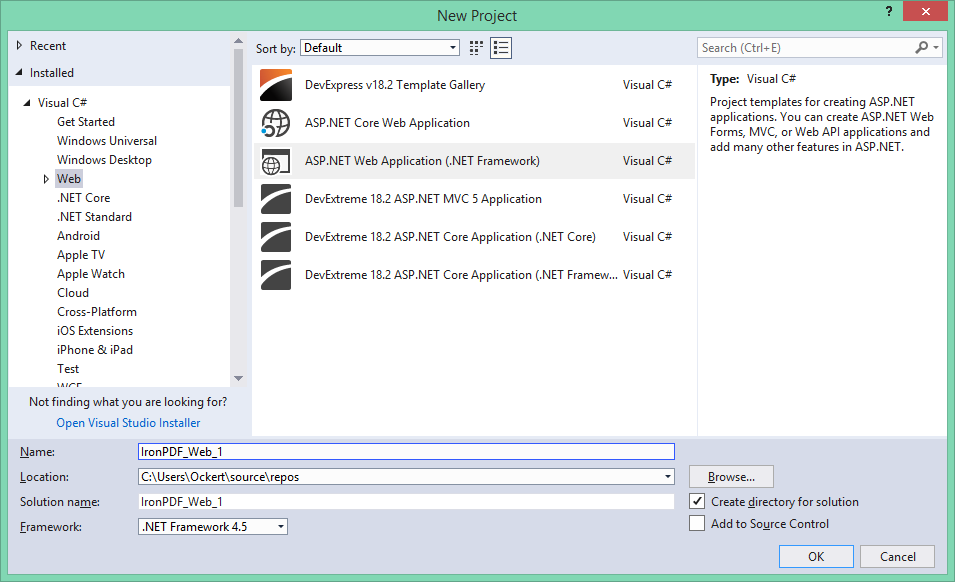 ASP.NET 웹 애플리케이션을 생성하기 위한 Visual Studio의 새로운 프로젝트 대화 상자 - PDF 생성 프로젝트의 기초
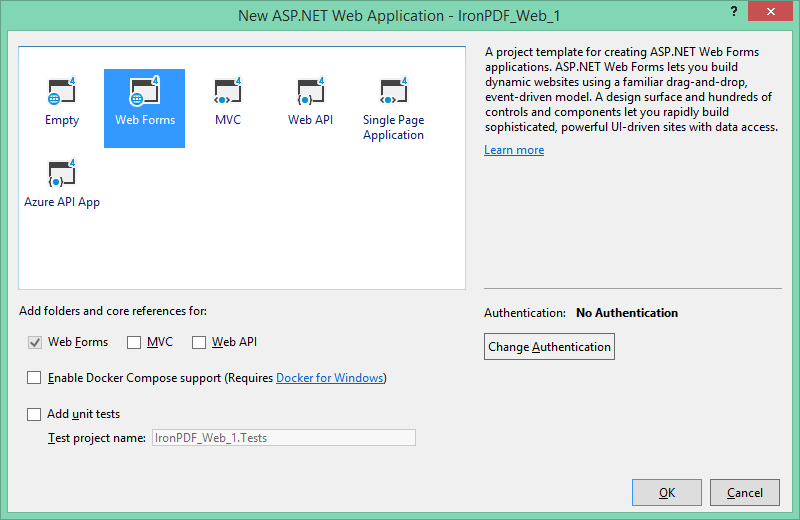 ChromePdfRenderer 및 GemBox.Pdf 구현에 적합한 프로젝트 템플릿으로 웹 폼을 선택
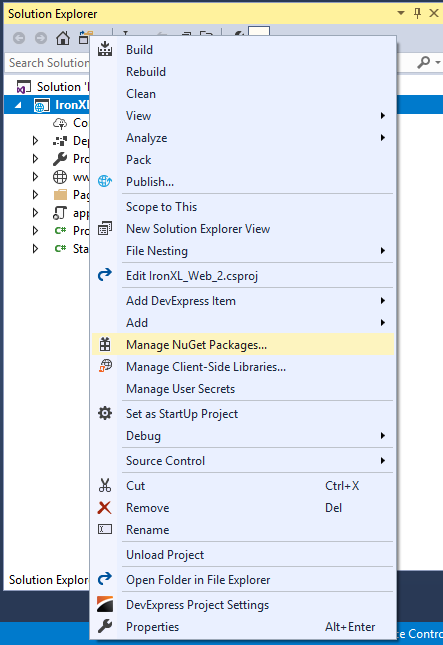 해당 프로젝트에서 오른쪽 클릭하여 라이브러리 설치를 위해 NuGet 패키지 관리자에 액세스
 Visual Studio에서 프로젝트 메뉴를 통해 NuGet 패키지 관리자에 대한 대체 액세스
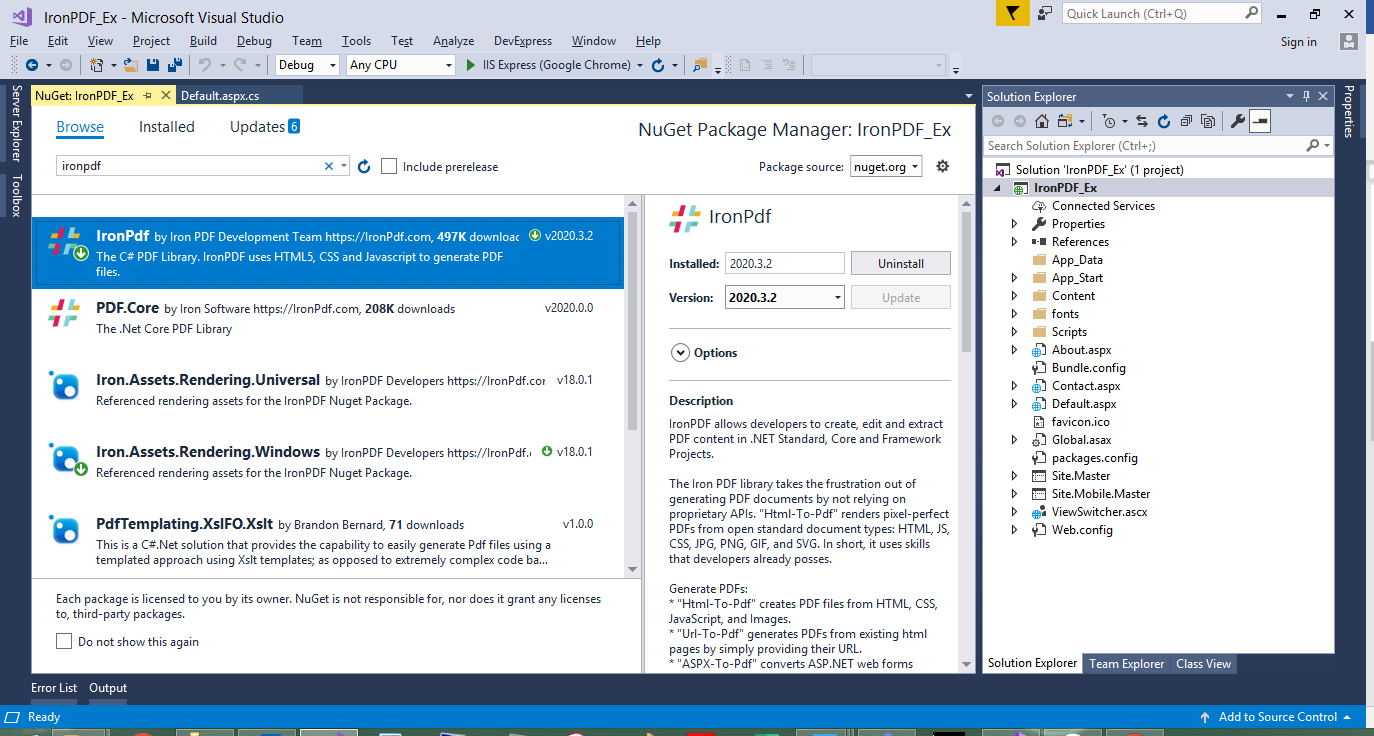 NuGet 패키지 관리자를 통한 ChromePdfRenderer 설치 - 종합 기능 설명 및 다운로드 수를 주목하세요
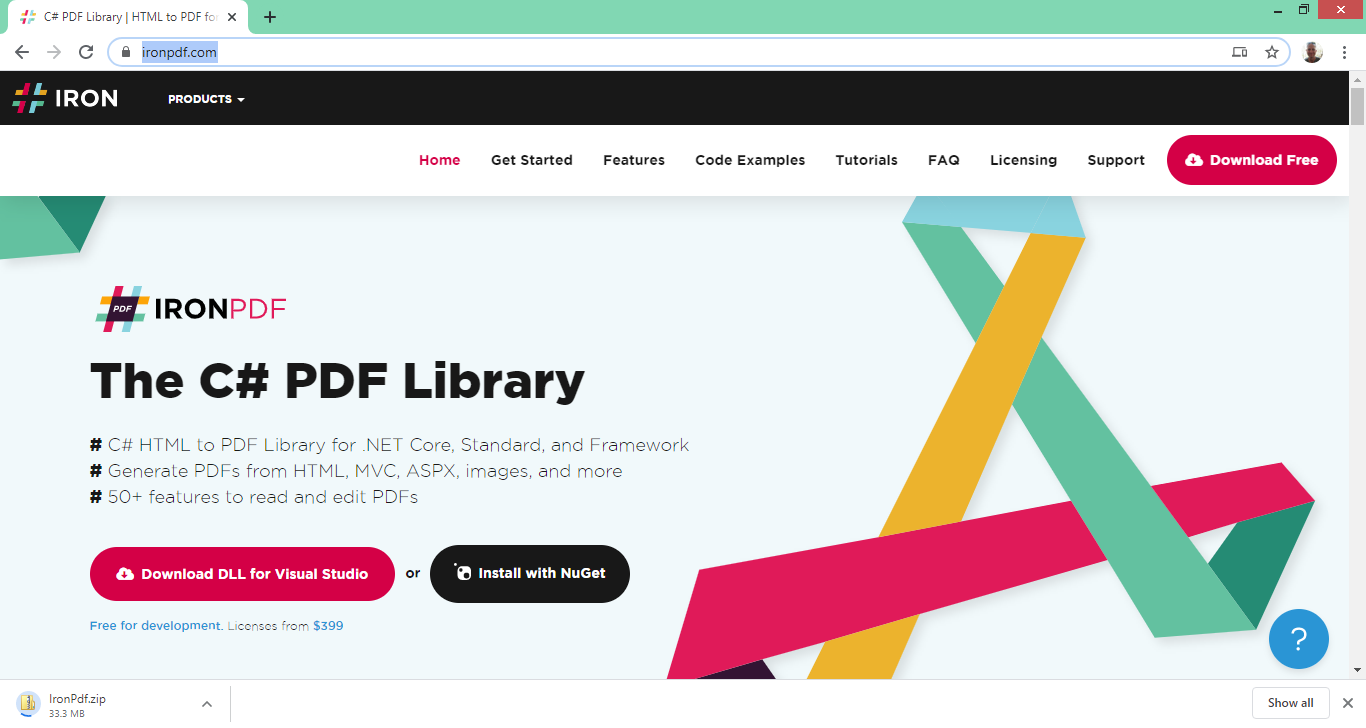 ChromePdfRenderer 웹사이트는 NuGet 설치가 적합하지 않은 시나리오에 대해 직접 DLL 다운로드를 제공합니다







