using GemBox.Pdf;
using GemBox.Pdf.Content;
using GemBox.Pdf.Forms;
using GemBox.Pdf.Security;

// Set license (use FREE-LIMITED-KEY for evaluation)
ComponentInfo.SetLicense("FREE-LIMITED-KEY");

// Create a new PDF document from scratch
using (var document = new PdfDocument())
{
    // Add a page with custom size
    var page = document.Pages.Add();

    // Create formatted text with multiple styles
    using (var formattedText = new PdfFormattedText())
    {
        formattedText.FontSize = 24;
        formattedText.FontFamily = new PdfFontFamily("Arial");
        formattedText.Color = PdfColor.FromRgb(0.2, 0.2, 0.6);
        formattedText.AppendLine("GemBox.Pdf Document Example");

        formattedText.FontSize = 12;
        formattedText.Color = PdfColor.FromRgb(0, 0, 0);
        formattedText.AppendLine("This document demonstrates PDF creation and manipulation features.");

        // Draw text to the page
        page.Content.DrawText(formattedText, new PdfPoint(50, 700));
    }

    // Add a form to the document
    var form = document.Form;

    // Create text field
    var textField = form.Fields.AddText(page, 50, 600, 200, 30);
    textField.Name = "CustomerName";
    textField.Value = "Enter your name";
    textField.Format.Fill.Color = PdfColor.FromRgb(0.95, 0.95, 0.95);

    // Create checkbox
    var checkBox = form.Fields.AddCheck(page, 50, 550, 20, 20);
    checkBox.Name = "Agreement";
    checkBox.Checked = false;

    // Add descriptive text next to checkbox
    using (var checkboxLabel = new PdfFormattedText())
    {
        checkboxLabel.Append("I agree to the terms and conditions");
        page.Content.DrawText(checkboxLabel, new PdfPoint(80, 555));
    }

    // Create submit button
    var submitButton = form.Fields.AddButton(page, 50, 500, 100, 30);
    submitButton.Name = "Submit";
    submitButton.Actions.Activate = PdfActionType.Named;

    // Add button appearance
    using (var buttonText = new PdfFormattedText())
    {
        buttonText.Append("Submit Form");
        buttonText.FontSize = 14;
        buttonText.Color = PdfColor.FromRgb(1, 1, 1);

        // Create button appearance stream
        var appearance = submitButton.Appearance.Normal;
        appearance.Fill.Color = PdfColor.FromRgb(0.2, 0.4, 0.8);
        appearance.Stroke.Color = PdfColor.FromRgb(0.1, 0.2, 0.4);
        appearance.Stroke.Width = 1;

        // Draw button background
        appearance.DrawRectangle(new PdfPoint(0, 0), new PdfSize(100, 30), true, true);

        // Draw button text
        appearance.DrawText(buttonText, new PdfPoint(20, 10));
    }

    // Add a table using low-level graphics
    var tableTop = 400;
    var tableLeft = 50;
    var cellWidth = 150;
    var cellHeight = 30;

    // Draw table headers
    page.Content.DrawRectangle(new PdfPoint(tableLeft, tableTop),
        new PdfSize(cellWidth * 3, cellHeight), true, true);

    using (var headerText = new PdfFormattedText())
    {
        headerText.FontSize = 12;
        headerText.Color = PdfColor.FromRgb(1, 1, 1);
        headerText.Append("Product");
        page.Content.DrawText(headerText, new PdfPoint(tableLeft + 10, tableTop + 10));

        headerText.Clear();
        headerText.Append("Quantity");
        page.Content.DrawText(headerText, new PdfPoint(tableLeft + cellWidth + 10, tableTop + 10));

        headerText.Clear();
        headerText.Append("Price");
        page.Content.DrawText(headerText, new PdfPoint(tableLeft + cellWidth * 2 + 10, tableTop + 10));
    }

    // Draw table data rows
    var rowData = new[]
    {
        new { Product = "PDF Library", Quantity = "1", Price = "$890" },
        new { Product = "Support Plan", Quantity = "1", Price = "$299" },
        new { Product = "Training", Quantity = "2", Price = "$500" }
    };

    var currentY = tableTop - cellHeight;
    foreach (var row in rowData)
    {
        // Draw cell borders
        page.Content.DrawRectangle(new PdfPoint(tableLeft, currentY),
            new PdfSize(cellWidth, cellHeight), false, true);
        page.Content.DrawRectangle(new PdfPoint(tableLeft + cellWidth, currentY),
            new PdfSize(cellWidth, cellHeight), false, true);
        page.Content.DrawRectangle(new PdfPoint(tableLeft + cellWidth * 2, currentY),
            new PdfSize(cellWidth, cellHeight), false, true);

        // Draw cell content
        using (var cellText = new PdfFormattedText())
        {
            cellText.FontSize = 11;
            cellText.Append(row.Product);
            page.Content.DrawText(cellText, new PdfPoint(tableLeft + 10, currentY + 10));

            cellText.Clear();
            cellText.Append(row.Quantity);
            page.Content.DrawText(cellText, new PdfPoint(tableLeft + cellWidth + 10, currentY + 10));

            cellText.Clear();
            cellText.Append(row.Price);
            page.Content.DrawText(cellText, new PdfPoint(tableLeft + cellWidth * 2 + 10, currentY + 10));
        }

        currentY -= cellHeight;
    }

    // Apply security settings
    var securitySettings = document.SecuritySettings;
    securitySettings.DocumentOpenPassword = "user123";
    securitySettings.PermissionsPassword = "owner123";
    securitySettings.Permissions = PdfPermissions.AllowPrint | PdfPermissions.AllowFormFill;

    // Save the document
    document.Save("gembox-example.pdf");
}

// Example: Manipulating existing PDF
using (var existingDoc = PdfDocument.Load("existing-document.pdf"))
{
    // Extract text from first page
    var page = existingDoc.Pages[0];
    var text = page.Content.GetText();
    Console.WriteLine($"Extracted text: {text}");

    // Add watermark to all pages
    foreach (var p in existingDoc.Pages)
    {
        using (var watermark = new PdfFormattedText())
        {
            watermark.Append("CONFIDENTIAL");
            watermark.FontSize = 50;
            watermark.Color = PdfColor.FromRgb(0.5, 0.5, 0.5);
            watermark.Opacity = 0.3;

            // Calculate center position
            var pageWidth = p.MediaBox.Width;
            var pageHeight = p.MediaBox.Height;
            var textWidth = watermark.Width;
            var textHeight = watermark.Height;

            var x = (pageWidth - textWidth) / 2;
            var y = (pageHeight - textHeight) / 2;

            // Draw watermark diagonally
            p.Content.SaveGraphicsState();
            p.Content.SetTransform(1, 0, 0, 1, x, y);
            p.Content.SetTransform(0.7071, 0.7071, -0.7071, 0.7071, 0, 0);
            p.Content.DrawText(watermark, new PdfPoint(0, 0));
            p.Content.RestoreGraphicsState();
        }
    }

    existingDoc.Save("watermarked-document.pdf");
}
using GemBox.Pdf;
using GemBox.Pdf.Content;
using GemBox.Pdf.Forms;
using GemBox.Pdf.Security;

// Set license (use FREE-LIMITED-KEY for evaluation)
ComponentInfo.SetLicense("FREE-LIMITED-KEY");

// Create a new PDF document from scratch
using (var document = new PdfDocument())
{
    // Add a page with custom size
    var page = document.Pages.Add();

    // Create formatted text with multiple styles
    using (var formattedText = new PdfFormattedText())
    {
        formattedText.FontSize = 24;
        formattedText.FontFamily = new PdfFontFamily("Arial");
        formattedText.Color = PdfColor.FromRgb(0.2, 0.2, 0.6);
        formattedText.AppendLine("GemBox.Pdf Document Example");

        formattedText.FontSize = 12;
        formattedText.Color = PdfColor.FromRgb(0, 0, 0);
        formattedText.AppendLine("This document demonstrates PDF creation and manipulation features.");

        // Draw text to the page
        page.Content.DrawText(formattedText, new PdfPoint(50, 700));
    }

    // Add a form to the document
    var form = document.Form;

    // Create text field
    var textField = form.Fields.AddText(page, 50, 600, 200, 30);
    textField.Name = "CustomerName";
    textField.Value = "Enter your name";
    textField.Format.Fill.Color = PdfColor.FromRgb(0.95, 0.95, 0.95);

    // Create checkbox
    var checkBox = form.Fields.AddCheck(page, 50, 550, 20, 20);
    checkBox.Name = "Agreement";
    checkBox.Checked = false;

    // Add descriptive text next to checkbox
    using (var checkboxLabel = new PdfFormattedText())
    {
        checkboxLabel.Append("I agree to the terms and conditions");
        page.Content.DrawText(checkboxLabel, new PdfPoint(80, 555));
    }

    // Create submit button
    var submitButton = form.Fields.AddButton(page, 50, 500, 100, 30);
    submitButton.Name = "Submit";
    submitButton.Actions.Activate = PdfActionType.Named;

    // Add button appearance
    using (var buttonText = new PdfFormattedText())
    {
        buttonText.Append("Submit Form");
        buttonText.FontSize = 14;
        buttonText.Color = PdfColor.FromRgb(1, 1, 1);

        // Create button appearance stream
        var appearance = submitButton.Appearance.Normal;
        appearance.Fill.Color = PdfColor.FromRgb(0.2, 0.4, 0.8);
        appearance.Stroke.Color = PdfColor.FromRgb(0.1, 0.2, 0.4);
        appearance.Stroke.Width = 1;

        // Draw button background
        appearance.DrawRectangle(new PdfPoint(0, 0), new PdfSize(100, 30), true, true);

        // Draw button text
        appearance.DrawText(buttonText, new PdfPoint(20, 10));
    }

    // Add a table using low-level graphics
    var tableTop = 400;
    var tableLeft = 50;
    var cellWidth = 150;
    var cellHeight = 30;

    // Draw table headers
    page.Content.DrawRectangle(new PdfPoint(tableLeft, tableTop),
        new PdfSize(cellWidth * 3, cellHeight), true, true);

    using (var headerText = new PdfFormattedText())
    {
        headerText.FontSize = 12;
        headerText.Color = PdfColor.FromRgb(1, 1, 1);
        headerText.Append("Product");
        page.Content.DrawText(headerText, new PdfPoint(tableLeft + 10, tableTop + 10));

        headerText.Clear();
        headerText.Append("Quantity");
        page.Content.DrawText(headerText, new PdfPoint(tableLeft + cellWidth + 10, tableTop + 10));

        headerText.Clear();
        headerText.Append("Price");
        page.Content.DrawText(headerText, new PdfPoint(tableLeft + cellWidth * 2 + 10, tableTop + 10));
    }

    // Draw table data rows
    var rowData = new[]
    {
        new { Product = "PDF Library", Quantity = "1", Price = "$890" },
        new { Product = "Support Plan", Quantity = "1", Price = "$299" },
        new { Product = "Training", Quantity = "2", Price = "$500" }
    };

    var currentY = tableTop - cellHeight;
    foreach (var row in rowData)
    {
        // Draw cell borders
        page.Content.DrawRectangle(new PdfPoint(tableLeft, currentY),
            new PdfSize(cellWidth, cellHeight), false, true);
        page.Content.DrawRectangle(new PdfPoint(tableLeft + cellWidth, currentY),
            new PdfSize(cellWidth, cellHeight), false, true);
        page.Content.DrawRectangle(new PdfPoint(tableLeft + cellWidth * 2, currentY),
            new PdfSize(cellWidth, cellHeight), false, true);

        // Draw cell content
        using (var cellText = new PdfFormattedText())
        {
            cellText.FontSize = 11;
            cellText.Append(row.Product);
            page.Content.DrawText(cellText, new PdfPoint(tableLeft + 10, currentY + 10));

            cellText.Clear();
            cellText.Append(row.Quantity);
            page.Content.DrawText(cellText, new PdfPoint(tableLeft + cellWidth + 10, currentY + 10));

            cellText.Clear();
            cellText.Append(row.Price);
            page.Content.DrawText(cellText, new PdfPoint(tableLeft + cellWidth * 2 + 10, currentY + 10));
        }

        currentY -= cellHeight;
    }

    // Apply security settings
    var securitySettings = document.SecuritySettings;
    securitySettings.DocumentOpenPassword = "user123";
    securitySettings.PermissionsPassword = "owner123";
    securitySettings.Permissions = PdfPermissions.AllowPrint | PdfPermissions.AllowFormFill;

    // Save the document
    document.Save("gembox-example.pdf");
}

// Example: Manipulating existing PDF
using (var existingDoc = PdfDocument.Load("existing-document.pdf"))
{
    // Extract text from first page
    var page = existingDoc.Pages[0];
    var text = page.Content.GetText();
    Console.WriteLine($"Extracted text: {text}");

    // Add watermark to all pages
    foreach (var p in existingDoc.Pages)
    {
        using (var watermark = new PdfFormattedText())
        {
            watermark.Append("CONFIDENTIAL");
            watermark.FontSize = 50;
            watermark.Color = PdfColor.FromRgb(0.5, 0.5, 0.5);
            watermark.Opacity = 0.3;

            // Calculate center position
            var pageWidth = p.MediaBox.Width;
            var pageHeight = p.MediaBox.Height;
            var textWidth = watermark.Width;
            var textHeight = watermark.Height;

            var x = (pageWidth - textWidth) / 2;
            var y = (pageHeight - textHeight) / 2;

            // Draw watermark diagonally
            p.Content.SaveGraphicsState();
            p.Content.SetTransform(1, 0, 0, 1, x, y);
            p.Content.SetTransform(0.7071, 0.7071, -0.7071, 0.7071, 0, 0);
            p.Content.DrawText(watermark, new PdfPoint(0, 0));
            p.Content.RestoreGraphicsState();
        }
    }

    existingDoc.Save("watermarked-document.pdf");
}
Imports GemBox.Pdf
Imports GemBox.Pdf.Content
Imports GemBox.Pdf.Forms
Imports GemBox.Pdf.Security
' Set license (use FREE-LIMITED-KEY for evaluation)
ComponentInfo.SetLicense("FREE-LIMITED-KEY")
' Create a new PDF document from scratch
Using document As New PdfDocument()
' Add a page with custom size
Dim page = document.Pages.Add()
' Create formatted text with multiple styles
Using formattedText As New PdfFormattedText()
formattedText.FontSize = 24
formattedText.FontFamily = New PdfFontFamily("Arial")
formattedText.Color = PdfColor.FromRgb(0.2, 0.2, 0.6)
formattedText.AppendLine("GemBox.Pdf Document Example")
formattedText.FontSize = 12
formattedText.Color = PdfColor.FromRgb(0, 0, 0)
formattedText.AppendLine("This document demonstrates PDF creation and manipulation features.")
' Draw text to the page
page.Content.DrawText(formattedText, New PdfPoint(50, 700))
End Using
' Add a form to the document
Dim form = document.Form
' Create text field
Dim textField = form.Fields.AddText(page, 50, 600, 200, 30)
textField.Name = "CustomerName"
textField.Value = "Enter your name"
textField.Format.Fill.Color = PdfColor.FromRgb(0.95, 0.95, 0.95)
' Create checkbox
Dim checkBox = form.Fields.AddCheck(page, 50, 550, 20, 20)
checkBox.Name = "Agreement"
checkBox.Checked = False
' Add descriptive text next to checkbox
Using checkboxLabel As New PdfFormattedText()
checkboxLabel.Append("I agree to the terms and conditions")
page.Content.DrawText(checkboxLabel, New PdfPoint(80, 555))
End Using
' Create submit button
Dim submitButton = form.Fields.AddButton(page, 50, 500, 100, 30)
submitButton.Name = "Submit"
submitButton.Actions.Activate = PdfActionType.Named
' Add button appearance
Using buttonText As New PdfFormattedText()
buttonText.Append("Submit Form")
buttonText.FontSize = 14
buttonText.Color = PdfColor.FromRgb(1, 1, 1)
' Create button appearance stream
Dim appearance = submitButton.Appearance.Normal
appearance.Fill.Color = PdfColor.FromRgb(0.2, 0.4, 0.8)
appearance.Stroke.Color = PdfColor.FromRgb(0.1, 0.2, 0.4)
appearance.Stroke.Width = 1
' Draw button background
appearance.DrawRectangle(New PdfPoint(0, 0), New PdfSize(100, 30), True, True)
' Draw button text
appearance.DrawText(buttonText, New PdfPoint(20, 10))
End Using
' Add a table using low-level graphics
Dim tableTop = 400
Dim tableLeft = 50
Dim cellWidth = 150
Dim cellHeight = 30
' Draw table headers
page.Content.DrawRectangle(New PdfPoint(tableLeft, tableTop),
New PdfSize(cellWidth * 3, cellHeight), True, True)
Using headerText As New PdfFormattedText()
headerText.FontSize = 12
headerText.Color = PdfColor.FromRgb(1, 1, 1)
headerText.Append("Product")
page.Content.DrawText(headerText, New PdfPoint(tableLeft + 10, tableTop + 10))
headerText.Clear()
headerText.Append("Quantity")
page.Content.DrawText(headerText, New PdfPoint(tableLeft + cellWidth + 10, tableTop + 10))
headerText.Clear()
headerText.Append("Price")
page.Content.DrawText(headerText, New PdfPoint(tableLeft + cellWidth * 2 + 10, tableTop + 10))
End Using
' Draw table data rows
Dim rowData = {
New With {.Product = "PDF Library", .Quantity = "1", .Price = "$890"},
New With {.Product = "Support Plan", .Quantity = "1", .Price = "$299"},
New With {.Product = "Training", .Quantity = "2", .Price = "$500"}
}
Dim currentY = tableTop - cellHeight
For Each row In rowData
' Draw cell borders
page.Content.DrawRectangle(New PdfPoint(tableLeft, currentY),
New PdfSize(cellWidth, cellHeight), False, True)
page.Content.DrawRectangle(New PdfPoint(tableLeft + cellWidth, currentY),
New PdfSize(cellWidth, cellHeight), False, True)
page.Content.DrawRectangle(New PdfPoint(tableLeft + cellWidth * 2, currentY),
New PdfSize(cellWidth, cellHeight), False, True)
' Draw cell content
Using cellText As New PdfFormattedText()
cellText.FontSize = 11
cellText.Append(row.Product)
page.Content.DrawText(cellText, New PdfPoint(tableLeft + 10, currentY + 10))
cellText.Clear()
cellText.Append(row.Quantity)
page.Content.DrawText(cellText, New PdfPoint(tableLeft + cellWidth + 10, currentY + 10))
cellText.Clear()
cellText.Append(row.Price)
page.Content.DrawText(cellText, New PdfPoint(tableLeft + cellWidth * 2 + 10, currentY + 10))
End Using
currentY -= cellHeight
Next
' Apply security settings
Dim securitySettings = document.SecuritySettings
securitySettings.DocumentOpenPassword = "user123"
securitySettings.PermissionsPassword = "owner123"
securitySettings.Permissions = PdfPermissions.AllowPrint Or PdfPermissions.AllowFormFill
' Save the document
document.Save("gembox-example.pdf")
End Using
' Example: Manipulating existing PDF
Using existingDoc = PdfDocument.Load("existing-document.pdf")
' Extract text from first page
Dim page = existingDoc.Pages(0)
Dim text = page.Content.GetText()
Console.WriteLine($"Extracted text: {text}")
' Add watermark to all pages
For Each p In existingDoc.Pages
Using watermark As New PdfFormattedText()
watermark.Append("CONFIDENTIAL")
watermark.FontSize = 50
watermark.Color = PdfColor.FromRgb(0.5, 0.5, 0.5)
watermark.Opacity = 0.3
' Calculate center position
Dim pageWidth = p.MediaBox.Width
Dim pageHeight = p.MediaBox.Height
Dim textWidth = watermark.Width
Dim textHeight = watermark.Height
Dim x = (pageWidth - textWidth) / 2
Dim y = (pageHeight - textHeight) / 2
' Draw watermark diagonally
p.Content.SaveGraphicsState()
p.Content.SetTransform(1, 0, 0, 1, x, y)
p.Content.SetTransform(0.7071, 0.7071, -0.7071, 0.7071, 0, 0)
p.Content.DrawText(watermark, New PdfPoint(0, 0))
p.Content.RestoreGraphicsState()
End Using
Next
existingDoc.Save("watermarked-document.pdf")
End Using
Imports GemBox.Pdf
Imports GemBox.Pdf.Content
Imports GemBox.Pdf.Forms
Imports GemBox.Pdf.Security

' Set license (use FREE-LIMITED-KEY for evaluation)
ComponentInfo.SetLicense("FREE-LIMITED-KEY")

' Create a new PDF document from scratch
Using document As New PdfDocument()
    ' Add a page with custom size
    Dim page = document.Pages.Add()

    ' Create formatted text with multiple styles
    Using formattedText As New PdfFormattedText()
        formattedText.FontSize = 24
        formattedText.FontFamily = New PdfFontFamily("Arial")
        formattedText.Color = PdfColor.FromRgb(0.2, 0.2, 0.6)
        formattedText.AppendLine("GemBox.Pdf Document Example")

        formattedText.FontSize = 12
        formattedText.Color = PdfColor.FromRgb(0, 0, 0)
        formattedText.AppendLine("This document demonstrates PDF creation and manipulation features.")

        ' Draw text to the page
        page.Content.DrawText(formattedText, New PdfPoint(50, 700))
    End Using

    ' Add a form to the document
    Dim form = document.Form

    ' Create text field
    Dim textField = form.Fields.AddText(page, 50, 600, 200, 30)
    textField.Name = "CustomerName"
    textField.Value = "Enter your name"
    textField.Format.Fill.Color = PdfColor.FromRgb(0.95, 0.95, 0.95)

    ' Create checkbox
    Dim checkBox = form.Fields.AddCheck(page, 50, 550, 20, 20)
    checkBox.Name = "Agreement"
    checkBox.Checked = False

    ' Add descriptive text next to checkbox
    Using checkboxLabel As New PdfFormattedText()
        checkboxLabel.Append("I agree to the terms and conditions")
        page.Content.DrawText(checkboxLabel, New PdfPoint(80, 555))
    End Using

    ' Create submit button
    Dim submitButton = form.Fields.AddButton(page, 50, 500, 100, 30)
    submitButton.Name = "Submit"
    submitButton.Actions.Activate = PdfActionType.Named

    ' Add button appearance
    Using buttonText As New PdfFormattedText()
        buttonText.Append("Submit Form")
        buttonText.FontSize = 14
        buttonText.Color = PdfColor.FromRgb(1, 1, 1)

        ' Create button appearance stream
        Dim appearance = submitButton.Appearance.Normal
        appearance.Fill.Color = PdfColor.FromRgb(0.2, 0.4, 0.8)
        appearance.Stroke.Color = PdfColor.FromRgb(0.1, 0.2, 0.4)
        appearance.Stroke.Width = 1

        ' Draw button background
        appearance.DrawRectangle(New PdfPoint(0, 0), New PdfSize(100, 30), True, True)

        ' Draw button text
        appearance.DrawText(buttonText, New PdfPoint(20, 10))
    End Using

    ' Add a table using low-level graphics
    Dim tableTop = 400
    Dim tableLeft = 50
    Dim cellWidth = 150
    Dim cellHeight = 30

    ' Draw table headers
    page.Content.DrawRectangle(New PdfPoint(tableLeft, tableTop),
        New PdfSize(cellWidth * 3, cellHeight), True, True)

    Using headerText As New PdfFormattedText()
        headerText.FontSize = 12
        headerText.Color = PdfColor.FromRgb(1, 1, 1)
        headerText.Append("Product")
        page.Content.DrawText(headerText, New PdfPoint(tableLeft + 10, tableTop + 10))

        headerText.Clear()
        headerText.Append("Quantity")
        page.Content.DrawText(headerText, New PdfPoint(tableLeft + cellWidth + 10, tableTop + 10))

        headerText.Clear()
        headerText.Append("Price")
        page.Content.DrawText(headerText, New PdfPoint(tableLeft + cellWidth * 2 + 10, tableTop + 10))
    End Using

    ' Draw table data rows
    Dim rowData = {
        New With {.Product = "PDF Library", .Quantity = "1", .Price = "$890"},
        New With {.Product = "Support Plan", .Quantity = "1", .Price = "$299"},
        New With {.Product = "Training", .Quantity = "2", .Price = "$500"}
    }

    Dim currentY = tableTop - cellHeight
    For Each row In rowData
        ' Draw cell borders
        page.Content.DrawRectangle(New PdfPoint(tableLeft, currentY),
            New PdfSize(cellWidth, cellHeight), False, True)
        page.Content.DrawRectangle(New PdfPoint(tableLeft + cellWidth, currentY),
            New PdfSize(cellWidth, cellHeight), False, True)
        page.Content.DrawRectangle(New PdfPoint(tableLeft + cellWidth * 2, currentY),
            New PdfSize(cellWidth, cellHeight), False, True)

        ' Draw cell content
        Using cellText As New PdfFormattedText()
            cellText.FontSize = 11
            cellText.Append(row.Product)
            page.Content.DrawText(cellText, New PdfPoint(tableLeft + 10, currentY + 10))

            cellText.Clear()
            cellText.Append(row.Quantity)
            page.Content.DrawText(cellText, New PdfPoint(tableLeft + cellWidth + 10, currentY + 10))

            cellText.Clear()
            cellText.Append(row.Price)
            page.Content.DrawText(cellText, New PdfPoint(tableLeft + cellWidth * 2 + 10, currentY + 10))
        End Using

        currentY -= cellHeight
    Next

    ' Apply security settings
    Dim securitySettings = document.SecuritySettings
    securitySettings.DocumentOpenPassword = "user123"
    securitySettings.PermissionsPassword = "owner123"
    securitySettings.Permissions = PdfPermissions.AllowPrint Or PdfPermissions.AllowFormFill

    ' Save the document
    document.Save("gembox-example.pdf")
End Using

' Example: Manipulating existing PDF
Using existingDoc = PdfDocument.Load("existing-document.pdf")
    ' Extract text from first page
    Dim page = existingDoc.Pages(0)
    Dim text = page.Content.GetText()
    Console.WriteLine($"Extracted text: {text}")

    ' Add watermark to all pages
    For Each p In existingDoc.Pages
        Using watermark As New PdfFormattedText()
            watermark.Append("CONFIDENTIAL")
            watermark.FontSize = 50
            watermark.Color = PdfColor.FromRgb(0.5, 0.5, 0.5)
            watermark.Opacity = 0.3

            ' Calculate center position
            Dim pageWidth = p.MediaBox.Width
            Dim pageHeight = p.MediaBox.Height
            Dim textWidth = watermark.Width
            Dim textHeight = watermark.Height

            Dim x = (pageWidth - textWidth) / 2
            Dim y = (pageHeight - textHeight) / 2

            ' Draw watermark diagonally
            p.Content.SaveGraphicsState()
            p.Content.SetTransform(1, 0, 0, 1, x, y)
            p.Content.SetTransform(0.7071, 0.7071, -0.7071, 0.7071, 0, 0)
            p.Content.DrawText(watermark, New PdfPoint(0, 0))
            p.Content.RestoreGraphicsState()
        End Using
    Next

    existingDoc.Save("watermarked-document.pdf")
End Using





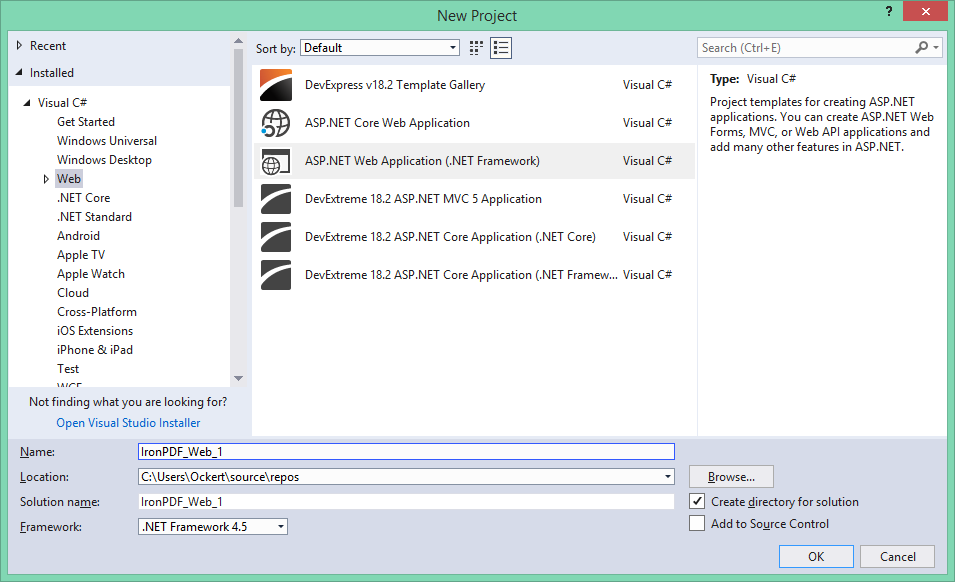 Visual Studio 创建ASP.NET Web应用程序的新项目对话框 - PDF生成项目的基础
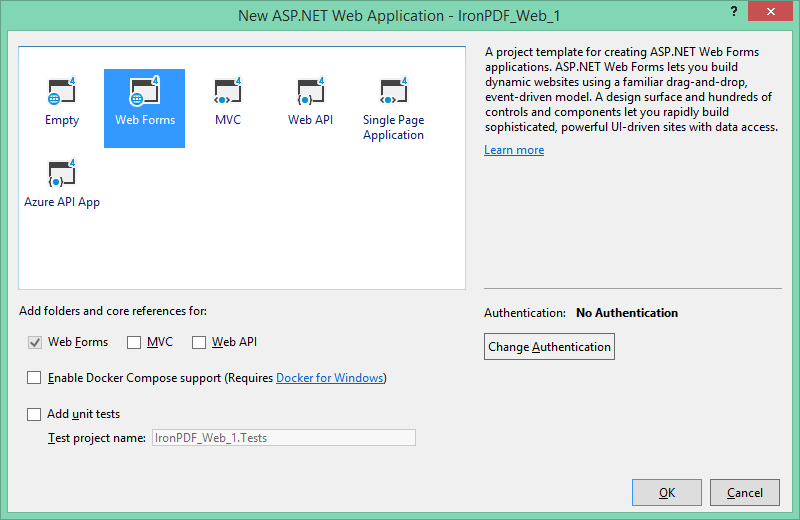 选择Web Forms作为项目模板 - 适用于IronPDF和GemBox.Pdf的实现
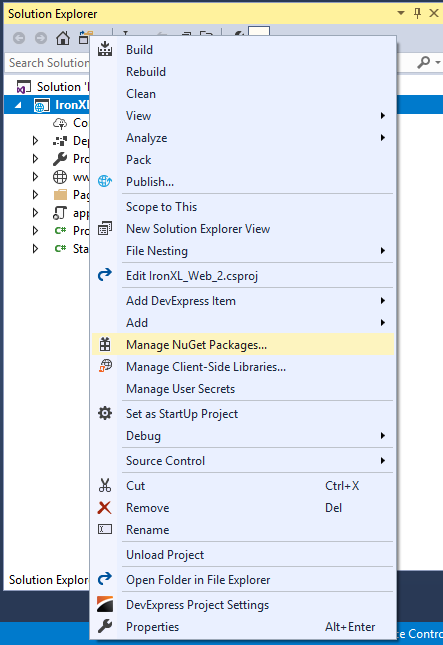 右键单击解决方案资源管理器中的项目以访问NuGet包管理器以进行库安装
 通过Visual Studio中的项目菜单访问NuGet包管理器的替代方法
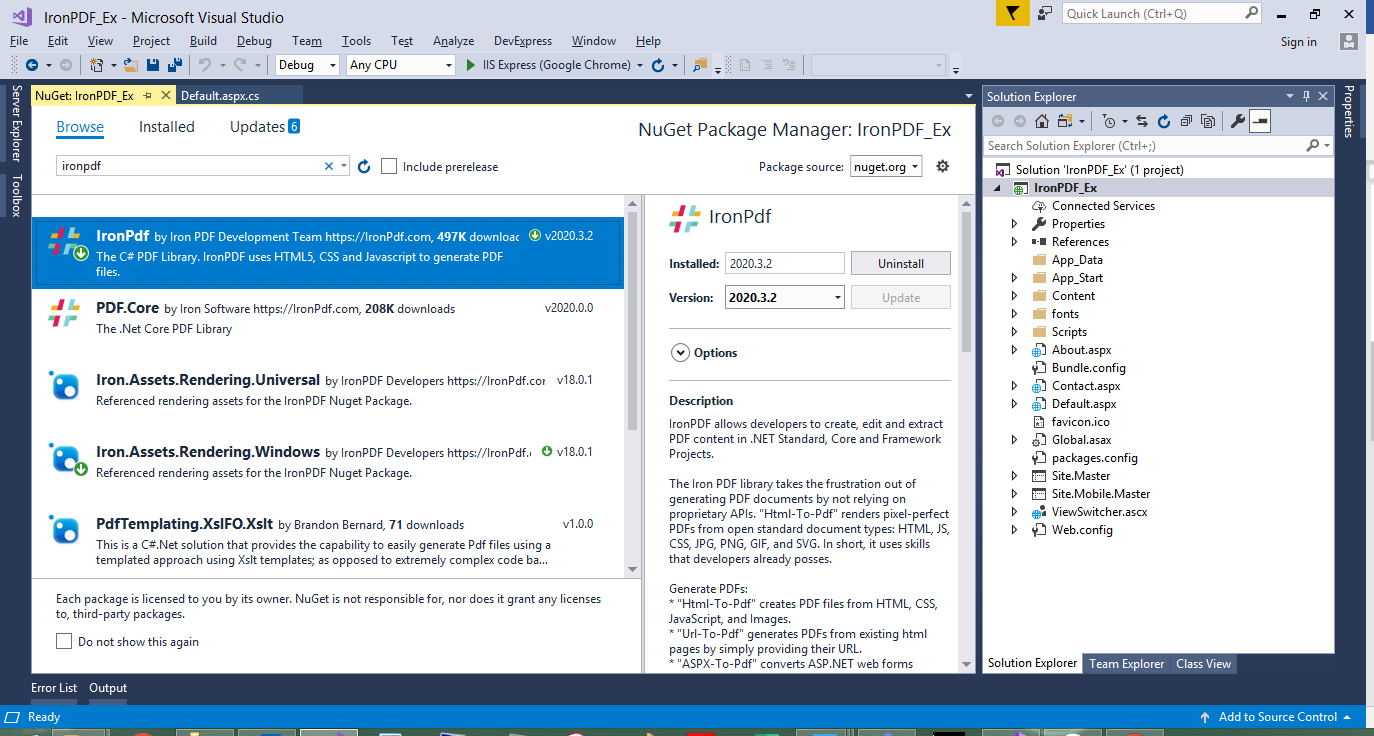 通过NuGet包管理器安装IronPDF - 注意到全面的功能描述和下载次数
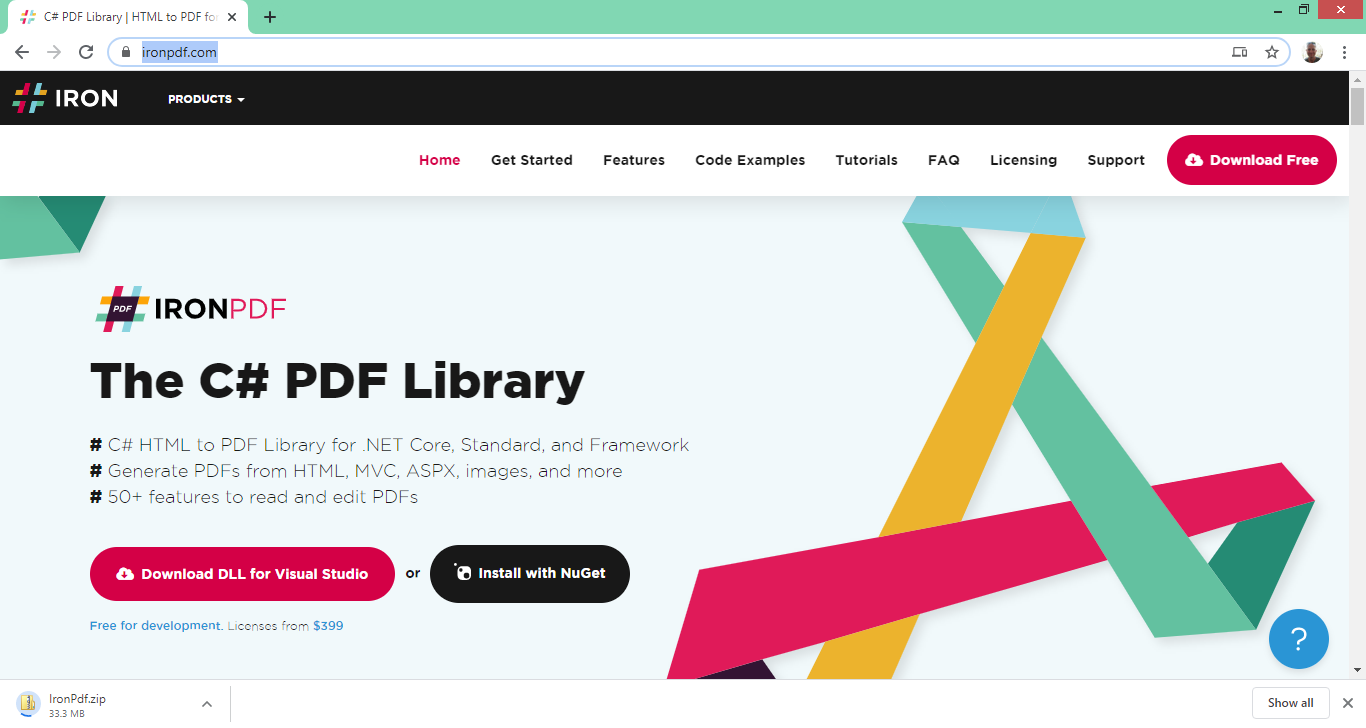 IronPDF的网站提供了直接DLL下载选项,用于不适合使用NuGet安装的情况

















