모든 문제를 시작하게 했던 C# PDF 라이브러리 문제
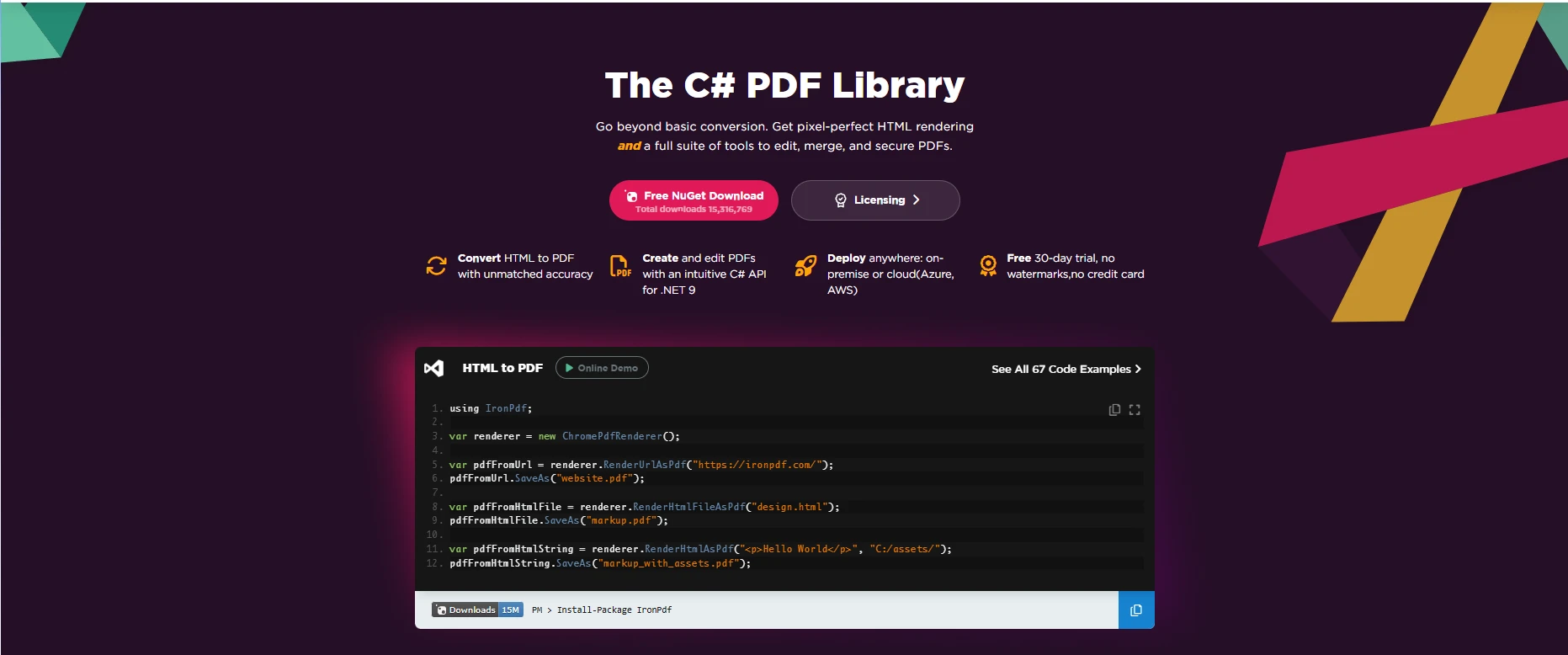
2016년에, Iron Software의 컨설팅 팀은 HTML에서 PDF 변환의 악몽에 시달리고 있었습니다. 우리는 Fortune 500 고객의 문서 생성을 현대화하기 위해 고용되었으며, 우리가 시도한 모든 라이브러리는 재앙을 일으킬 준비가 되어 있었습니다. 각 '솔루션'은 처음에는 유망해 보였지만, 실제 환경의 복잡성 - 동적 콘텐츠, CSS3 레이아웃, JavaScript가 많은 페이지 - 이 도입되었을 때 라이브러리는 조용히 실패하거나 대단하게 크래시했습니다.
최근 .NET 회의에서 Jeff Fritz는 이렇게 요약했습니다:
"> ".NET의 PDF 생성 풍경은 버려진 프로젝트와 미완성 솔루션의 무덤이었다고 말했다."
그는 과장을 하지 않았습니다. 우리는 거의 모든 시장에서의 라이브러리를 실제로 테스트했기 때문에 잘 알고 있습니다, 대부분 유지보수도 되지 않고, 반짝이는 기업 판매 데크와 함께 제공되는 라이브러리까지. 몇 달간의 시도와 실수, 좌절 끝에, 기존 솔루션은 단순히 현대 요구사항을 충족할 수 없다는 것이 명백히 드러났습니다.
IronPDF의 이야기는 여기서 시작됩니다 - 필요에서 비롯되었고, 우리가 시도한 모든 다른 것들의 실패에 의해 촉발되었습니다.
기존 솔루션이 실패한 이유(그리고 지금도)
솔직히 말하자면: 우리는 IronPDF를 만들었습니다. 왜냐하면 다른 모든 것이 망가졌고, 8년이 지난 지금도 대부분이 그렇기 때문입니다. 실패는 항상 기술적인 것만은 아니었습니다; 법적인, 건축적인 그리고 때로는 단순히 순전한 광기였습니다.
우리의 컨설팅 작업에서 실제로 사용된 코드와 함께 '솔루션'들이 우리가 더 나은 것을 구축하게 한 이유를 설명합니다.
엄청난 C# PDF 라이브러리 완급변경
전체 응용 프로그램을 기반으로 구축한 후 라이선스를 변경한 라이브러리로 시작해 봅시다:
iText – 실은 아닌 '무료' 라이브러리
2009년, iText는 무료 오픈 소스 PDF 라이브러리로 홍보되었습니다. 당시 LGPL 라이선스 하에 배포되어 개발자들에게 합리적인 선택처럼 보였습니다. 그러나 2012년까지 라이선스 조건이 AGPL로 변경되었습니다. AGPL 하에서는 개발자들이 애플리케이션 전체를 오픈 소스로 공개하거나 상용 라이센스를 구매하는 어려운 선택에 직면하게 되었습니다.
2025년이 되면 상용 iText 라이선스는 수 천 달러의 비용이 들 수 있으며, 종종 서버당 약 $2,500입니다. 이것은 많은 개발자들이 "AGPL 덫"이라고 부르는 것을 만듭니다: iText를 사용하고 모든 소스 코드를 공개하거나 상당한 라이선스 비용을 지불하십시오.
라이선스 문제 외에도, iText는 기본적으로 HTML을 PDF로 변환하는 기능을 제공하지 않습니다. 간단한 RenderHtml(html) 메서드는 존재하지 않습니다. 대신, 개발자는 별도의 pdfHTML 애드온(이것은 iText)을 사용해야 하며, 이는 자체적인 종속성과 추가적인 라이선스 복잡성을 가져옵니다. 기존의 XMLWorker 구성 요소는 iText의 일부였으며, 현재 iText 개발에는 관련이 없게 되었습니다.
이 제한적인 라이선스와 내장 HTML에서 PDF로의 지원이 없는 조합으로 인해 많은 팀이 현재 iText를 피하고 있습니다.
iText는 혼자가 아닙니다. QuestPDF는 또 다른 함정이었습니다: '최고의 C# PDF 라이브러리'로 온라인에서 적극 홍보되었지만, HTML에서 PDF로의 지원은 전혀 없습니다. 개발자들은 그것을 단순히 설계되지 않은 워크플로에 억지로 맞추려 하면서 며칠을 허비했습니다.
QuestPDF – 당신이 생각하는 일을 하지 않는 라이브러리
QuestPDF는 특히 Reddit 커뮤니티에서 C#의 최고의 PDF 라이브러리 중 하나로 종종 홍보됩니다. 그러나 명확히 드러나지 않는 중요한 제한 사항이 하나 있습니다: QuestPDF는 HTML에서 PDF로의 지원이 전혀 없습니다.
HTML을 렌더링하는 대신, QuestPDF는 개발자들이 플루언트 API를 사용하여 프로그래밍적으로 문서를 작성하도록 요구합니다. 예를 들어, 페이지, 컨테이너, 텍스트 블록을 C# 코드에서 직접 정의합니다. 특정 사용 사례에 있어서는 강력하지만, 이미 존재하는 HTML을 단순히 변환하기보다는 문서를 수동으로 배치하는 것처럼 느껴집니다.
라이선스 또한 또 다른 고려 사항입니다. 커뮤니티 라이선스는 개인, 오픈 소스 프로젝트, 연간 총 수익이 100만 달러 미만인 회사에 무료로 제공됩니다. 하지만 그 임계값을 초과하는 상업 조직은 유료 라이선스를 구매해야 합니다. 상업적인 가격은 $999(Professional, 최대 10명의 개발자)에서 시작하여 $2,999(Enterprise, 무제한 개발자)까지 올라가며, 이는 HTML에서 PDF 렌더링을 기본적으로 포함하지 않는 라이브러리에 대해 비싸게 느껴질 수 있습니다.
이러한 제한 때문에, QuestPDF는 .NET에서 간단하고 안정적인 HTML-to-PDF 변환을 찾는 개발자들에게 적합하지 않을 수 있습니다.
wkhtmltopdf 재앙 (2016-2023)
생산 환경에서 wkhtmltopdf를 사용하는 것은 악명 높게 고통스러웠습니다. 그것을 둘러싼 모든 래퍼는 동일한 답답한 패턴을 따르는 것 같았습니다:
- 신비로운 바이너리를 서버로 복사하십시오.
- 올바른 네이티브 종속성이 설치되어 있기를 기도하십시오.
- 프로덕션에서 예측 불가능하게 충돌하는 것을 지켜보십시오.
래퍼가 설치되어 있어도, 신뢰성은 보장과는 거리가 멀었습니다. 개발자들은 자주 다음과 같은 오류를 겪었습니다:
- "DLL 'wkhtmltox'를 로드할 수 없습니다."
- "주소 0x00000000에서 접근 위반"
- "응용 프로그램이 작동을 멈췄습니다"
- "Qt: OLE를 초기화할 수 없습니다 (오류 80010106)"
이러한 고장은 종종 수작업 개입을 필요로 했습니다. 일부 경우에는, 팀이 프로세스를 다시 실행시키기 위해 애플리케이션 풀을 재시작하는 방법에까지 의존했으며, 이는 불안정하고 지속 가능하지 않은 솔루션이었습니다.
이 불안정성과 어색한 배포 과정이 결합되어 wkhtmltopdf는 진지한 생산 워크로드에 위험한 선택이 되었습니다.
2023년 1월, wkhtmltopdf는 아카이브되고 방치되었습니다. 그 위에 구축된 모든 C# PDF 라이브러리는 즉각 기술적 부채가 되었습니다:
- TuesPechkin - 2015년 마지막 업데이트, 멀티 스레딩 주장들은 허구였습니다
- Rotativa - MVC 전용, 2025년에도 여전히 죽은 이진 파일을 배송
- DinkToPdf - 실제로는 .NET Core와 호환되지 않은 분기
- Haukcode.DinkToPdf - 죽은 변형의 또 다른 변형
- NReco.PdfGenerator - 포기된 소프트웨어를 감싸는 것에 $150 이상을 청구
- OpenHtmlToPdf - 그 이름은 다르다고 암시하지만, 실상은 그렇지 않음
wkhtmltopdf 래퍼를 사용하여 C#으로 HTML을 PDF로 변환하려는 개발자들은 끊임없이 파일 권한, 상대 URL, 바이너리 종속성을 관리해야 했습니다. 전체 웹 페이지의 PDF 문서를 생성하는 것은 불안정했고, HTML 요소 내부의 페이지 브레이크는 예측 불가능했습니다.
'그냥 Chrome을 사용하세요' 악몽
그런 다음 브라우저 자동화 집단이 등장했습니다. '그냥 Puppeteer를 사용하세요!'라고 그들이 말했습니다. PuppeteerSharp와 Playwright는 기술적으로 PDF를 생성할 수는 있지만, 실제 C# PDF 라이브러리는 아닙니다. 그들은 무거운 브라우저 바이너리, 복잡한 배포, 그리고 PDF/A 또는 PDF/UA와 같은 준수 기능의 부족을 요구합니다.
그것이 실제로 어떻게 보였나요:
// PuppeteerSharp - The "Simple" Solution That Wasn't
public class PuppeteerNightmare
{
    private Browser _browser;

    public async Task Initialize()
    {
        // Step 1: Download 300MB of Chrome
        await new BrowserFetcher().DownloadAsync();
        // Customer: "Why is your app 300MB?"
        // Us: "Uh... for PDFs?"

        // Step 2: Launch Chrome with magic arguments nobody understands
        _browser = await Puppeteer.LaunchAsync(new LaunchOptions
        {
            Headless = true,
            Args = new[]
            {
                "--no-sandbox",
                "--disable-setuid-sandbox",
                "--disable-dev-shm-usage",
                "--disable-gpu",
                "--no-first-run",
                "--no-zygote",
                "--single-process"
            }
        });
    }

    public async Task<byte[]> GeneratePdf(string html)
    {
        // This works great until:
        // 1. Chrome auto-updates and breaks your args
        // 2. You need to generate 100 PDFs simultaneously
        // 3. You deploy to Azure Functions (spoiler: it won't work)
        // 4. A memory leak eats 5GB of RAM

        var page = await _browser.NewPageAsync();
        await page.SetContentAsync(html);

        // Wait for... something? Nobody knows the right value
        await Task.Delay(1000);

        return await page.PdfDataAsync();
    }
}
// PuppeteerSharp - The "Simple" Solution That Wasn't
public class PuppeteerNightmare
{
    private Browser _browser;

    public async Task Initialize()
    {
        // Step 1: Download 300MB of Chrome
        await new BrowserFetcher().DownloadAsync();
        // Customer: "Why is your app 300MB?"
        // Us: "Uh... for PDFs?"

        // Step 2: Launch Chrome with magic arguments nobody understands
        _browser = await Puppeteer.LaunchAsync(new LaunchOptions
        {
            Headless = true,
            Args = new[]
            {
                "--no-sandbox",
                "--disable-setuid-sandbox",
                "--disable-dev-shm-usage",
                "--disable-gpu",
                "--no-first-run",
                "--no-zygote",
                "--single-process"
            }
        });
    }

    public async Task<byte[]> GeneratePdf(string html)
    {
        // This works great until:
        // 1. Chrome auto-updates and breaks your args
        // 2. You need to generate 100 PDFs simultaneously
        // 3. You deploy to Azure Functions (spoiler: it won't work)
        // 4. A memory leak eats 5GB of RAM

        var page = await _browser.NewPageAsync();
        await page.SetContentAsync(html);

        // Wait for... something? Nobody knows the right value
        await Task.Delay(1000);

        return await page.PdfDataAsync();
    }
}
' PuppeteerSharp - The "Simple" Solution That Wasn't
Public Class PuppeteerNightmare
Private _browser As Browser
Public Async Function Initialize() As Task
' Step 1: Download 300MB of Chrome
Await (New BrowserFetcher()).DownloadAsync()
' Customer: "Why is your app 300MB?"
' Us: "Uh... for PDFs?"
' Step 2: Launch Chrome with magic arguments nobody understands
_browser = Await Puppeteer.LaunchAsync(New LaunchOptions With {
.Headless = True,
.Args = New String() {
"--no-sandbox",
"--disable-setuid-sandbox",
"--disable-dev-shm-usage",
"--disable-gpu",
"--no-first-run",
"--no-zygote",
"--single-process"
}
})
End Function
Public Async Function GeneratePdf(html As String) As Task(Of Byte())
' This works great until:
' 1. Chrome auto-updates and breaks your args
' 2. You need to generate 100 PDFs simultaneously
' 3. You deploy to Azure Functions (spoiler: it won't work)
' 4. A memory leak eats 5GB of RAM
Dim page = Await _browser.NewPageAsync()
Await page.SetContentAsync(html)
' Wait for... something? Nobody knows the right value
Await Task.Delay(1000)
Return Await page.PdfDataAsync()
End Function
End Class
' PuppeteerSharp - The "Simple" Solution That Wasn't
Public Class PuppeteerNightmare
    Private _browser As Browser

    Public Async Function Initialize() As Task
        ' Step 1: Download 300MB of Chrome
        Await (New BrowserFetcher()).DownloadAsync()
        ' Customer: "Why is your app 300MB?"
        ' Us: "Uh... for PDFs?"

        ' Step 2: Launch Chrome with magic arguments nobody understands
        _browser = Await Puppeteer.LaunchAsync(New LaunchOptions With {
            .Headless = True,
            .Args = New String() {
                "--no-sandbox",
                "--disable-setuid-sandbox",
                "--disable-dev-shm-usage",
                "--disable-gpu",
                "--no-first-run",
                "--no-zygote",
                "--single-process"
            }
        })
    End Function

    Public Async Function GeneratePdf(html As String) As Task(Of Byte())
        ' This works great until:
        ' 1. Chrome auto-updates and breaks your args
        ' 2. You need to generate 100 PDFs simultaneously
        ' 3. You deploy to Azure Functions (spoiler: it won't work)
        ' 4. A memory leak eats 5GB of RAM

        Dim page = Await _browser.NewPageAsync()
        Await page.SetContentAsync(html)

        ' Wait for... something? Nobody knows the right value
        Await Task.Delay(1000)

        Return Await page.PdfDataAsync()
    End Function
End Class
무거운 Chrome 의존성과 더불어, 개발자들은 동적인 콘텐츠, CSS 지원, HTML을 PDF로 변환할 때의 인쇄 CSS 등의 문제를 직면했습니다. 이 방식으로 웹 페이지를 자동화하는 것은 종종 잘못된 페이지 나누기, 큰 메모리 사용량, 예측할 수 없는 PDF 페이지 크기로 이어졌습니다.
가치가 없던 상업 C# PDF 라이브러리
우리는 모든 상업용 C# HTML to PDF 라이브러리를 평가했습니다. 서류상으로는 이 라이브러리들이 유망해 보였으나, 실제로는 숨겨진 비용, 제한 사항, 혹은 구식 기술이 있었습니다. 여러분이 $500-$5000를 지불하면 보통 받을 수 있는 것은 다음과 같습니다:
GemBox.Document – 문단 계수기
GemBox.Document는 20 문단까지만 무료라고 광고하지만, 모든 테이블 셀도 하나의 문단으로 간주됩니다. 따라서, 5×5 테이블처럼 간단한 것을 만들면 이미 25 문단이 되어 라이선스를 구매해야 합니다.
GemBox.Document의 전체 버전은 단일 개발자 라이선스에 대해 $890이 들며, 이는 기본 문서 변환 기능에 대한 것입니다. 엄격한 무료 요금제 제한과 전체 라이선스 비용 때문에, 이 라이브러리로 프로젝트를 규모 확장하는 것은 빠르게 어려워집니다.
SelectPdf는 종종 크로스 플랫폼 HTML-to-PDF 솔루션으로 소개되지만, 실제로는 Windows에서만 작동합니다. 라이선스를 구매한 개발자들은 - $499부터 시작하는 - 이 라이브러리가 Linux 또는 macOS와 호환되지 않는다는 것을 빠르게 알게 됩니다.
무료 버전도 엄청나게 제한적입니다. 최대 다섯 페이지까지만 생성할 수 있습니다; 여섯 번째 페이지부터는 큰 'BUY A LICENSE' 워터마크가 출력에 찍힙니다.
이러한 제한은 SelectPdf가 실제 크로스 플랫폼 지원을 기대하는 개발자나 즉시 비용장벽에 부딪히지 않고 라이브러리를 테스트하고 싶어 하는 개발자에게 위험한 선택이 되게 만듭니다.
EO.Pdf – 레거시 거리짐
EO.Pdf는 수년에 걸쳐 상당한 부담을 가지고 있는 라이브러리에 $999의 높은 가격표와 함께 제공됩니다. 처음에는 Internet Explorer를 렌더링 엔진으로 의존했습니다. 최근에는 Chrome을 사용하도록 전환했지만, 이는 126 MB의 큰 메모리 사용량을 가져옵니다. 크로스 플랫폼 지원을 주장함에도 불구하고, EO.Pdf는 여전히 대부분 Windows 중심적입니다.
기술적으로 HtmlToPdf.ConvertHtml(html, pdfStream) 메소드는 작동하지만, 비용과 제한을 고려했을 때 EO.Pdf는 현대 HTML 기능을 처리하는 데 비용 효율적인 솔루션으로 간주되지 않습니다.
HiQPdf – 세 페이지의 놀라움
HiQPdf는 자신을 무료 버전이 있다고 홍보하지만, 실제로는 매우 제한적입니다: 최대 세 페이지만 생성할 수 있습니다. 네 번째 페이지에 도달하면 큰 워터마크가 문서에 적용됩니다.
이 제한을 제거하려면 약 $595부터 시작하는 상업용 라이선스를 구매해야 합니다.
실제로, 이런 제한으로 인해 무료 버전은 아주 작은 문서에만 유용합니다. 더 큰 문서는 빠르게 페이지 제한에 걸려 개발자들이 유료 업그레이드를 고려하게 만듭니다.
Spire.PDF – 이미지가 정말 PDF가 아닐 때
Spire.PDF는 HTML-to-PDF 변환을 광고하지만, 실제로는 종종 HTML을 단순히 스크린샷을 통해 '변환'합니다. 그 결과는 종종 10MB 크기의 큰 PDF로, 텍스트는 선택할 수 없습니다. 사용자들은 자주 '왜 PDF를 검색할 수 없나요?'라고 묻습니다. 그 답은 간단합니다: PDF에 포함된 단순한 이미지일 뿐 진짜 텍스트가 아니기 때문입니다.
LoadFromHTML 메서드는 여러 불리언 매개 변수를 사용하지만, 그 목적은 명확하지 않고 공식 문서는 거의 지침을 제공하지 않습니다. 대부분의 경우, 명확한 해답을 얻는 유일한 방법은 영업팀에 연락하는 것입니다.
이 접근 방식은 검색 가능하고, 복사 가능하며 제대로 구조화된 PDF가 필요한 사람에게 Spire.PDF를 문제로 만듭니다.
ABCpdf – 라이선싱 미로
ABCpdf는 '무료 라이선스'를 광고하지만, 실제로는 등록이 필요하고, 시간 제한이 있으며 워터마크가 추가됩니다. 전체 버전은 Gecko 엔진(구식 Firefox 버전) 또는 Trident(Internet Explorer)에 의존합니다. 놀랍게도, 2025년에도 Internet Explorer는 여전히 렌더링 옵션으로 제공됩니다.
ABCpdf를 사용할 때, HTML 콘텐츠를 추가하면 이러한 구식 렌더링 엔진에 의존하게 됩니다. 예를 들어, AddImageHtml(html)을 호출하면 IE 또는 구식 Firefox 엔진을 사용하여 렌더링됩니다.
ExpertPdf – 비싸기는 전문가급
ExpertPdf는 $550에서 $1,200까지의 높은 가격표를 가지고 있습니다. 그 비용으로 무엇을 얻을 수 있습니까? 본질적으로 구식 Chrome 버전을 감싸는 래퍼와 2018년 이후로 업데이트되지 않은 문서입니다.
Winnovative – 혁신은 2016년에 멈췄습니다
Winnovative의 HTML-to-PDF 변환기는 여전히 2016년의 WebKit 엔진을 기반으로 합니다. 이름에도 불구하고, 라이브러리는 최신 웹 표준에 발맞추지 못했습니다. 가격은 $750에서 $1,600까지이며, 오바마가 대통령이었던 시절의 기술입니다.
변환기는 CSS Grid나 최신 JavaScript 기능을 지원하지 않습니다. PDF를 생성할 수는 있지만, 현재의 HTML-to-PDF 솔루션과 비교했을 때 분명히 구식입니다.
PDFmyURL – 라이브러리조차 아닙니다
PDFmyURL은 진정한 C# 라이브러리가 아닙니다; 본질적으로 API 래퍼에 불과합니다. 사용할 때, 다른 사람의 서버에서 문서를 처리하기 위해 비용을 지불하게 됩니다. 문서가 민감한 경우 문제가 될 수 있습니다. 최소 비용은 월 $39입니다.
기능적으로는, C#에서 PDFmyURL을 사용한다는 것은 HTTP 요청을 웹 서비스에 보내야 한다는 의미입니다. 이는 로컬 라이브러리와 함께 작업하는 것이 아닙니다. 예를 들어, URL을 그들의 API 엔드포인트에 보내고 PDF를 응답으로 받습니다. PDF를 생성할 수 있지만, 독립적인 C# PDF 라이브러리가 아니라 네트워크 액세스가 필요한 웹 서비스입니다.
GrabzIt – 스크린샷, PDF가 아님
GrabzIt는 원래 웹 사이트 스크린샷을 찍기 위해 설계되었습니다. PDF 생성은 핵심 기능보다는 사후 고려 사항에 가깝습니다. 서비스는 캡처당 비용을 부과하며, 진정한 C# HTML-to-PDF 솔루션을 제공하지 않습니다.
PDF Duo .NET – 미스터리 라이브러리
PDF Duo .NET는 추가 DLL 없이 작동한다고 주장합니다. 실제로, 개발자 커뮤니티에서 거의 알려지지 않고 사용되지 않습니다. 문서가 거의 존재하지 않으며 지원 포럼에는 2019년으로 거슬러 올라가는 소수의 게시물만 있습니다.
이 라이브러리들이 기술적으로 작동하더라도, 실질적인 제한사항을 초래했습니다.
- 대부분의 무료 버전은 심각한 제약 조건이 있습니다 (페이지 제한, 워터마크, 제한된 기능 등).
- 라이선스는 종종 추가 비용이나 제한 사항을 숨깁니다.
- 엔진이 구식입니다 (IE, 오래된 Chrome, WebKit 2016) 그리고 현대 HTML/CSS에서는 실패합니다.
- 크로스 플랫폼 지원이 오도되거나 불완전합니다.
- 대규모 배포는 워크어라운드와 추가 디버깅이 필요합니다.
요컨대, 상용 라이브러리는 서류상으로는 매력적으로 보이지만 제작 중 기술 부채를 만듭니다. 팀에게 상당한 돈을 쓰거나 결국 '그냥 작동하는' IronPDF와 같은 라이브러리로 전환하게 만듭니다.
모든 것을 비용으로 지불하는 "무료" C# PDF 솔루션
때로는 '무료'가 무료가 아닐 수 있습니다. 많은 오픈 소스 또는 '체험' PDF 라이브러리들이 C#에서 숨겨진 비용을 수반합니다 - 개발자의 시간 낭비, 불완전한 HTML to PDF 지원, 미묘한 라이선스 함정 등. 절약한다고 생각할 수 있지만, 실제로는 디버깅 및 워크어라운드에 몇 달 이상을 소비합니다.
HtmlRenderer.PdfSharp – 2005년에 오신 것을 환영합니다
HtmlRenderer.PdfSharp은 매우 오래된 CSS만 지원합니다 - 본질적으로 조지 W. 부시가 대통령이었던 시기의 것입니다. flexbox, grid 레이아웃, border-radius 같은 현대 CSS 기능은 지원되지 않습니다. 이를 사용하려는 모든 시도는 실패할 것입니다.
콘텐츠를 배치하는 데는 1999년 웹 페이지가 구축된 것과 유사한 고전적인 테이블 기반 레이아웃에 의존해야 합니다. 최신 HTML 프레임워크나 라이브러리, 예를 들어 부트스트랩은 작동하지 않으며, JavaScript는 완전히 지원되지 않습니다.
최신 HTML을 렌더링하려고 하면, 라이브러리가 충돌하거나 잘못된 결과를 생성할 수 있으므로 현대 웹-to-PDF 변환 요구에 적합하지 않습니다.
PDFSharp– 혼란을 폭발시키는 라이브러리
PDFSharp는 프로그래밍 방식으로 PDF를 만드는 튼튼한 라이브러리입니다. 그러나 HTML을 PDF로 변환하지는 않습니다. HTML-to-PDF 기능을 원한다면 추가 라이브러리인 HtmlRenderer.PdfSharp을 사용해야 합니다. 문제는 HtmlRenderer.PdfSharp이 2019년 이후로 업데이트 되지 않았기 때문에 구식이거나 신뢰할 수 없을 수 있습니다.
PDFSharp을 사용하면 주로 모양, 텍스트, 그래픽을 수동으로 그립니다. 예를 들어 새 PDF 문서를 만들고 페이지를 추가하고 거기에 문자열이나 도형을 그릴 수 있지만, 이는 HTML 콘텐츠를 PDF로 렌더링하는 것과는 매우 다릅니다.
HTMLDOC – 닷컴 시대에서 온 것
HTMLDOC는 GPL 라이선스를 받았으며, 라이선스 조건이 '바이럴'합니다. 마지막 의미 있는 라이브러리 업데이트는 2001년이었으며, 현대 표준에 보조를 맞추지 못했습니다. CSS를 제대로 처리하지 않으며, 명령줄을 통해서만 작동합니다. 문서는 여전히 넷스케이프를 언급합니다.
PDF를 생성하려면 htmldoc --webpage -f output.pdf input.html 같은 명령을 실행합니다. 즉, HTMLDOC를 지금 사용한다는 것은 1990년대 후반으로 거슬러 올라가는 것입니다.
이 '무료' 라이브러리가 작은 프로젝트에서 HTML to PDF 변환을 위해 매력적으로 보일 수 있지만, 다음과 같이 처리할 때 종종 실패합니다.
- 전체 웹 콘텐츠: 동적 HTML 페이지, 현대 CSS, JavaScript 스니펫.
- PDF 규격 준수: PDF/A, PDF/UA 또는 접근성 지원 없음.
- 파일 권한 및 양식 필드: 제한적이거나 존재하지 않음.
- 크로스 플랫폼 배포: 일부는 Windows에서만 작동하거나 Internet Explorer 엔진에 의존합니다.
이 도구들로 전체 웹 페이지를 렌더링하려고 하면 종종 HTML 콘텐츠 일부분만 출력되거나 레이아웃이 깨지고, 기본적으로 검색 가능한 구조화된 문서가 아닌 스크린샷인 PDF가 됩니다. 개발자는 "무료"가 버그 수정 시간 낭비, 수동적인 해결 방안, 일관성 없는 결과 등의 숨겨진 비용과 함께 온다는 것을 신속하게 깨닫습니다 - 이 모든 것이 그들의 삶을 더 쉽게 만들기로 했던 라이브러리 때문입니다.
IronPDF는 이러한 문제를 해결하기 위해 특별히 구축되어 HTML 파일, 문자열 또는 동적 웹 콘텐츠로부터 PDF 문서를 생성하는 강력한 메서드를 제공하며, 적절한 CSS 지원과 페이지 나누기 처리 및 .NET 응용 프로그램에 매끄럽게 통합됩니다.
Bootstrap 및 현대 CSS 프레임워크 호환성
HTML을 PDF로 변환하는 라이브러리를 선택할 때 중요한 고려 사항 중 하나는 Bootstrap 및 현대 CSS 프레임워크에 대한 지원입니다. 많은 웹 응용 프로그램은 반응형 디자인을 위해 Bootstrap에 의존하며, 이러한 인터페이스를 수정 없이 PDF로 변환할 수 있는 기능은 웹 응용 프로그램의 모습을 맞춘 보고서, 청구서 및 문서를 생성하는 데 필수적입니다.
IronPDF: 전체 현대 프레임워크 지원
- Bootstrap 5: 완전한 flexbox 레이아웃 시스템, CSS Grid, 유틸리티 클래스 및 모든 구성 요소 라이브러리
- Bootstrap 4: 전체 카드 시스템, 내비게이션, flex 유틸리티 및 반응형 중단점
- Tailwind CSS: 모든 유틸리티 우선 클래스가 정확하게 렌더링됩니다
- Foundation: 완전한 그리드 시스템과 구성 요소 지원
- 현대 CSS3: Flexbox, CSS Grid, 사용자 정의 속성, 애니메이션, 트랜지션, 변환, 필터
실제 검증: IronPDF는 Bootstrap 홈페이지와 모든 공식 예제를 픽셀 단위의 완벽함으로 렌더링합니다.
코드 예제: 기능 비교 쇼케이스
using IronPdf;

// Set your IronPDF license key
IronPdf.License.LicenseKey = "License-Key goes here";

var renderer = new ChromePdfRenderer();
string bootstrapShowcase = @"
<!DOCTYPE html>
<html>
<head>
    <link href='https://cdn.jsdelivr.net/npm/bootstrap@5.3.0/dist/css/bootstrap.min.css' rel='stylesheet'>
    <style>
        .feature-icon {
            width: 64px;
            height: 64px;
            display: flex;
            align-items: center;
            justify-content: center;
            font-size: 2rem;
            border-radius: 12px;
        }
        .comparison-badge { font-size: 0.875rem; font-weight: 600; }
    </style>
</head>
<body>
    <div class='container my-5'>
        <div class='text-center mb-5'>
            <h1 class='display-4 fw-bold mb-3'>HTML to PDF Conversion Features</h1>
            <p class='lead text-muted'>Comprehensive feature comparison across rendering engines</p>
        </div>

        <div class='row g-4 mb-5'>
            <div class='col-md-4'>
                <div class='card h-100 border-primary border-2 shadow-sm'>
                    <div class='card-body text-center'>
                        <div class='feature-icon bg-primary text-white mx-auto mb-3'>🚀</div>
                        <h4 class='card-title'>Chromium Engine</h4>
                        <p class='text-muted mb-3'>Modern browser-grade rendering</p>
                        <div class='d-flex flex-column gap-2'>
                            <span class='comparison-badge badge bg-success'>✓ Full CSS3 Support</span>
                            <span class='comparison-badge badge bg-success'>✓ JavaScript Execution</span>
                            <span class='comparison-badge badge bg-success'>✓ Bootstrap 5 Ready</span>
                            <span class='comparison-badge badge bg-success'>✓ Modern Standards</span>
                        </div>
                    </div>
                    <div class='card-footer bg-primary text-white text-center'>
                        <strong>IronPDF, Puppeteer Sharp</strong>
                    </div>
                </div>
            </div>

            <div class='col-md-4'>
                <div class='card h-100 border-warning border-2 shadow-sm'>
                    <div class='card-body text-center'>
                        <div class='feature-icon bg-warning text-dark mx-auto mb-3'>⚙</div>
                        <h4 class='card-title'>Custom Engines</h4>
                        <p class='text-muted mb-3'>Proprietary rendering implementations</p>
                        <div class='d-flex flex-column gap-2'>
                            <span class='comparison-badge badge bg-warning text-dark'>~ 90% CSS3</span>
                            <span class='comparison-badge badge bg-warning text-dark'>⚠ Limited JavaScript</span>
                            <span class='comparison-badge badge bg-warning text-dark'>⚠ Partial Flexbox</span>
                            <span class='comparison-badge badge bg-warning text-dark'>⚠ Testing Required</span>
                        </div>
                    </div>
                    <div class='card-footer bg-warning text-dark text-center'>
                        <strong>EvoPDF, Aspose, Spire, iText7</strong>
                    </div>
                </div>
            </div>

            <div class='col-md-4'>
                <div class='card h-100 border-danger border-2 shadow-sm'>
                    <div class='card-body text-center'>
                        <div class='feature-icon bg-danger text-white mx-auto mb-3'>⏳</div>
                        <h4 class='card-title'>WebKit Legacy</h4>
                        <p class='text-muted mb-3'>Outdated rendering technology</p>
                        <div class='d-flex flex-column gap-2'>
                            <span class='comparison-badge badge bg-danger'>✗ No Flexbox</span>
                            <span class='comparison-badge badge bg-danger'>✗ Limited CSS3</span>
                            <span class='comparison-badge badge bg-danger'>✗ Bootstrap 3 Max</span>
                            <span class='comparison-badge badge bg-danger'>✗ Security Issues</span>
                        </div>
                    </div>
                    <div class='card-footer bg-danger text-white text-center'>
                        <strong>WkHtmlToPdf, NReco, DinkToPdf</strong>
                    </div>
                </div>
            </div>
        </div>

        <div class='card shadow-sm mb-4'>
            <div class='card-header bg-white'>
                <h4 class='mb-0'>Detailed Feature Matrix</h4>
            </div>
            <div class='card-body p-0'>
                <div class='table-responsive'>
                    <table class='table table-striped mb-0'>
                        <thead class='table-dark'>
                            <tr>
                                <th style='width: 30%'>Feature</th>
                                <th class='text-center'>Chromium</th>
                                <th class='text-center'>Custom</th>
                                <th class='text-center'>WebKit</th>
                            </tr>
                        </thead>
                        <tbody>
                            <tr>
                                <td><strong>HTML5 Elements</strong></td>
                                <td class='text-center'><span class='badge bg-success'>100%</span></td>
                                <td class='text-center'><span class='badge bg-warning text-dark'>85-95%</span></td>
                                <td class='text-center'><span class='badge bg-danger'>60-70%</span></td>
                            </tr>
                            <tr>
                                <td><strong>CSS3 Flexbox</strong></td>
                                <td class='text-center'><span class='badge bg-success'>Full</span></td>
                                <td class='text-center'><span class='badge bg-warning text-dark'>Partial</span></td>
                                <td class='text-center'><span class='badge bg-danger'>None</span></td>
                            </tr>
                            <tr>
                                <td><strong>CSS Grid Layout</strong></td>
                                <td class='text-center'><span class='badge bg-success'>Full</span></td>
                                <td class='text-center'><span class='badge bg-danger'>Limited</span></td>
                                <td class='text-center'><span class='badge bg-danger'>None</span></td>
                            </tr>
                            <tr>
                                <td><strong>JavaScript Execution</strong></td>
                                <td class='text-center'><span class='badge bg-success'>V8 Engine</span></td>
                                <td class='text-center'><span class='badge bg-warning text-dark'>Basic</span></td>
                                <td class='text-center'><span class='badge bg-danger'>Minimal</span></td>
                            </tr>
                            <tr>
                                <td><strong>Bootstrap 5 Support</strong></td>
                                <td class='text-center'><span class='badge bg-success'>Perfect</span></td>
                                <td class='text-center'><span class='badge bg-warning text-dark'>Needs Testing</span></td>
                                <td class='text-center'><span class='badge bg-danger'>Not Supported</span></td>
                            </tr>
                            <tr>
                                <td><strong>Custom Fonts (Web Fonts)</strong></td>
                                <td class='text-center'><span class='badge bg-success'>Full</span></td>
                                <td class='text-center'><span class='badge bg-warning text-dark'>Variable</span></td>
                                <td class='text-center'><span class='badge bg-warning text-dark'>Limited</span></td>
                            </tr>
                            <tr>
                                <td><strong>Modern Animations</strong></td>
                                <td class='text-center'><span class='badge bg-success'>CSS3 + JS</span></td>
                                <td class='text-center'><span class='badge bg-warning text-dark'>CSS3 Only</span></td>
                                <td class='text-center'><span class='badge bg-danger'>Basic CSS</span></td>
                            </tr>
                            <tr>
                                <td><strong>Security Updates</strong></td>
                                <td class='text-center'><span class='badge bg-success'>Active</span></td>
                                <td class='text-center'><span class='badge bg-success'>Active</span></td>
                                <td class='text-center'><span class='badge bg-danger'>2016 (EOL)</span></td>
                            </tr>
                        </tbody>
                    </table>
                </div>
            </div>
        </div>

        <div class='row g-4'>
            <div class='col-md-6'>
                <div class='card shadow-sm h-100'>
                    <div class='card-header bg-success text-white'>
                        <h5 class='mb-0'>✓ Chromium Advantages</h5>
                    </div>
                    <div class='card-body'>
                        <ul class='list-unstyled mb-0'>
                            <li class='mb-2'><strong>Browser-Accurate:</strong> Renders exactly as Chrome/Edge displays web content</li>
                            <li class='mb-2'><strong>Modern Standards:</strong> Full HTML5, CSS3, and ES6+ JavaScript support</li>
                            <li class='mb-2'><strong>Framework Ready:</strong> Bootstrap, Tailwind, Foundation work perfectly</li>
                            <li class='mb-2'><strong>Active Updates:</strong> Regular security patches and feature improvements</li>
                            <li class='mb-0'><strong>Developer Experience:</strong> Design in browser, convert to PDF with confidence</li>
                        </ul>
                    </div>
                </div>
            </div>

            <div class='col-md-6'>
                <div class='card shadow-sm h-100'>
                    <div class='card-header bg-danger text-white'>
                        <h5 class='mb-0'>✗ Legacy Engine Issues</h5>
                    </div>
                    <div class='card-body'>
                        <ul class='list-unstyled mb-0'>
                            <li class='mb-2'><strong>Rendering Gaps:</strong> Modern CSS features don't work or require workarounds</li>
                            <li class='mb-2'><strong>Maintenance Burden:</strong> Parallel CSS for web vs PDF increases complexity</li>
                            <li class='mb-2'><strong>Limited Frameworks:</strong> Bootstrap 4/5 and modern frameworks not supported</li>
                            <li class='mb-2'><strong>Security Risks:</strong> WebKit-based engines haven't received updates since 2016</li>
                            <li class='mb-0'><strong>Development Friction:</strong> Extensive testing required for each layout</li>
                        </ul>
                    </div>
                </div>
            </div>
        </div>

        <div class='alert alert-info mt-4 d-flex align-items-start'>
            <div class='me-3 fs-3'>💡</div>
            <div>
                <h5 class='alert-heading'>Recommendation</h5>
                <p class='mb-0'>Choose Chromium-based engines (IronPDF) for production applications requiring modern web standards. Legacy engines force compromises in design and increase maintenance costs, while custom engines require extensive testing for framework compatibility.</p>
            </div>
        </div>
    </div>
</body>
</html>";

var pdf = renderer.RenderHtmlAsPdf(bootstrapShowcase);
pdf.SaveAs("feature-showcase.pdf");
using IronPdf;

// Set your IronPDF license key
IronPdf.License.LicenseKey = "License-Key goes here";

var renderer = new ChromePdfRenderer();
string bootstrapShowcase = @"
<!DOCTYPE html>
<html>
<head>
    <link href='https://cdn.jsdelivr.net/npm/bootstrap@5.3.0/dist/css/bootstrap.min.css' rel='stylesheet'>
    <style>
        .feature-icon {
            width: 64px;
            height: 64px;
            display: flex;
            align-items: center;
            justify-content: center;
            font-size: 2rem;
            border-radius: 12px;
        }
        .comparison-badge { font-size: 0.875rem; font-weight: 600; }
    </style>
</head>
<body>
    <div class='container my-5'>
        <div class='text-center mb-5'>
            <h1 class='display-4 fw-bold mb-3'>HTML to PDF Conversion Features</h1>
            <p class='lead text-muted'>Comprehensive feature comparison across rendering engines</p>
        </div>

        <div class='row g-4 mb-5'>
            <div class='col-md-4'>
                <div class='card h-100 border-primary border-2 shadow-sm'>
                    <div class='card-body text-center'>
                        <div class='feature-icon bg-primary text-white mx-auto mb-3'>🚀</div>
                        <h4 class='card-title'>Chromium Engine</h4>
                        <p class='text-muted mb-3'>Modern browser-grade rendering</p>
                        <div class='d-flex flex-column gap-2'>
                            <span class='comparison-badge badge bg-success'>✓ Full CSS3 Support</span>
                            <span class='comparison-badge badge bg-success'>✓ JavaScript Execution</span>
                            <span class='comparison-badge badge bg-success'>✓ Bootstrap 5 Ready</span>
                            <span class='comparison-badge badge bg-success'>✓ Modern Standards</span>
                        </div>
                    </div>
                    <div class='card-footer bg-primary text-white text-center'>
                        <strong>IronPDF, Puppeteer Sharp</strong>
                    </div>
                </div>
            </div>

            <div class='col-md-4'>
                <div class='card h-100 border-warning border-2 shadow-sm'>
                    <div class='card-body text-center'>
                        <div class='feature-icon bg-warning text-dark mx-auto mb-3'>⚙</div>
                        <h4 class='card-title'>Custom Engines</h4>
                        <p class='text-muted mb-3'>Proprietary rendering implementations</p>
                        <div class='d-flex flex-column gap-2'>
                            <span class='comparison-badge badge bg-warning text-dark'>~ 90% CSS3</span>
                            <span class='comparison-badge badge bg-warning text-dark'>⚠ Limited JavaScript</span>
                            <span class='comparison-badge badge bg-warning text-dark'>⚠ Partial Flexbox</span>
                            <span class='comparison-badge badge bg-warning text-dark'>⚠ Testing Required</span>
                        </div>
                    </div>
                    <div class='card-footer bg-warning text-dark text-center'>
                        <strong>EvoPDF, Aspose, Spire, iText7</strong>
                    </div>
                </div>
            </div>

            <div class='col-md-4'>
                <div class='card h-100 border-danger border-2 shadow-sm'>
                    <div class='card-body text-center'>
                        <div class='feature-icon bg-danger text-white mx-auto mb-3'>⏳</div>
                        <h4 class='card-title'>WebKit Legacy</h4>
                        <p class='text-muted mb-3'>Outdated rendering technology</p>
                        <div class='d-flex flex-column gap-2'>
                            <span class='comparison-badge badge bg-danger'>✗ No Flexbox</span>
                            <span class='comparison-badge badge bg-danger'>✗ Limited CSS3</span>
                            <span class='comparison-badge badge bg-danger'>✗ Bootstrap 3 Max</span>
                            <span class='comparison-badge badge bg-danger'>✗ Security Issues</span>
                        </div>
                    </div>
                    <div class='card-footer bg-danger text-white text-center'>
                        <strong>WkHtmlToPdf, NReco, DinkToPdf</strong>
                    </div>
                </div>
            </div>
        </div>

        <div class='card shadow-sm mb-4'>
            <div class='card-header bg-white'>
                <h4 class='mb-0'>Detailed Feature Matrix</h4>
            </div>
            <div class='card-body p-0'>
                <div class='table-responsive'>
                    <table class='table table-striped mb-0'>
                        <thead class='table-dark'>
                            <tr>
                                <th style='width: 30%'>Feature</th>
                                <th class='text-center'>Chromium</th>
                                <th class='text-center'>Custom</th>
                                <th class='text-center'>WebKit</th>
                            </tr>
                        </thead>
                        <tbody>
                            <tr>
                                <td><strong>HTML5 Elements</strong></td>
                                <td class='text-center'><span class='badge bg-success'>100%</span></td>
                                <td class='text-center'><span class='badge bg-warning text-dark'>85-95%</span></td>
                                <td class='text-center'><span class='badge bg-danger'>60-70%</span></td>
                            </tr>
                            <tr>
                                <td><strong>CSS3 Flexbox</strong></td>
                                <td class='text-center'><span class='badge bg-success'>Full</span></td>
                                <td class='text-center'><span class='badge bg-warning text-dark'>Partial</span></td>
                                <td class='text-center'><span class='badge bg-danger'>None</span></td>
                            </tr>
                            <tr>
                                <td><strong>CSS Grid Layout</strong></td>
                                <td class='text-center'><span class='badge bg-success'>Full</span></td>
                                <td class='text-center'><span class='badge bg-danger'>Limited</span></td>
                                <td class='text-center'><span class='badge bg-danger'>None</span></td>
                            </tr>
                            <tr>
                                <td><strong>JavaScript Execution</strong></td>
                                <td class='text-center'><span class='badge bg-success'>V8 Engine</span></td>
                                <td class='text-center'><span class='badge bg-warning text-dark'>Basic</span></td>
                                <td class='text-center'><span class='badge bg-danger'>Minimal</span></td>
                            </tr>
                            <tr>
                                <td><strong>Bootstrap 5 Support</strong></td>
                                <td class='text-center'><span class='badge bg-success'>Perfect</span></td>
                                <td class='text-center'><span class='badge bg-warning text-dark'>Needs Testing</span></td>
                                <td class='text-center'><span class='badge bg-danger'>Not Supported</span></td>
                            </tr>
                            <tr>
                                <td><strong>Custom Fonts (Web Fonts)</strong></td>
                                <td class='text-center'><span class='badge bg-success'>Full</span></td>
                                <td class='text-center'><span class='badge bg-warning text-dark'>Variable</span></td>
                                <td class='text-center'><span class='badge bg-warning text-dark'>Limited</span></td>
                            </tr>
                            <tr>
                                <td><strong>Modern Animations</strong></td>
                                <td class='text-center'><span class='badge bg-success'>CSS3 + JS</span></td>
                                <td class='text-center'><span class='badge bg-warning text-dark'>CSS3 Only</span></td>
                                <td class='text-center'><span class='badge bg-danger'>Basic CSS</span></td>
                            </tr>
                            <tr>
                                <td><strong>Security Updates</strong></td>
                                <td class='text-center'><span class='badge bg-success'>Active</span></td>
                                <td class='text-center'><span class='badge bg-success'>Active</span></td>
                                <td class='text-center'><span class='badge bg-danger'>2016 (EOL)</span></td>
                            </tr>
                        </tbody>
                    </table>
                </div>
            </div>
        </div>

        <div class='row g-4'>
            <div class='col-md-6'>
                <div class='card shadow-sm h-100'>
                    <div class='card-header bg-success text-white'>
                        <h5 class='mb-0'>✓ Chromium Advantages</h5>
                    </div>
                    <div class='card-body'>
                        <ul class='list-unstyled mb-0'>
                            <li class='mb-2'><strong>Browser-Accurate:</strong> Renders exactly as Chrome/Edge displays web content</li>
                            <li class='mb-2'><strong>Modern Standards:</strong> Full HTML5, CSS3, and ES6+ JavaScript support</li>
                            <li class='mb-2'><strong>Framework Ready:</strong> Bootstrap, Tailwind, Foundation work perfectly</li>
                            <li class='mb-2'><strong>Active Updates:</strong> Regular security patches and feature improvements</li>
                            <li class='mb-0'><strong>Developer Experience:</strong> Design in browser, convert to PDF with confidence</li>
                        </ul>
                    </div>
                </div>
            </div>

            <div class='col-md-6'>
                <div class='card shadow-sm h-100'>
                    <div class='card-header bg-danger text-white'>
                        <h5 class='mb-0'>✗ Legacy Engine Issues</h5>
                    </div>
                    <div class='card-body'>
                        <ul class='list-unstyled mb-0'>
                            <li class='mb-2'><strong>Rendering Gaps:</strong> Modern CSS features don't work or require workarounds</li>
                            <li class='mb-2'><strong>Maintenance Burden:</strong> Parallel CSS for web vs PDF increases complexity</li>
                            <li class='mb-2'><strong>Limited Frameworks:</strong> Bootstrap 4/5 and modern frameworks not supported</li>
                            <li class='mb-2'><strong>Security Risks:</strong> WebKit-based engines haven't received updates since 2016</li>
                            <li class='mb-0'><strong>Development Friction:</strong> Extensive testing required for each layout</li>
                        </ul>
                    </div>
                </div>
            </div>
        </div>

        <div class='alert alert-info mt-4 d-flex align-items-start'>
            <div class='me-3 fs-3'>💡</div>
            <div>
                <h5 class='alert-heading'>Recommendation</h5>
                <p class='mb-0'>Choose Chromium-based engines (IronPDF) for production applications requiring modern web standards. Legacy engines force compromises in design and increase maintenance costs, while custom engines require extensive testing for framework compatibility.</p>
            </div>
        </div>
    </div>
</body>
</html>";

var pdf = renderer.RenderHtmlAsPdf(bootstrapShowcase);
pdf.SaveAs("feature-showcase.pdf");
Imports IronPdf
' Set your IronPDF license key
IronPdf.License.LicenseKey = "License-Key goes here"
Dim renderer As New ChromePdfRenderer()
Dim bootstrapShowcase As String = "
<!DOCTYPE html>
<html>
<head>
<link href='https://cdn.jsdelivr.net/npm/bootstrap@5.3.0/dist/css/bootstrap.min.css' rel='stylesheet'>
<style>
.feature-icon {
width: 64px;
height: 64px;
display: flex;
align-items: center;
justify-content: center;
font-size: 2rem;
border-radius: 12px;
}
.comparison-badge { font-size: 0.875rem; font-weight: 600; }
</style>
</head>
<body>
<div class='container my-5'>
<div class='text-center mb-5'>
<h1 class='display-4 fw-bold mb-3'>HTML to PDF Conversion Features</h1>
<p class='lead text-muted'>Comprehensive feature comparison across rendering engines</p>
</div>
<div class='row g-4 mb-5'>
<div class='col-md-4'>
<div class='card h-100 border-primary border-2 shadow-sm'>
<div class='card-body text-center'>
<div class='feature-icon bg-primary text-white mx-auto mb-3'>🚀</div>
<h4 class='card-title'>Chromium Engine</h4>
<p class='text-muted mb-3'>Modern browser-grade rendering</p>
<div class='d-flex flex-column gap-2'>
<span class='comparison-badge badge bg-success'>✓ Full CSS3 Support</span>
<span class='comparison-badge badge bg-success'>✓ JavaScript Execution</span>
<span class='comparison-badge badge bg-success'>✓ Bootstrap 5 Ready</span>
<span class='comparison-badge badge bg-success'>✓ Modern Standards</span>
</div>
</div>
<div class='card-footer bg-primary text-white text-center'>
<strong>IronPDF, Puppeteer Sharp</strong>
</div>
</div>
</div>
<div class='col-md-4'>
<div class='card h-100 border-warning border-2 shadow-sm'>
<div class='card-body text-center'>
<div class='feature-icon bg-warning text-dark mx-auto mb-3'>⚙</div>
<h4 class='card-title'>Custom Engines</h4>
<p class='text-muted mb-3'>Proprietary rendering implementations</p>
<div class='d-flex flex-column gap-2'>
<span class='comparison-badge badge bg-warning text-dark'>~ 90% CSS3</span>
<span class='comparison-badge badge bg-warning text-dark'>⚠ Limited JavaScript</span>
<span class='comparison-badge badge bg-warning text-dark'>⚠ Partial Flexbox</span>
<span class='comparison-badge badge bg-warning text-dark'>⚠ Testing Required</span>
</div>
</div>
<div class='card-footer bg-warning text-dark text-center'>
<strong>EvoPDF, Aspose, Spire, iText7</strong>
</div>
</div>
</div>
<div class='col-md-4'>
<div class='card h-100 border-danger border-2 shadow-sm'>
<div class='card-body text-center'>
<div class='feature-icon bg-danger text-white mx-auto mb-3'>⏳</div>
<h4 class='card-title'>WebKit Legacy</h4>
<p class='text-muted mb-3'>Outdated rendering technology</p>
<div class='d-flex flex-column gap-2'>
<span class='comparison-badge badge bg-danger'>✗ No Flexbox</span>
<span class='comparison-badge badge bg-danger'>✗ Limited CSS3</span>
<span class='comparison-badge badge bg-danger'>✗ Bootstrap 3 Max</span>
<span class='comparison-badge badge bg-danger'>✗ Security Issues</span>
</div>
</div>
<div class='card-footer bg-danger text-white text-center'>
<strong>WkHtmlToPdf, NReco, DinkToPdf</strong>
</div>
</div>
</div>
</div>
<div class='card shadow-sm mb-4'>
<div class='card-header bg-white'>
<h4 class='mb-0'>Detailed Feature Matrix</h4>
</div>
<div class='card-body p-0'>
<div class='table-responsive'>
<table class='table table-striped mb-0'>
<thead class='table-dark'>
<tr>
<th style='width: 30%'>Feature</th>
<th class='text-center'>Chromium</th>
<th class='text-center'>Custom</th>
<th class='text-center'>WebKit</th>
</tr>
</thead>
<tbody>
<tr>
<td><strong>HTML5 Elements</strong></td>
<td class='text-center'><span class='badge bg-success'>100%</span></td>
<td class='text-center'><span class='badge bg-warning text-dark'>85-95%</span></td>
<td class='text-center'><span class='badge bg-danger'>60-70%</span></td>
</tr>
<tr>
<td><strong>CSS3 Flexbox</strong></td>
<td class='text-center'><span class='badge bg-success'>Full</span></td>
<td class='text-center'><span class='badge bg-warning text-dark'>Partial</span></td>
<td class='text-center'><span class='badge bg-danger'>None</span></td>
</tr>
<tr>
<td><strong>CSS Grid Layout</strong></td>
<td class='text-center'><span class='badge bg-success'>Full</span></td>
<td class='text-center'><span class='badge bg-danger'>Limited</span></td>
<td class='text-center'><span class='badge bg-danger'>None</span></td>
</tr>
<tr>
<td><strong>JavaScript Execution</strong></td>
<td class='text-center'><span class='badge bg-success'>V8 Engine</span></td>
<td class='text-center'><span class='badge bg-warning text-dark'>Basic</span></td>
<td class='text-center'><span class='badge bg-danger'>Minimal</span></td>
</tr>
<tr>
<td><strong>Bootstrap 5 Support</strong></td>
<td class='text-center'><span class='badge bg-success'>Perfect</span></td>
<td class='text-center'><span class='badge bg-warning text-dark'>Needs Testing</span></td>
<td class='text-center'><span class='badge bg-danger'>Not Supported</span></td>
</tr>
<tr>
<td><strong>Custom Fonts (Web Fonts)</strong></td>
<td class='text-center'><span class='badge bg-success'>Full</span></td>
<td class='text-center'><span class='badge bg-warning text-dark'>Variable</span></td>
<td class='text-center'><span class='badge bg-warning text-dark'>Limited</span></td>
</tr>
<tr>
<td><strong>Modern Animations</strong></td>
<td class='text-center'><span class='badge bg-success'>CSS3 + JS</span></td>
<td class='text-center'><span class='badge bg-warning text-dark'>CSS3 Only</span></td>
<td class='text-center'><span class='badge bg-danger'>Basic CSS</span></td>
</tr>
<tr>
<td><strong>Security Updates</strong></td>
<td class='text-center'><span class='badge bg-success'>Active</span></td>
<td class='text-center'><span class='badge bg-success'>Active</span></td>
<td class='text-center'><span class='badge bg-danger'>2016 (EOL)</span></td>
</tr>
</tbody>
</table>
</div>
</div>
</div>
<div class='row g-4'>
<div class='col-md-6'>
<div class='card shadow-sm h-100'>
<div class='card-header bg-success text-white'>
<h5 class='mb-0'>✓ Chromium Advantages</h5>
</div>
<div class='card-body'>
<ul class='list-unstyled mb-0'>
<li class='mb-2'><strong>Browser-Accurate:</strong> Renders exactly as Chrome/Edge displays web content</li>
<li class='mb-2'><strong>Modern Standards:</strong> Full HTML5, CSS3, and ES6+ JavaScript support</li>
<li class='mb-2'><strong>Framework Ready:</strong> Bootstrap, Tailwind, Foundation work perfectly</li>
<li class='mb-2'><strong>Active Updates:</strong> Regular security patches and feature improvements</li>
<li class='mb-0'><strong>Developer Experience:</strong> Design in browser, convert to PDF with confidence</li>
</ul>
</div>
</div>
</div>
<div class='col-md-6'>
<div class='card shadow-sm h-100'>
<div class='card-header bg-danger text-white'>
<h5 class='mb-0'>✗ Legacy Engine Issues</h5>
</div>
<div class='card-body'>
<ul class='list-unstyled mb-0'>
<li class='mb-2'><strong>Rendering Gaps:</strong> Modern CSS features don't work or require workarounds</li>
<li class='mb-2'><strong>Maintenance Burden:</strong> Parallel CSS for web vs PDF increases complexity</li>
<li class='mb-2'><strong>Limited Frameworks:</strong> Bootstrap 4/5 and modern frameworks not supported</li>
<li class='mb-2'><strong>Security Risks:</strong> WebKit-based engines haven't received updates since 2016</li>
<li class='mb-0'><strong>Development Friction:</strong> Extensive testing required for each layout</li>
</ul>
</div>
</div>
</div>
</div>
<div class='alert alert-info mt-4 d-flex align-items-start'>
<div class='me-3 fs-3'>💡</div>
<div>
<h5 class='alert-heading'>Recommendation</h5>
<p class='mb-0'>Choose Chromium-based engines (IronPDF) for production applications requiring modern web standards. Legacy engines force compromises in design and increase maintenance costs, while custom engines require extensive testing for framework compatibility.</p>
</div>
</div>
</div>
</body>
</html>"
Dim pdf = renderer.RenderHtmlAsPdf(bootstrapShowcase)
pdf.SaveAs("feature-showcase.pdf")
Imports IronPdf

' Set your IronPDF license key
IronPdf.License.LicenseKey = "License-Key goes here"

Dim renderer As New ChromePdfRenderer()
Dim bootstrapShowcase As String = "
<!DOCTYPE html>
<html>
<head>
    <link href='https://cdn.jsdelivr.net/npm/bootstrap@5.3.0/dist/css/bootstrap.min.css' rel='stylesheet'>
    <style>
        .feature-icon {
            width: 64px;
            height: 64px;
            display: flex;
            align-items: center;
            justify-content: center;
            font-size: 2rem;
            border-radius: 12px;
        }
        .comparison-badge { font-size: 0.875rem; font-weight: 600; }
    </style>
</head>
<body>
    <div class='container my-5'>
        <div class='text-center mb-5'>
            <h1 class='display-4 fw-bold mb-3'>HTML to PDF Conversion Features</h1>
            <p class='lead text-muted'>Comprehensive feature comparison across rendering engines</p>
        </div>

        <div class='row g-4 mb-5'>
            <div class='col-md-4'>
                <div class='card h-100 border-primary border-2 shadow-sm'>
                    <div class='card-body text-center'>
                        <div class='feature-icon bg-primary text-white mx-auto mb-3'>🚀</div>
                        <h4 class='card-title'>Chromium Engine</h4>
                        <p class='text-muted mb-3'>Modern browser-grade rendering</p>
                        <div class='d-flex flex-column gap-2'>
                            <span class='comparison-badge badge bg-success'>✓ Full CSS3 Support</span>
                            <span class='comparison-badge badge bg-success'>✓ JavaScript Execution</span>
                            <span class='comparison-badge badge bg-success'>✓ Bootstrap 5 Ready</span>
                            <span class='comparison-badge badge bg-success'>✓ Modern Standards</span>
                        </div>
                    </div>
                    <div class='card-footer bg-primary text-white text-center'>
                        <strong>IronPDF, Puppeteer Sharp</strong>
                    </div>
                </div>
            </div>

            <div class='col-md-4'>
                <div class='card h-100 border-warning border-2 shadow-sm'>
                    <div class='card-body text-center'>
                        <div class='feature-icon bg-warning text-dark mx-auto mb-3'>⚙</div>
                        <h4 class='card-title'>Custom Engines</h4>
                        <p class='text-muted mb-3'>Proprietary rendering implementations</p>
                        <div class='d-flex flex-column gap-2'>
                            <span class='comparison-badge badge bg-warning text-dark'>~ 90% CSS3</span>
                            <span class='comparison-badge badge bg-warning text-dark'>⚠ Limited JavaScript</span>
                            <span class='comparison-badge badge bg-warning text-dark'>⚠ Partial Flexbox</span>
                            <span class='comparison-badge badge bg-warning text-dark'>⚠ Testing Required</span>
                        </div>
                    </div>
                    <div class='card-footer bg-warning text-dark text-center'>
                        <strong>EvoPDF, Aspose, Spire, iText7</strong>
                    </div>
                </div>
            </div>

            <div class='col-md-4'>
                <div class='card h-100 border-danger border-2 shadow-sm'>
                    <div class='card-body text-center'>
                        <div class='feature-icon bg-danger text-white mx-auto mb-3'>⏳</div>
                        <h4 class='card-title'>WebKit Legacy</h4>
                        <p class='text-muted mb-3'>Outdated rendering technology</p>
                        <div class='d-flex flex-column gap-2'>
                            <span class='comparison-badge badge bg-danger'>✗ No Flexbox</span>
                            <span class='comparison-badge badge bg-danger'>✗ Limited CSS3</span>
                            <span class='comparison-badge badge bg-danger'>✗ Bootstrap 3 Max</span>
                            <span class='comparison-badge badge bg-danger'>✗ Security Issues</span>
                        </div>
                    </div>
                    <div class='card-footer bg-danger text-white text-center'>
                        <strong>WkHtmlToPdf, NReco, DinkToPdf</strong>
                    </div>
                </div>
            </div>
        </div>

        <div class='card shadow-sm mb-4'>
            <div class='card-header bg-white'>
                <h4 class='mb-0'>Detailed Feature Matrix</h4>
            </div>
            <div class='card-body p-0'>
                <div class='table-responsive'>
                    <table class='table table-striped mb-0'>
                        <thead class='table-dark'>
                            <tr>
                                <th style='width: 30%'>Feature</th>
                                <th class='text-center'>Chromium</th>
                                <th class='text-center'>Custom</th>
                                <th class='text-center'>WebKit</th>
                            </tr>
                        </thead>
                        <tbody>
                            <tr>
                                <td><strong>HTML5 Elements</strong></td>
                                <td class='text-center'><span class='badge bg-success'>100%</span></td>
                                <td class='text-center'><span class='badge bg-warning text-dark'>85-95%</span></td>
                                <td class='text-center'><span class='badge bg-danger'>60-70%</span></td>
                            </tr>
                            <tr>
                                <td><strong>CSS3 Flexbox</strong></td>
                                <td class='text-center'><span class='badge bg-success'>Full</span></td>
                                <td class='text-center'><span class='badge bg-warning text-dark'>Partial</span></td>
                                <td class='text-center'><span class='badge bg-danger'>None</span></td>
                            </tr>
                            <tr>
                                <td><strong>CSS Grid Layout</strong></td>
                                <td class='text-center'><span class='badge bg-success'>Full</span></td>
                                <td class='text-center'><span class='badge bg-danger'>Limited</span></td>
                                <td class='text-center'><span class='badge bg-danger'>None</span></td>
                            </tr>
                            <tr>
                                <td><strong>JavaScript Execution</strong></td>
                                <td class='text-center'><span class='badge bg-success'>V8 Engine</span></td>
                                <td class='text-center'><span class='badge bg-warning text-dark'>Basic</span></td>
                                <td class='text-center'><span class='badge bg-danger'>Minimal</span></td>
                            </tr>
                            <tr>
                                <td><strong>Bootstrap 5 Support</strong></td>
                                <td class='text-center'><span class='badge bg-success'>Perfect</span></td>
                                <td class='text-center'><span class='badge bg-warning text-dark'>Needs Testing</span></td>
                                <td class='text-center'><span class='badge bg-danger'>Not Supported</span></td>
                            </tr>
                            <tr>
                                <td><strong>Custom Fonts (Web Fonts)</strong></td>
                                <td class='text-center'><span class='badge bg-success'>Full</span></td>
                                <td class='text-center'><span class='badge bg-warning text-dark'>Variable</span></td>
                                <td class='text-center'><span class='badge bg-warning text-dark'>Limited</span></td>
                            </tr>
                            <tr>
                                <td><strong>Modern Animations</strong></td>
                                <td class='text-center'><span class='badge bg-success'>CSS3 + JS</span></td>
                                <td class='text-center'><span class='badge bg-warning text-dark'>CSS3 Only</span></td>
                                <td class='text-center'><span class='badge bg-danger'>Basic CSS</span></td>
                            </tr>
                            <tr>
                                <td><strong>Security Updates</strong></td>
                                <td class='text-center'><span class='badge bg-success'>Active</span></td>
                                <td class='text-center'><span class='badge bg-success'>Active</span></td>
                                <td class='text-center'><span class='badge bg-danger'>2016 (EOL)</span></td>
                            </tr>
                        </tbody>
                    </table>
                </div>
            </div>
        </div>

        <div class='row g-4'>
            <div class='col-md-6'>
                <div class='card shadow-sm h-100'>
                    <div class='card-header bg-success text-white'>
                        <h5 class='mb-0'>✓ Chromium Advantages</h5>
                    </div>
                    <div class='card-body'>
                        <ul class='list-unstyled mb-0'>
                            <li class='mb-2'><strong>Browser-Accurate:</strong> Renders exactly as Chrome/Edge displays web content</li>
                            <li class='mb-2'><strong>Modern Standards:</strong> Full HTML5, CSS3, and ES6+ JavaScript support</li>
                            <li class='mb-2'><strong>Framework Ready:</strong> Bootstrap, Tailwind, Foundation work perfectly</li>
                            <li class='mb-2'><strong>Active Updates:</strong> Regular security patches and feature improvements</li>
                            <li class='mb-0'><strong>Developer Experience:</strong> Design in browser, convert to PDF with confidence</li>
                        </ul>
                    </div>
                </div>
            </div>

            <div class='col-md-6'>
                <div class='card shadow-sm h-100'>
                    <div class='card-header bg-danger text-white'>
                        <h5 class='mb-0'>✗ Legacy Engine Issues</h5>
                    </div>
                    <div class='card-body'>
                        <ul class='list-unstyled mb-0'>
                            <li class='mb-2'><strong>Rendering Gaps:</strong> Modern CSS features don't work or require workarounds</li>
                            <li class='mb-2'><strong>Maintenance Burden:</strong> Parallel CSS for web vs PDF increases complexity</li>
                            <li class='mb-2'><strong>Limited Frameworks:</strong> Bootstrap 4/5 and modern frameworks not supported</li>
                            <li class='mb-2'><strong>Security Risks:</strong> WebKit-based engines haven't received updates since 2016</li>
                            <li class='mb-0'><strong>Development Friction:</strong> Extensive testing required for each layout</li>
                        </ul>
                    </div>
                </div>
            </div>
        </div>

        <div class='alert alert-info mt-4 d-flex align-items-start'>
            <div class='me-3 fs-3'>💡</div>
            <div>
                <h5 class='alert-heading'>Recommendation</h5>
                <p class='mb-0'>Choose Chromium-based engines (IronPDF) for production applications requiring modern web standards. Legacy engines force compromises in design and increase maintenance costs, while custom engines require extensive testing for framework compatibility.</p>
            </div>
        </div>
    </div>
</body>
</html>"

Dim pdf = renderer.RenderHtmlAsPdf(bootstrapShowcase)
pdf.SaveAs("feature-showcase.pdf")
결과: Bootstrap 5의 카드 구성 요소, 반응형 그리드 시스템, 배지 유틸리티, 색상 유틸리티, 줄무늬 있는 테이블 구성 요소 및 경고 구성 요소를 포함하는 포괄적인 기능 비교 PDF - 모두 색상 정확도, 레이아웃 충실도 및 타이포그래피로 완벽하게 렌더링됩니다.
대부분의 C# HTML에서 PDF 변환 라이브러리: 제한되거나 Bootstrap 지원하지 않음
대부분의 C# HTML-PDF 라이브러리는 중대한 Bootstrap 제한 사항이 있는 카테고리에 속합니다:
WebKit 기반 라이브러리 (wkhtmltopdf, NReco, DinkToPdf, HiQPdf):
- Flexbox 지원 없음 (Bootstrap 4/5는 Flexbox에 많이 의존)
- CSS Grid 없음
- 최대 Bootstrap 3 (테이블 기반 레이아웃만)
- 마지막 업데이트 2016년 - 보안 취약점 및 현대 CSS 기능 없음
사용자 정의 엔진 라이브러리 (EvoPdf, Aspose, Spire, SelectPdf, iText):
- CSS3의 약 90% 지원, 주요 영역에서 격차
- 부분적인 Flexbox 구현
- 제한적인 CSS Grid
- 각 Bootstrap 구성 요소에 대한 광범위한 테스트 필요
HTML 지원 없음 (PDFSharpCore, XFINIUM.PDF, 부가 기능 없는 GemBox):
- 네이티브 HTML 렌더링 엔진 없음
- 수동적인 PDF 구성 필요
- Bootstrap 적용 불가
개발 영향: 비-Chromium 엔진을 사용하는 팀은 간소화된 "PDF 안전" 레이아웃을 만들거나 병렬 CSS 파일을 유지해야 하며, 이는 개발 시간을 대폭 증가시키고 웹 응용 프로그램과 PDF 출력 간의 디자인 일관성을 감소시킵니다.
포괄적인 Bootstrap 프레임워크 안내 및 CSS3 렌더링 세부사항은 Bootstrap & Flexbox CSS Guide를 참조하십시오.
실험적 및 버려진 프로젝트
C#의 일부 HTML to PDF 라이브러리는 가능성으로 시작했지만 빠르게 기술적 막다른 길이 되거나 과도하게 복잡한 인프라를 요구하게 되었습니다. 그들은 "현대적"으로 보일 수 있지만, 실제로는 HTML 콘텐츠나 전체 웹 페이지에서 PDF 문서를 생성하려는 개발자들에게 숨겨진 복잡성을 소개합니다.
Gotenberg – 마이크로서비스 악몽
Gotenberg는 "단지 Docker 컨테이너를 실행하세요!"라는 태그라인과 함께 사용이 간편하다고 홍보하지만, 실제로 이를 프로덕션에서 사용하려면 Docker, Kubernetes, 서비스 탐색, 로드 밸런싱 및 네트워크 정책 등 더 많은 것을 필요로 합니다.
간단한 C# HTML-PDF 작업으로 시작한 것이 빠르게 분산 시스템 문제로 변할 수 있습니다. Gotenberg가 실행되고 있는지, 네트워크가 정확히 작동하는지, Docker 컨테이너가 안정적인지를 보장해야 합니다. 추가된 운영 복잡성은 단순한 PDF 변환 작업에 대한 무거운 종속성을 만듭니다.
WebView2 제어 - 윈도우 전용 함정
Microsoft의 WebView2 제어가 처음에는 매력적으로 보일 수 있지만, 그것은 상당한 제한 사항을 가지고 있습니다: 오직 Windows에서만 작동하고, Edge WebView2 런타임이 필요하며, 데스크탑 환경이 없는 서버에서는 작동하지 않으며 보안 샌드박스 문제를 가지게 될 수 있습니다.
WebView2를 감싸는 Westwind.WebView.HtmlToPdf 같은 라이브러리는 동일한 제한 사항과 추가적인 종속성을 상속받습니다.
헤드리스 Chrome – Process.Start 공포
일부 개발자는 실제로 Process.Start("chrome", "--headless --print-to-pdf")를 사용해 프로덕션에서 Chrome을 헤드리스 모드로 실행하여 PDF를 생성하려고 시도합니다.
이 접근 방식은 여러 심각한 문제를 가지고 있습니다:
- 명령어 삽입 취약성
- Chrome 자동 업데이트로 인해 예상치 않게 모든 것이 깨질 수 있음
- 내장된 오류 처리 없음
- 시스템 전반에 걸쳐 임시 파일이 흩어짐
- 서버에 Chrome이 설치되어 있어야 함
전체적으로, 헤드리스 Chrome PDF 생성에 직접적으로 Process.Start에 의존하는 것은 생산 환경에서 위험하고 취약하다고 간주됩니다.
Selenium WebDriver – 테스트 도구, PDF 생성기가 아닙니다.
Selenium은 테스트를 위해 설계되었으며, PDF 생성 용도는 아닙니다. PDF 생성을 위해 사용하는 것은 알을 깨기 위해 불도저를 사용하는 것과 같습니다.
ChromeDriver와 같은 것으로 driver.Navigate().GoToUrl('data:text/html,' + html)을 사용하여 HTML 콘텐츠로 브라우저 인스턴스를 탐색할 수 있지만, Selenium은 직접 PDF를 생성할 수 없습니다. PDF 출력과 유사한 작업을 하려면 Chrome DevTools Protocol을 사용해야 하는데, 이는 복잡성을 추가하고 종종 메모리 누수를 초래합니다.
Selenium.WebDriver.ChromeDriver 패키지는 단순히 Selenium을 위한 Chrome 드라이버를 제공할 뿐입니다 - 이는 PDF 생성 솔루션이 아닙니다.
이 실험적 프로젝트들은 왜 방치된 혹은 실험적 도구를 사용하여 HTML을 PDF로 변환하려 하는 것이 종종 더 큰 문제를 초래하는지를 보여줍니다:
- Gotenberg: 단순한 PDF 변환 작업이어야 할 것이 Docker와 오케스트레이션을 요구합니다. 전체 웹 페이지와 HTML 파일을 관리하는 것은 분산 시스템 문제로 바뀝니다.
- WebView2: Windows 전용이며, 데스크톱 환경에 종속되고 서버 측 PDF 생성에는 적합하지 않습니다.
- Process.Start를 통한 헤드리스 Chrome: 보안 위험, 임시 파일, 플랫폼 종속성을 도입합니다.
- Selenium WebDriver: 브라우저 자동화를 위해 설계되었으며 PDF 문서 생성을 위한 것이 아닙니다. 개발자들은 종종 테스트 도구를 PDF 변환기로 취급하는 데 시간을 낭비합니다.
이러한 라이브러리들로 HTML 요소를 렌더링하거나, PDF 문서를 조작하거나, PDF 파일을 생성하려는 경우 자주 실패한 배포, 깨진 레이아웃, 검색할 수 없는 PDF가 발생합니다. IronPDF는 이러한 문제를 제거하기 위해 설계되었으며, 모든 플랫폼에서 HTML을 PDF로 변환하고, 동적 콘텐츠를 처리하며, 전체 CSS 지원을 제공하는 강력한 방법을 제공합니다.
"Emerging" C# PDF 라이브러리 (스포일러: 준비되지 않았습니다)
2025년이 되었음에도 불구하고 새로운 C# PDF 라이브러리가 계속 등장합니다. 그들 대부분은 세계를 약속하지만 현실은 다르게 말합니다. 이 "신흥" 솔루션들은 종종 GitHub에서 흥미롭게 보이지만 운영 준비가 되지 않았습니다.
PeachPDF – 증발하는웨어
PeachPDF는 "커뮤니티용으로 개발 중"이라고 설명되지만, 실제로는 아직 존재하지 않습니다. GitHub 리포지토리를 확인해 보면, 커밋이 세 개뿐이며, 마지막 커밋은 8개월 전에 이루어졌습니다. PDF 라이브러리 생태계는 이미 많은 검증된 옵션이 있으며, 이에 따라 이처럼 절반만 완성된 프로젝트는 거의 필요하지 않습니다.
Playwright – Microsoft의 브라우저 자동화
Playwright는 본질적으로 Microsoft의 Puppeteer 버전입니다. 많은 동일한 문제가 있습니다. 예를 들어, 브라우저 바이너리를 필요로 하며, 이는 상당한 오버헤드를 추가합니다. 배포가 복잡할 수 있으며, 실제로 PDF 라이브러리가 아닙니다 - HTML을 PDF로 변환하는 것이 주된 초점이 아닙니다.
Playwright 사용은 일반적으로 300MB 이상의 크로미엄 브라우저 바이너리를 추가로 관리해야 하며, 이는 모든 프로젝트에 추가적인 복잡성을 추가합니다.
Syncfusion으로 HTML에서 PDF로의 기능을 얻고자 한다면, 그들의 전체 제품 군을 효과적으로 구매해야 합니다. Syncfusion은 개인과 5명 미만의 개발자가 있고 연간 수익이 100만 달러 미만인 기업에 대해 무료 커뮤니티 라이선스를 제공하지만, 그 임계값을 초과하는 상업 팀은 현재 요금에 대한 연락이 필요한 구독 가격을 지불합니다. 리눅스에서는 PDF 지원을 추가하려면 단일 기능을 얻기 위해 추가 147MB의 파일이 필요합니다. 다시 말해, 하나의 기능만 원하더라도 70개에 접근하기 위한 비용을 지불하게 됩니다.
Aspose.PDF – 모두를 위한 Enterprise 가격
Aspose.PDF는 $1,199에서 시작하여 최대 $11,997까지 올라갈 수 있습니다. 소규모 팀 또는 개인 개발자에게는 이러한 가격이 부담이 될 수 있습니다. 문서는 방대하지만 높은 수준의 전문성을 가정하고 있어 신입자가 빠르게 시작하기 어렵습니다.
간단한 작업조차 복잡한 API 항해를 요구할 수 있습니다. 예를 들어, 새로운 문서를 생성하고 페이지를 추가하기 위해서는 여러 단계가 필요하며, 이는 간단한 라이브러리와 비교하여 불필요하게 복잡하게 느껴질 수 있습니다.
이 신흥 솔루션들은 종종 'HTML에서 PDF로 C# 변환기'로 마케팅되지만, 실제로는 복잡한 설정, 수작업, 비싼 제품군 구매가 필요합니다. 그들은 크로스 플랫폼 호환성, 강력한 PDF 생성, 전체 CSS 지원을 약속하지만, 실제 .NET 응용 프로그램에서의 테스트는 격차를 드러냅니다:
- 브라우저 바이너리는 수동으로 다운로드 및 관리되어야 합니다.
- 동적 콘텐츠나 현대 HTML 요소에 대한 PDF 생성이 실패합니다.
- CSS와 JavaScript 렌더링이 종종 불완전합니다.
- 문서가 최소화되거나 구식입니다.
이 라이브러리를 채택하려 하는 개발자들은 종종 며칠을 문제 해결에 보내고, 결국은 IronPDF와 같은 잘 정립된 솔루션으로 돌아 앞의 전체 웹 페이지 렌더링을 신뢰성 있게 처리합니다.
더 나은 대안을 찾고 계십니까? Aspose.PDF와의 비교를 확인하거나 개발자들이 IronPDF로 전환하는 이유를 참조하십시오.
왜 IronPDF를 다르게 만들었는가
C# HTML에서 PDF로의 변환에서 가능한 모든 실패 모드를 경험한 후, 우리는 2025년 개발자들에게 실제로 중요한 원칙을 중심으로 IronPDF를 설계했습니다. 우리의 목표는 단순했습니다: 플랫폼의 변덕이나 라이센스 함정, 지원되지 않는 기능에 대한 걱정 없이 HTML 콘텐츠에서 신뢰할 수 있는 PDF 변환을 제공합니다.
1. 그냥 작동합니다™
IronPDF는 PDF 생성을 위한 간단하고 신뢰할 수 있는 방법을 제공합니다. 복사할 외부 바이너리가 없으며, Chrome 설치가 필요하지 않으며, 플랫폼에 특정한 코드를 걱정할 필요가 없고, 그것이 작동하도록 추가 '기도'가 필요하지 않습니다.
IronPDF를 사용하여 ChromePdfRenderer를 생성하고 HTML을 전달하여 PDF를 받기만 하면 됩니다. 그게 전부입니다. 실제로는 복잡한 설정이나 의존성 없이 기대한 대로 작동합니다.
using IronPdf;

public class WhatPdfGenerationShouldBe
{
    public async Task<byte[]> GeneratePdf(string html)
    {
        var renderer = new ChromePdfRenderer();
        var pdf = await renderer.RenderHtmlAsPdfAsync(html);
        return pdf.BinaryData;
    }
}
using IronPdf;

public class WhatPdfGenerationShouldBe
{
    public async Task<byte[]> GeneratePdf(string html)
    {
        var renderer = new ChromePdfRenderer();
        var pdf = await renderer.RenderHtmlAsPdfAsync(html);
        return pdf.BinaryData;
    }
}
Imports IronPdf
Public Class WhatPdfGenerationShouldBe
Public Async Function GeneratePdf(html As String) As Task(Of Byte())
Dim renderer = New ChromePdfRenderer()
Dim pdf = Await renderer.RenderHtmlAsPdfAsync(html)
Return pdf.BinaryData
End Function
End Class
Imports IronPdf

Public Class WhatPdfGenerationShouldBe
    Public Async Function GeneratePdf(html As String) As Task(Of Byte())
        Dim renderer = New ChromePdfRenderer()
        Dim pdf = Await renderer.RenderHtmlAsPdfAsync(html)
        Return pdf.BinaryData
    End Function
End Class
IronPDF를 사용하면 HTML을 PDF로 변환하는 작업이 몇 줄 만에 이루어집니다. HTML 파일, HTML 문자열 또는 동적으로 렌더링된 웹 페이지에서 PDF 파일을 생성할 수 있으며 상대 URL, 파일 권한, 누락된 CSS 지원에 대해 걱정할 필요가 없습니다. 전체 웹 페이지, HTML 조각 또는 이미지가 포함된 HTML 코드를 렌더링하는 경우에도 모두 신뢰성 있게 작동합니다.
더 많은 예제를 원하십니까? HTML을 PDF로 변환하는 튜토리얼을 확인하거나 현실 세계의 코드 예제를 확인하세요.
2. 다른 곳에서는 따라올 수 없는 법률 준수
IronPDF는 다음을 완벽히 지원하는 유일한 라이브러리입니다:
- 섹션 508 (미국 접근성 표준)
- PDF/A (아카이브를 위한 ISO 19005)
- PDF/UA (접근성을 위한 ISO 14289)
PDF Association의 멤버로서 우리는 단순히 표준을 충족하는 것에 그치지 않고 이를 초과합니다. 정부 기관들이 우리를 신뢰하는 이유입니다.
public class ComplianceThatMatters
{
    public async Task<byte[]> GenerateCompliantPdf(string html)
    {
        var renderer = new ChromePdfRenderer();

        // Full Section 508 compliance
        renderer.RenderingOptions.CreatePdfA = true;

        // Better accessibility than Chrome itself
        var pdf = await renderer.RenderHtmlAsPdfAsync(html);

        // Add proper tags for screen readers
        pdf.AddAccessibilityTags();

        // This is why NASA, Tesla, and the US Government use IronPDF
        return pdf.BinaryData;
    }
}
public class ComplianceThatMatters
{
    public async Task<byte[]> GenerateCompliantPdf(string html)
    {
        var renderer = new ChromePdfRenderer();

        // Full Section 508 compliance
        renderer.RenderingOptions.CreatePdfA = true;

        // Better accessibility than Chrome itself
        var pdf = await renderer.RenderHtmlAsPdfAsync(html);

        // Add proper tags for screen readers
        pdf.AddAccessibilityTags();

        // This is why NASA, Tesla, and the US Government use IronPDF
        return pdf.BinaryData;
    }
}
Imports System.Threading.Tasks
Public Class ComplianceThatMatters
Public Async Function GenerateCompliantPdf(html As String) As Task(Of Byte())
Dim renderer = New ChromePdfRenderer()
' Full Section 508 compliance
renderer.RenderingOptions.CreatePdfA = True
' Better accessibility than Chrome itself
Dim pdf = Await renderer.RenderHtmlAsPdfAsync(html)
' Add proper tags for screen readers
pdf.AddAccessibilityTags()
' This is why NASA, Tesla, and the US Government use IronPDF
Return pdf.BinaryData
End Function
End Class
Imports System.Threading.Tasks

Public Class ComplianceThatMatters
    Public Async Function GenerateCompliantPdf(html As String) As Task(Of Byte())
        Dim renderer = New ChromePdfRenderer()

        ' Full Section 508 compliance
        renderer.RenderingOptions.CreatePdfA = True

        ' Better accessibility than Chrome itself
        Dim pdf = Await renderer.RenderHtmlAsPdfAsync(html)

        ' Add proper tags for screen readers
        pdf.AddAccessibilityTags()

        ' This is why NASA, Tesla, and the US Government use IronPDF
        Return pdf.BinaryData
    End Function
End Class
이는 HTML 페이지에서 생성된 PDF 문서가 양식 필드, 파일 권한 및 접근성에 대한 엄격한 표준을 충족함을 의미하며, 이는 PDF 변환 라이브러리 및 HTML 렌더러 도구가 종종 실패하는 부분입니다.
다른 라이브러리로 어려움을 겪고 계십니까? 직접 비교를 확인하세요:
이것은 마케팅 용어가 아닙니다. Puppeteer와 Playwright는 PDF/A나 PDF/UA 준수 문서를 생성할 수 없습니다. 이들은 이러한 기능이 부족한 Chrome의 PDF로 인쇄를 사용합니다. 백악관이 접근 가능한 PDF가 필요할 때, 그들은 무료 라이브러리를 사용하지 않고 IronPDF를 사용합니다.
3. 현대 개발을 위해 구축됨
우리의 고급 API를 통해 개발자는 몇 줄 만으로 동적 콘텐츠에서 PDF 문서를 생성할 수 있습니다:
public class AiGeneratedExample
{
    public async Task<byte[]> GenerateInvoiceWithAI(Invoice invoice)
    {
        var renderer = new ChromePdfRenderer
        {
            RenderingOptions =
            {
                MarginTop = 25,
                MarginBottom = 25,
                PaperOrientation = PdfPaperOrientation.Portrait,
                EnableJavaScript = true,
                CssMediaType = IronPdf.Rendering.PdfCssMediaType.Print
            }
        };

        var html = GenerateInvoiceHtml(invoice);
        var pdf = await renderer.RenderHtmlAsPdfAsync(html);

        // Add metadata
        pdf.MetaData.Author = "AI-Generated";
        pdf.MetaData.Title = $"Invoice #{invoice.Number}";

        return pdf.BinaryData;
    }
}
public class AiGeneratedExample
{
    public async Task<byte[]> GenerateInvoiceWithAI(Invoice invoice)
    {
        var renderer = new ChromePdfRenderer
        {
            RenderingOptions =
            {
                MarginTop = 25,
                MarginBottom = 25,
                PaperOrientation = PdfPaperOrientation.Portrait,
                EnableJavaScript = true,
                CssMediaType = IronPdf.Rendering.PdfCssMediaType.Print
            }
        };

        var html = GenerateInvoiceHtml(invoice);
        var pdf = await renderer.RenderHtmlAsPdfAsync(html);

        // Add metadata
        pdf.MetaData.Author = "AI-Generated";
        pdf.MetaData.Title = $"Invoice #{invoice.Number}";

        return pdf.BinaryData;
    }
}
Imports System.Threading.Tasks
Imports IronPdf
Public Class AiGeneratedExample
Public Async Function GenerateInvoiceWithAI(invoice As Invoice) As Task(Of Byte())
Dim renderer = New ChromePdfRenderer With {
.RenderingOptions = New PdfRenderingOptions With {
.MarginTop = 25,
.MarginBottom = 25,
.PaperOrientation = PdfPaperOrientation.Portrait,
.EnableJavaScript = True,
.CssMediaType = IronPdf.Rendering.PdfCssMediaType.Print
}
}
Dim html = GenerateInvoiceHtml(invoice)
Dim pdf = Await renderer.RenderHtmlAsPdfAsync(html)
' Add metadata
pdf.MetaData.Author = "AI-Generated"
pdf.MetaData.Title = $"Invoice #{invoice.Number}"
Return pdf.BinaryData
End Function
End Class
Imports System.Threading.Tasks
Imports IronPdf

Public Class AiGeneratedExample
    Public Async Function GenerateInvoiceWithAI(invoice As Invoice) As Task(Of Byte())
        Dim renderer = New ChromePdfRenderer With {
            .RenderingOptions = New PdfRenderingOptions With {
                .MarginTop = 25,
                .MarginBottom = 25,
                .PaperOrientation = PdfPaperOrientation.Portrait,
                .EnableJavaScript = True,
                .CssMediaType = IronPdf.Rendering.PdfCssMediaType.Print
            }
        }

        Dim html = GenerateInvoiceHtml(invoice)
        Dim pdf = Await renderer.RenderHtmlAsPdfAsync(html)

        ' Add metadata
        pdf.MetaData.Author = "AI-Generated"
        pdf.MetaData.Title = $"Invoice #{invoice.Number}"

        Return pdf.BinaryData
    End Function
End Class
개발자는 HTML을 PDF 형식으로 쉽게 변환하고, CSS 지원, 페이지 내/외부의 페이지 구분 및 인쇄 CSS 옵션과 함께 웹 페이지를 렌더링할 수 있습니다. API는 상대 URL, 이미지 파일 및 HTML 요소를 처리하여, PDF 페이지 크기, 사용자 지정 헤더 및 파일 권한을 완전히 제어할 수 있습니다.
4. 실제 OCR 통합
IronPDF는 OCR 기능으로 PDF 문서 조작을 지원합니다:
public class BeyondHtmlToPdf
{
    public async Task<string> ProcessScannedDocument(byte[] scannedPdf)
    {
        var pdf = PdfDocument.FromBytes(scannedPdf);

        // OCR the content
        var text = pdf.ExtractTextFromPage(0);

        if (string.IsNullOrWhiteSpace(text))
        {
            text = await pdf.ApplyOcr();
        }

        var structuredData = await ExtractWithAI(text);
        var combined = PdfDocument.Merge(pdf, otherPdf);

        combined.SignWithCertificate(certificate);
        return structuredData;
    }

    private async Task<string> ExtractWithAI(string text)
    {
        return await OpenAIService.Extract(text);
    }
}
public class BeyondHtmlToPdf
{
    public async Task<string> ProcessScannedDocument(byte[] scannedPdf)
    {
        var pdf = PdfDocument.FromBytes(scannedPdf);

        // OCR the content
        var text = pdf.ExtractTextFromPage(0);

        if (string.IsNullOrWhiteSpace(text))
        {
            text = await pdf.ApplyOcr();
        }

        var structuredData = await ExtractWithAI(text);
        var combined = PdfDocument.Merge(pdf, otherPdf);

        combined.SignWithCertificate(certificate);
        return structuredData;
    }

    private async Task<string> ExtractWithAI(string text)
    {
        return await OpenAIService.Extract(text);
    }
}
Imports System.Threading.Tasks
Public Class BeyondHtmlToPdf
Public Async Function ProcessScannedDocument(scannedPdf As Byte()) As Task(Of String)
Dim pdf = PdfDocument.FromBytes(scannedPdf)
' OCR the content
Dim text = pdf.ExtractTextFromPage(0)
If String.IsNullOrWhiteSpace(text) Then
text = Await pdf.ApplyOcr()
End If
Dim structuredData = Await ExtractWithAI(text)
Dim combined = PdfDocument.Merge(pdf, otherPdf)
combined.SignWithCertificate(certificate)
Return structuredData
End Function
Private Async Function ExtractWithAI(text As String) As Task(Of String)
Return Await OpenAIService.Extract(text)
End Function
End Class
Imports System.Threading.Tasks

Public Class BeyondHtmlToPdf
    Public Async Function ProcessScannedDocument(scannedPdf As Byte()) As Task(Of String)
        Dim pdf = PdfDocument.FromBytes(scannedPdf)

        ' OCR the content
        Dim text = pdf.ExtractTextFromPage(0)

        If String.IsNullOrWhiteSpace(text) Then
            text = Await pdf.ApplyOcr()
        End If

        Dim structuredData = Await ExtractWithAI(text)
        Dim combined = PdfDocument.Merge(pdf, otherPdf)

        combined.SignWithCertificate(certificate)
        Return structuredData
    End Function

    Private Async Function ExtractWithAI(text As String) As Task(Of String)
        Return Await OpenAIService.Extract(text)
    End Function
End Class
다른 PDF 변환 도구와는 달리, IronPDF는 스캔된 이미지 파일이나 HTML 콘텐츠에서 PDF 문서를 생성하고 자동으로 구조화된 데이터를 추출하여 복잡한 .NET 애플리케이션에서 PDF 생성을 간소화합니다.
더 알아보기: PDF 병합|디지털 서명|PDF에서 텍스트 추출
5. 실제로 작동하는 배포
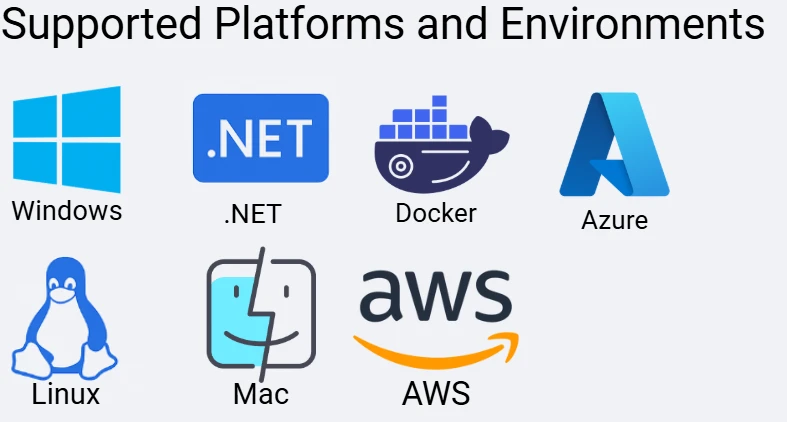
IronPDF는 최신 .NET 애플리케이션에서 크로스 플랫폼 HTML을 PDF로 변환하도록 설계되었습니다. 플랫폼 종속성, 바이너리 설치 또는 서버 구성을 걱정하지 않고 HTML 콘텐츠에서 PDF 문서를 생성할 수 있습니다:
- Windows Server
- 리눅스 배포판 (Ubuntu, Debian, Alpine)
- macOS
- Docker 컨테이너
- Azure Functions
- AWS Lambda
- Kubernetes
.NET 타겟도 여러 개 지원됩니다:
- .NET Framework 4.0 이상
- .NET Core 2.0 이상
.NET 5, 6, 7, 8, 9 및 10
라이브러리를 사용하는 것은 간단합니다. 렌더러를 생성하고 HTML 콘텐츠로 RenderHtmlAsPdfAsync를 호출하여 PDF를 얻을 수 있습니다. 간단히 말해: 어디서나 작동합니다.
배포 가이드를 참조하세요: Docker 배포|Azure 기능|AWS Lambda|Linux 설치
우리가 구축한 기술적 장점
1. 진정한 Chromium 렌더링
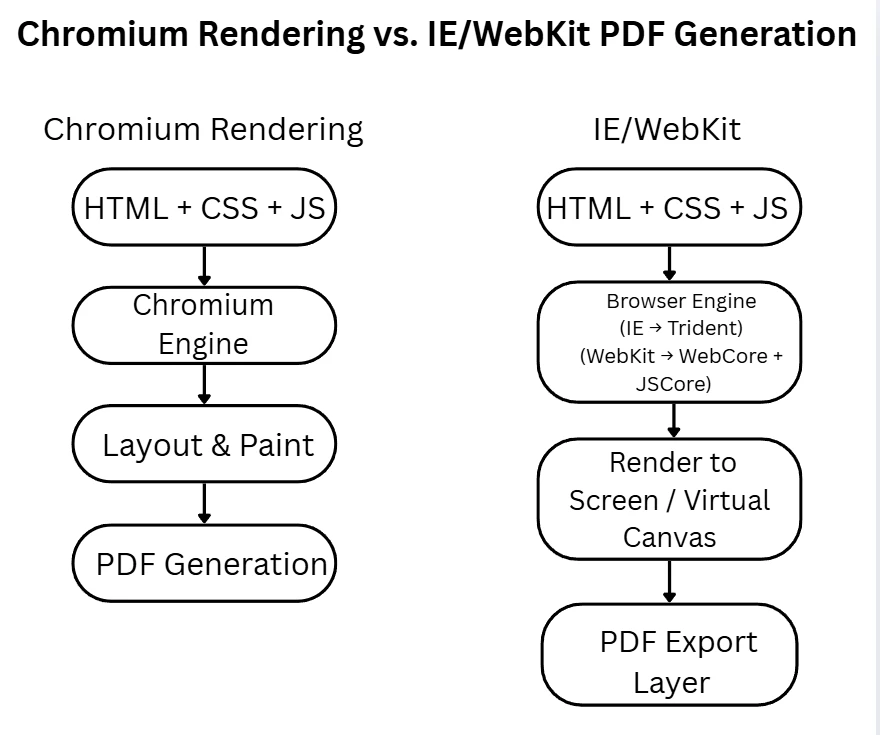
IronPDF는 최신 Chromium을 사용하여 구식 WebKit이나 Internet Explorer 대신 CSS3, JavaScript 및 HTML 요소 지원을 보장합니다.
public class ModernWebStandards
{
    public async Task<byte[]> GenerateModernPdf()
    {
        var renderer = new ChromePdfRenderer();

        var html = @"
        <style>
            .container {
                display: grid;
                grid-template-columns: repeat(auto-fit, minmax(250px, 1fr));
                gap: 2rem;
            }
            .card {
                background: linear-gradient(135deg, #667eea 0%, #764ba2 100%);
                border-radius: 15px;
                box-shadow: 0 20px 40px rgba(0,0,0,0.1);
            }
            @media print { .no-print { display: none; } }
        </style>
        <div class='container'>
            <div class='card'>Modern CSS works!</div>
        </div>";

        var pdf = await renderer.RenderHtmlAsPdfAsync(html);
        return pdf.BinaryData;
    }
}
public class ModernWebStandards
{
    public async Task<byte[]> GenerateModernPdf()
    {
        var renderer = new ChromePdfRenderer();

        var html = @"
        <style>
            .container {
                display: grid;
                grid-template-columns: repeat(auto-fit, minmax(250px, 1fr));
                gap: 2rem;
            }
            .card {
                background: linear-gradient(135deg, #667eea 0%, #764ba2 100%);
                border-radius: 15px;
                box-shadow: 0 20px 40px rgba(0,0,0,0.1);
            }
            @media print { .no-print { display: none; } }
        </style>
        <div class='container'>
            <div class='card'>Modern CSS works!</div>
        </div>";

        var pdf = await renderer.RenderHtmlAsPdfAsync(html);
        return pdf.BinaryData;
    }
}
Imports System.Threading.Tasks
Public Class ModernWebStandards
Public Async Function GenerateModernPdf() As Task(Of Byte())
Dim renderer = New ChromePdfRenderer()
Dim html = "
<style>
.container {
display: grid;
grid-template-columns: repeat(auto-fit, minmax(250px, 1fr));
gap: 2rem;
}
.card {
background: linear-gradient(135deg, #667eea 0%, #764ba2 100%);
border-radius: 15px;
box-shadow: 0 20px 40px rgba(0,0,0,0.1);
}
@media print { .no-print { display: none; } }
</style>
<div class='container'>
<div class='card'>Modern CSS works!</div>
</div>"
Dim pdf = Await renderer.RenderHtmlAsPdfAsync(html)
Return pdf.BinaryData
End Function
End Class
Imports System.Threading.Tasks

Public Class ModernWebStandards
    Public Async Function GenerateModernPdf() As Task(Of Byte())
        Dim renderer = New ChromePdfRenderer()

        Dim html = "
        <style>
            .container {
                display: grid;
                grid-template-columns: repeat(auto-fit, minmax(250px, 1fr));
                gap: 2rem;
            }
            .card {
                background: linear-gradient(135deg, #667eea 0%, #764ba2 100%);
                border-radius: 15px;
                box-shadow: 0 20px 40px rgba(0,0,0,0.1);
            }
            @media print { .no-print { display: none; } }
        </style>
        <div class='container'>
            <div class='card'>Modern CSS works!</div>
        </div>"

        Dim pdf = Await renderer.RenderHtmlAsPdfAsync(html)
        Return pdf.BinaryData
    End Function
End Class
이 강력한 방법은 PDF 파일이 적절한 페이지 구분 규칙을 유지하고 이미지 파일이 올바르게 임베드되며, 지정된 URL의 HTML 문자열 또는 HTML 파일이 신뢰할 수 있게 변환되도록 보장합니다. 개발자는 몇 줄의 코드만으로 HTML을 PDF 문서로 쉽게 변환할 수 있습니다.
2. 월간 업데이트
IronPDF는 월간 업데이트를 제공하여 PDF 생성 도구가 변화하는 웹 표준과 동기화되도록 합니다.
- 2025년 10월: .NET 10 지원 첫날
- 2025년 9월: 향상된 AI 통합 API
- 2025년 8월: HTML에서 PDF 렌더링 성능 개선
- 2025년 7월: Apple Silicon 네이티브 지원
경쟁자와 비교하세요:
- DinkToPdf: 마지막 업데이트 2020년 6월
- HtmlRenderer: 마지막 업데이트 2019년
- TuesPechkin: 마지막 업데이트 2015년
3. 실제 지원
IronPDF는 여러분을 방치하지 않습니다. support@ironsoftware.com에 이메일을 보내면 실제 개발자가 응답합니다. 포럼이나 챗봇이 아닌 HTML에서 PDF로 변환 프로세스, PDF 변환기 API, PDF 파일의 파일 권한을 아는 사람이 있습니다.
AI 혁명
다른 PDF 라이브러리가 고려하지 않은 것이 있습니다: 완전한 AI 통합. IronPDF는 AI 코딩 보조 프로그램과 완벽하게 작동하도록 설계되어 개발자가 HTML 문서를 즉각적으로 PDF 파일로 변환할 수 있습니다. 이는 웹 페이지, HTML 조각 또는 동적 HTML 콘텐츠의 HTML에서 PDF로 변환에 특히 유용하며 CSS 지원, 상대 URL 및 페이지 구분 설정을 유지합니다.
public class AIPoweredDocuments
{
    private readonly ChromePdfRenderer _renderer = new();

    public async Task<byte[]> GenerateAIDocument(string prompt)
    {
        // Step 1: AI generates the HTML
        var html = await GenerateHtmlWithAI(prompt);

        // Step 2: IronPDF renders it perfectly as a PDF document
        var pdf = await _renderer.RenderHtmlAsPdfAsync(html);

        // Step 3: OCR and extract data from existing PDF files
        var existingData = await ExtractDataFromPdfs();

        // Step 4: AI enhances the PDF document
        var enhanced = await EnhanceWithAI(pdf, existingData);

        return enhanced.BinaryData;
    }

    private async Task<string> GenerateHtmlWithAI(string prompt)
    {
        // IronPDF's API is so clean that ChatGPT/Claude
        // can generate working code without training
        var response = await OpenAI.Complete($@"
            Generate HTML for: {prompt}
            Requirements:
            - Use modern CSS3/HTML5
            - Include responsive design
            - Add print-specific CSS for PDF page size
        ");

        return response.Html;
    }
}
public class AIPoweredDocuments
{
    private readonly ChromePdfRenderer _renderer = new();

    public async Task<byte[]> GenerateAIDocument(string prompt)
    {
        // Step 1: AI generates the HTML
        var html = await GenerateHtmlWithAI(prompt);

        // Step 2: IronPDF renders it perfectly as a PDF document
        var pdf = await _renderer.RenderHtmlAsPdfAsync(html);

        // Step 3: OCR and extract data from existing PDF files
        var existingData = await ExtractDataFromPdfs();

        // Step 4: AI enhances the PDF document
        var enhanced = await EnhanceWithAI(pdf, existingData);

        return enhanced.BinaryData;
    }

    private async Task<string> GenerateHtmlWithAI(string prompt)
    {
        // IronPDF's API is so clean that ChatGPT/Claude
        // can generate working code without training
        var response = await OpenAI.Complete($@"
            Generate HTML for: {prompt}
            Requirements:
            - Use modern CSS3/HTML5
            - Include responsive design
            - Add print-specific CSS for PDF page size
        ");

        return response.Html;
    }
}
Imports System.Threading.Tasks
Public Class AIPoweredDocuments
Private ReadOnly _renderer As New ChromePdfRenderer()
Public Async Function GenerateAIDocument(prompt As String) As Task(Of Byte())
' Step 1: AI generates the HTML
Dim html = Await GenerateHtmlWithAI(prompt)
' Step 2: IronPDF renders it perfectly as a PDF document
Dim pdf = Await _renderer.RenderHtmlAsPdfAsync(html)
' Step 3: OCR and extract data from existing PDF files
Dim existingData = Await ExtractDataFromPdfs()
' Step 4: AI enhances the PDF document
Dim enhanced = Await EnhanceWithAI(pdf, existingData)
Return enhanced.BinaryData
End Function
Private Async Function GenerateHtmlWithAI(prompt As String) As Task(Of String)
' IronPDF's API is so clean that ChatGPT/Claude
' can generate working code without training
Dim response = Await OpenAI.Complete($"
Generate HTML for: {prompt}
Requirements:
- Use modern CSS3/HTML5
- Include responsive design
- Add print-specific CSS for PDF page size
")
Return response.Html
End Function
End Class
Imports System.Threading.Tasks

Public Class AIPoweredDocuments
    Private ReadOnly _renderer As New ChromePdfRenderer()

    Public Async Function GenerateAIDocument(prompt As String) As Task(Of Byte())
        ' Step 1: AI generates the HTML
        Dim html = Await GenerateHtmlWithAI(prompt)

        ' Step 2: IronPDF renders it perfectly as a PDF document
        Dim pdf = Await _renderer.RenderHtmlAsPdfAsync(html)

        ' Step 3: OCR and extract data from existing PDF files
        Dim existingData = Await ExtractDataFromPdfs()

        ' Step 4: AI enhances the PDF document
        Dim enhanced = Await EnhanceWithAI(pdf, existingData)

        Return enhanced.BinaryData
    End Function

    Private Async Function GenerateHtmlWithAI(prompt As String) As Task(Of String)
        ' IronPDF's API is so clean that ChatGPT/Claude
        ' can generate working code without training
        Dim response = Await OpenAI.Complete($"
            Generate HTML for: {prompt}
            Requirements:
            - Use modern CSS3/HTML5
            - Include responsive design
            - Add print-specific CSS for PDF page size
        ")

        Return response.Html
    End Function
End Class
이 접근 방식은 개발자가 AI 생성 HTML 콘텐츠에서 PDF 문서를(형식 필드, 이미지, 사용자 지정 헤더 포함) 몇 줄의 코드로 생성할 수 있도록 합니다. IronPDF는 HTML에서 PDF 변환, OCR 및 AI 추출을 원활하게 처리하여 모든 .NET 애플리케이션에 준비된 완전히 조작 가능하고 접근 가능한 전문 PDF 파일을 생성합니다.
개발자가 IronPDF를 선택하는 이유
IronPDF를 사용하면 시작이 매우 빠르고 간단합니다: 패키지를 설치하고, 세 줄의 코드만 작성하고, PDF를 생성합니다 - 모두 약 5분 만에 가능합니다.
반대로, 다른 HTML에서 PDF로 변환 솔루션은 종종 더 긴 설정 프로세스를 포함합니다: 패키지를 설치하고, 필요한 바이너리를 다운로드하고, 파일 경로를 구성하고, 플랫폼 차이점을 처리하고, 충돌을 디버그하며 다른 복잡한 문제를 다루어야 합니다. 많은 개발자에게 이는 최대 2주가 걸릴 수 있으며, 이는 종종 단순성과 신뢰성을 위해 IronPDF로 전환하게 만듭니다.
개발자들은 IronPDF가 PDF 생성을 빠르고, 신뢰할 수 있게, 쉽게 만들어 주기 때문에 감사하게 여깁니다. API가 단순하여 HTML 파일이나 HTML 콘텐츠에서 PDF를 생성하는 데 몇 줄의 코드만 필요합니다. 최종 사용자들은 적절한 형식 필드, 이미지, 전체 웹 페이지의 일관된 렌더링을 가진 접근 가능하고 구조화된 PDF의 혜택을 봅니다. IronPDF는 플랫폼 별 이슈, 복잡한 구성 또는 깨진 타사 도구 처리의 번거로움을 제거합니다.
직접 시도해 보세요
그만 읽고 IronPDF로 PDF 생성이 얼마나 간단한지 경험해 보세요:
// Install-Package IronPdf
using IronPdf;

class Program
{
    static async Task Main()
    {
        // Your first PDF in 3 lines of code
        var renderer = new ChromePdfRenderer();
        var pdf = await renderer.RenderHtmlAsPdfAsync("<h1>Hello World</h1>");
        pdf.SaveAs("hello.pdf");

        // No configuration, no extra binaries, no complicated setup
        // It just works across Windows, Linux, macOS, and Docker
    }
}
// Install-Package IronPdf
using IronPdf;

class Program
{
    static async Task Main()
    {
        // Your first PDF in 3 lines of code
        var renderer = new ChromePdfRenderer();
        var pdf = await renderer.RenderHtmlAsPdfAsync("<h1>Hello World</h1>");
        pdf.SaveAs("hello.pdf");

        // No configuration, no extra binaries, no complicated setup
        // It just works across Windows, Linux, macOS, and Docker
    }
}
Imports IronPdf
Class Program
Shared Async Function Main() As Task
' Your first PDF in 3 lines of code
Dim renderer = New ChromePdfRenderer()
Dim pdf = Await renderer.RenderHtmlAsPdfAsync("<h1>Hello World</h1>")
pdf.SaveAs("hello.pdf")
' No configuration, no extra binaries, no complicated setup
' It just works across Windows, Linux, macOS, and Docker
End Function
End Class
Imports IronPdf

Class Program
    Shared Async Function Main() As Task
        ' Your first PDF in 3 lines of code
        Dim renderer = New ChromePdfRenderer()
        Dim pdf = Await renderer.RenderHtmlAsPdfAsync("<h1>Hello World</h1>")
        pdf.SaveAs("hello.pdf")

        ' No configuration, no extra binaries, no complicated setup
        ' It just works across Windows, Linux, macOS, and Docker
    End Function
End Class
IronPDF로 모든 HTML 콘텐츠 또는 동적으로 생성된 웹 콘텐츠를 몇 줄로 전문적인 PDF 문서로 변환합니다. 라이브러리는 HTML에서 PDF 변환, 페이지 크기 조정, CSS 지원, 상대 URL, 이미지 등을 복잡한 설정 없이 처리합니다.
인보이스, 보고서 또는 전체 웹 페이지를 PDF 문서로 생성하든 관계없이 IronPDF는 Visual Studio 및 .NET 애플리케이션에 원활하게 통합됩니다. HTML 요소의 신뢰할 수 있는 렌더링, 적절한 문서 구조 및 파일 권한과 양식 필드에 대한 완전한 제어를 유지하면서도 코드를 간단하고 유지 관리 가능하게 유지합니다.
도움이 필요하나요? IronPDF의 지원 팀은 실제 엔지니어와 연결해 줍니다. 챗봇도 없고 스크립트도 없습니다. 라이브러리를 아는 전문가들뿐입니다.
시작 리소스:
결론
다른 라이브러리로 인한 개발자들의 좌절감, 오래된 코드, 디버깅에 몇 주가 소요되는 "무료" 솔루션, 플랫폼별 특이점, 답변 없는 지원 질문에 지쳐서 IronPDF를 만들었습니다.
8년 후, NuGet에서 1000만 건의 다운로드와 함께 IronPDF는 HTML을 PDF로 변환하는 유일한 라이브러리입니다. 다음과 같은 특징을 갖추고 있습니다:
- 매월 업데이트로 개선사항 및 .NET 지원
- Windows, Linux, macOS, Docker에서 일관되게 작동
- 포럼이나 챗봇이 아닌 실제 개발자 지원 제공
- 최신 AI 코드 도구와 원활하게 통합
- OCR 및 PDF 조작 기능 포함
- 508 섹션, PDF/A, PDF/UA 규정 준수 기준 충족
솔직히 말해봅니다 - 아무도 PDF 라이브러리에 돈을 지불하고 싶어하지 않습니다. 그러나 현실은: 당신은 어쨌든 지불하게 될 것입니다. IronPDF에 대해 한 번 $999 지불하거나, 디버깅, 생산 실패, 그리고 모든 것이 실패한 후 결국 IronPDF를 구매하는 데 주의 주어나 시간 동안 지불할 수 있습니다.
IronPDF를 또 다른 옵션으로 만들지 않았습니다. 우리는 그것을 해결책으로 만들었습니다. 우리가 1000만 건의 다운로드와 NASA, 테슬라, 백악관과 같은 고객을 보유한 이유가 있습니다 - 개발자들은 "무료" 옵션을 시도하고, 몇 주를 낭비한 후 결국 우리에게로 옵니다. 여정을 절약하세요.
PDF 생성을 그만 싸워볼 준비가 되셨습니까?
IronPDF: 올바른 해결책을 처음부터 얻으세요. 미래의 당신 자신(그리고 사용자들)이 감사할 것입니다.
ABCpdf, Aspose, DinkToPdf, ExpertPDF, GemBox, Gotenberg, GrabzIt, HTMLDOC, HiQPdf, NReco, PDF Duo .NET, PDFMyUrl, PDFSharp, PeachPDF, Playwright, PuppeteerSharp, QuestPDF, Rotativa, SelectPDF, Spire, Syncfusion, TuesPechkin, WebView2, Winnovative, Xfinium PDF, iText, and wkhtmltopdf are registered trademarks of their respective owners. 이 사이트는 Aspose Pty Ltd, CodeFlint, DinkToPdf, DuoDimension, Easy Software Products, GemBox Ltd., Gotenberg, GrabzIt, HiQPdf Software, Microsoft, NReco, Outside Software SRL, PDFmyURL, PeachPDF, PuppeteerSharp, Rotativa, SelectPdf, Syncfusion, TuesPechkin, Viscom Software, WebSupergoo Software, Winnovative Software, XFINIUM Software, e-iceblue, empira Software GmbH, iText Group, 또는 wkhtmltopdf와 관련이 없으며, 인증받지 않았으며, 후원받지 않았습니다. 모든 제품명, 로고 및 브랜드는 해당 소유자의 자산입니다. 비교는 정보 제공 목적으로만 사용되며, 작성 시점에 공개적으로 이용 가능한 정보를 반영합니다.













