IronPDF 대 iText / iText
포괄적인 .NET PDF 라이브러리 비교 - 증거 기반 문맥으로 기능별 비교
iText / iText
13
20가지 기능 중
10 예7 복잡함3 아니오
IronPDF ✦
20
20가지 기능 중
20 예0 복잡함0 아니오
공식 iText 문서, PDF 협회 목록 및 NuGet 패키지 참조에서 가져온 데이터.
iText는 강력하지만 AGPL 라이선스 복잡성과 다중 패키지 설정 오버헤드를 수반합니다.
IronPDF는 더 간단한 설정으로 완전한 커버리지를 제공합니다 - 30
일 동안 무료로 체험해 보세요.
iText PDF 라이브러리는 PDF 파일을 생성하고 조작하기 위한 Java 및 .NET 라이브러리입니다. iText는 iText와 iText의 고급 버전입니다. 이는 간단하고 성능이 뛰어나며 확장 가능한 라이브러리로, 오늘날의 PDF 문서 처리 및 문서 요구 사항을 충족하는 데 도움이 됩니다.
iText Group NV
iText Group는 iText Suite, iText pdf2Data, iText DITO 애플리케이션 소프트웨어 등 PDF(Portable Document Format) 기술의 세계적인 선도 기업입니다.
iText Core는 상호작용 가능한 폼을 만들기 위해 자신만의 애플리케이션에 통합할 수 있는 오픈 소스 PDF 라이브러리입니다. 이는 모듈형 코드 구조를 통해 향후 개선 및 확장이 가능한 iText에 사용된 성공적인 엔진의 재고입니다.
iText 소프트웨어 라이브러리의 기능
iText 라이브러리는 비즈니스 사용자를 위한 여러 기능을 제공합니다.
- PDF 문서를 만들고, 읽고, 조작하기
- PDF 문서에 디지털 서명 추가하기
- 인터랙티브 PDF 양식을 작성하고 평면화하기
- PDF 문서에 태그 추가하기
- 지도와 책 만들기
- 기존 PDF 문서에 북마크, 페이지 번호, 워터마크 및 기타 기능 추가하기
- PDF 문서 규격을 준수합니다:
- PDF 사양 포함 PDF 2.0 (ISO 32000-2)
- PDF/A (ISO 19005; PDF/A-1a/b, PDF/A-2a/b/u, PDF/A-3a/b/u)
- PDF/UA (ISO 14289)
iText 소개
iText는 디지털 문서 부문에서 활동하는 기술 회사입니다. 이 회사의 주력 제품은 Java와 .NET (C#)에서 PDF 문서를 생성하고 조작하기 위한 오픈 소스 Java 라이브러리 및 .NET 라이브러리입니다.
iText를 사용하여 PDF 문서 만들기
iText PDF 문서를 생성하는 헬로 월드 소스 코드 예제를 살펴보겠습니다.
// Import iText7 libraries
using iText.Kernel.Pdf;
using iText.Layout;
using iText.Layout.Element;

// Create a writer instance with the destination file path
var writer = new PdfWriter("destination.pdf");

// Create a PdfDocument instance which uses the writer
var pdf = new PdfDocument(writer);

// Create a Document instance for high-level manipulation
var document = new Document(pdf);

// Add a paragraph with "Hello World!" text
document.Add(new Paragraph("Hello World!"));

// Close the document to ensure changes are saved
document.Close();
// Import iText7 libraries
using iText.Kernel.Pdf;
using iText.Layout;
using iText.Layout.Element;

// Create a writer instance with the destination file path
var writer = new PdfWriter("destination.pdf");

// Create a PdfDocument instance which uses the writer
var pdf = new PdfDocument(writer);

// Create a Document instance for high-level manipulation
var document = new Document(pdf);

// Add a paragraph with "Hello World!" text
document.Add(new Paragraph("Hello World!"));

// Close the document to ensure changes are saved
document.Close();
' Import iText7 libraries
Imports iText.Kernel.Pdf
Imports iText.Layout
Imports iText.Layout.Element
' Create a writer instance with the destination file path
Private writer = New PdfWriter("destination.pdf")
' Create a PdfDocument instance which uses the writer
Private pdf = New PdfDocument(writer)
' Create a Document instance for high-level manipulation
Private document = New Document(pdf)
' Add a paragraph with "Hello World!" text
document.Add(New Paragraph("Hello World!"))
' Close the document to ensure changes are saved
document.Close()
' Import iText7 libraries
Imports iText.Kernel.Pdf
Imports iText.Layout
Imports iText.Layout.Element

' Create a writer instance with the destination file path
Private writer = New PdfWriter("destination.pdf")

' Create a PdfDocument instance which uses the writer
Private pdf = New PdfDocument(writer)

' Create a Document instance for high-level manipulation
Private document = New Document(pdf)

' Add a paragraph with "Hello World!" text
document.Add(New Paragraph("Hello World!"))

' Close the document to ensure changes are saved
document.Close()
설명:
- PdfWriter: 이 객체는 PDF 파일을 작성하는 책임을 집니다. 파일 경로에서 작동하며 유효한 PDF 문서에 필요한 구조를 작성합니다.
- PdfDocument: PDF 표준에 따라 컨텐츠와 데이터 구조를 관리하고
PdfWriter와 통신합니다.
- Document: 콘텐츠 추가를 처리하는 고수준의 추상화를 제공합니다. 단락, 표 등의 다양한 PDF 구성 요소를 추가할 수 있습니다.
- Paragraph: 문서에 삽입될 텍스트 영역을 나타냅니다.
Close() 메소드는 모든 컨텐츠가 플러시되고 파일이 올바르게 완료되었는지 확인하므로 매우 중요합니다.
제한 사항
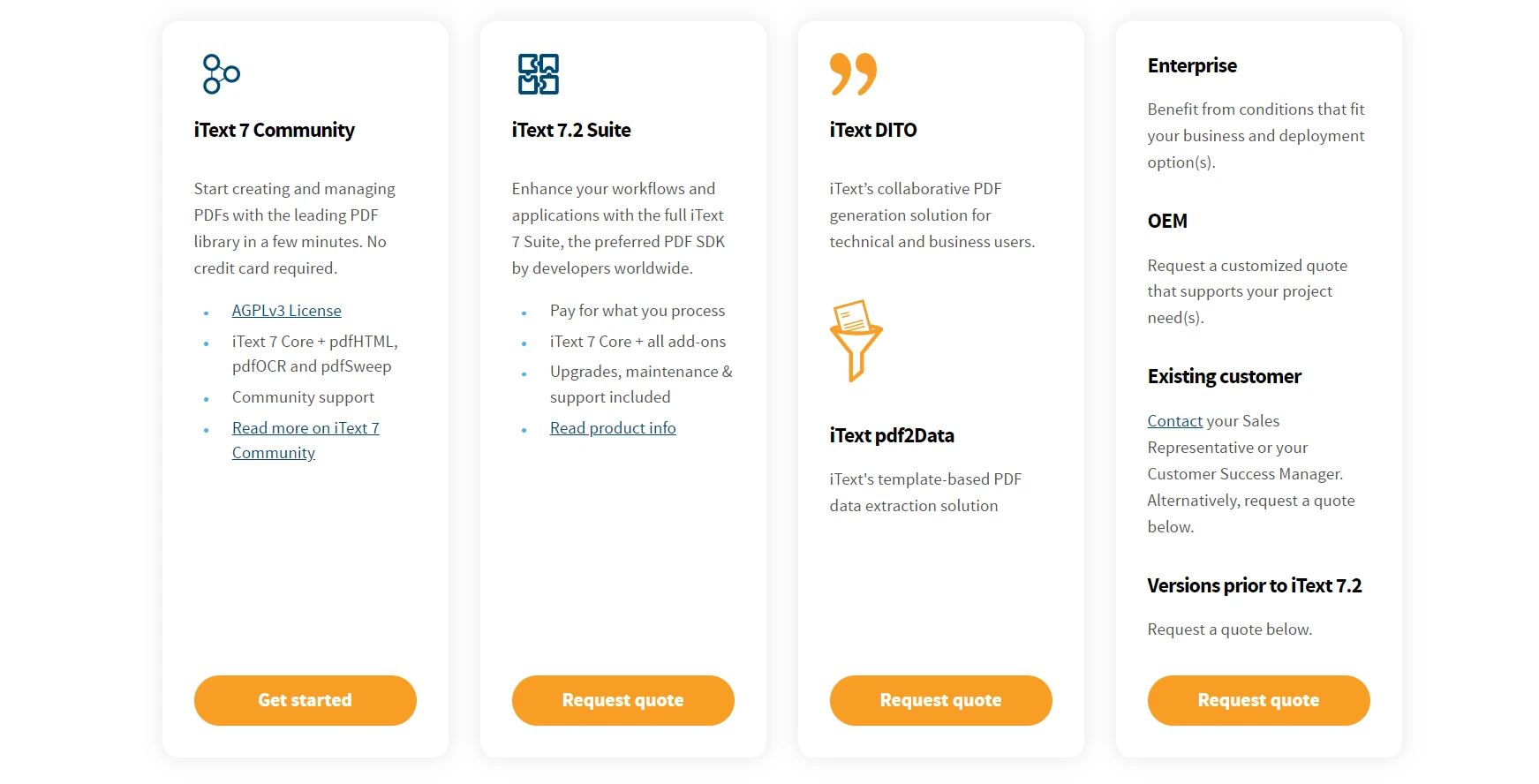
iText는 유료 제품이며 기능이 제한적입니다. 모든 기능을 단일 패키지에서 제공하지 않습니다. 다양한 용도로 다른 라이브러리를 사용해야 합니다. 예를 들어:
PDF 생성 및 PDF 생성은 iText에서 지원하는 반면 HTML to PDF 변환은 pdfHTML에서 지원합니다. 한편, PDF에서 민감한 데이터를 제거하는 기능은 pdfSweep에서 지원됩니다.
이미지, 표, 텍스트 추출 등의 데이터 추출은 pdf2Data 라이브러리에서 제공됩니다. RUPS는 PDF 디버깅을 지원하여 PDF 문서를 조작합니다.
마찬가지로 다른 기능에는 iText Suite의 일부인 라이브러리가 있습니다. 따라서 개발자가 많은 DLL을 관리하는 것은 매우 어렵습니다.
상업적 라이선스도 매우 비쌉니다. 그들은 자신의 iText 라이선스 및 가격 페이지에 가격을 언급하지 않았습니다. 견적을 받으려면 영업 부서에 연락해야 하고, 이는 시간이 소요됩니다.
만약 PDF 문서 생성을 작업하고 있는데, 동시에 기존 PDF에서 이미지, 표 또는 텍스트를 추출해야 한다고 가정해봅시다. 이 경우 iText Suite와 iText pdf2Data를 구매해야 하며 추가 비용이 발생합니다.
모든 기능을 단일 라이브러리에서 제공하고 합리적인 상업용 라이선스를 제공하는 포괄적인 기능의 iText 소프트웨어 대안이 있습니까? 답은 예입니다.
IronPDF
IronPDF 기능 및 역량 탐색하기는 Iron Software에서 개발 및 유지/보수하는 .NET 및 Java 라이브러리입니다. IronPDF는 PDF를 생성하고 편집하기 위한 가장 인기 있는 C# 및 Java PDF 라이브러리입니다. 간단한 API로 개발자가 .NET 프로젝트에서 HTML로부터 전문적이고 고품질의 PDF를 신속하게 생성할 수 있습니다. 정확성, 사용의 용이성, 속도를 우선합니다.
IronPDF의 기능은 다음과 같습니다:
- HTML, 문자열, URL, Razor, ASPX 및 MVC 보기에서 PDF 생성
- 다른 라이브러리를 사용하지 않고 이미지, 표 및 텍스트 추출
- 스캔 문서와 같은 이미지를 PDF로 변환하고 반대로도 변환
- 페이지 번호, 사용자 지정 헤더 및 풋터, 디지털 서명, 파일 첨부, 암호 보호 및 보안 조치를 추가하기 위한 기능 제공
- 전체 멀티스레딩 기능 및 비동기 처리 지원을 통해 높은 성능을 제공합니다
- 여기에 나열할 수 없는 50+ 기능 제공
- C#, VB.NET, F#와 같은 모든 .NET 언어와 호환됩니다.
- .NET Standard, .NET Core, .NET 5, 6, & 7을 포함한 모든 .NET 버전과 호환됩니다.
- Java, Kotlin, Scala와 호환되며 위에 언급된 모든 기능을 제공하는 IronPDF Java용를 발견하세요.
- Windows, Linux, Mac 운영 체제를 포함한 모든 운영 체제를 지원합니다.
- Web, 모바일, 데스크톱과 같은 모든 앱 유형을 지원합니다.
라이선스에 대해 조금 논의해보겠습니다.
IronPDF 라이선스
IronPDF는 개발용으로 무료이며 어떤 라이선스도 필요하지 않습니다. 그러나, 상업용으로 사용하려면 상업용 라이선스가 필요합니다. 언제든지 IronPDF의 무료 체험판을 이용할 수 있습니다. 상업용 라이선스는 749 USD에서 2999 USD까지 다양합니다. 필요에 맞게 패키지를 선택하고 작업을 시작할 수 있습니다. 영업팀에 연락할 필요가 없어 시간을 절약할 수 있습니다. 또한, 상업용 라이선스에는 24/7 지원이 포함되어 있습니다.
결론
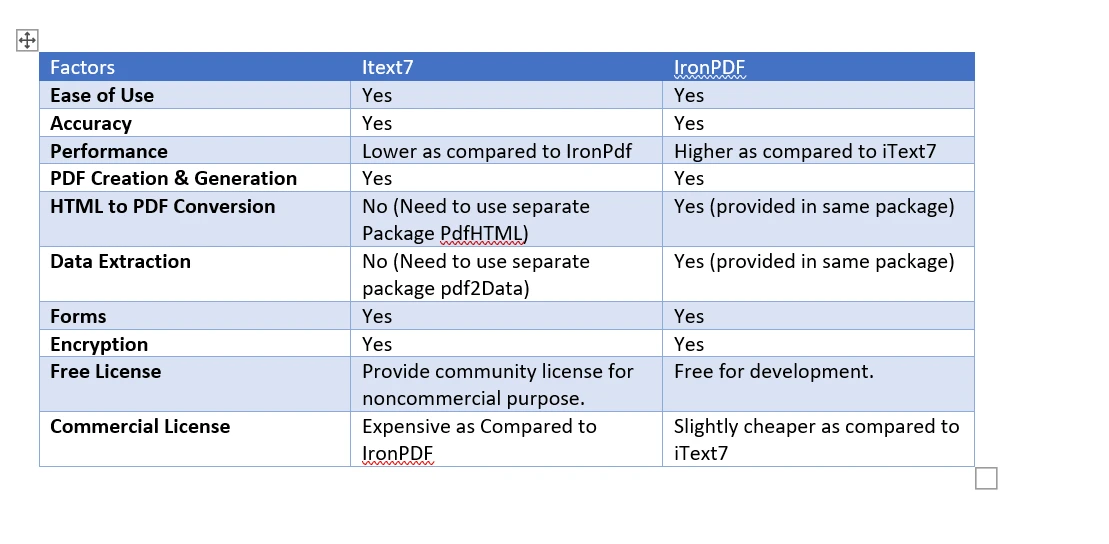
IronPDF는 모든 기능을 하나의 패키지로 제공합니다. 모든 기능을 포함한 솔루션과 같습니다. iText의 경우 다양한 기능에 대해 다른 패키지를 사용해야 합니다. IronPDF의 상업적 라이선스는 판매에 연락하지 않고 전체 지원과 함께 쉽게 구입할 수 있습니다. 반면, iText를 상업적 목적으로 사용하기 위한 견적을 요청하려면 영업에 연락해야 합니다.
이 기사를 간단하고 포괄적으로 작성했습니다. 댓글 섹션에서 자유롭게 질문하세요.
iText Group은 해당 소유자의 등록 상표입니다. 이 사이트는 iText Group과 관련이 없으며, 승인되거나 후원되지 않았습니다. 모든 제품 이름, 로고, 브랜드는 해당 소유자의 자산입니다. 비교는 정보 제공 목적으로만 사용되며, 작성 시점에 공개적으로 이용 가능한 정보를 반영합니다.













