using IronPdf;

// Disable local disk access or cross-origin requests
Installation.EnableWebSecurity = true;

// Instantiate Renderer
var renderer = new ChromePdfRenderer();

// Create a PDF from a HTML string using C#
var pdf = renderer.RenderHtmlAsPdf("<h1>Hello World</h1>");

// Export to a file or Stream
pdf.SaveAs("output.pdf");

// Advanced Example with HTML Assets
// Load external html assets: Images, CSS and JavaScript.
// An optional BasePath 'C:\site\assets\' is set as the file location to load assets from
var myAdvancedPdf = renderer.RenderHtmlAsPdf("<img src='icons/iron.png'>", @"C:\site\assets\");
myAdvancedPdf.SaveAs("html-with-assets.pdf");
using IronPdf;// Disable local disk access or cross-origin requestsInstallation.EnableWebSecurity = true;// Instantiate Renderervar renderer = new ChromePdfRenderer();// Create a PDF from a HTML string using C#var pdf = renderer.RenderHtmlAsPdf("<h1>Hello World</h1>");// Export to a file or Streampdf.SaveAs("output.pdf");// Advanced Example with HTML Assets// Load external html assets: Images, CSS and JavaScript.// An optional BasePath 'C:\site\assets\' is set as the file location to load assets fromvar myAdvancedPdf = renderer.RenderHtmlAsPdf("<img src='icons/iron.png'>", @"C:\site\assets\");myAdvancedPdf.SaveAs("html-with-assets.pdf");
ChromePdfRenderer는 Chrome 렌더링을 사용하여 CSS3 및 JavaScript를 완전히 지원하는 HTML-to-PDF 변환을 제공합니다. 반면, iText는 프로그래밍 가능한 PDF 생성을 제공하지만 현대 HTML 변환에서 어려움을 겪고 있어, 웹 표준 PDF를 필요로 하는 ASP.NET MVC 애플리케이션에는 ChromePdfRenderer가 더 나은 선택이 됩니다.
ASP.NET MVC 애플리케이션에서 PDF 문서를 생성하는 것은 보고서, 송장 및 다운로드 가능한 콘텐츠를 생성하기 위한 일반적인 요구사항입니다. [iText](https://itextpdf.com/products/itextsharp)는 수년간 인기가 있었지만, [ChromePdfRenderer](https://ironpdf.com)는 더 뛰어난 [HTML 렌더링 기능](https://ironpdf.com/how-to/pixel-perfect-html-to-pdf/)이 있는 현대적인 대안을 제공합니다. 이 글은 [.NET PDF 생성](https://ironpdf.com/how-to/create-new-pdfs/)을 위한 정보에 근거한 결정을 내리는 데 도움이 되는 두 가지 접근 방식을 탐구합니다.
두 라이브러리는 .NET 웹 컨텍스트에서 PDF를 생성한다는 동일한 핵심 문제를 해결하지만, 근본적으로 다른 접근 방식을 취합니다. iText는 객체 모델을 통해 PDF를 프로그래밍적으로 빌드하는 반면, ChromePdfRenderer는 전체 Chrome 렌더링 엔진을 사용하여 HTML을 PDF로 변환합니다. 이러한 아키텍처적 차이를 이해하는 것이 올바른 도구를 선택하는 열쇠입니다. Microsoft의 [ASP.NET MVC 프레임워크](https://learn.microsoft.com/en-us/aspnet/core/mvc/overview)는 두 통합 패턴을 모두 지원하며, 어느 라이브러리든 표준 컨트롤러-액션 파이프라인에 연결할 수 있습니다.
## 각 라이브러리는 어떻게 설치하나요?
코드를 작성하기 전에 각 라이브러리를 프로젝트에 가져와야 합니다. [NuGet](https://www.nuget.org/)는 .NET의 표준 패키지 관리자이며, 두 설치를 깔끔하게 처리합니다. iText의 경우, NuGet을 통해 레거시 패키지를 설치하세요:
```bash
dotnet add package iTextSharp
```
ChromePdfRenderer의 경우, 마찬가지로 NuGet을 통해 설치하시기 바랍니다:
```bash
:InstallCmd dotnet add package IronPdf
```
ChromePdfRenderer는 Chrome 렌더링 엔진을 패키지에 포함하여 서버에 추가 브라우저 설치가 필요하지 않습니다. 라이브러리는 Windows, Linux, macOS 및 컨테이너 환경을 기본적으로 지원합니다. 설치 후, 애플리케이션 시작 시 [ChromePdfRenderer 라이선스 키](https://ironpdf.com/licensing/)를 추가하십시오.
## MVC에서 iText를 사용하여 PDF를 생성하는 방법은 무엇인가요?
ASP.NET MVC 애플리케이션에서 iText를 사용하여 PDF 파일을 생성하려면, 먼저 NuGet을 통해 라이브러리를 설치하세요. iText 라이브러리는 [PDF 생성](https://ironpdf.com/how-to/create-new-pdfs/)을 위한 저수준의 제어를 Document 클래스 및 객체 모델을 통해 제공합니다.
다음 코드는 MVC 컨트롤러에서 iText로 PDF를 생성하기 위한 생산 준비 완료 구현을 설명합니다:
```csharp
// Production-ready iTextSharp implementation with proper resource disposal
public class ReportController : Controller
{
    private readonly ILogger<ReportController> _logger;

    public ReportController(ILogger<ReportController> logger)
    {
        _logger = logger;
    }

    public ActionResult GeneratePDF()
    {
        try
        {
            using var memoryStream = new MemoryStream();
            using var document = new Document(PageSize.A4, 50, 50, 25, 25);
            using var writer = PdfWriter.GetInstance(document, memoryStream);

            document.Open();
            document.AddTitle("Generated Report");
            document.AddCreationDate();

            var titleFont = FontFactory.GetFont(FontFactory.HELVETICA_BOLD, 16);
            document.Add(new Paragraph("Hello World", titleFont));
            document.Add(new Paragraph("This is a PDF document created with iTextSharp"));

            var table = new PdfPTable(3);
            table.AddCell("Header 1");
            table.AddCell("Header 2");
            table.AddCell("Header 3");
            document.Add(table);

            document.Close();

            var pdfBytes = memoryStream.ToArray();
            Response.Headers.Add("Content-Disposition", "inline; filename=report.pdf");
            _logger.LogInformation("PDF generated: {Size} bytes", pdfBytes.Length);
            return File(pdfBytes, "application/pdf");
        }
        catch (Exception ex)
        {
            _logger.LogError(ex, "Error generating PDF");
            return StatusCode(500, "Error generating PDF document");
        }
    }
}
```
### iText 출력은 어떻게 보이나요?

이 코드는 기본 접근 방식을 설명합니다: `Document` 인스턴스를 생성, 스트림에 `PdfWriter`를 연결, 요소 객체를 사용하여 콘텐츠를 추가, 그리고 액션 결과를 통해 파일을 반환합니다. 실행에서는 프로덕션 시스템에 필수적인 리소스 삭제 패턴을 처리합니다. 더 발전된 시나리오를 위해, [사용자 정의 용지 크기](https://ironpdf.com/how-to/custom-paper-size/)를 구성하거나, [페이지 방향을 관리](https://ironpdf.com/how-to/page-orientation-rotation/)하거나, [페이지 번호를 추가](https://ironpdf.com/how-to/page-numbers/)할 수 있습니다.
프로그래밍 방식의 접근은 페이지의 모든 요소에 대한 정밀한 제어를 제공합니다. 그러한 정밀성은 인보이스, 인증서 또는 구조가 항상 같은 양식을 사용하여 고정 레이아웃으로 생성해야 할 때 유용합니다. 그러나 콘텐츠가 동적이거나 HTML 템플릿에 의해 구동될 때는 부담이 됩니다.
## iText 라이브러리를 사용한 HTML to PDF 변환의 도전 과제는 무엇인가요?
iText는 프로그래밍 가능한 PDF 생성에 뛰어나지만, HTML을 PDF로 변환하는 것은 상당한 도전 과제를 제공합니다. 더 이상 사용되지 않는 `HTMLWorker` 클래스와 그 대체 `XMLWorker`는 제한된 CSS 지원을 제공하며, 특히 [반응형 CSS](https://ironpdf.com/how-to/html-to-pdf-responsive-css/) 및 [JavaScript 렌더링 콘텐츠](https://ironpdf.com/how-to/javascript-to-pdf/)를 다룰 때 현대 웹 콘텐츠와의 호환성에서 어려움을 겪습니다.
```csharp
// HTML conversion with iTextSharp -- note the CSS limitations
public class HtmlToPdfController : Controller
{
private readonly ILogger<HtmlToPdfController> _logger;
public HtmlToPdfController(ILogger<HtmlToPdfController> logger)
{
_logger = logger;
}
public async Task<ActionResult> ConvertHtmlAsync(string htmlContent)
{
if (string.IsNullOrWhiteSpace(htmlContent))
return BadRequest("HTML content is required");
return await Task.Run(() =>
{
using var stream = new MemoryStream();
using var document = new Document(PageSize.A4);
using var writer = PdfWriter.GetInstance(document, stream);
document.Open();
var cssResolver = XMLWorkerHelper.GetInstance().GetDefaultCssResolver(true);
var fontProvider = new XMLWorkerFontProvider();
var cssAppliers = new CssAppliersImpl(fontProvider);
var htmlContext = new HtmlPipelineContext(cssAppliers);
htmlContext.SetTagFactory(Tags.GetHtmlTagProcessorFactory());
// Pipeline with limited CSS3 support
var pdf = new PdfWriterPipeline(document, writer);
var html = new HtmlPipeline(htmlContext, pdf);
var css = new CssResolverPipeline(cssResolver, html);
var worker = new XMLWorker(css, true);
var parser = new XMLParser(worker);
using var stringReader = new StringReader(htmlContent);
parser.Parse(stringReader);
document.Close();
return File(stream.ToArray(), "application/pdf", "converted.pdf");
});
}
}
```
### iText는 HTML 렌더링을 얼마나 잘 처리하나요?
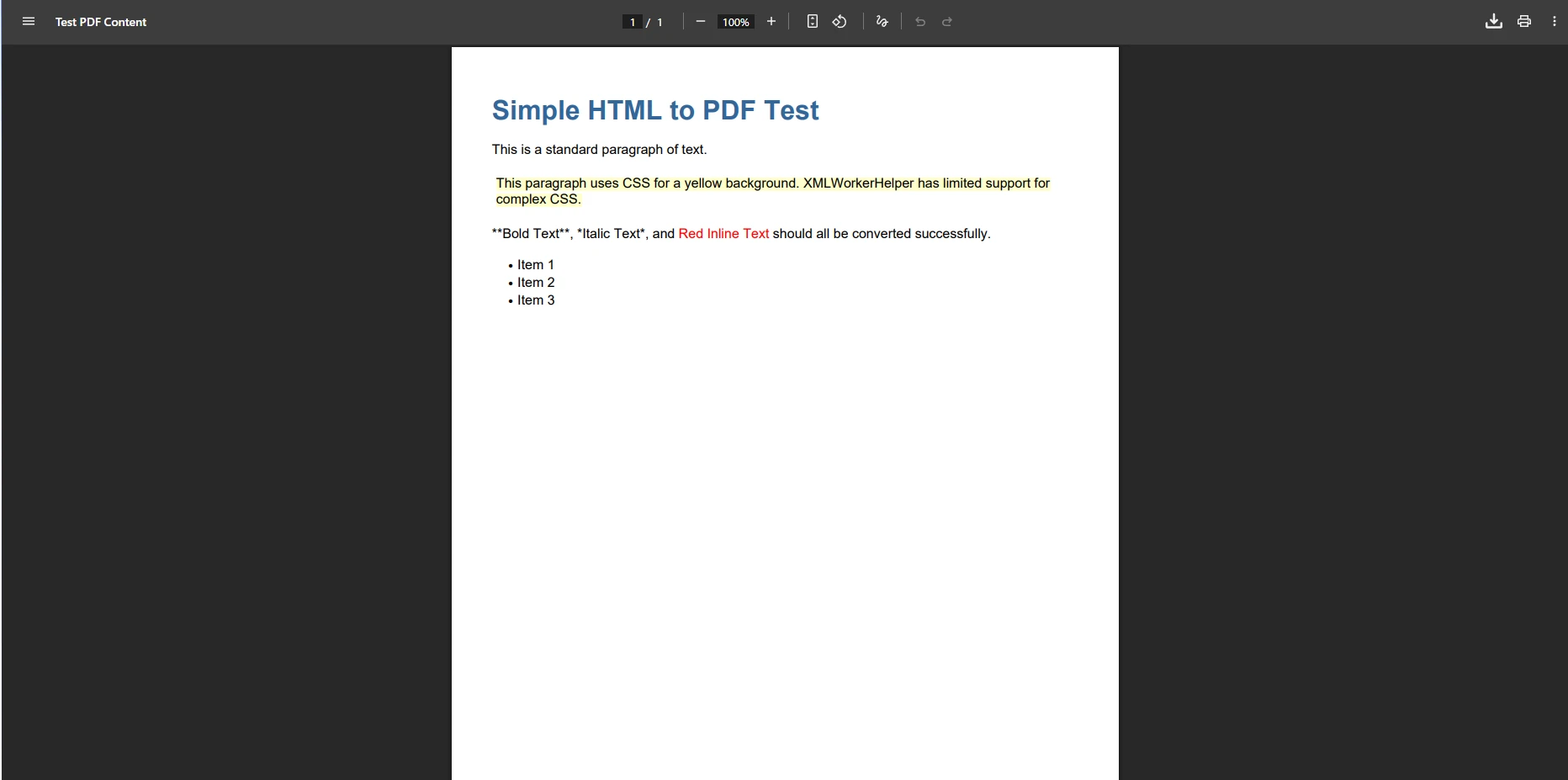
제한 사항은 Bootstrap 레이아웃, JavaScript로 렌더링된 콘텐츠, 또는 복잡한 CSS3 스타일 작업 시에 분명해집니다. 일반적인 문제로는 누락된 [웹 글꼴](https://ironpdf.com/how-to/manage-fonts/), 깨진 반응형 레이아웃, CSS 미디어 타입에 대한 지원 부족 등이 있습니다. 또한, iText는 HTML 콘텐츠를 변환할 때 [국제 언어 문자](https://ironpdf.com/troubleshooting/international-languages-and-cmjk/)와 SVG 그래픽을 처리하는 데 어려움을 겪습니다.
이러한 제한 사항은 단순히 겉모습의 문제가 아닙니다. 배경색이 보이지 않거나 그리드가 붕괴되어 고객에게 보여지는 인보이스나 보고서가 잘못 렌더링되면, PDF는 그 목적을 잃습니다. HTML 템플릿을 유지하는 팀의 경우, iText의 객체 모델에서 동일한 레이아웃을 다시 구축하는 것은 모든 문서 디자인의 두 가지 버전을 유지 관리해야 한다는 것을 의미합니다. 그 중복은 비용을 추가하고 웹 보기와 PDF 출력 사이에 드리프트를 초래합니다.
## Chrome 엔진을 사용하여 HTML에서 PDF를 어떻게 생성합니까?
ChromePdfRenderer는 Chrome 렌더링 엔진을 사용하여 PDF 생성을 변환하여 픽셀 완벽한 HTML에서 PDF로의 변환을 보장합니다. Visual Studio 프로젝트에서 간단한 접근 방식을 시작하려면 ChromePdfRenderer NuGet 패키지를 설치하세요.
```csharp
using IronPdf;
// Configure ChromePdfRenderer in Program.cs (top-level statements, .NET 10)
var builder = WebApplication.CreateBuilder(args);
builder.Services.AddSingleton<ChromePdfRenderer>(_ =>
{
var renderer = new ChromePdfRenderer();
renderer.RenderingOptions.MarginTop = 10;
renderer.RenderingOptions.MarginBottom = 10;
renderer.RenderingOptions.EnableJavaScript = true;
renderer.RenderingOptions.CssMediaType = PdfCssMediaType.Print;
return renderer;
});
builder.Services.AddMemoryCache();
builder.Services.AddControllersWithViews();
var app = builder.Build();
app.MapControllers();
app.Run();
```
### Chrome 렌더링에서 기대할 수 있는 품질은 무엇입니까?
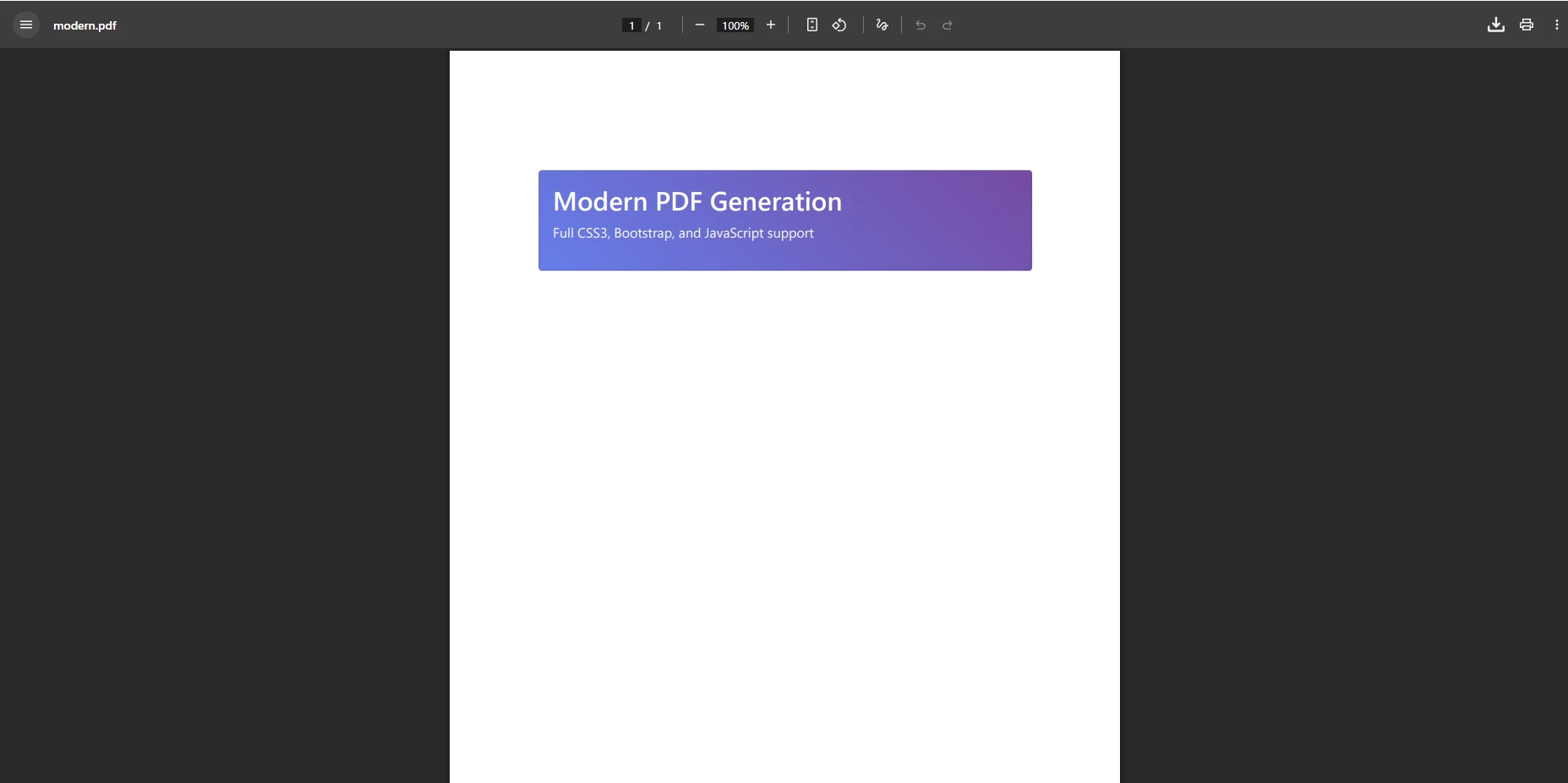
`ChromePdfRenderer`는 복잡한 레이아웃을 수작업 없이 처리합니다. CSS Grid, Flexbox, [Google Fonts의 웹 폰트](https://ironpdf.com/examples/google-fonts-htmltopdf/), JavaScript 차트를 지원합니다. 또한 라이브러리는 동적 콘텐츠에 대한 [렌더 지연](https://ironpdf.com/how-to/waitfor/)을 관리하고 반응형 페이지를 위한 [뷰포트 구성](https://ironpdf.com/how-to/viewport-zoom/)을 지원합니다. 완전한 구성 옵션은 [렌더링 옵션 참조문서](https://ironpdf.com/how-to/rendering-options/)를 참조하세요.
## ASP.NET MVC에서 Razor 뷰를 PDF로 어떻게 변환합니까?
ChromePdfRenderer는 Razor 엔진 뷰 렌더링 기능에서 두드러집니다. 전체 Razor 뷰를 ViewBag, ViewData 및 모델 바인딩에 대한 완벽한 지원과 함께 PDF로 직접 변환할 수 있습니다. 다음 예제는 서버 측에서 인보이스 뷰를 렌더링하고 이를 다운로드 가능한 PDF로 반환합니다:
```csharp
// Production-ready Razor view to PDF
public class InvoiceController : Controller
{
private readonly ChromePdfRenderer _pdfRenderer;
private readonly IInvoiceService _invoiceService;
private readonly IRazorViewToStringRenderer _razorRenderer;
public InvoiceController(
ChromePdfRenderer pdfRenderer,
IInvoiceService invoiceService,
IRazorViewToStringRenderer razorRenderer)
{
_pdfRenderer = pdfRenderer;
_invoiceService = invoiceService;
_razorRenderer = razorRenderer;
}
[HttpGet]
public async Task<IActionResult> DownloadInvoiceAsync(int id)
{
var invoice = await _invoiceService.GetInvoiceAsync(id);
if (invoice == null) return NotFound();
var htmlContent = await _razorRenderer.RenderViewToStringAsync(
"Invoice/InvoiceTemplate", invoice);
var renderOptions = new ChromePdfRenderOptions
{
PaperSize = PdfPaperSize.A4,
MarginTop = 20,
MarginBottom = 20,
PrintHtmlBackgrounds = true,
CreatePdfFormsFromHtml = true
};
var pdf = await Task.Run(() =>
_pdfRenderer.RenderHtmlAsPdf(htmlContent, renderOptions));
pdf.MetaData.Title = $"Invoice-{invoice.InvoiceNumber}";
pdf.MetaData.Subject = $"Invoice for {invoice.CustomerName}";
var fileName = $"Invoice-{invoice.InvoiceNumber}-{DateTime.UtcNow:yyyyMMdd}.pdf";
return File(pdf.BinaryData, "application/pdf", fileName);
}
}
```
### Razor 뷰 변환은 수동 빌드와 어떻게 비교됩니까?
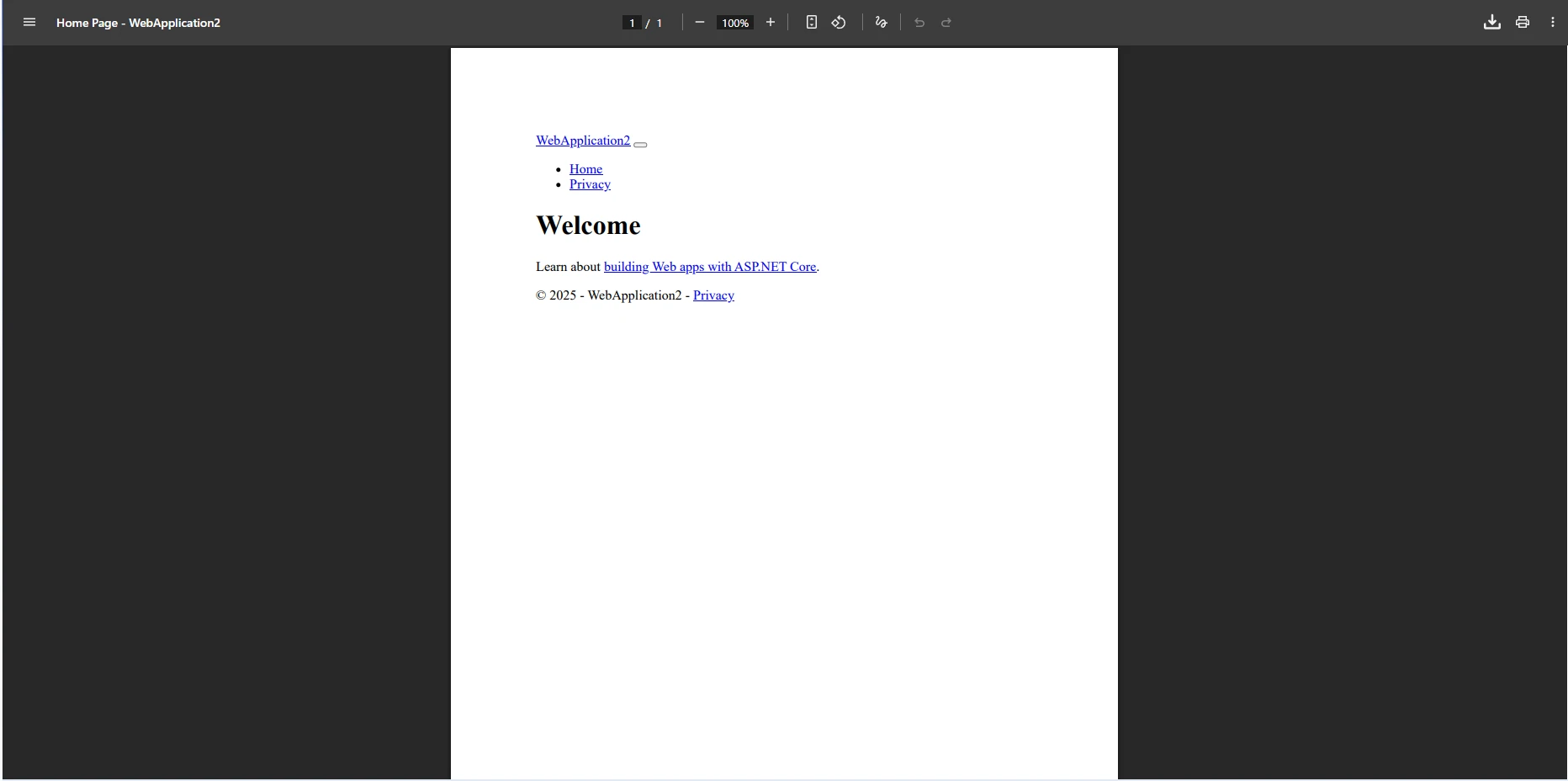
iText의 접근 방식과 대조되는 것은 코드에서 문서 구조를 수동으로 빌드해야 한다는 것입니다. 모든 헤딩, 테이블 셀, 폰트 선택 및 간격 조정은 C# 객체로 표현되어야 합니다. 브라우저에서 반복할 HTML 템플릿이 없습니다; 모든 변경은 PDF 출력에 대해 컴파일-검사 주기를 요구합니다.
ChromePdfRenderer의 Razor 통합은 기존의 Razor 뷰, HTML 파일 또는 HTML 문자열을 PDF 생성에 재사용할 수 있게 합니다. HTML ZIP 파일을 사용하거나 자산 로드를 위한 기본 URL 구성을 구현할 수도 있습니다. [CSHTML을 PDF로 변환하는 방법 안내서](https://ironpdf.com/how-to/cshtml-to-pdf-razor/)는 의존성 주입 설정을 포함한 전체 Razor 렌더링 패턴을 안내합니다.
## 파일 다운로드 및 스트리밍을 처리하여 PDF를 어떻게 생성합니까?
두 라이브러리는 웹 애플리케이션의 PDF 파일에 대한 다양한 출력 방법을 지원합니다. ChromePdfRenderer는 PDF 압축, 빠른 웹 보기를 위한 직렬화, 이미지로의 래스터화 같은 추가 기능을 제공합니다. 아래의 스트리밍 컨트롤러는 캐싱과 범위 요청 지원을 통해 대용량 PDF를 처리하는 방법을 시연합니다:
```csharp
// Streaming controller for large PDFs
public class StreamingPdfController : Controller
{
private readonly ChromePdfRenderer _ironPdfRenderer;
private readonly IMemoryCache _cache;
public StreamingPdfController(ChromePdfRenderer ironPdfRenderer, IMemoryCache cache)
{
_ironPdfRenderer = ironPdfRenderer;
_cache = cache;
}
[HttpGet]
public async Task<IActionResult> StreamLargePdf(string reportId)
{
var cacheKey = $"pdf_stream_{reportId}";
if (_cache.TryGetValue<byte[]>(cacheKey, out var cachedPdf))
return File(cachedPdf, "application/pdf", $"report_{reportId}.pdf");
Response.ContentType = "application/pdf";
Response.Headers.Add("Content-Disposition",
$"attachment; filename=large_report_{reportId}.pdf");
await using var stream = Response.BodyWriter.AsStream();
var html = await GenerateLargeHtmlReport(reportId);
var pdf = _ironPdfRenderer.RenderHtmlAsPdf(html);
pdf.SaveAs(stream);
if (pdf.BinaryData.Length < 10_000_000)
_cache.Set(cacheKey, pdf.BinaryData, TimeSpan.FromMinutes(30));
return new EmptyResult();
}
[HttpGet]
public IActionResult DownloadWithRangeSupport(string documentId)
{
var pdfBytes = GetPdfBytes(documentId);
return File(pdfBytes, "application/pdf",
$"document_{documentId}.pdf", enableRangeProcessing: true);
}
}
```
고급 시나리오에서 ChromePdfRenderer는 병렬 PDF 생성, 멀티 스레드 처리 및 [일괄 작업](https://ironpdf.com/examples/using-html-to-create-a-pdf/)을 지원합니다. [사용자 정의 로깅](https://ironpdf.com/how-to/custom-logging/)을 구현하고, 네트워크 인증을 처리하며, 쿠키를 사용하고 안전한 문서 생성을 위해 HTTP 요청 헤더를 추가할 수 있습니다.
## 두 라이브러리를 나란히 비교하면 어떻습니까?
아래 표는 ASP.NET MVC 프로젝트용 iText와 ChromePdfRenderer의 주요 차이점을 요약합니다:
<table class="content__data-table" data-content-table>
<caption>iText vs. ChromePdfRenderer -- ASP.NET MVC의 기능 비교</caption>
<thead>
<tr>
<th>특징</th>
<th>iText</th>
<th>ChromePdfRenderer</th>
</tr>
</thead>
<tbody>
<tr>
<td>HTML-을 PDF로 렌더링</td>
<td>제한적 (XMLWorker, 현대 CSS3 없음)</td>
<td>전체 Chrome 엔진 (CSS3, JS, Flexbox)</td>
</tr>
<tr>
<td>Razor / CSHTML 지원</td>
<td>네이티브 지원 없음</td>
<td>내장 Razor 뷰 렌더링</td>
</tr>
<tr>
<td>스레드 안전성</td>
<td>수동 잠금 필요</td>
<td>기본적으로 스레드 안전성</td>
</tr>
<tr>
<td>비동기 API</td>
<td>네이티브 비동기 없음</td>
<td>완전한 비동기 지원</td>
</tr>
<tr>
<td>리눅스 / Docker</td>
<td>지원됨</td>
<td>지원됨</td>
</tr>
<tr>
<td>라이선스 유형</td>
<td>AGPL (오픈 소스) 또는 상업적</td>
<td>무료 체험 제공 상업용</td>
</tr>
<tr>
<td>디지털 서명</td>
<td>예</td>
<td>예</td>
</tr>
<tr>
<td>PDF 양식</td>
<td>예 (수동)</td>
<td>예 (HTML 폼 요소에서)</td>
</tr>
</tbody>
</table>
iText는 프로그래밍 가능한 PDF 생성을 위한 세부 제어를 제공하여 문서 구조가 단순하고 고정된 경우 사용할 수 있는 옵션이 됩니다. ChromePdfRenderer는 HTML 템플릿이나 Razor 뷰를 [정확하게 렌더링](https://ironpdf.com/tutorials/pixel-perfect-html-to-pdf/)하여 전문적인 PDF 문서로 변환해야 할 때 더 강력한 선택입니다. 이는 전체 CSS3 지원과 JavaScript 실행을 포함합니다.
생산용 ASP.NET 애플리케이션에서는 ChromePdfRenderer가 뛰어난 [비동기 지원](https://ironpdf.com/examples/async/)과 의존성 주입 및 미들웨어 파이프라인을 포함한 현대 .NET 패턴과의 통합을 제공합니다. Razor 뷰를 렌더링하고, [디지털 서명](https://ironpdf.com/how-to/signing/)을 지원하며, [복잡한 레이아웃](https://ironpdf.com/how-to/html-to-pdf-page-breaks/)을 처리할 수 있는 기능은 Enterprise 애플리케이션에 선호되는 선택이 되게 합니다. 이 라이브러리는 [Blazor 서버 애플리케이션](https://ironpdf.com/how-to/blazor-tutorial/)과 문서 아카이브를 위한 PDF/A 준수를 지원합니다.
## 라이센스 및 프로젝트 고려 사항은?
iText 라이브러리는 오픈 소스 버전에 [AGPL 라이선스](https://www.gnu.org/licenses/agpl-3.0.en.html)를 사용하며, 이는 애플리케이션 코드도 오픈 소스여야 함을 요구합니다. 상업적인 라이센스는 독점 프로젝트를 위해 iText Group으로부터 제공됩니다. 이 라이센싱 고려 사항은 소스 코드를 공개할 수 없는 SaaS 제품이나 내부 Enterprise 도구에 특히 중요합니다.
ChromePdfRenderer는 개발 및 테스트를 위한 [무료 체험판](https://ironpdf.com/licensing/)이 포함된 상업적 라이센싱 모델을 사용합니다. 라이센스는 배포 환경에 따라 확장됩니다: 개발자, 단일 서버, 또는 무제한 배포 옵션. 두 가지 솔루션을 구현할 때는 Docker, Azure, Linux 환경을 포함한 배포 시나리오를 고려하십시오.
고트래픽 시나리오를 위한 성능 고려 사항에는 비동기 작업 구현, 적절한 메모리 관리 및 캐싱 전략 포함이 있습니다. ChromePdfRenderer의 Chrome 엔진은 복잡한 HTML 렌더링을 위해 우수한 성능을 제공하며, iText는 HTML이 없는 간단한 프로그래밍 가능한 PDF 생성에는 보다 효율적일 수 있습니다. 분당 수백 건의 PDF를 생성하는 애플리케이션의 경우, 현실적인 부하 아래에서의 벤치마크가 어떤 라이브러리가 인프라에 적합한지를 가장 신뢰할 수 있게 안내합니다.
대부분의 MVC 프로젝트의 경우, iText에서 ChromePdfRenderer로의 전환은 간단합니다. 핵심 변경 사항은 Chrome 엔진에 의해 렌더링된 HTML 템플릿으로 수동 문서 빌딩 코드를 대체하는 것입니다. ChromePdfRenderer는 원활한 전환을 위한 [광범위한 문서](https://ironpdf.com/docs/), [코드 예시](https://ironpdf.com/examples/using-html-to-create-a-pdf/), 및 [엔지니어링 지원](https://ironpdf.com/troubleshooting/engineering-support-for-ironpdf/)을 제공합니다.
## 다음 단계는 무엇입니까?
최신 웹 표준 지원과 함께 HTML을 PDF로 변환해야 하는 새로운 프로젝트에 대해, ChromePdfRenderer는 Chrome 기반 렌더링을 통해 분명한 이점을 제공합니다. 기본 PDF 생성을 위해 이미 iText를 사용하는 레거시 프로젝트는 HTML 렌더링 정확도가 요구되지 않는 한 기존 구현을 계속 사용할 수 있습니다.
[ChromePdfRenderer의 무료 체험판](https://ironpdf.com/licensing/)을 통해 시작하고 기존 Razor 뷰나 HTML 템플릿으로 직접 테스트하십시오. [전체 문서](https://ironpdf.com/docs/) 및 [API 참조](https://ironpdf.com/object-reference/api/)를 탐색하여 통합이 얼마나 빨리 이루어지는지 확인하십시오. 기존의 iText 기반 프로젝트를 마이그레이션하거나 [PDF 메모리 스트림 처리](https://ironpdf.com/how-to/pdf-memory-stream/) 및 [PDF/A 준수](https://ironpdf.com/how-to/pdfa/)에 대한 지침이 필요한 경우, 지원 팀이 도와드립니다.
ChromePdfRenderer와 iText 제품군을 비교하는 방법에 대한 포괄적인 견해는 전용 [iText 대 ChromePdfRenderer 비교](https://ironpdf.com/competitors/itext-vs-ironpdf/) 페이지를 참조하십시오.
[[i:(iText는 해당 소유자의 등록 상표입니다. 이 사이트는 iText와 관련이 없고, 승인받지 않았으며, 후원받지 않았습니다. 모든 제품명, 로고 및 브랜드는 해당 소유자의 자산입니다. 비교는 정보 제공 목적으로만 사용되며, 작성 시점에 공개적으로 이용 가능한 정보를 반영합니다.
)]]
ChromePdfRenderer는 Chrome 렌더링을 사용하여 CSS3 및 JavaScript를 완전히 지원하는 HTML-to-PDF 변환을 제공합니다. 반면, iText는 프로그래밍 가능한 PDF 생성을 제공하지만 현대 HTML 변환에서 어려움을 겪고 있어, 웹 표준 PDF를 필요로 하는 ASP.NET MVC 애플리케이션에는 ChromePdfRenderer가 더 나은 선택이 됩니다.
ASP.NET MVC 애플리케이션에서 PDF 문서를 생성하는 것은 보고서, 송장 및 다운로드 가능한 콘텐츠를 생성하기 위한 일반적인 요구사항입니다. iText는 수년간 인기가 있었지만, ChromePdfRenderer는 더 뛰어난 HTML 렌더링 기능이 있는 현대적인 대안을 제공합니다. 이 글은 .NET PDF 생성을 위한 정보에 근거한 결정을 내리는 데 도움이 되는 두 가지 접근 방식을 탐구합니다.
두 라이브러리는 .NET 웹 컨텍스트에서 PDF를 생성한다는 동일한 핵심 문제를 해결하지만, 근본적으로 다른 접근 방식을 취합니다. iText는 객체 모델을 통해 PDF를 프로그래밍적으로 빌드하는 반면, ChromePdfRenderer는 전체 Chrome 렌더링 엔진을 사용하여 HTML을 PDF로 변환합니다. 이러한 아키텍처적 차이를 이해하는 것이 올바른 도구를 선택하는 열쇠입니다. Microsoft의 ASP.NET MVC 프레임워크는 두 통합 패턴을 모두 지원하며, 어느 라이브러리든 표준 컨트롤러-액션 파이프라인에 연결할 수 있습니다.
각 라이브러리는 어떻게 설치하나요?
코드를 작성하기 전에 각 라이브러리를 프로젝트에 가져와야 합니다. NuGet는 .NET의 표준 패키지 관리자이며, 두 설치를 깔끔하게 처리합니다. iText의 경우, NuGet을 통해 레거시 패키지를 설치하세요:
dotnet add package iTextSharp
dotnet add package iTextSharp
SHELL
ChromePdfRenderer의 경우, 마찬가지로 NuGet을 통해 설치하시기 바랍니다:
> dotnet add package IronPdf
dotnet add package IronPdf
ChromePdfRenderer는 Chrome 렌더링 엔진을 패키지에 포함하여 서버에 추가 브라우저 설치가 필요하지 않습니다. 라이브러리는 Windows, Linux, macOS 및 컨테이너 환경을 기본적으로 지원합니다. 설치 후, 애플리케이션 시작 시 ChromePdfRenderer 라이선스 키를 추가하십시오.
MVC에서 iText를 사용하여 PDF를 생성하는 방법은 무엇인가요?
ASP.NET MVC 애플리케이션에서 iText를 사용하여 PDF 파일을 생성하려면, 먼저 NuGet을 통해 라이브러리를 설치하세요. iText 라이브러리는 PDF 생성을 위한 저수준의 제어를 Document 클래스 및 객체 모델을 통해 제공합니다.
다음 코드는 MVC 컨트롤러에서 iText로 PDF를 생성하기 위한 생산 준비 완료 구현을 설명합니다:
// Production-ready iTextSharp implementation with proper resource disposalpublic class ReportController : Controller{ private readonly ILogger<ReportController> _logger; publicReportController(ILogger<ReportController> logger) { _logger = logger; } public ActionResultGeneratePDF() { try { using var memoryStream = new MemoryStream(); using var document = new Document(PageSize.A4, 50, 50, 25, 25); using var writer = PdfWriter.GetInstance(document, memoryStream); document.Open(); document.AddTitle("Generated Report"); document.AddCreationDate(); var titleFont = FontFactory.GetFont(FontFactory.HELVETICA_BOLD, 16); document.Add(new Paragraph("Hello World", titleFont)); document.Add(new Paragraph("This is a PDF document created with iTextSharp")); var table = new PdfPTable(3); table.AddCell("Header 1"); table.AddCell("Header 2"); table.AddCell("Header 3"); document.Add(table); document.Close(); var pdfBytes = memoryStream.ToArray();Response.Headers.Add("Content-Disposition", "inline; filename=report.pdf"); _logger.LogInformation("PDF generated: {Size} bytes", pdfBytes.Length); returnFile(pdfBytes, "application/pdf"); } catch (Exception ex) { _logger.LogError(ex, "Error generating PDF"); returnStatusCode(500, "Error generating PDF document"); } }}
// Production-ready iTextSharp implementation with proper resource disposal
public class ReportController : Controller
{
    private readonly ILogger<ReportController> _logger;

    public ReportController(ILogger<ReportController> logger)
    {
        _logger = logger;
    }

    public ActionResult GeneratePDF()
    {
        try
        {
            using var memoryStream = new MemoryStream();
            using var document = new Document(PageSize.A4, 50, 50, 25, 25);
            using var writer = PdfWriter.GetInstance(document, memoryStream);

            document.Open();
            document.AddTitle("Generated Report");
            document.AddCreationDate();

            var titleFont = FontFactory.GetFont(FontFactory.HELVETICA_BOLD, 16);
            document.Add(new Paragraph("Hello World", titleFont));
            document.Add(new Paragraph("This is a PDF document created with iTextSharp"));

            var table = new PdfPTable(3);
            table.AddCell("Header 1");
            table.AddCell("Header 2");
            table.AddCell("Header 3");
            document.Add(table);

            document.Close();

            var pdfBytes = memoryStream.ToArray();
            Response.Headers.Add("Content-Disposition", "inline; filename=report.pdf");
            _logger.LogInformation("PDF generated: {Size} bytes", pdfBytes.Length);
            return File(pdfBytes, "application/pdf");
        }
        catch (Exception ex)
        {
            _logger.LogError(ex, "Error generating PDF");
            return StatusCode(500, "Error generating PDF document");
        }
    }
}
ImportsSystemImportsSystem.IOImportsMicrosoft.AspNetCore.MvcImportsMicrosoft.Extensions.LoggingImports iTextSharp.textImports iTextSharp.text.pdfPublic Class ReportControllerInheritsController PrivateReadOnly _logger AsILogger(OfReportController) Public Sub New(logger AsILogger(OfReportController)) _logger = logger End Sub Public Function GeneratePDF() AsActionResultTryUsing memoryStream As New MemoryStream()Using document As New Document(PageSize.A4, 50, 50, 25, 25)Using writer AsPdfWriter = PdfWriter.GetInstance(document, memoryStream) document.Open() document.AddTitle("Generated Report") document.AddCreationDate() Dim titleFont AsFont = FontFactory.GetFont(FontFactory.HELVETICA_BOLD, 16) document.Add(New Paragraph("Hello World", titleFont)) document.Add(New Paragraph("This is a PDF document created with iTextSharp")) Dim table As New PdfPTable(3) table.AddCell("Header 1") table.AddCell("Header 2") table.AddCell("Header 3") document.Add(table) document.Close() Dim pdfBytes AsByte() = memoryStream.ToArray() Response.Headers.Add("Content-Disposition", "inline; filename=report.pdf") _logger.LogInformation("PDF generated: {Size} bytes", pdfBytes.Length) ReturnFile(pdfBytes, "application/pdf")EndUsingEndUsingEndUsingCatch ex AsException _logger.LogError(ex, "Error generating PDF") ReturnStatusCode(500, "Error generating PDF document")EndTry End FunctionEnd Class
Imports System
Imports System.IO
Imports Microsoft.AspNetCore.Mvc
Imports Microsoft.Extensions.Logging
Imports iTextSharp.text
Imports iTextSharp.text.pdf

Public Class ReportController
    Inherits Controller

    Private ReadOnly _logger As ILogger(Of ReportController)

    Public Sub New(logger As ILogger(Of ReportController))
        _logger = logger
    End Sub

    Public Function GeneratePDF() As ActionResult
        Try
            Using memoryStream As New MemoryStream()
                Using document As New Document(PageSize.A4, 50, 50, 25, 25)
                    Using writer As PdfWriter = PdfWriter.GetInstance(document, memoryStream)
                        document.Open()
                        document.AddTitle("Generated Report")
                        document.AddCreationDate()

                        Dim titleFont As Font = FontFactory.GetFont(FontFactory.HELVETICA_BOLD, 16)
                        document.Add(New Paragraph("Hello World", titleFont))
                        document.Add(New Paragraph("This is a PDF document created with iTextSharp"))

                        Dim table As New PdfPTable(3)
                        table.AddCell("Header 1")
                        table.AddCell("Header 2")
                        table.AddCell("Header 3")
                        document.Add(table)

                        document.Close()

                        Dim pdfBytes As Byte() = memoryStream.ToArray()
                        Response.Headers.Add("Content-Disposition", "inline; filename=report.pdf")
                        _logger.LogInformation("PDF generated: {Size} bytes", pdfBytes.Length)
                        Return File(pdfBytes, "application/pdf")
                    End Using
                End Using
            End Using
        Catch ex As Exception
            _logger.LogError(ex, "Error generating PDF")
            Return StatusCode(500, "Error generating PDF document")
        End Try
    End Function
End Class
iText 출력은 어떻게 보이나요?
이 코드는 기본 접근 방식을 설명합니다: Document 인스턴스를 생성, 스트림에 PdfWriter를 연결, 요소 객체를 사용하여 콘텐츠를 추가, 그리고 액션 결과를 통해 파일을 반환합니다. 실행에서는 프로덕션 시스템에 필수적인 리소스 삭제 패턴을 처리합니다. 더 발전된 시나리오를 위해, 사용자 정의 용지 크기를 구성하거나, 페이지 방향을 관리하거나, 페이지 번호를 추가할 수 있습니다.
프로그래밍 방식의 접근은 페이지의 모든 요소에 대한 정밀한 제어를 제공합니다. 그러한 정밀성은 인보이스, 인증서 또는 구조가 항상 같은 양식을 사용하여 고정 레이아웃으로 생성해야 할 때 유용합니다. 그러나 콘텐츠가 동적이거나 HTML 템플릿에 의해 구동될 때는 부담이 됩니다.
iText 라이브러리를 사용한 HTML to PDF 변환의 도전 과제는 무엇인가요?
iText는 프로그래밍 가능한 PDF 생성에 뛰어나지만, HTML을 PDF로 변환하는 것은 상당한 도전 과제를 제공합니다. 더 이상 사용되지 않는 HTMLWorker 클래스와 그 대체 XMLWorker는 제한된 CSS 지원을 제공하며, 특히 반응형 CSS 및 JavaScript 렌더링 콘텐츠를 다룰 때 현대 웹 콘텐츠와의 호환성에서 어려움을 겪습니다.
// HTML conversion with iTextSharp -- note the CSS limitationspublic class HtmlToPdfController : Controller{ private readonly ILogger<HtmlToPdfController> _logger; publicHtmlToPdfController(ILogger<HtmlToPdfController> logger) { _logger = logger; } public async Task<ActionResult> ConvertHtmlAsync(string htmlContent) { if (string.IsNullOrWhiteSpace(htmlContent)) returnBadRequest("HTML content is required"); return awaitTask.Run(() => { using var stream = new MemoryStream(); using var document = new Document(PageSize.A4); using var writer = PdfWriter.GetInstance(document, stream); document.Open(); var cssResolver = XMLWorkerHelper.GetInstance().GetDefaultCssResolver(true); var fontProvider = new XMLWorkerFontProvider(); var cssAppliers = new CssAppliersImpl(fontProvider); var htmlContext = new HtmlPipelineContext(cssAppliers); htmlContext.SetTagFactory(Tags.GetHtmlTagProcessorFactory()); // Pipeline with limited CSS3 support var pdf = new PdfWriterPipeline(document, writer); var html = new HtmlPipeline(htmlContext, pdf); var css = new CssResolverPipeline(cssResolver, html); var worker = new XMLWorker(css, true); var parser = new XMLParser(worker); using var stringReader = new StringReader(htmlContent); parser.Parse(stringReader); document.Close(); returnFile(stream.ToArray(), "application/pdf", "converted.pdf"); }); }}
// HTML conversion with iTextSharp -- note the CSS limitations
public class HtmlToPdfController : Controller
{
    private readonly ILogger<HtmlToPdfController> _logger;

    public HtmlToPdfController(ILogger<HtmlToPdfController> logger)
    {
        _logger = logger;
    }

    public async Task<ActionResult> ConvertHtmlAsync(string htmlContent)
    {
        if (string.IsNullOrWhiteSpace(htmlContent))
            return BadRequest("HTML content is required");

        return await Task.Run(() =>
        {
            using var stream = new MemoryStream();
            using var document = new Document(PageSize.A4);
            using var writer = PdfWriter.GetInstance(document, stream);

            document.Open();

            var cssResolver = XMLWorkerHelper.GetInstance().GetDefaultCssResolver(true);
            var fontProvider = new XMLWorkerFontProvider();
            var cssAppliers = new CssAppliersImpl(fontProvider);
            var htmlContext = new HtmlPipelineContext(cssAppliers);
            htmlContext.SetTagFactory(Tags.GetHtmlTagProcessorFactory());

            // Pipeline with limited CSS3 support
            var pdf = new PdfWriterPipeline(document, writer);
            var html = new HtmlPipeline(htmlContext, pdf);
            var css = new CssResolverPipeline(cssResolver, html);

            var worker = new XMLWorker(css, true);
            var parser = new XMLParser(worker);

            using var stringReader = new StringReader(htmlContent);
            parser.Parse(stringReader);
            document.Close();

            return File(stream.ToArray(), "application/pdf", "converted.pdf");
        });
    }
}
ImportsSystemImportsSystem.IOImportsSystem.Threading.TasksImportsSystem.Web.MvcImports iTextSharp.textImports iTextSharp.text.pdfImports iTextSharp.tool.xmlImports iTextSharp.tool.xml.pipeline.cssImports iTextSharp.tool.xml.pipeline.htmlImports iTextSharp.tool.xml.pipeline.endImportsMicrosoft.Extensions.Logging' HTML conversion with iTextSharp -- note the CSS limitationsPublic Class HtmlToPdfControllerInheritsController PrivateReadOnly _logger AsILogger(OfHtmlToPdfController) Public Sub New(logger AsILogger(OfHtmlToPdfController)) _logger = logger End Sub PublicAsync Function ConvertHtmlAsync(htmlContent AsString) AsTask(OfActionResult) IfString.IsNullOrWhiteSpace(htmlContent) Then ReturnBadRequest("HTML content is required") End If ReturnAwaitTask.Run(Function()Using stream As New MemoryStream()Using document As New Document(PageSize.A4)Using writer = PdfWriter.GetInstance(document, stream) document.Open() Dim cssResolver = XMLWorkerHelper.GetInstance().GetDefaultCssResolver(True) Dim fontProvider = New XMLWorkerFontProvider() Dim cssAppliers = New CssAppliersImpl(fontProvider) Dim htmlContext = New HtmlPipelineContext(cssAppliers) htmlContext.SetTagFactory(Tags.GetHtmlTagProcessorFactory()) ' Pipeline with limited CSS3 support Dim pdf = New PdfWriterPipeline(document, writer) Dim html = New HtmlPipeline(htmlContext, pdf) Dim css = New CssResolverPipeline(cssResolver, html) Dim worker = New XMLWorker(css, True) Dim parser = New XMLParser(worker)Using stringReader As New StringReader(htmlContent) parser.Parse(stringReader)EndUsing document.Close()EndUsingEndUsingEndUsing ReturnFile(stream.ToArray(), "application/pdf", "converted.pdf") End Function) End FunctionEnd Class
Imports System
Imports System.IO
Imports System.Threading.Tasks
Imports System.Web.Mvc
Imports iTextSharp.text
Imports iTextSharp.text.pdf
Imports iTextSharp.tool.xml
Imports iTextSharp.tool.xml.pipeline.css
Imports iTextSharp.tool.xml.pipeline.html
Imports iTextSharp.tool.xml.pipeline.end
Imports Microsoft.Extensions.Logging

' HTML conversion with iTextSharp -- note the CSS limitations
Public Class HtmlToPdfController
    Inherits Controller

    Private ReadOnly _logger As ILogger(Of HtmlToPdfController)

    Public Sub New(logger As ILogger(Of HtmlToPdfController))
        _logger = logger
    End Sub

    Public Async Function ConvertHtmlAsync(htmlContent As String) As Task(Of ActionResult)
        If String.IsNullOrWhiteSpace(htmlContent) Then
            Return BadRequest("HTML content is required")
        End If

        Return Await Task.Run(Function()
                                  Using stream As New MemoryStream()
                                      Using document As New Document(PageSize.A4)
                                          Using writer = PdfWriter.GetInstance(document, stream)
                                              document.Open()

                                              Dim cssResolver = XMLWorkerHelper.GetInstance().GetDefaultCssResolver(True)
                                              Dim fontProvider = New XMLWorkerFontProvider()
                                              Dim cssAppliers = New CssAppliersImpl(fontProvider)
                                              Dim htmlContext = New HtmlPipelineContext(cssAppliers)
                                              htmlContext.SetTagFactory(Tags.GetHtmlTagProcessorFactory())

                                              ' Pipeline with limited CSS3 support
                                              Dim pdf = New PdfWriterPipeline(document, writer)
                                              Dim html = New HtmlPipeline(htmlContext, pdf)
                                              Dim css = New CssResolverPipeline(cssResolver, html)

                                              Dim worker = New XMLWorker(css, True)
                                              Dim parser = New XMLParser(worker)

                                              Using stringReader As New StringReader(htmlContent)
                                                  parser.Parse(stringReader)
                                              End Using

                                              document.Close()
                                          End Using
                                      End Using
                                  End Using

                                  Return File(stream.ToArray(), "application/pdf", "converted.pdf")
                              End Function)
    End Function
End Class
iText는 HTML 렌더링을 얼마나 잘 처리하나요?
제한 사항은 Bootstrap 레이아웃, JavaScript로 렌더링된 콘텐츠, 또는 복잡한 CSS3 스타일 작업 시에 분명해집니다. 일반적인 문제로는 누락된 웹 글꼴, 깨진 반응형 레이아웃, CSS 미디어 타입에 대한 지원 부족 등이 있습니다. 또한, iText는 HTML 콘텐츠를 변환할 때 국제 언어 문자와 SVG 그래픽을 처리하는 데 어려움을 겪습니다.
이러한 제한 사항은 단순히 겉모습의 문제가 아닙니다. 배경색이 보이지 않거나 그리드가 붕괴되어 고객에게 보여지는 인보이스나 보고서가 잘못 렌더링되면, PDF는 그 목적을 잃습니다. HTML 템플릿을 유지하는 팀의 경우, iText의 객체 모델에서 동일한 레이아웃을 다시 구축하는 것은 모든 문서 디자인의 두 가지 버전을 유지 관리해야 한다는 것을 의미합니다. 그 중복은 비용을 추가하고 웹 보기와 PDF 출력 사이에 드리프트를 초래합니다.
Chrome 엔진을 사용하여 HTML에서 PDF를 어떻게 생성합니까?
ChromePdfRenderer는 Chrome 렌더링 엔진을 사용하여 PDF 생성을 변환하여 픽셀 완벽한 HTML에서 PDF로의 변환을 보장합니다. Visual Studio 프로젝트에서 간단한 접근 방식을 시작하려면 ChromePdfRenderer NuGet 패키지를 설치하세요.
using IronPdf;// Configure ChromePdfRenderer in Program.cs (top-level statements, .NET 10)var builder = WebApplication.CreateBuilder(args);builder.Services.AddSingleton<ChromePdfRenderer>(_ =>{ var renderer = new ChromePdfRenderer(); renderer.RenderingOptions.MarginTop = 10; renderer.RenderingOptions.MarginBottom = 10; renderer.RenderingOptions.EnableJavaScript = true; renderer.RenderingOptions.CssMediaType = PdfCssMediaType.Print; return renderer;});builder.Services.AddMemoryCache();builder.Services.AddControllersWithViews();var app = builder.Build();app.MapControllers();app.Run();
using IronPdf;

// Configure ChromePdfRenderer in Program.cs (top-level statements, .NET 10)
var builder = WebApplication.CreateBuilder(args);

builder.Services.AddSingleton<ChromePdfRenderer>(_ =>
{
    var renderer = new ChromePdfRenderer();
    renderer.RenderingOptions.MarginTop = 10;
    renderer.RenderingOptions.MarginBottom = 10;
    renderer.RenderingOptions.EnableJavaScript = true;
    renderer.RenderingOptions.CssMediaType = PdfCssMediaType.Print;
    return renderer;
});

builder.Services.AddMemoryCache();
builder.Services.AddControllersWithViews();

var app = builder.Build();
app.MapControllers();
app.Run();
Imports IronPdf

' Configure ChromePdfRenderer in Program.vb (top-level statements, .NET 10)
Dim builder = WebApplication.CreateBuilder(args)

builder.Services.AddSingleton(Function(_)
    Dim renderer = New ChromePdfRenderer()
    renderer.RenderingOptions.MarginTop = 10
    renderer.RenderingOptions.MarginBottom = 10
    renderer.RenderingOptions.EnableJavaScript = True
    renderer.RenderingOptions.CssMediaType = PdfCssMediaType.Print
    Return renderer
End Function)

builder.Services.AddMemoryCache()
builder.Services.AddControllersWithViews()

Dim app = builder.Build()
app.MapControllers()
app.Run()
Chrome 렌더링에서 기대할 수 있는 품질은 무엇입니까?
ChromePdfRenderer는 복잡한 레이아웃을 수작업 없이 처리합니다. CSS Grid, Flexbox, Google Fonts의 웹 폰트, JavaScript 차트를 지원합니다. 또한 라이브러리는 동적 콘텐츠에 대한 렌더 지연을 관리하고 반응형 페이지를 위한 뷰포트 구성을 지원합니다. 완전한 구성 옵션은 렌더링 옵션 참조문서를 참조하세요.
ASP.NET MVC에서 Razor 뷰를 PDF로 어떻게 변환합니까?
ChromePdfRenderer는 Razor 엔진 뷰 렌더링 기능에서 두드러집니다. 전체 Razor 뷰를 ViewBag, ViewData 및 모델 바인딩에 대한 완벽한 지원과 함께 PDF로 직접 변환할 수 있습니다. 다음 예제는 서버 측에서 인보이스 뷰를 렌더링하고 이를 다운로드 가능한 PDF로 반환합니다:
// Production-ready Razor view to PDFpublic class InvoiceController : Controller{ private readonly ChromePdfRenderer _pdfRenderer; private readonly IInvoiceService _invoiceService; private readonly IRazorViewToStringRenderer _razorRenderer; publicInvoiceController( ChromePdfRenderer pdfRenderer, IInvoiceService invoiceService, IRazorViewToStringRenderer razorRenderer) { _pdfRenderer = pdfRenderer; _invoiceService = invoiceService; _razorRenderer = razorRenderer; } [HttpGet] public async Task<IActionResult> DownloadInvoiceAsync(int id) { var invoice = await _invoiceService.GetInvoiceAsync(id); if (invoice == null) returnNotFound(); var htmlContent = await _razorRenderer.RenderViewToStringAsync( "Invoice/InvoiceTemplate", invoice); var renderOptions = new ChromePdfRenderOptions {PaperSize = PdfPaperSize.A4,MarginTop = 20,MarginBottom = 20,PrintHtmlBackgrounds = true,CreatePdfFormsFromHtml = true }; var pdf = awaitTask.Run(() => _pdfRenderer.RenderHtmlAsPdf(htmlContent, renderOptions)); pdf.MetaData.Title = $"Invoice-{invoice.InvoiceNumber}"; pdf.MetaData.Subject = $"Invoice for {invoice.CustomerName}"; var fileName = $"Invoice-{invoice.InvoiceNumber}-{DateTime.UtcNow:yyyyMMdd}.pdf"; returnFile(pdf.BinaryData, "application/pdf", fileName); }}
// Production-ready Razor view to PDF
public class InvoiceController : Controller
{
    private readonly ChromePdfRenderer _pdfRenderer;
    private readonly IInvoiceService _invoiceService;
    private readonly IRazorViewToStringRenderer _razorRenderer;

    public InvoiceController(
        ChromePdfRenderer pdfRenderer,
        IInvoiceService invoiceService,
        IRazorViewToStringRenderer razorRenderer)
    {
        _pdfRenderer = pdfRenderer;
        _invoiceService = invoiceService;
        _razorRenderer = razorRenderer;
    }

    [HttpGet]
    public async Task<IActionResult> DownloadInvoiceAsync(int id)
    {
        var invoice = await _invoiceService.GetInvoiceAsync(id);
        if (invoice == null) return NotFound();

        var htmlContent = await _razorRenderer.RenderViewToStringAsync(
            "Invoice/InvoiceTemplate", invoice);

        var renderOptions = new ChromePdfRenderOptions
        {
            PaperSize = PdfPaperSize.A4,
            MarginTop = 20,
            MarginBottom = 20,
            PrintHtmlBackgrounds = true,
            CreatePdfFormsFromHtml = true
        };

        var pdf = await Task.Run(() =>
            _pdfRenderer.RenderHtmlAsPdf(htmlContent, renderOptions));

        pdf.MetaData.Title = $"Invoice-{invoice.InvoiceNumber}";
        pdf.MetaData.Subject = $"Invoice for {invoice.CustomerName}";

        var fileName = $"Invoice-{invoice.InvoiceNumber}-{DateTime.UtcNow:yyyyMMdd}.pdf";
        return File(pdf.BinaryData, "application/pdf", fileName);
    }
}
ImportsSystemImportsSystem.Threading.TasksImportsMicrosoft.AspNetCore.Mvc' Production-ready Razor view to PDFPublic Class InvoiceControllerInheritsController PrivateReadOnly _pdfRenderer AsChromePdfRenderer PrivateReadOnly _invoiceService AsIInvoiceService PrivateReadOnly _razorRenderer AsIRazorViewToStringRenderer Public Sub New(pdfRenderer AsChromePdfRenderer, invoiceService AsIInvoiceService, razorRenderer AsIRazorViewToStringRenderer) _pdfRenderer = pdfRenderer _invoiceService = invoiceService _razorRenderer = razorRenderer End Sub <HttpGet> PublicAsync Function DownloadInvoiceAsync(id AsInteger) AsTask(OfIActionResult) Dim invoice = Await _invoiceService.GetInvoiceAsync(id) If invoice Is Nothing Then ReturnNotFound() Dim htmlContent = Await _razorRenderer.RenderViewToStringAsync("Invoice/InvoiceTemplate", invoice) Dim renderOptions As New ChromePdfRenderOptionsWith { .PaperSize = PdfPaperSize.A4, .MarginTop = 20, .MarginBottom = 20, .PrintHtmlBackgrounds = True, .CreatePdfFormsFromHtml = True } Dim pdf = AwaitTask.Run(Function() _pdfRenderer.RenderHtmlAsPdf(htmlContent, renderOptions)) pdf.MetaData.Title = $"Invoice-{invoice.InvoiceNumber}" pdf.MetaData.Subject = $"Invoice for {invoice.CustomerName}" Dim fileName = $"Invoice-{invoice.InvoiceNumber}-{DateTime.UtcNow:yyyyMMdd}.pdf" ReturnFile(pdf.BinaryData, "application/pdf", fileName) End FunctionEnd Class
Imports System
Imports System.Threading.Tasks
Imports Microsoft.AspNetCore.Mvc

' Production-ready Razor view to PDF
Public Class InvoiceController
    Inherits Controller

    Private ReadOnly _pdfRenderer As ChromePdfRenderer
    Private ReadOnly _invoiceService As IInvoiceService
    Private ReadOnly _razorRenderer As IRazorViewToStringRenderer

    Public Sub New(pdfRenderer As ChromePdfRenderer, invoiceService As IInvoiceService, razorRenderer As IRazorViewToStringRenderer)
        _pdfRenderer = pdfRenderer
        _invoiceService = invoiceService
        _razorRenderer = razorRenderer
    End Sub

    <HttpGet>
    Public Async Function DownloadInvoiceAsync(id As Integer) As Task(Of IActionResult)
        Dim invoice = Await _invoiceService.GetInvoiceAsync(id)
        If invoice Is Nothing Then Return NotFound()

        Dim htmlContent = Await _razorRenderer.RenderViewToStringAsync("Invoice/InvoiceTemplate", invoice)

        Dim renderOptions As New ChromePdfRenderOptions With {
            .PaperSize = PdfPaperSize.A4,
            .MarginTop = 20,
            .MarginBottom = 20,
            .PrintHtmlBackgrounds = True,
            .CreatePdfFormsFromHtml = True
        }

        Dim pdf = Await Task.Run(Function() _pdfRenderer.RenderHtmlAsPdf(htmlContent, renderOptions))

        pdf.MetaData.Title = $"Invoice-{invoice.InvoiceNumber}"
        pdf.MetaData.Subject = $"Invoice for {invoice.CustomerName}"

        Dim fileName = $"Invoice-{invoice.InvoiceNumber}-{DateTime.UtcNow:yyyyMMdd}.pdf"
        Return File(pdf.BinaryData, "application/pdf", fileName)
    End Function
End Class
Razor 뷰 변환은 수동 빌드와 어떻게 비교됩니까?
iText의 접근 방식과 대조되는 것은 코드에서 문서 구조를 수동으로 빌드해야 한다는 것입니다. 모든 헤딩, 테이블 셀, 폰트 선택 및 간격 조정은 C# 객체로 표현되어야 합니다. 브라우저에서 반복할 HTML 템플릿이 없습니다; 모든 변경은 PDF 출력에 대해 컴파일-검사 주기를 요구합니다.
ChromePdfRenderer의 Razor 통합은 기존의 Razor 뷰, HTML 파일 또는 HTML 문자열을 PDF 생성에 재사용할 수 있게 합니다. HTML ZIP 파일을 사용하거나 자산 로드를 위한 기본 URL 구성을 구현할 수도 있습니다. CSHTML을 PDF로 변환하는 방법 안내서는 의존성 주입 설정을 포함한 전체 Razor 렌더링 패턴을 안내합니다.
파일 다운로드 및 스트리밍을 처리하여 PDF를 어떻게 생성합니까?
두 라이브러리는 웹 애플리케이션의 PDF 파일에 대한 다양한 출력 방법을 지원합니다. ChromePdfRenderer는 PDF 압축, 빠른 웹 보기를 위한 직렬화, 이미지로의 래스터화 같은 추가 기능을 제공합니다. 아래의 스트리밍 컨트롤러는 캐싱과 범위 요청 지원을 통해 대용량 PDF를 처리하는 방법을 시연합니다:
// Streaming controller for large PDFspublic class StreamingPdfController : Controller{ private readonly ChromePdfRenderer _ironPdfRenderer; private readonly IMemoryCache _cache; publicStreamingPdfController(ChromePdfRenderer ironPdfRenderer, IMemoryCache cache) { _ironPdfRenderer = ironPdfRenderer; _cache = cache; } [HttpGet] public async Task<IActionResult> StreamLargePdf(string reportId) { var cacheKey = $"pdf_stream_{reportId}"; if (_cache.TryGetValue<byte[]>(cacheKey, out var cachedPdf)) returnFile(cachedPdf, "application/pdf", $"report_{reportId}.pdf");Response.ContentType = "application/pdf";Response.Headers.Add("Content-Disposition", $"attachment; filename=large_report_{reportId}.pdf"); await using var stream = Response.BodyWriter.AsStream(); var html = awaitGenerateLargeHtmlReport(reportId); var pdf = _ironPdfRenderer.RenderHtmlAsPdf(html); pdf.SaveAs(stream); if (pdf.BinaryData.Length < 10_000_000) _cache.Set(cacheKey, pdf.BinaryData, TimeSpan.FromMinutes(30)); return new EmptyResult(); } [HttpGet] public IActionResultDownloadWithRangeSupport(string documentId) { var pdfBytes = GetPdfBytes(documentId); returnFile(pdfBytes, "application/pdf", $"document_{documentId}.pdf", enableRangeProcessing: true); }}
// Streaming controller for large PDFs
public class StreamingPdfController : Controller
{
    private readonly ChromePdfRenderer _ironPdfRenderer;
    private readonly IMemoryCache _cache;

    public StreamingPdfController(ChromePdfRenderer ironPdfRenderer, IMemoryCache cache)
    {
        _ironPdfRenderer = ironPdfRenderer;
        _cache = cache;
    }

    [HttpGet]
    public async Task<IActionResult> StreamLargePdf(string reportId)
    {
        var cacheKey = $"pdf_stream_{reportId}";
        if (_cache.TryGetValue<byte[]>(cacheKey, out var cachedPdf))
            return File(cachedPdf, "application/pdf", $"report_{reportId}.pdf");

        Response.ContentType = "application/pdf";
        Response.Headers.Add("Content-Disposition",
            $"attachment; filename=large_report_{reportId}.pdf");

        await using var stream = Response.BodyWriter.AsStream();
        var html = await GenerateLargeHtmlReport(reportId);
        var pdf = _ironPdfRenderer.RenderHtmlAsPdf(html);
        pdf.SaveAs(stream);

        if (pdf.BinaryData.Length < 10_000_000)
            _cache.Set(cacheKey, pdf.BinaryData, TimeSpan.FromMinutes(30));

        return new EmptyResult();
    }

    [HttpGet]
    public IActionResult DownloadWithRangeSupport(string documentId)
    {
        var pdfBytes = GetPdfBytes(documentId);
        return File(pdfBytes, "application/pdf",
            $"document_{documentId}.pdf", enableRangeProcessing: true);
    }
}
ImportsSystemImportsSystem.Threading.TasksImportsMicrosoft.AspNetCore.MvcImportsMicrosoft.Extensions.Caching.Memory' Streaming controller for large PDFsPublic Class StreamingPdfControllerInheritsController PrivateReadOnly _ironPdfRenderer AsChromePdfRenderer PrivateReadOnly _cache AsIMemoryCache Public Sub New(ironPdfRenderer AsChromePdfRenderer, cache AsIMemoryCache) _ironPdfRenderer = ironPdfRenderer _cache = cache End Sub <HttpGet> PublicAsync Function StreamLargePdf(reportId AsString) AsTask(OfIActionResult) Dim cacheKey = $"pdf_stream_{reportId}" Dim cachedPdf AsByte() = Nothing If _cache.TryGetValue(cacheKey, cachedPdf) Then ReturnFile(cachedPdf, "application/pdf", $"report_{reportId}.pdf") End If Response.ContentType = "application/pdf" Response.Headers.Add("Content-Disposition", $"attachment; filename=large_report_{reportId}.pdf")AwaitUsing stream = Response.BodyWriter.AsStream() Dim html = AwaitGenerateLargeHtmlReport(reportId) Dim pdf = _ironPdfRenderer.RenderHtmlAsPdf(html) pdf.SaveAs(stream) If pdf.BinaryData.Length < 10000000 Then _cache.Set(cacheKey, pdf.BinaryData, TimeSpan.FromMinutes(30)) End IfEndUsing Return New EmptyResult() End Function <HttpGet> Public Function DownloadWithRangeSupport(documentId AsString) AsIActionResult Dim pdfBytes = GetPdfBytes(documentId) ReturnFile(pdfBytes, "application/pdf", $"document_{documentId}.pdf", enableRangeProcessing:=True) End FunctionEnd Class
Imports System
Imports System.Threading.Tasks
Imports Microsoft.AspNetCore.Mvc
Imports Microsoft.Extensions.Caching.Memory

' Streaming controller for large PDFs
Public Class StreamingPdfController
    Inherits Controller

    Private ReadOnly _ironPdfRenderer As ChromePdfRenderer
    Private ReadOnly _cache As IMemoryCache

    Public Sub New(ironPdfRenderer As ChromePdfRenderer, cache As IMemoryCache)
        _ironPdfRenderer = ironPdfRenderer
        _cache = cache
    End Sub

    <HttpGet>
    Public Async Function StreamLargePdf(reportId As String) As Task(Of IActionResult)
        Dim cacheKey = $"pdf_stream_{reportId}"
        Dim cachedPdf As Byte() = Nothing

        If _cache.TryGetValue(cacheKey, cachedPdf) Then
            Return File(cachedPdf, "application/pdf", $"report_{reportId}.pdf")
        End If

        Response.ContentType = "application/pdf"
        Response.Headers.Add("Content-Disposition", $"attachment; filename=large_report_{reportId}.pdf")

        Await Using stream = Response.BodyWriter.AsStream()
            Dim html = Await GenerateLargeHtmlReport(reportId)
            Dim pdf = _ironPdfRenderer.RenderHtmlAsPdf(html)
            pdf.SaveAs(stream)

            If pdf.BinaryData.Length < 10000000 Then
                _cache.Set(cacheKey, pdf.BinaryData, TimeSpan.FromMinutes(30))
            End If
        End Using

        Return New EmptyResult()
    End Function

    <HttpGet>
    Public Function DownloadWithRangeSupport(documentId As String) As IActionResult
        Dim pdfBytes = GetPdfBytes(documentId)
        Return File(pdfBytes, "application/pdf", $"document_{documentId}.pdf", enableRangeProcessing:=True)
    End Function
End Class
고급 시나리오에서 ChromePdfRenderer는 병렬 PDF 생성, 멀티 스레드 처리 및 일괄 작업을 지원합니다. 사용자 정의 로깅을 구현하고, 네트워크 인증을 처리하며, 쿠키를 사용하고 안전한 문서 생성을 위해 HTTP 요청 헤더를 추가할 수 있습니다.
두 라이브러리를 나란히 비교하면 어떻습니까?
아래 표는 ASP.NET MVC 프로젝트용 iText와 ChromePdfRenderer의 주요 차이점을 요약합니다:
iText vs. ChromePdfRenderer -- ASP.NET MVC의 기능 비교
특징
iText
ChromePdfRenderer
HTML-을 PDF로 렌더링
제한적 (XMLWorker, 현대 CSS3 없음)
전체 Chrome 엔진 (CSS3, JS, Flexbox)
Razor / CSHTML 지원
네이티브 지원 없음
내장 Razor 뷰 렌더링
스레드 안전성
수동 잠금 필요
기본적으로 스레드 안전성
비동기 API
네이티브 비동기 없음
완전한 비동기 지원
리눅스 / Docker
지원됨
지원됨
라이선스 유형
AGPL (오픈 소스) 또는 상업적
무료 체험 제공 상업용
디지털 서명
예
예
PDF 양식
예 (수동)
예 (HTML 폼 요소에서)
iText는 프로그래밍 가능한 PDF 생성을 위한 세부 제어를 제공하여 문서 구조가 단순하고 고정된 경우 사용할 수 있는 옵션이 됩니다. ChromePdfRenderer는 HTML 템플릿이나 Razor 뷰를 정확하게 렌더링하여 전문적인 PDF 문서로 변환해야 할 때 더 강력한 선택입니다. 이는 전체 CSS3 지원과 JavaScript 실행을 포함합니다.
생산용 ASP.NET 애플리케이션에서는 ChromePdfRenderer가 뛰어난 비동기 지원과 의존성 주입 및 미들웨어 파이프라인을 포함한 현대 .NET 패턴과의 통합을 제공합니다. Razor 뷰를 렌더링하고, 디지털 서명을 지원하며, 복잡한 레이아웃을 처리할 수 있는 기능은 Enterprise 애플리케이션에 선호되는 선택이 되게 합니다. 이 라이브러리는 Blazor 서버 애플리케이션과 문서 아카이브를 위한 PDF/A 준수를 지원합니다.
라이센스 및 프로젝트 고려 사항은?
iText 라이브러리는 오픈 소스 버전에 AGPL 라이선스를 사용하며, 이는 애플리케이션 코드도 오픈 소스여야 함을 요구합니다. 상업적인 라이센스는 독점 프로젝트를 위해 iText Group으로부터 제공됩니다. 이 라이센싱 고려 사항은 소스 코드를 공개할 수 없는 SaaS 제품이나 내부 Enterprise 도구에 특히 중요합니다.
ChromePdfRenderer는 개발 및 테스트를 위한 무료 체험판이 포함된 상업적 라이센싱 모델을 사용합니다. 라이센스는 배포 환경에 따라 확장됩니다: 개발자, 단일 서버, 또는 무제한 배포 옵션. 두 가지 솔루션을 구현할 때는 Docker, Azure, Linux 환경을 포함한 배포 시나리오를 고려하십시오.
고트래픽 시나리오를 위한 성능 고려 사항에는 비동기 작업 구현, 적절한 메모리 관리 및 캐싱 전략 포함이 있습니다. ChromePdfRenderer의 Chrome 엔진은 복잡한 HTML 렌더링을 위해 우수한 성능을 제공하며, iText는 HTML이 없는 간단한 프로그래밍 가능한 PDF 생성에는 보다 효율적일 수 있습니다. 분당 수백 건의 PDF를 생성하는 애플리케이션의 경우, 현실적인 부하 아래에서의 벤치마크가 어떤 라이브러리가 인프라에 적합한지를 가장 신뢰할 수 있게 안내합니다.
대부분의 MVC 프로젝트의 경우, iText에서 ChromePdfRenderer로의 전환은 간단합니다. 핵심 변경 사항은 Chrome 엔진에 의해 렌더링된 HTML 템플릿으로 수동 문서 빌딩 코드를 대체하는 것입니다. ChromePdfRenderer는 원활한 전환을 위한 광범위한 문서, 코드 예시, 및 엔지니어링 지원을 제공합니다.
다음 단계는 무엇입니까?
최신 웹 표준 지원과 함께 HTML을 PDF로 변환해야 하는 새로운 프로젝트에 대해, ChromePdfRenderer는 Chrome 기반 렌더링을 통해 분명한 이점을 제공합니다. 기본 PDF 생성을 위해 이미 iText를 사용하는 레거시 프로젝트는 HTML 렌더링 정확도가 요구되지 않는 한 기존 구현을 계속 사용할 수 있습니다.
참고해 주세요: iText는 해당 소유자의 등록 상표입니다. 이 사이트는 iText와 관련이 없고, 승인받지 않았으며, 후원받지 않았습니다. 모든 제품명, 로고 및 브랜드는 해당 소유자의 자산입니다. 비교는 정보 제공 목적으로만 사용되며, 작성 시점에 공개적으로 이용 가능한 정보를 반영합니다.
커티스 차우는 칼턴 대학교에서 컴퓨터 과학 학사 학위를 취득했으며, Node.js, TypeScript, JavaScript, React를 전문으로 하는 프론트엔드 개발자입니다. 직관적이고 미적으로 뛰어난 사용자 인터페이스를 만드는 데 열정을 가진 그는 최신 프레임워크를 활용하고, 잘 구성되고 시각적으로 매력적인 매뉴얼을 제작하는 것을 즐깁니다.

















