




업데이트됨 2026년 4월 23일
.NET에서 Microsoft.Extensions.AI로 LLM 통합 간소화
AI는 소프트웨어 개발을 변혁하고 있으나, 대규모 언어 모델(LLM)을 .NET에 통합하는 것은 지금까지 복잡했습니다. 현대에는 OpenAI 기반 PDF 파싱, 데이터 추출 및 콘텐츠 요약을 .NET 애플리케이션에 가져오는 IronPdf.AI로 AI 통합을 더욱 확장하세요.
더 읽어보기

예외 처리는 C#에서 필수적입니다. 이 튜토리얼에서는 여러 catch 절과 함께 try-catch 문을 사용하는 방법을 보여줍니다. 다양한 예외 유형을 포착하고, 예외 필터를 사용하며, finally를 사용하여 리소스를 정리하는 방법을 소개할 것입니다. 목표는 견고하고 오류에 내성이 있는 C# 애플리케이션을 구축하게 돕는 것입니다.
다양한 예외 유형을 잡아내는 것을 배움으로써 특정 문제에 대한 반응을 더 맞춤화할 수 있으며, 프로그램의 신뢰성을 개선할 수 있습니다. 우리는 또한 더 정확한 오류 처리가 가능하도록 만드는 when 키워드를 사용하여 catch 블록에 조건을 적용하는 방법에 대해서도 다룰 것입니다.
이 가이드는 예외를 잡고 일반 및 복잡한 오류를 매끄럽게 처리할 수 있는 방법을 제공합니다. IronPDF를 예외 처리의 맥락에서 탐구할 것입니다.
C#에서 예외 처리는 런타임 오류를 처리하고 프로그램의 갑작스러운 종료를 방지하며 프로그램 실행 중 발생할 수 있는 예상치 못한 상황을 관리하는 데 사용되는 방법입니다. 예외 처리의 핵심 구성 요소에는 try, catch, 및 finally 블록이 포함됩니다.
try 블록에는 예외를 발생시킬 수 있는 코드가 포함되며, catch 블록은 예외가 발생할 경우 이를 관리하는 역할을 합니다. 예외가 발생했는지 여부에 관계없이 finally 블록은 선택 사항이며, catch 블록 후에 코드를 실행합니다. 간단한 구조는 다음과 같습니다:
try
{
    // Code that may throw an exception
}
catch (Exception e)
{
    // Code to handle the exception
}
finally
{
    // Code that executes after try and catch, regardless of an exception
}Try
' Code that may throw an exception
Catch e As Exception
' Code to handle the exception
Finally
' Code that executes after try and catch, regardless of an exception
End Try실제 응용 프로그램에서는 단일 작업이 다양한 유형의 예외를 발생시킬 수 있습니다. 이를 해결하기 위해 C#에서는 단일 try 블록에 대해 여러 catch 블록을 정의할 수 있습니다. 각 catch 블록은 모든 예외를 처리하기 위해 다른 예외 유형을 지정할 수 있습니다.
구체적인 오류 발생에 따라 조치가 필요할 때, 상세한 오류 처리를 위해 다중 예외를 잡는 것이 필수적입니다. 개발자들이 특정 오류 상황에 적합한 방식으로 각 예외를 처리할 수 있습니다.
여러 유형의 예외를 잡기 위해 단일 catch 블록을 구현하는 예는 다음과 같습니다:
try
{
    // Code that may throw multiple types of exceptions
    int[] numbers = { 1, 2, 3 };
    Console.WriteLine(numbers[5]); // This will throw an IndexOutOfRangeException
}
catch (IndexOutOfRangeException ex)
{
    Console.WriteLine("An index was out of range: " + ex.Message);
}
catch (DivideByZeroException ex)
{
    Console.WriteLine("Can't divide by Zero: " + ex.Message);
}
catch (Exception ex)
{
    Console.WriteLine("Error: " + ex.Message);
}Try
' Code that may throw multiple types of exceptions
Dim numbers() As Integer = { 1, 2, 3 }
Console.WriteLine(numbers(5)) ' This will throw an IndexOutOfRangeException
Catch ex As IndexOutOfRangeException
Console.WriteLine("An index was out of range: " & ex.Message)
Catch ex As DivideByZeroException
Console.WriteLine("Can't divide by Zero: " & ex.Message)
Catch ex As Exception
Console.WriteLine("Error: " & ex.Message)
End Try이 코드에서는 IndexOutOfRangeException 및 DivideByZeroException와 같은 특정 예외가 각자의 catch 블록에 의해 포착됩니다. 다른 유형의 예외는 일반 Exception catch 블록에 의해 포착됩니다.
C#은 또한 catch 블록 내에서 조건을 지정할 수 있는 예외 필터를 지원합니다. 이 기능은 실행 시 평가된 조건에 따라 어떤 예외를 포착할지를 더 제어하기 위해 when 키워드를 사용합니다.
예외 필터를 추가하기 위해 when 키워드를 사용하는 방법은 다음과 같습니다:
try
{
    // Code that may throw an exception
    throw new InvalidOperationException("Invalid operation occurred", new Exception("Inner exception"));
}
catch (Exception ex) when (ex.InnerException != null)
{
    Console.WriteLine("Exception with inner exception caught: " + ex.Message);
}
catch (Exception ex)
{
    Console.WriteLine("Exception caught: " + ex.Message);
}Try
' Code that may throw an exception
Throw New InvalidOperationException("Invalid operation occurred", New Exception("Inner exception"))
Catch ex As Exception When ex.InnerException IsNot Nothing
Console.WriteLine("Exception with inner exception caught: " & ex.Message)
Catch ex As Exception
Console.WriteLine("Exception caught: " & ex.Message)
End Try완료된 후 try 및 모든 catch 블록 후에 코드를 실행하기 위해 finally 블록이 사용됩니다. 예외 발생 여부와 관계없이 리소스 정리, 파일 스트림 또는 데이터베이스 연결 닫기 등에 유용합니다.
try
{
    // Code that might throw an exception
}
catch (Exception e)
{
    // Handle the exception
}
finally
{
    // Cleanup code, executed after try/catch
    Console.WriteLine("Cleanup code runs here.");
}Try
' Code that might throw an exception
Catch e As Exception
' Handle the exception
Finally
' Cleanup code, executed after try/catch
Console.WriteLine("Cleanup code runs here.")
End TryIronPDF는 .NET 애플리케이션 내에서 작업하는 C# 개발자들을 위해 설계된 종합적인 라이브러리입니다. HTML에서 직접 PDF 파일을 생성하고 조작할 수 있도록 도와줍니다. 작동하기 위해 외부 종속성을 필요로 하지 않습니다.
Adobe Acrobat을 사용하고 설치하지 않고도 모든 PDF 작업을 수행할 수 있습니다. IronPDF는 편집, 병합, 분할 및 암호화와 디지털 서명을 통한 PDF 문서 보호와 같은 다양한 PDF 기능을 지원합니다. 개발자들은 웹 애플리케이션, 데스크톱 애플리케이션 및 서비스 등 다양한 애플리케이션 유형에서 IronPDF를 활용할 수 있습니다.
인터링크:
IronPDF의 주요 기능은 HTML을 PDF로 변환하는 것으로, 레이아웃과 스타일을 유지합니다. 보고서, 청구서, 문서화 등 웹 콘텐츠에서 PDF를 생성하는 데 완벽합니다. HTML 파일, URL 및 HTML 문자열을 모두 PDF 파일로 변환할 수 있습니다.
using IronPdf;

class Program
{
    static void Main(string[] args)
    {
        var renderer = new ChromePdfRenderer();

        // 1. Convert HTML String to PDF
        var htmlContent = "<h1>Hello, IronPDF!</h1><p>This is a PDF from an HTML string.</p>";
        var pdfFromHtmlString = renderer.RenderHtmlAsPdf(htmlContent);
        pdfFromHtmlString.SaveAs("HTMLStringToPDF.pdf");

        // 2. Convert HTML File to PDF
        var htmlFilePath = "path_to_your_html_file.html"; // Specify the path to your HTML file
        var pdfFromHtmlFile = renderer.RenderHtmlFileAsPdf(htmlFilePath);
        pdfFromHtmlFile.SaveAs("HTMLFileToPDF.pdf");

        // 3. Convert URL to PDF
        var url = "http://ironpdf.com"; // Specify the URL
        var pdfFromUrl = renderer.RenderUrlAsPdf(url);
        pdfFromUrl.SaveAs("URLToPDF.pdf");
    }
}Imports IronPdf
Friend Class Program
Shared Sub Main(ByVal args() As String)
Dim renderer = New ChromePdfRenderer()
' 1. Convert HTML String to PDF
Dim htmlContent = "<h1>Hello, IronPDF!</h1><p>This is a PDF from an HTML string.</p>"
Dim pdfFromHtmlString = renderer.RenderHtmlAsPdf(htmlContent)
pdfFromHtmlString.SaveAs("HTMLStringToPDF.pdf")
' 2. Convert HTML File to PDF
Dim htmlFilePath = "path_to_your_html_file.html" ' Specify the path to your HTML file
Dim pdfFromHtmlFile = renderer.RenderHtmlFileAsPdf(htmlFilePath)
pdfFromHtmlFile.SaveAs("HTMLFileToPDF.pdf")
' 3. Convert URL to PDF
Dim url = "http://ironpdf.com" ' Specify the URL
Dim pdfFromUrl = renderer.RenderUrlAsPdf(url)
pdfFromUrl.SaveAs("URLToPDF.pdf")
End Sub
End ClassHTML에서 PDF를 생성하기 위해 IronPDF를 사용하는 간단한 C# 예제입니다. 여러 유형의 예외에 대한 오류 처리도 포함되어 있습니다. 이 예는 프로젝트에 IronPDF가 설치되어 있다는 가정을 합니다. NuGet 콘솔에서 이 명령을 실행하여 IronPDF를 설치하세요:
여기에 코드는 다음과 같습니다:
using IronPdf;
using System;

class Program
{
    static void Main(string[] args)
    {
        // Set your IronPDF license key, if applicable.
        License.LicenseKey = "License-Key";
        var renderer = new ChromePdfRenderer();

        try
        {
            // Convert HTML to PDF
            var pdf = renderer.RenderHtmlAsPdf("<h1>Hello, World!</h1>");
            pdf.SaveAs("Exceptions.pdf");
            Console.WriteLine("PDF successfully created.");
        }
        catch (IronPdf.Exceptions.IronPdfProductException ex)
        {
            // Handle PDF generation errors
            Console.WriteLine("Failed to generate PDF: " + ex.Message);
        }
        catch (System.IO.IOException ex)
        {
            // Handle IO errors (e.g., disk I/O errors)
            Console.WriteLine("IO Exception: " + ex.Message);
        }
        catch (Exception ex)
        {
            // Handle other errors
            Console.WriteLine("Error: " + ex.Message);
        }
    }
}Imports IronPdf
Imports System
Module Program
Sub Main(args As String())
' Set your IronPDF license key, if applicable.
License.LicenseKey = "License-Key"
Dim renderer = New ChromePdfRenderer()
Try
' Convert HTML to PDF
Dim pdf = renderer.RenderHtmlAsPdf("<h1>Hello, World!</h1>")
pdf.SaveAs("Exceptions.pdf")
Console.WriteLine("PDF successfully created.")
Catch ex As IronPdf.Exceptions.IronPdfProductException
' Handle PDF generation errors
Console.WriteLine("Failed to generate PDF: " & ex.Message)
Catch ex As System.IO.IOException
' Handle IO errors (e.g., disk I/O errors)
Console.WriteLine("IO Exception: " & ex.Message)
Catch ex As Exception
' Handle other errors
Console.WriteLine("Error: " & ex.Message)
End Try
End Sub
End Module이 코드를 실행하면 명령줄에 이 메시지가 나타납니다.
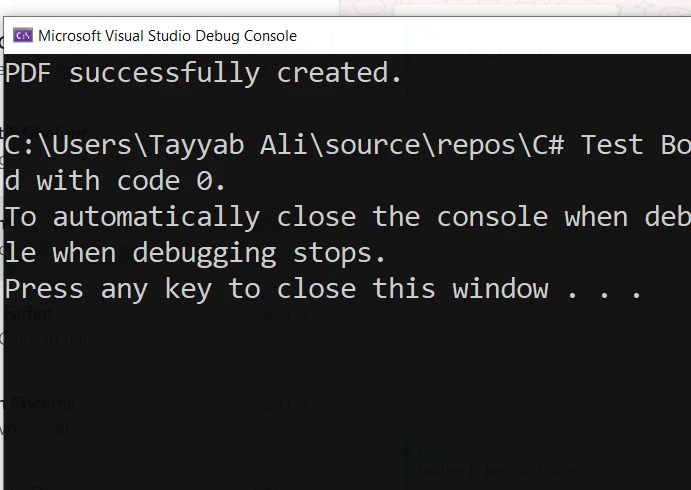
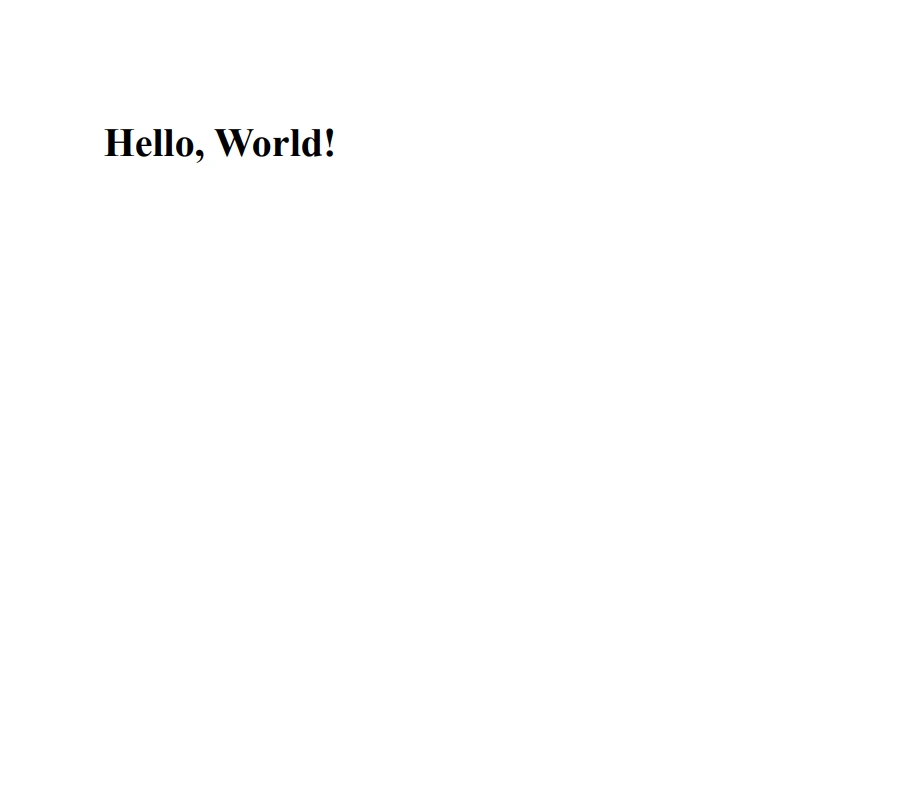
그리고 이것은 이 코드에 의해 생성된 PDF 파일입니다:
IronPDF가 적절히 구성된 환경에서 이를 테스트하고, 애플리케이션에 필요한 HTML 콘텐츠를 수정하세요. 이는 오류를 효율적으로 관리하고 PDF 생성 작업의 신뢰성을 향상시키는 데 도움이 됩니다.
C#에서 다중 예외를 처리하는 것은 애플리케이션에서 강력한 오류 처리 기능을 제공하는 강력한 기능입니다. 여러 catch 블록, 예외 필터 및 finally 블록을 사용하여 다양한 오류를 우아하게 처리하고 다양한 오류 조건에서도 무결성을 유지하는 강력하고 안정적인 응용 프로그램을 만들 수 있습니다.
여러 예외 처리를 포괄적으로 이해하고 구현함으로써, 애플리케이션이 예상치 못한 상황에 효과적으로 대처할 수 있도록 잘 준비될 수 있습니다. IronPDF는 $999에서 시작하는 무료 체험을 제공합니다.

제이콥 멜러는 Iron Software의 최고 기술 책임자(CTO)이자 C# PDF 기술을 개척한 선구적인 엔지니어입니다. Iron Software의 핵심 코드베이스를 최초로 개발한 그는 창립 초기부터 회사의 제품 아키텍처를 설계해 왔으며, CEO인 캐머런 리밍턴과 함께 회사를 NASA, 테슬라, 그리고 전 세계 정부 기관에 서비스를 제공하는 50명 이상의 직원을 보유한 기업으로 성장시켰습니다.



IronPDF는 IRON SUITE 의 일부입니다.
10개의 .NET API 제품, 당신의 사무 문서를 위해











PDF 파일을 HTML처럼 빠르게 변환해야 할 때.


