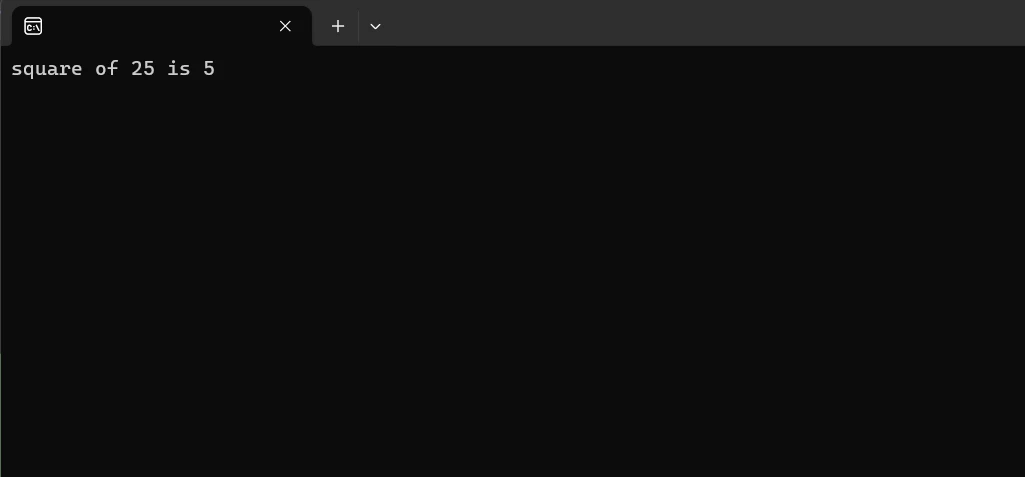
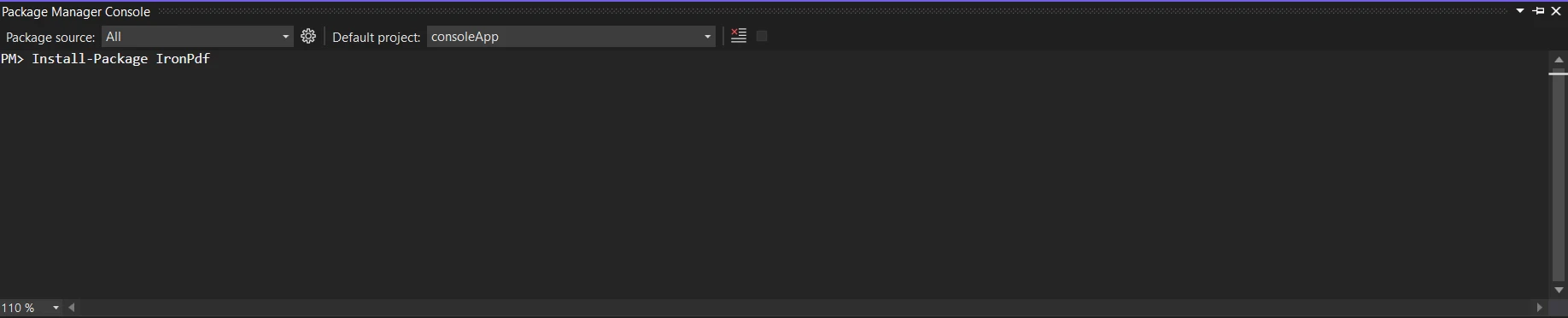
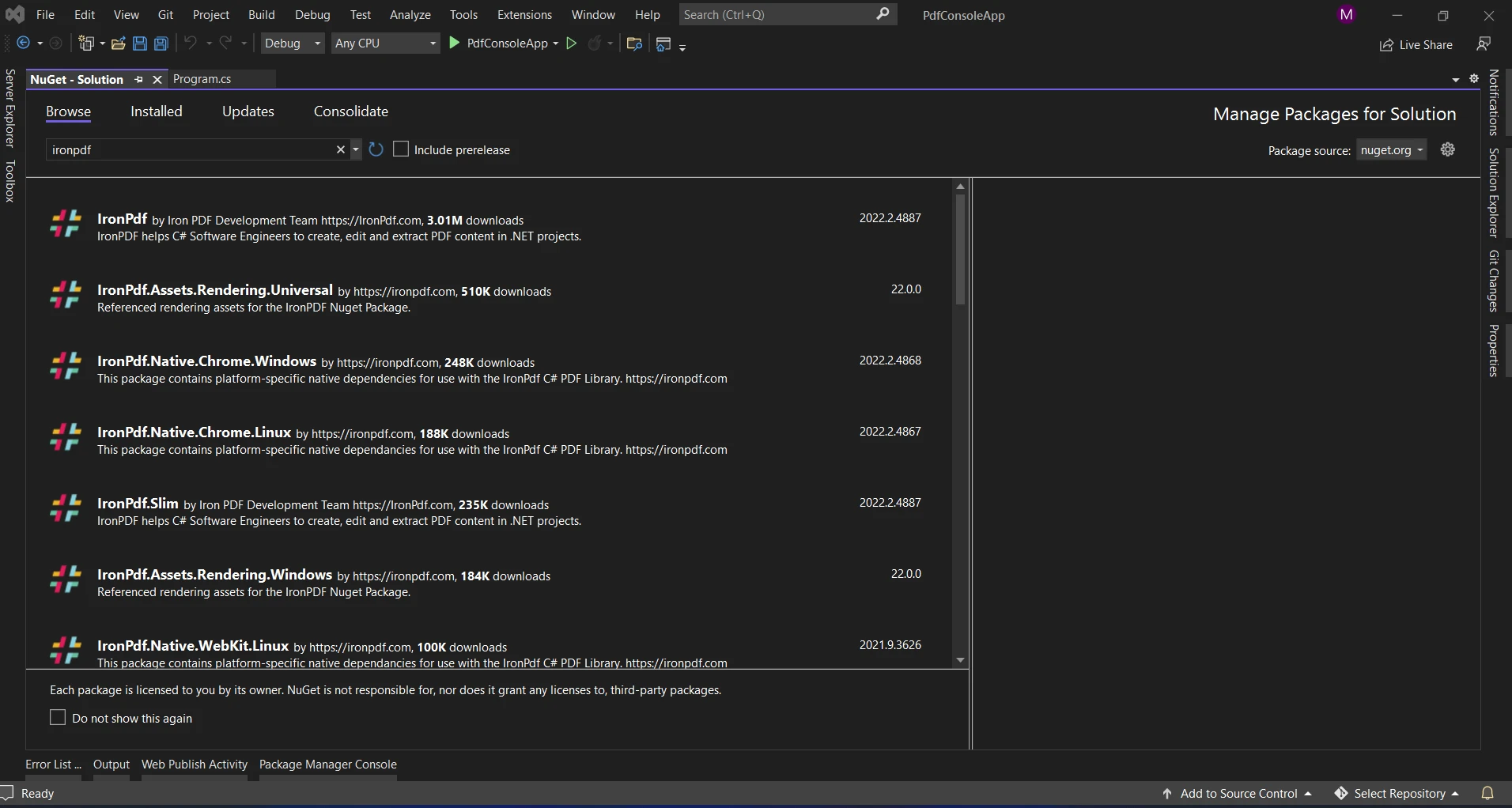
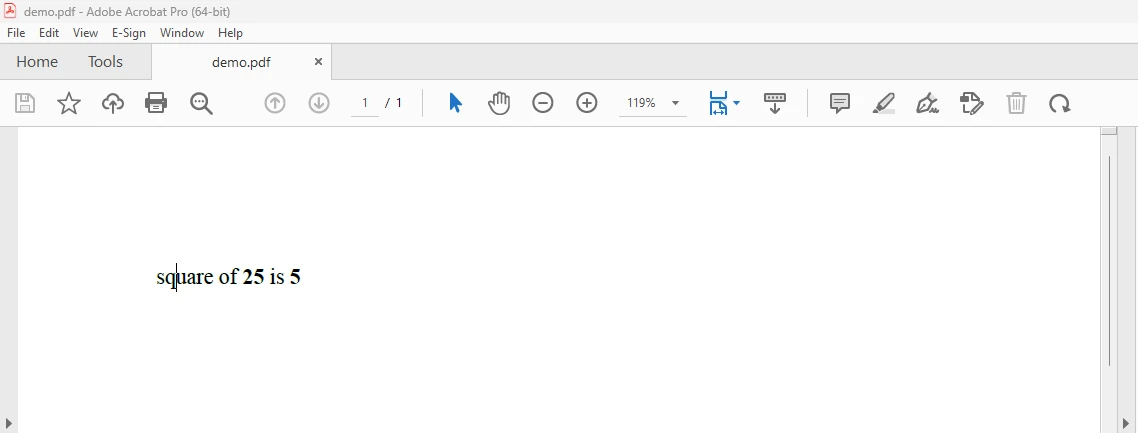
.NET 도움말 C# String Interpolation (How It Works For Developers) 커티스 차우 업데이트됨:6월 22, 2025 다운로드 IronPDF NuGet 다운로드 DLL 다운로드 윈도우 설치 프로그램 무료 체험 시작하기 LLM용 사본 LLM용 사본 LLM용 마크다운 형식으로 페이지를 복사하세요 ChatGPT에서 열기 ChatGPT에 이 페이지에 대해 문의하세요 제미니에서 열기 제미니에게 이 페이지에 대해 문의하세요 Grok에서 열기 Grok에게 이 페이지에 대해 문의하세요 혼란 속에서 열기 Perplexity에게 이 페이지에 대해 문의하세요 공유하다 페이스북에 공유하기 트위터에 공유하기 LinkedIn에 공유하기 URL 복사 이메일로 기사 보내기 What is String Interpolation? Programmers can create strings using string interpolation, which involves immediately evaluating and inserting expressions or variables into the constant string object literal. Verbatim strings containing placeholders that are replaced by the values of specified expressions or variables can be created with interpolated strings. Compared to more conventional techniques like string concatenation or the use of format string specifiers, interpolated string representation makes it easier to combine text with dynamic data in a variety of programming languages that allow this feature, making code more legible and concise. In this article, we are going to learn about the C# string interpolation feature in C# expression result. The following are the resulting string interpolation features: Placeholder Syntax: To insert expressions or variables into a result string, string interpolation uses a particular syntax. Typically, special symbols or characters (such as {}, $(), {{}}, etc.) enclose the placeholders for string interpolation. Evaluation of Expressions: At runtime, the variables or expressions included in the placeholders are evaluated and their results are immediately placed into the raw string. Better Readability: By enabling developers to directly put values into strings without explicitly converting or concatenating values, the readability of code is improved. How to use String Interpolation Create a new C# project. Make sure the required C# version has been installed. Create a string interpolation using the symbols or characters. Use the interpolated string as required. Run the code. String Interpolation in C# String interpolation in C# allows developers to embed expressions or variables directly into string literals. It simplifies the process of constructing multi-line strings by providing a concise and readable syntax. If we use string interpolation directly, the compiler will place string.Format method in its place. Components of the literal string interpolation structure: The $ sign indicates that the string literal is interpolated and comes before it. It sets ordinary string literals apart from interpolated strings. String Literal with Placeholders: Curly braces {} enclose placeholders for expressions or variables inside the string literal designated for interpolation with $. These placeholders show the locations where the expression or variable values will be entered. Expressions or Variables within Placeholders: In the final interpolated string, placeholders will be replaced by the values of the expressions or variables enclosed in curly braces ({}). Final Interpolated String: This is the string that remains after interpolation, where placeholders have been replaced with the evaluated values of variables or expressions. Structure Of Interpolation C# Add the $ sign to the start of a string literal to indicate that it is an interpolated string. White space cannot appear between the $ and the " that starts a string literal. {<interpolationExpression>[,<alignment>][:<formatString>]} //constant expression {<interpolationExpression>[,<alignment>][:<formatString>]} //constant expression $vbLabelText $csharpLabel String Interpolation with Verbatim and Raw Strings Use several $ characters to begin an interpolated raw string literal to incorporate { and } characters in the returned string. Any sequence of { or } characters that is less than the total number of $ characters is inserted into the output string when you do that. To encapsulate any interpolation expression in that string, the number of braces used must match the amount of $ characters. As demonstrated by the following example below: int x = 25; Console.WriteLine($"square of {x} is {Math.Sqrt(x)}"); // Interpolated string output int x = 25; Console.WriteLine($"square of {x} is {Math.Sqrt(x)}"); // Interpolated string output $vbLabelText $csharpLabel Output: String Interpolation Feature With IronPDF A highlight of IronPDF is its HTML to PDF conversion capabilities, preserving all layouts and styles. It converts web content into PDFs, perfect for reports, invoices, and documentation. You can easily convert HTML files, URLs, and HTML strings to PDFs. using IronPdf; class Program { static void Main(string[] args) { var renderer = new ChromePdfRenderer(); // 1. Convert HTML String to PDF var htmlContent = "<h1>Hello, IronPDF!</h1><p>This is a PDF from an HTML string.</p>"; var pdfFromHtmlString = renderer.RenderHtmlAsPdf(htmlContent); pdfFromHtmlString.SaveAs("HTMLStringToPDF.pdf"); // 2. Convert HTML File to PDF var htmlFilePath = "path_to_your_html_file.html"; // Specify the path to your HTML file var pdfFromHtmlFile = renderer.RenderHtmlFileAsPdf(htmlFilePath); pdfFromHtmlFile.SaveAs("HTMLFileToPDF.pdf"); // 3. Convert URL to PDF var url = "http://ironpdf.com"; // Specify the URL var pdfFromUrl = renderer.RenderUrlAsPdf(url); pdfFromUrl.SaveAs("URLToPDF.pdf"); } } using IronPdf; class Program { static void Main(string[] args) { var renderer = new ChromePdfRenderer(); // 1. Convert HTML String to PDF var htmlContent = "<h1>Hello, IronPDF!</h1><p>This is a PDF from an HTML string.</p>"; var pdfFromHtmlString = renderer.RenderHtmlAsPdf(htmlContent); pdfFromHtmlString.SaveAs("HTMLStringToPDF.pdf"); // 2. Convert HTML File to PDF var htmlFilePath = "path_to_your_html_file.html"; // Specify the path to your HTML file var pdfFromHtmlFile = renderer.RenderHtmlFileAsPdf(htmlFilePath); pdfFromHtmlFile.SaveAs("HTMLFileToPDF.pdf"); // 3. Convert URL to PDF var url = "http://ironpdf.com"; // Specify the URL var pdfFromUrl = renderer.RenderUrlAsPdf(url); pdfFromUrl.SaveAs("URLToPDF.pdf"); } } $vbLabelText $csharpLabel Install IronPDF Get the IronPDF library for seamless PDF generation as it is required for the next fix. To do this, enter the following code into the Package Manager: Install-Package IronPdf Alternatively, you may use the NuGet Package Manager to search for the package "IronPDF". We may pick and download the necessary package from this list of all the NuGet packages associated with IronPDF. String Interpolation Using IronPDF The example code shows how we can create a PDF using the string interpolation method and interpolated expression. For a single interpolation expression, alignment specifiers and format strings can be combined. using IronPdf; namespace ConsoleApp1 { internal class Program { static void Main(string [] args) { int x = 25; // Define the interpolated string var outputstr = $@"square of <b>{x}</b> is <b>{Math.Sqrt(x)}</b>"; // Create a PDF using IronPDF var pdfcreate = ChromePdfRenderer.StaticRenderHtmlAsPdf(outputstr); // Save the PDF as a file pdfcreate.SaveAs("demo.pdf"); } } } using IronPdf; namespace ConsoleApp1 { internal class Program { static void Main(string [] args) { int x = 25; // Define the interpolated string var outputstr = $@"square of <b>{x}</b> is <b>{Math.Sqrt(x)}</b>"; // Create a PDF using IronPDF var pdfcreate = ChromePdfRenderer.StaticRenderHtmlAsPdf(outputstr); // Save the PDF as a file pdfcreate.SaveAs("demo.pdf"); } } } $vbLabelText $csharpLabel In the above code, the given string interpolation helps us convert the string representation into the desired output string name. We are also using multiple strings to interpolate into a single string. And with the help of the IronPDF, we are creating the PDF for the formatted strings. Likewise, we can create any number of PDF string representations into a PDF with the help of IronPDF. We can also format strings using the string.Format method. Result: To know more about the IronPDF, refer to the IronPDF documentation. Conclusion To sum up, C#'s string interpolation is a strong and effective feature that makes it easier to create strings by allowing expressions to be directly embedded into them. When compared to conventional string concatenation or formatting techniques, it provides a syntax that is easier to read and comprehend using opening and closing braces. IronPDF offers a permanent license, upgrade options, a year of software maintenance, and a 30-day money-back guarantee in the $799 Lite bundle. Users can evaluate the product in practical application settings for thirty days during the watermarked trial period. Please visit the supplied IronPDF pricing and licensing page to learn more about IronPDF's costs, licensing, and trial version. To learn more about the various Iron Software products and libraries, check their website. 자주 묻는 질문 C#에서 문자열 보간이란 무엇인가요? C#의 문자열 보간을 사용하면 개발자가 표현식이나 변수를 문자열 리터럴에 직접 포함할 수 있으므로 간결하고 읽기 쉬운 구문을 제공하여 문자열을 구성하는 프로세스를 간소화할 수 있습니다. 문자열 보간을 사용하여 C#에서 PDF를 만들려면 어떻게 해야 하나요? 문자열 보간을 사용하여 HTML 콘텐츠에 데이터를 동적으로 삽입한 다음 IronPDF의 렌더링 메서드를 사용하여 PDF로 변환할 수 있습니다. 문자열 보간을 사용하여 PDF 생성을 위한 HTML 콘텐츠 서식을 지정할 수 있나요? 예, 문자열 보간을 사용하여 표현식이나 변수를 사용하여 HTML 콘텐츠의 서식을 동적으로 지정한 다음 IronPDF와 같은 도구를 사용하여 PDF로 렌더링할 수 있습니다. C#에서 문자열 보간에는 어떤 구문이 사용되나요? C#의 문자열 보간 구문은 문자열 리터럴 앞에 '$' 기호를 배치하고 중괄호 '{}'를 사용하여 표현식이나 변수를 포함하는 것입니다. IronPDF는 문자열 보간과 어떻게 통합되나요? IronPDF는 HTML 콘텐츠를 PDF 문서로 렌더링할 수 있으므로 개발자는 문자열 보간을 사용하여 데이터를 PDF로 변환하기 전에 HTML에 동적으로 삽입할 수 있습니다. 기존 문자열 서식 지정 방법보다 문자열 보간을 사용하면 어떤 이점이 있나요? 문자열 보간은 문자열 연결 및 형식 지정자에 비해 가독성과 간결성이 향상되어 코드를 더 쉽게 이해하고 유지 관리할 수 있습니다. IronPDF를 사용하여 HTML 문자열을 PDF 문서로 변환하려면 어떻게 해야 하나요? IronPDF는 HTML 콘텐츠를 입력으로 받아 형식이 지정된 PDF를 출력하는 RenderHtmlAsPdf와 같은 메서드를 사용하여 HTML 문자열을 PDF 문서로 변환할 수 있습니다. 문자열 보간에서 '$' 기호의 역할은 무엇인가요? '$' 기호는 문자열이 보간된 문자열임을 나타내는 데 사용되며, 중괄호 '{}' 안에 있는 표현식을 평가하여 출력에 포함할 수 있습니다. C#에서 문자열 보간 내에서 표현식의 서식을 어떻게 지정하나요? 문자열 보간 내의 표현식은 중괄호 내의 정렬 및 서식 지정자를 사용하여 서식을 지정할 수 있으므로 사용자 지정 출력 형식이 가능합니다. 문자열 보간으로 PDF 콘텐츠 생성을 어떻게 개선할 수 있나요? 문자열 보간을 사용하면 PDF로 변환하기 전에 HTML에 동적 콘텐츠를 삽입할 수 있으므로 개인화된 형식의 문서를 효율적으로 만들 수 있습니다. 커티스 차우 지금 바로 엔지니어링 팀과 채팅하세요 기술 문서 작성자 커티스 차우는 칼턴 대학교에서 컴퓨터 과학 학사 학위를 취득했으며, Node.js, TypeScript, JavaScript, React를 전문으로 하는 프론트엔드 개발자입니다. 직관적이고 미적으로 뛰어난 사용자 인터페이스를 만드는 데 열정을 가진 그는 최신 프레임워크를 활용하고, 잘 구성되고 시각적으로 매력적인 매뉴얼을 제작하는 것을 즐깁니다. 커티스는 개발 분야 외에도 사물 인터넷(IoT)에 깊은 관심을 가지고 있으며, 하드웨어와 소프트웨어를 통합하는 혁신적인 방법을 연구합니다. 여가 시간에는 게임을 즐기거나 디스코드 봇을 만들면서 기술에 대한 애정과 창의성을 결합합니다. 관련 기사 업데이트됨 12월 11, 2025 Bridging CLI Simplicity & .NET : Using Curl DotNet with IronPDF Jacob Mellor has bridged this gap with CurlDotNet, a library created to bring the familiarity of cURL to the .NET ecosystem. 더 읽어보기 업데이트됨 12월 20, 2025 RandomNumberGenerator C# Using the RandomNumberGenerator C# class can help take your PDF generation and editing projects to the next level 더 읽어보기 업데이트됨 12월 20, 2025 C# String Equals (How it Works for Developers) When combined with a powerful PDF library like IronPDF, switch pattern matching allows you to build smarter, cleaner logic for document processing 더 읽어보기 C# Writeline (How It Works For Developers)BouncyCastle C# (How It Works For D...
업데이트됨 12월 11, 2025 Bridging CLI Simplicity & .NET : Using Curl DotNet with IronPDF Jacob Mellor has bridged this gap with CurlDotNet, a library created to bring the familiarity of cURL to the .NET ecosystem. 더 읽어보기
업데이트됨 12월 20, 2025 RandomNumberGenerator C# Using the RandomNumberGenerator C# class can help take your PDF generation and editing projects to the next level 더 읽어보기
업데이트됨 12월 20, 2025 C# String Equals (How it Works for Developers) When combined with a powerful PDF library like IronPDF, switch pattern matching allows you to build smarter, cleaner logic for document processing 더 읽어보기