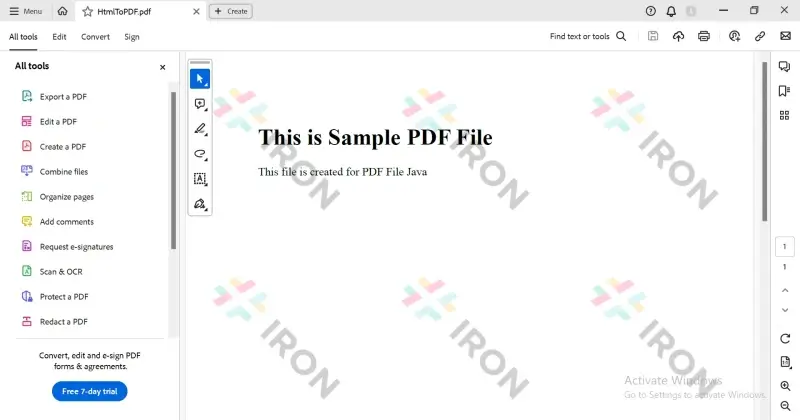
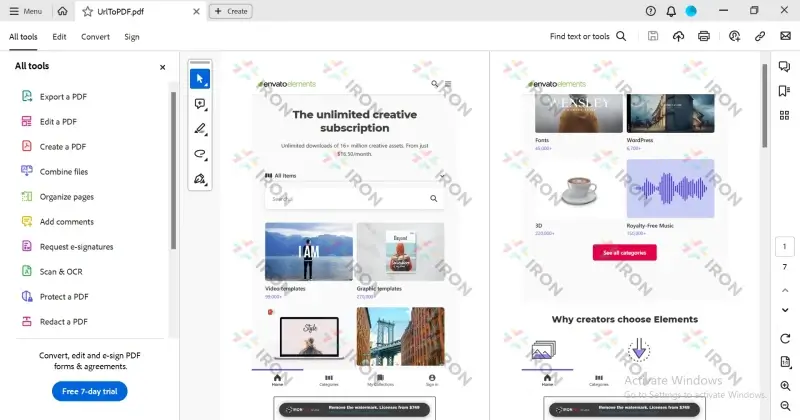
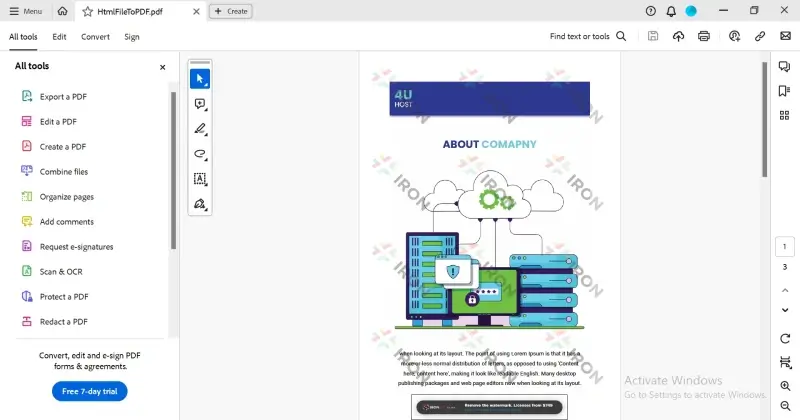
JAVA용 IRONPDF 사용 Java로 PDF 문서를 만드는 방법 커티스 차우 업데이트됨:7월 28, 2025 다운로드 IronPDF 메이븐 다운로드 JAR 다운로드 무료 체험 시작하기 LLM용 사본 LLM용 사본 LLM용 마크다운 형식으로 페이지를 복사하세요 ChatGPT에서 열기 ChatGPT에 이 페이지에 대해 문의하세요 제미니에서 열기 제미니에게 이 페이지에 대해 문의하세요 Grok에서 열기 Grok에게 이 페이지에 대해 문의하세요 혼란 속에서 열기 Perplexity에게 이 페이지에 대해 문의하세요 공유하다 페이스북에 공유하기 트위터에 공유하기 LinkedIn에 공유하기 URL 복사 이메일로 기사 보내기 This article provides a comprehensive guide to working with PDFs in Java, covering key concepts, the best library, and examples. How to Create PDF Document in Java Create or Open a Java Project Add Reference to the IronPDF Library Write Code to create PDF Documents in Java Create PDF files from HTML Files The Best Java PDF Library There are multiple PDF libraries available for Java, each with its pros and cons. Some are difficult to use, some are very costly, some do not have enough features, and some lack performance and efficiency. IronPDF is the ideal library as it is very easy to use and provides a comprehensive set of features, including creating, reading, and editing PDF files in Java with greater efficiency and performance. Introducing IronPDF for Java IronPDF for Java Features is a Java PDF library that helps software engineers create, edit, and extract PDF content in Java projects. IronPDF for Java supports many features, such as generating PDFs from HTML, URL, JavaScript, CSS, and various image formats; adding headers and footers with HTML; applying digital signatures; attachments; implementing PDF security and password protection; converting PDFs to PDF/A and PDF/UA standards; and more. IronPDF supports HTML to PDF conversion, allowing the transformation of web-based content into PDF format. Create a new Project Create or open an existing project. This project may be a web application, Android, or desktop application. It will work in any type of project. In this tutorial, a Maven project is recommended to make it simple and understandable. Create a Maven project Adding IronPDF to the Demo Project Add a Maven dependency to your Java project by adding the relevant <dependency> entry in your project's pom.xml file: <dependency> <groupId>com.ironpdf</groupId> <artifactId>ironpdf</artifactId> <version>[VERSION]</version> </dependency> <dependency> <groupId>com.ironpdf</groupId> <artifactId>ironpdf</artifactId> <version>[VERSION]</version> </dependency> XML Save the pom.xml file and build the project. This will install IronPDF in the project, allowing you to utilize its functionalities to create, edit, and manage PDF files. Create PDF files from HTML String (HTML to PDF) Let's start generating a PDF in Java easily by using the IronPDF Library. The following sample code demonstrates the HTML String to PDF Conversion. import com.ironsoftware.ironpdf.PdfDocument; public class HtmlStringToPdf { public static void main(String[] args) { // Define the HTML content to be converted into a PDF String htmlString = "<h1>This is a Sample PDF File</h1><p>This file is created for PDF File in Java</p>"; // Convert the HTML string into a PDF document PdfDocument myPdf = PdfDocument.renderHtmlAsPdf(htmlString); // Save the PDF document to a file myPdf.saveAs("HtmlToPDF.pdf"); } } import com.ironsoftware.ironpdf.PdfDocument; public class HtmlStringToPdf { public static void main(String[] args) { // Define the HTML content to be converted into a PDF String htmlString = "<h1>This is a Sample PDF File</h1><p>This file is created for PDF File in Java</p>"; // Convert the HTML string into a PDF document PdfDocument myPdf = PdfDocument.renderHtmlAsPdf(htmlString); // Save the PDF document to a file myPdf.saveAs("HtmlToPDF.pdf"); } } JAVA The above Java code snippet demonstrates the use of the IronPDF Library that converts an HTML string (htmlString) into a PDF document. The HTML content, containing a title (<h1>) and a paragraph (<p>), is intended for the PDF file. The code creates a PDF document by rendering the HTML content and then saves the resulting PDF as "HtmlToPDF.pdf". This functionality is useful for dynamically generating PDF documents from HTML content in Java applications, potentially facilitating the conversion of web-based content into a downloadable or shareable PDF format. The output PDF file Create PDF documents from a URL This section will create a PDF file from a URL. The following sample code demonstrates the example of URL to PDF Conversion using IronPDF. import com.ironsoftware.ironpdf.PdfDocument; import java.io.IOException; public class UrlToPdf { public static void main(String[] args) { try { // Convert the content from the URL into a PDF document PdfDocument myPdf = PdfDocument.renderUrlAsPdf("https://elements.envato.com/"); // Save the PDF document to a file myPdf.saveAs("UrlToPDF.pdf"); } catch (IOException e) { e.printStackTrace(); } } } import com.ironsoftware.ironpdf.PdfDocument; import java.io.IOException; public class UrlToPdf { public static void main(String[] args) { try { // Convert the content from the URL into a PDF document PdfDocument myPdf = PdfDocument.renderUrlAsPdf("https://elements.envato.com/"); // Save the PDF document to a file myPdf.saveAs("UrlToPDF.pdf"); } catch (IOException e) { e.printStackTrace(); } } } JAVA The above Java code snippet utilizes the IronPDF Library to create a PDF document by rendering the content of a specified URL ("https://elements.envato.com/"). This code effectively converts the web content at the given URL into a PDF document. The resulting PDF is then saved as "UrlToPDF.pdf". Such functionality is valuable for capturing and storing the content of a web page in PDF format, offering a convenient way to preserve and share online information offline. The output PDF file from the URL Create a PDF Document from an HTML File The following source code demonstrates the example of HTML File to PDF Conversion. This will extract content from an HTML file and create a new document from that. import com.ironsoftware.ironpdf.PdfDocument; public class HtmlFileToPdf { public static void main(String[] args) { // Convert content from the HTML file into a PDF document PdfDocument myPdf = PdfDocument.renderHtmlFileAsPdf("about.html"); // Save the PDF document to a file myPdf.saveAs("HtmlFileToPDF.pdf"); } } import com.ironsoftware.ironpdf.PdfDocument; public class HtmlFileToPdf { public static void main(String[] args) { // Convert content from the HTML file into a PDF document PdfDocument myPdf = PdfDocument.renderHtmlFileAsPdf("about.html"); // Save the PDF document to a file myPdf.saveAs("HtmlFileToPDF.pdf"); } } JAVA In the above Java code snippet, IronPDF is used to generate a PDF document by rendering the HTML content stored in a local file named "about.html". The code essentially converts the content of the HTML file into an instance document. The resulting PDF is then saved as "HtmlFileToPDF.pdf." This functionality is beneficial for scenarios where existing HTML files need to be transformed into PDF documents, providing a practical means of preserving and distributing content in a different format. IronPDF efficiently adds image files into this PDF file that were present in the HTML File. The output PDF file from an HTML file The strength of IronPDF lies in its ability to faithfully replicate the visual aspects of a web page, encompassing layout, styles, and dynamic elements. This meticulous rendering ensures that the resulting PDF closely mirrors the original website, making IronPDF an influential tool for diverse tasks. It proves invaluable for archiving web pages, generating PDF reports from online data, and reliably capturing the visual state of dynamic web content. Developers leveraging IronPDF within their applications can achieve these objectives with precision, offering a robust solution for seamlessly integrating web content into PDF documents. Conclusion In conclusion, working with PDFs in Java is efficient and powerful with the integration of IronPDF. This comprehensive guide has explored fundamental PDF concepts, the importance of selecting the right Java PDF library, and practical examples using IronPDF. Notably, IronPDF stands out for its ease of use, extensive feature set, and robust capabilities, including HTML to PDF conversion and faithful reproduction of webpage elements. IronPDF's ability to accurately capture the visual representation of web content makes it an invaluable tool for tasks such as working with PDF forms, archiving, report generation, and capturing dynamic web states within Java applications. Whether creating PDFs from HTML strings, URLs, or HTML files, Working with PDF Forms in Java, IronPDF provides a seamless and reliable solution for developers. It can also be used as a standard Java printing API to print PDF Documents. IronPDF offers a free trial version and licensing options and is cost-friendly, making it an accessible and budget-friendly choice for developers seeking robust PDF solutions in their Java applications. 자주 묻는 질문 Java로 된 HTML 파일에서 PDF를 생성하려면 어떻게 해야 하나요? IronPDF를 사용하여 HTML 파일 콘텐츠를 PDF 형식으로 변환하는 PdfDocument.renderHtmlFileAsPdf 메서드를 활용하여 HTML 파일에서 PDF를 생성할 수 있습니다. Java로 PDF를 생성할 때 IronPDF가 선호되는 이유는 무엇인가요? IronPDF는 사용 편의성, 광범위한 기능 세트, 고성능으로 선호되는 라이브러리로 HTML, URL 및 Java의 다양한 이미지 형식에서 PDF를 생성하는 데 이상적인 라이브러리입니다. Java를 사용하여 URL을 PDF 문서로 변환하려면 어떻게 해야 하나요? IronPDF를 사용하면 웹 콘텐츠를 캡처하여 PDF로 저장하는 PdfDocument.renderUrlAsPdf 메서드를 사용하여 URL을 PDF 문서로 변환할 수 있습니다. IronPDF는 PDF 생성 시 동적 웹 콘텐츠를 처리할 수 있나요? 예, IronPDF는 동적 웹 콘텐츠의 시각적 상태를 정확하게 캡처하여 결과 PDF가 원본 웹 페이지와 거의 일치하도록 보장하므로 보관 및 보고서 생성과 같은 작업에 필수적입니다. IronPDF와 같은 PDF 라이브러리를 Java 프로젝트에 통합하려면 어떻게 해야 하나요? IronPDF를 Java 프로젝트에 통합하려면 프로젝트의 pom.xml 파일에 적절한 groupId, artifactId 및 버전 세부 정보와 함께 Maven 종속성을 추가하세요. Java용 IronPDF의 주요 기능은 무엇인가요? IronPDF의 주요 기능에는 HTML, URL 및 이미지 형식에서 PDF 생성, 머리글 및 바닥글 추가, 디지털 서명 적용, PDF 보안 구현, PDF를 PDF/A와 같은 형식으로 변환하는 기능이 포함됩니다. IronPDF는 HTML 문자열을 PDF 문서로 변환하는 데 적합하나요? 예, IronPDF는 PdfDocument.renderHtmlAsPdf 메서드를 사용하여 HTML 문자열을 PDF 문서로 변환하여 웹 콘텐츠를 PDF 형식으로 효과적으로 재생산하는 데 적합합니다. IronPDF를 사용하면 어떤 유형의 프로젝트에 도움이 될 수 있나요? IronPDF는 웹 애플리케이션, Android 앱, 데스크톱 애플리케이션 등 다양한 유형의 Java 프로젝트에서 사용할 수 있으므로 다양한 개발 환경에서 다용도로 사용할 수 있습니다. IronPDF는 개발자를 위한 평가판을 제공하나요? 예, IronPDF는 라이선스 옵션과 함께 무료 평가판을 제공하여 Java에서 포괄적인 PDF 기능을 원하는 개발자에게 비용 효율적인 솔루션을 제공합니다. IronPDF가 HTML에서 PDF로 변환 작업에 이상적인 이유는 무엇인가요? IronPDF는 웹 페이지의 시각적 측면을 충실히 복제하여 결과 PDF가 원본 콘텐츠를 정확하게 반영할 수 있기 때문에 HTML에서 PDF로 변환하는 작업에 이상적입니다. 커티스 차우 지금 바로 엔지니어링 팀과 채팅하세요 기술 문서 작성자 커티스 차우는 칼턴 대학교에서 컴퓨터 과학 학사 학위를 취득했으며, Node.js, TypeScript, JavaScript, React를 전문으로 하는 프론트엔드 개발자입니다. 직관적이고 미적으로 뛰어난 사용자 인터페이스를 만드는 데 열정을 가진 그는 최신 프레임워크를 활용하고, 잘 구성되고 시각적으로 매력적인 매뉴얼을 제작하는 것을 즐깁니다. 커티스는 개발 분야 외에도 사물 인터넷(IoT)에 깊은 관심을 가지고 있으며, 하드웨어와 소프트웨어를 통합하는 혁신적인 방법을 연구합니다. 여가 시간에는 게임을 즐기거나 디스코드 봇을 만들면서 기술에 대한 애정과 창의성을 결합합니다. 관련 기사 업데이트됨 6월 22, 2025 Java에서 TIFF를 PDF로 변환하는 방법 이 포괄적인 가이드는 IronPDF를 사용하여 Java에서 TIFF 이미지를 PDF로 원활하게 변환하는 방법에 대한 단계를 안내합니다. 더 읽어보기 업데이트됨 7월 28, 2025 Java에서 PDF를 PDFA로 변환하는 방법 이 문서에서는 IronPDF를 사용하여 Java에서 PDF 파일을 PDF/A 형식으로 변환하는 방법을 살펴봅니다. 더 읽어보기 업데이트됨 7월 28, 2025 Java에서 PDF 파일을 읽는 방법 이 문서에서는 IronPDF를 사용하여 Java에서 PDF 파일을 읽는 방법을 살펴봅니다. PDF 파일에서 텍스트와 메타데이터 객체를 읽고 암호화된 문서를 만드는 방법을 다룹니다. 더 읽어보기 Java에서 PDF를 PDFA로 변환하는 방법Java에서 PDF 파일을 읽는 방법

업데이트됨 6월 22, 2025 Java에서 TIFF를 PDF로 변환하는 방법 이 포괄적인 가이드는 IronPDF를 사용하여 Java에서 TIFF 이미지를 PDF로 원활하게 변환하는 방법에 대한 단계를 안내합니다. 더 읽어보기
업데이트됨 7월 28, 2025 Java에서 PDF를 PDFA로 변환하는 방법 이 문서에서는 IronPDF를 사용하여 Java에서 PDF 파일을 PDF/A 형식으로 변환하는 방법을 살펴봅니다. 더 읽어보기
업데이트됨 7월 28, 2025 Java에서 PDF 파일을 읽는 방법 이 문서에서는 IronPDF를 사용하여 Java에서 PDF 파일을 읽는 방법을 살펴봅니다. PDF 파일에서 텍스트와 메타데이터 객체를 읽고 암호화된 문서를 만드는 방법을 다룹니다. 더 읽어보기