푸터 콘텐츠로 바로가기
PYTHON 도움말

msgpack python(개발자를 위한 사용법)

MessagePack is an efficient binary serialization format that allows data exchange among multiple languages. It is similar to JSON but faster and more compact. The msgpack library in Python provides the necessary tools to work with this format, offering both CPython bindings and a pure Python implementation.

Key Features of MessagePack

  1. Efficiency: MessagePack is designed to be more efficient than JSON, both in terms of speed and size. It achieves this using a binary format (msgpack spec), which reduces the overhead associated with text-based formats like JSON.
  2. Cross-Language Support: MessagePack supports multiple programming languages, making it ideal for applications where data needs to be shared across different systems and languages.
  3. Compatibility: The msgpack library in Python is compatible with both Python 2 and Python 3, as well as CPython and PyPy implementations.
  4. Custom Data Types: MessagePack allows for the packing and unpacking of custom data types with advanced unpacking control, which can be helpful for complex applications.

Installation

Before you can start reading and writing MessagePack data, you need to install the msgpack library, which can be done using pip:

pip install msgpack
pip install msgpack
SHELL

Basic Usage

Here is a simple example of how to use MessagePack to serialize and deserialize data:

import msgpack

# Serialize key-value pairs or file-like object
data = {'key': 'value', 'number': 42}
packed_data = msgpack.packb(data, use_bin_type=True)

# Deserialize data
unpacked_data = msgpack.unpackb(packed_data, raw=False)
print(unpacked_data)
import msgpack

# Serialize key-value pairs or file-like object
data = {'key': 'value', 'number': 42}
packed_data = msgpack.packb(data, use_bin_type=True)

# Deserialize data
unpacked_data = msgpack.unpackb(packed_data, raw=False)
print(unpacked_data)
PYTHON

Advanced Features

  1. Streaming Unpacking: MessagePack supports streaming unpacking, which unpacks multiple objects from a single stream. This is useful for processing large datasets or continuous data streams.
import msgpack
from io import BytesIO

# Create a buffer for streaming data
buf = BytesIO()
for i in range(100):
    buf.write(msgpack.packb(i))
buf.seek(0)

# Unpack data from the buffer
unpacker = msgpack.Unpacker(buf)
for unpacked in unpacker:
    print(unpacked)
import msgpack
from io import BytesIO

# Create a buffer for streaming data
buf = BytesIO()
for i in range(100):
    buf.write(msgpack.packb(i))
buf.seek(0)

# Unpack data from the buffer
unpacker = msgpack.Unpacker(buf)
for unpacked in unpacker:
    print(unpacked)
PYTHON
  1. Custom Data Types: You can define custom packing and unpacking functions for custom data types. For example, to handle the datetime custom data type:
import datetime
import msgpack

def encode_datetime(obj):
    """Encode datetime objects for MessagePack serialization."""
    if isinstance(obj, datetime.datetime):
        return {'__datetime__': True, 'as_str': obj.strftime('%Y%m%dT%H:%M:%S.%f')}
    return obj

def decode_datetime(obj):
    """Decode datetime objects after MessagePack deserialization."""
    if '__datetime__' in obj:
        return datetime.datetime.strptime(obj['as_str'], '%Y%m%dT%H:%M:%S.%f')
    return obj

# Serialize data with custom datetime support
data = {'time': datetime.datetime.now()}
packed_data = msgpack.packb(data, default=encode_datetime)

# Deserialize data with custom datetime support
unpacked_data = msgpack.unpackb(packed_data, object_hook=decode_datetime)
print(unpacked_data)
import datetime
import msgpack

def encode_datetime(obj):
    """Encode datetime objects for MessagePack serialization."""
    if isinstance(obj, datetime.datetime):
        return {'__datetime__': True, 'as_str': obj.strftime('%Y%m%dT%H:%M:%S.%f')}
    return obj

def decode_datetime(obj):
    """Decode datetime objects after MessagePack deserialization."""
    if '__datetime__' in obj:
        return datetime.datetime.strptime(obj['as_str'], '%Y%m%dT%H:%M:%S.%f')
    return obj

# Serialize data with custom datetime support
data = {'time': datetime.datetime.now()}
packed_data = msgpack.packb(data, default=encode_datetime)

# Deserialize data with custom datetime support
unpacked_data = msgpack.unpackb(packed_data, object_hook=decode_datetime)
print(unpacked_data)
PYTHON

Introducing IronPDF

msgpack python (How It Works For Developers): Figure 1

IronPDF is a powerful Python library designed to create, edit, and sign PDFs using HTML, CSS, images, and JavaScript. It offers commercial-grade performance with a low memory footprint. Key features include:

HTML to PDF Conversion

Convert HTML files, HTML strings, and URLs to PDFs. For example, render a webpage as a PDF using the Chrome PDF renderer.

Cross-Platform Support

Compatible with various .NET platforms, including .NET Core, .NET Standard, and .NET Framework. It supports Windows, Linux, and macOS.

Editing and Signing

Set properties, add security with passwords and permissions, and apply digital signatures to your PDFs.

Page Templates and Settings

Customize PDFs with headers, footers, page numbers, and adjustable margins. Supports responsive layouts and custom paper sizes.

Standards Compliance

Adheres to PDF standards such as PDF/A and PDF/UA. Supports UTF-8 character encoding and handles assets like images, CSS, and fonts.

Generate PDF Documents using IronPDF and msgpack

import msgpack
import datetime
from ironpdf import * 

# Apply your license key for IronPDF
License.LicenseKey = "key"

# Serialize data
data = {'key': 'value', 'number': 42}
packed_data = msgpack.packb(data, use_bin_type=True)

# Deserialize data
unpacked_data = msgpack.unpackb(packed_data, raw=False)
print(unpacked_data)

# Custom Data Types
def encode_datetime(obj):
    """Encode datetime objects for MessagePack serialization."""
    if isinstance(obj, datetime.datetime):
        return {'__datetime__': True, 'as_str': obj.strftime('%Y%m%dT%H:%M:%S.%f')}
    return obj

def decode_datetime(obj):
    """Decode datetime objects after MessagePack deserialization."""
    if '__datetime__' in obj:
        return datetime.datetime.strptime(obj['as_str'], '%Y%m%dT%H:%M:%S.%f')
    return obj

datat = {'time': datetime.datetime.now()}
packed_datat = msgpack.packb(datat, default=encode_datetime)
unpacked_datat = msgpack.unpackb(packed_datat, object_hook=decode_datetime)
print(unpacked_datat)  

# Render a PDF from a HTML string using Python
renderer = ChromePdfRenderer()
content = "<h1>Awesome Iron PDF with msgpack</h1>"
content += "<h3>Serialize data</h3>"
content += f"<p>{data}</p>"
content += f"<p> msgpack.packb(data, use_bin_type=True):</p><p>{packed_data}</p>"
content += "<h3>Deserialize data</h3>"
content += f"<p> msgpack.unpackb(packed_data, raw=False):</p><p>{unpacked_data}</p>"
content += "<h3>Encode Custom Data Types</h3>"
content += f"<p>{datat}</p>"
content += f"<p> msgpack.packb(datat, default=encode_datetime):</p><p>{packed_datat}</p>"

pdf = renderer.RenderHtmlAsPdf(content)
pdf.SaveAs("Demo-msgpack.pdf")  # Export to a file
import msgpack
import datetime
from ironpdf import * 

# Apply your license key for IronPDF
License.LicenseKey = "key"

# Serialize data
data = {'key': 'value', 'number': 42}
packed_data = msgpack.packb(data, use_bin_type=True)

# Deserialize data
unpacked_data = msgpack.unpackb(packed_data, raw=False)
print(unpacked_data)

# Custom Data Types
def encode_datetime(obj):
    """Encode datetime objects for MessagePack serialization."""
    if isinstance(obj, datetime.datetime):
        return {'__datetime__': True, 'as_str': obj.strftime('%Y%m%dT%H:%M:%S.%f')}
    return obj

def decode_datetime(obj):
    """Decode datetime objects after MessagePack deserialization."""
    if '__datetime__' in obj:
        return datetime.datetime.strptime(obj['as_str'], '%Y%m%dT%H:%M:%S.%f')
    return obj

datat = {'time': datetime.datetime.now()}
packed_datat = msgpack.packb(datat, default=encode_datetime)
unpacked_datat = msgpack.unpackb(packed_datat, object_hook=decode_datetime)
print(unpacked_datat)  

# Render a PDF from a HTML string using Python
renderer = ChromePdfRenderer()
content = "<h1>Awesome Iron PDF with msgpack</h1>"
content += "<h3>Serialize data</h3>"
content += f"<p>{data}</p>"
content += f"<p> msgpack.packb(data, use_bin_type=True):</p><p>{packed_data}</p>"
content += "<h3>Deserialize data</h3>"
content += f"<p> msgpack.unpackb(packed_data, raw=False):</p><p>{unpacked_data}</p>"
content += "<h3>Encode Custom Data Types</h3>"
content += f"<p>{datat}</p>"
content += f"<p> msgpack.packb(datat, default=encode_datetime):</p><p>{packed_datat}</p>"

pdf = renderer.RenderHtmlAsPdf(content)
pdf.SaveAs("Demo-msgpack.pdf")  # Export to a file
PYTHON

Code Explanation

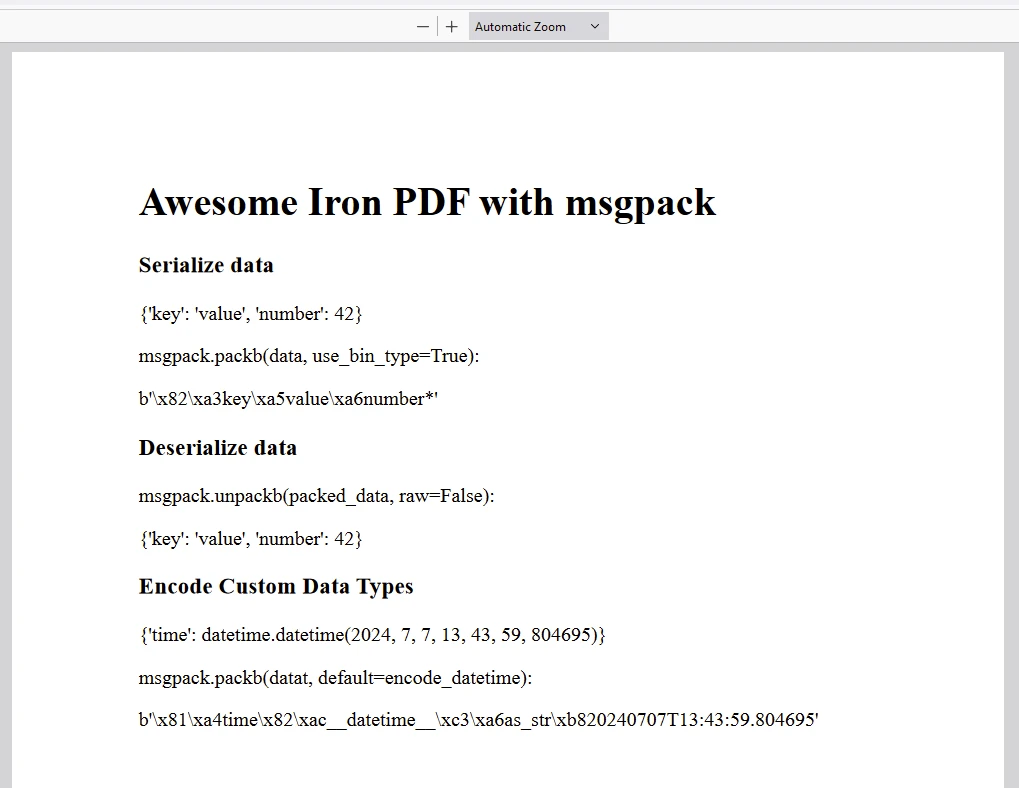
This script demonstrates the integration of msgpack with IronPDF for serializing and deserializing data, as well as creating a PDF document from HTML content.

Breakdown

  1. Serializing Data with msgpack:

    • Converts Python data (dict in this case) into a binary format (packed_data) using msgpack.packb() with use_bin_type=True.
  2. Deserializing Data with msgpack:

    • Converts the binary packed_data back into Python data (unpacked_data) using msgpack.unpackb() with raw=False.
  3. Custom Data Types Handling:

    • Defines custom encoding (encode_datetime) and decoding (decode_datetime) functions to handle datetime objects during serialization and deserialization using msgpack.
  4. HTML Content for PDF Generation:

    • Constructs an HTML string (content) that includes:
      • Header and subsections detailing the serialized data (data and packed_data).
      • Deserialized data (unpacked_data).
      • Custom data types serialization (datat and packed_datat).
  5. PDF Generation with IronPDF:

    • Uses IronPDF (ChromePdfRenderer) to generate a PDF document (pdf) from the constructed HTML content (content).
  6. Saving the PDF:

    • Saves the generated PDF document as "Demo-msgpack.pdf".

Output

msgpack python (How It Works For Developers): Figure 2

PDF

msgpack python (How It Works For Developers): Figure 3

IronPDF License

IronPDF runs on the license key for Python. IronPDF for Python offers a free trial license key to allow users to check out its extensive features before purchase.

Place the License Key at the start of the script before using the IronPDF package:

from ironpdf import * 
# Apply your license key
License.LicenseKey = "key"
from ironpdf import * 
# Apply your license key
License.LicenseKey = "key"
PYTHON

Conclusion

MessagePack is a powerful tool for efficient data serialization in Python. Its compact binary format, cross-language support, and ability to handle custom data types make it a versatile choice for various applications. Whether you are working on data interchange between different systems or optimizing the performance of your data processing tasks, MessagePack offers a robust solution.

IronPDF is a versatile Python library designed for creating, manipulating, and rendering PDF documents directly from Python applications. It simplifies tasks such as converting HTML to PDF, creating interactive PDF forms, and performing various document manipulations like merging and splitting PDF files. With seamless integration into existing web technologies, IronPDF offers developers a powerful toolset for generating dynamic PDFs, enhancing productivity in document management and presentation tasks.

커티스 차우
기술 문서 작성자

커티스 차우는 칼턴 대학교에서 컴퓨터 과학 학사 학위를 취득했으며, Node.js, TypeScript, JavaScript, React를 전문으로 하는 프론트엔드 개발자입니다. 직관적이고 미적으로 뛰어난 사용자 인터페이스를 만드는 데 열정을 가진 그는 최신 프레임워크를 활용하고, 잘 구성되고 시각적으로 매력적인 매뉴얼을 제작하는 것을 즐깁니다.


커티스는 개발 분야 외에도 사물 인터넷(IoT)에 깊은 관심을 가지고 있으며, 하드웨어와 소프트웨어를 통합하는 혁신적인 방법을 연구합니다. 여가 시간에는 게임을 즐기거나 디스코드 봇을 만들면서 기술에 대한 애정과 창의성을 결합합니다.