Klasa HttpClient, będąca częścią .NET Framework, udostępnia metody do wysyłania żądań HTTP i odbierania odpowiedzi HTTP z zasobu zidentyfikowanego przez adres URI. Ułatwia to wysyłanie żądań HTTP, niezależnie od tego, czy wykonujesz żądania GET, POST, PUT czy DELETE. W niniejszym przewodniku omówiono podstawowe zastosowania HttpClient w praktycznych scenariuszach oraz przedstawiono bibliotekę IronPDF.
Tworzenie nowej instancji HttpClient
Klasa HttpClient służy do wysyłania żądań HTTP. Można utworzyć nową instancję w następujący sposób:
using System;
using System.Net.Http;
using System.Threading.Tasks;

class Program
{
    static async Task Main(string[] args)
    {
        using var client = new HttpClient(); // Create a new instance of HttpClient

        // Send a GET request to the specified URI and store the HTTP response
        var response = await client.GetAsync("https://api.weatherapi.com/v1/current.json?key=YOUR_API_KEY&q=London");

        // Retrieve the response content as a string
        var responseBody = await response.Content.ReadAsStringAsync();

        // Print the response content to the console
        Console.WriteLine(responseBody);
    }
}
using System;
using System.Net.Http;
using System.Threading.Tasks;

class Program
{
    static async Task Main(string[] args)
    {
        using var client = new HttpClient(); // Create a new instance of HttpClient

        // Send a GET request to the specified URI and store the HTTP response
        var response = await client.GetAsync("https://api.weatherapi.com/v1/current.json?key=YOUR_API_KEY&q=London");

        // Retrieve the response content as a string
        var responseBody = await response.Content.ReadAsStringAsync();

        // Print the response content to the console
        Console.WriteLine(responseBody);
    }
}
Imports System
Imports System.Net.Http
Imports System.Threading.Tasks
Module Program
Async Function Main(args As String()) As Task
Using client As New HttpClient() ' Create a new instance of HttpClient
' Send a GET request to the specified URI and store the HTTP response
Dim response = Await client.GetAsync("https://api.weatherapi.com/v1/current.json?key=YOUR_API_KEY&q=London")
' Retrieve the response content as a string
Dim responseBody = Await response.Content.ReadAsStringAsync()
' Print the response content to the console
Console.WriteLine(responseBody)
End Using
End Function
End Module
Imports System
Imports System.Net.Http
Imports System.Threading.Tasks

Module Program
    Async Function Main(args As String()) As Task
        Using client As New HttpClient() ' Create a new instance of HttpClient

            ' Send a GET request to the specified URI and store the HTTP response
            Dim response = Await client.GetAsync("https://api.weatherapi.com/v1/current.json?key=YOUR_API_KEY&q=London")

            ' Retrieve the response content as a string
            Dim responseBody = Await response.Content.ReadAsStringAsync()

            ' Print the response content to the console
            Console.WriteLine(responseBody)
        End Using
    End Function
End Module
W tym przykładzie:
- Nowa instancja klasy HttpClient jest tworzona przy użyciu
var client = new HttpClient().
- Żądanie HTTP GET jest wysyłane przy użyciu metody
GetAsync.
HttpResponseMessage jest przechowywane w var response.- Zawartość odpowiedzi jest pobierana przy użyciu
response.Content.ReadAsStringAsync().
Wysyłanie żądań HTTP
Żądanie HTTP GET
Aby wysłać żądanie HTTP GET i obsłużyć odpowiedź:
using System;
using System.Net.Http;
using System.Threading.Tasks;

class Example
{
    static async Task Main(string[] args)
    {
        var client = new HttpClient();
        var response = await client.GetAsync("https://api.weatherapi.com/v1/current.json?key=YOUR_API_KEY&q=Paris");

        // Check if the request was successful
        if (response.IsSuccessStatusCode)
        {
            var responseBody = await response.Content.ReadAsStringAsync();
            Console.WriteLine(responseBody);
        }
    }
}
using System;
using System.Net.Http;
using System.Threading.Tasks;

class Example
{
    static async Task Main(string[] args)
    {
        var client = new HttpClient();
        var response = await client.GetAsync("https://api.weatherapi.com/v1/current.json?key=YOUR_API_KEY&q=Paris");

        // Check if the request was successful
        if (response.IsSuccessStatusCode)
        {
            var responseBody = await response.Content.ReadAsStringAsync();
            Console.WriteLine(responseBody);
        }
    }
}
Imports System
Imports System.Net.Http
Imports System.Threading.Tasks
Friend Class Example
Shared Async Function Main(ByVal args() As String) As Task
Dim client = New HttpClient()
Dim response = Await client.GetAsync("https://api.weatherapi.com/v1/current.json?key=YOUR_API_KEY&q=Paris")
' Check if the request was successful
If response.IsSuccessStatusCode Then
Dim responseBody = Await response.Content.ReadAsStringAsync()
Console.WriteLine(responseBody)
End If
End Function
End Class
Imports System
Imports System.Net.Http
Imports System.Threading.Tasks

Friend Class Example
	Shared Async Function Main(ByVal args() As String) As Task
		Dim client = New HttpClient()
		Dim response = Await client.GetAsync("https://api.weatherapi.com/v1/current.json?key=YOUR_API_KEY&q=Paris")

		' Check if the request was successful
		If response.IsSuccessStatusCode Then
			Dim responseBody = Await response.Content.ReadAsStringAsync()
			Console.WriteLine(responseBody)
		End If
	End Function
End Class
- Właściwość
IsSuccessStatusCode zapewnia, że żądanie zakończyło się sukcesem.
- Treść odpowiedzi jest odczytywana asynchronicznie przy użyciu
ReadAsStringAsync().
Żądanie HTTP POST
Wysyłanie żądania POST wymaga dodania treści żądania:
using System;
using System.Net.Http;
using System.Text;
using System.Threading.Tasks;

class Example
{
    static async Task Main(string[] args)
    {
        var client = new HttpClient();
        var requestBody = new StringContent("{ \"location\": \"New York\" }", Encoding.UTF8, "application/json");

        // Send the POST request with the specified body
        var response = await client.PostAsync("https://api.weatherapi.com/v1/forecast.json?key=YOUR_API_KEY", requestBody);

        // Check if the request was successful
        if (response.IsSuccessStatusCode)
        {
            var responseBody = await response.Content.ReadAsStringAsync();
            Console.WriteLine(responseBody);
        }
    }
}
using System;
using System.Net.Http;
using System.Text;
using System.Threading.Tasks;

class Example
{
    static async Task Main(string[] args)
    {
        var client = new HttpClient();
        var requestBody = new StringContent("{ \"location\": \"New York\" }", Encoding.UTF8, "application/json");

        // Send the POST request with the specified body
        var response = await client.PostAsync("https://api.weatherapi.com/v1/forecast.json?key=YOUR_API_KEY", requestBody);

        // Check if the request was successful
        if (response.IsSuccessStatusCode)
        {
            var responseBody = await response.Content.ReadAsStringAsync();
            Console.WriteLine(responseBody);
        }
    }
}
Imports System
Imports System.Net.Http
Imports System.Text
Imports System.Threading.Tasks
Friend Class Example
Shared Async Function Main(ByVal args() As String) As Task
Dim client = New HttpClient()
Dim requestBody = New StringContent("{ ""location"": ""New York"" }", Encoding.UTF8, "application/json")
' Send the POST request with the specified body
Dim response = Await client.PostAsync("https://api.weatherapi.com/v1/forecast.json?key=YOUR_API_KEY", requestBody)
' Check if the request was successful
If response.IsSuccessStatusCode Then
Dim responseBody = Await response.Content.ReadAsStringAsync()
Console.WriteLine(responseBody)
End If
End Function
End Class
Imports System
Imports System.Net.Http
Imports System.Text
Imports System.Threading.Tasks

Friend Class Example
	Shared Async Function Main(ByVal args() As String) As Task
		Dim client = New HttpClient()
		Dim requestBody = New StringContent("{ ""location"": ""New York"" }", Encoding.UTF8, "application/json")

		' Send the POST request with the specified body
		Dim response = Await client.PostAsync("https://api.weatherapi.com/v1/forecast.json?key=YOUR_API_KEY", requestBody)

		' Check if the request was successful
		If response.IsSuccessStatusCode Then
			Dim responseBody = Await response.Content.ReadAsStringAsync()
			Console.WriteLine(responseBody)
		End If
	End Function
End Class
PostAsync wysyła żądanie z określoną treścią (requestBody).- Należy określić typ zawartości (application/json).
Żądanie HTTP PUT
Żądanie HTTP PUT aktualizuje zasoby:
using System;
using System.Net.Http;
using System.Text;
using System.Threading.Tasks;

class Example
{
    static async Task Main(string[] args)
    {
        var client = new HttpClient();
        var requestBody = new StringContent("{ \"location\": \"Tokyo\", \"days\": 3 }", Encoding.UTF8, "application/json");

        // Send a PUT request to update the resource
        var response = await client.PutAsync("https://api.weatherapi.com/v1/forecast.json?key=YOUR_API_KEY", requestBody);

        // Check if the request was successful
        if (response.IsSuccessStatusCode)
        {
            var responseBody = await response.Content.ReadAsStringAsync();
            Console.WriteLine(responseBody);
        }
    }
}
using System;
using System.Net.Http;
using System.Text;
using System.Threading.Tasks;

class Example
{
    static async Task Main(string[] args)
    {
        var client = new HttpClient();
        var requestBody = new StringContent("{ \"location\": \"Tokyo\", \"days\": 3 }", Encoding.UTF8, "application/json");

        // Send a PUT request to update the resource
        var response = await client.PutAsync("https://api.weatherapi.com/v1/forecast.json?key=YOUR_API_KEY", requestBody);

        // Check if the request was successful
        if (response.IsSuccessStatusCode)
        {
            var responseBody = await response.Content.ReadAsStringAsync();
            Console.WriteLine(responseBody);
        }
    }
}
Imports System
Imports System.Net.Http
Imports System.Text
Imports System.Threading.Tasks
Friend Class Example
Shared Async Function Main(ByVal args() As String) As Task
Dim client = New HttpClient()
Dim requestBody = New StringContent("{ ""location"": ""Tokyo"", ""days"": 3 }", Encoding.UTF8, "application/json")
' Send a PUT request to update the resource
Dim response = Await client.PutAsync("https://api.weatherapi.com/v1/forecast.json?key=YOUR_API_KEY", requestBody)
' Check if the request was successful
If response.IsSuccessStatusCode Then
Dim responseBody = Await response.Content.ReadAsStringAsync()
Console.WriteLine(responseBody)
End If
End Function
End Class
Imports System
Imports System.Net.Http
Imports System.Text
Imports System.Threading.Tasks

Friend Class Example
	Shared Async Function Main(ByVal args() As String) As Task
		Dim client = New HttpClient()
		Dim requestBody = New StringContent("{ ""location"": ""Tokyo"", ""days"": 3 }", Encoding.UTF8, "application/json")

		' Send a PUT request to update the resource
		Dim response = Await client.PutAsync("https://api.weatherapi.com/v1/forecast.json?key=YOUR_API_KEY", requestBody)

		' Check if the request was successful
		If response.IsSuccessStatusCode Then
			Dim responseBody = Await response.Content.ReadAsStringAsync()
			Console.WriteLine(responseBody)
		End If
	End Function
End Class
PutAsync wysyła żądanie PUT w celu zaktualizowania zasobu pod określonym URI.- Treść żądania zazwyczaj zawiera dane, które mają zostać zaktualizowane.
Żądanie HTTP DELETE
Aby wysłać żądanie HTTP DELETE:
using System;
using System.Net.Http;
using System.Threading.Tasks;

class Example
{
    static async Task Main(string[] args)
    {
        var client = new HttpClient();

        // Send a DELETE request to remove the resource
        var response = await client.DeleteAsync("https://api.weatherapi.com/v1/locations/1?key=YOUR_API_KEY");

        // Check if the request was successful
        if (response.IsSuccessStatusCode)
        {
            Console.WriteLine("Resource deleted successfully");
        }
    }
}
using System;
using System.Net.Http;
using System.Threading.Tasks;

class Example
{
    static async Task Main(string[] args)
    {
        var client = new HttpClient();

        // Send a DELETE request to remove the resource
        var response = await client.DeleteAsync("https://api.weatherapi.com/v1/locations/1?key=YOUR_API_KEY");

        // Check if the request was successful
        if (response.IsSuccessStatusCode)
        {
            Console.WriteLine("Resource deleted successfully");
        }
    }
}
Imports System
Imports System.Net.Http
Imports System.Threading.Tasks
Friend Class Example
Shared Async Function Main(ByVal args() As String) As Task
Dim client = New HttpClient()
' Send a DELETE request to remove the resource
Dim response = Await client.DeleteAsync("https://api.weatherapi.com/v1/locations/1?key=YOUR_API_KEY")
' Check if the request was successful
If response.IsSuccessStatusCode Then
Console.WriteLine("Resource deleted successfully")
End If
End Function
End Class
Imports System
Imports System.Net.Http
Imports System.Threading.Tasks

Friend Class Example
	Shared Async Function Main(ByVal args() As String) As Task
		Dim client = New HttpClient()

		' Send a DELETE request to remove the resource
		Dim response = Await client.DeleteAsync("https://api.weatherapi.com/v1/locations/1?key=YOUR_API_KEY")

		' Check if the request was successful
		If response.IsSuccessStatusCode Then
			Console.WriteLine("Resource deleted successfully")
		End If
	End Function
End Class
DeleteAsync wysyła żądanie DELETE w celu usunięcia zasobu.
Obsługa odpowiedzi HTTP
Każde żądanie HTTP zwraca obiekt HttpResponseMessage, który zawiera treść odpowiedzi, nagłówki i kod statusu. Na przykład:
using System;
using System.Net.Http;
using System.Threading.Tasks;

class Example
{
    static async Task Main(string[] args)
    {
        var client = new HttpClient();
        var response = await client.GetAsync("https://api.weatherapi.com/v1/current.json?key=YOUR_API_KEY&q=Sydney");

        // Check if the request was successful
        if (response.IsSuccessStatusCode)
        {
            var responseBody = await response.Content.ReadAsStringAsync();
            Console.WriteLine(responseBody);
        }
        else
        {
            Console.WriteLine($"Error: {response.StatusCode}");
        }
    }
}
using System;
using System.Net.Http;
using System.Threading.Tasks;

class Example
{
    static async Task Main(string[] args)
    {
        var client = new HttpClient();
        var response = await client.GetAsync("https://api.weatherapi.com/v1/current.json?key=YOUR_API_KEY&q=Sydney");

        // Check if the request was successful
        if (response.IsSuccessStatusCode)
        {
            var responseBody = await response.Content.ReadAsStringAsync();
            Console.WriteLine(responseBody);
        }
        else
        {
            Console.WriteLine($"Error: {response.StatusCode}");
        }
    }
}
Imports System
Imports System.Net.Http
Imports System.Threading.Tasks
Friend Class Example
Shared Async Function Main(ByVal args() As String) As Task
Dim client = New HttpClient()
Dim response = Await client.GetAsync("https://api.weatherapi.com/v1/current.json?key=YOUR_API_KEY&q=Sydney")
' Check if the request was successful
If response.IsSuccessStatusCode Then
Dim responseBody = Await response.Content.ReadAsStringAsync()
Console.WriteLine(responseBody)
Else
Console.WriteLine($"Error: {response.StatusCode}")
End If
End Function
End Class
Imports System
Imports System.Net.Http
Imports System.Threading.Tasks

Friend Class Example
	Shared Async Function Main(ByVal args() As String) As Task
		Dim client = New HttpClient()
		Dim response = Await client.GetAsync("https://api.weatherapi.com/v1/current.json?key=YOUR_API_KEY&q=Sydney")

		' Check if the request was successful
		If response.IsSuccessStatusCode Then
			Dim responseBody = Await response.Content.ReadAsStringAsync()
			Console.WriteLine(responseBody)
		Else
			Console.WriteLine($"Error: {response.StatusCode}")
		End If
	End Function
End Class
Response.StatusCode dostarcza kod statusu (np. 200, 404).response.Content zawiera treść odpowiedzi, którą można odczytać asynchronicznie przy użyciu ReadAsStringAsync().
Efektywne wykorzystanie HttpClient
Instancje HttpClient powinny być ponownie wykorzystywane w celu wykorzystania puli połączeń i uniknięcia wyczerpania zasobów systemowych. Typowym wzorcem jest utworzenie pojedynczej instancji HttpClient na cały okres działania aplikacji lub usługi. Można to zrobić za pomocą zmiennej statycznej lub wstrzykiwania zależności w przypadku aplikacji internetowych.
Przykład statycznego HttpClient
public static class HttpClientProvider
{
    private static readonly HttpClient client = new HttpClient();
    public static HttpClient Client => client;
}
public static class HttpClientProvider
{
    private static readonly HttpClient client = new HttpClient();
    public static HttpClient Client => client;
}
Public Module HttpClientProvider
'INSTANT VB NOTE: The field client was renamed since Visual Basic does not allow fields to have the same name as other class members:
Private ReadOnly client_Conflict As New HttpClient()
Public ReadOnly Property Client() As HttpClient
Get
Return client_Conflict
End Get
End Property
End Module
Public Module HttpClientProvider
'INSTANT VB NOTE: The field client was renamed since Visual Basic does not allow fields to have the same name as other class members:
	Private ReadOnly client_Conflict As New HttpClient()
	Public ReadOnly Property Client() As HttpClient
		Get
			Return client_Conflict
		End Get
	End Property
End Module
Instancja HttpClient jest ponownie wykorzystywana w całej aplikacji, co zmniejsza obciążenie związane z tworzeniem nowych połączeń HTTP.
Korzystanie z HttpClient z wstrzykiwaniem zależności
W aplikacji internetowej zalecanym podejściem jest zarejestrowanie HttpClient jako usługi singletonowej:
public void ConfigureServices(IServiceCollection services)
{
    services.AddHttpClient();
}
public void ConfigureServices(IServiceCollection services)
{
    services.AddHttpClient();
}
Public Sub ConfigureServices(ByVal services As IServiceCollection)
services.AddHttpClient()
End Sub
Public Sub ConfigureServices(ByVal services As IServiceCollection)
	services.AddHttpClient()
End Sub
Można również tworzyć klientów nazwanych i klientów typowanych w celu uzyskania bardziej szczegółowych konfiguracji.
Pula połączeń i ustawienia proxy
Dzięki ponownemu wykorzystaniu instancji HttpClient zyskujesz korzyści płynące z puli połączeń, co poprawia wydajność wielu żądań wysyłanych do tego samego serwera. Ustawienia proxy można również skonfigurować za pomocą klasy HttpClientHandler:
using System.Net;
using System.Net.Http;

var handler = new HttpClientHandler
{
    Proxy = new WebProxy("http://proxyserver:port"), // Set the proxy server
    UseProxy = true
};

var client = new HttpClient(handler);
using System.Net;
using System.Net.Http;

var handler = new HttpClientHandler
{
    Proxy = new WebProxy("http://proxyserver:port"), // Set the proxy server
    UseProxy = true
};

var client = new HttpClient(handler);
Imports System.Net
Imports System.Net.Http
Private handler = New HttpClientHandler With {
.Proxy = New WebProxy("http://proxyserver:port"),
.UseProxy = True
}
Private client = New HttpClient(handler)
Imports System.Net
Imports System.Net.Http

Private handler = New HttpClientHandler With {
	.Proxy = New WebProxy("http://proxyserver:port"),
	.UseProxy = True
}

Private client = New HttpClient(handler)
Obsługa błędów i kody statusu
Aby obsłużyć różne kody statusu HTTP, sprawdź właściwość HttpResponseMessage.StatusCode:
using System;
using System.Net;
using System.Net.Http;
using System.Threading.Tasks;

async Task MakeRequestAsync()
{
    try
    {
        using var client = new HttpClient();
        var response = await client.GetAsync("https://api.weatherapi.com/v1/current.json?key=YOUR_API_KEY&q=Berlin");

        // Handle the response based on the status code
        switch (response.StatusCode)
        {
            case HttpStatusCode.OK:
                Console.WriteLine("Success");
                var content = await response.Content.ReadAsStringAsync();
                Console.WriteLine($"Response content: {content}");
                break;
            case HttpStatusCode.NotFound:
                Console.WriteLine("Resource not found");
                break;
            case HttpStatusCode.Unauthorized:
                Console.WriteLine("Unauthorized access");
                break;
            case HttpStatusCode.InternalServerError:
                Console.WriteLine("Server error occurred");
                break;
            default:
                Console.WriteLine($"Unexpected status code: {response.StatusCode}");
                break;
        }
    }
    catch (HttpRequestException e)
    {
        Console.WriteLine($"Request error: {e.Message}");
    }
    catch (Exception e)
    {
        Console.WriteLine($"An error occurred: {e.Message}");
    }
}
using System;
using System.Net;
using System.Net.Http;
using System.Threading.Tasks;

async Task MakeRequestAsync()
{
    try
    {
        using var client = new HttpClient();
        var response = await client.GetAsync("https://api.weatherapi.com/v1/current.json?key=YOUR_API_KEY&q=Berlin");

        // Handle the response based on the status code
        switch (response.StatusCode)
        {
            case HttpStatusCode.OK:
                Console.WriteLine("Success");
                var content = await response.Content.ReadAsStringAsync();
                Console.WriteLine($"Response content: {content}");
                break;
            case HttpStatusCode.NotFound:
                Console.WriteLine("Resource not found");
                break;
            case HttpStatusCode.Unauthorized:
                Console.WriteLine("Unauthorized access");
                break;
            case HttpStatusCode.InternalServerError:
                Console.WriteLine("Server error occurred");
                break;
            default:
                Console.WriteLine($"Unexpected status code: {response.StatusCode}");
                break;
        }
    }
    catch (HttpRequestException e)
    {
        Console.WriteLine($"Request error: {e.Message}");
    }
    catch (Exception e)
    {
        Console.WriteLine($"An error occurred: {e.Message}");
    }
}
Imports System
Imports System.Net
Imports System.Net.Http
Imports System.Threading.Tasks
Async Function MakeRequestAsync() As Task
Try
Dim client = New HttpClient()
Dim response = Await client.GetAsync("https://api.weatherapi.com/v1/current.json?key=YOUR_API_KEY&q=Berlin")
' Handle the response based on the status code
Select Case response.StatusCode
Case HttpStatusCode.OK
Console.WriteLine("Success")
Dim content = Await response.Content.ReadAsStringAsync()
Console.WriteLine($"Response content: {content}")
Case HttpStatusCode.NotFound
Console.WriteLine("Resource not found")
Case HttpStatusCode.Unauthorized
Console.WriteLine("Unauthorized access")
Case HttpStatusCode.InternalServerError
Console.WriteLine("Server error occurred")
Case Else
Console.WriteLine($"Unexpected status code: {response.StatusCode}")
End Select
Catch e As HttpRequestException
Console.WriteLine($"Request error: {e.Message}")
Catch e As Exception
Console.WriteLine($"An error occurred: {e.Message}")
End Try
End Function
Imports System
Imports System.Net
Imports System.Net.Http
Imports System.Threading.Tasks

Async Function MakeRequestAsync() As Task
	Try
		Dim client = New HttpClient()
		Dim response = Await client.GetAsync("https://api.weatherapi.com/v1/current.json?key=YOUR_API_KEY&q=Berlin")

		' Handle the response based on the status code
		Select Case response.StatusCode
			Case HttpStatusCode.OK
				Console.WriteLine("Success")
				Dim content = Await response.Content.ReadAsStringAsync()
				Console.WriteLine($"Response content: {content}")
			Case HttpStatusCode.NotFound
				Console.WriteLine("Resource not found")
			Case HttpStatusCode.Unauthorized
				Console.WriteLine("Unauthorized access")
			Case HttpStatusCode.InternalServerError
				Console.WriteLine("Server error occurred")
			Case Else
				Console.WriteLine($"Unexpected status code: {response.StatusCode}")
		End Select
	Catch e As HttpRequestException
		Console.WriteLine($"Request error: {e.Message}")
	Catch e As Exception
		Console.WriteLine($"An error occurred: {e.Message}")
	End Try
End Function
Obsługa treści odpowiedzi JSON
Często pracujesz z odpowiedziami JSON. Możesz deserializować zawartość odpowiedzi do obiektu silnie typowanego:
using System;
using System.Net.Http;
using System.Text.Json;
using System.Threading.Tasks;

class Example
{
    static async Task Main(string[] args)
    {
        var client = new HttpClient();
        var response = await client.GetAsync("https://api.weatherapi.com/v1/current.json?key=YOUR_API_KEY&q=London");
        var jsonString = await response.Content.ReadAsStringAsync();

        // Deserialize the JSON response into a WeatherResponse object
        var weatherResponse = JsonSerializer.Deserialize<WeatherResponse>(jsonString);

        Console.WriteLine($"Location: {weatherResponse.Location}, Temperature: {weatherResponse.Temperature}");
    }
}

public class WeatherResponse
{
    public string Location { get; set; }
    public double Temperature { get; set; }
}
using System;
using System.Net.Http;
using System.Text.Json;
using System.Threading.Tasks;

class Example
{
    static async Task Main(string[] args)
    {
        var client = new HttpClient();
        var response = await client.GetAsync("https://api.weatherapi.com/v1/current.json?key=YOUR_API_KEY&q=London");
        var jsonString = await response.Content.ReadAsStringAsync();

        // Deserialize the JSON response into a WeatherResponse object
        var weatherResponse = JsonSerializer.Deserialize<WeatherResponse>(jsonString);

        Console.WriteLine($"Location: {weatherResponse.Location}, Temperature: {weatherResponse.Temperature}");
    }
}

public class WeatherResponse
{
    public string Location { get; set; }
    public double Temperature { get; set; }
}
Imports System
Imports System.Net.Http
Imports System.Text.Json
Imports System.Threading.Tasks
Module Example
Async Function Main(ByVal args As String()) As Task
Dim client = New HttpClient()
Dim response = Await client.GetAsync("https://api.weatherapi.com/v1/current.json?key=YOUR_API_KEY&q=London")
Dim jsonString = Await response.Content.ReadAsStringAsync()
' Deserialize the JSON response into a WeatherResponse object
Dim weatherResponse = JsonSerializer.Deserialize(Of WeatherResponse)(jsonString)
Console.WriteLine($"Location: {weatherResponse.Location}, Temperature: {weatherResponse.Temperature}")
End Function
End Module
Public Class WeatherResponse
Public Property Location As String
Public Property Temperature As Double
End Class
Imports System
Imports System.Net.Http
Imports System.Text.Json
Imports System.Threading.Tasks

Module Example
    Async Function Main(ByVal args As String()) As Task
        Dim client = New HttpClient()
        Dim response = Await client.GetAsync("https://api.weatherapi.com/v1/current.json?key=YOUR_API_KEY&q=London")
        Dim jsonString = Await response.Content.ReadAsStringAsync()

        ' Deserialize the JSON response into a WeatherResponse object
        Dim weatherResponse = JsonSerializer.Deserialize(Of WeatherResponse)(jsonString)

        Console.WriteLine($"Location: {weatherResponse.Location}, Temperature: {weatherResponse.Temperature}")
    End Function
End Module

Public Class WeatherResponse
    Public Property Location As String
    Public Property Temperature As Double
End Class
Metoda ReadAsStringAsync() upraszcza odczytywanie treści JSON bezpośrednio do obiektów C#.
Przedstawiamy IronPDF
IronPDF to biblioteka .NET do obsługi plików PDF, zaprojektowana do tworzenia, edycji i konwersji plików PDF w języku C#. Jest szeroko stosowany do generowania wysokiej jakości plików PDF z HTML, CSS, JavaScript i innych formatów. IronPDF oferuje takie funkcje, jak konwersja HTML do PDF, łączenie plików PDF, dodawanie znaków wodnych, a nawet zaawansowane operacje, takie jak podpisy cyfrowe i szyfrowanie plików PDF. Jest kompatybilny z różnymi platformami, w tym Windows, Linux i macOS, co czyni go wszechstronnym rozwiązaniem do programowania wielopłatformowego.
Korzystanie z IronPDF z HttpClient
Połączenie IronPDF z klasą HttpClient w języku C# to skuteczny sposób na dynamiczne generowanie i edycję dokumentów PDF z zasobów internetowych. Na przykład można pobrać zawartość HTML z adresu URL za pomocą HttpClient, a następnie przekonwertować ten kod HTML na dokument PDF przy użyciu IronPDF. Jest to przydatne podczas dynamicznego generowania raportów, faktur lub dowolnych dokumentów na podstawie aktualnych treści internetowych.
using System;
using System.Net.Http;
using System.Text.Json;
using System.Threading.Tasks;
using IronPdf;

class Program
{
    static async Task Main(string[] args)
    {
        License.LicenseKey = "YOUR_LICENSE_KEY"; // Set your IronPDF license key
        using var client = new HttpClient();
        var response = await client.GetAsync("https://api.weatherapi.com/v1/forecast.json?key=YOUR_API_KEY&q=London&days=3");

        // Check if the request was successful
        if (response.IsSuccessStatusCode)
        {
            var jsonContent = await response.Content.ReadAsStringAsync();
            var jsonElement = JsonSerializer.Deserialize<JsonElement>(jsonContent);

            // Format the JSON content for pretty-printing
            var formattedJson = JsonSerializer.Serialize(jsonElement, new JsonSerializerOptions { WriteIndented = true });

            // Escape the JSON for HTML
            formattedJson = System.Web.HttpUtility.HtmlEncode(formattedJson);

            // Create an HTML string for PDF generation
            var htmlContent = $@"
            <html>
            <head>
                <style>
                    body {{font-family: Arial, sans-serif;}}
                    pre {{background-color: #f4f4f4; padding: 20px; border-radius: 5px; white-space: pre-wrap; word-wrap: break-word;}}
                </style>
            </head>
            <body>
                <h1>Weather Forecast (JSON Data)</h1>
                <pre>{formattedJson}</pre>
            </body>
            </html>";

            // Generate the PDF from the HTML content
            var renderer = new ChromePdfRenderer();
            var pdf = renderer.RenderHtmlAsPdf(htmlContent);

            // Save the PDF to a file
            pdf.SaveAs("F://weather_report.pdf");

            Console.WriteLine("PDF generated successfully!");
        }
        else
        {
            Console.WriteLine($"Failed to retrieve content. Status code: {response.StatusCode}");
        }
    }
}
using System;
using System.Net.Http;
using System.Text.Json;
using System.Threading.Tasks;
using IronPdf;

class Program
{
    static async Task Main(string[] args)
    {
        License.LicenseKey = "YOUR_LICENSE_KEY"; // Set your IronPDF license key
        using var client = new HttpClient();
        var response = await client.GetAsync("https://api.weatherapi.com/v1/forecast.json?key=YOUR_API_KEY&q=London&days=3");

        // Check if the request was successful
        if (response.IsSuccessStatusCode)
        {
            var jsonContent = await response.Content.ReadAsStringAsync();
            var jsonElement = JsonSerializer.Deserialize<JsonElement>(jsonContent);

            // Format the JSON content for pretty-printing
            var formattedJson = JsonSerializer.Serialize(jsonElement, new JsonSerializerOptions { WriteIndented = true });

            // Escape the JSON for HTML
            formattedJson = System.Web.HttpUtility.HtmlEncode(formattedJson);

            // Create an HTML string for PDF generation
            var htmlContent = $@"
            <html>
            <head>
                <style>
                    body {{font-family: Arial, sans-serif;}}
                    pre {{background-color: #f4f4f4; padding: 20px; border-radius: 5px; white-space: pre-wrap; word-wrap: break-word;}}
                </style>
            </head>
            <body>
                <h1>Weather Forecast (JSON Data)</h1>
                <pre>{formattedJson}</pre>
            </body>
            </html>";

            // Generate the PDF from the HTML content
            var renderer = new ChromePdfRenderer();
            var pdf = renderer.RenderHtmlAsPdf(htmlContent);

            // Save the PDF to a file
            pdf.SaveAs("F://weather_report.pdf");

            Console.WriteLine("PDF generated successfully!");
        }
        else
        {
            Console.WriteLine($"Failed to retrieve content. Status code: {response.StatusCode}");
        }
    }
}
Imports System
Imports System.Net.Http
Imports System.Text.Json
Imports System.Threading.Tasks
Imports IronPdf
Module Program
Async Function Main(args As String()) As Task
License.LicenseKey = "YOUR_LICENSE_KEY" ' Set your IronPDF license key
Using client As New HttpClient()
Dim response = Await client.GetAsync("https://api.weatherapi.com/v1/forecast.json?key=YOUR_API_KEY&q=London&days=3")
' Check if the request was successful
If response.IsSuccessStatusCode Then
Dim jsonContent = Await response.Content.ReadAsStringAsync()
Dim jsonElement = JsonSerializer.Deserialize(Of JsonElement)(jsonContent)
' Format the JSON content for pretty-printing
Dim formattedJson = JsonSerializer.Serialize(jsonElement, New JsonSerializerOptions With {.WriteIndented = True})
' Escape the JSON for HTML
formattedJson = System.Web.HttpUtility.HtmlEncode(formattedJson)
' Create an HTML string for PDF generation
Dim htmlContent = "
<html>
<head>
<style>
body {font-family: Arial, sans-serif;}
pre {background-color: #f4f4f4; padding: 20px; border-radius: 5px; white-space: pre-wrap; word-wrap: break-word;}
</style>
</head>
<body>
<h1>Weather Forecast (JSON Data)</h1>
<pre>" & formattedJson & "</pre>
</body>
</html>"
' Generate the PDF from the HTML content
Dim renderer = New ChromePdfRenderer()
Dim pdf = renderer.RenderHtmlAsPdf(htmlContent)
' Save the PDF to a file
pdf.SaveAs("F://weather_report.pdf")
Console.WriteLine("PDF generated successfully!")
Else
Console.WriteLine($"Failed to retrieve content. Status code: {response.StatusCode}")
End If
End Using
End Function
End Module
Imports System
Imports System.Net.Http
Imports System.Text.Json
Imports System.Threading.Tasks
Imports IronPdf

Module Program
    Async Function Main(args As String()) As Task
        License.LicenseKey = "YOUR_LICENSE_KEY" ' Set your IronPDF license key
        Using client As New HttpClient()
            Dim response = Await client.GetAsync("https://api.weatherapi.com/v1/forecast.json?key=YOUR_API_KEY&q=London&days=3")

            ' Check if the request was successful
            If response.IsSuccessStatusCode Then
                Dim jsonContent = Await response.Content.ReadAsStringAsync()
                Dim jsonElement = JsonSerializer.Deserialize(Of JsonElement)(jsonContent)

                ' Format the JSON content for pretty-printing
                Dim formattedJson = JsonSerializer.Serialize(jsonElement, New JsonSerializerOptions With {.WriteIndented = True})

                ' Escape the JSON for HTML
                formattedJson = System.Web.HttpUtility.HtmlEncode(formattedJson)

                ' Create an HTML string for PDF generation
                Dim htmlContent = "
                <html>
                <head>
                    <style>
                        body {font-family: Arial, sans-serif;}
                        pre {background-color: #f4f4f4; padding: 20px; border-radius: 5px; white-space: pre-wrap; word-wrap: break-word;}
                    </style>
                </head>
                <body>
                    <h1>Weather Forecast (JSON Data)</h1>
                    <pre>" & formattedJson & "</pre>
                </body>
                </html>"

                ' Generate the PDF from the HTML content
                Dim renderer = New ChromePdfRenderer()
                Dim pdf = renderer.RenderHtmlAsPdf(htmlContent)

                ' Save the PDF to a file
                pdf.SaveAs("F://weather_report.pdf")

                Console.WriteLine("PDF generated successfully!")
            Else
                Console.WriteLine($"Failed to retrieve content. Status code: {response.StatusCode}")
            End If
        End Using
    End Function
End Module
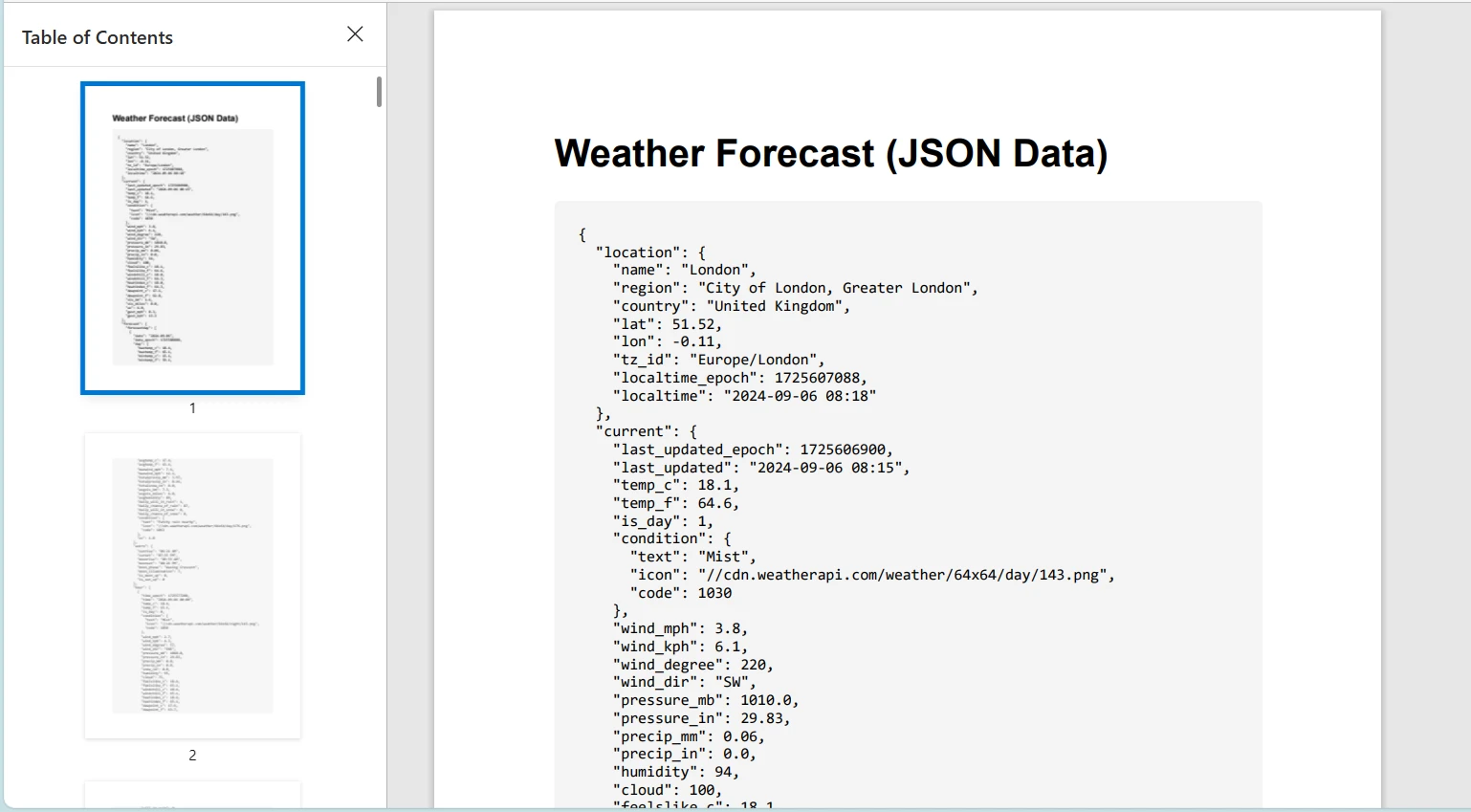
Pamiętaj, aby zastąpić "YOUR_API_KEY" kluczem API podczas korzystania z prawdziwego interfejsu API pogody.
Wnioski
W tym samouczku omówiono wykorzystanie klasy HttpClient w języku C# do wysyłania żądań HTTP i obsługi odpowiedzi. Wprowadziliśmy również IronPDF, potężną bibliotekę do generowania plików PDF w aplikacjach .NET. Pokazaliśmy, jak połączyć te technologie, pobierając zawartość HTML z serwisu internetowego za pomocą HttpClient i konwertując ją do formatu PDF za pomocą IronPDF.
IronPDF oferuje darmową wersję próbną, a jego licencje zaczynają się od $999, co czyni go cennym narzędziem dla programistów szukających kompleksowych możliwości generowania PDF.













