


IronPDF ve HiQPdf C# Arasındaki Karşılaştırma

.NET projeniz için doğru PDF kütüphanesini mi arıyorsunuz? IronPDF ve PDFTron (şimdi Apryse) arasındaki bu kapsamlı karşılaştırma, özellikleri, fiyatları, performansı ve geliştirici deneyimini analiz ederek bilinçli bir karar verme sürecinize yardımcı olur. Web uygulamaları, masaüstü yazılımları veya bulut hizmetleri oluştururken, doğru PDF araç kitini seçmek geliştirme hızınızı ve proje başarınızı önemli ölçüde etkileyebilir.
Hızlı Karşılaştırma Özeti
| Kategori | Özellikler/Aspekt | IronPDF | PDFTron (Apryse) | Temel Avantaj |
|---|---|---|---|---|
| Çekirdek Mimari | Tasarım Felsefesi | Sadelik odaklı, Chrome V8 motoru | Kurumsal odaklı, özel motor | IronPDF: Daha hızlı geliştirme |
| API Karmaşıklığı | Basit yöntemler, örneğin RenderHtmlAsPdf() | IronPDF: Önemli ölçüde daha az hazırlık kodu | ||
| Öğrenme Eğrisi | 1-2 gün tipik | 1-2 hafta tipik | IronPDF: Daha hızlı benimseme | |
| Platform Desteği | Çapraz Platform | Yerel destek, tek paket | Birden fazla paket/modül gerekli | IronPDF: Daha basit dağıtım |
| .NET Sürümleri | .NET 10, 9, 8, 7, 6, 5, Core 3.1+, Framework 4.6.2+ | Ek kurulumla benzer destek | Her İkisi: Modern çerçeve desteği | |
| HTML'den PDF'e | Renderleme Motoru | Tam Chrome V8 motoru | Özel motor (HTML2PDF modülü üzerinden) | IronPDF: %98+ tarayıcı uyumluluğu |
| JavaScript Desteği | Rendeleme gecikmeleriyle tam destek | Sınırlı destek | IronPDF: Dinamik içerik hazır | |
| MS Office Desteği | DOCX'ten PDF'ye | Yerleşik DocxToPdfRenderer | PDFTron: Daha iyi Office sadakati | |
| CAD Desteği | Mevcut değil | DWG, DXF, DGN'den PDF'ye | PDFTron: CAD iş akışları | |
| Performans | HTML İşleme Hızı | Chrome-motor işleme; içerik karmaşıklığına göre değişir | Özel-motor render; karşılaştırmalar için Apryse ile iletişime geçin | Kullanım amacına göre değişir |
| Bellek Kullanımı | Gömeçli Chrome sürecinden dolayı daha yüksek; asenkron/paralel işleme destekler | Basit dönüşümler için daha düşük yük (özel motor) | Apryse: Temel kullanım için daha düşük bellek | |
| Licensing & Pricing | Giriş Seviyesi | Lite: $999 (1 geliştirici, 1 proje) | Fiyat teklifi için satış ekibi ile iletişime geçin | IronPDF: Şeffaf fiyatlandırma |
| Enterprise | Professional: $2,999 (10 geliştirici) | Fiyat teklifi için satış ekibi ile iletişime geçin | IronPDF: Şeffaf yayınlanmış fiyatlandırma | |
| Destek | Destek Dahil | Evet, 24/5 mühendislik desteği | Lisans seviyesine göre değişir | IronPDF: Destek dahil |
| En İyi Kullanım Alanı | Kullanım Durumları | Modern web uygulamaları, HTML raporları, hızlı geliştirme | Doküman ağırlıklı iş akışları, CAD/Office dönüştürme | Bağlama bağlı |
IronPDF ve PDFTron (Apryse) Nedir?
IronPDF Genel Bakış
IronPDF, geliştiriciler için PDF oluşturma, düzenleme ve manipülasyonu kolaylaştıran, kapsamlı bir .NET PDF kütüphanesidir. Chrome bir rendeleme motoru üzerine inşa edilmiştir, HTML, CSS ve JavaScript'i pikselle mükemmel PDF belgelerine dönüştürmede ustadır. Kütüphanenin anlaşılır API tasarımı, geliştiricilerin minimal kodla PDF işlevselliğini entegre etmelerine olanak tanır, bu da web uygulamaları, raporlama sistemleri ve doküman otomasyonu için idealdir.
PDFTron (Apryse) Genel Görünüm
PDFTron, Şubat 2023'te Apryse olarak yeniden markalaşmış, işletme odaklı bir PDF SDK'sıdır ve geniş belgeler işleme yetenekleri sunar. Öncelikle karmaşık belge iş akışları için geliştirilen bu SDK, çeşitli dosya formatları için güçlü destek sunar, Microsoft Office, CAD çizimleri ve özel belge türleri de bunlar arasındadır. PDFTron Systems Inc., belgeleme teknolojisinde küresel bir lider olarak iText, Windward, Eversign ve daha fazlası gibi 13 şirketi bir araya getirerek yeniden markalaşma duyurusunu yaptı. Bu şirketler arasında iText, Windward, Eversign ve daha fazlası yer alıyor.
PDF Oluşturma için Bir ASP.NET Projesini Nasıl Yaratırım?
PDF oluşturma için bir ASP.NET projesi kurmak, hangi kütüphaneyi seçerseniz seçin uygun konfigürasyon gerektirir. IronPDF veya PDFTron entegrasyonu için bir temel oluşturmak için bu adımları izleyin:
- Visual Studio 2022 veya daha yenisini açın
- 'Yeni bir proje oluştur'u tıklayın 'ASP.NET Core Web Uygulaması' (NET 6.0 veya daha yenisi önerilir) seçin Proje adınızı ve konumunu seçin 'Web Uygulaması (Model-Görünüm-Denetleyici)' veya ihtiyaçlarınıza göre 'Web API'yi seçin Optimum uyumluluk için '.NET 8.0' veya daha yenisinin seçili olduğundan emin olun
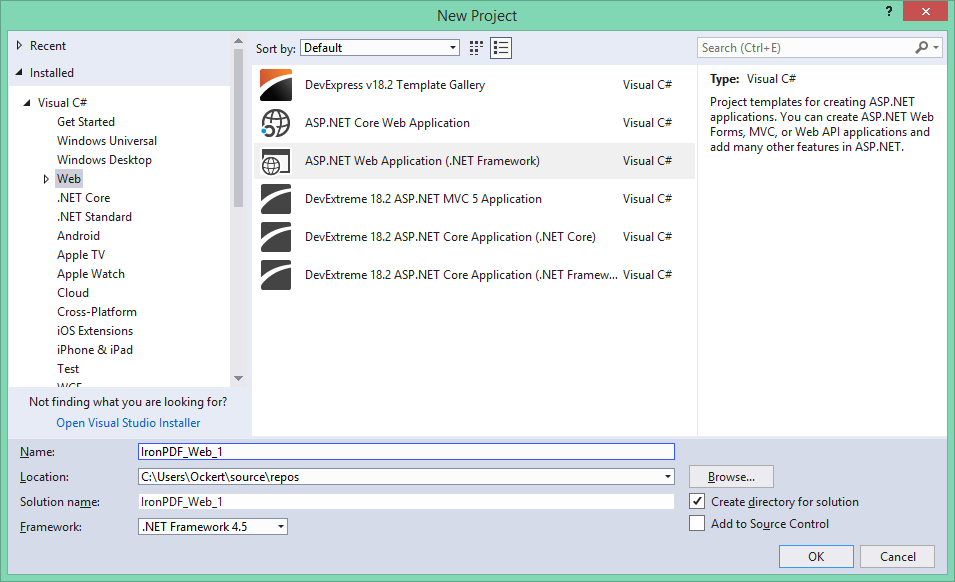 Visual Studio'nun Yeni Proje iletişim kutusu, PDF kütüphanesi entegrasyonu için ASP.NET proje şablonlarını gösteriyor
Web Forms uygulamaları için:
- 'ASP.NET Web Uygulaması (.NET Framework)' seçin Şablon seçeneklerinden 'Web Forms'u seçin Proje yapısını oluşturmak için 'Oluştur'a tıklayın
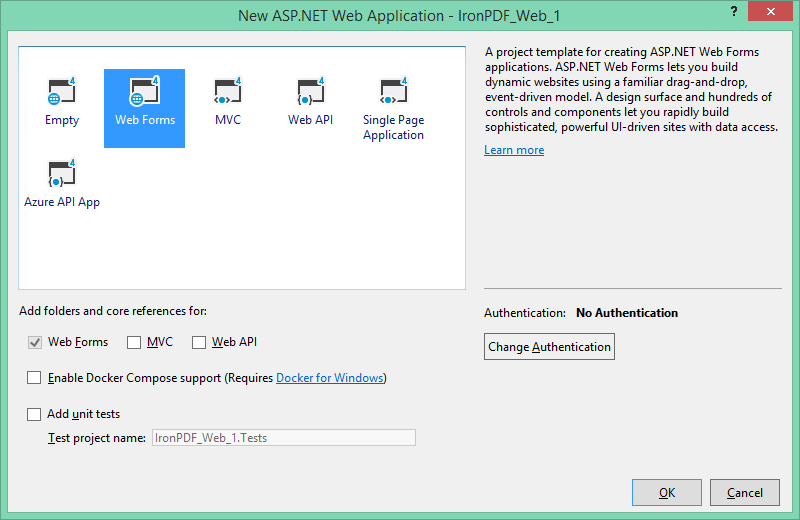 PDF yeteneklerine sahip geleneksel ASP.NET uygulamaları için Web Forms şablonunun seçilmesi
IronPDF'yi C# Projemde Nasıl Yüklerim?
IronPDF, farklı geliştirme iş akışlarına uyacak birden fazla kurulum yöntemi sunar. Visual Studio'da, Çözüm Gezgini'nde projenize sağ tıklayın ve 'NuGet Paketlerini Yönet...' seçeneğini seçin. Oradan, IronPDF'yi arayın ve en son sürümü yükleyin.
Yöntem 1: Visual Studio Paket Yöneticisi Kullanılarak
En basit yaklaşım, Visual Studio'nun yerleşik NuGet Paket Yöneticisini kullanır:
- Çözüm Gezgini'nde projenize sağ tıklayın
- "NuGet Paketlerini Yönet" seçeneğini seçin
- "Gözat"a tıklayın ve "IronPDF" arayın
- IronPDF paketinde 'Yükle'yi tıklayın
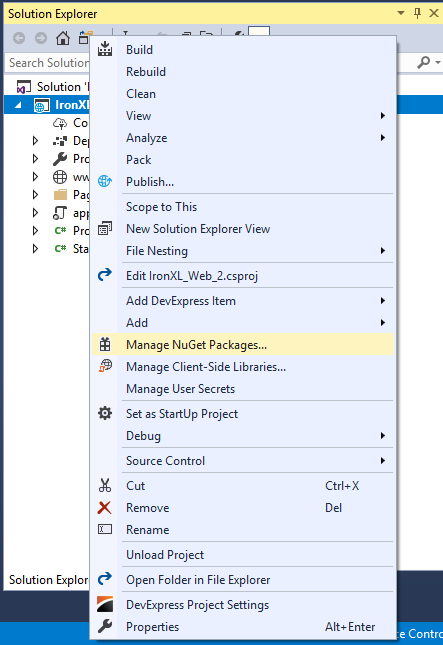 Visual Studio'nun Çözüm Gezgini üzerinden IronPDF yüklemesi için NuGet Paket Yöneticisine erişim
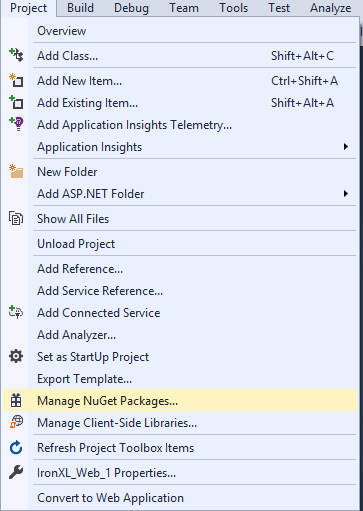 Visual Studio'nun Proje menüsü aracılığıyla NuGet Paket Yöneticisine alternatif erişim
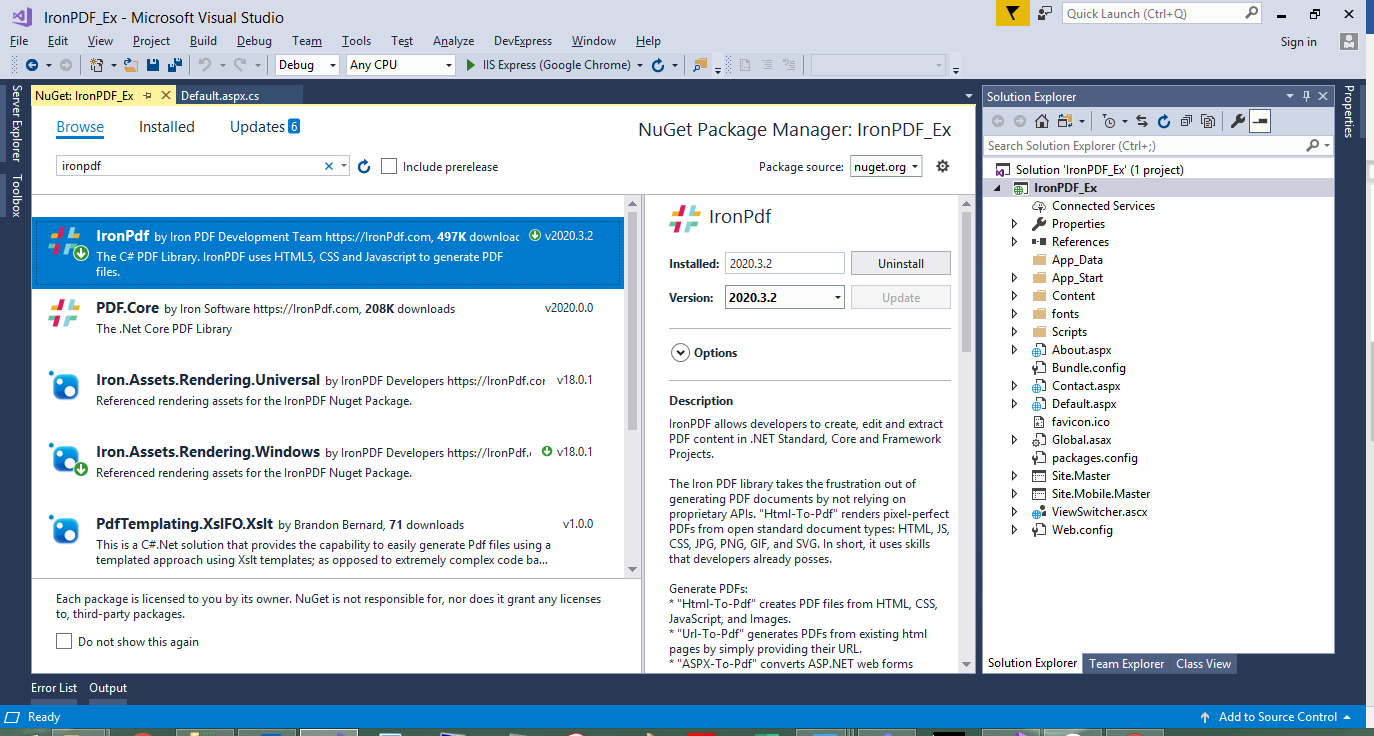 NuGet Paket Yöneticisi aracılığıyla sürüm bilgileri ve bağımlılıklarla birlikte IronPDF'nin yüklenmesi
Yöntem 2: Paket Yöneticisi Konsolu Kullanarak
Komut satırı araçlarını tercih eden geliştiriciler için:
# Open Package Manager Console in Visual Studio
# Tools > NuGet Package Manager > Package Manager Console
Install-Package IronPdf

# For specific version installation
Install-Package IronPdf -Version 2025.7.0
# Open Package Manager Console in Visual Studio
# Tools > NuGet Package Manager > Package Manager Console
Install-Package IronPdf
# For specific version installation
Install-Package IronPdf -Version 2025.7.0Yöntem 3: Doğrudan İndirme Kurulumu
NuGet erişimi olmayan ortamlar için:
- IronPDF'nin resmi sitesinden indirin ZIP dosyasını proje dizininize çıkarın Visual Studio'da, 'Başvurular'a sağ tıklayın → 'Başvuru Ekle'
IronPdf.dll'e gidin ve seçin
Yöntem 4: .NET CLI Kullanarak
Komut satırı meraklıları ve CI/CD boru hatları için:
# Navigate to your project directory
cd MyProject

# Install IronPDF
dotnet add package IronPdf

# Restore packages
dotnet restore
# Navigate to your project directory
cd MyProject
# Install IronPDF
dotnet add package IronPdf
# Restore packages
dotnet restorePDFTron (Apryse) SDK Nasıl Yüklenir?
PDFTron kurulumunda modüler mimarisi ve kurumsal odaklı yaklaşımı nedeniyle daha fazla adım bulunur. İşlem, hedef platformunuza ve gereksinim duyduğunuz özelliklere bağlı olarak değişir.
Ön Koşullar
- Visual Studio 2019 veya daha yeni
- .NET Masaüstü Geliştirme iş yükü
- .NET Framework 4.5.1+ geliştirme araçları PDFTron SDK indirme
Manuel Entegrasyon Adımları
-
SDK'yı Çıkarın
# Example extraction path
PDFNET_BASE = C:/PDFTron/PDFNetDotNet4/
# Example extraction path PDFNET_BASE = C:/PDFTron/PDFNetDotNet4/SHELL -
Lisans Anahtarı ile Başlatın
// Initialize PDFTron with your license key
pdftron.PDFNet.Initialize("your-license-key-here");

// Note: Demo keys expire after evaluation period
// Contact Apryse sales for production licenses
// Initialize PDFTron with your license key pdftron.PDFNet.Initialize("your-license-key-here"); // Note: Demo keys expire after evaluation period // Contact Apryse sales for production licenses' Initialize PDFTron with your license key pdftron.PDFNet.Initialize("your-license-key-here") ' Note: Demo keys expire after evaluation period ' Contact Apryse sales for production licenses$vbLabelText $csharpLabel -
Gerekli Kütüphaneleri Kopyalayın
LibklasörünüPDFNET_BASEkonumundan proje dizininize kopyalayın- Hem
PDFNetLoader.dllhem de platforma özgüPDFNet.dlliçin referanslar ekleyin
- Yerel Kopya Özelliğini Yapılandırın
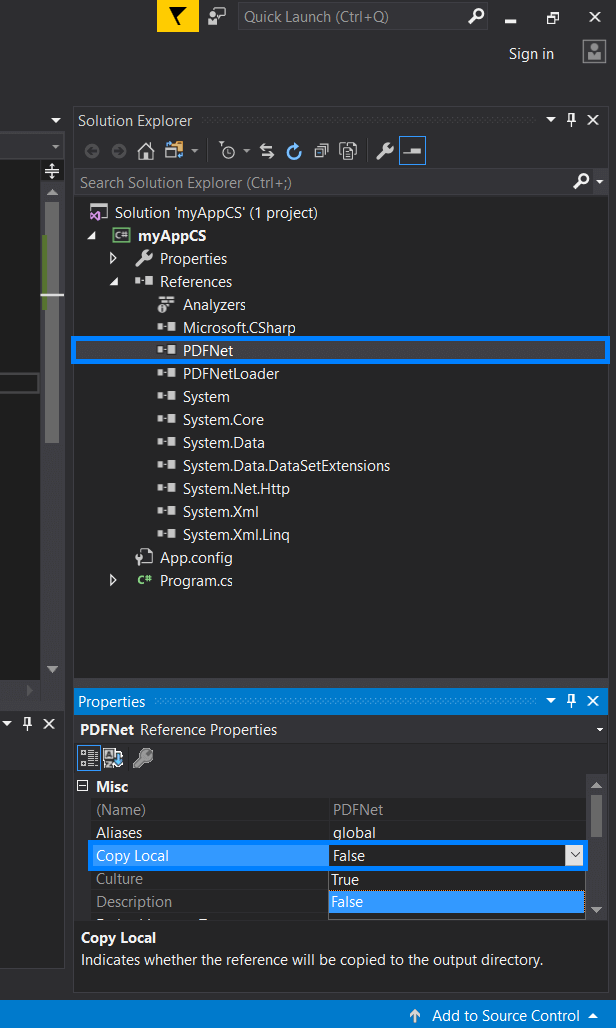 PDFNet.dll'in PDFTron dağıtımı için Yerel Kopya özelliğinin Yanlış ayarlanması
-
App.config'i Güncelleyin
<configuration>
   <runtime>
       <loadFromRemoteSources enabled="true" />
   </runtime>
</configuration>
<configuration> <runtime> <loadFromRemoteSources enabled="true" /> </runtime> </configuration>XML -
Yapı Sonrası Olayları Yapılandırın
xcopy $(ProjectDir)Lib\PDFNet $(TargetDir)PDFNet /S /I /Yxcopy $(ProjectDir)Lib\PDFNet $(TargetDir)PDFNet /S /I /YSHELL
NuGet Kurulumu (Basit)
Daha basitleştirilmiş bir yaklaşım için:
- NuGet Paket Yöneticisini açın 'PDFTron.NET.x64' veya platforma özgü paketi arayın Mimarinize uygun paketi yükleyin
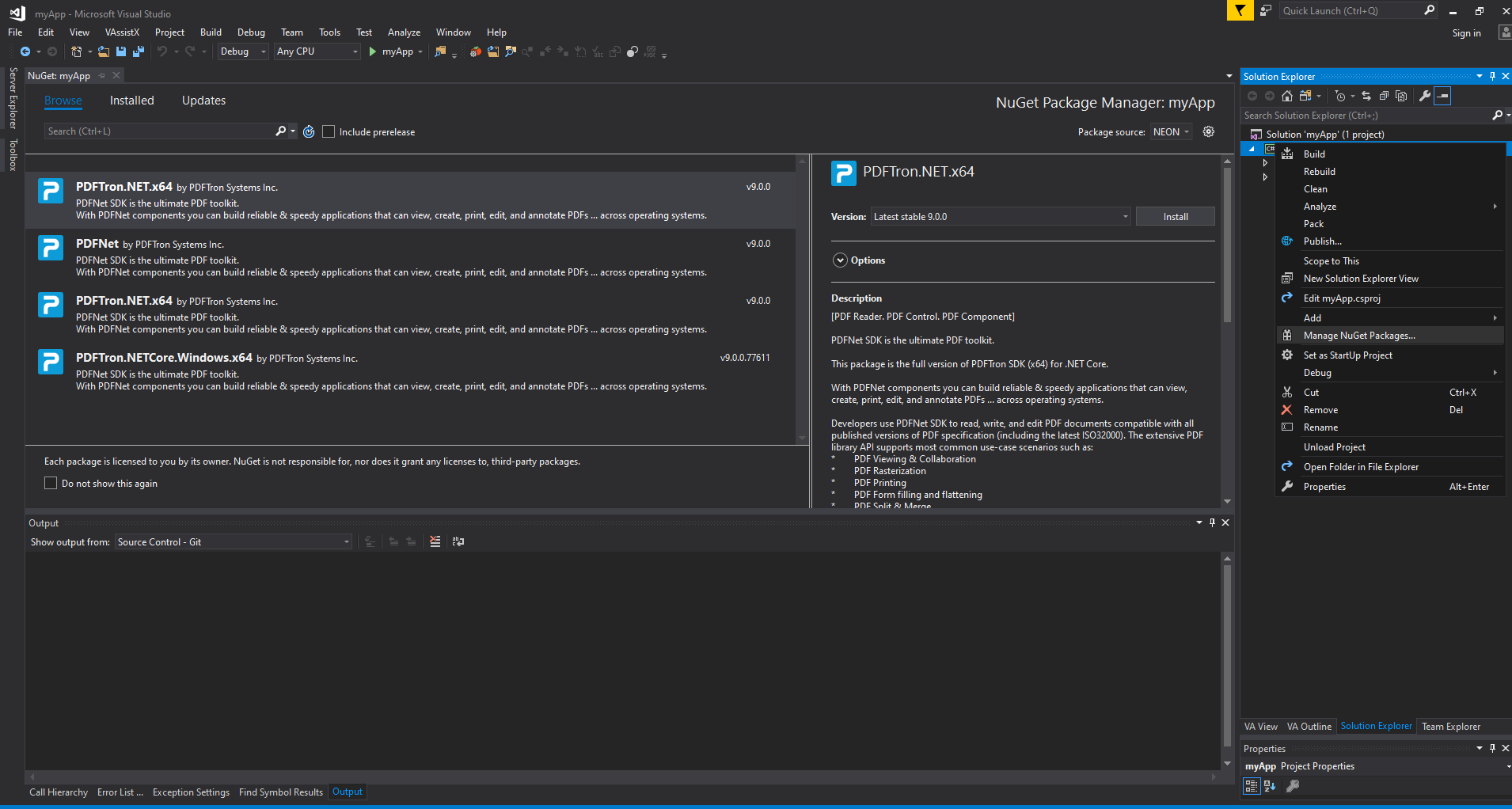 Platforma özgü paketlerle NuGet Paket Yöneticisi aracılığıyla PDFTron'un yüklenmesi
PDFTron, ComPDFKit'in 10+ tipiyle karşılaştırıldığında 30'dan fazla ek açıklama türü sunar. Ancak, bu geniş özellik seti, kurulum sırasında dikkatli modül seçimini gerektirir.
Bu Kütüphaneleri Kullanarak Bir URL'yi PDF'ye Nasıl Dönüştürürüm?
Her iki kütüphane de URL'den PDF'ye dönüşüm sunar, ancak farklı yaklaşımlar ve yeteneklerle. Her birinin uygulama detayları ve performans özelliklerini inceleyelim.
IronPDF ile URL'yi PDF'ye Dönüştürme
IronPDF'nin Chrome render motoru, modern web standartları için olağanüstü destek sunar:
using IronPdf;

// Initialize the Chrome renderer with advanced options
var renderer = new ChromePdfRenderer();

// Configure rendering for optimal results
renderer.RenderingOptions.PaperSize = PdfPaperSize.A4;
renderer.RenderingOptions.MarginTop = 20;
renderer.RenderingOptions.MarginBottom = 20;
renderer.RenderingOptions.CssMediaType = PdfCssMediaType.Print;
renderer.RenderingOptions.EnableJavaScript = true;
renderer.RenderingOptions.RenderDelay = 1000; // Wait for JS execution

// Handle authentication if needed
renderer.LoginCredentials = new ChromeHttpLoginCredentials() {
    Username = "user@domain.com",
    Password = "secure_password"
};

// Render URL to PDF with full browser capabilities
var pdf = renderer.RenderUrlAsPdf("https://ironpdf.com/");

// Add metadata for document management
pdf.MetaData.Author = "Development Team";
pdf.MetaData.Title = "Website Export - " + DateTime.Now.ToString("yyyy-MM-dd");

// Save with compression
pdf.CompressImages(90);
pdf.SaveAs("website-export.pdf");
using IronPdf;
// Initialize the Chrome renderer with advanced options
var renderer = new ChromePdfRenderer();
// Configure rendering for optimal results
renderer.RenderingOptions.PaperSize = PdfPaperSize.A4;
renderer.RenderingOptions.MarginTop = 20;
renderer.RenderingOptions.MarginBottom = 20;
renderer.RenderingOptions.CssMediaType = PdfCssMediaType.Print;
renderer.RenderingOptions.EnableJavaScript = true;
renderer.RenderingOptions.RenderDelay = 1000; // Wait for JS execution
// Handle authentication if needed
renderer.LoginCredentials = new ChromeHttpLoginCredentials() {
Username = "user@domain.com",
Password = "secure_password"
};
// Render URL to PDF with full browser capabilities
var pdf = renderer.RenderUrlAsPdf("https://ironpdf.com/");
// Add metadata for document management
pdf.MetaData.Author = "Development Team";
pdf.MetaData.Title = "Website Export - " + DateTime.Now.ToString("yyyy-MM-dd");
// Save with compression
pdf.CompressImages(90);
pdf.SaveAs("website-export.pdf");Imports IronPdf
' Initialize the Chrome renderer with advanced options
Private renderer = New ChromePdfRenderer()
' Configure rendering for optimal results
renderer.RenderingOptions.PaperSize = PdfPaperSize.A4
renderer.RenderingOptions.MarginTop = 20
renderer.RenderingOptions.MarginBottom = 20
renderer.RenderingOptions.CssMediaType = PdfCssMediaType.Print
renderer.RenderingOptions.EnableJavaScript = True
renderer.RenderingOptions.RenderDelay = 1000 ' Wait for JS execution
' Handle authentication if needed
renderer.LoginCredentials = New ChromeHttpLoginCredentials() With {
.Username = "user@domain.com",
.Password = "secure_password"
}
' Render URL to PDF with full browser capabilities
Dim pdf = renderer.RenderUrlAsPdf("https://ironpdf.com/")
' Add metadata for document management
pdf.MetaData.Author = "Development Team"
pdf.MetaData.Title = "Website Export - " & DateTime.Now.ToString("yyyy-MM-dd")
' Save with compression
pdf.CompressImages(90)
pdf.SaveAs("website-export.pdf")IronPDF'deki Chrome renderleyici, aşağıdaki karmaşık senaryoları işler:
- Yoğun JavaScript ile Tek Sayfa Uygulamaları (SPA)
- Medya sorguları ile duyarlı tasarımlar
- Web yazı tipleri ve harici stil sayfaları
- AJAX içerik yükleme
- CSS animasyonları ve geçişleri
IronPDF, kutudan çıkar çıkmaz bu işleme senaryolarını destekler: nuget.org/packages/IronPdf. Son performans iyileştirmeleri, özellikle karmaşık web uygulamaları için işleme hızını arttırmıştır.
PDFTron (Apryse) ile URL'yi PDF'ye Dönüştürme
PDFTron, web içeriği dönüşümü için HTML2PDF modülüne ihtiyaç duyar:
using pdftron;
using pdftron.PDF;
using pdftron.SDF;

class UrlToPdfConverter
{
    public static void ConvertUrlToPdf(string url, string outputPath)
    {
        // Initialize PDFTron with license
        PDFNet.Initialize("your-license-key");

        // Create a new PDF document
        using (PDFDoc doc = new PDFDoc())
        {
            // Initialize HTML2PDF converter
            HTML2PDF converter = new HTML2PDF();

            // Configure conversion settings
            HTML2PDF.WebPageSettings settings = new HTML2PDF.WebPageSettings();
            settings.SetPrintBackground(true);
            settings.SetLoadImages(true);

            // Set page dimensions
            converter.SetPaperSize(PrinterMode.PaperSize.e_letter);
            converter.SetMargins(0.5, 0.5, 0.5, 0.5);

            // Insert URL content
            converter.InsertFromURL(url);

            // Perform conversion
            if (converter.Convert(doc))
            {
                // Save the resulting PDF
                doc.Save(outputPath, SDFDoc.SaveOptions.e_linearized);
                Console.WriteLine($"Successfully converted {url} to {outputPath}");
            }
            else
            {
                Console.WriteLine("Conversion failed");
            }
        }
    }
}
using pdftron;
using pdftron.PDF;
using pdftron.SDF;
class UrlToPdfConverter
{
public static void ConvertUrlToPdf(string url, string outputPath)
{
// Initialize PDFTron with license
PDFNet.Initialize("your-license-key");
// Create a new PDF document
using (PDFDoc doc = new PDFDoc())
{
// Initialize HTML2PDF converter
HTML2PDF converter = new HTML2PDF();
// Configure conversion settings
HTML2PDF.WebPageSettings settings = new HTML2PDF.WebPageSettings();
settings.SetPrintBackground(true);
settings.SetLoadImages(true);
// Set page dimensions
converter.SetPaperSize(PrinterMode.PaperSize.e_letter);
converter.SetMargins(0.5, 0.5, 0.5, 0.5);
// Insert URL content
converter.InsertFromURL(url);
// Perform conversion
if (converter.Convert(doc))
{
// Save the resulting PDF
doc.Save(outputPath, SDFDoc.SaveOptions.e_linearized);
Console.WriteLine($"Successfully converted {url} to {outputPath}");
}
else
{
Console.WriteLine("Conversion failed");
}
}
}
}Imports pdftron
Imports pdftron.PDF
Imports pdftron.SDF
Friend Class UrlToPdfConverter
Public Shared Sub ConvertUrlToPdf(ByVal url As String, ByVal outputPath As String)
' Initialize PDFTron with license
PDFNet.Initialize("your-license-key")
' Create a new PDF document
Using doc As New PDFDoc()
' Initialize HTML2PDF converter
Dim converter As New HTML2PDF()
' Configure conversion settings
Dim settings As New HTML2PDF.WebPageSettings()
settings.SetPrintBackground(True)
settings.SetLoadImages(True)
' Set page dimensions
converter.SetPaperSize(PrinterMode.PaperSize.e_letter)
converter.SetMargins(0.5, 0.5, 0.5, 0.5)
' Insert URL content
converter.InsertFromURL(url)
' Perform conversion
If converter.Convert(doc) Then
' Save the resulting PDF
doc.Save(outputPath, SDFDoc.SaveOptions.e_linearized)
Console.WriteLine($"Successfully converted {url} to {outputPath}")
Else
Console.WriteLine("Conversion failed")
End If
End Using
End Sub
End ClassPDFTron HTML2PDF için önemli hususlar:
- PDFTron'un SDK'sı teknolojinin genişliği (API'ler, özellikler) ve dağıtım kapsamı (dış veya iç kullanıcılar) baz alınarak fiyatlandırılır.
- Tarayıcı motorlarına kıyasla sınırlı JavaScript desteği
- Karmaşık düzenler için ek yapılandırma gerekebilir
- Basit HTML belgeleri için daha uygundur
HTML Stringlerinden PDF Nasıl Oluşturulur?
HTML dizgilerinden PDF oluşturmak, dinamik raporlar, faturalar ve belgeler oluşturmak için gereklidir. Her iki kütüphane de bunu farklı şekilde ele alır.
HTML Dizgisinden PDF'ye Dönüştürme
IronPDF, tam CSS3 ve JavaScript desteği ile karmaşık HTML'yi başarıyla işler:
using IronPdf;
using System.Text;

public class HtmlStringToPdfConverter
{
    public static PdfDocument GenerateInvoice(InvoiceData data)
    {
        // Build dynamic HTML with modern CSS
        var html = new StringBuilder();
        html.Append(@"
        <!DOCTYPE html>
        <html>
        <head>
            <meta charset='UTF-8'>
            <style>
                @import url('https://fonts.googleapis.com/css2?family=Roboto:wght@300;400;700&display=swap');

                body {
                    font-family: 'Roboto', sans-serif;
                    margin: 0;
                    padding: 20px;
                    color: #333;
                }

                .invoice-header {
                    display: flex;
                    justify-content: space-between;
                    border-bottom: 2px solid #007bff;
                    padding-bottom: 20px;
                    margin-bottom: 30px;
                }

                .company-logo {
                    width: 150px;
                    height: auto;
                }

                .invoice-details {
                    text-align: right;
                }

                .invoice-number {
                    font-size: 24px;
                    font-weight: 700;
                    color: #007bff;
                }

                table {
                    width: 100%;
                    border-collapse: collapse;
                    margin-top: 20px;
                }

                th {
                    background-color: #f8f9fa;
                    padding: 12px;
                    text-align: left;
                    border-bottom: 2px solid #dee2e6;
                }

                td {
                    padding: 12px;
                    border-bottom: 1px solid #dee2e6;
                }

                .total-row {
                    font-weight: 700;
                    font-size: 18px;
                    background-color: #e9ecef;
                }

                @media print {
                    body { margin: 0; }
                    .no-print { display: none; }
                }
            </style>
        </head>
        <body>
        ");

        // Add invoice header
        html.Append($@"
            <div class='invoice-header'>
                <div>
                    <img src='data:image/png;base64,{data.CompanyLogoBase64}' class='company-logo' alt='Company Logo'>
                    <h2>{data.CompanyName}</h2>
                    <p>{data.CompanyAddress}</p>
                </div>
                <div class='invoice-details'>
                    <div class='invoice-number'>Invoice #{data.InvoiceNumber}</div>
                    <p>Date: {data.InvoiceDate:yyyy-MM-dd}</p>
                    <p>Due: {data.DueDate:yyyy-MM-dd}</p>
                </div>
            </div>
        ");

        // Add line items table
        html.Append(@"
            <table>
                <thead>
                    <tr>
                        <th>Description</th>
                        <th>Quantity</th>
                        <th>Unit Price</th>
                        <th>Total</th>
                    </tr>
                </thead>
                <tbody>
        ");

        foreach (var item in data.LineItems)
        {
            html.Append($@"
                <tr>
                    <td>{item.Description}</td>
                    <td>{item.Quantity}</td>
                    <td>${item.UnitPrice:F2}</td>
                    <td>${item.Total:F2}</td>
                </tr>
            ");
        }

        html.Append($@"
                </tbody>
                <tfoot>
                    <tr class='total-row'>
                        <td colspan='3'>Total</td>
                        <td>${data.Total:F2}</td>
                    </tr>
                </tfoot>
            </table>
        </body>
        </html>
        ");

        // Configure renderer for optimal output
        var renderer = new ChromePdfRenderer();
        renderer.RenderingOptions.CssMediaType = PdfCssMediaType.Print;
        renderer.RenderingOptions.EnableJavaScript = true;
        renderer.RenderingOptions.CreatePdfFormsFromHtml = true;

        // Generate PDF with proper base path for assets
        var pdf = renderer.RenderHtmlAsPdf(html.ToString());

        // Add security if needed
        pdf.SecuritySettings.UserPassword = data.CustomerEmail;
        pdf.SecuritySettings.AllowUserPrinting = true;
        pdf.SecuritySettings.AllowUserCopyPasteContent = false;

        return pdf;
    }
}
using IronPdf;
using System.Text;
public class HtmlStringToPdfConverter
{
public static PdfDocument GenerateInvoice(InvoiceData data)
{
// Build dynamic HTML with modern CSS
var html = new StringBuilder();
html.Append(@"
<!DOCTYPE html>
<html>
<head>
<meta charset='UTF-8'>
<style>
@import url('https://fonts.googleapis.com/css2?family=Roboto:wght@300;400;700&display=swap');
body {
font-family: 'Roboto', sans-serif;
margin: 0;
padding: 20px;
color: #333;
}
.invoice-header {
display: flex;
justify-content: space-between;
border-bottom: 2px solid #007bff;
padding-bottom: 20px;
margin-bottom: 30px;
}
.company-logo {
width: 150px;
height: auto;
}
.invoice-details {
text-align: right;
}
.invoice-number {
font-size: 24px;
font-weight: 700;
color: #007bff;
}
table {
width: 100%;
border-collapse: collapse;
margin-top: 20px;
}
th {
background-color: #f8f9fa;
padding: 12px;
text-align: left;
border-bottom: 2px solid #dee2e6;
}
td {
padding: 12px;
border-bottom: 1px solid #dee2e6;
}
.total-row {
font-weight: 700;
font-size: 18px;
background-color: #e9ecef;
}
@media print {
body { margin: 0; }
.no-print { display: none; }
}
</style>
</head>
<body>
");
// Add invoice header
html.Append($@"
<div class='invoice-header'>
<div>
<img src='data:image/png;base64,{data.CompanyLogoBase64}' class='company-logo' alt='Company Logo'>
<h2>{data.CompanyName}</h2>
<p>{data.CompanyAddress}</p>
</div>
<div class='invoice-details'>
<div class='invoice-number'>Invoice #{data.InvoiceNumber}</div>
<p>Date: {data.InvoiceDate:yyyy-MM-dd}</p>
<p>Due: {data.DueDate:yyyy-MM-dd}</p>
</div>
</div>
");
// Add line items table
html.Append(@"
<table>
<thead>
<tr>
<th>Description</th>
<th>Quantity</th>
<th>Unit Price</th>
<th>Total</th>
</tr>
</thead>
<tbody>
");
foreach (var item in data.LineItems)
{
html.Append($@"
<tr>
<td>{item.Description}</td>
<td>{item.Quantity}</td>
<td>${item.UnitPrice:F2}</td>
<td>${item.Total:F2}</td>
</tr>
");
}
html.Append($@"
</tbody>
<tfoot>
<tr class='total-row'>
<td colspan='3'>Total</td>
<td>${data.Total:F2}</td>
</tr>
</tfoot>
</table>
</body>
</html>
");
// Configure renderer for optimal output
var renderer = new ChromePdfRenderer();
renderer.RenderingOptions.CssMediaType = PdfCssMediaType.Print;
renderer.RenderingOptions.EnableJavaScript = true;
renderer.RenderingOptions.CreatePdfFormsFromHtml = true;
// Generate PDF with proper base path for assets
var pdf = renderer.RenderHtmlAsPdf(html.ToString());
// Add security if needed
pdf.SecuritySettings.UserPassword = data.CustomerEmail;
pdf.SecuritySettings.AllowUserPrinting = true;
pdf.SecuritySettings.AllowUserCopyPasteContent = false;
return pdf;
}
}Imports IronPdf
Imports System.Text
Public Class HtmlStringToPdfConverter
Public Shared Function GenerateInvoice(ByVal data As InvoiceData) As PdfDocument
' Build dynamic HTML with modern CSS
Dim html = New StringBuilder()
html.Append("
<!DOCTYPE html>
<html>
<head>
<meta charset='UTF-8'>
<style>
@import url('https://fonts.googleapis.com/css2?family=Roboto:wght@300;400;700&display=swap');
body {
font-family: 'Roboto', sans-serif;
margin: 0;
padding: 20px;
color: #333;
}
.invoice-header {
display: flex;
justify-content: space-between;
border-bottom: 2px solid #007bff;
padding-bottom: 20px;
margin-bottom: 30px;
}
.company-logo {
width: 150px;
height: auto;
}
.invoice-details {
text-align: right;
}
.invoice-number {
font-size: 24px;
font-weight: 700;
color: #007bff;
}
table {
width: 100%;
border-collapse: collapse;
margin-top: 20px;
}
th {
background-color: #f8f9fa;
padding: 12px;
text-align: left;
border-bottom: 2px solid #dee2e6;
}
td {
padding: 12px;
border-bottom: 1px solid #dee2e6;
}
.total-row {
font-weight: 700;
font-size: 18px;
background-color: #e9ecef;
}
@media print {
body { margin: 0; }
.no-print { display: none; }
}
</style>
</head>
<body>
")
' Add invoice header
html.Append($"
<div class='invoice-header'>
<div>
<img src='data:image/png;base64,{data.CompanyLogoBase64}' class='company-logo' alt='Company Logo'>
<h2>{data.CompanyName}</h2>
<p>{data.CompanyAddress}</p>
</div>
<div class='invoice-details'>
<div class='invoice-number'>Invoice #{data.InvoiceNumber}</div>
<p>Date: {data.InvoiceDate:yyyy-MM-dd}</p>
<p>Due: {data.DueDate:yyyy-MM-dd}</p>
</div>
</div>
")
' Add line items table
html.Append("
<table>
<thead>
<tr>
<th>Description</th>
<th>Quantity</th>
<th>Unit Price</th>
<th>Total</th>
</tr>
</thead>
<tbody>
")
For Each item In data.LineItems
html.Append($"
<tr>
<td>{item.Description}</td>
<td>{item.Quantity}</td>
<td>${item.UnitPrice:F2}</td>
<td>${item.Total:F2}</td>
</tr>
")
Next item
html.Append($"
</tbody>
<tfoot>
<tr class='total-row'>
<td colspan='3'>Total</td>
<td>${data.Total:F2}</td>
</tr>
</tfoot>
</table>
</body>
</html>
")
' Configure renderer for optimal output
Dim renderer = New ChromePdfRenderer()
renderer.RenderingOptions.CssMediaType = PdfCssMediaType.Print
renderer.RenderingOptions.EnableJavaScript = True
renderer.RenderingOptions.CreatePdfFormsFromHtml = True
' Generate PDF with proper base path for assets
Dim pdf = renderer.RenderHtmlAsPdf(html.ToString())
' Add security if needed
pdf.SecuritySettings.UserPassword = data.CustomerEmail
pdf.SecuritySettings.AllowUserPrinting = True
pdf.SecuritySettings.AllowUserCopyPasteContent = False
Return pdf
End Function
End ClassIronPDF'nin HTML renderlemesinin temel avantajları:
- Flexbox ve grid düzenleri dahil tam CSS3 desteği
- Google Fonts ve web font entegrasyonu
- JavaScript grafik kütüphaneleri (Chart.js, D3.js) mükemmel şekilde işlenir
- Görünüm kontrolü ile duyarlı tasarım desteği
- Kendi kendine yeten belgeler için Base64 resim yerleştirme
PDFTron (Apryse) ile HTML Dizgisinden PDF'ye Dönüştürme
PDFTron'un HTML dizgisi dönüşümüne yaklaşımı:
using pdftron;
using pdftron.PDF;
using pdftron.SDF;

public class PdfTronHtmlConverter
{
    public static void ConvertHtmlString(string htmlContent, string outputPath)
    {
        PDFNet.Initialize("your-license-key");

        using (PDFDoc doc = new PDFDoc())
        {
            // Create HTML2PDF converter instance
            HTML2PDF converter = new HTML2PDF();

            // Configure page settings
            converter.SetPaperSize(PrinterMode.PaperSize.e_letter);
            converter.SetLandscape(false);
            converter.SetMargins(1.0, 1.0, 1.0, 1.0, HTML2PDF.e_inches);

            // Enable images and backgrounds
            HTML2PDF.WebPageSettings settings = new HTML2PDF.WebPageSettings();
            settings.SetPrintBackground(true);
            settings.SetLoadImages(true);
            settings.SetJavaScriptDelay(1000); // Limited JS support

            // Insert HTML content
            converter.InsertFromHtmlString(htmlContent);

            // Convert to PDF
            if (converter.Convert(doc))
            {
                // Post-processing options
                doc.Save(outputPath, SDFDoc.SaveOptions.e_linearized);
            }
        }
    }
}
using pdftron;
using pdftron.PDF;
using pdftron.SDF;
public class PdfTronHtmlConverter
{
public static void ConvertHtmlString(string htmlContent, string outputPath)
{
PDFNet.Initialize("your-license-key");
using (PDFDoc doc = new PDFDoc())
{
// Create HTML2PDF converter instance
HTML2PDF converter = new HTML2PDF();
// Configure page settings
converter.SetPaperSize(PrinterMode.PaperSize.e_letter);
converter.SetLandscape(false);
converter.SetMargins(1.0, 1.0, 1.0, 1.0, HTML2PDF.e_inches);
// Enable images and backgrounds
HTML2PDF.WebPageSettings settings = new HTML2PDF.WebPageSettings();
settings.SetPrintBackground(true);
settings.SetLoadImages(true);
settings.SetJavaScriptDelay(1000); // Limited JS support
// Insert HTML content
converter.InsertFromHtmlString(htmlContent);
// Convert to PDF
if (converter.Convert(doc))
{
// Post-processing options
doc.Save(outputPath, SDFDoc.SaveOptions.e_linearized);
}
}
}
}Imports pdftron
Imports pdftron.PDF
Imports pdftron.SDF
Public Class PdfTronHtmlConverter
Public Shared Sub ConvertHtmlString(ByVal htmlContent As String, ByVal outputPath As String)
PDFNet.Initialize("your-license-key")
Using doc As New PDFDoc()
' Create HTML2PDF converter instance
Dim converter As New HTML2PDF()
' Configure page settings
converter.SetPaperSize(PrinterMode.PaperSize.e_letter)
converter.SetLandscape(False)
converter.SetMargins(1.0, 1.0, 1.0, 1.0, HTML2PDF.e_inches)
' Enable images and backgrounds
Dim settings As New HTML2PDF.WebPageSettings()
settings.SetPrintBackground(True)
settings.SetLoadImages(True)
settings.SetJavaScriptDelay(1000) ' Limited JS support
' Insert HTML content
converter.InsertFromHtmlString(htmlContent)
' Convert to PDF
If converter.Convert(doc) Then
' Post-processing options
doc.Save(outputPath, SDFDoc.SaveOptions.e_linearized)
End If
End Using
End Sub
End ClassPDFTron HTML sınırlamaları göz önünde bulundurulmalı:
- Temel CSS desteği (ileri düzey düzenler yok)
- Sınırlı JavaScript çalıştırma
- Font yerleştirme ek yapılandırma gerektirir
- Basit belge düzenleri için daha uygun
ASPX Sayfalarını PDF'ye Nasıl Dönüştürebilirim?
ASPX sayfalarını PDF'ye dönüştürmek, ASP.NET uygulamaları için yaygın bir gereksinimdir. IronPDF yerel destek sunarken, PDFTron geçici çözümler gerektirir.
IronPDF ile ASPX'ten PDF'ye Dönüştürme
IronPDF, tek bir kod satırı ile sorunsuz ASPX dönüşümü sunar:
using IronPdf;

public partial class InvoicePage : System.Web.UI.Page
{
    protected void Page_Load(object sender, EventArgs e)
    {
        // Render the current ASPX page as PDF on page load
        if (Request.QueryString["pdf"] == "true")
        {
            // Configure PDF output options
            AspxToPdf.RenderThisPageAsPdf(
                AspxToPdf.FileBehavior.InBrowser,
                "Invoice_" + DateTime.Now.ToString("yyyyMMdd") + ".pdf");
        }
    }

    protected void ExportToPdfButton_Click(object sender, EventArgs e)
    {
        // Advanced configuration for ASPX to PDF
        IronPdf.AspxToPdf.RenderThisPageAsPdf(
            IronPdf.AspxToPdf.FileBehavior.Attachment,
            "Invoice.pdf",
            new ChromePdfRenderOptions()
            {
                PaperSize = PdfPaperSize.A4,
                MarginTop = 20,
                MarginBottom = 20,
                CssMediaType = PdfCssMediaType.Print,
                EnableJavaScript = true,
                CreatePdfFormsFromHtml = true,
                FitToPaper = true
            });
    }
}
using IronPdf;
public partial class InvoicePage : System.Web.UI.Page
{
protected void Page_Load(object sender, EventArgs e)
{
// Render the current ASPX page as PDF on page load
if (Request.QueryString["pdf"] == "true")
{
// Configure PDF output options
AspxToPdf.RenderThisPageAsPdf(
AspxToPdf.FileBehavior.InBrowser,
"Invoice_" + DateTime.Now.ToString("yyyyMMdd") + ".pdf");
}
}
protected void ExportToPdfButton_Click(object sender, EventArgs e)
{
// Advanced configuration for ASPX to PDF
IronPdf.AspxToPdf.RenderThisPageAsPdf(
IronPdf.AspxToPdf.FileBehavior.Attachment,
"Invoice.pdf",
new ChromePdfRenderOptions()
{
PaperSize = PdfPaperSize.A4,
MarginTop = 20,
MarginBottom = 20,
CssMediaType = PdfCssMediaType.Print,
EnableJavaScript = true,
CreatePdfFormsFromHtml = true,
FitToPaper = true
});
}
}Imports IronPdf
Partial Public Class InvoicePage
Inherits System.Web.UI.Page
Protected Sub Page_Load(ByVal sender As Object, ByVal e As EventArgs)
' Render the current ASPX page as PDF on page load
If Request.QueryString("pdf") = "true" Then
' Configure PDF output options
AspxToPdf.RenderThisPageAsPdf(AspxToPdf.FileBehavior.InBrowser, "Invoice_" & DateTime.Now.ToString("yyyyMMdd") & ".pdf")
End If
End Sub
Protected Sub ExportToPdfButton_Click(ByVal sender As Object, ByVal e As EventArgs)
' Advanced configuration for ASPX to PDF
IronPdf.AspxToPdf.RenderThisPageAsPdf(IronPdf.AspxToPdf.FileBehavior.Attachment, "Invoice.pdf", New ChromePdfRenderOptions() With {
.PaperSize = PdfPaperSize.A4,
.MarginTop = 20,
.MarginBottom = 20,
.CssMediaType = PdfCssMediaType.Print,
.EnableJavaScript = True,
.CreatePdfFormsFromHtml = True,
.FitToPaper = True
})
End Sub
End ClassRenderleme süreci üzerinde daha fazla kontrol için:
// In Global.asax.cs or Startup.cs
public static void ConfigureAspxToPdf()
{
    // Set global defaults for all ASPX to PDF conversions
    AspxToPdf.GlobalSettings.PaperSize = PdfPaperSize.A4;
    AspxToPdf.GlobalSettings.PrintHtmlBackgrounds = true;
    AspxToPdf.GlobalSettings.EnableJavaScript = true;
    AspxToPdf.GlobalSettings.CssMediaType = PdfCssMediaType.Screen;

    // Custom headers and footers
    AspxToPdf.GlobalSettings.HtmlHeader = new HtmlHeaderFooter()
    {
        HtmlFragment = "<div style='text-align: center; font-size: 12px;'>{page} of {total-pages}</div>",
        Height = 25
    };
}
// In Global.asax.cs or Startup.cs
public static void ConfigureAspxToPdf()
{
// Set global defaults for all ASPX to PDF conversions
AspxToPdf.GlobalSettings.PaperSize = PdfPaperSize.A4;
AspxToPdf.GlobalSettings.PrintHtmlBackgrounds = true;
AspxToPdf.GlobalSettings.EnableJavaScript = true;
AspxToPdf.GlobalSettings.CssMediaType = PdfCssMediaType.Screen;
// Custom headers and footers
AspxToPdf.GlobalSettings.HtmlHeader = new HtmlHeaderFooter()
{
HtmlFragment = "<div style='text-align: center; font-size: 12px;'>{page} of {total-pages}</div>",
Height = 25
};
}' In Global.asax.cs or Startup.cs
Public Shared Sub ConfigureAspxToPdf()
' Set global defaults for all ASPX to PDF conversions
AspxToPdf.GlobalSettings.PaperSize = PdfPaperSize.A4
AspxToPdf.GlobalSettings.PrintHtmlBackgrounds = True
AspxToPdf.GlobalSettings.EnableJavaScript = True
AspxToPdf.GlobalSettings.CssMediaType = PdfCssMediaType.Screen
' Custom headers and footers
AspxToPdf.GlobalSettings.HtmlHeader = New HtmlHeaderFooter() With {
.HtmlFragment = "<div style='text-align: center; font-size: 12px;'>{page} of {total-pages}</div>",
.Height = 25
}
End SubIronPDF'nin ASPX'ten PDF'ye dönüştürme özelliği şunları korur:
ViewStateve form değerleri- Oturum durumu verileri
- CSS stil ve düzenleri
- JavaScript ile oluşturulan içerik
- Ana sayfa düzenleri
PDFTron ile Alternatif ASPX
Apryse (PDFTron), IronPDF'nın AspxToPdf sınıfına eşdeğer bir yerleşik ASPX'ten PDF'ye dönüştürücü sağlamaz. Geliştiriciler genellikle, ASPX sayfası çıktısını önce bir HTML dizesi olarak yakalayarak bunu cıvar:
// Capture ASPX output as HTML, then convert
public void ConvertAspxWithPdfTron()
{
    // Render ASPX to string first
    StringWriter sw = new StringWriter();
    HtmlTextWriter hw = new HtmlTextWriter(sw);

    // Render the page to HTML
    this.RenderControl(hw);
    string htmlContent = sw.ToString();

    // Then use PDFTron's HTML2PDF
    PDFNet.Initialize("your-license-key");

    using (PDFDoc doc = new PDFDoc())
    {
        HTML2PDF converter = new HTML2PDF();
        converter.InsertFromHtmlString(htmlContent);
        converter.Convert(doc);

        // Send to browser
        byte[] pdfBytes = doc.Save(SDFDoc.SaveOptions.e_linearized);
        Response.ContentType = "application/pdf";
        Response.BinaryWrite(pdfBytes);
        Response.End();
    }
}
// Capture ASPX output as HTML, then convert
public void ConvertAspxWithPdfTron()
{
// Render ASPX to string first
StringWriter sw = new StringWriter();
HtmlTextWriter hw = new HtmlTextWriter(sw);
// Render the page to HTML
this.RenderControl(hw);
string htmlContent = sw.ToString();
// Then use PDFTron's HTML2PDF
PDFNet.Initialize("your-license-key");
using (PDFDoc doc = new PDFDoc())
{
HTML2PDF converter = new HTML2PDF();
converter.InsertFromHtmlString(htmlContent);
converter.Convert(doc);
// Send to browser
byte[] pdfBytes = doc.Save(SDFDoc.SaveOptions.e_linearized);
Response.ContentType = "application/pdf";
Response.BinaryWrite(pdfBytes);
Response.End();
}
}' Capture ASPX output as HTML, then convert
Public Sub ConvertAspxWithPdfTron()
' Render ASPX to string first
Dim sw As New StringWriter()
Dim hw As New HtmlTextWriter(sw)
' Render the page to HTML
Me.RenderControl(hw)
Dim htmlContent As String = sw.ToString()
' Then use PDFTron's HTML2PDF
PDFNet.Initialize("your-license-key")
Using doc As New PDFDoc()
Dim converter As New HTML2PDF()
converter.InsertFromHtmlString(htmlContent)
converter.Convert(doc)
' Send to browser
Dim pdfBytes() As Byte = doc.Save(SDFDoc.SaveOptions.e_linearized)
Response.ContentType = "application/pdf"
Response.BinaryWrite(pdfBytes)
Response.End()
End Using
End SubGörüntüleri PDF'ye Nasıl Dönüştürebilirim?
Resmi PDF'ye dönüştürme, belge arşivleme ve portföy oluşturma için önemlidir. Her iki kütüphane de bu işlevi farklı yaklaşımlarla sunuyor.
IronPDF ile Resmi PDF'ye Dönüştürme
IronPDF, verimli toplu işleme için özel bir ImageToPdfConverter sınıfı sağlar:
using IronPdf;
using System.IO;
using System.Linq;

public class ImagePdfGenerator
{
    public static void CreatePhotoAlbum(string imageFolder, string outputPath)
    {
        // Get all supported image files
        var supportedExtensions = new[] { ".jpg", ".jpeg", ".png", ".gif", ".bmp", ".tiff", ".svg" };
        var imageFiles = Directory.GetFiles(imageFolder)
            .Where(f => supportedExtensions.Contains(Path.GetExtension(f).ToLower()))
            .OrderBy(f => f);

        // Convert images to PDF with options
        var pdf = ImageToPdfConverter.ImageToPdf(imageFiles, ImageBehavior.FitToPage);

        // Add metadata
        pdf.MetaData.Title = "Photo Album";
        pdf.MetaData.Author = "Photography Department";
        pdf.MetaData.CreationDate = DateTime.Now;

        // Apply compression for smaller file size
        pdf.CompressImages(80); // 80% quality

        // Save the PDF
        pdf.SaveAs(outputPath);
    }

    public static void CreateThumbnailCatalog(List<ProductImage> images)
    {
        var renderer = new ChromePdfRenderer();

        // Build HTML with image grid
        var html = @"
        <html>
        <head>
            <style>
                .image-grid {
                    display: grid;
                    grid-template-columns: repeat(3, 1fr);
                    gap: 20px;
                    padding: 20px;
                }
                .image-item {
                    text-align: center;
                }
                .image-item img {
                    max-width: 100%;
                    height: 200px;
                    object-fit: cover;
                    border: 1px solid #ddd;
                }
                .image-caption {
                    margin-top: 10px;
                    font-size: 12px;
                }
            </style>
        </head>
        <body>
            <h1>Product Catalog</h1>
            <div class='image-grid'>";

        foreach (var image in images)
        {
            html += $@"
                <div class='image-item'>
                    <img src='data:image/jpeg;base64,{image.Base64Data}' />
                    <div class='image-caption'>{image.ProductName}</div>
                </div>";
        }

        html += "</div></body></html>";

        // Render with optimal settings for images
        renderer.RenderingOptions.CssMediaType = PdfCssMediaType.Print;
        var pdf = renderer.RenderHtmlAsPdf(html);
        pdf.SaveAs("product-catalog.pdf");
    }
}
using IronPdf;
using System.IO;
using System.Linq;
public class ImagePdfGenerator
{
public static void CreatePhotoAlbum(string imageFolder, string outputPath)
{
// Get all supported image files
var supportedExtensions = new[] { ".jpg", ".jpeg", ".png", ".gif", ".bmp", ".tiff", ".svg" };
var imageFiles = Directory.GetFiles(imageFolder)
.Where(f => supportedExtensions.Contains(Path.GetExtension(f).ToLower()))
.OrderBy(f => f);
// Convert images to PDF with options
var pdf = ImageToPdfConverter.ImageToPdf(imageFiles, ImageBehavior.FitToPage);
// Add metadata
pdf.MetaData.Title = "Photo Album";
pdf.MetaData.Author = "Photography Department";
pdf.MetaData.CreationDate = DateTime.Now;
// Apply compression for smaller file size
pdf.CompressImages(80); // 80% quality
// Save the PDF
pdf.SaveAs(outputPath);
}
public static void CreateThumbnailCatalog(List<ProductImage> images)
{
var renderer = new ChromePdfRenderer();
// Build HTML with image grid
var html = @"
<html>
<head>
<style>
.image-grid {
display: grid;
grid-template-columns: repeat(3, 1fr);
gap: 20px;
padding: 20px;
}
.image-item {
text-align: center;
}
.image-item img {
max-width: 100%;
height: 200px;
object-fit: cover;
border: 1px solid #ddd;
}
.image-caption {
margin-top: 10px;
font-size: 12px;
}
</style>
</head>
<body>
<h1>Product Catalog</h1>
<div class='image-grid'>";
foreach (var image in images)
{
html += $@"
<div class='image-item'>
<img src='data:image/jpeg;base64,{image.Base64Data}' />
<div class='image-caption'>{image.ProductName}</div>
</div>";
}
html += "</div></body></html>";
// Render with optimal settings for images
renderer.RenderingOptions.CssMediaType = PdfCssMediaType.Print;
var pdf = renderer.RenderHtmlAsPdf(html);
pdf.SaveAs("product-catalog.pdf");
}
}Imports IronPdf
Imports System.IO
Imports System.Linq
Public Class ImagePdfGenerator
Public Shared Sub CreatePhotoAlbum(ByVal imageFolder As String, ByVal outputPath As String)
' Get all supported image files
Dim supportedExtensions = { ".jpg", ".jpeg", ".png", ".gif", ".bmp", ".tiff", ".svg" }
Dim imageFiles = Directory.GetFiles(imageFolder).Where(Function(f) supportedExtensions.Contains(Path.GetExtension(f).ToLower())).OrderBy(Function(f) f)
' Convert images to PDF with options
Dim pdf = ImageToPdfConverter.ImageToPdf(imageFiles, ImageBehavior.FitToPage)
' Add metadata
pdf.MetaData.Title = "Photo Album"
pdf.MetaData.Author = "Photography Department"
pdf.MetaData.CreationDate = DateTime.Now
' Apply compression for smaller file size
pdf.CompressImages(80) ' 80% quality
' Save the PDF
pdf.SaveAs(outputPath)
End Sub
Public Shared Sub CreateThumbnailCatalog(ByVal images As List(Of ProductImage))
Dim renderer = New ChromePdfRenderer()
' Build HTML with image grid
Dim html = "
<html>
<head>
<style>
.image-grid {
display: grid;
grid-template-columns: repeat(3, 1fr);
gap: 20px;
padding: 20px;
}
.image-item {
text-align: center;
}
.image-item img {
max-width: 100%;
height: 200px;
object-fit: cover;
border: 1px solid #ddd;
}
.image-caption {
margin-top: 10px;
font-size: 12px;
}
</style>
</head>
<body>
<h1>Product Catalog</h1>
<div class='image-grid'>"
For Each image In images
html &= $"
<div class='image-item'>
<img src='data:image/jpeg;base64,{image.Base64Data}' />
<div class='image-caption'>{image.ProductName}</div>
</div>"
Next image
html &= "</div></body></html>"
' Render with optimal settings for images
renderer.RenderingOptions.CssMediaType = PdfCssMediaType.Print
Dim pdf = renderer.RenderHtmlAsPdf(html)
pdf.SaveAs("product-catalog.pdf")
End Sub
End ClassGelişmiş resim işleme özellikleri:
- Vektör kalitesi koruyarak SVG'den PDF'ye dönüşüm
- Bellek optimizasyonu ile toplu işleme
- Özel boyutlandırma ve konumlandırma seçenekleri
- EXIF veri koruma
PDFTron (Apryse) ile Resmi PDF'ye Dönüştürme
PDFTron, resim işleme için dönüşüm API'sini kullanır:
using pdftron;
using pdftron.PDF;
using pdftron.SDF;

public class PdfTronImageConverter
{
    public static void ConvertImageToPdf(string imagePath, string outputPath)
    {
        PDFNet.Initialize("your-license-key");

        using (PDFDoc doc = new PDFDoc())
        {
            // Use Convert API for image to PDF
            pdftron.PDF.Convert.ToPdf(doc, imagePath);

            // Additional image processing
            PageIterator itr = doc.GetPageIterator();
            while (itr.HasNext())
            {
                Page page = itr.Current();

                // Adjust page size to image
                Rect crop_box = page.GetCropBox();
                page.SetMediaBox(crop_box);

                itr.Next();
            }

            // Save optimized PDF
            doc.Save(outputPath, SDFDoc.SaveOptions.e_linearized);
        }
    }

    public static void CreateMultiPageImagePdf(string[] imagePaths, string outputPath)
    {
        PDFNet.Initialize("your-license-key");

        using (PDFDoc doc = new PDFDoc())
        {
            ElementBuilder builder = new ElementBuilder();
            ElementWriter writer = new ElementWriter();

            foreach (string imagePath in imagePaths)
            {
                // Create a new page for each image
                Page page = doc.PageCreate();
                writer.Begin(page);

                // Add image to page
                Image img = Image.Create(doc, imagePath);
                Element element = builder.CreateImage(img, 0, 0, 612, 792);
                writer.WritePlacedElement(element);

                writer.End();
                doc.PagePushBack(page);
            }

            doc.Save(outputPath, SDFDoc.SaveOptions.e_linearized);
        }
    }
}
using pdftron;
using pdftron.PDF;
using pdftron.SDF;
public class PdfTronImageConverter
{
public static void ConvertImageToPdf(string imagePath, string outputPath)
{
PDFNet.Initialize("your-license-key");
using (PDFDoc doc = new PDFDoc())
{
// Use Convert API for image to PDF
pdftron.PDF.Convert.ToPdf(doc, imagePath);
// Additional image processing
PageIterator itr = doc.GetPageIterator();
while (itr.HasNext())
{
Page page = itr.Current();
// Adjust page size to image
Rect crop_box = page.GetCropBox();
page.SetMediaBox(crop_box);
itr.Next();
}
// Save optimized PDF
doc.Save(outputPath, SDFDoc.SaveOptions.e_linearized);
}
}
public static void CreateMultiPageImagePdf(string[] imagePaths, string outputPath)
{
PDFNet.Initialize("your-license-key");
using (PDFDoc doc = new PDFDoc())
{
ElementBuilder builder = new ElementBuilder();
ElementWriter writer = new ElementWriter();
foreach (string imagePath in imagePaths)
{
// Create a new page for each image
Page page = doc.PageCreate();
writer.Begin(page);
// Add image to page
Image img = Image.Create(doc, imagePath);
Element element = builder.CreateImage(img, 0, 0, 612, 792);
writer.WritePlacedElement(element);
writer.End();
doc.PagePushBack(page);
}
doc.Save(outputPath, SDFDoc.SaveOptions.e_linearized);
}
}
}Imports pdftron
Imports pdftron.PDF
Imports pdftron.SDF
Public Class PdfTronImageConverter
Public Shared Sub ConvertImageToPdf(ByVal imagePath As String, ByVal outputPath As String)
PDFNet.Initialize("your-license-key")
Using doc As New PDFDoc()
' Use Convert API for image to PDF
pdftron.PDF.Convert.ToPdf(doc, imagePath)
' Additional image processing
Dim itr As PageIterator = doc.GetPageIterator()
Do While itr.HasNext()
Dim page As Page = itr.Current()
' Adjust page size to image
Dim crop_box As Rect = page.GetCropBox()
page.SetMediaBox(crop_box)
itr.Next()
Loop
' Save optimized PDF
doc.Save(outputPath, SDFDoc.SaveOptions.e_linearized)
End Using
End Sub
Public Shared Sub CreateMultiPageImagePdf(ByVal imagePaths() As String, ByVal outputPath As String)
PDFNet.Initialize("your-license-key")
Using doc As New PDFDoc()
Dim builder As New ElementBuilder()
Dim writer As New ElementWriter()
For Each imagePath As String In imagePaths
' Create a new page for each image
Dim page As Page = doc.PageCreate()
writer.Begin(page)
' Add image to page
Dim img As Image = Image.Create(doc, imagePath)
Dim element As Element = builder.CreateImage(img, 0, 0, 612, 792)
writer.WritePlacedElement(element)
writer.End()
doc.PagePushBack(page)
Next imagePath
doc.Save(outputPath, SDFDoc.SaveOptions.e_linearized)
End Using
End Sub
End ClassLisanslama Seçenekleri ve Maliyetleri Nelerdir?
Lisanslamayı anlamak, bütçeleme ve uyumluluk için kritik öneme sahiptir. İki kütüphane çok farklı fiyatlandırma modellerine sahiptir.
IronPDF Lisanslama
IronPDF, $999'den $2,999'e kadar 3 fiyatlandırma sürümü sunar. Ayrıca IronPDF'nin ücretsiz bir deneme sürümü de bulunmaktadır. IronPDF, Nisan 2026 itibarıyla şeffaf, yayınlanmış fiyatlandırma sunar:
Lisans Seviyeleri:
- Lite License: $999
- 1 geliştirici
- 1 lokasyon
- 1 proje
-
Bireysel geliştiriciler veya küçük projeler için ideal
- Plus License: $1,499
- 3 geliştirici
- 3 lokasyon
- 3 proje
-
Küçük ekipler için mükemmel
- Professional License: $2,999
- 10 geliştirici
- 10 lokasyon
- 10 proje
-
Daha büyük ekipler için uygun
- Unlimited License: $5,999
- Sınırsız geliştirici
- Sınırsız konum Sınırsız projeler
Ek Seçenekler:
- Telif Ücretsiz Yeniden Dağıtım: +$2,999 (tek seferlik) SaaS/OEM lisanslama mevcut
- Iron Suite paketi: 2 ürün fiyatına 10 ürün edinin
Tüm Ekip Lisansları devredilemezdir ve bir organizasyon veya ajans/müşteri ilişkisi dışındaki lisans paylaşımı yasaktır.
PDFTron (Apryse) Lisanslama
Apryse'ın (eski adıyla PDFTron) lisanslaması, yayımlanmamış fiyatlarla teklif bazındadır. apryse.com/pricing adresinden Apryse satış birimi ile doğrudan bağlantıya geçin.
Ana lisanslama özellikleri:
- Tüm fiyatlandırma, doğrudan satış katılımı gerektirir — self servis satın alma yok
- Ek modüller (örn. HTML2PDF, Office dönüşümü) ayrı lisanslama gerektirebilir
- Kurumsal dağıtımlar için genellikle karmaşık lisans pazarlıkları gereklidir
- Modül başına fiyatlandırma, toplam sahip olma maliyetini arttırabilir
Ana Farklılıklar:
- IronPDF: Süresiz lisanslar, tek seferlik ödeme
- PDFTron: Genellikle abonelik tabanlı veya yıllık ücretler
- IronPDF: Tüm özellikler temel lisansa dahil
- PDFTron: Ücretli eklentilerle temel özellikler
Destek Seçenekleri Nasıl Karşılaştırılır?
Geliştirici desteği proje sürelerini yapabilir veya bozabilir. Her satıcının müşteri yardımına nasıl yaklaştığını inceleyelim.
IronPDF Desteği
IronPDF tüm lisanslarla birlikte profesyonel destek içerir:
- E-posta yoluyla 24/5 mühendislik desteği
- Geliştirme ekibine doğrudan erişim
- Tipik yanıt süresi: 24-48 saat
- Kapsamlı belgeler
- Video eğitimleri ve kod örnekleri
IronPDF kütüphanesi Azure WebApps, Functions ve WebJobs'ta çalışır. Linux ve Windows varyantlarında çalışır, ancak önemli ölçüde daha iyi test edilmiş ve kurulumu kolay olduğundan Windows varyantı Functions ve WebApps'i öneririm.
PDFTron (Apryse) Desteği
PDFTron'un desteği lisans kademesine göre değişir:
- PDFTron'un maliyeti yüksektir. İşimizin önemi maliyeti haklı çıkarıyor, ancak bu ürünü diğer PDF web çözümleriyle karşılaştırırken kesinlikle bir engeldi.
- Temel lisanslar için forum tabanlı destek
- Ücretli destek planları mevcut
- Bazı zamanlarda destek yetersiz kalabilir ve geliştiriciler kendi başlarına mücadele etmek zorunda kalabilirler.
- Yanıt süreleri destek kademesine göre değişir
Performans Özellikleri Nelerdir?
Performans, kullanıcı deneyimini ve sunucu maliyetlerini etkiler. Gerçek dünya performans verilerini inceleyelim.
IronPDF Performansı
Son geliştirmeler, IronPDF'nin performansını önemli ölçüde artırmıştır:
// Optimized batch processing example
public async Task BatchConvertWithPerformanceMonitoring()
{
    var renderer = new ChromePdfRenderer();

    // Configure for performance
    renderer.RenderingOptions.CssMediaType = PdfCssMediaType.Screen;
    renderer.RenderingOptions.RenderDelay = 0; // No delay for static content
    renderer.RenderingOptions.Timeout = 30; // 30 second timeout

    // Enable parallel processing
    var tasks = new List<Task<PdfDocument>>();
    var urls = GetUrlsToConvert();

    // Process in parallel with throttling
    using (var semaphore = new SemaphoreSlim(4)) // Max 4 concurrent
    {
        foreach (var url in urls)
        {
            await semaphore.WaitAsync();

            tasks.Add(Task.Run(async () =>
            {
                try
                {
                    return await renderer.RenderUrlAsPdfAsync(url);
                }
                finally
                {
                    semaphore.Release();
                }
            }));
        }

        var results = await Task.WhenAll(tasks);

        // Merge results if needed
        var merged = PdfDocument.Merge(results);
        merged.SaveAs("batch-output.pdf");
    }
}
// Optimized batch processing example
public async Task BatchConvertWithPerformanceMonitoring()
{
var renderer = new ChromePdfRenderer();
// Configure for performance
renderer.RenderingOptions.CssMediaType = PdfCssMediaType.Screen;
renderer.RenderingOptions.RenderDelay = 0; // No delay for static content
renderer.RenderingOptions.Timeout = 30; // 30 second timeout
// Enable parallel processing
var tasks = new List<Task<PdfDocument>>();
var urls = GetUrlsToConvert();
// Process in parallel with throttling
using (var semaphore = new SemaphoreSlim(4)) // Max 4 concurrent
{
foreach (var url in urls)
{
await semaphore.WaitAsync();
tasks.Add(Task.Run(async () =>
{
try
{
return await renderer.RenderUrlAsPdfAsync(url);
}
finally
{
semaphore.Release();
}
}));
}
var results = await Task.WhenAll(tasks);
// Merge results if needed
var merged = PdfDocument.Merge(results);
merged.SaveAs("batch-output.pdf");
}
}' Optimized batch processing example
Public Async Function BatchConvertWithPerformanceMonitoring() As Task
Dim renderer = New ChromePdfRenderer()
' Configure for performance
renderer.RenderingOptions.CssMediaType = PdfCssMediaType.Screen
renderer.RenderingOptions.RenderDelay = 0 ' No delay for static content
renderer.RenderingOptions.Timeout = 30 ' 30 second timeout
' Enable parallel processing
Dim tasks = New List(Of Task(Of PdfDocument))()
Dim urls = GetUrlsToConvert()
' Process in parallel with throttling
Using semaphore = New SemaphoreSlim(4) ' Max 4 concurrent
For Each url In urls
Await semaphore.WaitAsync()
tasks.Add(Task.Run(Async Function()
Try
Return Await renderer.RenderUrlAsPdfAsync(url)
Finally
semaphore.Release()
End Try
End Function))
Next url
Dim results = Await Task.WhenAll(tasks)
' Merge results if needed
Dim merged = PdfDocument.Merge(results)
merged.SaveAs("batch-output.pdf")
End Using
End FunctionPerformans özellikleri:
- Basit HTML, birçok harici kaynak ile karmaşık sayfalardan daha hızlı işler
- Tam Chrome işleme nedeniyle CSS/JS ile karmaşık HTML daha uzun sürer
- IronPDF, burada belgelenmiş olduğuna göre fonksiyonların Asenkron varyantlarını da içerir ironpdf.com/examples/async. Benim kullanım durumum için, HTML'yi PDF'ye toplu olarak renderlemek için
Parallel.ForEachkullanmak en yüksek performanslı stratejiydi
PDFTron (Apryse) Performansı
Apryse'nin özel motoru basit belge dönüşümleri için genellikle daha düşük ek yük sağlar:
- Sınırlı CSS ile temel HTML için daha hızlı (tam tarayıcı rendere gerek yok)
- Office belge dönüşümleri için verimli
- Chrome tabanlı render işlemine göre daha düşük bellek tüketimi
- Yüksek hacimli basit belge iş akışları için iyi uyarlanmış
Ancak, kullanıcılar karmaşık senaryolarda sorun bildiriyor:
- Zaman zaman hatalar ortaya çıkabiliyor. Bazen QA testlerinde görülmesi gereken oldukça zararlı hatalar. Onların düzeltilmesi biraz zaman alabiliyor.
Modern CSS Framework ve Bootstrap Desteği
Kurumsal uygulamalar giderek daha fazla modern CSS frameworkleri olan Bootstrap, Tailwind ve Foundation'ı benimsediğinden, bu çerçeveleri doğru şekilde PDF'ye dönüştürme yeteneği, PDF kütüphaneleri için kritik bir seçim kriteri haline gelir.
IronPDF: Tam Kapsamlı Chromium-Tabanlı Framework Desteği
IronPDF'nin Chrome V8 motoru, tüm modern CSS çerçeveleri ve web standartları için kapsamlı destek sağlar:
- Bootstrap 5: Tüm esnek kutu ve CSS Grid destekli, tüm duyarlı araçlarla birlikte
- Bootstrap 4: Kart bileşenleri, navigasyon sistemleri ve form düzenleriyle tam uyumluluk
- Tailwind CSS: Tüm tuş sınıfları, duyarlı modifikasyonlar ve JIT derleme kalıpları
- Foundation: Tam ızgara sistemi ve bileşen kütüphanesi desteği
- Modern CSS3: Flexbox, CSS Grid, CSS değişkenleri, animasyonlar, dönüşümler ve geçişler
- JavaScript Frameworkleri: Tam etkileşim desteğiyle React, Vue, Angular bileşen renderi
Üretim doğrulaması: Bootstrap ana sayfası ve resmi şablonlar %98+ tarayıcı uyumuyla dönüştürülür.
Kod Örneği: Veri Tabloları ile Kurumsal Gösterge Paneli
using IronPdf;

var renderer = new ChromePdfRenderer();

string bootstrapDashboard = @"
<!DOCTYPE html>
<html>
<head>
    <link href='https://cdn.jsdelivr.net/npm/bootstrap@5.3.0/dist/css/bootstrap.min.css' rel='stylesheet'>
</head>
<body>
    <div class='container-fluid py-4'>
        <div class='d-flex justify-content-between align-items-center mb-4'>
            <h1>Sales Dashboard - Q1 2025</h1>
            <span class='badge bg-success fs-5'>+15.3% YoY</span>
        </div>

        <div class='row g-4 mb-4'>
            <div class='col-md-3'>
                <div class='card text-center'>
                    <div class='card-body'>
                        <h6 class='text-muted'>Total Revenue</h6>
                        <h2 class='text-primary'>$1.2M</h2>
                        <small class='text-success'>↑ 12%</small>
                    </div>
                </div>
            </div>
            <div class='col-md-3'>
                <div class='card text-center'>
                    <div class='card-body'>
                        <h6 class='text-muted'>New Customers</h6>
                        <h2 class='text-info'>1,847</h2>
                        <small class='text-success'>↑ 8%</small>
                    </div>
                </div>
            </div>
            <div class='col-md-3'>
                <div class='card text-center'>
                    <div class='card-body'>
                        <h6 class='text-muted'>Avg Order Value</h6>
                        <h2 class='text-warning'>$649</h2>
                        <small class='text-danger'>↓ 3%</small>
                    </div>
                </div>
            </div>
            <div class='col-md-3'>
                <div class='card text-center'>
                    <div class='card-body'>
                        <h6 class='text-muted'>Conversion Rate</h6>
                        <h2 class='text-success'>3.2%</h2>
                        <small class='text-success'>↑ 0.4%</small>
                    </div>
                </div>
            </div>
        </div>

        <div class='card'>
            <div class='card-header bg-primary text-white'>
                <h5 class='mb-0'>Top Products by Revenue</h5>
            </div>
            <div class='card-body p-0'>
                <table class='table table-striped table-hover mb-0'>
                    <thead class='table-light'>
                        <tr>
                            <th>Product</th>
                            <th>Category</th>
                            <th>Units Sold</th>
                            <th class='text-end'>Revenue</th>
                            <th class='text-end'>Growth</th>
                        </tr>
                    </thead>
                    <tbody>
                        <tr>
                            <td><strong>Professional License</strong></td>
                            <td><span class='badge bg-primary'>Software</span></td>
                            <td>1,234</td>
                            <td class='text-end'>$369,000</td>
                            <td class='text-end'><span class='badge bg-success'>+18%</span></td>
                        </tr>
                        <tr>
                            <td><strong>Plus License</strong></td>
                            <td><span class='badge bg-primary'>Software</span></td>
                            <td>2,891</td>
                            <td class='text-end'>$289,000</td>
                            <td class='text-end'><span class='badge bg-success'>+15%</span></td>
                        </tr>
                        <tr>
                            <td><strong>Support Package</strong></td>
                            <td><span class='badge bg-info'>Services</span></td>
                            <td>892</td>
                            <td class='text-end'>$178,000</td>
                            <td class='text-end'><span class='badge bg-success'>+22%</span></td>
                        </tr>
                        <tr>
                            <td><strong>Training Program</strong></td>
                            <td><span class='badge bg-info'>Services</span></td>
                            <td>456</td>
                            <td class='text-end'>$91,000</td>
                            <td class='text-end'><span class='badge bg-warning'>+5%</span></td>
                        </tr>
                    </tbody>
                </table>
            </div>
        </div>
    </div>
</body>
</html>";

var pdf = renderer.RenderHtmlAsPdf(bootstrapDashboard);
pdf.SaveAs("sales-dashboard.pdf");
using IronPdf;
var renderer = new ChromePdfRenderer();
string bootstrapDashboard = @"
<!DOCTYPE html>
<html>
<head>
<link href='https://cdn.jsdelivr.net/npm/bootstrap@5.3.0/dist/css/bootstrap.min.css' rel='stylesheet'>
</head>
<body>
<div class='container-fluid py-4'>
<div class='d-flex justify-content-between align-items-center mb-4'>
<h1>Sales Dashboard - Q1 2025</h1>
<span class='badge bg-success fs-5'>+15.3% YoY</span>
</div>
<div class='row g-4 mb-4'>
<div class='col-md-3'>
<div class='card text-center'>
<div class='card-body'>
<h6 class='text-muted'>Total Revenue</h6>
<h2 class='text-primary'>$1.2M</h2>
<small class='text-success'>↑ 12%</small>
</div>
</div>
</div>
<div class='col-md-3'>
<div class='card text-center'>
<div class='card-body'>
<h6 class='text-muted'>New Customers</h6>
<h2 class='text-info'>1,847</h2>
<small class='text-success'>↑ 8%</small>
</div>
</div>
</div>
<div class='col-md-3'>
<div class='card text-center'>
<div class='card-body'>
<h6 class='text-muted'>Avg Order Value</h6>
<h2 class='text-warning'>$649</h2>
<small class='text-danger'>↓ 3%</small>
</div>
</div>
</div>
<div class='col-md-3'>
<div class='card text-center'>
<div class='card-body'>
<h6 class='text-muted'>Conversion Rate</h6>
<h2 class='text-success'>3.2%</h2>
<small class='text-success'>↑ 0.4%</small>
</div>
</div>
</div>
</div>
<div class='card'>
<div class='card-header bg-primary text-white'>
<h5 class='mb-0'>Top Products by Revenue</h5>
</div>
<div class='card-body p-0'>
<table class='table table-striped table-hover mb-0'>
<thead class='table-light'>
<tr>
<th>Product</th>
<th>Category</th>
<th>Units Sold</th>
<th class='text-end'>Revenue</th>
<th class='text-end'>Growth</th>
</tr>
</thead>
<tbody>
<tr>
<td><strong>Professional License</strong></td>
<td><span class='badge bg-primary'>Software</span></td>
<td>1,234</td>
<td class='text-end'>$369,000</td>
<td class='text-end'><span class='badge bg-success'>+18%</span></td>
</tr>
<tr>
<td><strong>Plus License</strong></td>
<td><span class='badge bg-primary'>Software</span></td>
<td>2,891</td>
<td class='text-end'>$289,000</td>
<td class='text-end'><span class='badge bg-success'>+15%</span></td>
</tr>
<tr>
<td><strong>Support Package</strong></td>
<td><span class='badge bg-info'>Services</span></td>
<td>892</td>
<td class='text-end'>$178,000</td>
<td class='text-end'><span class='badge bg-success'>+22%</span></td>
</tr>
<tr>
<td><strong>Training Program</strong></td>
<td><span class='badge bg-info'>Services</span></td>
<td>456</td>
<td class='text-end'>$91,000</td>
<td class='text-end'><span class='badge bg-warning'>+5%</span></td>
</tr>
</tbody>
</table>
</div>
</div>
</div>
</body>
</html>";
var pdf = renderer.RenderHtmlAsPdf(bootstrapDashboard);
pdf.SaveAs("sales-dashboard.pdf");Imports IronPdf
Dim renderer As New ChromePdfRenderer()
Dim bootstrapDashboard As String = "
<!DOCTYPE html>
<html>
<head>
<link href='https://cdn.jsdelivr.net/npm/bootstrap@5.3.0/dist/css/bootstrap.min.css' rel='stylesheet'>
</head>
<body>
<div class='container-fluid py-4'>
<div class='d-flex justify-content-between align-items-center mb-4'>
<h1>Sales Dashboard - Q1 2025</h1>
<span class='badge bg-success fs-5'>+15.3% YoY</span>
</div>
<div class='row g-4 mb-4'>
<div class='col-md-3'>
<div class='card text-center'>
<div class='card-body'>
<h6 class='text-muted'>Total Revenue</h6>
<h2 class='text-primary'>$1.2M</h2>
<small class='text-success'>↑ 12%</small>
</div>
</div>
</div>
<div class='col-md-3'>
<div class='card text-center'>
<div class='card-body'>
<h6 class='text-muted'>New Customers</h6>
<h2 class='text-info'>1,847</h2>
<small class='text-success'>↑ 8%</small>
</div>
</div>
</div>
<div class='col-md-3'>
<div class='card text-center'>
<div class='card-body'>
<h6 class='text-muted'>Avg Order Value</h6>
<h2 class='text-warning'>$649</h2>
<small class='text-danger'>↓ 3%</small>
</div>
</div>
</div>
<div class='col-md-3'>
<div class='card text-center'>
<div class='card-body'>
<h6 class='text-muted'>Conversion Rate</h6>
<h2 class='text-success'>3.2%</h2>
<small class='text-success'>↑ 0.4%</small>
</div>
</div>
</div>
</div>
<div class='card'>
<div class='card-header bg-primary text-white'>
<h5 class='mb-0'>Top Products by Revenue</h5>
</div>
<div class='card-body p-0'>
<table class='table table-striped table-hover mb-0'>
<thead class='table-light'>
<tr>
<th>Product</th>
<th>Category</th>
<th>Units Sold</th>
<th class='text-end'>Revenue</th>
<th class='text-end'>Growth</th>
</tr>
</thead>
<tbody>
<tr>
<td><strong>Professional License</strong></td>
<td><span class='badge bg-primary'>Software</span></td>
<td>1,234</td>
<td class='text-end'>$369,000</td>
<td class='text-end'><span class='badge bg-success'>+18%</span></td>
</tr>
<tr>
<td><strong>Plus License</strong></td>
<td><span class='badge bg-primary'>Software</span></td>
<td>2,891</td>
<td class='text-end'>$289,000</td>
<td class='text-end'><span class='badge bg-success'>+15%</span></td>
</tr>
<tr>
<td><strong>Support Package</strong></td>
<td><span class='badge bg-info'>Services</span></td>
<td>892</td>
<td class='text-end'>$178,000</td>
<td class='text-end'><span class='badge bg-success'>+22%</span></td>
</tr>
<tr>
<td><strong>Training Program</strong></td>
<td><span class='badge bg-info'>Services</span></td>
<td>456</td>
<td class='text-end'>$91,000</td>
<td class='text-end'><span class='badge bg-warning'>+5%</span></td>
</tr>
</tbody>
</table>
</div>
</div>
</div>
</body>
</html>"
Dim pdf = renderer.RenderHtmlAsPdf(bootstrapDashboard)
pdf.SaveAs("sales-dashboard.pdf")Çıkış: Bootstrap'in flexbox metrik kartları, duyarlı ızgara düzeni ve stillendirilmiş veri tabloları ile mükemmel uyumlulukta bir PDF'de render edilmiş profesyonel bir kurumsal gösterge paneli.
PDFTron (Apryse): Framework Sınırlamaları Olan HTML2PDF Modülü
PDFTron'un HTML'den PDF'ye dönüştürme işlemi, modern CSS çerçeveleri için belirli sınırlamalarla özel bir render motoru kullanan HTML2PDF modülü aracılığıyla sağlanır:
- Özel Motor: Chromium bazlı değil, yani CSS3 desteği seçmeli ve kapsamlı değil
- Flexbox Desteği: Kısmi uygulama, Bootstrap 4/5 flexbox düzenleri doğru şekilde render edilmeyebilir
- CSS Grid: CSS Grid Düzen spesifikasyonlarına sınırlı destek
- JavaScript Sınırlamaları: Tam tarayıcı motorlarına kıyasla sınırlı JavaScript yürütme
- Bootstrap 3: Tablo tabanlı düzenlerden dolayı genellikle Bootstrap 4/5'ten daha iyi çalışır
- Framework Testi Gereklidir: Karmaşık Bootstrap bileşenleri geniş kapsamlı test ve potansiyel geçici çözümler gerektirir
Geliştirici raporlarına göre, Bootstrap ile çalışan PDFTron kullanıcıları şu sorunlarla karşılaşır:
- Hizalama sorunlarıyla render edilen Flexbox tabanlı navigasyon çubukları
- CSS ayarlamaları gerektiren kart desteleri ve ızgara sistemleri
- PDF çıktısında ciddiye alınmayan duyarlı araçlar
- Bootstrap bileşenlerini basitleştirme veya geri dönüş CSS kullanma ihtiyacı
Kurumsal değerlendirme: Modern Bootstrap sürümleri (4+) üzerine inşa edilmiş uygulamalar için, PDFTron'un düzen dönüşümlerini ele almak için önemli bir ek geliştirme çabası gerektirebilir, bu da diğer performans avantajlarını dengeleyebilir. Özel motor yaklaşımı, gerçek bir tarayıcı ile aynı render uyumunu almadığınız anlamına gelir.
Kapsamlı Bootstrap framework desteği ve test rehberliği için Bootstrap & Flexbox CSS Guide adresine bakın.
Hangi Kütüphaneyi Ne Zaman Seçmeliyim?
Doğru seçim yapmak, özel gereksinimlerinize ve kısıtlamalarınıza bağlıdır.
IronPDF'i Tercih Edin Ne Zaman:
HTML/CSS Uyumluluğu Kritik
- Karmaşık düzenlere sahip modern web uygulamaları
- JavaScript ağırlıklı içerik
- Korunması gereken duyarlı tasarımlar
Hızlı Geliştirme Öncelikli
- Basit API geliştirme süresini kısaltır
- Kapsamlı kod örnekleri
- Minimal öğrenme eğrisi
Bütçe Şeffaflığı Önemli
- Yayınlanan fiyatlar doğru bütçelemeye olanak tanır
- Beklenmedik maliyetler veya gizli ücretler yok
- Temel lisansa tüm özellikler dahildir
Belirli Özelliklere İhtiyacınız Var
- ASPX'ten PDF'e dönüşüm
- Azure ve bulut optimizasyonu
- Kapsamlı HTML/CSS/JS desteği
PDFTron (Apryse) Şu Durumlarda Tercih Edin:
Kurumsal Belge İş Akışları
- XFA desteği ile karmaşık form işleme
- CAD dosya dönüşümleri (DWG, DXF)
- Gelişmiş Ofis belge yönetimi
Özelliklerden Önce Performans
- Yüksek hacimli basit belge işleme
- Daha düşük bellek gereksinimleri
- Temel HTML dönüştürme ihtiyaçları
Özelleştirilmiş Gereksinimler
- Yerleşik belge görüntüleyici bileşenleri
- Geniş kapsamlı açıklama türleri (30+)
- Eski sistem entegrasyonu
Büyük Kurumsal Ortam
- Özel destek sözleşmeleri
- Özel özellik geliştirme
- Uyum sertifikaları
Özet ve Sonuç
Hem IronPDF hem de PDFTron (Apryse) yetenekli PDF kütüphaneleridir, ancak farklı pazar segmentleri ve kullanım senaryolarına hizmet ederler.
IronPDF şu konularda üstündür:
- Modern web teknolojisi desteği (HTML5, CSS3, JavaScript)
- Geliştirici dostu API tasarımı
- Şeffaf, uygun fiyatlı fiyatlandırma
- Hızlı uygulama geliştirme
- Bulut ve konteyner tabanlı dağıtımlar
PDFTron (Apryse) güçlü yönleri şunlardır:
- Kurumsal belge iş akışları
- CAD ve özel format desteği
- Daha düşük kaynak tüketimi
- Geniş kapsamlı ek açıklama yetenekleri
- Miras sistemlerle uyumluluk
.NET geliştiricilerinin modern uygulamalar ürettiği çoğu durumda, IronPDF özelliklerin güçlü bir kombinasyonunu, kullanım kolaylığını ve şeffaf fiyatlandırmayı sunar. Chrome tabanlı render motoru, yüksek fideliteli HTML'den PDF'ye dönüşümünü güvence altına alır, basit API ise geliştirmeyi hızlandırır.
PDFTron, CAD dönüşümü, karmaşık form işleme veya eski belge formatları ile çalışırken belirli gereksinimleri olan kuruluşlar için hala uygun kalır. Ancak, fiyat şeffaflığının ve modüler lisanslama yapısının olmaması toplam maliyetleri önemli ölçüde artırabilir.
Başlarken
IronPDF'yi Deneyin:
PDFTron'u Keşfedin:
Belirli kullanım senaryolarınızla her iki seçeneği de ayrıntılı olarak değerlendirdiğinizden emin olun ve karar vermeden önce her ikisini de thorough bir şekilde değerlendirin. Teknik yeteneklerin yanı sıra uzun vadeli maliyetler, destek kalitesi ve özellik yol haritaları gibi faktörleri de göz önünde bulundurun.

Sıkça Sorulan Sorular
HTML'yi C# içerisinde PDF'ye nasıl dönüştürebilirim?
HTML dizgilerini PDF'lere dönüştürmek için IronPDF'ün RenderHtmlAsPdf yöntemini kullanabilirsiniz. Ayrıca, HTML dosyalarını RenderHtmlFileAsPdf kullanarak PDF'lere dönüştürebilirsiniz.
HTML'den PDF'ye dönüştürmede IronPDF ve PDFTron arasında performans farklılıkları nelerdir?
IronPDF, kompleks web içerikleri için Chrome tabanlı motoruyla üstün bir render sunarak, JavaScript ve CSS3 için daha iyi destek sağlar. PDFTron, basit HTML için daha hızlı olmasına rağmen, kompleks içerikleri aynı verimle ele almayabilir.
IronPDF ve PDFTron için lisanslama seçenekleri nelerdir?
IronPDF, tüm özelliklerin dahil olduğu, şeffaf ve süresiz lisansları 749 dolardan başlayan fiyatlarla sunar. Ancak, PDFTron lisanslama için özel teklifler gerektirir ve bu 5.000 dolar ile 100.000 dolar+ arasında yıllık değişebilir.
Bu kütüphaneleri kullanarak ASPX sayfalarını PDF'ye dönüştürmek mümkün mü?
Evet, IronPDF, AspxToPdf.RenderThisPageAsPdf yöntemini tek satırlık bir kodla kullanarak ASPX sayfalarını PDF'ye dönüştürebilir. PDFTron, ASPX sayfa dönüştürmeyi doğrudan desteklemez.
Hangi kütüphane Azure gibi bulut ortamları için daha uygun?
IronPDF, Azure ve AWS dahil bulut ortamları için optimize edilmiştir ve Functions ve WebApps ile sorunsuz çalışır. PDFTron, optimal bulut dağıtımı için ek yapılandırma gerektirebilir.
IronPDF veya PDFTron ile doldurulabilir PDF formları oluşturabilir misiniz?
Evet, her iki kütüphane de doldurulabilir PDF formları oluşturmaya destek verir. IronPDF, HTML formlarının otomatik dönüştürülmesi için CreatePdfFormsFromHtml kullanır. PDFTron, geniş alan türleri sunar ancak daha karmaşık entegrasyon gerektirir.
IronPDF ve PDFTron kullanıcıları için hangi destek seçenekleri mevcut?
IronPDF, doğrudan geliştirici erişimi ve tipik olarak 24-48 saatlik yanıt süresi ile 24/5 mühendislik desteği sunar. PDFTron'un destek seçenekleri, lisans seviyesine bağlı olarak değişir ve temel forum desteği ile ücretli doğrudan yardım sunar.
IronPDF ve PDFTron, parola korumalı web sitelerini ele almada nasıl karşılaştırılır?
IronPDF, giriş formları ve HTTP kimlik doğrulamasını ele almak için ChromeHttpLoginCredentials yoluyla kimlik doğrulama desteği sunar; PDFTron ise bu özellik için sınırlı destek sunar.









 Ücretsiz Başlayın
 Ücretsiz Başlayın
 Ücretsiz Canlı Demo Rezervasyonu





 Kredi kartı veya hesap oluşturma gerektirmez










