IronPDF v2026.6 renders a small business report to PDF in 318 ms, down from 714 ms in v2025.1, using 31 KB of peak memory instead of 113 KB. Same input, same method call, just 2.2 times faster. Quantified insights and data down below will show where exactly those differences could affect your existing workflow or change it for the better.
Where do the gains show up?
We ran the same operations on both versions across a range of document profiles. The legacy version was tested first (IronPDF v.2025.1). The table below reports absolute numbers so you can find the comparison metric that is useful to you.

Operation - HTML to PDF
Document - Business Report
Mode - Single
The memory column is worth a second look. Peak memory per render fell from 113 KB to 31 KB, and per-operation memory is what decides how many documents a server can render at once before it runs out of headroom. On a laptop the difference is invisible, however, under concurrent load, it is capacity you no longer have to pay for.
Will upgrading versions break anything?
The short answer is no, and this is the part that actually decides whether the numbers above matter to you.
These gains live behind the same API. The work happened inside existing methods, so RenderHtmlAsPdf is still the same and your calling code does not change. Moving from your old version to the latest version is a NuGet version bump, not a migration. Compatibility and optimization are separate things, and you can take the speed without taking a rewrite.
The latest version is fully compatible with .NET 10, making it easy to keep your document workflows up to date as your applications move to the latest .NET releases.
What has actually changed?
Faster numbers come from specific changes, not general effort, and the specific change is the interesting part.
One or two changes described that concretely tell the reader more than any amount of "we optimized the pipeline," and they are the evidence that the library is actively worked on rather than coasting. Link the commits or changelog entries so the claim is checkable.
How is it measured?
Speed and memory are two different questions, so we measure them with two different tools rather than one number that blurs both.
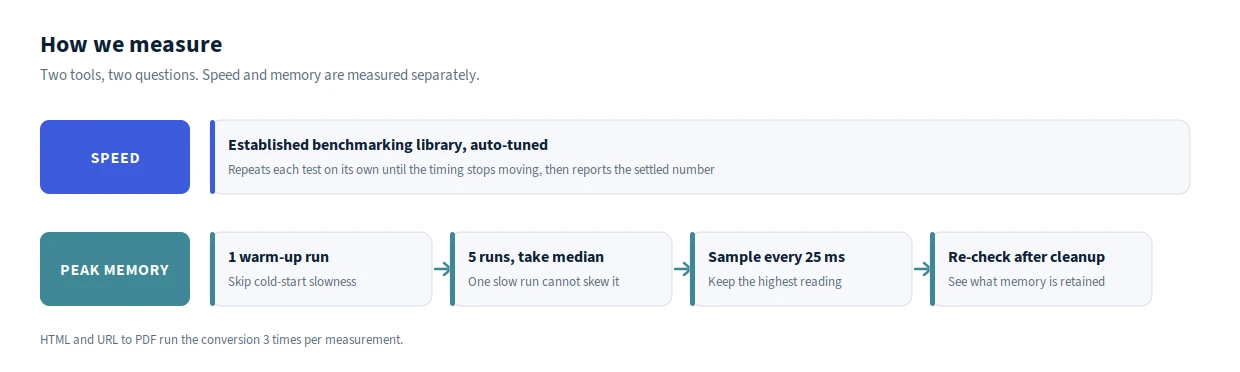
Speed is measured with an established benchmarking library. It repeats each test on its own, as many times as it needs to until the timing settles and stops moving, then reports the stable result.
Peak memory is the highest amount of memory a single render uses while it runs, the same spike you would see in Task Manager, which is what tells you how much headroom each document needs on your server.
Put it on your own documents
Already running IronPDF?
Everything above is sitting in the latest version right now, on the same API you already call. Update the version and your next render is faster and lighter than today's.
New to IronPDF? Try IronPDF Free for 30 Days.