


Appmetrics C# (Geliştiriciler İçin Nasıl Çalışır)

AppMetrics C#, uygulama izleme ve performans analizini basitleştirmek için tasarlanmış güçlü bir araçtır. AppMetrics soyutlamaları ile, uygulamanızın çeşitli yönlerini izlemeyle ilgili karmaşıklığı basitleştirir. İster .NET Core ister .NET Framework kullanıyor olun, bu .NET kütüphanesi, metrik türlerini verimli bir şekilde kaydetmenize olanak tanır. Metrikleri alabilir ve AppMetrics tarafından desteklenen metrik türlerini kapsamlı içgörüler için kullanabilirsiniz.
.NET kütüphanesi, metrikleri almayı destekler ve belirli bir aralıkta metrikleri boşaltmanıza olanak tanır, bu da zamanında veri toplamasını garanti eder. Ayrıca, gelişmiş esneklik için extensibility noktaları sağlayan bir uzatma metodu sunar. Çapraz platformlu bir çözüm olarak, AppMetrics çeşitli ortamlar için uygundur ve tutarlı performans izleme garanti eder.
IronPDF: Gelişmiş PDF Kütüphanesi C# Geliştiricileri için, C# geliştiricileri için özellikle PDF belgeleri ile çalışırken önemli bir kütüphanedir. .NET Core uygulamaları içinde doğrudan PDF dosyaları oluşturma, düzenleme ve çıkarma işlemlerini etkinleştirir. Bu, uygulamanızdan raporlar, faturalar veya herhangi bir belgeyi PDF formatında oluşturmanız gereken durumlarda özellikle yararlı olabilir.
AppMetrics ile Başlama
Çok platformlu AppMetrics'i .NET projenize entegre etmek için, AppMetrics kütüphanesini yükleyerek başlarsınız. Bunu, .NET için paket yöneticisi olan NuGet paketleri kullanarak yapabilirsiniz. Projenizde, NuGet Paket Yöneticisi Konsolu'nda aşağıdaki komutu çalıştırın:
Install-Package App.Metrics.AspNetCore
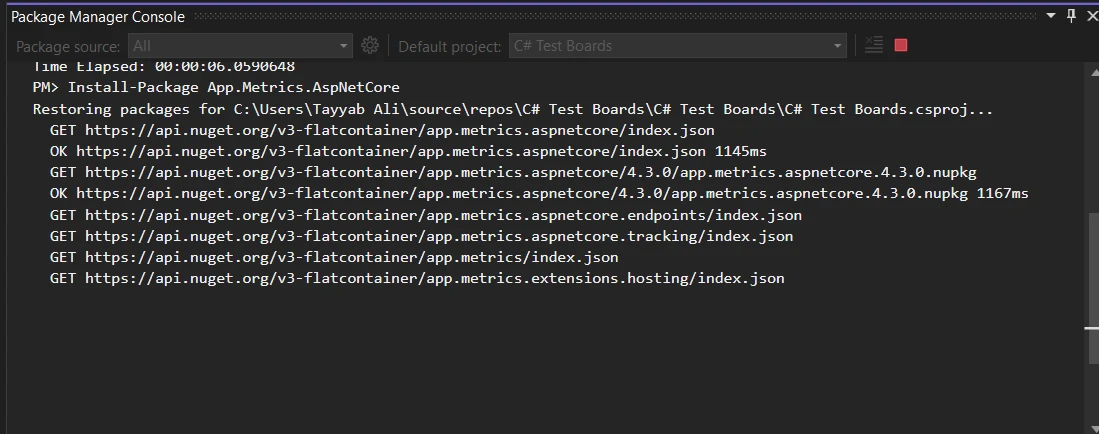
Bu komut, projenize başlayarak AppMetrics'i yapılandırabilmeniz için gerekli tüm bağımlılıkları ekler.
Temel Bir Kod Örneği: HTTP İsteklerini İzleme
İşte, AppMetrics kullanarak .NET uygulamanızda HTTP istekleri için temel izlemeyi nasıl kuracağınızı gösteriyor. İlk olarak, Startup.cs dosyanızda metrikleri oluşturun. ConfigureServices metoduna aşağıdaki kodu ekleyin:
public void ConfigureServices(IServiceCollection services)
{
    services.AddMetrics(); // Add basic metrics services
    services.AddMetricsTrackingMiddleware(); // Enable middleware for tracking
    services.AddMetricsEndpoints(); // Add endpoints for metrics exposure
}
public void ConfigureServices(IServiceCollection services)
{
services.AddMetrics(); // Add basic metrics services
services.AddMetricsTrackingMiddleware(); // Enable middleware for tracking
services.AddMetricsEndpoints(); // Add endpoints for metrics exposure
}Public Sub ConfigureServices(ByVal services As IServiceCollection)
services.AddMetrics() ' Add basic metrics services
services.AddMetricsTrackingMiddleware() ' Enable middleware for tracking
services.AddMetricsEndpoints() ' Add endpoints for metrics exposure
End SubSonra, aynı dosyadaki Configure metodunda, izlemeyi sağlamak için AppMetrics orta katmanını eklediğinizden emin olun:
public void Configure(IApplicationBuilder app, IWebHostEnvironment env)
{
    app.UseMetricsAllMiddleware(); // Register the middleware to capture all metrics
}
public void Configure(IApplicationBuilder app, IWebHostEnvironment env)
{
app.UseMetricsAllMiddleware(); // Register the middleware to capture all metrics
}Public Sub Configure(ByVal app As IApplicationBuilder, ByVal env As IWebHostEnvironment)
app.UseMetricsAllMiddleware() ' Register the middleware to capture all metrics
End SubBu yapılandırma, uygulamanıza gelen HTTP istekleri hakkında metrikler, istek sayısı, istek süresi ve hata oranları gibi metrikleri otomatik olarak yakalamaya başlar.
AppMetrics Özelliklerini Uygulama
Özel Metrikler Kaydetme
Uygulamanızda özel metrikler oluşturmak ve kaydetmek veya bazı şeyleri ölçmek için AppMetrics, neyin izlenmesi gerektiğini tanımlamak için esnek bir yol sağlar. İşte kullanıcı oturum açmalarını izlemek için basit bir sayaç kaydetme örneği:
public class LoginTracker
{
    private readonly IMetrics _metrics;

    public LoginTracker(IMetrics metrics)
    {
        _metrics = metrics;
    }

    public void TrackLogin(string userId)
    {
        // Increment login counter for the specified user ID
        _metrics.Measure.Counter.Increment(MetricsRegistry.Logins, new MetricTags("UserId", userId));
    }
}
public class LoginTracker
{
private readonly IMetrics _metrics;
public LoginTracker(IMetrics metrics)
{
_metrics = metrics;
}
public void TrackLogin(string userId)
{
// Increment login counter for the specified user ID
_metrics.Measure.Counter.Increment(MetricsRegistry.Logins, new MetricTags("UserId", userId));
}
}Public Class LoginTracker
Private ReadOnly _metrics As IMetrics
Public Sub New(ByVal metrics As IMetrics)
_metrics = metrics
End Sub
Public Sub TrackLogin(ByVal userId As String)
' Increment login counter for the specified user ID
_metrics.Measure.Counter.Increment(MetricsRegistry.Logins, New MetricTags("UserId", userId))
End Sub
End ClassBu kodda, TrackLogin her çağrıldığında, belirtilen kullanıcı kimliği için oturum açma sayacı artar.
Uygulama Performansını Ölçme
AppMetrics, uygulama performansını ölçmek için de kullanılabilir. Örneğin, zamanlayıcılar kullanarak belirli bir yöntem süresini izleyebilirsiniz:
public void ProcessData()
{
    // Measure time taken by the database query process
    using (_metrics.Measure.Timer.Time(MetricsRegistry.DatabaseQueryTimer))
    {
        // Code to execute a database query goes here
    }
}
public void ProcessData()
{
// Measure time taken by the database query process
using (_metrics.Measure.Timer.Time(MetricsRegistry.DatabaseQueryTimer))
{
// Code to execute a database query goes here
}
}Public Sub ProcessData()
' Measure time taken by the database query process
Using _metrics.Measure.Timer.Time(MetricsRegistry.DatabaseQueryTimer)
' Code to execute a database query goes here
End Using
End SubBu zamanlayıcı, ProcessData metodunun yürütülmesinin ne kadar sürdüğünü kaydederek veritabanı sorgularının performansı hakkında içgörüler sağlar.
Bir Gösterge Tablosuna Metrikleri Raporlama
Çeşitli metrik türlerinizi görselleştirmek ve izlemek için AppMetrics, verileri farklı gösterge panolarına rapor edebilir. İşte verilerin bir InfluxDB panosuna nasıl rapor edileceğini yapılandırabileceğiniz bir örnek:
public void ConfigureServices(IServiceCollection services)
{
    services.AddMetricsReportingHostedService();
    services.AddMetrics(builder =>
    {
        builder.Report.ToInfluxDb(options =>
        {
            options.InfluxDb.BaseUri = new Uri("http://your-influxdb-server"); // Configure InfluxDB server URI
            options.InfluxDb.Database = "appmetricsdb"; // Specify the database name
            options.InfluxDb.UserName = "user"; // Set database username
            options.InfluxDb.Password = "password"; // Set database password
            options.HttpPolicy.BackoffPeriod = TimeSpan.FromSeconds(30); // Set backoff period
            options.HttpPolicy.FailuresBeforeBackoff = 5; // Set failure count before backoff
            options.HttpPolicy.Timeout = TimeSpan.FromSeconds(10); // Set HTTP timeout duration
            options.FlushInterval = TimeSpan.FromSeconds(5); // Set interval for reporting metrics
        });
    });
}
public void ConfigureServices(IServiceCollection services)
{
services.AddMetricsReportingHostedService();
services.AddMetrics(builder =>
{
builder.Report.ToInfluxDb(options =>
{
options.InfluxDb.BaseUri = new Uri("http://your-influxdb-server"); // Configure InfluxDB server URI
options.InfluxDb.Database = "appmetricsdb"; // Specify the database name
options.InfluxDb.UserName = "user"; // Set database username
options.InfluxDb.Password = "password"; // Set database password
options.HttpPolicy.BackoffPeriod = TimeSpan.FromSeconds(30); // Set backoff period
options.HttpPolicy.FailuresBeforeBackoff = 5; // Set failure count before backoff
options.HttpPolicy.Timeout = TimeSpan.FromSeconds(10); // Set HTTP timeout duration
options.FlushInterval = TimeSpan.FromSeconds(5); // Set interval for reporting metrics
});
});
}Public Sub ConfigureServices(ByVal services As IServiceCollection)
services.AddMetricsReportingHostedService()
services.AddMetrics(Sub(builder)
builder.Report.ToInfluxDb(Sub(options)
options.InfluxDb.BaseUri = New Uri("http://your-influxdb-server") ' Configure InfluxDB server URI
options.InfluxDb.Database = "appmetricsdb" ' Specify the database name
options.InfluxDb.UserName = "user" ' Set database username
options.InfluxDb.Password = "password" ' Set database password
options.HttpPolicy.BackoffPeriod = TimeSpan.FromSeconds(30) ' Set backoff period
options.HttpPolicy.FailuresBeforeBackoff = 5 ' Set failure count before backoff
options.HttpPolicy.Timeout = TimeSpan.FromSeconds(10) ' Set HTTP timeout duration
options.FlushInterval = TimeSpan.FromSeconds(5) ' Set interval for reporting metrics
End Sub)
End Sub)
End SubBellek Kullanımını İzleme
Sistem bellek kullanımının izlenmesi, performans ayarlamaları için kritiktir. İşte nasıl boş belleği izleyebileceğiniz:
public void CheckSystemMemory()
{
    var freeMemory = GC.GetTotalMemory(false); // Get total free memory
    _metrics.Measure.Gauge.SetValue(MetricsRegistry.FreeMemory, freeMemory); // Set gauge to measure free memory
}
public void CheckSystemMemory()
{
var freeMemory = GC.GetTotalMemory(false); // Get total free memory
_metrics.Measure.Gauge.SetValue(MetricsRegistry.FreeMemory, freeMemory); // Set gauge to measure free memory
}Public Sub CheckSystemMemory()
Dim freeMemory = GC.GetTotalMemory(False) ' Get total free memory
_metrics.Measure.Gauge.SetValue(MetricsRegistry.FreeMemory, freeMemory) ' Set gauge to measure free memory
End SubBu gösterge, uygulamanıza sunulan boş belleği ölçer, böylece bellek tüketim desenlerini anlamanıza yardımcı olur.
Belirtilmiş Aralıklarla Metrikleri Yönetme
AppMetrics, belirli aralıklarla metrik toplamak için yapılandırılabilir. Bu, verileri çok sık kaydetmeden performansı korumaya yardımcı olur:
public void ConfigureScheduledReporting(IApplicationBuilder app)
{
    var metrics = app.ApplicationServices.GetService<IMetricsRoot>(); // Retrieve the IMetricsRoot instance
    var scheduler = new AppMetricsTaskScheduler(
        TimeSpan.FromSeconds(60), // Set the interval for metrics collection
        async () =>
        {
            await Task.WhenAll(metrics.ReportRunner.RunAllAsync()); // Run all reports asynchronously
        });
    scheduler.Start(); // Start the scheduler
}
public void ConfigureScheduledReporting(IApplicationBuilder app)
{
var metrics = app.ApplicationServices.GetService<IMetricsRoot>(); // Retrieve the IMetricsRoot instance
var scheduler = new AppMetricsTaskScheduler(
TimeSpan.FromSeconds(60), // Set the interval for metrics collection
async () =>
{
await Task.WhenAll(metrics.ReportRunner.RunAllAsync()); // Run all reports asynchronously
});
scheduler.Start(); // Start the scheduler
}Public Sub ConfigureScheduledReporting(ByVal app As IApplicationBuilder)
Dim metrics = app.ApplicationServices.GetService(Of IMetricsRoot)() ' Retrieve the IMetricsRoot instance
Dim scheduler = New AppMetricsTaskScheduler(TimeSpan.FromSeconds(60), Async Sub()
Await Task.WhenAll(metrics.ReportRunner.RunAllAsync()) ' Run all reports asynchronously
End Sub)
scheduler.Start() ' Start the scheduler
End SubBu yapılandırma, metriklerin her 60 saniyede bir rapor edilmesini sağlayarak, sistemin sürekli veri kaydı ile bunaltılmadan tutarlı performans izlemesini sağlar.
IronPDF ile AppMetrics'i Entegre Etme
C# uygulamalarınızda metrikler ve PDF oluşturma ile çalışırken, AppMetrics C#'ı IronPDF ile birleştirmek çok faydalı olabilir. Bu entegrasyon, performans incelemeleri, müşteri sunumları veya hatta iç denetimler için yararlı olan metrik verilerinizden doğrudan PDF formatında raporlar oluşturmanıza olanak tanır.
IronPDF'e Giriş
IronPDF, geliştiricilerin C# kullanarak PDF belgelerini oluşturmasını, okumasını ve düzenlemesini sağlayan kapsamlı bir kütüphanedir. IronPDF'yi diğerlerinden ayıran şey, HTML'yi IronPDF ile PDF'ye dönüştürme yeteneğidir, bu da web tabanlı rapor oluşturma konusunda özellikle değerli kılar. Bu yetenek, raporlarınızın görsel yanlarının korunmasını sağlar ve webden yazılı formata yüksek derecede sadakat sunar.
Use Case of Merging IronPDF with AppMetrics C
Uygulamanızın aylık performans raporlarını paydaşlara sağlamanız gereken bir senaryoyu düşünün. Bu raporlar yanıt süreleri, hata oranları, kullanıcı oturumları ve daha fazlası gibi metrikleri içerir. Açık kaynak AppMetrics C# ile bu metrikleri sorunsuz bir şekilde yakalayabilirsiniz. Bu işlevselliği IronPDF ile birleştirerek, bu metrikleri otomatik olarak düzgün formatlanmış bir PDF belgesinde oluşturabilir ve dağıtabilirsiniz.
Kullanım Durumu Kod Örneği
Aşağıda bunun nasıl uygulanacağını gösteren tamamlanmış bir örnek bulunmaktadır. Bu örnek, hem IronPDF hem de AppMetrics C#'ın projenizde kurulmuş olduğunu varsayar.
using App.Metrics;
using App.Metrics.Formatters.Prometheus;
using IronPdf;
public class MetricsToPdfConverter
{
    private readonly IMetricsRoot _metrics;

    public MetricsToPdfConverter(IMetricsRoot metrics)
    {
        _metrics = metrics;
    }

    public void GeneratePdfReport(string outputPath)
    {
        // Step 1: Capture the metrics snapshot
        var metricsData = _metrics.Snapshot.Get();
        var formatter = new MetricsPrometheusTextOutputFormatter();
        using var stream = new MemoryStream();
        formatter.WriteAsync(stream, metricsData).Wait();

        // Step 2: Convert the metrics snapshot to string format
        stream.Position = 0;
        var reader = new StreamReader(stream);
        var metricsText = reader.ReadToEnd();

        // Step 3: Use IronPDF to convert the metrics text to a PDF document
        var renderer = new ChromePdfRenderer();
        var pdf = renderer.RenderHtmlAsPdf("<h1> Metrics Report </h1> <pre>" + metricsText + "</pre>");

        // Step 4: Save the PDF document
        pdf.SaveAs(outputPath);
    }
}

// Usage
var metrics = new MetricsBuilder().Build();
var pdfConverter = new MetricsToPdfConverter(metrics);
pdfConverter.GeneratePdfReport("MonthlyPerformanceReport.pdf");
using App.Metrics;
using App.Metrics.Formatters.Prometheus;
using IronPdf;
public class MetricsToPdfConverter
{
private readonly IMetricsRoot _metrics;
public MetricsToPdfConverter(IMetricsRoot metrics)
{
_metrics = metrics;
}
public void GeneratePdfReport(string outputPath)
{
// Step 1: Capture the metrics snapshot
var metricsData = _metrics.Snapshot.Get();
var formatter = new MetricsPrometheusTextOutputFormatter();
using var stream = new MemoryStream();
formatter.WriteAsync(stream, metricsData).Wait();
// Step 2: Convert the metrics snapshot to string format
stream.Position = 0;
var reader = new StreamReader(stream);
var metricsText = reader.ReadToEnd();
// Step 3: Use IronPDF to convert the metrics text to a PDF document
var renderer = new ChromePdfRenderer();
var pdf = renderer.RenderHtmlAsPdf("<h1> Metrics Report </h1> <pre>" + metricsText + "</pre>");
// Step 4: Save the PDF document
pdf.SaveAs(outputPath);
}
}
// Usage
var metrics = new MetricsBuilder().Build();
var pdfConverter = new MetricsToPdfConverter(metrics);
pdfConverter.GeneratePdfReport("MonthlyPerformanceReport.pdf");Imports App.Metrics
Imports App.Metrics.Formatters.Prometheus
Imports IronPdf
Public Class MetricsToPdfConverter
Private ReadOnly _metrics As IMetricsRoot
Public Sub New(ByVal metrics As IMetricsRoot)
_metrics = metrics
End Sub
Public Sub GeneratePdfReport(ByVal outputPath As String)
' Step 1: Capture the metrics snapshot
Dim metricsData = _metrics.Snapshot.Get()
Dim formatter = New MetricsPrometheusTextOutputFormatter()
Dim stream = New MemoryStream()
formatter.WriteAsync(stream, metricsData).Wait()
' Step 2: Convert the metrics snapshot to string format
stream.Position = 0
Dim reader = New StreamReader(stream)
Dim metricsText = reader.ReadToEnd()
' Step 3: Use IronPDF to convert the metrics text to a PDF document
Dim renderer = New ChromePdfRenderer()
Dim pdf = renderer.RenderHtmlAsPdf("<h1> Metrics Report </h1> <pre>" & metricsText & "</pre>")
' Step 4: Save the PDF document
pdf.SaveAs(outputPath)
End Sub
End Class
' Usage
Private metrics = (New MetricsBuilder()).Build()
Private pdfConverter = New MetricsToPdfConverter(metrics)
pdfConverter.GeneratePdfReport("MonthlyPerformanceReport.pdf")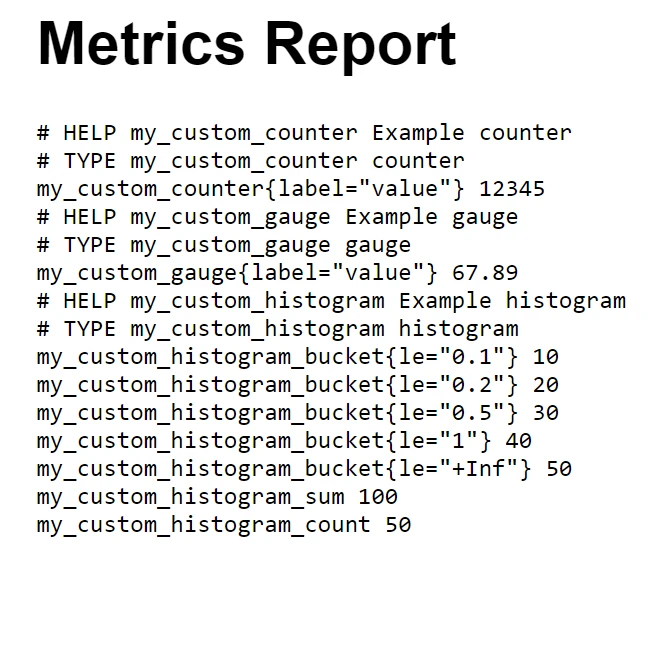
Bu entegrasyon, rapor oluşturma sürecini otomatikleştirmenin yanı sıra, raporların kolayca okunabilir ve profesyonelce formatlanmış olmasını sağlar, herhangi bir paydaş toplantısı veya arşivleme amaçları için mükemmeldir.
Sonuç
Özetlemek gerekirse, .NET projelerinizde AppMetrics C# ve IronPDF'yi birleştirmek, hem uygulama performansını izlemek hem de yüksek kaliteli PDF raporları oluşturmak için güçlü bir çözüm sunar. Bu entegrasyon, AppMetrics ile ayrıntılı performans verilerini yakalamaktan IronPDF kullanarak bunları net ve profesyonel bir formatta sunmaya kadar sorunsuz bir geçiş sağlar.
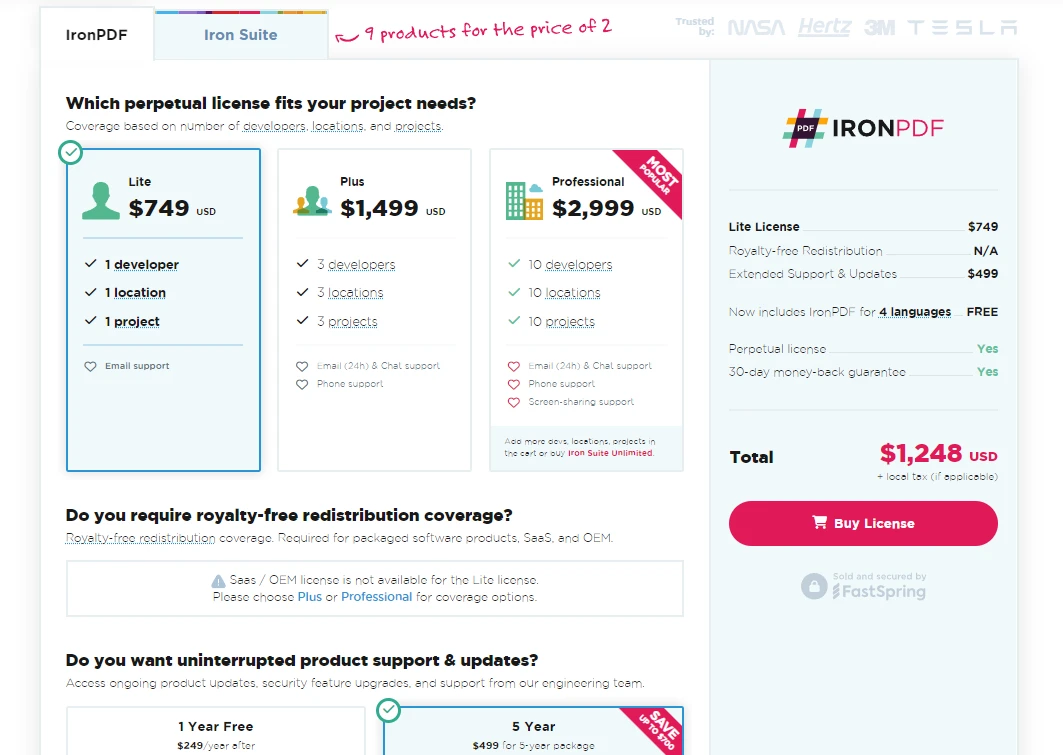
IronPDF, uygulamalarınızda PDF dosyalarını yönetmek isteyen C# geliştiricileri için özellikle faydalıdır. PDF belgelerinin oluşturulmasını ve işlenmesini basitleştirir ve HTML'yi doğrudan PDF'ye dönüştürme gibi benzersiz bir yetenek sunar. Projelerinize IronPDF eklemeyi düşünüyorsanız, başlangıç için ücretsiz bir IronPDF denemesi sunuyorlar ve lisanslar $999'den başlıyor, belge işleme yeteneklerinizi geliştirmenin maliyet-etkin bir yolunu sağlıyor.
Sıkça Sorulan Sorular
AppMetrics C# nedir ve geliştiricilere nasıl fayda sağlar?
AppMetrics C#, .NET Core ve .NET Framework'te uygulamaların çeşitli metriklerini verimli bir şekilde izlemenizi ve geri almanızı sağlayan bir uygulama izleme ve performans analizi aracıdır.
AppMetrics bir .NET projesine nasıl entegre edilebilir?
NuGet Paket Yöneticisi'ni Install-Package App.Metrics.AspNetCore komutuyla kullanarak AppMetrics'i .NET projenize entegre edebilirsiniz.
AppMetrics verilerinden rapor oluşturulmasında IronPDF'in rolü nedir?
IronPDF, HTML formatındaki metrik verilerini yüksek kaliteli PDF'lere dönüştürerek, AppMetrics verilerinden kapsamlı PDF raporları oluşturmak için kullanılabilir, bu performans incelemeleri ve sunumlar için idealdir.
Özel metrikler AppMetrics kullanılarak nasıl takip edilebilir?
AppMetrics, kullanıcı aktiviteleri veya belirli işlem süreleri gibi özel metrikleri tanımlamanıza ve takip etmenize olanak tanır, böylece uygulamanızın ihtiyaçlarına göre ayrıntılı performans analizleri sunar.
AppMetrics verilerinin görselleştirilmesi için hangi seçenekler mevcuttur?
AppMetrics, geliştiricilerin metrik verilerini etkili bir şekilde görselleştirmesi ve izlemesi için InfluxDB gibi çeşitli panellere raporlama yapmayı destekler.
AppMetrics kullanarak geliştiriciler uygulama performansını nasıl optimize edebilir?
Geliştiriciler, AppMetrics kullanarak bellek kullanımını izleyebilir ve planlanmış metrikleri ele alarak, kaynakların verimli yönetimini ve uygulama yanıt verebilirliğini sağlar.
IronPDF ile PDF raporları oluşturmanın avantajları nelerdir?
IronPDF kullanarak AppMetrics verilerinden PDF raporları oluşturmak, paydaşlarla iletişimi geliştiren profesyonel ve kolay okunabilir belgeler yaratmanın avantajını sağlar.
IronPDF için ücretsiz bir deneme mevcut mu?
Evet, IronPDF ücretsiz bir deneme sunar ve böylelikle geliştiriciler, satın alma taahhüdünde bulunmadan önce PDF oluşturma yeteneklerini keşfedebilirler.










 Ücretsiz Başlayın
 Ücretsiz Başlayın
 Ücretsiz Canlı Demo Rezervasyonu





 Kredi kartı veya hesap oluşturma gerektirmez










