




更新日 2026年4月23日
Microsoft.Extensions.AIを使用した .NET での LLM 統合の簡素化
AI はソフトウェア開発を変革していますが、.NET への大規模言語モデル (LLM) の統合はこれまで複雑でした。IronPdf.AI を使用して AI 統合をさらに進め、OpenAI を活用した PDF 解析、データ抽出、およびコンテンツの要約を .NET アプリケーションにもたらします。
詳しく読む

AppMetrics C#は、アプリケーションの監視とパフォーマンス分析を効率化するために設計された強力なツールです。 AppMetricsの抽象化により、アプリケーションの様々な側面の追跡に伴う複雑さが簡略化されます。 .NET Coreや.NET Frameworkを使用する場合、こ for .NETライブラリを利用することで、メトリックタイプを効率的に記録できます。 メトリクスを取得し、AppMetricsがサポートするメトリックタイプを利用することで、包括的な洞察が得られます。
.NETライブラリはメトリクスの取得をサポートし、指定された間隔でメトリクスをフラッシュすることができ、タイムリーなデータ収集を保証します。 また、拡張メソッドを提供し、拡張性を向上させる柔軟性を提供します。 クロスプラットフォームソリューションとして、AppMetricsは多様な環境に適しており、一貫したパフォーマンス監視を保証します。
IronPDF: C#開発者のための高度なPDFライブラリは、特にPDFドキュメントを扱う際に、C#開発者にとって重要なライブラリです。 これは、.NET Coreアプリケーション内で直接PDFファイルを作成、編集、および抽出することを可能にします。 レポート、請求書、またはその他のドキュメントをアプリケーションからPDF形式で生成する必要があるシナリオで特に役立ちます。
クロスプラットフォームのAppMetricsを.NETプロジェクトに統合するには、最初にAppMetricsライブラリをインストールする必要があります。 これは、.NETのパッケージマネージャーであるNuGetパッケージを使用して行うことができます。 プロジェクト内で、NuGetパッケージマネージャーコンソールで以下のコマンドを実行します。
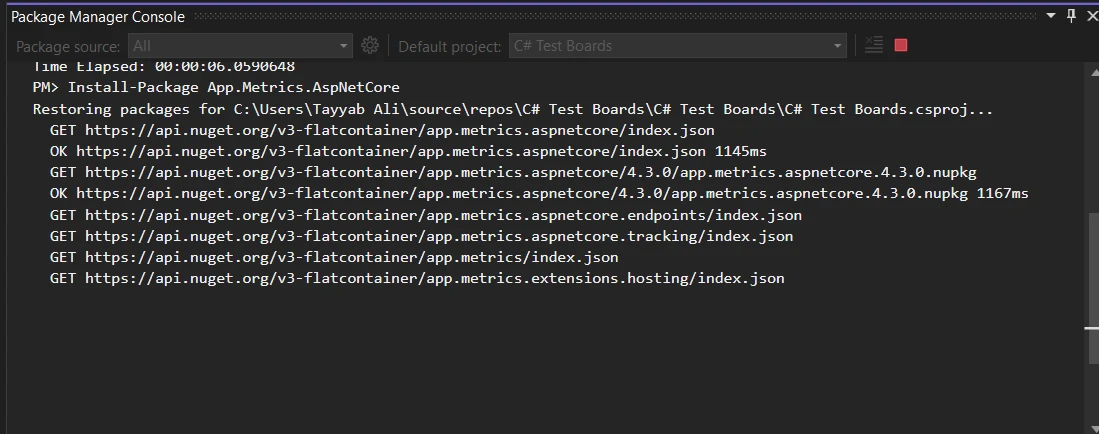
このコマンドは、必要なすべての依存関係をプロジェクトに追加し、AppMetricsの設定を開始できるようにします。
AppMetricsを使用して、.NETアプリケーションでのHTTPリクエストの基本的な監視を設定する方法を紹介します。 最初に、Startup.csファイルでメトリックを構築します。以下のコードをConfigureServicesメソッドに追加します。
public void ConfigureServices(IServiceCollection services)
{
    services.AddMetrics(); // Add basic metrics services
    services.AddMetricsTrackingMiddleware(); // Enable middleware for tracking
    services.AddMetricsEndpoints(); // Add endpoints for metrics exposure
}Public Sub ConfigureServices(ByVal services As IServiceCollection)
services.AddMetrics() ' Add basic metrics services
services.AddMetricsTrackingMiddleware() ' Enable middleware for tracking
services.AddMetricsEndpoints() ' Add endpoints for metrics exposure
End Sub次に、同じファイルのConfigureメソッドで、AppMetricsミドルウェアを追加して監視を処理することを確認します。
public void Configure(IApplicationBuilder app, IWebHostEnvironment env)
{
    app.UseMetricsAllMiddleware(); // Register the middleware to capture all metrics
}Public Sub Configure(ByVal app As IApplicationBuilder, ByVal env As IWebHostEnvironment)
app.UseMetricsAllMiddleware() ' Register the middleware to capture all metrics
End Subこの設定により、アプリケーションへのHTTPリクエストについて、リクエスト数、リクエスト時間、エラーレートなどのメトリクスを自動的にキャプチャします。
カスタムメトリクスを作成、記録する、またはアプリケーション内の事項を測定するには、AppMetricsが柔軟な追跡方法を提供します。 ユーザーログインを追跡するためのシンプルなカウンターを記録する例を示します。
public class LoginTracker
{
    private readonly IMetrics _metrics;

    public LoginTracker(IMetrics metrics)
    {
        _metrics = metrics;
    }

    public void TrackLogin(string userId)
    {
        // Increment login counter for the specified user ID
        _metrics.Measure.Counter.Increment(MetricsRegistry.Logins, new MetricTags("UserId", userId));
    }
}Public Class LoginTracker
Private ReadOnly _metrics As IMetrics
Public Sub New(ByVal metrics As IMetrics)
_metrics = metrics
End Sub
Public Sub TrackLogin(ByVal userId As String)
' Increment login counter for the specified user ID
_metrics.Measure.Counter.Increment(MetricsRegistry.Logins, New MetricTags("UserId", userId))
End Sub
End Classこのコードでは、TrackLoginが呼び出される度に、指定されたユーザーIDのログインカウンターが増加します。
AppMetricsはアプリケーションのパフォーマンスを測定するためにも使用できます。 例えば、特定のメソッドの実行時間をタイマーで追跡できます。
public void ProcessData()
{
    // Measure time taken by the database query process
    using (_metrics.Measure.Timer.Time(MetricsRegistry.DatabaseQueryTimer))
    {
        // Code to execute a database query goes here
    }
}Public Sub ProcessData()
' Measure time taken by the database query process
Using _metrics.Measure.Timer.Time(MetricsRegistry.DatabaseQueryTimer)
' Code to execute a database query goes here
End Using
End Subこのタイマーは、ProcessDataメソッドの実行にかかる時間を記録し、データベースクエリのパフォーマンスに関する洞察を提供します。
さまざまなメトリックタイプを視覚化し監視するために、AppMetricsは異なるダッシュボードにデータを報告することができます。 InfluxDBダッシュボードへの報告を設定する方法を紹介します。
public void ConfigureServices(IServiceCollection services)
{
    services.AddMetricsReportingHostedService();
    services.AddMetrics(builder =>
    {
        builder.Report.ToInfluxDb(options =>
        {
            options.InfluxDb.BaseUri = new Uri("http://your-influxdb-server"); // Configure InfluxDB server URI
            options.InfluxDb.Database = "appmetricsdb"; // Specify the database name
            options.InfluxDb.UserName = "user"; // Set database username
            options.InfluxDb.Password = "password"; // Set database password
            options.HttpPolicy.BackoffPeriod = TimeSpan.FromSeconds(30); // Set backoff period
            options.HttpPolicy.FailuresBeforeBackoff = 5; // Set failure count before backoff
            options.HttpPolicy.Timeout = TimeSpan.FromSeconds(10); // Set HTTP timeout duration
            options.FlushInterval = TimeSpan.FromSeconds(5); // Set interval for reporting metrics
        });
    });
}Public Sub ConfigureServices(ByVal services As IServiceCollection)
services.AddMetricsReportingHostedService()
services.AddMetrics(Sub(builder)
builder.Report.ToInfluxDb(Sub(options)
options.InfluxDb.BaseUri = New Uri("http://your-influxdb-server") ' Configure InfluxDB server URI
options.InfluxDb.Database = "appmetricsdb" ' Specify the database name
options.InfluxDb.UserName = "user" ' Set database username
options.InfluxDb.Password = "password" ' Set database password
options.HttpPolicy.BackoffPeriod = TimeSpan.FromSeconds(30) ' Set backoff period
options.HttpPolicy.FailuresBeforeBackoff = 5 ' Set failure count before backoff
options.HttpPolicy.Timeout = TimeSpan.FromSeconds(10) ' Set HTTP timeout duration
options.FlushInterval = TimeSpan.FromSeconds(5) ' Set interval for reporting metrics
End Sub)
End Sub)
End Subシステムメモリ使用量の監視はパフォーマンスチューニングにとって重要です。 空きメモリを追跡する方法を紹介します。
public void CheckSystemMemory()
{
    var freeMemory = GC.GetTotalMemory(false); // Get total free memory
    _metrics.Measure.Gauge.SetValue(MetricsRegistry.FreeMemory, freeMemory); // Set gauge to measure free memory
}Public Sub CheckSystemMemory()
Dim freeMemory = GC.GetTotalMemory(False) ' Get total free memory
_metrics.Measure.Gauge.SetValue(MetricsRegistry.FreeMemory, freeMemory) ' Set gauge to measure free memory
End Subこのゲージは、アプリケーションに使用可能な空きメモリを測定し、メモリ消費パターンを理解するのに役立ちます。
AppMetricsは、指定された間隔でメトリクス収集を処理するように構成できます。 頻繁にデータを記録しすぎず、パフォーマンスを維持するのに役立ちます。
public void ConfigureScheduledReporting(IApplicationBuilder app)
{
    var metrics = app.ApplicationServices.GetService<IMetricsRoot>(); // Retrieve the IMetricsRoot instance
    var scheduler = new AppMetricsTaskScheduler(
        TimeSpan.FromSeconds(60), // Set the interval for metrics collection
        async () =>
        {
            await Task.WhenAll(metrics.ReportRunner.RunAllAsync()); // Run all reports asynchronously
        });
    scheduler.Start(); // Start the scheduler
}Public Sub ConfigureScheduledReporting(ByVal app As IApplicationBuilder)
Dim metrics = app.ApplicationServices.GetService(Of IMetricsRoot)() ' Retrieve the IMetricsRoot instance
Dim scheduler = New AppMetricsTaskScheduler(TimeSpan.FromSeconds(60), Async Sub()
Await Task.WhenAll(metrics.ReportRunner.RunAllAsync()) ' Run all reports asynchronously
End Sub)
scheduler.Start() ' Start the scheduler
End Subこの構成により、メトリクスは60秒ごとに報告され、一貫したパフォーマンス監視が確保されますが、継続的なデータロギングでシステムが圧迫されることはありません。
C#アプリケーションでメトリクスおよびPDF生成を行う際、AppMetrics C#とIronPDFを組み合わせることで非常に有益です。 この統合により、パフォーマンスレビュー、クライアントプレゼンテーション、または内部監査に便利な形式で、メトリクスデータから直接PDF形式のレポートを生成することができます。
IronPDFは、C#を使用してPDFドキュメントを作成、読み取り、および編集できる包括的なライブラリです。 What sets IronPDF apart is its ability to IronPDFを使用してHTMLをPDFに変換する、これによりWebベースのレポート生成に特に価値があります。 この機能により、レポートの視覚的要素が保持され、Webから印刷フォームへの高い忠実度を提供します。
アプリケーションの月次パフォーマンスレポートを利害関係者に提供する必要があるシナリオを考えてみてください。 これらのレポートには、応答時間、エラーレート、ユーザーセッションなどのメトリクスが含まれます。 オープンソースのAppMetrics C#を使用すると、これらのメトリクスをシームレスにキャプチャできます。 この機能をIronPDFと統合することで、これらのメトリクスを整ったPDFドキュメントで自動的に生成および配布することができます。
以下は、その実装方法の完全な例です。 この例では、プロジェクトにIronPDFおよびAppMetrics C#をすでに設定していることを前提としています。
using App.Metrics;
using App.Metrics.Formatters.Prometheus;
using IronPdf;
public class MetricsToPdfConverter
{
    private readonly IMetricsRoot _metrics;

    public MetricsToPdfConverter(IMetricsRoot metrics)
    {
        _metrics = metrics;
    }

    public void GeneratePdfReport(string outputPath)
    {
        // Step 1: Capture the metrics snapshot
        var metricsData = _metrics.Snapshot.Get();
        var formatter = new MetricsPrometheusTextOutputFormatter();
        using var stream = new MemoryStream();
        formatter.WriteAsync(stream, metricsData).Wait();

        // Step 2: Convert the metrics snapshot to string format
        stream.Position = 0;
        var reader = new StreamReader(stream);
        var metricsText = reader.ReadToEnd();

        // Step 3: Use IronPDF to convert the metrics text to a PDF document
        var renderer = new ChromePdfRenderer();
        var pdf = renderer.RenderHtmlAsPdf("<h1> Metrics Report </h1> <pre>" + metricsText + "</pre>");

        // Step 4: Save the PDF document
        pdf.SaveAs(outputPath);
    }
}

// Usage
var metrics = new MetricsBuilder().Build();
var pdfConverter = new MetricsToPdfConverter(metrics);
pdfConverter.GeneratePdfReport("MonthlyPerformanceReport.pdf");Imports App.Metrics
Imports App.Metrics.Formatters.Prometheus
Imports IronPdf
Public Class MetricsToPdfConverter
Private ReadOnly _metrics As IMetricsRoot
Public Sub New(ByVal metrics As IMetricsRoot)
_metrics = metrics
End Sub
Public Sub GeneratePdfReport(ByVal outputPath As String)
' Step 1: Capture the metrics snapshot
Dim metricsData = _metrics.Snapshot.Get()
Dim formatter = New MetricsPrometheusTextOutputFormatter()
Dim stream = New MemoryStream()
formatter.WriteAsync(stream, metricsData).Wait()
' Step 2: Convert the metrics snapshot to string format
stream.Position = 0
Dim reader = New StreamReader(stream)
Dim metricsText = reader.ReadToEnd()
' Step 3: Use IronPDF to convert the metrics text to a PDF document
Dim renderer = New ChromePdfRenderer()
Dim pdf = renderer.RenderHtmlAsPdf("<h1> Metrics Report </h1> <pre>" & metricsText & "</pre>")
' Step 4: Save the PDF document
pdf.SaveAs(outputPath)
End Sub
End Class
' Usage
Private metrics = (New MetricsBuilder()).Build()
Private pdfConverter = New MetricsToPdfConverter(metrics)
pdfConverter.GeneratePdfReport("MonthlyPerformanceReport.pdf")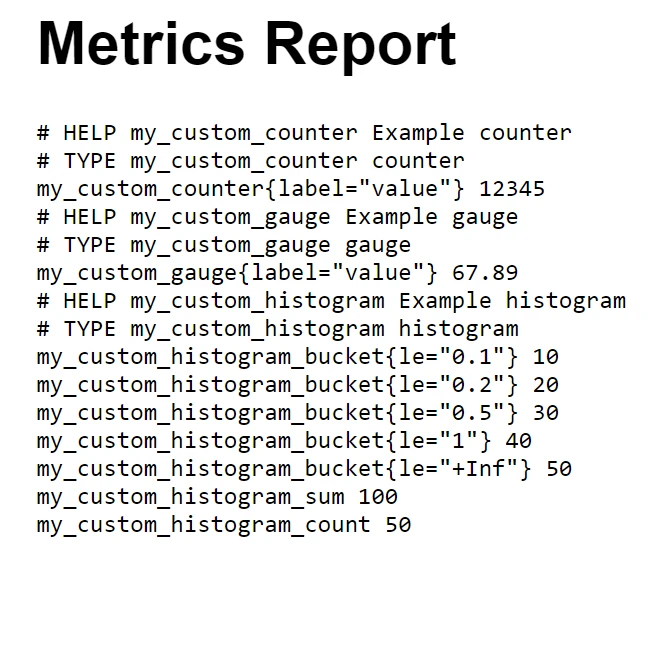
この統合により、レポート生成のプロセスが自動化されるだけでなく、レポートが読みやすく、プロフェッショナルにフォーマットされることが保証され、利害関係者会議やアーカイブ目的に最適です。
まとめると、.NETプロジェクトにおけるAppMetrics C#とIronPDFの組み合わせは、アプリケーションパフォーマンスの監視と高品質なPDFレポートの生成に対する堅牢なソリューションを提供します。 この統合により、AppMetricsで詳細なパフォーマンスデータをキャプチャすることから、IronPDFを使用してそれを明確かつプロフェッショナルな形式で提示することへのシームレスな移行が可能になります。
IronPDFは、アプリケーション内でPDFファイルを処理することを望むC#開発者にとって特に有益です。 PDFドキュメントの作成および操作を簡略化し、HTMLを直接PDFに変換するというユニークな機能を提供します。 IronPDF をプロジェクトに組み込むことを検討している場合、IronPDFの無料トライアルが提供されており、ライセンスは $999 から始まります。書類処理能力を強化するためのコスト効果の高い方法を提供しています。

ジェイコブ・メラーはIron Softwareの最高技術責任者(CTO)であり、C# PDFテクノロジーを開拓する先見的なエンジニアです。Iron Softwareのコアコードベースを支えるオリジナル開発者として、彼は創業以来、会社の製品アーキテクチャを形成し、CEOのCameron Rimingtonとともに、会社をNASA、Tesla、および世界的な政府機関にサービスを提供する50人以上の会社に変えました。1999年にロンドンで最初のソフトウェアビジネスを開業し、2005年に最初 for .NETコンポーネントを作成した後、Microsoftのエコシステム全体で複雑な問題を解決することを専門としました。



IronPDF はIRONSUITEの一部です
オフィス文書向けの.NET API製品10個

PDFがHTMLのように見える必要があるとき、迅速に。












