

Node.js Fetch (Geliştiriciler İçin Nasıl Çalışır)

Node Fetch, HTTP taleplerini basit ve sezgisel hale getirmek için tasarlanmış Node.js ekosistemindeki popüler, hafif bir modüldür. Tarayıcı ortamında kullanıma sunulan Fetch API'den ilham alarak, web API'leri ile etkileşim için hafif ve tanıdık bir yol sunar. Node-fetch, Node.js için Fetch API desteği sunarak hizmet çalışanlarının HTTP üstbilgilerini işleme ve HTTPS taleplerini etkin bir şekilde gerçekleştirmesini sağlar.
Bu makale, Node-fetchin temel özelliklerini ve kullanımını keşfetmenize yardımcı olacak ve Node.js'te HTTP istek işlemlerini kolaylaştırmak isteyen geliştiriciler için kapsamlı bir rehber sunacaktır. HTML içeriğini PDF'ye dönüştürmek, PDF'ler oluşturmak ve düzenlemek gibi birçok işlemi gerçekleştirebilen Node.js için bir PDF kütüphanesi olan IronPDFi de kullanacağız.
Node.js fetch nedir?
Node fetch, Fetch API'yi Node.js'ye getiren bir modüldür. Fetch API, genellikle web tarayıcılarında kullanılan modern bir HTTP istek yapma arayüzüdür. Node.js fetch, bu işlevselliği çoğaltarak Node.js uygulamalarının HTTP isteklerini aynı kolaylık ve basitlikle gerçekleştirmesini sağlar. Bu, Fetch API'ye zaten aşina olan geliştiriciler veya Node.js uygulamalarında HTTP taleplerini kolay şekilde halletmek isteyenler için mükemmel bir seçimdir.
Node.js fetchin Ana Özellikleri
1. Basitlik ve Tanıdıklık
Node.js fetch, tarayıcılarda bulunan Fetch API'yi taklit ederek geliştiriciler için basit ve tanıdık bir arayüz sağlar.
2. Promise Tabanlı
Fetch API gibi, Node.js fetch de promise tabanlıdır ve geliştiricilerin daha okunabilir ve yönetilebilir bir şekilde eşzamansız kod yazmasını sağlar.
3. Hafif
Node.js fetch minimalist bir kütüphanedir, bu da onu hızlı ve verimli kılar. Daha büyük HTTP kütüphanelerinin yüküyle gelmez, bu yüzden uygulamanızı ince tutar.
4. Uyumluluk
Node.js fetch, geniş bir HTTP yöntemleri, üstbilgiler ve yanıt türlerini destekleyerek onu son derece çok yönlü kılar.
5. Akış
Büyük yükleri etkin bir şekilde işlemek için akış yanıtlarını destekler.
Node.js Fetch'in Kurulumu
Node-fetch ile başlamadan önce, npm (Node Paket Yöneticisi) üzerinden kurulum yapmanız gerekiyor. Proje dizininizde aşağıdaki komutu çalıştırın:
npm install node-fetchnpm install node-fetchTemel Kullanım
Node.js fetch kullanarak GET isteği yapmanın temel bir örneği:
import fetch from 'node-fetch';

const url = 'https://jsonplaceholder.typicode.com/posts';

// Make a GET request to fetch data
fetch(url)
    .then(response => {
        // Check if the response status is OK
        if (!response.ok) {
            throw new Error('Network response was not ok');
        }
        // Parse the response as JSON
        return response.json();
    })
    .then(data => {
        // Process the JSON data
        console.log(data);
    })
    .catch(error => {
        // Handle any errors that occur during the fetch
        console.error('There has been a problem with your fetch operation:', error);
    });
import fetch from 'node-fetch';
const url = 'https://jsonplaceholder.typicode.com/posts';
// Make a GET request to fetch data
fetch(url)
.then(response => {
// Check if the response status is OK
if (!response.ok) {
throw new Error('Network response was not ok');
}
// Parse the response as JSON
return response.json();
})
.then(data => {
// Process the JSON data
console.log(data);
})
.catch(error => {
// Handle any errors that occur during the fetch
console.error('There has been a problem with your fetch operation:', error);
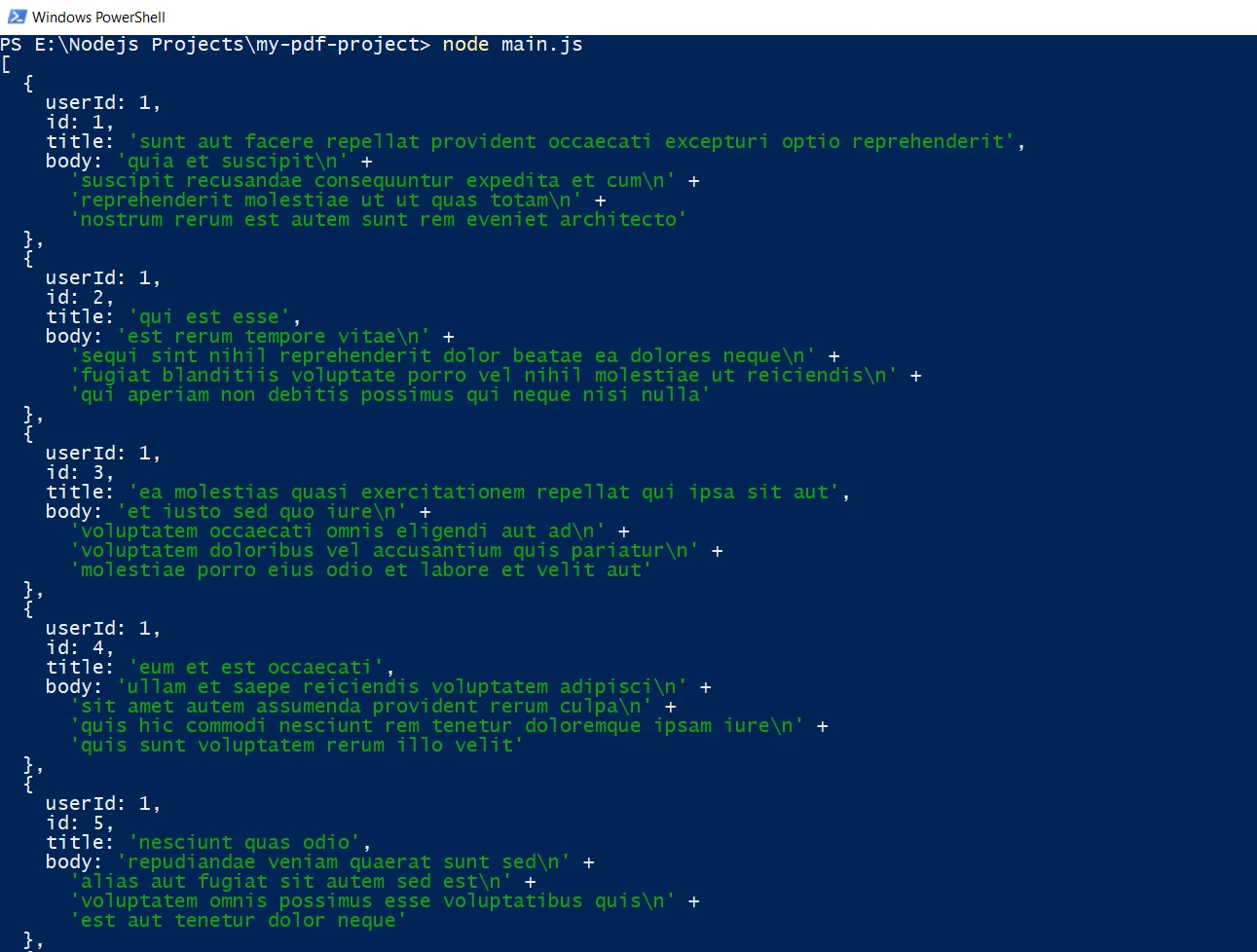
});Bu kod kesiti, bir API'den JSON verileri almak için basit bir GET isteği gösterir. Fetch fonksiyonu, yanıt nesnesine çözümlenen bir promise döndürür. Daha sonra yanıtları döndüren yöntemleri çağırabilirsiniz, örneğin yanıt gövdesini ayrıştırmak için json().
Konsol Çıkış
İleri Düzey Kullanım
Node.js fetch, daha gelişmiş özellikler de destekler, örneğin POST talepleri yapma, özel istek üstbilgileri ayarlama ve farklı yanıt türlerini işleme.
Bir POST Talebi Yapma
import fetch from 'node-fetch';

const url = 'https://jsonplaceholder.typicode.com/posts';
const data = { key: 'value' };

// Make a POST request with JSON payload
fetch(url, {
    method: 'POST',
    headers: {
        // Specify content type as JSON
        'Content-Type': 'application/json'
    },
    body: JSON.stringify(data)
})
    .then(response => {
        // Check if the response status is OK
        if (!response.ok) {
            throw new Error('Network response was not ok');
        }
        // Parse the response as JSON
        return response.json();
    })
    .then(data => {
        // Process the JSON data
        console.log(data);
    })
    .catch(error => {
        // Handle any errors that occur during the fetch
        console.error('There has been a problem with your fetch operation:', error);
    });
import fetch from 'node-fetch';
const url = 'https://jsonplaceholder.typicode.com/posts';
const data = { key: 'value' };
// Make a POST request with JSON payload
fetch(url, {
method: 'POST',
headers: {
// Specify content type as JSON
'Content-Type': 'application/json'
},
body: JSON.stringify(data)
})
.then(response => {
// Check if the response status is OK
if (!response.ok) {
throw new Error('Network response was not ok');
}
// Parse the response as JSON
return response.json();
})
.then(data => {
// Process the JSON data
console.log(data);
})
.catch(error => {
// Handle any errors that occur during the fetch
console.error('There has been a problem with your fetch operation:', error);
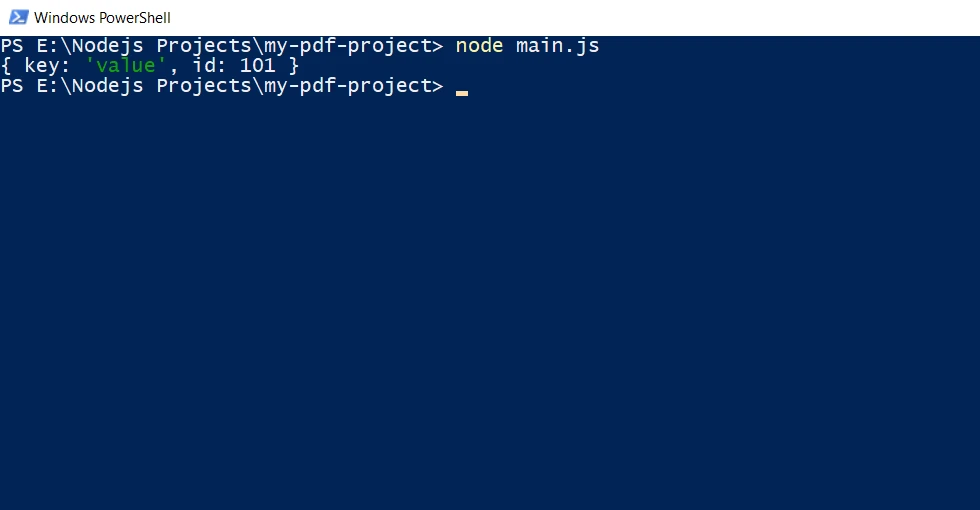
});Bu örnek, JSON yükü ile bir POST isteği gönderme işlemini gösterir. Headers seçeneği, yanıtın içerik türünü belirtmek için kullanılır ve body seçeneği, seri hale getirilmiş JSON verilerini içerir.
Konsol Çıkış
Akış Yanıtlarını İşleme
import fetch from 'node-fetch';
import fs from 'fs';

const url = 'https://jsonplaceholder.typicode.com/posts';

// Make a GET request to fetch data and stream it to a file
fetch(url)
    .then(response => {
        // Check if the response status is OK
        if (!response.ok) {
            throw new Error('Network response was not ok');
        }
        // Pipe the response body as a file stream to 'large-data.json'
        const dest = fs.createWriteStream('./large-data.json');
        response.body.pipe(dest);
    })
    .catch(error => {
        // Handle any errors that occur during the fetch
        console.error('There has been a problem with your fetch operation:', error);
    });
import fetch from 'node-fetch';
import fs from 'fs';
const url = 'https://jsonplaceholder.typicode.com/posts';
// Make a GET request to fetch data and stream it to a file
fetch(url)
.then(response => {
// Check if the response status is OK
if (!response.ok) {
throw new Error('Network response was not ok');
}
// Pipe the response body as a file stream to 'large-data.json'
const dest = fs.createWriteStream('./large-data.json');
response.body.pipe(dest);
})
.catch(error => {
// Handle any errors that occur during the fetch
console.error('There has been a problem with your fetch operation:', error);
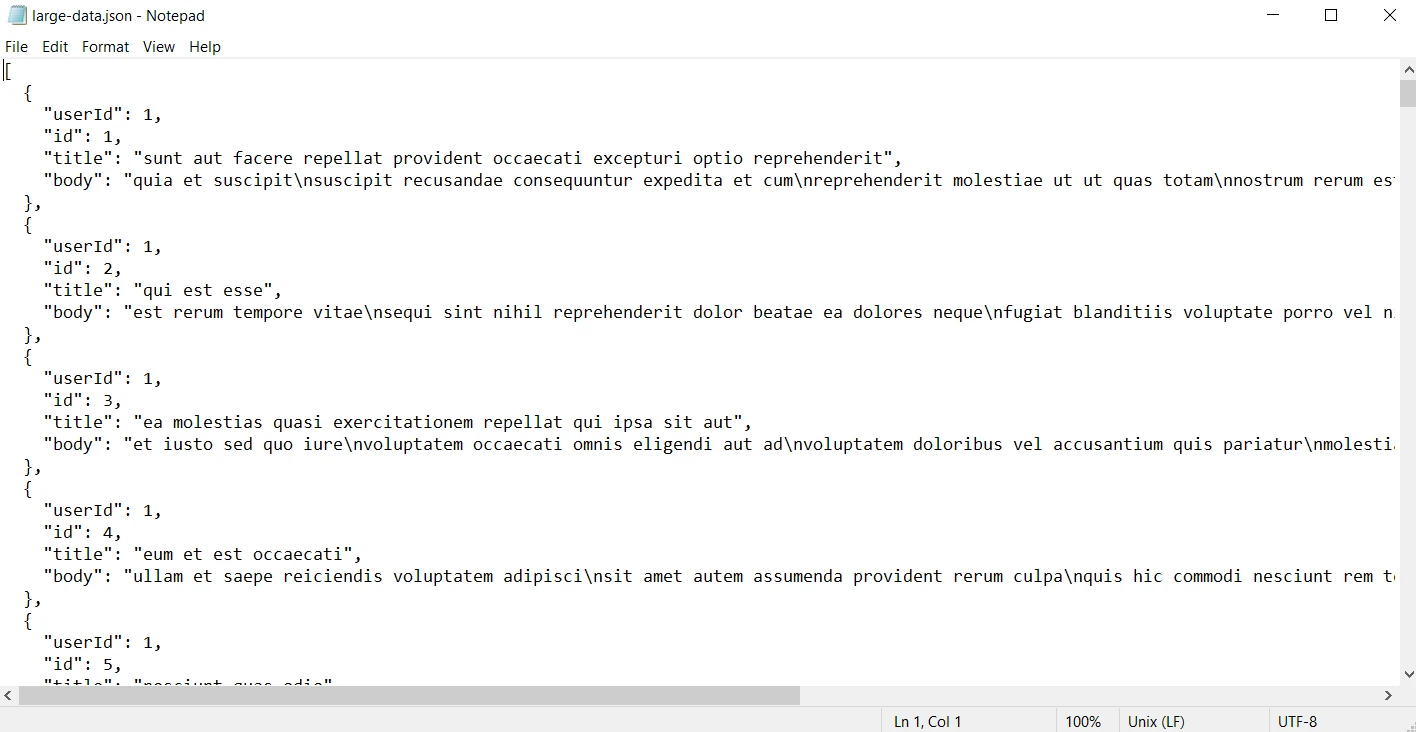
});Bu örnekte, yanıt gövdesi bir dosya akışı olarak sunucuya aktarılır ve büyük yanıtları etkin bir şekilde işleme yönteminin gösterimini yapar.
ÇIKTI
Hata Yönetimi
HTTP talepleriyle çalışırken doğru hata yönetimi çok önemlidir. Node.js fetch, promise kullanarak hataları yakalama ve yönetmenin basit bir yolunu sunar.
fetch(url)
    .then(response => {
        // Check if the response status is OK
        if (!response.ok) {
            throw new Error(`HTTP error! status: ${response.status}`);
        }
        // Parse the response as JSON
        return response.json();
    })
    .then(data => {
        // Process the JSON data
        console.log(data);
    })
    .catch(error => {
        // Handle any errors that occur during the fetch
        console.error('Fetch error:', error);
    });
fetch(url)
.then(response => {
// Check if the response status is OK
if (!response.ok) {
throw new Error(`HTTP error! status: ${response.status}`);
}
// Parse the response as JSON
return response.json();
})
.then(data => {
// Process the JSON data
console.log(data);
})
.catch(error => {
// Handle any errors that occur during the fetch
console.error('Fetch error:', error);
});Burada, yanıt durumu 200-299 aralığında değilse bir hata atılır ve catch bloğu istek sırasında meydana gelen hataları yönetir. Aksi takdirde, geçerli JSON yanıtı döndürülür.
Node.js fetch ile IronPDF Kullanarak Node.js'de PDF Oluşturma
Node fetch, Node.js ekosisteminde HTTP fetch talepleri için popüler bir kütüphanedir. Onunla birlikte kullanılan güçlü bir PDF oluşturma kütüphanesi IronPDF, çeşitli web kaynaklarından PDF'ler oluşturmak için çok yönlü bir araç haline gelir.
IronPDF Nedir?
IronPDF, geliştiricilerin PDF'leri basit ve verimli bir şekilde oluşturmasına, düzenlemesine ve içerik çıkarmasına olanak sağlayan sağlam bir kütüphanedir. C#, Python, Java ve Node.js için mevcut olan IronPDF, sezgisel API'si ile PDF manipülasyonunu basitleştirir.
IronPDF Kütüphanesinin Kurulumu
Öncelikle, projenize IronPDF kurmanız gerekiyor. Kütüphaneyi kurmak için aşağıdaki npm komutunu kullanın:
npm i @ironsoftware/ironpdf
Node.js fetch ile IronPDF'yi kullanarak web içerik kaynaklarından PDF oluşturmanın nasıl yapıldığını keşfedelim.
Node.js fetch ve IronPDF Birleştirilmesi
Node.js fetch ve IronPDF'nin gücünü kullanarak web içeriğini dinamik olarak alabilir ve PDF'ler üretebilirsiniz. Örneğin, bir API uç noktasının verilerini alabilir, dinamik HTML oluşturabilir ve PDF'ye dönüştürebilirsiniz. Aşağıdaki örnek, bu görevi nasıl başarabileceğinizi gösterir:
import fetch from 'node-fetch';
import { PdfDocument } from '@ironsoftware/ironpdf';

(async () => {
    // Replace the apiUrl with the actual URL
    const apiUrl = "https://jsonplaceholder.typicode.com/posts";

    // Fetch data from API
    const response = await fetch(apiUrl);
    const data = await response.json();

    // Create dynamic HTML content with a table
    const htmlContent = `
        <!DOCTYPE html>
        <html>
        <head>
            <title>Data Report</title>
            <style>
                body {
                    font-family: Arial, sans-serif;
                    margin: 40px;
                }
                table {
                    width: 100%;
                    border-collapse: collapse;
                }
                table, th, td {
                    border: 1px solid black;
                }
                th, td {
                    padding: 10px;
                    text-align: left;
                }
                th {
                    background-color: #f2f2f2;
                }
                h1 {
                    text-align: center;
                }
            </style>
        </head>
        <body>
            <h1>Data Report</h1>
            <table>
                <tr>
                    <th>User ID</th>
                    <th>ID</th>
                    <th>Title</th>
                    <th>Body</th>
                </tr>
                ${data.map(item => `
                    <tr>
                        <td>${item.userId}</td>
                        <td>${item.id}</td>
                        <td>${item.title}</td>
                        <td>${item.body}</td>
                    </tr>
                `).join('')}
            </table>
        </body>
        </html>
    `;

    // Generate PDF from the HTML string
    const pdfFromHtmlString = await PdfDocument.fromHtml(htmlContent);
    await pdfFromHtmlString.saveAs("dynamic_report.pdf");
    console.log("PDF generated from API data successfully!");
})();
import fetch from 'node-fetch';
import { PdfDocument } from '@ironsoftware/ironpdf';
(async () => {
// Replace the apiUrl with the actual URL
const apiUrl = "https://jsonplaceholder.typicode.com/posts";
// Fetch data from API
const response = await fetch(apiUrl);
const data = await response.json();
// Create dynamic HTML content with a table
const htmlContent = `
<!DOCTYPE html>
<html>
<head>
<title>Data Report</title>
<style>
body {
font-family: Arial, sans-serif;
margin: 40px;
}
table {
width: 100%;
border-collapse: collapse;
}
table, th, td {
border: 1px solid black;
}
th, td {
padding: 10px;
text-align: left;
}
th {
background-color: #f2f2f2;
}
h1 {
text-align: center;
}
</style>
</head>
<body>
<h1>Data Report</h1>
<table>
<tr>
<th>User ID</th>
<th>ID</th>
<th>Title</th>
<th>Body</th>
</tr>
${data.map(item => `
<tr>
<td>${item.userId}</td>
<td>${item.id}</td>
<td>${item.title}</td>
<td>${item.body}</td>
</tr>
`).join('')}
</table>
</body>
</html>
`;
// Generate PDF from the HTML string
const pdfFromHtmlString = await PdfDocument.fromHtml(htmlContent);
await pdfFromHtmlString.saveAs("dynamic_report.pdf");
console.log("PDF generated from API data successfully!");
})();Çıktı PDF
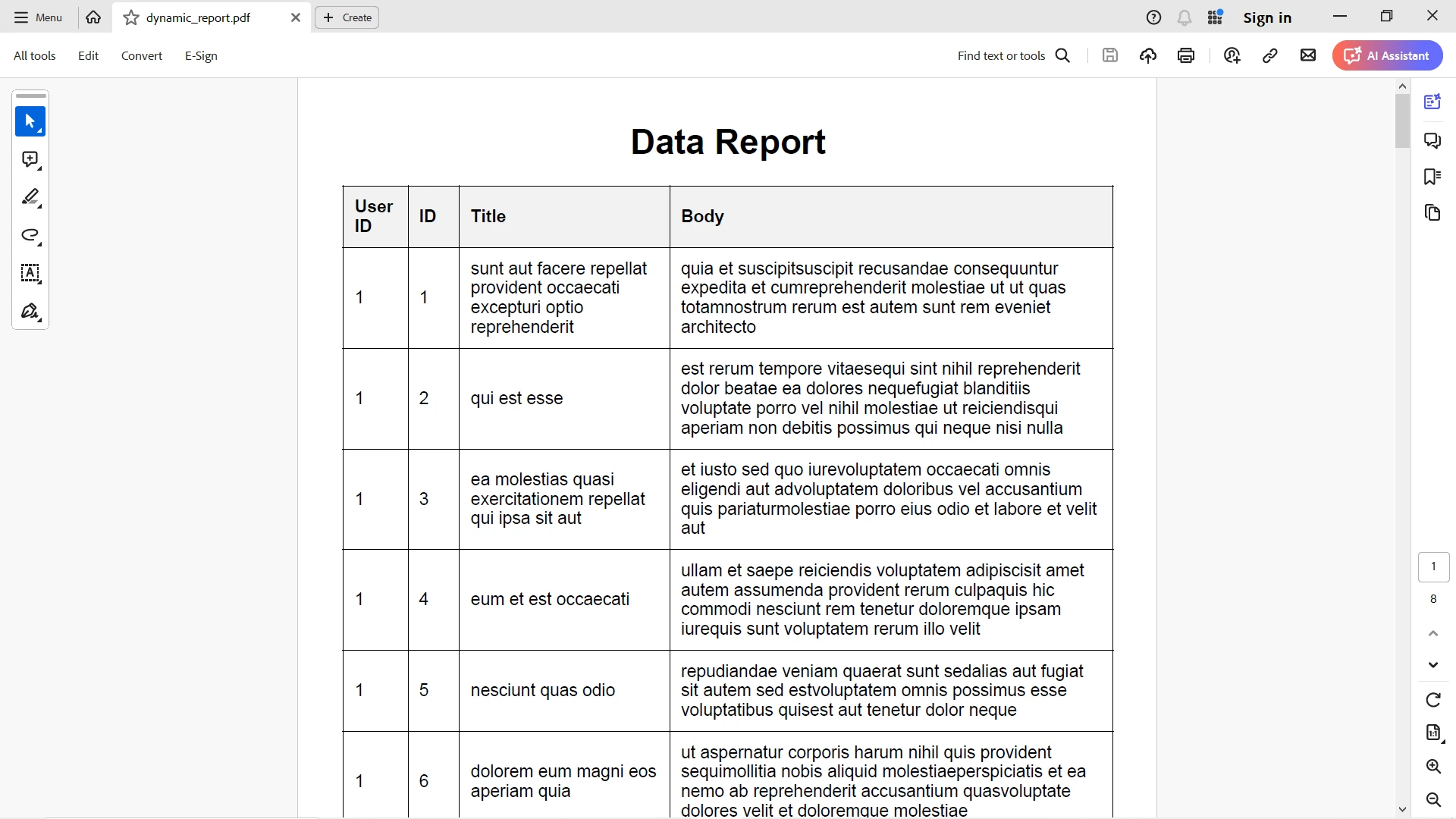
JSON yanıt çıktısı şık bir şekilde HTML tabloya eşlenir ve IronPDF, tüm stil özellikleriyle birlikte bunu doğru bir şekilde dönüştürür.
IronPDF ve işlevsellikleri hakkında daha fazla bilgi için lütfen bu dökümantasyon sayfasına başvurun.
Sonuç
Node fetch, Node.js'te HTTP istekleri yapmak için güçlü ve basit bir araçtır. Tanıdık API'si, promise tabanlı yaklaşımı ve hafif yapısı, hem yeni başlayanlar hem de deneyimli geliştiriciler için mükemmel bir tercih haline getirir. İster temel GET talepleri yapıyor olun, ister özel üstbilgilerle karmaşık POST talepleri işliyor olun, Node fetch web API'leriyle temiz ve verimli bir şekilde etkileşim kurmanın bir yolunu sunar.
Node fetch ve IronPDF birleştirildiğinde, Node.js'te çeşitli web içerik kaynaklarından PDF üretmek için güçlü ve esnek bir yol sunar. Bu iki kütüphaneyi entegre ederek, web verilerini kullanarak sağlam uygulamalar oluşturabilir ve profesyonel PDF'ler oluşturabilirsiniz.
IronPDF $999'den başlayan fiyatlarla. Güçlü PDF oluşturma özelliklerini risksiz deneyimleyin. Bugün deneyin ve farkı kendiniz görün!








 Ücretsiz Başlayın
 Ücretsiz Başlayın
 Ücretsiz Canlı Demo Rezervasyonu





 Kredi kartı veya hesap oluşturma gerektirmez










