



已更新 2026年4月23日
deepstream io(開發人員的工作原理)
在這篇文章中,我們將學習如何使用開放即時伺服器 deepstream 和 IronPDF 生成 PDF。
閱讀更多

Pyspellchecker 和 IronPDF 是兩個功能強大的 Python 模組,設計目的不同:Pyspellchecker 用於資料處理,IronPDF 用於文件建立工作流程。 Pyspellchecker 在拼寫檢查方面表現出色,提供一個寶貴的工具來確保文字在各個應用程式中保持準確和一致。 它提供了一個乾淨、易於使用的介面來自動檢測和糾正拼寫錯誤,有助於文件、報告和應用程式中的文字處理。
相反地,IronPDF 在從 HTML 內容建立 PDF 頁面方面非常有效。 此功能允許使用者將報告、網頁或其他 HTML 內容轉換為專業格式的 PDF。 通過將 IronPDF 與 Pyspellchecker 結合使用,Pyspellchecker 能夠在文字上進行拼寫檢查,讓使用者可以輕鬆地從拼寫檢查過的內容生成 PDF 文件,準備分享或存檔。 這個組合可以確保使用者內容的質量。
通過整合 Pyspellchecker 和 IronPDF,可以顯著提升文件建立工作流程。 這些程式庫支持多語言中高效的資料處理和專業的文件管理,無論單獨用於拼寫檢查還是結合使用以生成精美的無錯誤的 PDF 文件。
Pyspellchecker 是一個用於拼寫檢查的純 Python 模組。 最初是為了在 Python 應用程式中進行簡單的拼寫檢查實現而開發的,現在提供了一個快速介面來以可靠和友好的方式驗證任何基於文字的應用程式中的拼寫。 在許多場景中,文字的準確性非常關鍵,例如內容管理系統、自動化寫作工具和文件處理中,這個工具是無價的。
Pyspellchecker 是多語言的,利用預先配置的字典來檢測拼寫錯誤,並使用 Levenshtein 距離算法來糾正錯誤,這個算法可找到與原詞在編輯距離二之內的排列。
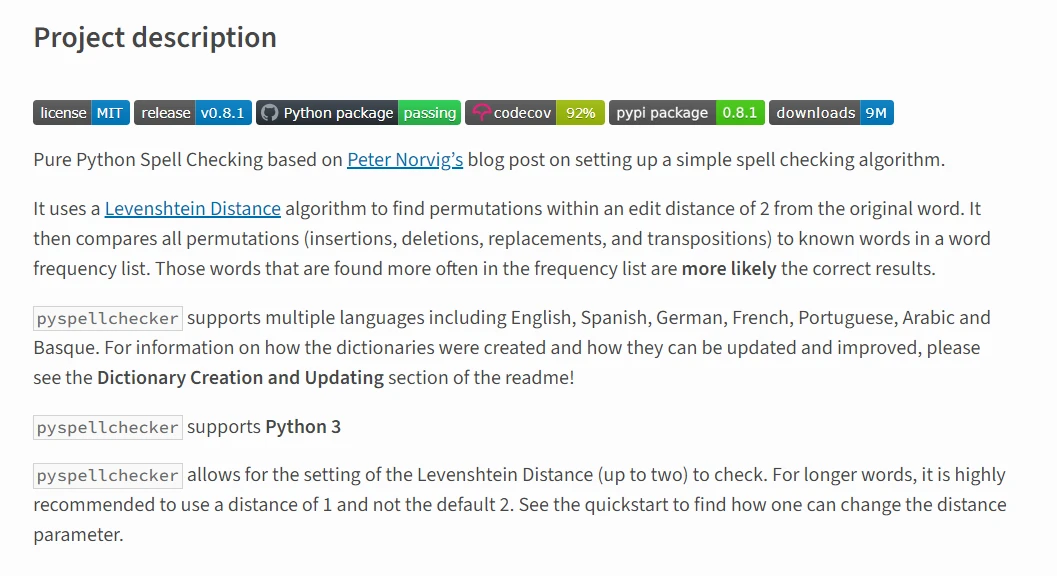
Pyspellchecker 允許開發人員無縫地將拼寫檢查整合到他們的程式中,確保所有文字,無論是程式生成的還是使用者撰寫的,都能滿足高標準的拼寫正確要求。 該程式庫提供了一個簡單而靈活的解決方案,提高了各種 Python 應用程式和程式領域的文字輸出質量。
Pyspellchecker 的關鍵功能包括:
首先,在您的 Python 環境中安裝 Pyspellchecker。 如果未安裝,請按照以下步驟進行設置:
如果 Pyspellchecker 尚未安裝,請使用 pip 來安裝它:
pip install pyspellchecker下面是一個完整的例子,展示如何設置和使用 Pyspellchecker:
from spellchecker import SpellChecker

# Create an instance of SpellChecker with default English dictionary
spell = SpellChecker()

# Optional: Configure language or load custom words
# spell = SpellChecker(language='en')
# spell.word_frequency.load_words(['example', 'custom', 'words'])

# Example text for spell-checking
words_to_check = ['word', 'apple', 'example', 'splling']  # 'splling' is intentionally misspelled

# Identify misspelled words
misspelled = spell.unknown(words_to_check)

# Display corrections for misspelled words
for word in misspelled:
print(f"Suggestion for '{word}': {spell.correction(word)}")這個 Python 腳本演示如何使用 Pyspellchecker 包對單詞列表進行拼寫檢查。 首先導入 SpellChecker 類並建立一個具有預設設置的實例,通常是針對英語語言。 它包括載入自定義單詞或設置語言的可選配置。 主要的使用範例定義 words_to_check,一個包含錯誤拼寫的英文單詞列表。 unknown() 方法識別拼錯的單詞,並對每一個單詞,腳本使用 correction() 方法列印糾正建議。 這個例子突顯了 Pyspellchecker 在 Python 應用程式中有效偵測和建議拼寫錯誤更正的能力。
以下指南將幫助您使用 Pyspellchecker 並將其與 IronPDF 整合,以從拼寫檢查過的文字生成 PDF 文件:
IronPDF Python 套件是一個多功能工具,用於建立、修改和閱讀 PDF,讓開發人員能夠執行一系列的高級 PDF 相關任務。 這增加了相容性並允許生成出色的 PDF 報告。 動態生成和更新 PDF 的應用程式特別受益於其功能。
IronPDF 允許輕鬆地將 HTML 資料轉換為 PDF 文件。 您可以利用 HTML5、CSS3 和 JavaScript 的功能直接從網頁內容建立視覺上引人入勝的 PDF 出版物。
開發人員可以以程式化的方式建立新的 PDF 文件,填入文字,包含圖片,並生成表格。 您還可以使用 IronPDF 打開現有文件並進一步編輯,允許根據需要新增、修改或刪除內容。
PDF 自身支持各種字體、顏色和其他設計元素的複雜佈局。 當處理包含動態內容的 PDF 時,使用標準 HTML 格式渲染資料要比使用 JavaScript 更加輕鬆,使用 IronPDF 程式包。
使用以下命令通過 pip 安裝 IronPDF:
下面是一個範例,說明如何使用 Pyspellchecker 進行拼寫檢查文字,然後使用 IronPDF 生成 PDF 文件:
from spellchecker import SpellChecker
from ironpdf import ChromePdfRenderer
import warnings

# Suppress warnings for a clean output
warnings.filterwarnings('ignore')

# Set IronPDF license key (replace with your actual key)
License.LicenseKey = "your key goes here"

# Example text to spell check
text_to_check = "Thiss sentennce hass soome misspelled wordss."

# Create an instance of SpellChecker
spell = SpellChecker()

# Spell check the text
corrected_text = []
words = text_to_check.split()
for word in words:
    corrected_text.append(spell.correction(word))
corrected_text = " ".join(corrected_text)

# Generate PDF with IronPDF
pdf_renderer = ChromePdfRenderer()
pdf_html = f"<html><body><p>{corrected_text}</p></body></html>"
pdf_document = pdf_renderer.RenderHtmlAsPdf(pdf_html)
pdf_document.SaveAs("spell_checked_document.pdf")上面的程式碼整合了使用 Pyspellchecker 的拼寫檢查和使用 IronPDF 的 PDF 生成。 首先從 IronPDF 導入 ChromePdfRenderer,並從拼寫檢查模組導入 SpellChecker。 抑制了警告以保持控制台輸出整潔。 在設置 IronPDF 授權金鑰後,程式執行進行到含有故意拼錯文字的範例。 它使用 Pyspellchecker 檢查並糾正每個單詞的拼寫,然後將糾正後的文字格式化為 HTML。 最後,IronPDF 使用 ChromePdfRenderer 生成一個 PDF,將其保存為 "spell_checked_document.pdf"。 這個精簡的程式演示了 Pyspellchecker 和 IronPDF 如何結合生成校正良好的文字和完美的 PDF,適合內容管理和自動化文件處理。
總而言之,將 Pyspellchecker 與 IronPDF 結合,提供了全面的支持以提升 PDF 生成的質量和效果。 Pyspellchecker 提供可靠且有效的拼寫檢查,當與 IronPDF 一同使用時,確保拼寫正確的文字被格式化為專業的 PDF 文件。
這些程式庫相輔相成,支持各種應用程式從內容管理系統到檔案管理系統及自動生成報告,生成專業無錯誤的文件。 隨著 Pyspellchecker 的文字驗證及 IronPDF 建立高標準 PDF 的能力,生產力和文件質量達到了新高度。
將 IronPDF 與其他 Iron Software 解決方案配對,提供了額外的優勢,證明 $999 執照費是一項值得的投資。

Curtis Chau擁有Carleton大學的電腦科學學士學位,專精於前端開發,擁有Node.js、TypeScript、JavaScript和React的專業知識。Curtis熱衷於建立直觀且美觀的使用者介面,喜愛使用現代框架並建立結構良好、視覺吸引力的手冊。


IronPDF 是 IRONSUITE 的一部分
10 款適用於辦公室文件的 .NET API 產品

當您需要您的PDF看起來像HTML一樣快速。











