



已更新 2026年4月23日
deepstream io(開發人員的工作原理)
在這篇文章中,我們將學習如何使用開放即時伺服器 deepstream 和 IronPDF 生成 PDF。
閱讀更多

Keras 是一個強大且易於使用的Python程式庫,用於開發和評估深度學習模型。 最初由François Chollet開發,Keras模型因其簡單性和使用者友好的介面而受到歡迎,成為機器學習領域初學者和專家都青睞的選擇。
另外,我們會研究IronPDF PDF生成程式庫,以及如何將這兩種程式庫結合生成結果並導出為PDF。
以"為人類而設計的深度學習"為口號,Keras被設計得易於使用、模組化且可擴展。 Keras模型在錯誤發生時提供清晰且可行的反饋,幫助開發者高效地除錯和優化他們的模型。
Keras可以在多種深度學習框架上運行,例如TensorFlow、Theano和Microsoft Cognitive Toolkit (CNTK)。 這種靈活性允許開發者選擇最適合他們需求的後端。
Keras支援廣泛的神經網路層,包括卷積層、遞迴層和全連接層。 它還提供對複雜架構的支援,如多輸入和多輸出模型、層共享和模型共享。
Keras包含資料預處理的工具,例如圖像和文字處理,簡化了為訓練模型準備資料集的工作。
Keras提供了可視化神經網路結構和監控訓練過程的工具。 這對於理解模型的行為和做出必要的調整至關重要。 最簡單的模型型別是Sequential Keras模型,它只是一個線性層的堆疊。
安裝Keras很簡單。 您可以使用pip安裝它:
pip install keras
pip install tensorflow以下是一個使用Keras構建簡單前饋神經網路的範例:
import keras
import numpy as np
import matplotlib.pyplot as plt

# Function to read UCR formatted data
def readucr(filename):
    """
    Reads a UCR format file and returns the features and labels.

    Args:
    filename (str): Path to the data file

    Returns:
    x, y: Features and labels as numpy arrays
    """
    data = np.loadtxt(filename, delimiter="\t")
    y = data[:, 0]
    x = data[:, 1:]
    return x, y.astype(int)

# Define the root URL for the dataset
root_url = "https://raw.githubusercontent.com/hfawaz/cd-diagram/master/FordA/"
x_train, y_train = readucr(root_url + "FordA_TRAIN.tsv")
x_test, y_test = readucr(root_url + "FordA_TEST.tsv")

# Get unique classes from the dataset
classes = np.unique(np.concatenate((y_train, y_test), axis=0))

# Plot an example from each class
plt.figure()
for c in classes:
    c_x_train = x_train[y_train == c]
    plt.plot(c_x_train[0], label="class " + str(c))
plt.legend(loc="best")
plt.show()
plt.close()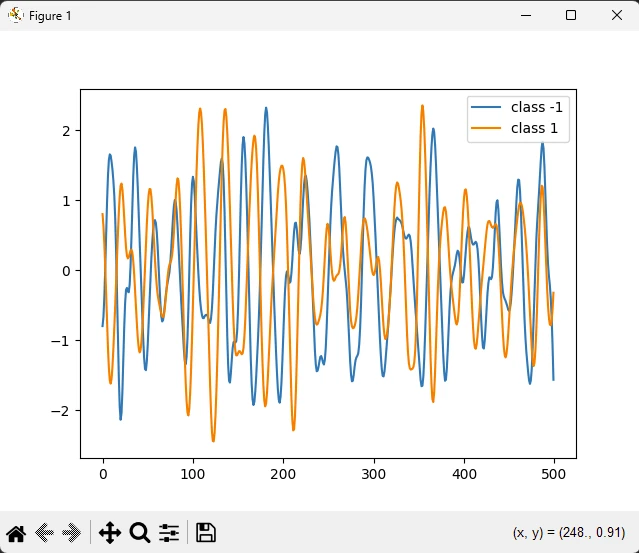
Keras被廣泛用於圖像分類任務。 例如,使用Keras構建的卷積神經網路(CNN)可以在識別圖像中的物體方面達到高準確率。
Keras為構建能夠處理和理解人類語言的模型提供了工具。 Keras中的遞迴神經網路(RNN)和長短期記憶(LSTM)網路常被用於情感分析和機器翻譯等任務。
Keras可用於開發生成模型,如生成對抗網路(GAN),它們被用來生成類似訓練資料的新樣本。
IronPDF 是由Iron Software開發和維護的一個強大的Python程式庫。 它允許開發者在Python專案中建立、編輯和提取PDF內容。 以下是IronPDF的一些關鍵特性:
PDF生成:
您可以從各種來源生成PDF,包括HTML、URL、JavaScript、CSS和圖像格式。
可以向生成的PDF新增頁眉、頁腳、簽名、附件和安全功能。
性能優化:
跨平台相容性:
要開始,使用pip安裝IronPDF:
安裝後,您可以使用HTML內容或URL建立PDF。 以下是一些範例:
from ironpdf import ChromePdfRenderer

# Create a PDF renderer
renderer = ChromePdfRenderer()

# Render HTML content as a PDF
pdf = renderer.RenderHtmlAsPdf("<h1>Hello World</h1>")
pdf.SaveAs("ironAwesome.pdf")
from ironpdf import ChromePdfRenderer
# Create a PDF renderer
renderer = ChromePdfRenderer()
# Render a URL as a PDF
pdf = renderer.RenderUrlAsPdf("https://ironpdf.com/python/")
pdf.SaveAs("ironAwesome.pdf")現在生成模型圖並使用以下程式碼將其匯出到PDF:
import keras
import numpy as np
import matplotlib.pyplot as plt
from ironpdf import License, ImageToPdfConverter

# Apply your license key
License.LicenseKey = "your key goes here"

def readucr(filename):
    """Read and parse UCR formatted data."""
    data = np.loadtxt(filename, delimiter="\t")
    y = data[:, 0]
    x = data[:, 1:]
    return x, y.astype(int)

# Define the root URL for the dataset
root_url = "https://raw.githubusercontent.com/hfawaz/cd-diagram/master/FordA/"
x_train, y_train = readucr(root_url + "FordA_TRAIN.tsv")
x_test, y_test = readucr(root_url + "FordA_TEST.tsv")

# Extract unique classes from the dataset
classes = np.unique(np.concatenate((y_train, y_test), axis=0))

# Plot example data for each class
plt.figure()
for c in classes:
    c_x_train = x_train[y_train == c]
    plt.plot(c_x_train[0], label="class " + str(c))
plt.legend(loc="best")
plt.savefig('data.png')
plt.show()
plt.close()

# Convert the saved image to a PDF
ImageToPdfConverter.ImageToPdf("data.png").SaveAs("plot.pdf")導入程式庫:
設置授權金鑰:
License.LicenseKey = "your key"設置IronPDF的授權金鑰。讀取資料:
readucr從具有特定格式(制表符分隔值)的文件中讀取資料。載入訓練和測試資料:
readucr函式載入資料。繪製資料:
c_x_train[0])並繪製它。保存圖形:
將圖像轉換為PDF:
ImageToPdfConverter來自IronPDF,將保存的圖像("data.png")轉換為PDF文件("plot.pdf")。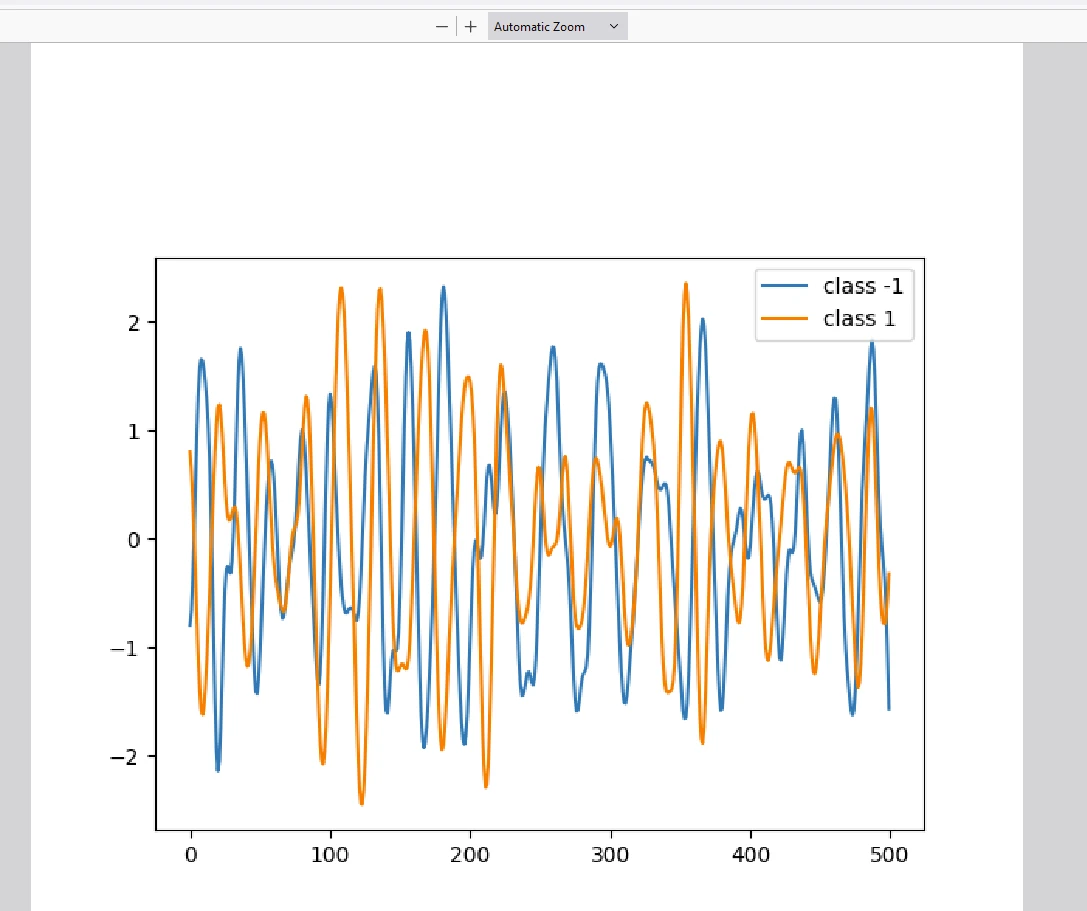
IronPDF 需要授權才能運行,如上述程式碼所示。 在腳本的開頭設置授權金鑰,如下所示:
# Apply your license key
License.LicenseKey = "your key goes here"如果您對IronPDF程式庫的試用授權感興趣,可以從這裡獲得試用授權金鑰。
Keras人工智慧Python程式庫因其簡單性和靈活性在深度學習社群中脫穎而出。 它抽象掉構建神經網路所涉及的許多複雜性,允許開發者專注於設計和試驗模型。 無論您是剛開始學習深度學習的初學者,還是經驗豐富的從業者,Keras都提供了將您的想法變為現實所需的工具,通過它對人腦的模擬。
另一方面,IronPDF是一個多功能的PDF生成和操作程式庫,使得將結果匯出為PDF變得輕而易舉。 擁有這兩種技能將幫助使用者撰寫現代資料科學模型,並將輸出匯出為PDF以供結果記錄使用。

Curtis Chau擁有Carleton大學的電腦科學學士學位,專精於前端開發,擁有Node.js、TypeScript、JavaScript和React的專業知識。Curtis熱衷於建立直觀且美觀的使用者介面,喜愛使用現代框架並建立結構良好、視覺吸引力的手冊。



IronPDF 是 IRONSUITE 的一部分
10 款適用於辦公室文件的 .NET API 產品

當您需要您的PDF看起來像HTML一樣快速。











