



업데이트됨 2026년 4월 23일
deepstream io (개발자를 위한 작동 방식)
이 글에서는 오픈 실시간 서버인 DeepStream과 IronPDF를 사용하여 PDF를 생성하는 방법을 알아보겠습니다.
더 읽어보기

Keras 는 딥러닝 모델을 개발하고 평가하기 위한 강력하고 사용하기 쉬운 Python 라이브러리입니다. 프랑수아 숄레가 처음 개발한 케라스 모델은 단순함과 사용자 친화적인 인터페이스 덕분에 인기를 얻었으며, 머신 러닝 분야의 초보자와 전문가 모두에게 훌륭한 선택이 되었습니다.
또한 IronPDF PDF 생성 라이브러리를 살펴보고 이 두 라이브러리를 결합하여 결과를 생성하고 PDF로 내보내는 방법을 알아보겠습니다.
'인간을 위한 딥러닝'이라는 슬로건을 내세운 케라스는 사용하기 쉽고, 모듈식이며, 확장 가능하도록 설계되었습니다. 케라스 모델은 오류 발생 시 명확하고 실행 가능한 피드백을 제공하여 개발자가 모델을 효율적으로 디버깅하고 최적화할 수 있도록 도와줍니다.
Keras는 TensorFlow, Theano, Microsoft Cognitive Toolkit(CNTK) 등 다양한 딥러닝 프레임워크 위에서 실행될 수 있습니다. 이러한 유연성을 통해 개발자는 자신의 필요에 가장 적합한 백엔드를 선택할 수 있습니다.
케라스는 컨볼루션 레이어, 순환 레이어, 완전 연결 레이어를 포함한 다양한 신경망 레이어를 지원합니다. 또한 다중 입력 및 다중 출력 모델, 레이어 공유, 모델 공유와 같은 복잡한 아키텍처를 지원합니다.
Keras에는 이미지 및 텍스트 처리와 같은 데이터 전처리 유틸리티가 포함되어 있어 모델 학습을 위한 데이터 세트 준비를 간소화합니다.
케라스는 신경망의 구조를 시각화하고 학습 과정을 모니터링하는 도구를 제공합니다. 이는 모델의 동작 방식을 이해하고 필요한 조정을 하는 데 매우 중요합니다. 가장 간단한 모델 유형은 Sequential Keras 모델로, 단순히 레이어를 선형으로 쌓아 올린 것입니다.
Keras 설치는 간단합니다. pip를 사용하여 설치할 수 있습니다.
pip install keras
pip install tensorflow다음은 Keras를 사용하여 간단한 피드포워드 신경망을 구축하는 방법의 예입니다.
import keras
import numpy as np
import matplotlib.pyplot as plt

# Function to read UCR formatted data
def readucr(filename):
    """
    Reads a UCR format file and returns the features and labels.

    Args:
    filename (str): Path to the data file

    Returns:
    x, y: Features and labels as numpy arrays
    """
    data = np.loadtxt(filename, delimiter="\t")
    y = data[:, 0]
    x = data[:, 1:]
    return x, y.astype(int)

# Define the root URL for the dataset
root_url = "https://raw.githubusercontent.com/hfawaz/cd-diagram/master/FordA/"
x_train, y_train = readucr(root_url + "FordA_TRAIN.tsv")
x_test, y_test = readucr(root_url + "FordA_TEST.tsv")

# Get unique classes from the dataset
classes = np.unique(np.concatenate((y_train, y_test), axis=0))

# Plot an example from each class
plt.figure()
for c in classes:
    c_x_train = x_train[y_train == c]
    plt.plot(c_x_train[0], label="class " + str(c))
plt.legend(loc="best")
plt.show()
plt.close()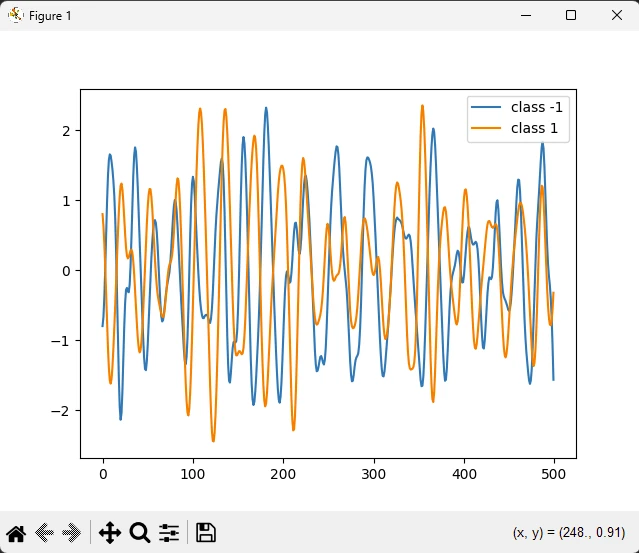
케라스는 이미지 분류 작업에 널리 사용됩니다. 예를 들어, Keras로 구축된 합성곱 신경망(CNN)은 이미지에서 객체를 인식하는 데 높은 정확도를 달성할 수 있습니다.
Keras는 인간의 언어를 처리하고 이해할 수 있는 모델을 구축하기 위한 도구를 제공합니다. 케라스(Keras)의 순환 신경망(RNN)과 장단기 메모리(LSTM) 네트워크는 감정 분석 및 기계 번역과 같은 작업에 일반적으로 사용됩니다.
Keras는 훈련 데이터와 유사한 새로운 데이터 샘플을 생성하는 데 사용되는 GAN(Generative Adversarial Networks)과 같은 생성 모델을 개발하는 데 사용할 수 있습니다.
IronPDF 는 Iron Software 에서 개발 및 유지 관리하는 강력한 Python 라이브러리입니다. 이 기능을 사용하면 개발자가 Python 프로젝트에서 PDF 콘텐츠를 생성, 편집 및 추출할 수 있습니다. IronPDF 의 주요 기능은 다음과 같습니다.
PDF 생성:
HTML, URL, JavaScript, CSS 및 이미지 형식을 포함한 다양한 소스에서 PDF를 생성할 수 있습니다.
생성된 PDF 파일에 머리글, 바닥글, 서명, 첨부 파일 및 보안 기능을 추가할 수 있습니다.
성능 최적화:
플랫폼 간 호환성:
시작하려면 pip를 사용하여 IronPDF 설치하세요.
설치가 완료되면 HTML 콘텐츠 또는 URL을 사용하여 PDF를 생성할 수 있습니다. 다음은 예시입니다.
from ironpdf import ChromePdfRenderer

# Create a PDF renderer
renderer = ChromePdfRenderer()

# Render HTML content as a PDF
pdf = renderer.RenderHtmlAsPdf("<h1>Hello World</h1>")
pdf.SaveAs("ironAwesome.pdf")
from ironpdf import ChromePdfRenderer
# Create a PDF renderer
renderer = ChromePdfRenderer()
# Render a URL as a PDF
pdf = renderer.RenderUrlAsPdf("https://ironpdf.com/python/")
pdf.SaveAs("ironAwesome.pdf")이제 아래 코드를 사용하여 모델 플롯을 생성하고 PDF로 내보내십시오.
import keras
import numpy as np
import matplotlib.pyplot as plt
from ironpdf import License, ImageToPdfConverter

# Apply your license key
License.LicenseKey = "your key goes here"

def readucr(filename):
    """Read and parse UCR formatted data."""
    data = np.loadtxt(filename, delimiter="\t")
    y = data[:, 0]
    x = data[:, 1:]
    return x, y.astype(int)

# Define the root URL for the dataset
root_url = "https://raw.githubusercontent.com/hfawaz/cd-diagram/master/FordA/"
x_train, y_train = readucr(root_url + "FordA_TRAIN.tsv")
x_test, y_test = readucr(root_url + "FordA_TEST.tsv")

# Extract unique classes from the dataset
classes = np.unique(np.concatenate((y_train, y_test), axis=0))

# Plot example data for each class
plt.figure()
for c in classes:
    c_x_train = x_train[y_train == c]
    plt.plot(c_x_train[0], label="class " + str(c))
plt.legend(loc="best")
plt.savefig('data.png')
plt.show()
plt.close()

# Convert the saved image to a PDF
ImageToPdfConverter.ImageToPdf("data.png").SaveAs("plot.pdf")라이브러리 가져오기:
라이선스 키 설정:
License.LicenseKey = "your key" 줄은 IronPDF의 라이선스 키를 설정합니다.데이터 읽기:
readucr 함수는 특정 형식(탭으로 구분된 값)의 파일에서 데이터를 읽습니다.학습 및 테스트 데이터 불러오기:
readucr 함수를 사용하여 데이터를 로드합니다.데이터 그래프 그리기:
c_x_train[0])를 선택하고 이를 플롯합니다.줄거리 구하기:
이미지를 PDF로 변환하기:
ImageToPdfConverter는 저장된 이미지("data.png")를 PDF 파일("plot.pdf")로 변환합니다.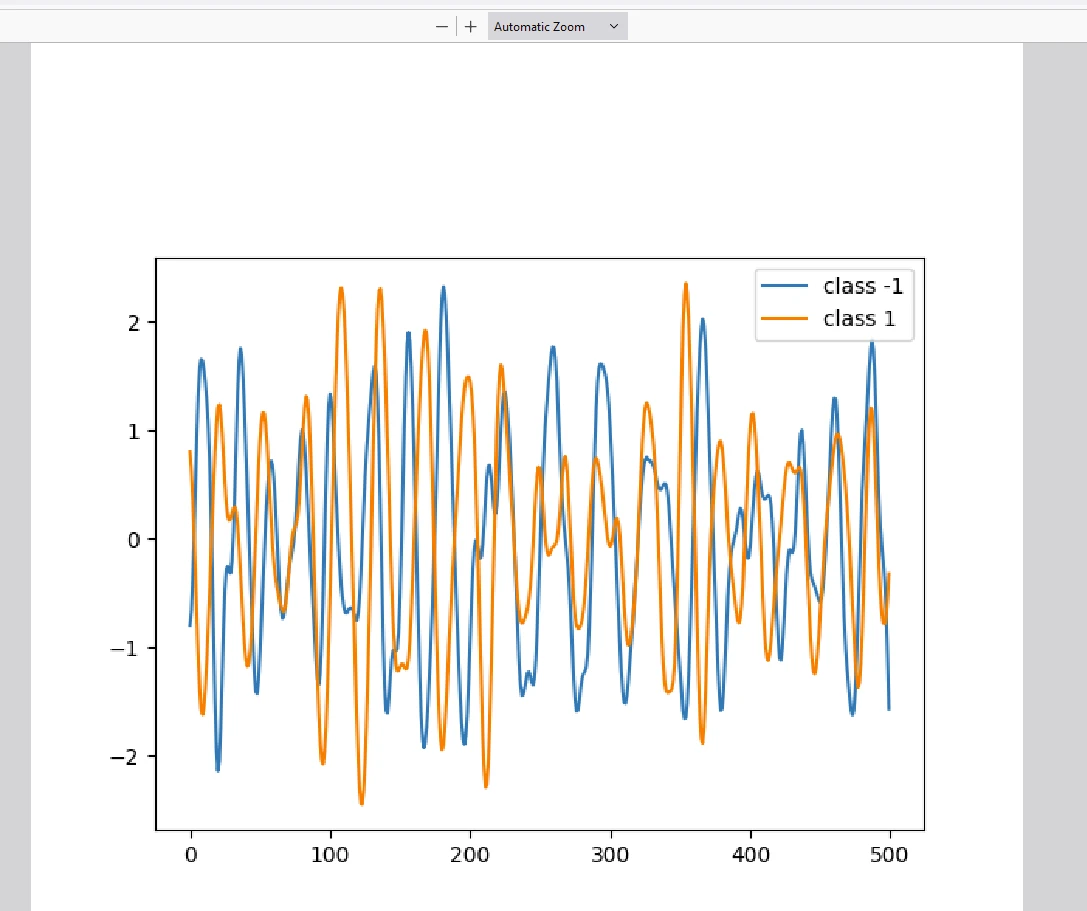
IronPDF 실행하려면 위 코드에 나와 있는 것처럼 라이선스가 필요합니다. 스크립트 시작 부분에 다음과 같이 라이선스 키를 설정하십시오.
# Apply your license key
License.LicenseKey = "your key goes here"IronPDF 라이브러리의 평가판 라이선스에 관심이 있으시면 여기 에서 평가판 라이선스 키를 받으실 수 있습니다.
케라스(Keras)는 단순성과 유연성 덕분에 딥러닝 커뮤니티에서 두각을 나타내는 Python 인공지능 라이브러리입니다. 이는 신경망 구축에 수반되는 복잡성을 상당 부분 추상화하여 개발자가 모델 설계 및 실험에 집중할 수 있도록 해줍니다. 딥러닝을 이제 막 시작하는 초보자든 숙련된 전문가든 관계없이, 케라스는 인간의 두뇌를 모방하여 아이디어를 현실로 구현하는 데 필요한 도구를 제공합니다.
반면 IronPDF 다양한 PDF 생성 및 조작 라이브러리로, 결과물을 PDF로 쉽게 내보낼 수 있도록 해줍니다. 이 두 가지 기술을 갖추면 사용자는 최신 데이터 과학 모델을 작성하고 결과를 문서화하기 위해 출력을 PDF로 내보낼 수 있습니다.

커티스 차우는 칼턴 대학교에서 컴퓨터 과학 학사 학위를 취득했으며, Node.js, TypeScript, JavaScript, React를 전문으로 하는 프론트엔드 개발자입니다. 직관적이고 미적으로 뛰어난 사용자 인터페이스를 만드는 데 열정을 가진 그는 최신 프레임워크를 활용하고, 잘 구성되고 시각적으로 매력적인 매뉴얼을 제작하는 것을 즐깁니다.



IronPDF는 IRON SUITE 의 일부입니다.
10개의 .NET API 제품, 당신의 사무 문서를 위해











PDF 파일을 HTML처럼 빠르게 변환해야 할 때.

