在PDF中添加水印 是文档安全、品牌和版本控制的常见要求。 无论是将文档标记为机密、对官方报告进行品牌化,还是防止未经授权的复制,水印都是一个至关重要的功能。
在C#中,开发人员可以选择多个库,其中IronPDF和PDFsharp是两个最受欢迎的选项。 然而,它们的实现方法、易用性、性能和许可结构差异显著。 本文提供了IronPDF和PDFSharp在为现有PDF添加水印方面的详细比较,提供了对其功能、实现过程和定制能力的见解。
该比较涵盖了两个库的水印 API,并提供了可运行的代码示例,以便您可以评估哪个库更符合您的项目要求。
理解PDF水印
什么是水印?
水印是文档上的图形或文本叠加,用作标识、威慑或品牌元素。 水印可以是可见的,也可以是不可见的,这取决于其用途,并且与用于文档注释的文本和图像印章密切相关。
水印的类型
- 文字水印——通常是半透明的叠加,带有"机密"或"草稿"等信息。
- 图像水印——嵌入到文档中的徽标、标志或图形。
- 透明水印——不会阻碍文档可读性的微弱品牌标识。
- 加盖水印——确保可见性的更加显著的标记。
常见用例
- 安全和保护——通过将文档标记为专有来防止未经授权的复制。
- 品牌化——添加公司徽标或签名,以保持跨文档的品牌一致性。
- 版本控制——标记草稿、最终版本或文档修订。
什么是IronPDF和PDFSharp?
IronPDF
IronPDF是一个功能丰富的优质 .NET 库,旨在简化 PDF 处理,从创建 PDF到高级操作任务。 它特别适合于寻找易用的PDF操作任务实现的开发人员,包括水印。
关键特性:
- 简单直观的API,需要最少的代码。
- 支持文本和图像水印,自定义选项。
- 提供不透明度控制、定位和旋转以实现精确放置。
- 兼容.NET 6+、.NET Core和.NET Framework。
- 提供永久许可模型用于长期使用。
- 附加功能包括PDF注释、HTML到PDF转换和数字签名。
PDFSharp
PDFSharp是一个开源库,允许开发人员在C#中创建、编辑和操作PDF。 如果您当前正在使用PDFSharp并考虑转换,可以参考PDFSharp到IronPDF迁移指南逐步过渡。 虽然它提供了对绘图操作的精细控制,但与IronPDF的抽象方法相比,水印功能需要更多的手动实现。
关键特性:
- 免费和开源,使其成为预算有限项目的经济选择。
- 提供对PDF绘图操作的低级控制,包括轮廓图形路径和透明图形路径。
- 支持文本和图像水印,但转换需要额外的代码。
- 与.NET Framework和.NET Core(通过PDFSharpCore)兼容。
- 不包含内置的高级水印功能; 开发者通过绘图 API 直接实现不透明度和旋转等功能。
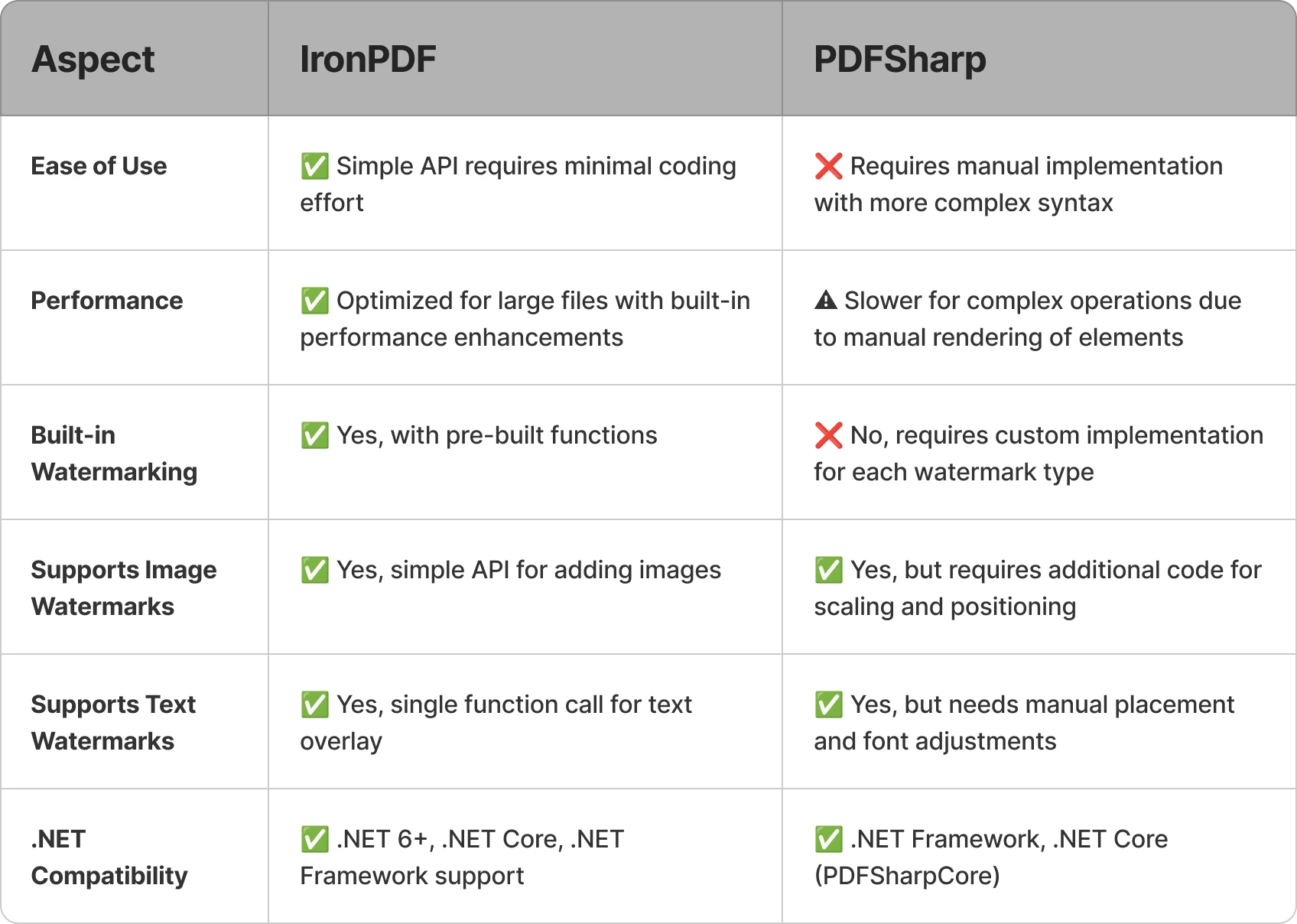
以下是对这两个库在水印任务方面的比较简要概述:
IronPDF 的 [30 天免费试用](trial-license includes the full watermarking API used in the examples below.
使用IronPDF添加水印
IronPDF 提供了一个高级 API,使开发人员只需几行代码即可应用水印,无需手动计算坐标或设置图形管线。由于IronPDF的水印工具接受 HTML/CSS 字符串(利用了库中使用的基于 Chromium 的 HTML 渲染引擎) ,因此您可以使用熟悉的 Web 标记完全控制样式、定位和外观。
文字水印示例
using IronPdf;

const string filename = "existing.pdf";
// Load the existing PDF file
PdfDocument pdf = PdfDocument.FromFile(filename);

// Create a simple HTML-based watermark
string watermark = "<h1 style='color:red'>Confidential!</h1>";

// Apply the watermark to the PDF
pdf.ApplyWatermark(watermark);

// Save the updated document with the applied watermark
pdf.SaveAs("watermarked.pdf");
using IronPdf;

const string filename = "existing.pdf";
// Load the existing PDF file
PdfDocument pdf = PdfDocument.FromFile(filename);

// Create a simple HTML-based watermark
string watermark = "<h1 style='color:red'>Confidential!</h1>";

// Apply the watermark to the PDF
pdf.ApplyWatermark(watermark);

// Save the updated document with the applied watermark
pdf.SaveAs("watermarked.pdf");
Imports IronPdf
Private Const filename As String = "existing.pdf"
' Load the existing PDF file
Private pdf As PdfDocument = PdfDocument.FromFile(filename)
' Create a simple HTML-based watermark
Private watermark As String = "<h1 style='color:red'>Confidential!</h1>"
' Apply the watermark to the PDF
pdf.ApplyWatermark(watermark)
' Save the updated document with the applied watermark
pdf.SaveAs("watermarked.pdf")
Imports IronPdf

Private Const filename As String = "existing.pdf"
' Load the existing PDF file
Private pdf As PdfDocument = PdfDocument.FromFile(filename)

' Create a simple HTML-based watermark
Private watermark As String = "<h1 style='color:red'>Confidential!</h1>"

' Apply the watermark to the PDF
pdf.ApplyWatermark(watermark)

' Save the updated document with the applied watermark
pdf.SaveAs("watermarked.pdf")
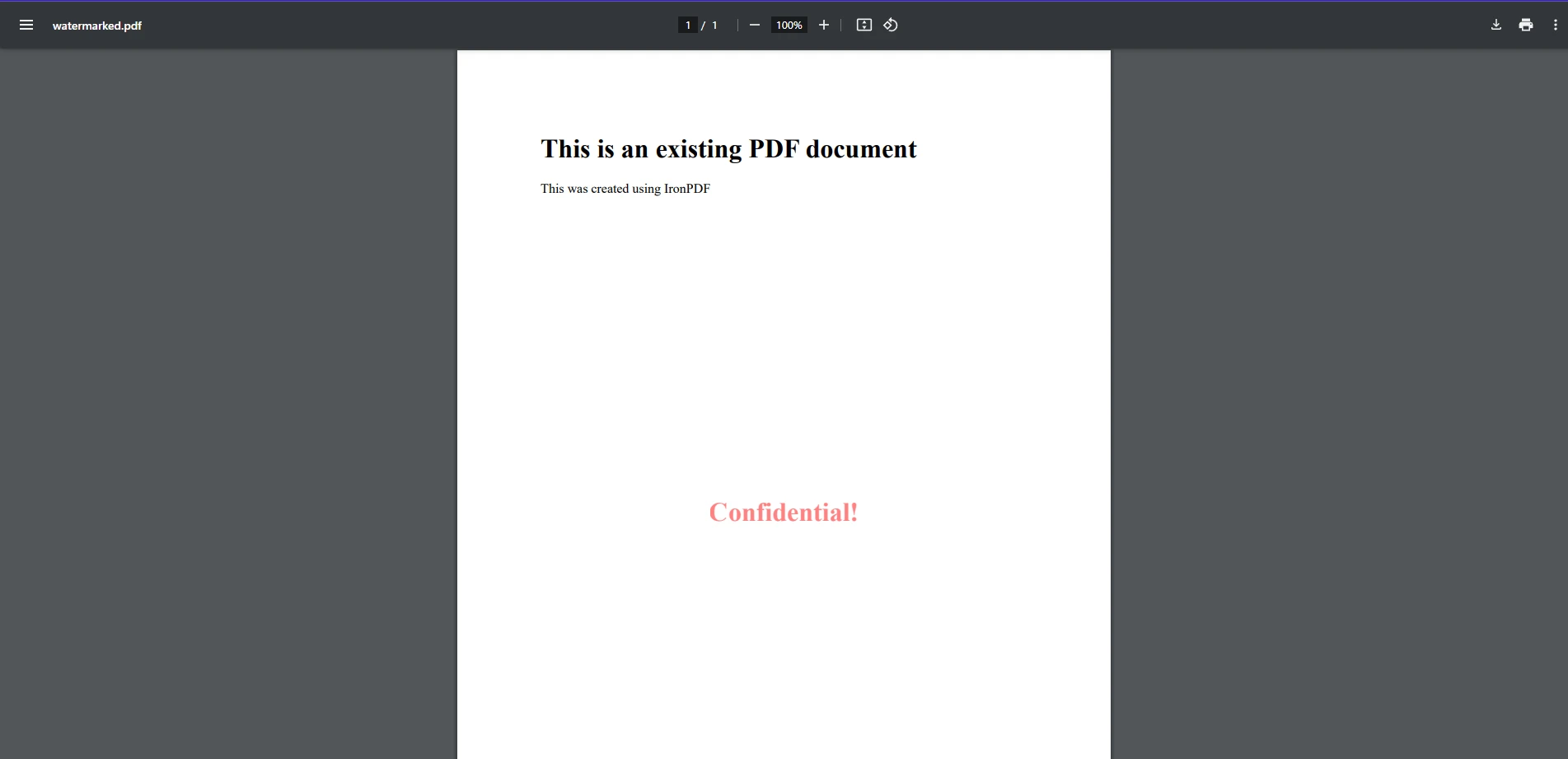
在此代码示例中,我们可以看到使用IronPDF将水印应用到现有PDF文件是多么简单。 在这里,我们使用FromFile方法加载现有PDF。 然后,我们创建一个作为水印的简单字符串,该字符串格式化为HTML元素,并使用ApplyWatermark应用于PDF,类似于使用HTML从零开始创建PDF的方法。 如输出图像所示,这添加了一个简单的文字字符串"Confidential"作为我们PDF上的水印。
图像水印示例
using IronPdf;

// Load the PDF document
PdfDocument pdf = PdfDocument.FromFile("existing.pdf");

// Create an HTML-based watermark containing the image
string watermark = "<img src='https://ironsoftware.com/img/products/ironpdf-logo-text-dotnet.svg'>";

// Apply the watermark to the PDF with rotation and opacity
pdf.ApplyWatermark(watermark, rotation: 45, opacity: 80);

// Save the watermarked document
pdf.SaveAs("watermarked.pdf");
using IronPdf;

// Load the PDF document
PdfDocument pdf = PdfDocument.FromFile("existing.pdf");

// Create an HTML-based watermark containing the image
string watermark = "<img src='https://ironsoftware.com/img/products/ironpdf-logo-text-dotnet.svg'>";

// Apply the watermark to the PDF with rotation and opacity
pdf.ApplyWatermark(watermark, rotation: 45, opacity: 80);

// Save the watermarked document
pdf.SaveAs("watermarked.pdf");
Imports IronPdf
' Load the PDF document
Private pdf As PdfDocument = PdfDocument.FromFile("existing.pdf")
' Create an HTML-based watermark containing the image
Private watermark As String = "<img src='https://ironsoftware.com/img/products/ironpdf-logo-text-dotnet.svg'>"
' Apply the watermark to the PDF with rotation and opacity
pdf.ApplyWatermark(watermark, rotation:= 45, opacity:= 80)
' Save the watermarked document
pdf.SaveAs("watermarked.pdf")
Imports IronPdf

' Load the PDF document
Private pdf As PdfDocument = PdfDocument.FromFile("existing.pdf")

' Create an HTML-based watermark containing the image
Private watermark As String = "<img src='https://ironsoftware.com/img/products/ironpdf-logo-text-dotnet.svg'>"

' Apply the watermark to the PDF with rotation and opacity
pdf.ApplyWatermark(watermark, rotation:= 45, opacity:= 80)

' Save the watermarked document
pdf.SaveAs("watermarked.pdf")
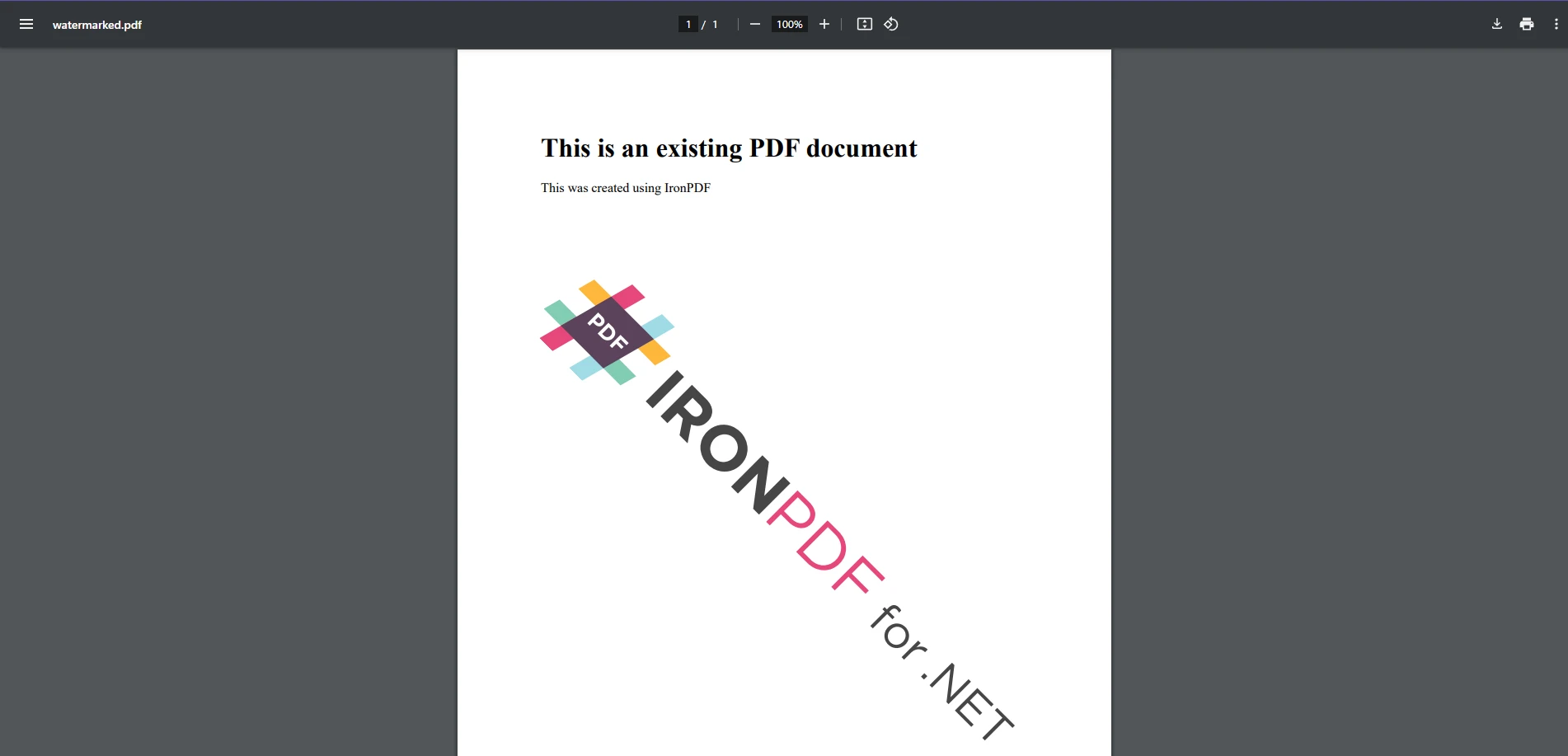
将图像添加为水印与添加文本一样简单,因为它们都使用相同的方法。 就像在文字示例中一样,我们创建一个新的水印字符串变量,包含指向图像URL的HTML图像标签并将其应用。 这次,我们通过IronPDF的渲染选项参数加入了自定义旋转和不透明度变换。
此方法在指定位置覆盖一个图像水印,允许自定义位置和透明度。
使用PDFSharp添加水印
PDFSharp要求开发人员使用其GDI+绘图API手动渲染文本和图像。 要在现有PDF文件上加水印,请创建用于绘图的XGraphics对象并应用所需的内容。
文字水印示例
using PdfSharp.Pdf;
using PdfSharp.Drawing;
using PdfSharp.Pdf.IO;

const string filename = "existing.pdf";
// Open the PDF document in modify mode
var document = PdfReader.Open(filename, PdfDocumentOpenMode.Modify);

foreach (var page in document.Pages)
{
    // Create an XGraphics object for drawing
    var gfx = XGraphics.FromPdfPage(page);

    // Move the origin to the center of the page for rotation purposes
    gfx.TranslateTransform(page.Width / 2, page.Height / 2);

    // Rotate for diagonal watermark placement
    gfx.RotateTransform(Math.Atan(page.Height / page.Width));

    // Define font and brush for drawing the watermark text
    var font = new XFont("Arial", 40);
    var brush = new XSolidBrush(XColor.FromArgb(128, XColors.Red));  // Semi-transparent red

    // Draw the watermark text centered on the page
    gfx.DrawString("WATERMARK", font, brush, new XPoint(0, 0));
}

// Save modified document
document.Save("watermarked.pdf");
using PdfSharp.Pdf;
using PdfSharp.Drawing;
using PdfSharp.Pdf.IO;

const string filename = "existing.pdf";
// Open the PDF document in modify mode
var document = PdfReader.Open(filename, PdfDocumentOpenMode.Modify);

foreach (var page in document.Pages)
{
    // Create an XGraphics object for drawing
    var gfx = XGraphics.FromPdfPage(page);

    // Move the origin to the center of the page for rotation purposes
    gfx.TranslateTransform(page.Width / 2, page.Height / 2);

    // Rotate for diagonal watermark placement
    gfx.RotateTransform(Math.Atan(page.Height / page.Width));

    // Define font and brush for drawing the watermark text
    var font = new XFont("Arial", 40);
    var brush = new XSolidBrush(XColor.FromArgb(128, XColors.Red));  // Semi-transparent red

    // Draw the watermark text centered on the page
    gfx.DrawString("WATERMARK", font, brush, new XPoint(0, 0));
}

// Save modified document
document.Save("watermarked.pdf");
Imports PdfSharp.Pdf
Imports PdfSharp.Drawing
Imports PdfSharp.Pdf.IO
Private Const filename As String = "existing.pdf"
' Open the PDF document in modify mode
Private document = PdfReader.Open(filename, PdfDocumentOpenMode.Modify)
For Each page In document.Pages
' Create an XGraphics object for drawing
Dim gfx = XGraphics.FromPdfPage(page)
' Move the origin to the center of the page for rotation purposes
gfx.TranslateTransform(page.Width \ 2, page.Height \ 2)
' Rotate for diagonal watermark placement
gfx.RotateTransform(Math.Atan(page.Height \ page.Width))
' Define font and brush for drawing the watermark text
Dim font = New XFont("Arial", 40)
Dim brush = New XSolidBrush(XColor.FromArgb(128, XColors.Red)) ' Semi-transparent red
' Draw the watermark text centered on the page
gfx.DrawString("WATERMARK", font, brush, New XPoint(0, 0))
Next page
' Save modified document
document.Save("watermarked.pdf")
Imports PdfSharp.Pdf
Imports PdfSharp.Drawing
Imports PdfSharp.Pdf.IO

Private Const filename As String = "existing.pdf"
' Open the PDF document in modify mode
Private document = PdfReader.Open(filename, PdfDocumentOpenMode.Modify)

For Each page In document.Pages
	' Create an XGraphics object for drawing
	Dim gfx = XGraphics.FromPdfPage(page)

	' Move the origin to the center of the page for rotation purposes
	gfx.TranslateTransform(page.Width \ 2, page.Height \ 2)

	' Rotate for diagonal watermark placement
	gfx.RotateTransform(Math.Atan(page.Height \ page.Width))

	' Define font and brush for drawing the watermark text
	Dim font = New XFont("Arial", 40)
	Dim brush = New XSolidBrush(XColor.FromArgb(128, XColors.Red)) ' Semi-transparent red

	' Draw the watermark text centered on the page
	gfx.DrawString("WATERMARK", font, brush, New XPoint(0, 0))
Next page

' Save modified document
document.Save("watermarked.pdf")
该实现方式通过显式的基于坐标的定位,在每个页面上绘制水印。 虽然它产生的输出类似于IronPDF示例,但PDFSharp的方法需要更多的代码——IronPDF的文本水印需要大约4行代码,相比之下PDFSharp需要10行,因为PDFSharp将布局决策(翻译、旋转、字体选择)委托给开发人员,而不是抽象化它们。
图像水印示例
using PdfSharp.Pdf;
using PdfSharp.Drawing;
using PdfSharp.Pdf.IO;

// Open the existing PDF document in modify mode
var document = PdfReader.Open("sample.pdf", PdfDocumentOpenMode.Modify);

// Load the watermark image
XImage watermark = XImage.FromFile("watermark.png");

foreach (var page in document.Pages)
{
    // Create a graphics object from the page
    XGraphics gfx = XGraphics.FromPdfPage(page);

    // Draw the image watermark at the specified position and size
    gfx.DrawImage(watermark, 50, 100, watermark.PixelWidth / 2, watermark.PixelHeight / 2);
}

// Save the modified PDF document
document.Save("watermarked.pdf");
using PdfSharp.Pdf;
using PdfSharp.Drawing;
using PdfSharp.Pdf.IO;

// Open the existing PDF document in modify mode
var document = PdfReader.Open("sample.pdf", PdfDocumentOpenMode.Modify);

// Load the watermark image
XImage watermark = XImage.FromFile("watermark.png");

foreach (var page in document.Pages)
{
    // Create a graphics object from the page
    XGraphics gfx = XGraphics.FromPdfPage(page);

    // Draw the image watermark at the specified position and size
    gfx.DrawImage(watermark, 50, 100, watermark.PixelWidth / 2, watermark.PixelHeight / 2);
}

// Save the modified PDF document
document.Save("watermarked.pdf");
Imports PdfSharp.Pdf
Imports PdfSharp.Drawing
Imports PdfSharp.Pdf.IO
' Open the existing PDF document in modify mode
Private document = PdfReader.Open("sample.pdf", PdfDocumentOpenMode.Modify)
' Load the watermark image
Private watermark As XImage = XImage.FromFile("watermark.png")
For Each page In document.Pages
' Create a graphics object from the page
Dim gfx As XGraphics = XGraphics.FromPdfPage(page)
' Draw the image watermark at the specified position and size
'INSTANT VB WARNING: Instant VB cannot determine whether both operands of this division are integer types - if they are then you should use the VB integer division operator:
gfx.DrawImage(watermark, 50, 100, watermark.PixelWidth / 2, watermark.PixelHeight / 2)
Next page
' Save the modified PDF document
document.Save("watermarked.pdf")
Imports PdfSharp.Pdf
Imports PdfSharp.Drawing
Imports PdfSharp.Pdf.IO

' Open the existing PDF document in modify mode
Private document = PdfReader.Open("sample.pdf", PdfDocumentOpenMode.Modify)

' Load the watermark image
Private watermark As XImage = XImage.FromFile("watermark.png")

For Each page In document.Pages
	' Create a graphics object from the page
	Dim gfx As XGraphics = XGraphics.FromPdfPage(page)

	' Draw the image watermark at the specified position and size
'INSTANT VB WARNING: Instant VB cannot determine whether both operands of this division are integer types - if they are then you should use the VB integer division operator:
	gfx.DrawImage(watermark, 50, 100, watermark.PixelWidth / 2, watermark.PixelHeight / 2)
Next page

' Save the modified PDF document
document.Save("watermarked.pdf")
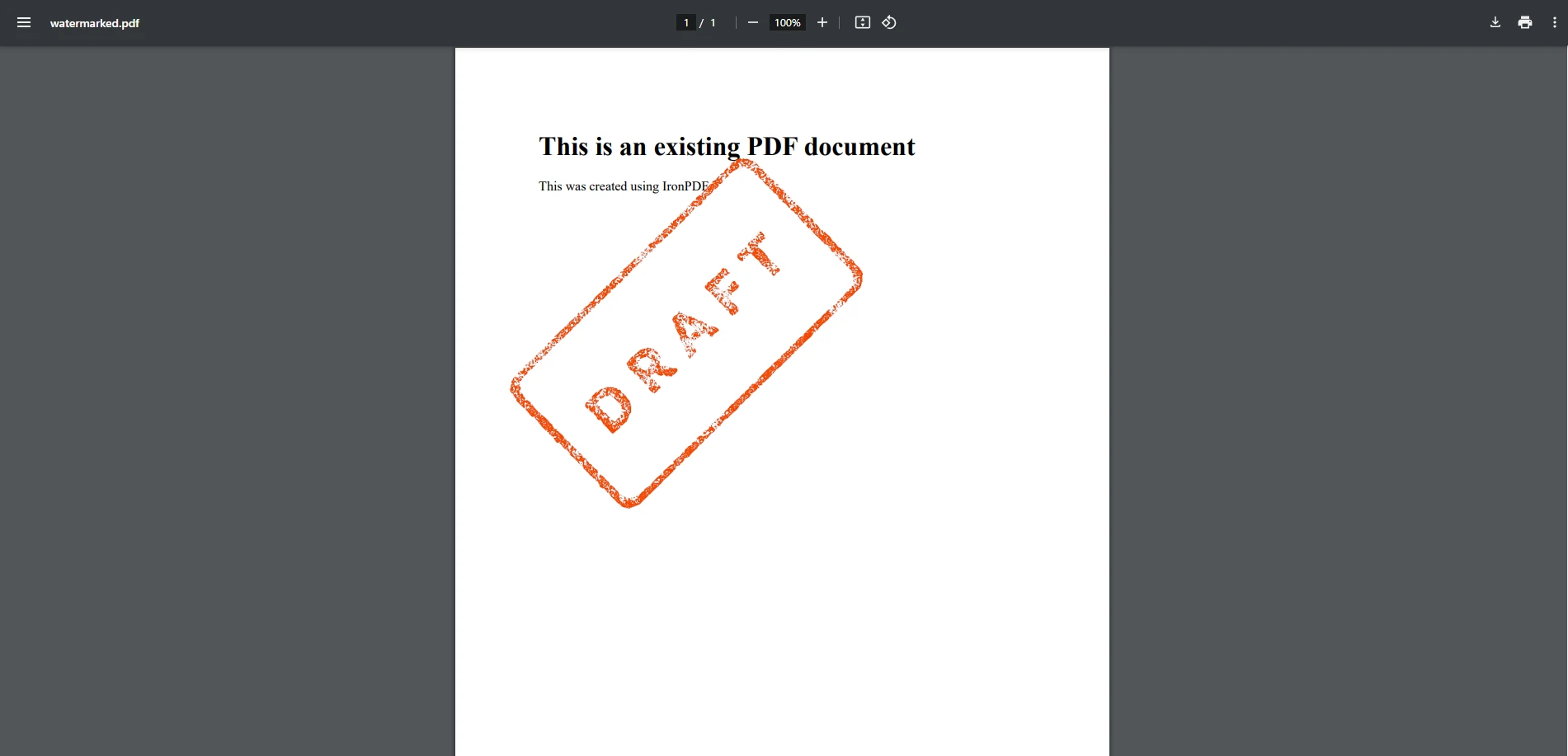
该方法将图像水印放置在固定位置和大小。透明度处理在PDFSharp的单一调用API表面之外——需要透明度控制的开发人员可以通过XGraphics管道直接管理。 如同文本水印示例,PDFSharp为渲染提供了精细的控制,但相比IronPDF更高级别的水印API,需要额外的设置。
IronPDF和PDFSharp在水印方面如何比较?
易用性
- IronPDF: 提供高级功能,可通过最少的代码简化水印处理。 它对复杂操作进行抽象,使其成为需要快速高效解决方案的开发人员的理想选择。
- PDFSharp: 需要使用图形API的手动实现,这增加了复杂性和开发时间。它更适合需要对渲染进行细粒度控制但对额外编码感到舒服的开发人员。
性能
- **IronPDF:**以单个 NuGet 包的形式提供,其水印操作可在一次方法调用中处理不透明度、旋转和定位,从而减少为多页文档添加水印时的每页处理开销。 对于大规模工作流程,请参阅IronPDF 性能优化指南。
- **PDFSharp:**轻量级,依赖项少。 对于涉及每页多个变换的复杂水印任务,开发人员可能需要分析和优化其绘图逻辑,因为PDFSharp不会在内部批量处理或缓存这些操作。
自定义选项
- IronPDF: 内置支持不透明度、旋转、定位和字体大小自定义。 用户可以轻松调整设置,而无需深入复杂的渲染逻辑。
- PDFSharp: 对不透明度、透明效果和变换处理需要额外编码。 虽然强大,但它需要开发者进行更高水平的自定义,包括使用
var格式进行特定的渲染任务。
兼容性
- **IronPDF:**完全兼容 .NET 6+、.NET Core 和 .NET Framework,使其适用于现代和传统应用程序。
- **PDFSharp:**支持 .NET Framework 和 .NET Core(通过 PDFSharpCore)。 根据您选择的社区移植版本,某些较新的框架功能可能超出其当前范围。
许可和成本
- **IronPDF:**一款商业产品,需要付费许可,但包含永久许可选项、客户支持和持续更新。
- **PDFSharp:**开源且免费使用,对于喜欢不受限制的许可模式但愿意自行处理支持和更新的开发人员来说,这是一个经济高效的解决方案。
除了许可费用之外,项目总成本还包括开发人员花费在基于坐标的手动定位、自定义不透明度和旋转逻辑以及IronPDF在单个方法调用中处理的每页绘图代码上的时间。 对于评估多年项目生命周期成本的团队来说,这些实施和维护时间往往会超过开源许可和商业许可之间的差异。
你应该选择哪个库?
PDFSharp提供了扎实的低级绘图控制和开源许可证——对于预算紧张且有能力从头构建水印逻辑的团队而言,一个真正的优势。 对于那些需要将水印定位、透明度、旋转和基于 HTML/CSS 的样式等功能作为一流操作的团队来说, IronPDF提供了一个更全面的 API,可以缩短实现时间。最终,最佳选择取决于您的项目需求、编码经验和可用资源。
通过免费下载试用 IronPDF,探索它如何将您的C# PDF项目提升到新高度!
PDFSharp 是其各自所有者的注册商标。 本网站与PDFSharp无任何关联,亦未获得其认可或赞助。所有产品名称、标识和品牌均为其各自所有者的财产。 比较仅供参考,反映撰写时公开可用的信息。























