




已更新 2026年4月23日
简化 .NET 与 Microsoft.Extensions.AI 的 LLM 集成
AI正在改变软件开发,但将大型语言模型(LLM)集成到.NET中直到现在一直很复杂。通过IronPdf.AI,将AI集成更进一步,该产品为.NET应用程序带来了OpenAI驱动的PDF解析、数据提取和内容摘要。
阅读更多

C# 已成为开发人员众多可用编程语言中的一种流行且适应性强的选项。 集合的概念是 C# 丰富的库和框架的核心,这是该语言的主要优势之一。 在 C# 中,集合在有效存储和组织数据方面至关重要。 它们为开发人员提供了广泛的有效工具来解决复杂的编程问题。 在本文中,我们将深入探讨集合,涵盖它们的特性、类型及最佳使用策略。
C# 中的集合是允许程序员处理和存储对象类集的容器。 这些对象灵活且适应许多编程环境,它们可能是相同或不同的类型。 大多数集合类在 C# 中实现 System 命名空间的组件,这意味着需要导入诸如 System.Collections 和 System.Collections.Generic 等命名空间,这些命名空间提供了各种集合类,包括泛型和非泛型类。 集合还允许动态内存分配,添加、搜索和排序集合类中的项目。
ArrayList、Hashtable 和 Queue 是 C# 中可用的一些非泛型集合类,这些类在该语言的早期版本中加入。 这些集合提供了一种替代方法,不需要显式定义要保存和处理的项目类型。 但是,由于性能更高且类型安全,开发人员经常选择使用泛型集合。
C# 的后续版本包含了泛型集合,以克服非泛型集合的缺点。 它们在编译期间提供类型安全,并允许开发人员处理严格类型的数据。 泛型集合类 List、Dictionary< TKey, TValue >、Queue 和 Stack 都是经常使用的。 这些集合是现代 C# 开发中的首选,因为它们提供了更高的性能和编译时类型验证。
用于快速和轻松插入和删除元素的动态数组是 List<t> 类。 由于提供了过滤、搜索和操作组件的方法,它在需要可调整大小的集合的情况下是一个灵活的选项。
// Creating a list with integers and adding/removing elements
List<int> numbers = new List<int> { 1, 2, 3, 4, 5 };
numbers.Add(6); // Adds element '6' to the end
numbers.Remove(3); // Removes the first occurrence of the element '3'' Creating a list with integers and adding/removing elements
Dim numbers As New List(Of Integer) From {1, 2, 3, 4, 5}
numbers.Add(6) ' Adds element '6' to the end
numbers.Remove(3) ' Removes the first occurrence of the element '3'Dictionary<TKey, TValue>Dictionary<TKey, TValue> 类表示键值对的集合,具有快速查找速度。 它在通过唯一键值快速访问数据至关重要的情况下经常使用。 此键用于访问字典中的元素。
// Creating a dictionary mapping names to ages
Dictionary<string, int> ageMap = new Dictionary<string, int>();
ageMap.Add("John", 25); // The string "John" is the key that can access the value 25
ageMap["Jane"] = 30; // Setting the key "Jane" to hold the value 30' Creating a dictionary mapping names to ages
Dim ageMap As New Dictionary(Of String, Integer)()
ageMap.Add("John", 25) ' The string "John" is the key that can access the value 25
ageMap("Jane") = 30 ' Setting the key "Jane" to hold the value 30先进先出(FIFO)和后进先出(LIFO)集合分别由泛型 Queue<t> 和泛型 Stack<t> 类实现。 它们可用于根据应用程序的需要按一定顺序管理项目。
// Creating and manipulating a queue
Queue<string> tasks = new Queue<string>();
tasks.Enqueue("Task 1"); // Adding to the queue
tasks.Enqueue("Task 2");

// Creating and manipulating a stack
Stack<double> numbers = new Stack<double>();
numbers.Push(3.14); // Adding to the stack
numbers.Push(2.71);' Creating and manipulating a queue
Dim tasks As New Queue(Of String)()
tasks.Enqueue("Task 1") ' Adding to the queue
tasks.Enqueue("Task 2")
' Creating and manipulating a stack
Dim numbers As New Stack(Of Double)()
numbers.Push(3.14) ' Adding to the stack
numbers.Push(2.71)以无序集合排列的唯一项由 HashSet<t> 类表示。 它提供了执行诸如差集、并集和交集之类的集合操作的有效方法。
// Creating hashsets and performing a union operation
HashSet<int> setA = new HashSet<int> { 1, 2, 3, 4 };
HashSet<int> setB = new HashSet<int> { 3, 4, 5, 6 };
HashSet<int> unionSet = new HashSet<int>(setA);
unionSet.UnionWith(setB); // Combining setA and setB' Creating hashsets and performing a union operation
Dim setA As New HashSet(Of Integer) From {1, 2, 3, 4}
Dim setB As New HashSet(Of Integer) From {3, 4, 5, 6}
Dim unionSet As New HashSet(Of Integer)(setA)
unionSet.UnionWith(setB) ' Combining setA and setB
名为 IronPDF 的 C# 库可轻松在 .NET 应用程序中创建、编辑和显示 PDF 文档。 它提供多种许可选择、跨平台兼容性、高质量呈现和 HTML 到 PDF 的转换。 IronPDF 的用户友好型 API 使处理 PDF 变得更容易,使其成为 C# 开发人员的宝贵工具。
IronPDF 的突出功能是其HTML 到 PDF 转换功能,它保持所有布局和样式。 它从网页内容生成 PDF,因此非常适合报告、发票和文档。 HTML 文件、网址和 HTML 字符串可以轻松转换为 PDF。
using IronPdf;

class Program
{
    static void Main(string[] args)
    {
        var renderer = new ChromePdfRenderer();

        // 1. Convert HTML String to PDF
        var htmlContent = "<h1>Hello, IronPDF!</h1><p>This is a PDF from an HTML string.</p>";
        var pdfFromHtmlString = renderer.RenderHtmlAsPdf(htmlContent);
        pdfFromHtmlString.SaveAs("HTMLStringToPDF.pdf");

        // 2. Convert HTML File to PDF
        var htmlFilePath = "path_to_your_html_file.html"; // Specify the path to your HTML file
        var pdfFromHtmlFile = renderer.RenderHtmlFileAsPdf(htmlFilePath);
        pdfFromHtmlFile.SaveAs("HTMLFileToPDF.pdf");

        // 3. Convert URL to PDF
        var url = "http://ironpdf.com"; // Specify the URL
        var pdfFromUrl = renderer.RenderUrlAsPdf(url);
        pdfFromUrl.SaveAs("URLToPDF.pdf");
    }
}Imports IronPdf
Friend Class Program
Shared Sub Main(ByVal args() As String)
Dim renderer = New ChromePdfRenderer()
' 1. Convert HTML String to PDF
Dim htmlContent = "<h1>Hello, IronPDF!</h1><p>This is a PDF from an HTML string.</p>"
Dim pdfFromHtmlString = renderer.RenderHtmlAsPdf(htmlContent)
pdfFromHtmlString.SaveAs("HTMLStringToPDF.pdf")
' 2. Convert HTML File to PDF
Dim htmlFilePath = "path_to_your_html_file.html" ' Specify the path to your HTML file
Dim pdfFromHtmlFile = renderer.RenderHtmlFileAsPdf(htmlFilePath)
pdfFromHtmlFile.SaveAs("HTMLFileToPDF.pdf")
' 3. Convert URL to PDF
Dim url = "http://ironpdf.com" ' Specify the URL
Dim pdfFromUrl = renderer.RenderUrlAsPdf(url)
pdfFromUrl.SaveAs("URLToPDF.pdf")
End Sub
End ClassIronPDF 的主要特性包括:
要了解更多关于 IronPDF 文档,请参考IronPDF 文档。
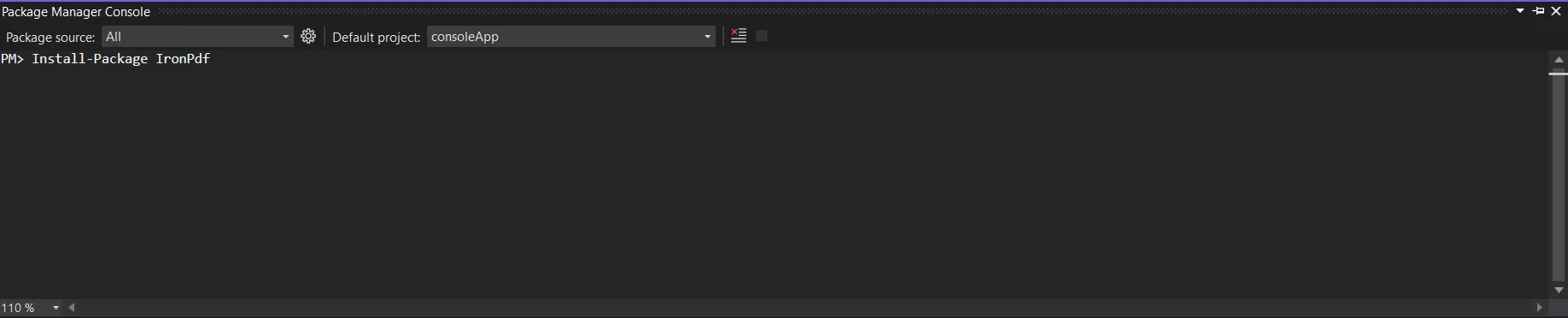
首先使用包管理器控制台或 NuGet 包管理器安装 IronPDF 库:
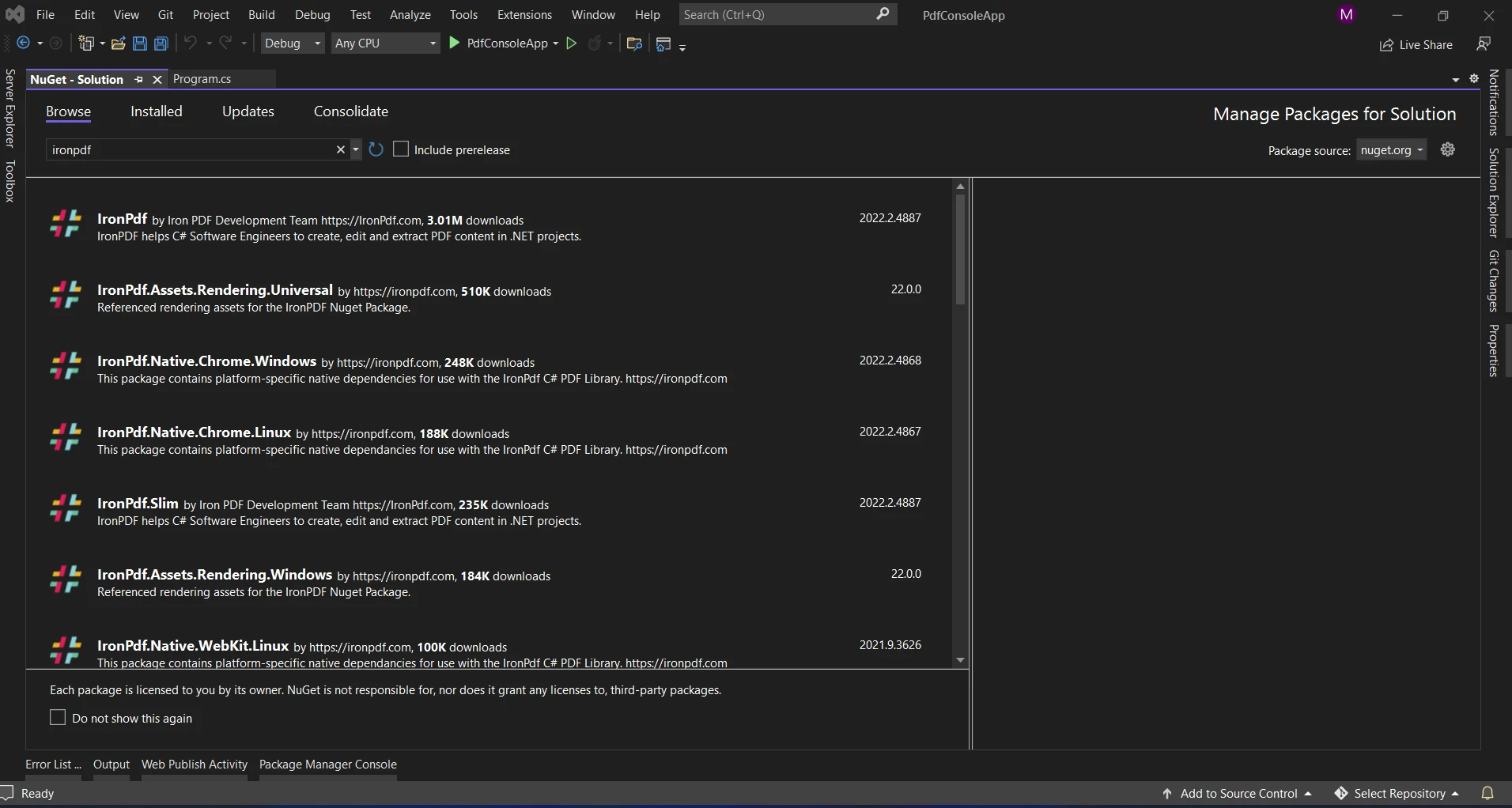
 using NuGet 包管理器搜索" IronPDF"包是另一种选择。 我们可以从 NuGet 包中选择并下载与 IronPDF 相关的所需包。
在深入了解 IronPDF 接口之前,了解集合在数据结构和组织中的作用至关重要。 开发人员可以通过使用集合以有组织的方式存储、检索和修改项目的集合。 提供了许多不同类型,例如 List、Dictionary<TKey, TValue> 和 HashSet,开发人员可以选择最适合其需求的集合。
想象一下你必须创建一个包含销售交易列表的报告。 该数据可以使用 List<Transaction> 有效组织,作为进一步处理和显示的基础。
// Define the Transaction class
public class Transaction
{
    public string ProductName { get; set; }
    public decimal Amount { get; set; }
    public DateTime Date { get; set; }
}

// Create a list of transactions
List<Transaction> transactions = new List<Transaction>
{
    new Transaction { ProductName = "Product A", Amount = 100.50m, Date = DateTime.Now.AddDays(-2) },
    new Transaction { ProductName = "Product B", Amount = 75.20m, Date = DateTime.Now.AddDays(-1) },
    // Add more transactions as needed
};' Define the Transaction class
Public Class Transaction
Public Property ProductName() As String
Public Property Amount() As Decimal
Public Property [Date]() As DateTime
End Class
' Create a list of transactions
Private transactions As New List(Of Transaction) From {
New Transaction With {
.ProductName = "Product A",
.Amount = 100.50D,
.Date = DateTime.Now.AddDays(-2)
},
New Transaction With {
.ProductName = "Product B",
.Amount = 75.20D,
.Date = DateTime.Now.AddDays(-1)
}
}在 PDF 中,我们将制作一个简单的表格,列出每个产品名称、交易金额和日期。
using IronPdf;

// Create a PDF document renderer
var pdfDocument = new HtmlToPdf();

// HTML content with a table populated by data from the 'transactions' list
string htmlContent = "<table><tr><th>Product Name</th><th>Amount</th><th>Date</th></tr>";
foreach (var transaction in transactions)
{
    htmlContent += $"<tr><td>{transaction.ProductName}</td><td>{transaction.Amount}</td><td>{transaction.Date.ToShortDateString()}</td></tr>";
}
htmlContent += "</table>";

// Convert HTML to PDF
PdfDocument pdf = pdfDocument.RenderHtmlAsPdf(htmlContent);

// Specify the file path to save the PDF
string pdfFilePath = "transactions_report.pdf";
pdf.SaveAs(pdfFilePath);Imports IronPdf
' Create a PDF document renderer
Private pdfDocument = New HtmlToPdf()
' HTML content with a table populated by data from the 'transactions' list
Private htmlContent As String = "<table><tr><th>Product Name</th><th>Amount</th><th>Date</th></tr>"
For Each transaction In transactions
htmlContent &= $"<tr><td>{transaction.ProductName}</td><td>{transaction.Amount}</td><td>{transaction.Date.ToShortDateString()}</td></tr>"
Next transaction
htmlContent &= "</table>"
' Convert HTML to PDF
Dim pdf As PdfDocument = pdfDocument.RenderHtmlAsPdf(htmlContent)
' Specify the file path to save the PDF
Dim pdfFilePath As String = "transactions_report.pdf"
pdf.SaveAs(pdfFilePath)开发人员可以选择在生成后将 PDF 文档保存到磁盘或显示给用户。 IronPDF 提供了多种输出选项,包括浏览器流、文件保存和云存储集成。
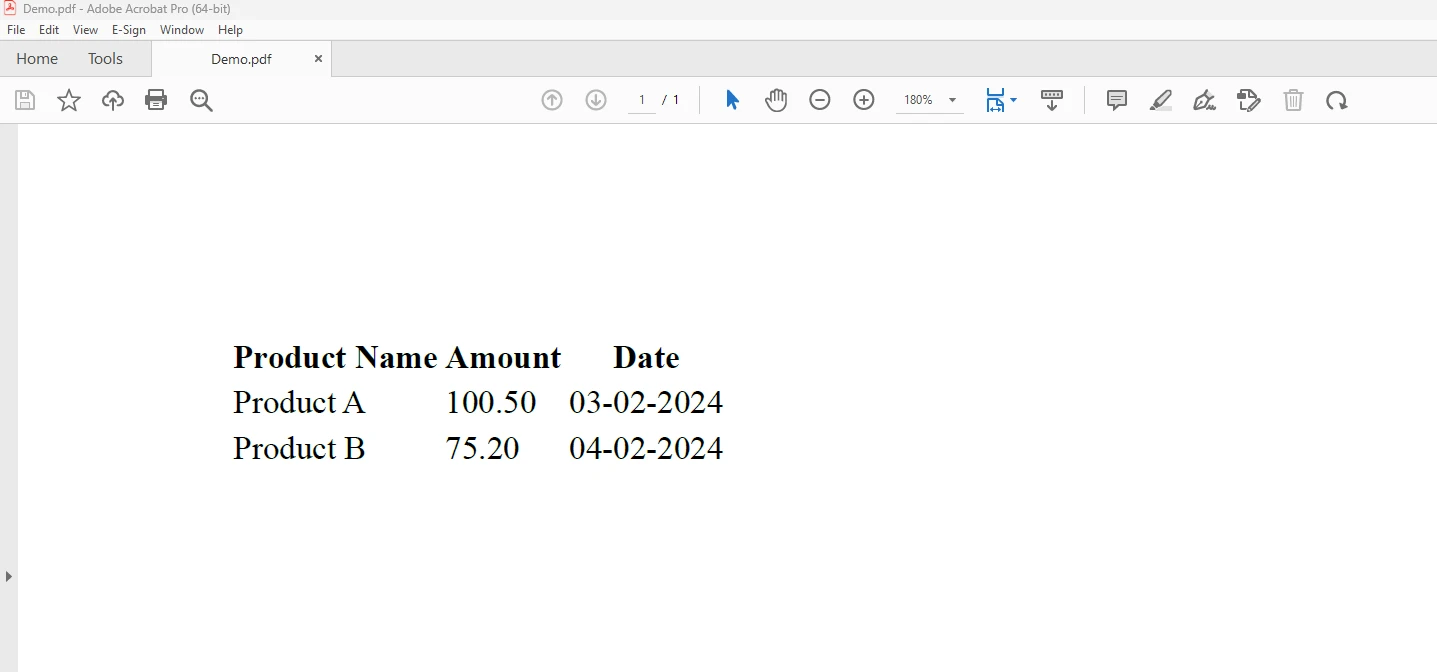
上面的图显示了从上述代码生成的输出。 要了解更多关于代码的信息,请参考使用 HTML 创建 PDF 示例。
结合集合与 IronPDF 提供了动态文档生成的丰富机会。 开发人员可以通过利用集合有效管理和组织数据,而 IronPDF 使创建视觉上美观的 PDF 文档变得容易。 IronPDF 和集合的结合实力为 C# 应用程序中的动态内容生成提供了一种可靠和适应性强的解决方案,无论您正在生成的文档类型是发票、报告或其他任何形式。
IronPDF的$999 Lite版本包括一年的软件支持、升级选项以及永久许可证。 用户还可以在带水印的试用期间有机会在实际条件下评估该产品。 若要了解有关 IronPDF 的费用、许可和免费试用的更多信息,请访问IronPDF 许可信息。 如要获得更多有关 Iron Software 的信息,请访问Iron Software 网站。

Jacob Mellor 是 Iron Software 的首席技术官,也是一位开创 C# PDF 技术的有远见的工程师。作为 Iron Software 核心代码库的原始开发者,他从公司成立之初就开始塑造公司的产品架构,与首席执行官 Cameron Rimington 一起将公司转变为一家拥有 50 多名员工的公司,为 NASA、特斯拉和全球政府机构提供服务。



IronPDF 是 IRONSUITE的一部分
10 个 .NET API 产品用于您的办公文档

当您需要PDF看起来像HTML时,速度快。


