




Updated August 1, 2026
RandomNumberGenerator C#
Using the RandomNumberGenerator C# class can help take your PDF generation and editing projects to the next level
Read More

For developers navigating the gap between quick command line tool scripts and robust .NET code, the friction often lies in translating a working cURL command into a proper HTTP request within C#. Jacob Mellor has bridged this gap with CurlDotNet, a library created to bring the familiarity of cURL to the .NET ecosystem.
By combining this tool with Iron Software products like IronPDF or IronXL, you can build powerful pipelines that fetch data via complex API calls and immediately generate professional reports. In this article we'll look at some examples where these tools can work together to take your projects to the next level.
CurlDotNet is a pure C# .NET implementation of the industry-standard curl tool. Unlike wrappers that rely on native dependencies or libcurl, this library offers a 100% managed solution with full support for Windows, Linux, macOS, and more. It ensures the same behavior as the standard client, allowing you to simply paste a bash copy of a command from API docs directly into your code.
To get started, simply run the following command in your project directory:
dotnet add package curldotnetThis installs the package CurlDotNet, giving you access to ready-to-use recipes for handling web requests without the overhead of HttpClient configuration.
The library excels at parsing string value commands. If you have a working curl https string from a GitHub API page or internal docs, you can execute it directly.
using CurlDotNet;

// Simply copy-paste your shell command
var command = "curl -X GET https://api.github.com/users/jacob-mellor -H 'User-Agent: curl-dot-net'";
var result = await Curl.ExecuteAsync(command);
Console.WriteLine(result.Body);Imports CurlDotNet
' Simply copy-paste your shell command
Dim command As String = "curl -X GET https://api.github.com/users/jacob-mellor -H 'User-Agent: curl-dot-net'"
Dim result = Await Curl.ExecuteAsync(command)
Console.WriteLine(result.Body)
For those who prefer a structured approach, the fluent builder provides a clean API to set headers, curl options, and access tokens.
var response = await Curl.GetAsync("https://api.github.com/users/ironsoftware")
    .WithHeader("Authorization", "Bearer YOUR_TOKEN")
    .WithHeader("X-API-Key", "12345")
.ExecuteAsync();Dim response = Await Curl.GetAsync("https://api.github.com/users/ironsoftware") _
.WithHeader("Authorization", "Bearer YOUR_TOKEN") _
.WithHeader("X-API-Key", "12345") _
.ExecuteAsync()This flexibility handles TLS handshake mechanics, rate limiting, and error handling internally, mimicking the default behavior of the curl executable.
The real power unlocks when you pipe the output of CurlDotNet into Iron Software tools. Since CurlDotNet handles the transport layer (fetching JSON, files, or HTML), Iron Software products can focus on processing that content.
Imagine you need to download user data from a secure URL and generate a PDF report. The API requires a specific bash signature that is hard to replicate with HttpClient but easy with a curl command.
// Define the curl command string with all necessary headers (here we use an example test website)
string curlCmd = "curl https://www.w3.org/TR/html4/ -H 'X-API-Key: secure_key'";

// Execute the request
var result = await Curl.ExecuteAsync(curlCmd);

// Extract the content (assumed to be HTML for this scenario)
string htmlContent = result.Body;Imports System.Threading.Tasks
' Define the curl command string with all necessary headers (here we use an example test website)
Dim curlCmd As String = "curl https://www.w3.org/TR/html4/ -H 'X-API-Key: secure_key'"
' Execute the request
Dim result = Await Curl.ExecuteAsync(curlCmd)
' Extract the content (assumed to be HTML for this scenario)
Dim htmlContent As String = result.BodyIronPDF is a powerful library designed to render HTML, CSS, JavaScript, and images into high-fidelity PDF documents. It provides full support for modern web standards and includes features like adding headers, footers, and setting specific rendering options.
using IronPdf;

// Instantiate the renderer
var renderer = new ChromePdfRenderer();

// Convert the fetched HTML data to PDF
var pdf = renderer.RenderHtmlAsPdf(htmlContent);

// Save the file to the output path
pdf.SaveAs("output.pdf");Imports IronPdf
' Instantiate the renderer
Dim renderer As New ChromePdfRenderer()
' Convert the fetched HTML data to PDF
Dim pdf = renderer.RenderHtmlAsPdf(htmlContent)
' Save the file to the output path
pdf.SaveAs("output.pdf")
If your app consumes a JSON feed, you can fetch it using CurlDotNet's test capabilities and export it using IronXL.
We use the fluent builder for clean .NET code to fetch the JSON feed:
string testUrl = "https://jsonplaceholder.typicode.com/users";

Console.WriteLine($"Executing HTTP request to fetch JSON from: {testUrl}");
// Replace the CurlDotNet fluent builder usage with the correct async method
var response = await Curl.GetAsync(testUrl); // Use Curl.GetAsync() for async HTTP GET

string jsonBody = response.Body;Imports System
Dim testUrl As String = "https://jsonplaceholder.typicode.com/users"
Console.WriteLine($"Executing HTTP request to fetch JSON from: {testUrl}")
' Replace the CurlDotNet fluent builder usage with the correct async method
Dim response = Await Curl.GetAsync(testUrl) ' Use Curl.GetAsync() for async HTTP GET
Dim jsonBody As String = response.BodyIronXL is a comprehensive .NET library designed to handle all aspects of reading, writing, and manipulating Excel file formats (.xlsx, .xls, .csv). Crucially, it does this without needing Microsoft Office installed on the server or client machine, making it ideal for cross-platform Linux and CI CD environments. Key features include full support for creating charts, applying formulas, and styling cells.
With the raw JSON data now in a string, IronXL can be used to parse it and build a spreadsheet.
var workbook = WorkBook.Create(ExcelFileFormat.XLSX);
 var sheet = workbook.CreateWorkSheet("User Data");

 // 1. Deserialize the JSON string to a list of UserRecord objects
 Console.WriteLine("Deserializing JSON data...");
 var salesRecords = JsonConvert.DeserializeObject<List<UserRecord>>(jsonBody);

 // 2. Insert the data into the sheet using IronXL's SetCellValue method
 Console.WriteLine("Inserting data into Excel using IronXL...");

 // Write headers
 sheet.SetCellValue(0, 0, "id");
 sheet.SetCellValue(0, 1, "name");
 sheet.SetCellValue(0, 2, "username");
 sheet.SetCellValue(0, 3, "email");

 // Write data rows
 for (int i = 0; i < salesRecords.Count; i++)
 {
     var record = salesRecords[i];
     sheet.SetCellValue(i + 1, 0, record.id);
     sheet.SetCellValue(i + 1, 1, record.name);
     sheet.SetCellValue(i + 1, 2, record.username);
     sheet.SetCellValue(i + 1, 3, record.email);
 }

 // Save the Excel file
 string filePath = "UserReport.xlsx";
 workbook.SaveAs(filePath);

Console.WriteLine($"\n Success! Excel report saved to: {Path.GetFullPath(filePath)}");Imports IronXL
Imports Newtonsoft.Json
Imports System.IO
Dim workbook = WorkBook.Create(ExcelFileFormat.XLSX)
Dim sheet = workbook.CreateWorkSheet("User Data")
' 1. Deserialize the JSON string to a list of UserRecord objects
Console.WriteLine("Deserializing JSON data...")
Dim salesRecords = JsonConvert.DeserializeObject(Of List(Of UserRecord))(jsonBody)
' 2. Insert the data into the sheet using IronXL's SetCellValue method
Console.WriteLine("Inserting data into Excel using IronXL...")
' Write headers
sheet.SetCellValue(0, 0, "id")
sheet.SetCellValue(0, 1, "name")
sheet.SetCellValue(0, 2, "username")
sheet.SetCellValue(0, 3, "email")
' Write data rows
For i As Integer = 0 To salesRecords.Count - 1
Dim record = salesRecords(i)
sheet.SetCellValue(i + 1, 0, record.id)
sheet.SetCellValue(i + 1, 1, record.name)
sheet.SetCellValue(i + 1, 2, record.username)
sheet.SetCellValue(i + 1, 3, record.email)
Next
' Save the Excel file
Dim filePath As String = "UserReport.xlsx"
workbook.SaveAs(filePath)
Console.WriteLine(vbCrLf & " Success! Excel report saved to: " & Path.GetFullPath(filePath))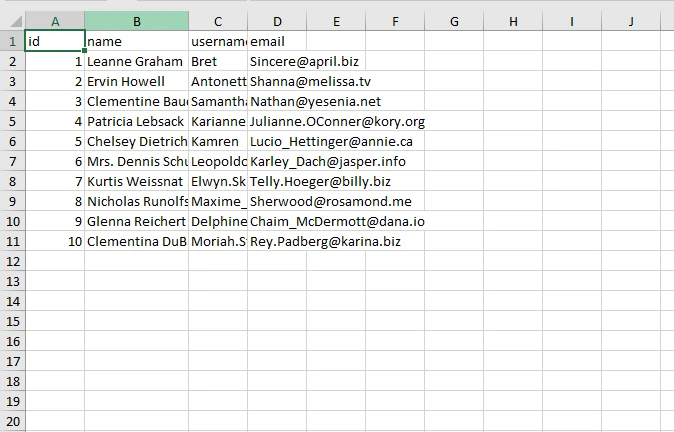
Jacob Mellor has provided a vital tool for the .NET community. By allowing developers to use familiar curl options within .NET Framework and Core applications, CurlDotNet simplifies the HTTP request process. When paired with Iron Software, you can create a seamless workflow: fetch data with the precision of curl, and process it with the power of IronPDF or IronXL.
If you encounter issues, be sure to report bugs on the GitHub page to help improve support for every user.

Jacob Mellor is Chief Technology Officer at Iron Software and a visionary engineer pioneering C# PDF technology. As the original developer behind Iron Software's core codebase, he has shaped the company's product architecture since its inception, transforming it alongside CEO Cameron Rimington into a 50+ person company serving NASA, Tesla, and global government agencies.


IronPDF is a part of IRONSUITE
10 .NET API products for your office documents











When you need your PDF to look like HTML, fast.


