The Problem With Manual Invoice Generation
 When an order completes on a small store, emailing a PDF document invoice manually is annoying. When it happens across hundreds of orders during a Black Friday flash sale, it becomes a crisis.
Most .NET e-commerce teams cobble together invoice delivery from multiple moving parts: a Word template someone exports to PDF format, a scheduled job that runs hourly, a third-party service that occasionally drops emails, or worse, a developer who exports invoices on demand when a customer complains. The result is inconsistent formatting across PDF files, delayed delivery, and invoices that look nothing like the brand customers just purchased from.
Compliance adds another layer of pressure. Tax authorities in the U.S. and EU increasingly expect structured, archivable records per transaction. A generated PDF created through delayed PDF conversion from a Word template three days after the order, with no audit trail, is a liability.
Scaling amplifies every gap. At 20 orders a day, a manual or semi-manual process survives. At 2,000 orders during a seasonal spike, it collapses. What e-commerce teams need is a PDF generation pipeline that fires immediately at checkout, produces a consistent branded document every time, and requires zero manual intervention at any volume.
The Solution: Programmatic PDF Generation With IronPDF
The IronPDF library from Iron Software lets ASP.NET applications generate PDF documents directly from HTML and CSS, the same markup your front-end team already uses to design receipts and invoices in the browser.
Instead of exporting Word templates or juggling existing PDFs, developers can perform reliable HTML to PDF conversion inside the application itself. This .NET PDF library embeds a Chromium rendering engine so you can convert HTML, HTML strings, or even a full web page into a finished PDF object.
Rather than maintaining a separate templating system or routing requests to an external rendering service, IronPDF embeds Chromium inside your application. It plugs directly into existing MVC controllers, Razor Pages, or background services without installing external executables or spinning up headless browser processes.
Developers simply install the library via the NuGet Package Manager or the Visual Studio Package Manager using Install-Package IronPdf in the Package Manager Console.
Once installed, using IronPDF for high-quality PDF generation takes only just a few lines of C# code.
An order completes, a method call fires, and a pixel-perfect output PDF appears in the customer's inbox before the thank-you page finishes loading.
There is no queue to manage, no external dependency to monitor, and no new templating language to learn.
How It Works in Practice: HTML to PDF in C#
1. Order Completes → Invoice Generation Triggers
The most natural place to trigger invoice generation is in the order confirmation handler, either directly in the controller action or inside a background service if you want to keep the HTTP response fast.
This approach is ideal for automating document workflows and other PDF generation tasks commonly found in modern e-commerce platforms.
// Called after order is persisted to the database
public async Task SendInvoiceAsync(Order order)
{
    var invoiceHtml = BuildInvoiceHtml(order);
    await GenerateAndEmailInvoiceAsync(invoiceHtml, order);
}
// Called after order is persisted to the database
public async Task SendInvoiceAsync(Order order)
{
    var invoiceHtml = BuildInvoiceHtml(order);
    await GenerateAndEmailInvoiceAsync(invoiceHtml, order);
}
JavaScript
BuildInvoiceHtml can be as simple as a simple HTML string built with C# interpolation, or it can render a structured HTML file template. Either way, the HTML content you pass to IronPDF becomes the document structure for the final PDF document.
This flexibility allows developers to generate dynamic documents such as invoices, receipts, and dynamic reports from standard web layouts.
2. Create PDF Files via ChromePdfRenderer from HTML File or Template
Once you have the invoice HTML structure, including line items, totals, tax breakdowns, shipping address, and logos, generating the PDF file takes only a few lines.
This IronPDF example demonstrates how developers commonly initialize the renderer:
using IronPdf;

var renderer = new ChromePdfRenderer();

renderer.RenderingOptions.PaperSize = IronPdf.Rendering.PdfPaperSize.A4;

renderer.RenderingOptions.MarginTop = 15;

renderer.RenderingOptions.MarginBottom = 15;

PdfDocument invoice = renderer.RenderHtmlAsPdf(invoiceHtml);
using IronPdf;

var renderer = new ChromePdfRenderer();

renderer.RenderingOptions.PaperSize = IronPdf.Rendering.PdfPaperSize.A4;

renderer.RenderingOptions.MarginTop = 15;

renderer.RenderingOptions.MarginBottom = 15;

PdfDocument invoice = renderer.RenderHtmlAsPdf(invoiceHtml);
Imports IronPdf

Dim renderer As New ChromePdfRenderer()

renderer.RenderingOptions.PaperSize = IronPdf.Rendering.PdfPaperSize.A4

renderer.RenderingOptions.MarginTop = 15

renderer.RenderingOptions.MarginBottom = 15

Dim invoice As PdfDocument = renderer.RenderHtmlAsPdf(invoiceHtml)
Imports IronPdf

Dim renderer As New ChromePdfRenderer()

renderer.RenderingOptions.PaperSize = IronPdf.Rendering.PdfPaperSize.A4

renderer.RenderingOptions.MarginTop = 15

renderer.RenderingOptions.MarginBottom = 15

Dim invoice As PdfDocument = renderer.RenderHtmlAsPdf(invoiceHtml)
Example Generated PDF Document
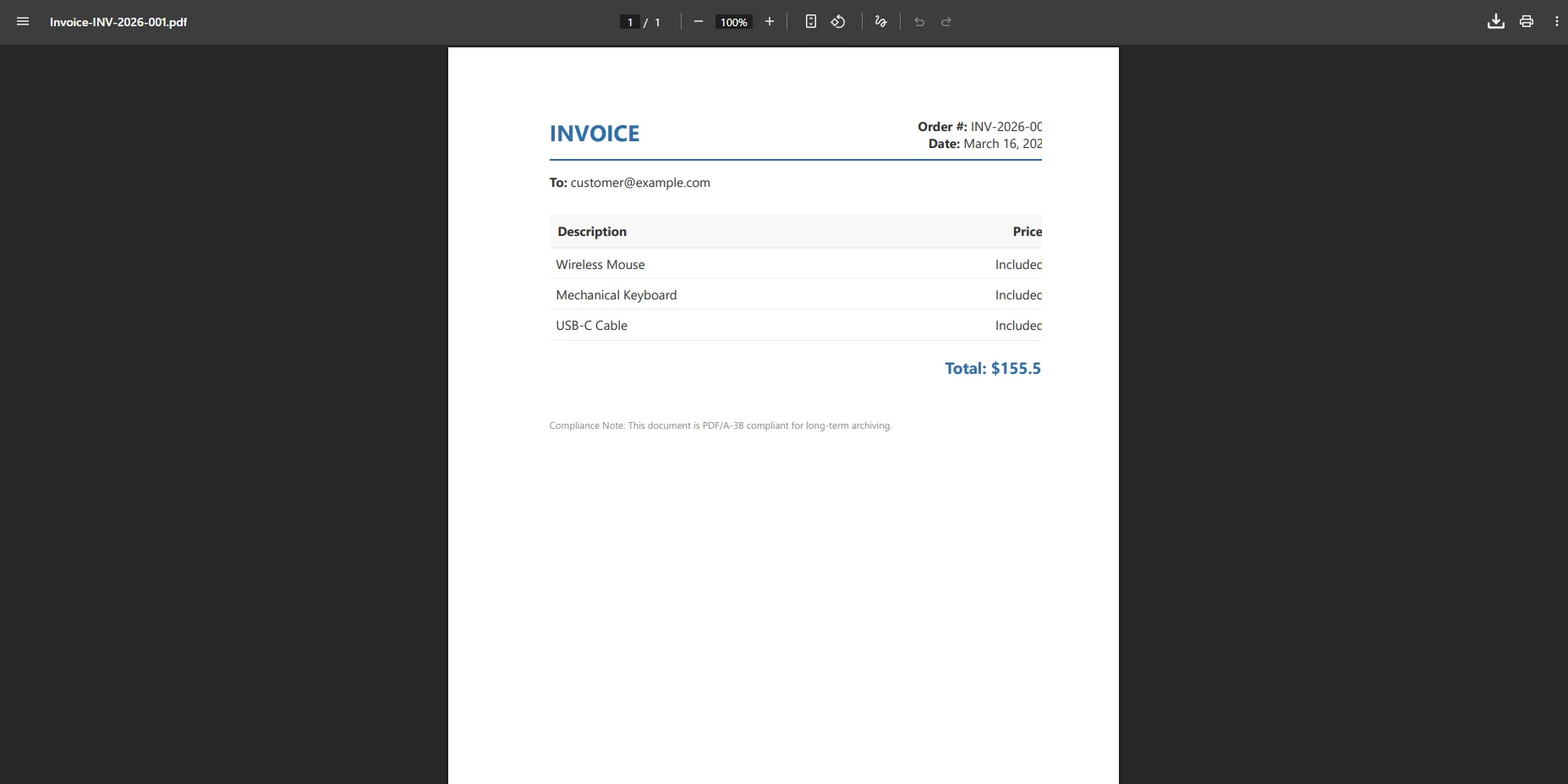 In many tutorials you will see variables such as:
var renderer = new ChromePdfRenderer();
var pdf = renderer.RenderHtmlAsPdf(invoiceHtml);
var renderer = new ChromePdfRenderer();
var pdf = renderer.RenderHtmlAsPdf(invoiceHtml);
Dim renderer As New ChromePdfRenderer()
Dim pdf = renderer.RenderHtmlAsPdf(invoiceHtml)
Dim renderer As New ChromePdfRenderer()
Dim pdf = renderer.RenderHtmlAsPdf(invoiceHtml)
or shorthand examples referencing var renderer new ChromePdfRenderer, renderer new ChromePdfRenderer, or var pdf renderer.RenderHtmlAsPdf when demonstrating the following code snippet.
ChromePdfRenderer handles full CSS3 and HTML5, allowing external CSS files, JavaScript files, embedded fonts, and images. It supports local files, hosted assets, and complex HTML structures.
The result is a professional generated PDF that matches what a Chrome browser would print, ideal for creating branded PDF documents or invoice layouts that include embed images, styled tables, and precise font size control.
If your HTML references external assets like a hosted logo or stylesheet, set a BaseUrlPath as the second parameter on RenderHtmlAsPdf() so IronPDF can resolve relative paths during rendering.
3. PDF Attached to Confirmation Email
After rendering, PdfDocument exposes BinaryData, a byte array you can write directly to a MemoryStream for email attachment without touching the filesystem:
using System.Net.Mail;
using System.IO;

var pdfBytes = invoice.BinaryData;

using var attachment = new Attachment(
    new MemoryStream(pdfBytes),
    $"Invoice-{order.OrderNumber}.pdf",
    "application/pdf"
);

var message = new MailMessage
{
    From = new MailAddress("orders@yourstore.com"),
    Subject = $"Your Invoice – Order #{order.OrderNumber}",
    Body = "Thank you for your order. Your invoice is attached.",
    IsBodyHtml = false
};

message.To.Add(order.CustomerEmail);

message.Attachments.Add(attachment);

using var client = new SmtpClient("smtp.yourprovider.com");

await client.SendMailAsync(message);
using System.Net.Mail;
using System.IO;

var pdfBytes = invoice.BinaryData;

using var attachment = new Attachment(
    new MemoryStream(pdfBytes),
    $"Invoice-{order.OrderNumber}.pdf",
    "application/pdf"
);

var message = new MailMessage
{
    From = new MailAddress("orders@yourstore.com"),
    Subject = $"Your Invoice – Order #{order.OrderNumber}",
    Body = "Thank you for your order. Your invoice is attached.",
    IsBodyHtml = false
};

message.To.Add(order.CustomerEmail);

message.Attachments.Add(attachment);

using var client = new SmtpClient("smtp.yourprovider.com");

await client.SendMailAsync(message);
Imports System.Net.Mail
Imports System.IO
Dim pdfBytes = invoice.BinaryData
Using attachment As New Attachment(
New MemoryStream(pdfBytes),
$"Invoice-{order.OrderNumber}.pdf",
"application/pdf"
)
Dim message As New MailMessage With {
.From = New MailAddress("orders@yourstore.com"),
.Subject = $"Your Invoice – Order #{order.OrderNumber}",
.Body = "Thank you for your order. Your invoice is attached.",
.IsBodyHtml = False
}
message.To.Add(order.CustomerEmail)
message.Attachments.Add(attachment)
Using client As New SmtpClient("smtp.yourprovider.com")
Await client.SendMailAsync(message)
End Using
End Using
Imports System.Net.Mail
Imports System.IO

Dim pdfBytes = invoice.BinaryData

Using attachment As New Attachment(
    New MemoryStream(pdfBytes),
    $"Invoice-{order.OrderNumber}.pdf",
    "application/pdf"
)

    Dim message As New MailMessage With {
        .From = New MailAddress("orders@yourstore.com"),
        .Subject = $"Your Invoice – Order #{order.OrderNumber}",
        .Body = "Thank you for your order. Your invoice is attached.",
        .IsBodyHtml = False
    }

    message.To.Add(order.CustomerEmail)

    message.Attachments.Add(attachment)

    Using client As New SmtpClient("smtp.yourprovider.com")
        Await client.SendMailAsync(message)
    End Using

End Using
PDF Sent as Email Attachment
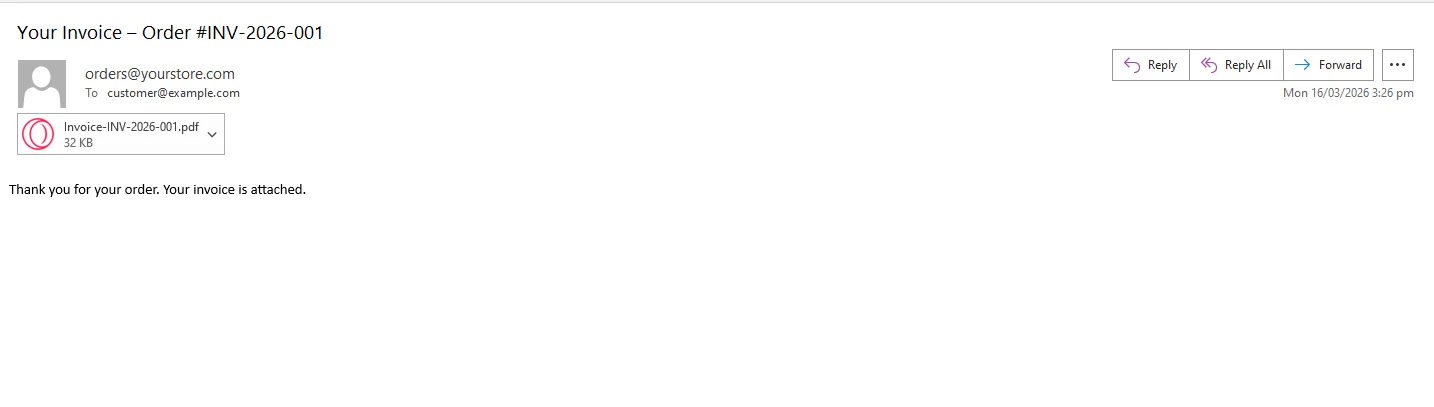 The result is a clean output PDF sent instantly after checkout. Whether your application sends multiple PDFs, separate PDFs, or even needs to split PDFs for reporting purposes, the workflow remains simple.
If you use SendGrid or another transactional email provider, the same byte array maps directly to their attachment API.
4. Optionally Store for Order History
The same byte array can be written to Azure Blob Storage, AWS S3, or your database alongside the order record.
This ensures long-term document integrity and provides a permanent archive of existing PDF documents.
// Store in blob storage (Azure example)
await blobClient.UploadAsync(new BinaryData(invoice.BinaryData));

// Or save locally during development
invoice.SaveAs($"invoices/{order.OrderNumber}.pdf");
// Store in blob storage (Azure example)
await blobClient.UploadAsync(new BinaryData(invoice.BinaryData));

// Or save locally during development
invoice.SaveAs($"invoices/{order.OrderNumber}.pdf");
' Store in blob storage (Azure example)
Await blobClient.UploadAsync(New BinaryData(invoice.BinaryData))
' Or save locally during development
invoice.SaveAs($"invoices/{order.OrderNumber}.pdf")
' Store in blob storage (Azure example)
Await blobClient.UploadAsync(New BinaryData(invoice.BinaryData))

' Or save locally during development
invoice.SaveAs($"invoices/{order.OrderNumber}.pdf")
Your application can later retrieve those existing PDFs, display them in a PDF viewer, or allow customers to download their first PDF invoice again from their account page.
Real-World Benefits
Brand consistency. Every invoice that leaves your system carries the same logo, color scheme, and typography, because it is rendered from the same HTML template every time. There is no designer manually applying styles in Word.
Speed at scale. IronPDF handles various PDF generation tasks efficiently. During a flash sale generating hundreds of invoices per hour, the system produces PDFs in C# without bottlenecks.
Compliance-ready archiving. IronPDF supports PDF/A output, the ISO-standardized format designed for long-term archival. For e-commerce businesses required to retain tax records for seven years, PDF/A documents are accepted by tax authorities in the U.S. and EU as valid records. Switching on PDF/A compliance is a single property:
renderer.RenderingOptions.PdfArchiveFormat =
    IronPdf.Rendering.PdfArchiveFormat.PDF_A_3B;
renderer.RenderingOptions.PdfArchiveFormat =
IronPdf.Rendering.PdfArchiveFormat.PDF_A_3B;renderer.RenderingOptions.PdfArchiveFormat = IronPdf.Rendering.PdfArchiveFormat.PDF_A_3B
renderer.RenderingOptions.PdfArchiveFormat = IronPdf.Rendering.PdfArchiveFormat.PDF_A_3B
Customer experience. Customers receive a professional invoice in their inbox within seconds of checkout - not hours later, not after a manual export. That invoice is also available for download on their account page from the same stored PDF.
Developer experience. Your team designs and tests invoice templates in a browser like any other HTML page. There is no proprietary templating engine to learn, no XML schema to fight, and no render-vs-browser discrepancy to debug. If it looks right in Chrome, it will look right in the PDF.
Closing
Invoice automation is one of those problems that looks solved until you examine it closely, and realize how fragile manual workflows become under scale.
A modern HTML to PDF pipeline using the IronPDF library simplifies document workflows, improves reliability, and enables consistent PDF creation across applications.
If you are evaluating solutions for an existing ASP.NET platform, you can install package IronPDF through the NuGet Package Manager and begin generating PDF documents immediately.
With IronPDF, teams can easily create PDFs, modify PDF files, edit PDFs, encrypt PDFs, apply digital signatures, generate PDF forms, and produce high-quality PDFs with IronPDF for enterprise systems.
IronPDF is part of the broader Iron Software ecosystem, including tools referenced in the TextLogo Iron Suite related documentation and showcased through Iron Software's customer logos.
The company also participates in environmental initiatives like Percent for the Planet, helping developers automate document workflows while supporting sustainability.
You can test the full rendering pipeline - including batch generation, custom templates, and email delivery - under a 30-day free trial with no watermarks and no feature limits. Details at ironpdf.com.













