Willkommen zu unserem Tutorial über die praktische Find Funktion in C#. Sie sind gerade auf eine leistungsstarke Funktion gestoßen, die Ihren Programmierprozess optimieren kann. Egal, ob Sie ein erfahrener Programmierer sind oder gerade erst anfangen, dieses Tutorial führt Sie durch alle Elemente, um Ihnen den Einstieg zu erleichtern.
Die Grundlagen von Find
Im Kern ist Find eine Funktion, die es Ihnen ermöglicht, das erste Element in einer Sammlung, einem Array oder einer Liste zu finden, das ein bestimmtes Prädikat erfüllt. Was ist ein Prädikat, fragen Sie? In der Programmierung ist ein Prädikat eine Funktion, die bestimmte, für Elemente in einer Sammlung definierte Bedingungen testet.
Lassen Sie uns in ein Beispiel für eine öffentliche Klasse eintauchen.
public class BikePart
{
    public string Id { get; set; } // Property to identify the bike part

    // Override the Equals method to specify how to compare two BikePart objects
    public override bool Equals(object obj)
    {
        if (obj == null || !(obj is BikePart))
            return false;

        return this.Id == ((BikePart)obj).Id;
    }

    // Override GetHashCode for hashing BikePart objects
    public override int GetHashCode()
    {
        return this.Id.GetHashCode();
    }

    // Override ToString to return a custom string representation of the object
    public override string ToString()
    {
        return "BikePart ID: " + this.Id;
    }
}
public class BikePart
{
    public string Id { get; set; } // Property to identify the bike part

    // Override the Equals method to specify how to compare two BikePart objects
    public override bool Equals(object obj)
    {
        if (obj == null || !(obj is BikePart))
            return false;

        return this.Id == ((BikePart)obj).Id;
    }

    // Override GetHashCode for hashing BikePart objects
    public override int GetHashCode()
    {
        return this.Id.GetHashCode();
    }

    // Override ToString to return a custom string representation of the object
    public override string ToString()
    {
        return "BikePart ID: " + this.Id;
    }
}
Public Class BikePart
Public Property Id() As String ' - Property to identify the bike part
' Override the Equals method to specify how to compare two BikePart objects
Public Overrides Function Equals(ByVal obj As Object) As Boolean
If obj Is Nothing OrElse Not (TypeOf obj Is BikePart) Then
Return False
End If
Return Me.Id = DirectCast(obj, BikePart).Id
End Function
' Override GetHashCode for hashing BikePart objects
Public Overrides Function GetHashCode() As Integer
Return Me.Id.GetHashCode()
End Function
' Override ToString to return a custom string representation of the object
Public Overrides Function ToString() As String
Return "BikePart ID: " & Me.Id
End Function
End Class
Public Class BikePart
	Public Property Id() As String ' -  Property to identify the bike part

	' Override the Equals method to specify how to compare two BikePart objects
	Public Overrides Function Equals(ByVal obj As Object) As Boolean
		If obj Is Nothing OrElse Not (TypeOf obj Is BikePart) Then
			Return False
		End If

		Return Me.Id = DirectCast(obj, BikePart).Id
	End Function

	' Override GetHashCode for hashing BikePart objects
	Public Overrides Function GetHashCode() As Integer
		Return Me.Id.GetHashCode()
	End Function

	' Override ToString to return a custom string representation of the object
	Public Overrides Function ToString() As String
		Return "BikePart ID: " & Me.Id
	End Function
End Class
In diesem Code ist BikePart unsere öffentliche Klasse, und sie enthält eine öffentliche Zeichenfolge-ID, um jedes Fahrradersatzteil zu identifizieren. Wir haben die ToString Methode überschrieben, um die ID des Fahrradteils schön zu drucken, und wir haben auch die Equals und GetHashCode Methoden für Vergleichszwecke überschrieben.
Suchen mit Prädikaten anwenden
Jetzt, da wir unsere BikePart Klasse haben, können wir eine Liste von Fahrradteilen erstellen und Find verwenden, um bestimmte Teile basierend auf ihren IDs zu finden. Betrachten wir folgendes Beispiel:
using System;
using System.Collections.Generic;

public static void Main()
{
    // Create a list of BikePart objects
    List<BikePart> bikeParts = new List<BikePart>
    {
        new BikePart { Id = "Chain Ring ID" },
        new BikePart { Id = "Crank Arm ID" },
        new BikePart { Id = "Regular Seat ID" },
        new BikePart { Id = "Banana Seat ID" },
    };

    // Define a predicate to find a BikePart with a specific ID
    Predicate<BikePart> findChainRingPredicate = (BikePart bp) => { return bp.Id == "Chain Ring ID"; };
    BikePart chainRingPart = bikeParts.Find(findChainRingPredicate);

    // Print the found BikePart's ID to the console
    Console.WriteLine(chainRingPart.ToString());
}
using System;
using System.Collections.Generic;

public static void Main()
{
    // Create a list of BikePart objects
    List<BikePart> bikeParts = new List<BikePart>
    {
        new BikePart { Id = "Chain Ring ID" },
        new BikePart { Id = "Crank Arm ID" },
        new BikePart { Id = "Regular Seat ID" },
        new BikePart { Id = "Banana Seat ID" },
    };

    // Define a predicate to find a BikePart with a specific ID
    Predicate<BikePart> findChainRingPredicate = (BikePart bp) => { return bp.Id == "Chain Ring ID"; };
    BikePart chainRingPart = bikeParts.Find(findChainRingPredicate);

    // Print the found BikePart's ID to the console
    Console.WriteLine(chainRingPart.ToString());
}
Imports System
Imports System.Collections.Generic
Public Shared Sub Main()
' Create a list of BikePart objects
Dim bikeParts As New List(Of BikePart) From {
New BikePart With {.Id = "Chain Ring ID"},
New BikePart With {.Id = "Crank Arm ID"},
New BikePart With {.Id = "Regular Seat ID"},
New BikePart With {.Id = "Banana Seat ID"}
}
' Define a predicate to find a BikePart with a specific ID
Dim findChainRingPredicate As Predicate(Of BikePart) = Function(bp As BikePart)
Return bp.Id = "Chain Ring ID"
End Function
Dim chainRingPart As BikePart = bikeParts.Find(findChainRingPredicate)
' Print the found BikePart's ID to the console
Console.WriteLine(chainRingPart.ToString())
End Sub
Imports System
Imports System.Collections.Generic

Public Shared Sub Main()
	' Create a list of BikePart objects
	Dim bikeParts As New List(Of BikePart) From {
		New BikePart With {.Id = "Chain Ring ID"},
		New BikePart With {.Id = "Crank Arm ID"},
		New BikePart With {.Id = "Regular Seat ID"},
		New BikePart With {.Id = "Banana Seat ID"}
	}

	' Define a predicate to find a BikePart with a specific ID
	Dim findChainRingPredicate As Predicate(Of BikePart) = Function(bp As BikePart)
		Return bp.Id = "Chain Ring ID"
	End Function
	Dim chainRingPart As BikePart = bikeParts.Find(findChainRingPredicate)

	' Print the found BikePart's ID to the console
	Console.WriteLine(chainRingPart.ToString())
End Sub
In diesem Code instanziieren wir vier BikePart Objekte mit eindeutigen IDs. Als nächstes erstellen wir ein Prädikat findChainRingPredicate, das überprüft, ob ein Fahrradteil die ID "Kettenring-ID" hat. Schließlich rufen wir Find auf unserer Liste von Fahrradteilen mit dem von uns definierten Prädikat auf und drucken die gefundene Teil-ID auf die Konsole.
Prädikat-Parameter verstehen
Sie fragen sich vielleicht über den Prädikat-Match Parameter in unserer Find Methode. Hier definieren Sie die Bedingungen, unter denen die Find Methode ein Element zurückgibt. In unserem Fall wollten wir, dass die Find Methode das erste Element zurückgibt, das die "Kettenring-ID" erfüllt.
Wenn kein Element die in Ihrem Prädikat definierten Bedingungen erfüllt, gibt die Find Methode einen Standardwert zurück. Wenn Sie beispielsweise mit einem Array von Ganzzahlen arbeiten und Ihr Prädikat keinen Treffer findet, gibt die Find Methode '0' zurück, den Standardwert für Ganzzahlen in C#.
Das Prinzip der linearen Suche
Es ist wichtig zu beachten, dass die Find Funktion eine lineare Suche über das gesamte Array, die Liste oder die Sammlung durchführt. Das bedeutet, dass sie am ersten Element beginnt und jedes folgende Element in der Reihenfolge prüft, bis sie die erste Übereinstimmung eines Elements findet, das das Prädikat erfüllt.
In einigen Fällen möchten Sie vielleicht das letzte Element finden, das das Prädikat erfüllt, anstatt des ersten. Für diesen Zweck bietet C# die FindLast Funktion.
FindIndex und FindLastIndex
Genau wie Find Ihnen hilft, das erste Vorkommen eines Elements zu finden, das Ihr angegebenes Prädikat erfüllt, bietet C# auch die FindIndex und FindLastIndex Methoden, um Ihnen die Indizes der ersten und letzten Elemente zu geben, die Ihre Bedingungen jeweils erfüllen.
Versuchen wir ein Beispiel:
using System;
using System.Collections.Generic;

public static void Main()
{
    // Create a list of BikePart objects with an additional duplicate entry
    List<BikePart> bikeParts = new List<BikePart>
    {
        new BikePart { Id = "Chain Ring ID" },
        new BikePart { Id = "Crank Arm ID" },
        new BikePart { Id = "Regular Seat ID" },
        new BikePart { Id = "Banana Seat ID" },
        new BikePart { Id = "Chain Ring ID" }, // Added a second chain ring
    };

    // Define a predicate to find a BikePart with a specific ID
    Predicate<BikePart> findChainRingPredicate = (BikePart bp) => { return bp.Id == "Chain Ring ID"; };

    // Find the index of the first and last occurrence of the specified BikePart
    int firstChainRingIndex = bikeParts.FindIndex(findChainRingPredicate);
    int lastChainRingIndex = bikeParts.FindLastIndex(findChainRingPredicate);

    // Print the indices to the console
    Console.WriteLine($"First Chain Ring ID found at index: {firstChainRingIndex}");
    Console.WriteLine($"Last Chain Ring ID found at index: {lastChainRingIndex}");
}
using System;
using System.Collections.Generic;

public static void Main()
{
    // Create a list of BikePart objects with an additional duplicate entry
    List<BikePart> bikeParts = new List<BikePart>
    {
        new BikePart { Id = "Chain Ring ID" },
        new BikePart { Id = "Crank Arm ID" },
        new BikePart { Id = "Regular Seat ID" },
        new BikePart { Id = "Banana Seat ID" },
        new BikePart { Id = "Chain Ring ID" }, // Added a second chain ring
    };

    // Define a predicate to find a BikePart with a specific ID
    Predicate<BikePart> findChainRingPredicate = (BikePart bp) => { return bp.Id == "Chain Ring ID"; };

    // Find the index of the first and last occurrence of the specified BikePart
    int firstChainRingIndex = bikeParts.FindIndex(findChainRingPredicate);
    int lastChainRingIndex = bikeParts.FindLastIndex(findChainRingPredicate);

    // Print the indices to the console
    Console.WriteLine($"First Chain Ring ID found at index: {firstChainRingIndex}");
    Console.WriteLine($"Last Chain Ring ID found at index: {lastChainRingIndex}");
}
Imports System
Imports System.Collections.Generic
Public Shared Sub Main()
' Create a list of BikePart objects with an additional duplicate entry
Dim bikeParts As New List(Of BikePart) From {
New BikePart With {.Id = "Chain Ring ID"},
New BikePart With {.Id = "Crank Arm ID"},
New BikePart With {.Id = "Regular Seat ID"},
New BikePart With {.Id = "Banana Seat ID"},
New BikePart With {.Id = "Chain Ring ID"}
}
' Define a predicate to find a BikePart with a specific ID
Dim findChainRingPredicate As Predicate(Of BikePart) = Function(bp As BikePart)
Return bp.Id = "Chain Ring ID"
End Function
' Find the index of the first and last occurrence of the specified BikePart
Dim firstChainRingIndex As Integer = bikeParts.FindIndex(findChainRingPredicate)
Dim lastChainRingIndex As Integer = bikeParts.FindLastIndex(findChainRingPredicate)
' Print the indices to the console
Console.WriteLine($"First Chain Ring ID found at index: {firstChainRingIndex}")
Console.WriteLine($"Last Chain Ring ID found at index: {lastChainRingIndex}")
End Sub
Imports System
Imports System.Collections.Generic

Public Shared Sub Main()
	' Create a list of BikePart objects with an additional duplicate entry
	Dim bikeParts As New List(Of BikePart) From {
		New BikePart With {.Id = "Chain Ring ID"},
		New BikePart With {.Id = "Crank Arm ID"},
		New BikePart With {.Id = "Regular Seat ID"},
		New BikePart With {.Id = "Banana Seat ID"},
		New BikePart With {.Id = "Chain Ring ID"}
	}

	' Define a predicate to find a BikePart with a specific ID
	Dim findChainRingPredicate As Predicate(Of BikePart) = Function(bp As BikePart)
		Return bp.Id = "Chain Ring ID"
	End Function

	' Find the index of the first and last occurrence of the specified BikePart
	Dim firstChainRingIndex As Integer = bikeParts.FindIndex(findChainRingPredicate)
	Dim lastChainRingIndex As Integer = bikeParts.FindLastIndex(findChainRingPredicate)

	' Print the indices to the console
	Console.WriteLine($"First Chain Ring ID found at index: {firstChainRingIndex}")
	Console.WriteLine($"Last Chain Ring ID found at index: {lastChainRingIndex}")
End Sub
Die Kraft von FindAll
Die FindAll Methode, wie der Name schon sagt, ruft alle Elemente in der Sammlung ab, die das Prädikat erfüllen. Sie wird verwendet, wenn Sie Elemente basierend auf bestimmten Bedingungen filtern müssen. Die FindAll Methode gibt eine neue Liste mit allen passenden Elementen zurück.
Hier ist ein Codebeispiel:
using System;
using System.Collections.Generic;

public static void Main()
{
    // Create a list of BikePart objects with an additional duplicate entry
    List<BikePart> bikeParts = new List<BikePart>
    {
        new BikePart { Id = "Chain Ring ID" },
        new BikePart { Id = "Crank Arm ID" },
        new BikePart { Id = "Regular Seat ID" },
        new BikePart { Id = "Banana Seat ID" },
        new BikePart { Id = "Chain Ring ID" }, // Added a second chain ring
    };

    // Define a predicate to find all BikeParts with a specific ID
    Predicate<BikePart> findChainRingPredicate = (BikePart bp) => { return bp.Id == "Chain Ring ID"; };

    // Use FindAll to get all matching BikePart objects
    List<BikePart> chainRings = bikeParts.FindAll(findChainRingPredicate);

    // Print the count and details of each found BikePart
    Console.WriteLine($"Found {chainRings.Count} Chain Rings:");
    foreach (BikePart chainRing in chainRings)
    {
        Console.WriteLine(chainRing.ToString());
    }
}
using System;
using System.Collections.Generic;

public static void Main()
{
    // Create a list of BikePart objects with an additional duplicate entry
    List<BikePart> bikeParts = new List<BikePart>
    {
        new BikePart { Id = "Chain Ring ID" },
        new BikePart { Id = "Crank Arm ID" },
        new BikePart { Id = "Regular Seat ID" },
        new BikePart { Id = "Banana Seat ID" },
        new BikePart { Id = "Chain Ring ID" }, // Added a second chain ring
    };

    // Define a predicate to find all BikeParts with a specific ID
    Predicate<BikePart> findChainRingPredicate = (BikePart bp) => { return bp.Id == "Chain Ring ID"; };

    // Use FindAll to get all matching BikePart objects
    List<BikePart> chainRings = bikeParts.FindAll(findChainRingPredicate);

    // Print the count and details of each found BikePart
    Console.WriteLine($"Found {chainRings.Count} Chain Rings:");
    foreach (BikePart chainRing in chainRings)
    {
        Console.WriteLine(chainRing.ToString());
    }
}
Imports System
Imports System.Collections.Generic
Public Shared Sub Main()
' Create a list of BikePart objects with an additional duplicate entry
Dim bikeParts As New List(Of BikePart) From {
New BikePart With {.Id = "Chain Ring ID"},
New BikePart With {.Id = "Crank Arm ID"},
New BikePart With {.Id = "Regular Seat ID"},
New BikePart With {.Id = "Banana Seat ID"},
New BikePart With {.Id = "Chain Ring ID"}
}
' Define a predicate to find all BikeParts with a specific ID
Dim findChainRingPredicate As Predicate(Of BikePart) = Function(bp As BikePart)
Return bp.Id = "Chain Ring ID"
End Function
' Use FindAll to get all matching BikePart objects
Dim chainRings As List(Of BikePart) = bikeParts.FindAll(findChainRingPredicate)
' Print the count and details of each found BikePart
Console.WriteLine($"Found {chainRings.Count} Chain Rings:")
For Each chainRing As BikePart In chainRings
Console.WriteLine(chainRing.ToString())
Next chainRing
End Sub
Imports System
Imports System.Collections.Generic

Public Shared Sub Main()
	' Create a list of BikePart objects with an additional duplicate entry
	Dim bikeParts As New List(Of BikePart) From {
		New BikePart With {.Id = "Chain Ring ID"},
		New BikePart With {.Id = "Crank Arm ID"},
		New BikePart With {.Id = "Regular Seat ID"},
		New BikePart With {.Id = "Banana Seat ID"},
		New BikePart With {.Id = "Chain Ring ID"}
	}

	' Define a predicate to find all BikeParts with a specific ID
	Dim findChainRingPredicate As Predicate(Of BikePart) = Function(bp As BikePart)
		Return bp.Id = "Chain Ring ID"
	End Function

	' Use FindAll to get all matching BikePart objects
	Dim chainRings As List(Of BikePart) = bikeParts.FindAll(findChainRingPredicate)

	' Print the count and details of each found BikePart
	Console.WriteLine($"Found {chainRings.Count} Chain Rings:")
	For Each chainRing As BikePart In chainRings
		Console.WriteLine(chainRing.ToString())
	Next chainRing
End Sub
IronPDF ins Spiel bringen
Ein wichtiger Bereich, in dem unser C#-Find-Wissen genutzt werden kann, ist die PDF-Inhaltsmanipulation mit IronPDF, einer leistungsstarken C#-Bibliothek für die PDF-Verarbeitung.
Angenommen, wir arbeiten mit einem PDF-Dokument, das Informationen zu verschiedenen Fahrradteilen enthält. Oft müssen wir spezifische Teile in diesem Inhalt finden. Hier kombinieren IronPDF und die C# Find-Methode ihre Kräfte, um eine mächtige Lösung zu bieten.
Zuerst würden wir IronPDF verwenden, um den Text aus unserem PDF zu extrahieren, und dann können wir die Find oder FindAll Methode verwenden, die wir gelernt haben, um den spezifischen Teil im extrahierten Text zu finden.
using IronPdf;
using System;
using System.Collections.Generic;
using System.Linq;

public class Program
{
    public static void Main()
    {
        // Load and extract text from a PDF document
        PdfDocument pdf = PdfDocument.FromFile(@"C:\Users\Administrator\Desktop\bike.pdf");
        string pdfText = pdf.ExtractAllText();

        // Split the extracted text into lines
        List<string> pdfLines = pdfText.Split('\n').ToList();

        // Define a predicate to find lines that contain a specific text
        Predicate<string> findChainRingPredicate = (string line) => { return line.Contains("Chain Ring ID"); };

        // Use FindAll to get all lines containing the specified text
        List<string> chainRingLines = pdfLines.FindAll(findChainRingPredicate);

        // Print the count and content of each found line
        Console.WriteLine($"Found {chainRingLines.Count} lines mentioning 'Chain Ring ID':");
        foreach (string line in chainRingLines)
        {
            Console.WriteLine(line);
        }
    }
}
using IronPdf;
using System;
using System.Collections.Generic;
using System.Linq;

public class Program
{
    public static void Main()
    {
        // Load and extract text from a PDF document
        PdfDocument pdf = PdfDocument.FromFile(@"C:\Users\Administrator\Desktop\bike.pdf");
        string pdfText = pdf.ExtractAllText();

        // Split the extracted text into lines
        List<string> pdfLines = pdfText.Split('\n').ToList();

        // Define a predicate to find lines that contain a specific text
        Predicate<string> findChainRingPredicate = (string line) => { return line.Contains("Chain Ring ID"); };

        // Use FindAll to get all lines containing the specified text
        List<string> chainRingLines = pdfLines.FindAll(findChainRingPredicate);

        // Print the count and content of each found line
        Console.WriteLine($"Found {chainRingLines.Count} lines mentioning 'Chain Ring ID':");
        foreach (string line in chainRingLines)
        {
            Console.WriteLine(line);
        }
    }
}
Imports IronPdf
Imports System
Imports System.Collections.Generic
Imports System.Linq
Public Class Program
Public Shared Sub Main()
' Load and extract text from a PDF document
Dim pdf As PdfDocument = PdfDocument.FromFile("C:\Users\Administrator\Desktop\bike.pdf")
Dim pdfText As String = pdf.ExtractAllText()
' Split the extracted text into lines
Dim pdfLines As List(Of String) = pdfText.Split(ControlChars.Lf).ToList()
' Define a predicate to find lines that contain a specific text
Dim findChainRingPredicate As Predicate(Of String) = Function(line As String) line.Contains("Chain Ring ID")
' Use FindAll to get all lines containing the specified text
Dim chainRingLines As List(Of String) = pdfLines.FindAll(findChainRingPredicate)
' Print the count and content of each found line
Console.WriteLine($"Found {chainRingLines.Count} lines mentioning 'Chain Ring ID':")
For Each line As String In chainRingLines
Console.WriteLine(line)
Next
End Sub
End Class
Imports IronPdf
Imports System
Imports System.Collections.Generic
Imports System.Linq

Public Class Program
    Public Shared Sub Main()
        ' Load and extract text from a PDF document
        Dim pdf As PdfDocument = PdfDocument.FromFile("C:\Users\Administrator\Desktop\bike.pdf")
        Dim pdfText As String = pdf.ExtractAllText()

        ' Split the extracted text into lines
        Dim pdfLines As List(Of String) = pdfText.Split(ControlChars.Lf).ToList()

        ' Define a predicate to find lines that contain a specific text
        Dim findChainRingPredicate As Predicate(Of String) = Function(line As String) line.Contains("Chain Ring ID")

        ' Use FindAll to get all lines containing the specified text
        Dim chainRingLines As List(Of String) = pdfLines.FindAll(findChainRingPredicate)

        ' Print the count and content of each found line
        Console.WriteLine($"Found {chainRingLines.Count} lines mentioning 'Chain Ring ID':")
        For Each line As String In chainRingLines
            Console.WriteLine(line)
        Next
    End Sub
End Class
In diesem Code haben wir ein PDF geladen, den Text extrahiert, in Zeilen aufgeteilt und dann FindAll verwendet, um alle Zeilen zu finden, die 'Kettenring-ID' erwähnen.
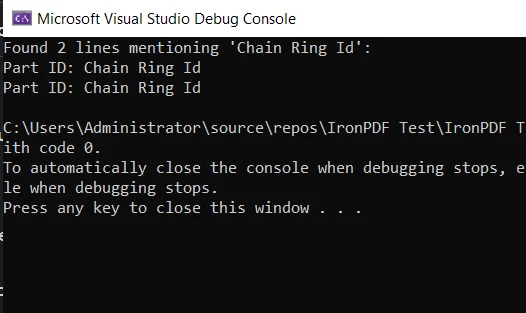
Dies ist ein einfaches Beispiel dafür, wie die Find Methode zusammen mit IronPDF in einem praktischen Szenario verwendet werden kann. Es demonstriert den Nutzen und die Vielseitigkeit von C# zusammen mit seinen leistungsstarken Bibliotheken, die Ihnen bei Ihren Programmieraufgaben helfen.
Abschluss
In diesem Tutorial haben wir tief in die C# Find Methode und ihre Verwandten, FindIndex, FindLastIndex und FindAll, eingetaucht. Wir haben ihre Anwendungen erkundet, einige Codebeispiele betrachtet und die Bedingungen aufgedeckt, unter denen sie am effektivsten sind.
Wir haben uns auch in die Welt der PDF-Manipulation mit der IronPDF-Bibliothek begeben. Ebenso haben wir eine praktische Anwendung unseres Wissens über die Find Methode beim Extrahieren und Durchsuchen von Inhalten innerhalb eines PDF-Dokuments gesehen.
IronPDF bietet eine kostenlose Testversion von IronPDF an, die eine hervorragende Gelegenheit bietet, seine Funktionen zu erkunden und herauszufinden, wie es Ihren C#-Projekten zugutekommen kann. Wenn Sie sich entscheiden, IronPDF nach der Testversion weiter zu verwenden, beginnen die Lizenzen bei $999.























