


AutoFixture C#(開発者向けの仕組み)

AutoFixtureは、.NET用のオープンソースライブラリで、単体テスト作成の"Arrange"フェーズを最小化し、テスト管理を改善することを目的としています。 主な目的は、開発者がテストに集中できるようにオブジェクトグラフをテストデータで作成することです。 この記事では、効率的なテストデータ生成を通じて、テスト駆動開発を促進するためにAutoFixtureを使用する方法を探ります。
AutoFixtureは、単体テスト用のテストデータ作成プロセスを効率化するために設計された強力なC#ライブラリです。 これは、テストケースのためのデータを自動生成することによって、開発者が反復的なセットアップコードを書くのを避けるのに役立ちます。 単体テストにおいて、AutoFixtureはテストデータ生成に効率的なアプローチを提供し、それぞれの単体テストがさまざまでリアルな入力で実行されることを保証します。 AutoFixtureはC#でのテストをより効率的にし、自動的にテストデータを生成して手動のセットアップを減らすことができます。
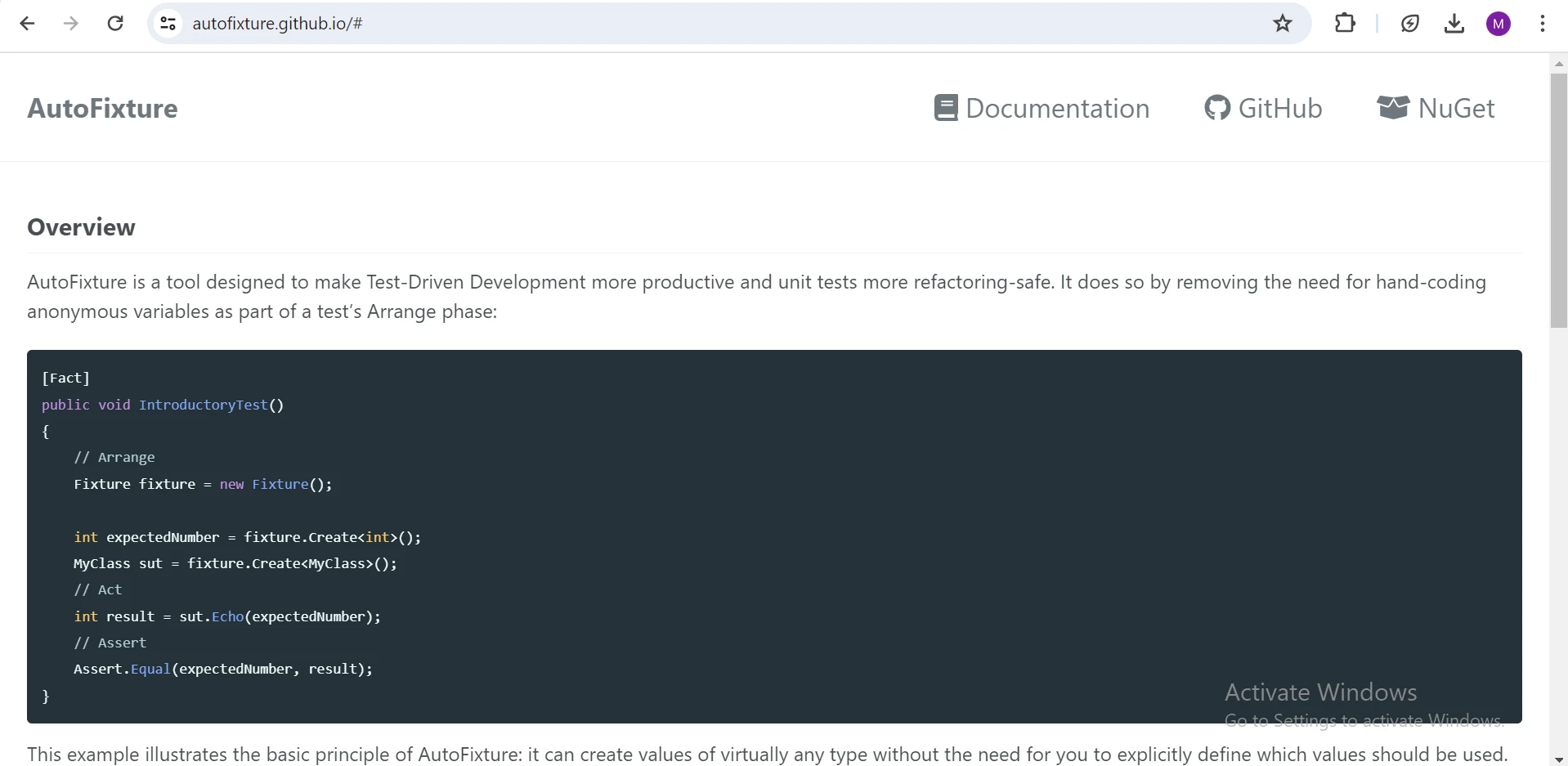
AutoFixtureのインストールとセットアップ
AutoFixtureはNuGetパッケージとして利用可能であり、NuGetパッケージマネージャーコンソールまたはVisual StudioのNuGetパッケージマネージャーUIで.NETパッケージを追加することでインストールできます。
Install-Package AutoFixture
NuGetはプロジェクトにAutoFixtureとその依存関係の最新バージョンをダウンロードしてインストールします。
クラスのテストデータ作成例
例えば、Ageのようなプロパティを持つ単純な従業員クラスがあります。 このクラスのインスタンスを単体テストで手動で作成する代わりに、AutoFixtureを活用してランダムデータを生成することができます。
public class Employee
{
    public string FirstName { get; set; }
    public string LastName { get; set; }
    public int Age { get; set; }

    public Employee(string firstName, string lastName, int age)
    {
        FirstName = firstName;
        LastName = lastName;
        Age = age;
    }

    public string GetFullName() => $"{FirstName} {LastName}";
}
public class Employee
{
public string FirstName { get; set; }
public string LastName { get; set; }
public int Age { get; set; }
public Employee(string firstName, string lastName, int age)
{
FirstName = firstName;
LastName = lastName;
Age = age;
}
public string GetFullName() => $"{FirstName} {LastName}";
}Public Class Employee
Public Property FirstName() As String
Public Property LastName() As String
Public Property Age() As Integer
Public Sub New(ByVal firstName As String, ByVal lastName As String, ByVal age As Integer)
Me.FirstName = firstName
Me.LastName = lastName
Me.Age = age
End Sub
Public Function GetFullName() As String
Return $"{FirstName} {LastName}"
End Function
End Classコードの説明
Ageというプロパティで表される、従業員の名、姓、年齢を含む重要な詳細をカプセル化しています。 コンストラクタはこれらの詳細をパラメータとして受け取り、対応するプロパティに割り当てることで従業員オブジェクトのインスタンス化を容易にします。 さらに、GetFullNameメソッドは従業員の名と姓を連結し、フルネームを文字列として返します。
テストシナリオ用コードの設定
次に、Employeeクラスをテストするためのテストクラスを作成します。
using AutoFixture;

public class EmployeeTests
{
    private readonly IFixture _fixture;

    public EmployeeTests()
    {
        // Using AutoFixture's Fixture to create test data
        _fixture = new Fixture();
    }
}
using AutoFixture;
public class EmployeeTests
{
private readonly IFixture _fixture;
public EmployeeTests()
{
// Using AutoFixture's Fixture to create test data
_fixture = new Fixture();
}
}Imports AutoFixture
Public Class EmployeeTests
Private ReadOnly _fixture As IFixture
Public Sub New()
' Using AutoFixture's Fixture to create test data
_fixture = New Fixture()
End Sub
End Classコードの説明
このコードスニペットはAutoFixtureをEmployeeクラスの単体テストに組み込んでいます。 AutoFixture名前空間をインポートすることにより、開発者はデータ生成機能にアクセスできます。 Fixtureの新しいインスタンスで初期化され、テストデータの作成を簡素化します。 このセットアップにより、包括的なEmployeeクラスカバレッジのテスト効率と信頼性が向上します。
例1: 従業員のテストケースオブジェクト値の検証
[Fact]
public void Employee_ShouldHaveValidValues()
{
    // Arrange
    var firstName = _fixture.Create<string>();
    var lastName = _fixture.Create<string>();
    var age = _fixture.Create<int>();

    // Act
    var employee = new Employee(firstName, lastName, age);

    // Assert
    Assert.Equal(firstName, employee.FirstName);
    Assert.Equal(lastName, employee.LastName);
    Assert.Equal(age, employee.Age);
}
[Fact]
public void Employee_ShouldHaveValidValues()
{
// Arrange
var firstName = _fixture.Create<string>();
var lastName = _fixture.Create<string>();
var age = _fixture.Create<int>();
// Act
var employee = new Employee(firstName, lastName, age);
// Assert
Assert.Equal(firstName, employee.FirstName);
Assert.Equal(lastName, employee.LastName);
Assert.Equal(age, employee.Age);
}<Fact>
Public Sub Employee_ShouldHaveValidValues()
' Arrange
Dim firstName = _fixture.Create(Of String)()
Dim lastName = _fixture.Create(Of String)()
Dim age = _fixture.Create(Of Integer)()
' Act
Dim employee As New Employee(firstName, lastName, age)
' Assert
Assert.Equal(firstName, employee.FirstName)
Assert.Equal(lastName, employee.LastName)
Assert.Equal(age, employee.Age)
End Subコードの説明
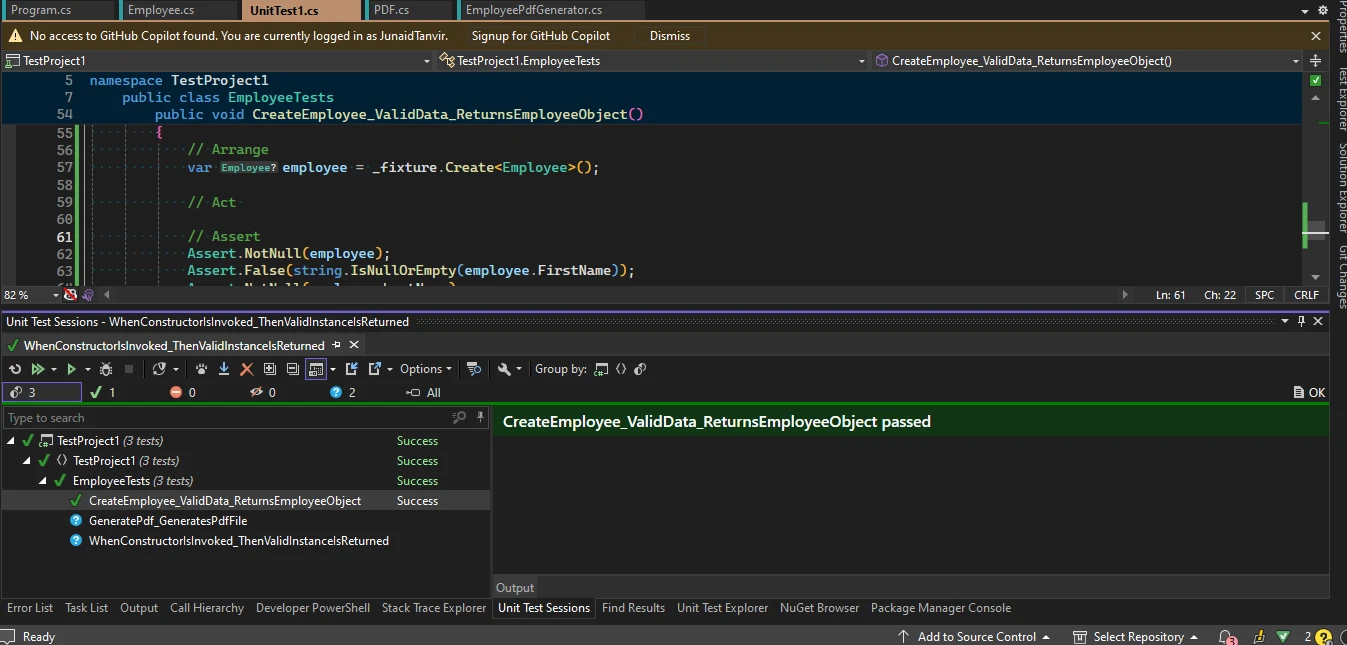
テストメソッドEmployeeクラスが提供された値でプロパティを正しく初期化することを検証します。 Employeeインスタンスを作成します。 その後、Ageプロパティが生成された値と一致するかを確認し、コンストラクタがこれらのプロパティを正確に設定することを保証します。
例2: コンストラクタが呼び出されたときの従業員の検証
[Fact]
public void CreateEmployee_ValidData_ReturnsEmployeeObject()
{
    // Arrange
    var employee = _fixture.Create<Employee>();

    // Act
    // Assert
    Assert.NotNull(employee);
    Assert.False(string.IsNullOrEmpty(employee.FirstName));
    Assert.NotNull(employee.LastName);
    Assert.True(employee.Age > 0);
}
[Fact]
public void CreateEmployee_ValidData_ReturnsEmployeeObject()
{
// Arrange
var employee = _fixture.Create<Employee>();
// Act
// Assert
Assert.NotNull(employee);
Assert.False(string.IsNullOrEmpty(employee.FirstName));
Assert.NotNull(employee.LastName);
Assert.True(employee.Age > 0);
}<Fact>
Public Sub CreateEmployee_ValidData_ReturnsEmployeeObject()
' Arrange
Dim employee = _fixture.Create(Of Employee)()
' Act
' Assert
Assert.NotNull(employee)
Assert.False(String.IsNullOrEmpty(employee.FirstName))
Assert.NotNull(employee.LastName)
Assert.True(employee.Age > 0)
End Subコードの説明
このテストメソッドには、Employeeオブジェクトのプロパティがランダムに生成された値と一致するかどうかを検証するテストアサーションが含まれます。 それは、Ageが適切に設定され、有効であるかどうかを確認します。 失敗したアサーションは、従業員詳細の期待値とランダムに生成された値の不一致を示します。
IronPDFの紹介
IronPDF C# PDFライブラリは、Iron Softwareによって開発された、PDFテキストの読み取り、およびHTMLを使用してPDFドキュメントを作成するための強力なC# PDFライブラリです。 この多用途なツールは、スタイル情報を含めた簡単にフォーマット可能な文書を、高品質なPDFに変換することを可能にします。 IronPDFを使用すると、HTMLからPDFを生成するプロセスがシームレスで、ユーザーはURLからHTMLコンテンツを取得し、それを構造化されたPDFファイルに変換できます。 この機能は、Webコンテンツから直接プロフェッショナルなPDFドキュメントを自動化および効率化することを望む開発者にとって、IronPDFは不可欠なツールとなっています。
IronPDFのインストール
NuGetパッケージ管理コンソールを開き、次のコマンドを実行します。
Install-Package IronPdf
IronPDFでAutoFixtureの機能を使用するコード例
以下は、AutoFixtureとIronPDFを組み合わせて従業員データのPDFを生成する例です。
using DemoAutofixture;
using IronPdf;
using System;
using System.Collections.Generic;
using System.Linq;
using System.Text;

public class EmployeePdfGenerator
{
    private readonly Fixture _fixture;

    public EmployeePdfGenerator()
    {
        _fixture = new Fixture();
    }

    public List<Employee> GenerateEmployees(int count)
    {
        return _fixture.CreateMany<Employee>(count).ToList();
    }

    public void GeneratePdf(List<Employee> employees, string filePath)
    {
        IronPdf.License.LicenseKey = "Your-License-Key-Here";
        var renderer = new ChromePdfRenderer();
        string htmlContent = GenerateHtml(employees);

        try
        {
            renderer.RenderHtmlAsPdf(htmlContent).SaveAs(filePath);
            Console.WriteLine("PDF Created Successfully!");
        }
        catch (Exception ex)
        {
            Console.WriteLine($"Error generating PDF: {ex.Message}");
        }
    }

    private string GenerateHtml(List<Employee> employees)
    {
        StringBuilder htmlBuilder = new StringBuilder();
        htmlBuilder.Append("<!DOCTYPE html><html><head><title>Employee List</title></head><body><h1>Employee List</h1><ul>");

        foreach (var employee in employees)
        {
            htmlBuilder.Append($"<li>{employee.GetFullName()} - Age: {employee.Age}</li>");
        }

        htmlBuilder.Append("</ul></body></html>");
        return htmlBuilder.ToString();
    }
}
using DemoAutofixture;
using IronPdf;
using System;
using System.Collections.Generic;
using System.Linq;
using System.Text;
public class EmployeePdfGenerator
{
private readonly Fixture _fixture;
public EmployeePdfGenerator()
{
_fixture = new Fixture();
}
public List<Employee> GenerateEmployees(int count)
{
return _fixture.CreateMany<Employee>(count).ToList();
}
public void GeneratePdf(List<Employee> employees, string filePath)
{
IronPdf.License.LicenseKey = "Your-License-Key-Here";
var renderer = new ChromePdfRenderer();
string htmlContent = GenerateHtml(employees);
try
{
renderer.RenderHtmlAsPdf(htmlContent).SaveAs(filePath);
Console.WriteLine("PDF Created Successfully!");
}
catch (Exception ex)
{
Console.WriteLine($"Error generating PDF: {ex.Message}");
}
}
private string GenerateHtml(List<Employee> employees)
{
StringBuilder htmlBuilder = new StringBuilder();
htmlBuilder.Append("<!DOCTYPE html><html><head><title>Employee List</title></head><body><h1>Employee List</h1><ul>");
foreach (var employee in employees)
{
htmlBuilder.Append($"<li>{employee.GetFullName()} - Age: {employee.Age}</li>");
}
htmlBuilder.Append("</ul></body></html>");
return htmlBuilder.ToString();
}
}Imports DemoAutofixture
Imports IronPdf
Imports System
Imports System.Collections.Generic
Imports System.Linq
Imports System.Text
Public Class EmployeePdfGenerator
Private ReadOnly _fixture As Fixture
Public Sub New()
_fixture = New Fixture()
End Sub
Public Function GenerateEmployees(ByVal count As Integer) As List(Of Employee)
Return _fixture.CreateMany(Of Employee)(count).ToList()
End Function
Public Sub GeneratePdf(ByVal employees As List(Of Employee), ByVal filePath As String)
IronPdf.License.LicenseKey = "Your-License-Key-Here"
Dim renderer = New ChromePdfRenderer()
Dim htmlContent As String = GenerateHtml(employees)
Try
renderer.RenderHtmlAsPdf(htmlContent).SaveAs(filePath)
Console.WriteLine("PDF Created Successfully!")
Catch ex As Exception
Console.WriteLine($"Error generating PDF: {ex.Message}")
End Try
End Sub
Private Function GenerateHtml(ByVal employees As List(Of Employee)) As String
Dim htmlBuilder As New StringBuilder()
htmlBuilder.Append("<!DOCTYPE html><html><head><title>Employee List</title></head><body><h1>Employee List</h1><ul>")
For Each employee In employees
htmlBuilder.Append($"<li>{employee.GetFullName()} - Age: {employee.Age}</li>")
Next employee
htmlBuilder.Append("</ul></body></html>")
Return htmlBuilder.ToString()
End Function
End Classこのクラスを使用するには、GeneratePdfを呼び出します。
List<Employee> employees = new()
{
    new Employee("John", "Smith", 32),
    new Employee("Emily", "Davis", 18),
    new Employee("David", "Brown", 24),
    new Employee("Jane", "Doe", 16),
    new Employee("Michael", "Johnson", 49),
};

EmployeePdfGenerator pdfGenerator = new();
pdfGenerator.GeneratePdf(employees, "EmployeeList.pdf");
List<Employee> employees = new()
{
new Employee("John", "Smith", 32),
new Employee("Emily", "Davis", 18),
new Employee("David", "Brown", 24),
new Employee("Jane", "Doe", 16),
new Employee("Michael", "Johnson", 49),
};
EmployeePdfGenerator pdfGenerator = new();
pdfGenerator.GeneratePdf(employees, "EmployeeList.pdf");Dim employees As New List(Of Employee)() From {
New Employee("John", "Smith", 32),
New Employee("Emily", "Davis", 18),
New Employee("David", "Brown", 24),
New Employee("Jane", "Doe", 16),
New Employee("Michael", "Johnson", 49)
}
Dim pdfGenerator As New EmployeePdfGenerator()
pdfGenerator.GeneratePdf(employees, "EmployeeList.pdf")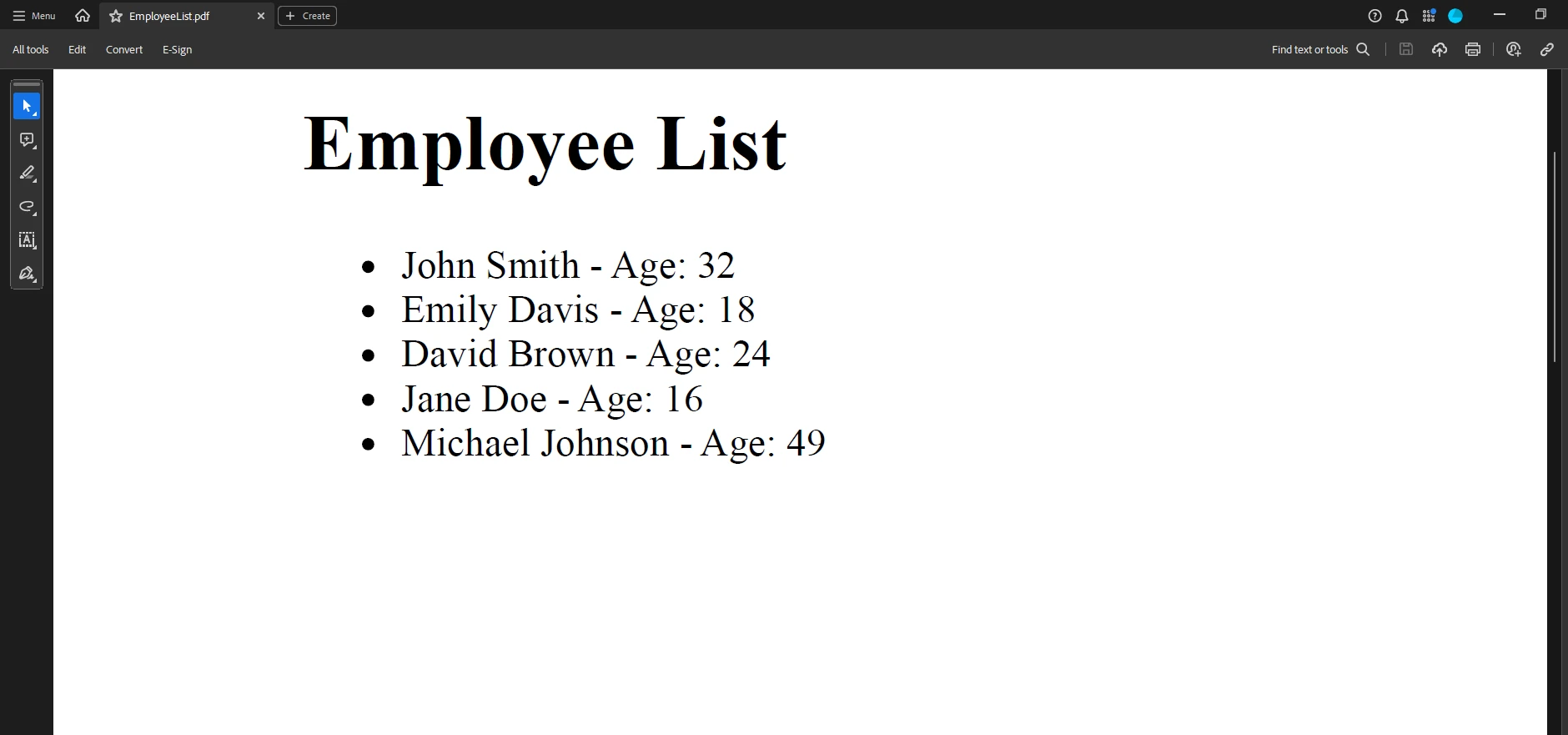
コードの説明
提供されたC#コードは、IronPDFライブラリを使用して、社員とその年齢のPDFドキュメントを生成します。 それは、Employeeオブジェクトのリストとファイルパスを取ります。 内部的には、HtmlToPdfクラスを使用してこのHTMLをPDFとしてレンダリングし、指定されたファイルパスに保存します。 改善には、HTML生成にStringBuilderを使用し、PDF生成とファイル保存の基本的なエラーハンドリングを追加することが含まれています。
テストメソッドの書き方
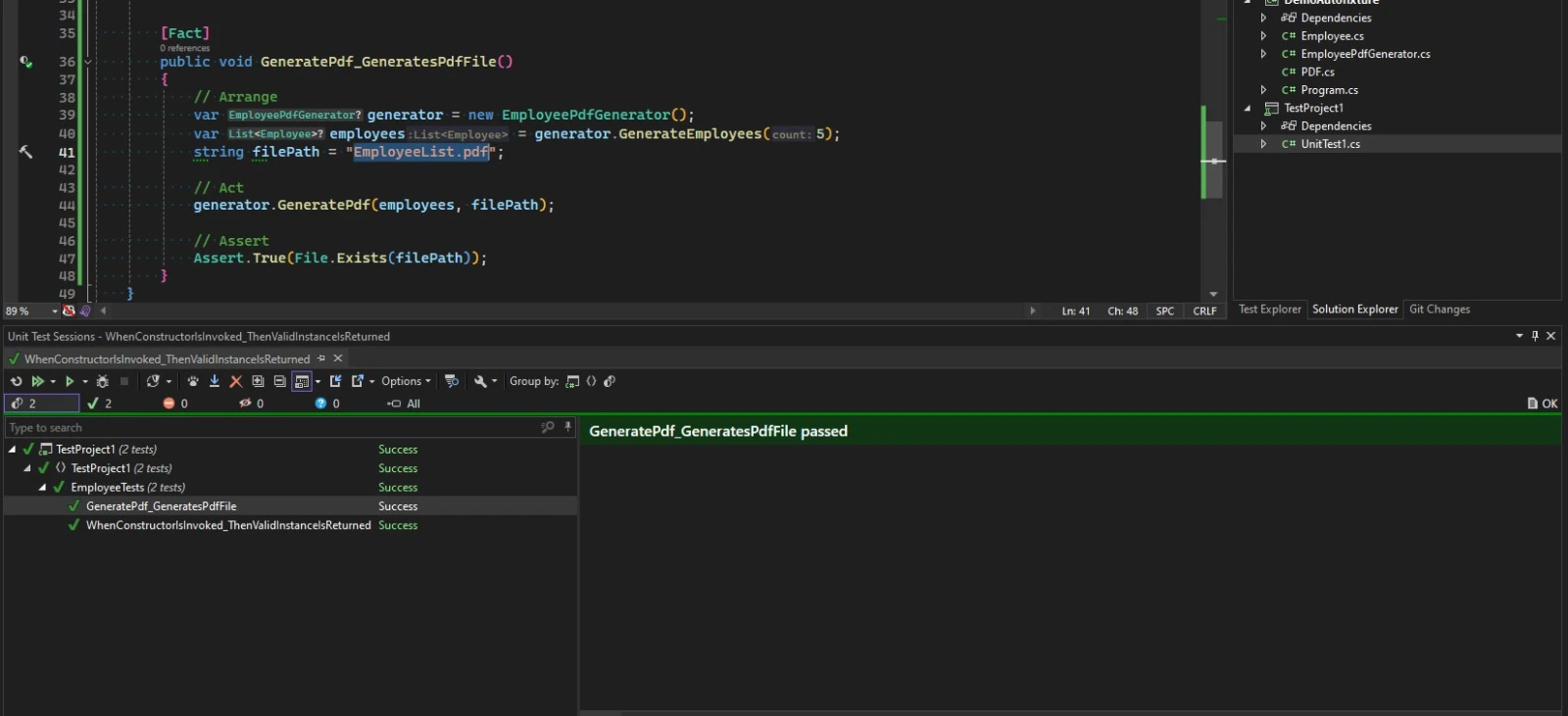
以下のセットアップでは、AutoFixtureを使用してEmployeeクラスのインスタンスを作成し、テスト用のランダム化されたデータを生成できるようにしています。 IronPDFはHTMLコンテンツを、従業員情報を含むPDF形式にシームレスに変換します。 EmployeePdfGeneratorクラスはこれらのプロセスを編成し、データ生成とPDF変換の両方を効率的に管理します。 一方、EmployeePdfGeneratorTests XUnitテストクラスは、厳密なテストを通してPDF生成の適切な機能を確保します。 この統合アプローチは、社員データの生成と文書化を簡素化し、PDF生成プロセスにおける堅牢性と信頼性を保証します。
using System.IO;
using Xunit;

public class EmployeePdfGeneratorTests
{
    [Fact]
    public void GeneratePdf_GeneratesPdfFile()
    {
        // Arrange
        var generator = new EmployeePdfGenerator();
        var employees = generator.GenerateEmployees(5);
        string filePath = "EmployeeList.pdf";

        // Act
        generator.GeneratePdf(employees, filePath);

        // Assert
        Assert.True(File.Exists(filePath));
    }
}
using System.IO;
using Xunit;
public class EmployeePdfGeneratorTests
{
[Fact]
public void GeneratePdf_GeneratesPdfFile()
{
// Arrange
var generator = new EmployeePdfGenerator();
var employees = generator.GenerateEmployees(5);
string filePath = "EmployeeList.pdf";
// Act
generator.GeneratePdf(employees, filePath);
// Assert
Assert.True(File.Exists(filePath));
}
}Imports System.IO
Imports Xunit
Public Class EmployeePdfGeneratorTests
<Fact>
Public Sub GeneratePdf_GeneratesPdfFile()
' Arrange
Dim generator = New EmployeePdfGenerator()
Dim employees = generator.GenerateEmployees(5)
Dim filePath As String = "EmployeeList.pdf"
' Act
generator.GeneratePdf(employees, filePath)
' Assert
Assert.True(File.Exists(filePath))
End Sub
End Classここで、GeneratePdfメソッドが正しく機能することを確認します。
結論
AutoFixtureは.NETの単体テスト作成の"Arrange"フェーズを簡素化し、開発者がセットアップの複雑さではなくテストケースに集中する手段を提供します。 それは、テストデータを自動的に生成することで、単体テストプロセスを効率化し、さまざまなリアルな入力を確保します。 IronPDFライセンス情報と組み合わせることで、継続的な使用とサポートのための強力なコンビネーションを提供します。
よくある質問
C#でAutoFixtureを使用してテストデータを生成するにはどうすればよいですか?
C#でAutoFixtureを使用してテストデータを生成するには、'Fixture'クラスを利用します。このクラスにより、クラスのインスタンスをランダムなデータで自動的に作成でき、さまざまなテストシナリオを効率的に設定できます。
.NETプロジェクトでAutoFixtureをインストールする手順は何ですか?
.NETプロジェクトでAutoFixtureをインストールするには、NuGetパッケージマネージャーコンソールでInstall-Package AutoFixtureコマンドを使用することができます。また、Visual StudioのNuGetパッケージマネージャーUIを通じて利用可能で、AutoFixtureを検索してプロジェクトに追加することができます。
AutoFixtureはユニットテストプロセスをどのように改善しますか?
AutoFixtureは、現実的で多様なテストデータを自動生成して、ユニットテストプロセスを強化します。これにより手動設定の必要性が減少し、幅広い入力でテストを実施してテストカバレッジと信頼性を向上させます。
AutoFixtureは.NETのPDF生成ライブラリと統合できますか?
はい、AutoFixtureはIronPDFのような.NETのPDF生成ライブラリと統合できます。AutoFixtureを使用してデータを生成することで、HTMLからPDFへの変換機能を活用し、従業員データのような動的コンテンツを含むPDFを作成できます。
AutoFixtureの'Fixture'クラスの目的は何ですか?
AutoFixtureの'Fixture'クラスは、テストのセットアップを簡素化するために設計されています。それは、ランダムデータでクラスのインスタンスを生成し、開発者がデータを手動で設定するのではなく、ロジックのテストに集中できるようにします。
AutoFixtureはテスト駆動開発(TDD)をどのように支援しますか?
AutoFixtureはテスト駆動開発(TDD)を支援することで、簡単にテストデータを生成できるようにします。これにより、開発者はデータ設定に過度の時間をかけずにテストを書き、機能を実装することができ、TDDプロセスを効率化します。
AutoFixtureとPDFライブラリを使用して、C#で文書作成を自動化するにはどうすればよいですか?
AutoFixtureとIronPDFのようなPDFライブラリを組み合わせて、C#で文書作成を自動化できます。AutoFixtureは文書に必要なデータを生成し、IronPDFはそのデータをHTMLとしてフォーマットし、効率的にPDF文書に変換します。










 無料で始めましょう
 無料で始めましょう
 無料ライブデモを予約
















