




Updated April 23, 2026
Bridging CLI Simplicity & .NET : Using Curl DotNet with IronPDF
Jacob Mellor has bridged this gap with CurlDotNet, a library created to bring the familiarity of cURL to the .NET ecosystem.
Read More

AutoFixture is an open-source library for .NET aimed at minimizing the 'Arrange' phase of unit test writing, thereby improving test management. Its main objective is to enable developers to concentrate on what they are testing, rather than the setup process, by letting you create object graphs with test data. This article explores how AutoFixture can be used to facilitate test-driven development through efficient test data generation.
AutoFixture is a powerful library in C# designed to streamline the process of creating test data for unit tests. It helps developers avoid writing repetitive setup code by automatically generating data for test cases. In unit testing, AutoFixture provides a streamlined approach to generating test data, ensuring that each unit test is executed with varied and realistic inputs. AutoFixture makes testing in C# more efficient by automatically generating test data, reducing the need for manual setup.
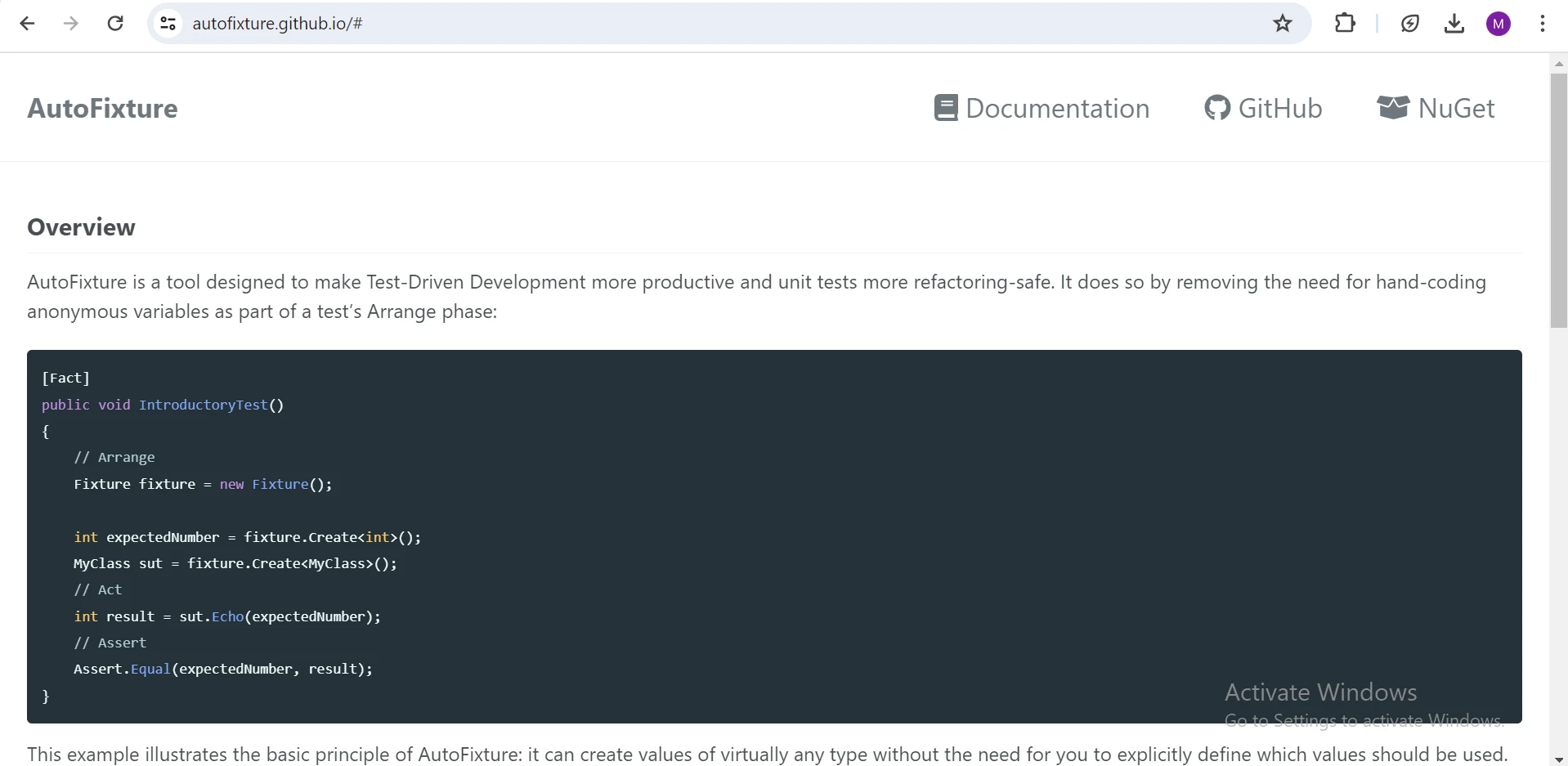
AutoFixture is available as a NuGet package and can be installed using the NuGet Package Manager Console or the .NET add package in Visual Studio's NuGet Package Manager UI.
NuGet will download and install the latest version of AutoFixture and its dependencies into your project.
Suppose we have a simple employee class with properties like FirstName, LastName, and Age. Instead of manually creating instances of this class in our unit tests, we can leverage AutoFixture to generate random data for us.
public class Employee
{
    public string FirstName { get; set; }
    public string LastName { get; set; }
    public int Age { get; set; }

    public Employee(string firstName, string lastName, int age)
    {
        FirstName = firstName;
        LastName = lastName;
        Age = age;
    }

    public string GetFullName() => $"{FirstName} {LastName}";
}Public Class Employee
Public Property FirstName() As String
Public Property LastName() As String
Public Property Age() As Integer
Public Sub New(ByVal firstName As String, ByVal lastName As String, ByVal age As Integer)
Me.FirstName = firstName
Me.LastName = lastName
Me.Age = age
End Sub
Public Function GetFullName() As String
Return $"{FirstName} {LastName}"
End Function
End ClassThe Employee class encapsulates essential details of an employee, including their first name, last name, and age, represented by properties FirstName, LastName, and Age respectively. Its constructor facilitates the instantiation of an employee object by accepting these details as parameters and assigning them to the corresponding properties. Additionally, the GetFullName method concatenates the first name and last name of the employee, returning the full name as a string.
Next, we will create a test class to test the Employee class:
using AutoFixture;

public class EmployeeTests
{
    private readonly IFixture _fixture;

    public EmployeeTests()
    {
        // Using AutoFixture's Fixture to create test data
        _fixture = new Fixture();
    }
}Imports AutoFixture
Public Class EmployeeTests
Private ReadOnly _fixture As IFixture
Public Sub New()
' Using AutoFixture's Fixture to create test data
_fixture = New Fixture()
End Sub
End ClassThis code snippet incorporates AutoFixture into unit testing for the Employee class. By importing the AutoFixture namespace, developers access data generation functionality. The _fixture field, initialized with a new instance of Fixture, streamlines test data creation. This setup enhances test efficiency and reliability for comprehensive Employee class coverage.
[Fact]
public void Employee_ShouldHaveValidValues()
{
    // Arrange
    var firstName = _fixture.Create<string>();
    var lastName = _fixture.Create<string>();
    var age = _fixture.Create<int>();

    // Act
    var employee = new Employee(firstName, lastName, age);

    // Assert
    Assert.Equal(firstName, employee.FirstName);
    Assert.Equal(lastName, employee.LastName);
    Assert.Equal(age, employee.Age);
}<Fact>
Public Sub Employee_ShouldHaveValidValues()
' Arrange
Dim firstName = _fixture.Create(Of String)()
Dim lastName = _fixture.Create(Of String)()
Dim age = _fixture.Create(Of Integer)()
' Act
Dim employee As New Employee(firstName, lastName, age)
' Assert
Assert.Equal(firstName, employee.FirstName)
Assert.Equal(lastName, employee.LastName)
Assert.Equal(age, employee.Age)
End SubThe test method Employee_ShouldHaveValidValues validates that the Employee class correctly initializes its properties with provided values. Using a test fixture to generate random data for the FirstName, LastName, and Age, the test creates an Employee instance. It then asserts that the FirstName, LastName, and Age properties of the Employee object match the generated values, ensuring that the constructor sets these properties accurately.
[Fact]
public void CreateEmployee_ValidData_ReturnsEmployeeObject()
{
    // Arrange
    var employee = _fixture.Create<Employee>();

    // Act
    // Assert
    Assert.NotNull(employee);
    Assert.False(string.IsNullOrEmpty(employee.FirstName));
    Assert.NotNull(employee.LastName);
    Assert.True(employee.Age > 0);
}<Fact>
Public Sub CreateEmployee_ValidData_ReturnsEmployeeObject()
' Arrange
Dim employee = _fixture.Create(Of Employee)()
' Act
' Assert
Assert.NotNull(employee)
Assert.False(String.IsNullOrEmpty(employee.FirstName))
Assert.NotNull(employee.LastName)
Assert.True(employee.Age > 0)
End SubThis test method includes test assertions that validate whether the properties of an Employee object match randomly generated values. It verifies if the string type properties FirstName and LastName, and int Age are properly set and valid. Any failed assertions signal a mismatch between the expected and random values generated for employee details.
IronPDF C# PDF Library is a robust C# PDF library developed by Iron Software that facilitates the reading of PDF text and the creation of PDF documents using HTML. This versatile tool enables the conversion of easy-to-format documents, complete with style information, into high-quality PDFs. With IronPDF, generating PDFs from HTML text is a seamless process, allowing users to pull HTML content from URLs and transform it into well-structured PDF files. This capability makes IronPDF an essential tool for developers looking to automate and streamline the creation of professional PDF documents directly from web content.
Open the NuGet Package Manager console, and run the following command:
Below is an example that demonstrates using AutoFixture alongside IronPDF to generate a PDF of employee data:
using DemoAutofixture;
using IronPdf;
using System;
using System.Collections.Generic;
using System.Linq;
using System.Text;

public class EmployeePdfGenerator
{
    private readonly Fixture _fixture;

    public EmployeePdfGenerator()
    {
        _fixture = new Fixture();
    }

    public List<Employee> GenerateEmployees(int count)
    {
        return _fixture.CreateMany<Employee>(count).ToList();
    }

    public void GeneratePdf(List<Employee> employees, string filePath)
    {
        IronPdf.License.LicenseKey = "Your-License-Key-Here";
        var renderer = new ChromePdfRenderer();
        string htmlContent = GenerateHtml(employees);

        try
        {
            renderer.RenderHtmlAsPdf(htmlContent).SaveAs(filePath);
            Console.WriteLine("PDF Created Successfully!");
        }
        catch (Exception ex)
        {
            Console.WriteLine($"Error generating PDF: {ex.Message}");
        }
    }

    private string GenerateHtml(List<Employee> employees)
    {
        StringBuilder htmlBuilder = new StringBuilder();
        htmlBuilder.Append("<!DOCTYPE html><html><head><title>Employee List</title></head><body><h1>Employee List</h1><ul>");

        foreach (var employee in employees)
        {
            htmlBuilder.Append($"<li>{employee.GetFullName()} - Age: {employee.Age}</li>");
        }

        htmlBuilder.Append("</ul></body></html>");
        return htmlBuilder.ToString();
    }
}Imports DemoAutofixture
Imports IronPdf
Imports System
Imports System.Collections.Generic
Imports System.Linq
Imports System.Text
Public Class EmployeePdfGenerator
Private ReadOnly _fixture As Fixture
Public Sub New()
_fixture = New Fixture()
End Sub
Public Function GenerateEmployees(ByVal count As Integer) As List(Of Employee)
Return _fixture.CreateMany(Of Employee)(count).ToList()
End Function
Public Sub GeneratePdf(ByVal employees As List(Of Employee), ByVal filePath As String)
IronPdf.License.LicenseKey = "Your-License-Key-Here"
Dim renderer = New ChromePdfRenderer()
Dim htmlContent As String = GenerateHtml(employees)
Try
renderer.RenderHtmlAsPdf(htmlContent).SaveAs(filePath)
Console.WriteLine("PDF Created Successfully!")
Catch ex As Exception
Console.WriteLine($"Error generating PDF: {ex.Message}")
End Try
End Sub
Private Function GenerateHtml(ByVal employees As List(Of Employee)) As String
Dim htmlBuilder As New StringBuilder()
htmlBuilder.Append("<!DOCTYPE html><html><head><title>Employee List</title></head><body><h1>Employee List</h1><ul>")
For Each employee In employees
htmlBuilder.Append($"<li>{employee.GetFullName()} - Age: {employee.Age}</li>")
Next employee
htmlBuilder.Append("</ul></body></html>")
Return htmlBuilder.ToString()
End Function
End ClassTo use this class, you would instantiate EmployeePdfGenerator, generate a list of employees, and then call GeneratePdf:
List<Employee> employees = new()
{
    new Employee("John", "Smith", 32),
    new Employee("Emily", "Davis", 18),
    new Employee("David", "Brown", 24),
    new Employee("Jane", "Doe", 16),
    new Employee("Michael", "Johnson", 49),
};

EmployeePdfGenerator pdfGenerator = new();
pdfGenerator.GeneratePdf(employees, "EmployeeList.pdf");Dim employees As New List(Of Employee)() From {
New Employee("John", "Smith", 32),
New Employee("Emily", "Davis", 18),
New Employee("David", "Brown", 24),
New Employee("Jane", "Doe", 16),
New Employee("Michael", "Johnson", 49)
}
Dim pdfGenerator As New EmployeePdfGenerator()
pdfGenerator.GeneratePdf(employees, "EmployeeList.pdf")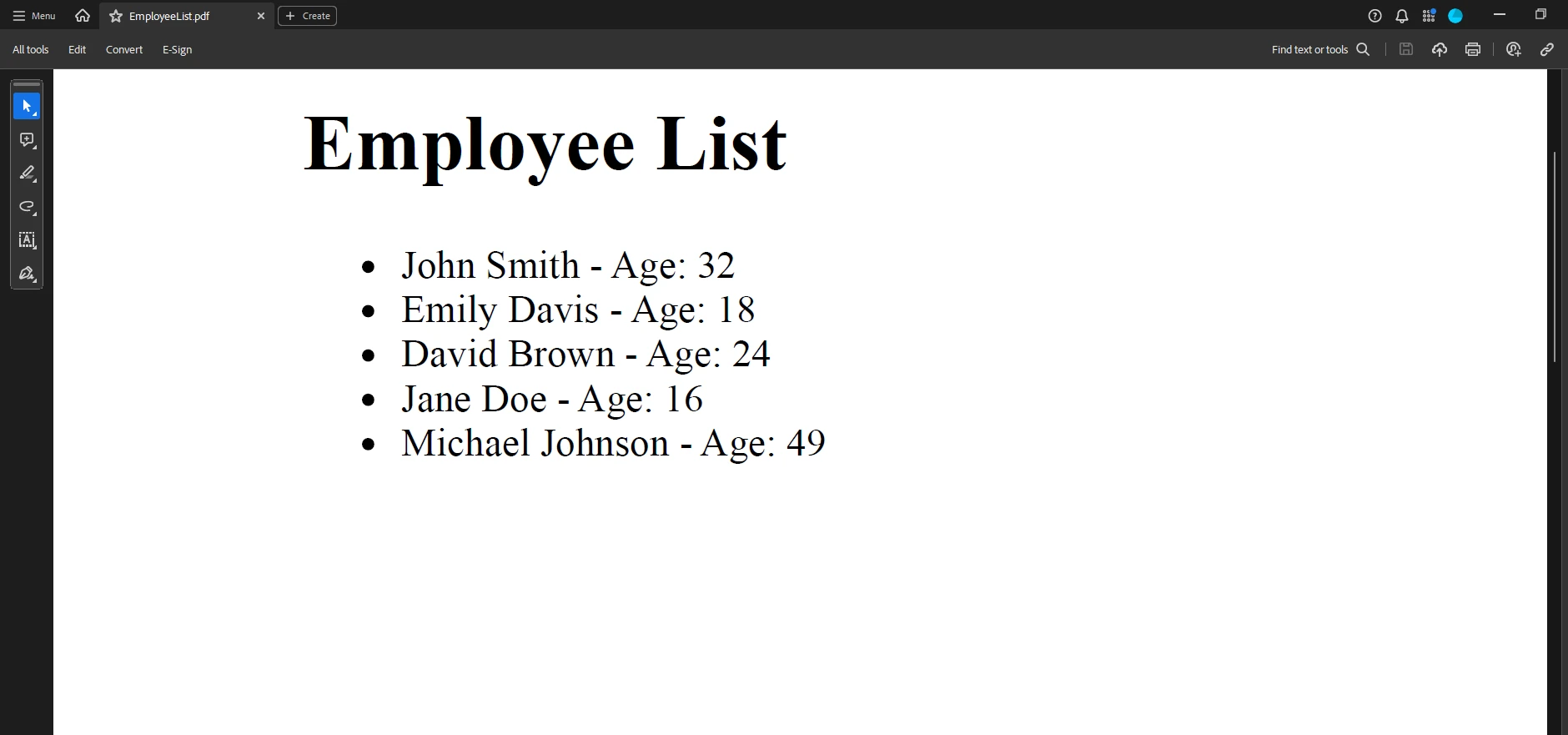
The provided C# code uses the IronPDF library to generate a PDF document listing employees and their ages. It defines an EmployeePdfGenerator class that includes the method GeneratePdf, which takes a list of Employee objects and a file path. Internally, it constructs HTML content through the GenerateHtml method, then uses IronPDF's HtmlToPdf class to render this HTML as a PDF, saved at the specified file path. Enhancements include using StringBuilder for HTML generation and adding basic error handling for PDF generation and file saving.
In the setup below, AutoFixture is utilized for creating instances of the Employee class, enabling the generation of randomized data for testing. IronPDF is employed to seamlessly convert HTML content, including employee information, into PDF format. The EmployeePdfGenerator class orchestrates these processes, managing both data generation and PDF conversion efficiently. Meanwhile, the EmployeePdfGeneratorTests XUnit test class ensures the proper functionality of PDF generation through rigorous testing. This integrated approach simplifies the generation and documentation of employee data, ensuring robustness and reliability in the PDF generation process.
using System.IO;
using Xunit;

public class EmployeePdfGeneratorTests
{
    [Fact]
    public void GeneratePdf_GeneratesPdfFile()
    {
        // Arrange
        var generator = new EmployeePdfGenerator();
        var employees = generator.GenerateEmployees(5);
        string filePath = "EmployeeList.pdf";

        // Act
        generator.GeneratePdf(employees, filePath);

        // Assert
        Assert.True(File.Exists(filePath));
    }
}Imports System.IO
Imports Xunit
Public Class EmployeePdfGeneratorTests
<Fact>
Public Sub GeneratePdf_GeneratesPdfFile()
' Arrange
Dim generator = New EmployeePdfGenerator()
Dim employees = generator.GenerateEmployees(5)
Dim filePath As String = "EmployeeList.pdf"
' Act
generator.GeneratePdf(employees, filePath)
' Assert
Assert.True(File.Exists(filePath))
End Sub
End ClassHere the EmployeePdfGeneratorTests class contains a test case that validates the creation of a PDF file at the specified file path, ensuring that the GeneratePdf method functions correctly.
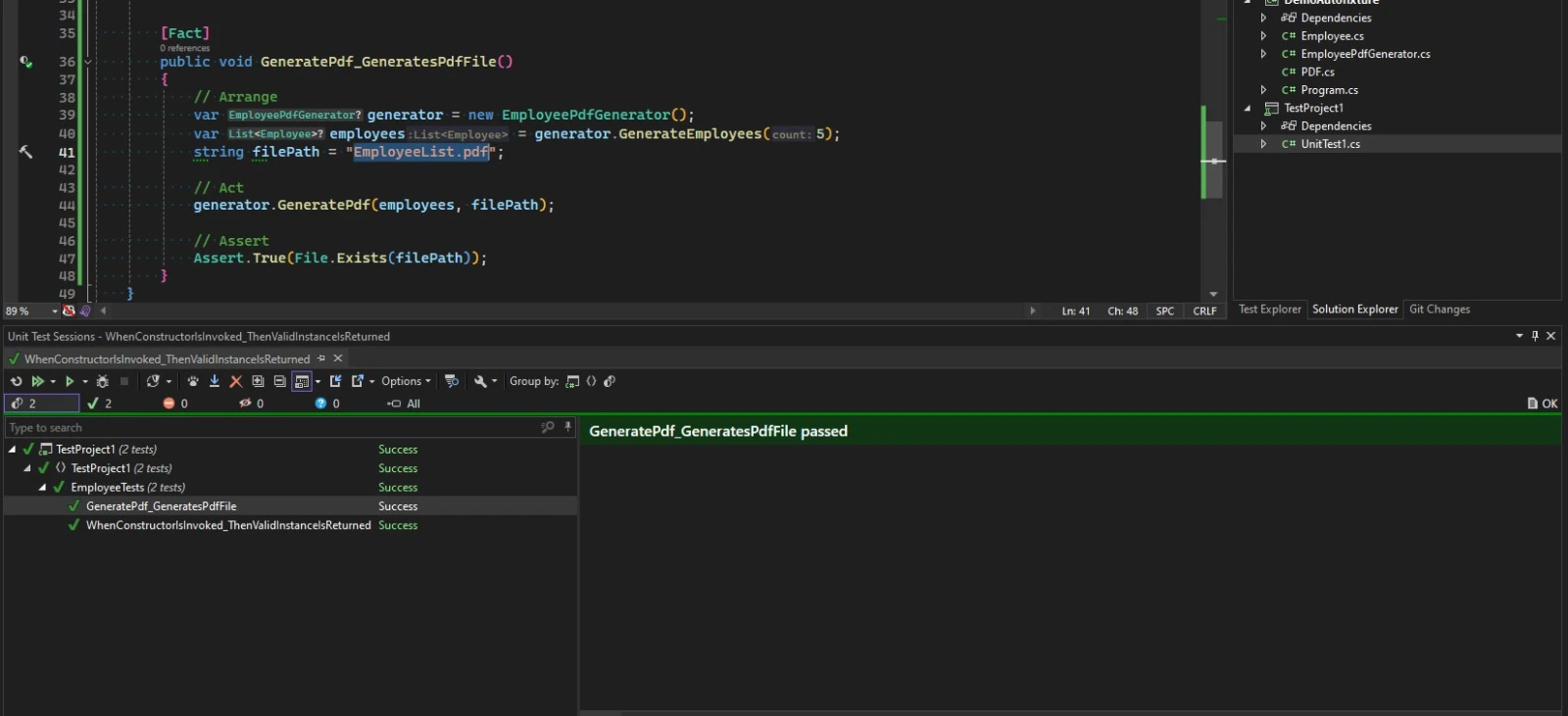
AutoFixture simplifies the 'Arrange' phase of writing unit tests in .NET, offering developers a means to focus on test cases rather than setup intricacies. It streamlines the unit testing process, ensuring varied and realistic inputs by automatically generating test data. In conjunction with IronPDF Licensing Information, it provides a powerful combination for continued use and support.

Jacob Mellor is Chief Technology Officer at Iron Software and a visionary engineer pioneering C# PDF technology. As the original developer behind Iron Software's core codebase, he has shaped the company's product architecture since its inception, transforming it alongside CEO Cameron Rimington into a 50+ person company serving NASA, Tesla, and global government agencies.



IronPDF is a part of IRONSUITE
10 .NET API products for your office documents











When you need your PDF to look like HTML, fast.


