




更新日 2026年4月23日
Microsoft.Extensions.AIを使用した .NET での LLM 統合の簡素化
AI はソフトウェア開発を変革していますが、.NET への大規模言語モデル (LLM) の統合はこれまで複雑でした。IronPdf.AI を使用して AI 統合をさらに進め、OpenAI を活用した PDF 解析、データ抽出、およびコンテンツの要約を .NET アプリケーションにもたらします。
詳しく読む

オブジェクト指向プログラミング (OOP)は、プログラマーがモジュール化、再利用可能、適応可能なコードを作成できるソフトウェア開発の基本概念です。 C#は、複雑なアプリケーションを構築するための強力なフレームワークを提供する現代的なオブジェクト指向プログラミング言語です。 このガイドは、実践的な実装とコーディング例に焦点を当て、初心者がこれらの原則を効果的に理解し適用するのを助けるために、C#を使用したOOPの概念を紹介します。 また、IronPDFライブラリをC#で使用してこれらの原則をどのように適用できるかについても説明します。
OOPの核心には、クラス、オブジェクト、継承、多態性、抽象化、カプセル化などのいくつかの重要な概念があります。 これらの概念により、開発者は現実世界のエンティティをモデル化し、複雑さを管理し、コードの保守性を向上させることができます。
クラスは個々のオブジェクトを作成します。 クラスは、クラスのオブジェクトが共有するデータと動作を定義する設計図です。 オブジェクトはクラスの具現化です。 それはクラスの設計図で定義された抽象的なプレースホルダーではなく、実際の値を具現化します。
public class Car // A class declared as 'Car' defines its structure and behavior.
{
    public string Name;
    public string Color;

    public void DisplayInfo()
    {
        Console.WriteLine($"Name: {Name}, Color: {Color}");
    }
}

class Program // This is the program class, serving as the entry point of a C# program.
{
    static void Main(string[] args)
    {
        Car myCar = new Car();
        myCar.Name = "Toyota";
        myCar.Color = "Red";
        myCar.DisplayInfo();
    }
}Public Class Car ' A class declared as 'Car' defines its structure and behavior.
Public Name As String
Public Color As String
Public Sub DisplayInfo()
Console.WriteLine($"Name: {Name}, Color: {Color}")
End Sub
End Class
Friend Class Program ' This is the program class, serving as the entry point of a C# program.
Shared Sub Main(ByVal args() As String)
Dim myCar As New Car()
myCar.Name = "Toyota"
myCar.Color = "Red"
myCar.DisplayInfo()
End Sub
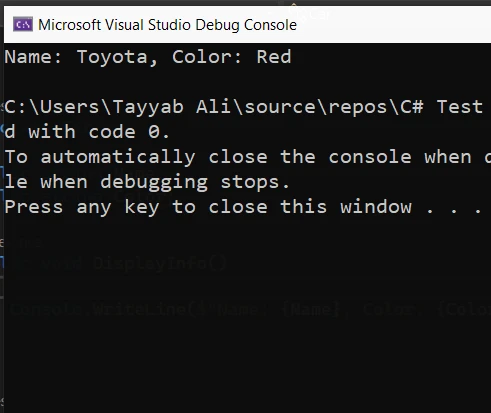
End Classこの例では、Carクラスは2つのデータメンバー(NameとColor)と1つのメソッド(DisplayInfo)を持っています。 アプリケーションのエントリーポイントとして機能するMainメソッドは、Carクラスのインスタンスを作成し、そのフィールドに値を割り当て、そのメソッドを呼び出してこれらの値を表示します。
継承により、クラスは既存のクラスのプロパティとメソッドを継承することができます。 プロパティが継承されるクラスはベースクラスと呼ばれ、それらのプロパティを継承するクラスは派生クラスと呼ばれます。
public class Vehicle
{
    public string LicensePlate;

    public void Honk()
    {
        Console.WriteLine("Honking");
    }
}

public class Truck : Vehicle // Truck is a child class derived from the Vehicle base class.
{
    public int CargoCapacity;
}

class Program
{
    static void Main(string[] args)
    {
        Truck myTruck = new Truck();
        myTruck.LicensePlate = "ABC123";
        myTruck.CargoCapacity = 5000;
        myTruck.Honk();
    }
}Public Class Vehicle
Public LicensePlate As String
Public Sub Honk()
Console.WriteLine("Honking")
End Sub
End Class
Public Class Truck ' Truck is a child class derived from the Vehicle base class.
Inherits Vehicle
Public CargoCapacity As Integer
End Class
Friend Class Program
Shared Sub Main(ByVal args() As String)
Dim myTruck As New Truck()
myTruck.LicensePlate = "ABC123"
myTruck.CargoCapacity = 5000
myTruck.Honk()
End Sub
End Classこの例では、TruckはVehicleベースクラスを拡張する派生クラスであり、そのLicensePlateフィールドとHonkメソッドを継承し、新しいフィールドCargoCapacityを追加しています。
多態性により、オブジェクトはその具体的なクラスではなく、そのベースクラスのインスタンスとして扱うことができます。 抽象化により、インスタンス化できない抽象クラスとインターフェースを定義できますが、ベースクラスとして使用することができます。
抽象クラスはインスタンス化できず、複数の派生クラスが共有できるベースクラスの共通定義を提供するために使用されることが一般的です。
public abstract class Shape
{
    public abstract void Draw();
}

public class Circle : Shape
{
    public override void Draw()
    {
        Console.WriteLine("Drawing a circle");
    }
}Public MustInherit Class Shape
Public MustOverride Sub Draw()
End Class
Public Class Circle
Inherits Shape
Public Overrides Sub Draw()
Console.WriteLine("Drawing a circle")
End Sub
End Classインターフェースは、その定義されたメソッドを実装することでクラスが満たすことができる契約を確立します。 クラスは複数のインターフェースを実装でき、多態性の一形態を可能にします。
public interface IDrawable
{
    void Draw();
}

public interface IColorable
{
    void Color();
}

public class CustomShape : IDrawable, IColorable // Defining a new class CustomShape that implements IDrawable and IColorable.
{
    public void Draw()
    {
        Console.WriteLine("Custom shape drawn");
    }

    public void Color()
    {
        Console.WriteLine("Custom shape colored");
    }
}Public Interface IDrawable
Sub Draw()
End Interface
Public Interface IColorable
Sub Color()
End Interface
Public Class CustomShape ' Defining a new class CustomShape that implements IDrawable and IColorable.
Implements IDrawable, IColorable
Public Sub Draw() Implements IDrawable.Draw
Console.WriteLine("Custom shape drawn")
End Sub
Public Sub Color() Implements IColorable.Color
Console.WriteLine("Custom shape colored")
End Sub
End Classカプセル化は、オブジェクトの特定のコンポーネントへのアクセスを制限し、外部から内部の表現を見えないようにするメカニズムです。 これは、アクセス修飾子を使用して達成されます。
public class Person
{
    private string name; // Private variable, inaccessible outside the class
    public string Name   // Public property to access the private variable
    {
        get { return name; }
        set { name = value; }
    }
}

// Example showing a simple customer class with encapsulated data
public class Customer
{
    public string Name { get; set; }
    public string Address { get; set; }
}Public Class Person
'INSTANT VB NOTE: The field name was renamed since Visual Basic does not allow fields to have the same name as other class members:
Private name_Conflict As String ' Private variable, inaccessible outside the class
Public Property Name() As String ' Public property to access the private variable
Get
Return name_Conflict
End Get
Set(ByVal value As String)
name_Conflict = value
End Set
End Property
End Class
' Example showing a simple customer class with encapsulated data
Public Class Customer
Public Property Name() As String
Public Property Address() As String
End Classこの例では、nameフィールドはプライベートで、Personクラスの外部ではアクセスできません。 このフィールドへのアクセスは、getとsetメソッドを含むパブリックNameプロパティを介して提供されます。
今、これらの原則が実際にどのように動作するのかを示すために、複数のクラスを含む例を探ります。
using System;

namespace OOPExample
{
    public class Program
    {
        static void Main(string[] args)
        {
            ElectricCar myElectricCar = new ElectricCar();
            myElectricCar.Make = "Tesla";
            myElectricCar.Model = "Model 3";
            myElectricCar.BatteryLevel = 100;
            myElectricCar.Drive();
            myElectricCar.Charge();
        }
    }

    public abstract class Vehicle
    {
        public string Make { get; set; }
        public string Model { get; set; }

        public abstract void Drive();
    }

    public class Car : Vehicle
    {
        public override void Drive()
        {
            Console.WriteLine($"The {Make} {Model} is driving.");
        }
    }

    public class ElectricCar : Car
    {
        public int BatteryLevel { get; set; }

        public void Charge()
        {
            Console.WriteLine("Charging the car.");
        }

        public override void Drive()
        {
            Console.WriteLine($"The {Make} {Model} is driving silently.");
        }
    }
}Imports System
Namespace OOPExample
Public Class Program
Shared Sub Main(ByVal args() As String)
Dim myElectricCar As New ElectricCar()
myElectricCar.Make = "Tesla"
myElectricCar.Model = "Model 3"
myElectricCar.BatteryLevel = 100
myElectricCar.Drive()
myElectricCar.Charge()
End Sub
End Class
Public MustInherit Class Vehicle
Public Property Make() As String
Public Property Model() As String
Public MustOverride Sub Drive()
End Class
Public Class Car
Inherits Vehicle
Public Overrides Sub Drive()
Console.WriteLine($"The {Make} {Model} is driving.")
End Sub
End Class
Public Class ElectricCar
Inherits Car
Public Property BatteryLevel() As Integer
Public Sub Charge()
Console.WriteLine("Charging the car.")
End Sub
Public Overrides Sub Drive()
Console.WriteLine($"The {Make} {Model} is driving silently.")
End Sub
End Class
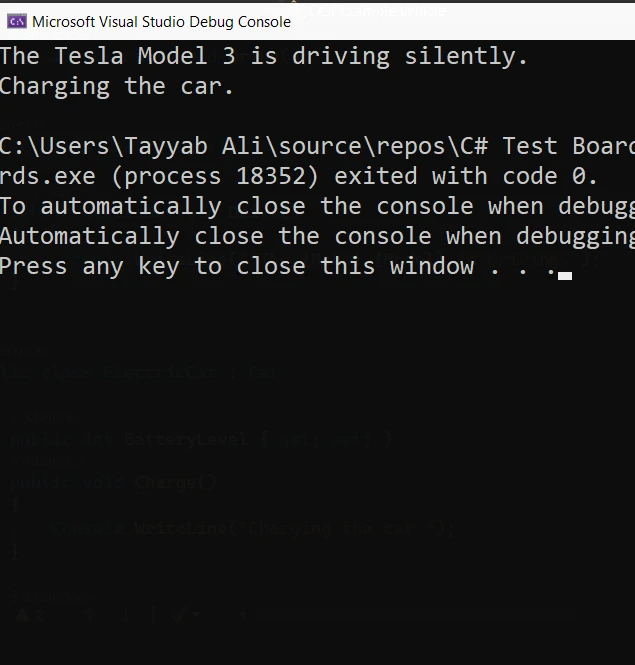
End Namespaceこの例では、**Drive()はVehicle抽象クラスからの抽象メソッドです。 CarはDrive()を実装する派生クラスであり、ElectricCarは階層でもう一段、BatteryLevelや独自のDrive()**実装などの新機能を追加します。 この構造は、C#アプリケーションで抽象化、カプセル化、継承、多態性がどのように連携しているかを示しています。
IronPDFライブラリ .NET 向けは、.NETアプリケーション内でPDFドキュメントを作成、編集、抽出するプロセスを簡素化するように設計された、C#開発者向けの多用途なツールです。 IronPDFは、HTML文字列、URL、またはASPXファイルからPDFを簡単に生成できます。これにより、PDFの作成と操作プロセスに対する高い制御が提供されます。 さらに、IronPDFは、ヘッダーとフッターの追加、透かし、暗号化などの高度な機能をサポートしており、.NETアプリケーションでのPDF処理に完全なソリューションを提供します。
ここに、C#アプリケーション内でIronPDFを使用することを示す簡略化された例があります。継承を通じてIronPDFの機能を拡張する方法を説明するためにvirtualキーワードを組み込んでいます。ベースクラスが基本的なPDFレポートを生成し、派生クラスがこの機能を拡張してカスタムヘッダーを含めることを想定してみましょう。
using IronPdf;

public class BasicReportGenerator
{
    public virtual PdfDocument GenerateReport(string htmlContent)
    {
        var renderer = new ChromePdfRenderer();
        var pdf = renderer.RenderHtmlAsPdf(htmlContent);
        return pdf;
    }
}

public class CustomReportGenerator : BasicReportGenerator
{
    public override PdfDocument GenerateReport(string htmlContent)
    {
        var pdf = base.GenerateReport(htmlContent);
        AddCustomHeader(pdf, "Custom Report Header");
        return pdf;
    }

    private void AddCustomHeader(PdfDocument document, string headerContent)
    {
        // Create text header
        TextHeaderFooter textHeader = new TextHeaderFooter
        {
            CenterText = headerContent,
        };
        document.AddTextHeaders(textHeader);
    }
}

class Program
{
    static void Main(string[] args)
    {
        License.LicenseKey = "License-Key";
        // HTML content for the report
        string htmlContent = "<html><body><h1>Sample Report</h1><p>This is a sample report content.</p></body></html>";

        // Using BasicReportGenerator
        BasicReportGenerator basicReportGenerator = new BasicReportGenerator();
        var basicPdf = basicReportGenerator.GenerateReport(htmlContent);
        basicPdf.SaveAs("basic_report.pdf");

        // Using CustomReportGenerator
        CustomReportGenerator customReportGenerator = new CustomReportGenerator();
        var customPdf = customReportGenerator.GenerateReport(htmlContent);
        customPdf.SaveAs("custom_report.pdf");

        Console.WriteLine("PDF reports generated successfully.");
    }
}Imports IronPdf
Public Class BasicReportGenerator
Public Overridable Function GenerateReport(ByVal htmlContent As String) As PdfDocument
Dim renderer = New ChromePdfRenderer()
Dim pdf = renderer.RenderHtmlAsPdf(htmlContent)
Return pdf
End Function
End Class
Public Class CustomReportGenerator
Inherits BasicReportGenerator
Public Overrides Function GenerateReport(ByVal htmlContent As String) As PdfDocument
Dim pdf = MyBase.GenerateReport(htmlContent)
AddCustomHeader(pdf, "Custom Report Header")
Return pdf
End Function
Private Sub AddCustomHeader(ByVal document As PdfDocument, ByVal headerContent As String)
' Create text header
Dim textHeader As New TextHeaderFooter With {.CenterText = headerContent}
document.AddTextHeaders(textHeader)
End Sub
End Class
Friend Class Program
Shared Sub Main(ByVal args() As String)
License.LicenseKey = "License-Key"
' HTML content for the report
Dim htmlContent As String = "<html><body><h1>Sample Report</h1><p>This is a sample report content.</p></body></html>"
' Using BasicReportGenerator
Dim basicReportGenerator As New BasicReportGenerator()
Dim basicPdf = basicReportGenerator.GenerateReport(htmlContent)
basicPdf.SaveAs("basic_report.pdf")
' Using CustomReportGenerator
Dim customReportGenerator As New CustomReportGenerator()
Dim customPdf = customReportGenerator.GenerateReport(htmlContent)
customPdf.SaveAs("custom_report.pdf")
Console.WriteLine("PDF reports generated successfully.")
End Sub
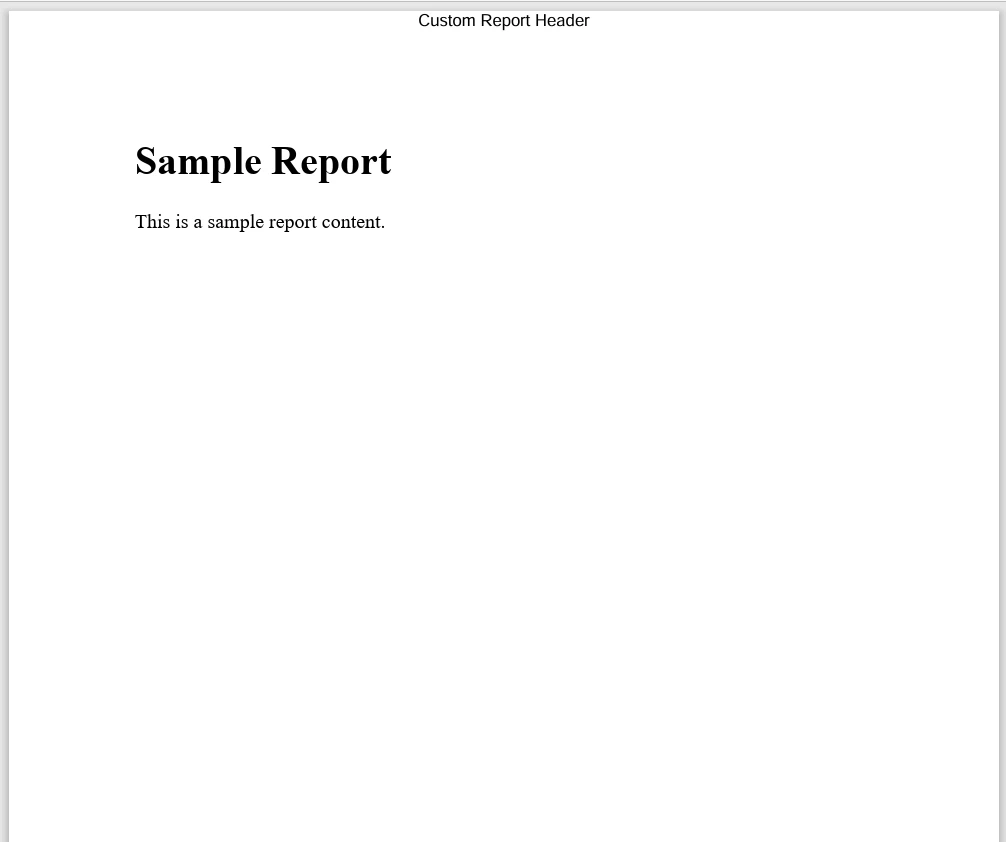
End Classこの例では、BasicReportGeneratorにはHTMLコンテンツを取り込み、IronPDFを使用してPDFドキュメントを生成するメソッドGenerateReportがあります。 BasicReportGeneratorから継承されたCustomReportGeneratorクラスは、基本メソッドによって生成された後でPDFにカスタムヘッダーを追加するために、GenerateReportメソッドをオーバーライドします。 ここにそのコードによって生成されたカスタムレポートがあります:
OOPの基本原則を理解し、適用することで、初心者はC#をマスターし強力なソフトウェアソリューションを開発する大きな一歩を踏み出すことができます。 継承と多態性により、コードの再利用と柔軟性が実現し、新しいクラスは既存の構造と機能を活用できます。 抽象化とカプセル化により、クラスは外部に必要なものだけを公開し、内部の作業を意図しない使用から保護します。 C#でのPDF生成用のIronPDF無料トライアルを試すことができます。これはliteLicenseから利用可能です。

ジェイコブ・メラーはIron Softwareの最高技術責任者(CTO)であり、C# PDFテクノロジーを開拓する先見的なエンジニアです。Iron Softwareのコアコードベースを支えるオリジナル開発者として、彼は創業以来、会社の製品アーキテクチャを形成し、CEOのCameron Rimingtonとともに、会社をNASA、Tesla、および世界的な政府機関にサービスを提供する50人以上の会社に変えました。1999年にロンドンで最初のソフトウェアビジネスを開業し、2005年に最初 for .NETコンポーネントを作成した後、Microsoftのエコシステム全体で複雑な問題を解決することを専門としました。



IronPDF はIRONSUITEの一部です
オフィス文書向けの.NET API製品10個

PDFがHTMLのように見える必要があるとき、迅速に。












