


C# Pattern Matching Expressions(開発者向けの動作方法)

C#におけるパターンマッチングは、C# 7.0で導入された強力な機能で、以降のバージョンで拡張されています。 これは、条件文、型チェック、オブジェクトの分解を扱う際に、より簡潔で表現力豊かなコードを書くことを開発者に許します。
パターンマッチング式は、パターンに対して値をマッチングし、対応するコードブロックを実行するための柔軟で直感的な方法を提供します。 この記事では、C#のパターンマッチング式の複雑さを、構文、使用例、コード例を含めて探ります。 記事の最後では、IronPDF PDF生成ライブラリについて、Iron Softwareから、C#アプリケーションでオンザフライでPDFドキュメントを生成する方法についても少し探ります。
Benefits of Pattern Matching in C
C#コードでのパターンマッチングは多数の利点を提供します:
-読みやすさの向上:パターン マッチングにより複雑な条件付きロジックが簡素化され、自分自身と他の開発者の両方にとってコードが理解しやすくなり、追跡しやすくなります。 -コード行数の削減:複雑な条件文を簡潔なパターンに凝縮することで、パターン マッチングによってコードベースが合理化され、コード行数が減り、実装がより簡潔になります。 -保守性の向上:パターン マッチングによって得られる明確さにより、コードの保守とデバッグが容易になります。 パターンが明確に区切られることで、コードベースの他の部分に影響を与えずに特定のロジックブロックを特定して変更することが容易になります。 -より表現力豊かなアルゴリズム:パターン マッチングにより、開発者はより自然で直感的な方法でアルゴリズムを表現できるようになります。 コード構造を問題解決のパラダイムに合わせることで、パターンマッチングは概念モデルに近似したアルゴリズムの作成を促進します。
Types of Pattern Matching in C
パターンマッチングは以下の式でサポートされます:
is式switch文switch式
次のパターンは、構造と一致させるために使用できます:
宣言と型パターン
宣言と型パターンは、与えられた型と式の実行時型の互換性をチェックするためのC#の必須ツールです。宣言パターンを使用することで、互換性のチェックとローカル変数の宣言を同時に行うことができます。 次の例を考えてみましょう。
object greeting = "Iron Software is Awesome!";
if (greeting is string message)
{
    Console.WriteLine(message.ToLower());  // output: iron software is awesome!
}
object greeting = "Iron Software is Awesome!";
if (greeting is string message)
{
Console.WriteLine(message.ToLower()); // output: iron software is awesome!
}Dim greeting As Object = "Iron Software is Awesome!"
Dim tempVar As Boolean = TypeOf greeting Is String
Dim message As String = If(tempVar, DirectCast(greeting, String), Nothing)
If tempVar Then
Console.WriteLine(message.ToLower()) ' output: iron software is awesome!
End Ifここでは、宣言パターンが式 greeting が型 string と一致する場合、それが変数 message に割り当てられ、後続の操作を可能にします。
次のいずれかの条件が成り立つ場合、宣言パターンが有効です:
- 式のランタイム型は
Tです。 - 式のランタイム型は
Tに由来し、インタフェースTを実装しているか、Tに暗黙的に変換できます。 - 式のランタイム型は、基になる型が
Tの Nullable 値型です。 - 式のランタイム型から型
Tへのボクシングまたはアンボクシング変換が存在します。
以下の条件を示す例を考えてみましょう:
int? nullableX = 8;
int y = 45;
object boxedy = y;
if (nullableX is int a && boxedy is int b)
{
    Console.WriteLine(a + b);  // output: 53
}
int? nullableX = 8;
int y = 45;
object boxedy = y;
if (nullableX is int a && boxedy is int b)
{
Console.WriteLine(a + b); // output: 53
}Dim nullableX? As Integer = 8
Dim y As Integer = 45
Dim boxedy As Object = y
Dim tempVar As Boolean = TypeOf boxedy Is Integer
Dim b As Integer = If(tempVar, DirectCast(boxedy, Integer), Nothing)
Dim tempVar2 As Boolean = TypeOf nullableX Is Integer
Dim a As Integer = If(tempVar2, CInt(nullableX), Nothing)
If tempVar2 AndAlso tempVar Then
Console.WriteLine(a + b) ' output: 53
End Ifここでは、nullableX が基になる型 int の Nullable 値型であるため、そのパターンと一致し、boxedy が int にアンボクシングできるため一致します。
新しい変数を宣言せずに単に式の型をチェックする必要がある場合、以下の例に示すように、_ を破棄することができます。
public static decimal CalculateToll(Vehicle vehicle) => vehicle switch
{
    Bus _ => 4.00m,
    Motor _ => 8.50m,
    null => throw new ArgumentNullException(nameof(vehicle)),
    _ => throw new ArgumentException("Unknown type of a vehicle", nameof(vehicle)),
};
public static decimal CalculateToll(Vehicle vehicle) => vehicle switch
{
Bus _ => 4.00m,
Motor _ => 8.50m,
null => throw new ArgumentNullException(nameof(vehicle)),
_ => throw new ArgumentException("Unknown type of a vehicle", nameof(vehicle)),
};'INSTANT VB TODO TASK: The following 'switch expression' was not converted by Instant VB:
'public static decimal CalculateToll(Vehicle vehicle) => vehicle switch
'{
' Bus _ => 4.00m,
' Motor _ => 8.50m,
' null => throw new ArgumentNullException(nameof(vehicle)),
' _ => throw new ArgumentException("Unknown type of a vehicle", nameof(vehicle)),
'};このスニペットでは、_ が Vehicle と一致する任意の型のプレースホルダーとして機能します。
宣言と型パターンの両方は、パターンマッチング前に式が非nullであることを保証します。 以下に示すように否定されたnull定数パターンを使用して非nullをチェックできます:
if (inputVal is not null)
{
    // ...
}
if (inputVal is not null)
{
// ...
}If inputVal IsNot Nothing Then
' ...
End Ifこの否定は、さらなる操作を進める前に inputVal が null でないことを確認します。
C#コードで宣言と型パターンを利用することで、可読性を向上させ、コード行数を削減し、アルゴリズムをより効果的に表現できます。 これらのパターンは、型ベースのロジックを扱うための簡潔で表現力豊かな方法を提供し、コードベースの保守性を向上させます。
定数パターン
定数パターンは、式の結果が特定の定数値と一致するかどうかを検証します。 次の例を考えてみましょう。
public static decimal GetGroupTicketPrice(int visitorCount) => visitorCount switch
{
1 => 2.0m,
2 => 10.0m,
3 => 25.0m,
4 => 60.0m,
0 => 0.0m,
_ => throw new ArgumentException($"Not supported number of visitors: {visitorCount}", nameof(visitorCount)),
};public static decimal GetGroupTicketPrice(int visitorCount) => visitorCount switch
{
1 => 2.0m,
2 => 10.0m,
3 => 25.0m,
4 => 60.0m,
0 => 0.0m,
_ => throw new ArgumentException($"Not supported number of visitors: {visitorCount}", nameof(visitorCount)),
};Dim tempVar As Decimal
Select Case visitorCount
Case 1
tempVar = 2.0D
Case 2
tempVar = 10.0D
Case 3
tempVar = 25.0D
Case 4
tempVar = 60.0D
Case 0
tempVar = 0.0D
Case Else
'INSTANT VB TODO TASK: Throw expressions are not converted by Instant VB:
'ORIGINAL LINE: tempVar = throw new ArgumentException(string.Format("Not supported number of visitors: {0}", visitorCount), nameof(visitorCount));
tempVar = throw New ArgumentException($"Not supported number of visitors: {visitorCount}", NameOf(visitorCount))
End Select
'INSTANT VB TODO TASK: Local functions are not converted by Instant VB:
'public static decimal GetGroupTicketPrice(int visitorCount)
'{
' Return tempVar;
'}ここでは、定数パターンが visitorCount が指定された定数値のいずれかと一致するかどうかをチェックし、対応するチケット価格を返します。
定数パターンでは、以下のような様々なタイプの定数式を使用できます:
- 整数または浮動小数点数のリテラル。
- 文字。
- 文字列リテラル。
- ブール値 (
trueまたはfalse)。 - 列挙型の値。
- 宣言された定数フィールドまたはローカルの名前。
null.
型 Span<char> または ReadOnlySpan<char> の式は定数文字列と一致できます。
null をチェックするために、次のように定数パターンを使用してください:
if (inputVal is null)
{
return;
}if (inputVal is null)
{
return;
}If inputVal Is Nothing Then
Return
End Ifここでは、パターンが inputVal が null であることを確認し、さらなる操作を進めます。
また、否定されたnull定数パターンを使用して非null値を確認することもできます:
if (inputVal is not null)
{
    // ...
}if (inputVal is not null)
{
// ...
}If inputVal IsNot Nothing Then
' ...
End Ifこのパターンは、inputVal が null でないことを確認し、安全に後続の操作を行うことを可能にします。
C#コードに定数パターンを組み込むことで、特定の定数値をマッチングする必要があるシナリオを効果的に処理し、コードの明確さと保守性を向上させます。
関係パターン
関係パターンは、定数と式の結果を比較する手段を提供します。 次の例を考えてみましょう。
Console.WriteLine(Classify(20));  // output: Too high
Console.WriteLine(Classify(double.NaN));  // output: Unknown
Console.WriteLine(Classify(4));  // output: Acceptable

static string Classify(double measurement) => measurement switch
{
    < -4.0 => "Too low",
    > 10.0 => "Too high",
    double.NaN => "Unknown",
    _ => "Acceptable",
};
Console.WriteLine(Classify(20)); // output: Too high
Console.WriteLine(Classify(double.NaN)); // output: Unknown
Console.WriteLine(Classify(4)); // output: Acceptable
static string Classify(double measurement) => measurement switch
{
< -4.0 => "Too low",
> 10.0 => "Too high",
double.NaN => "Unknown",
_ => "Acceptable",
};Console.WriteLine(Classify(20)) ' output: Too high
Console.WriteLine(Classify(Double.NaN)) ' output: Unknown
Console.WriteLine(Classify(4)) ' output: Acceptable
'INSTANT VB TODO TASK: The following 'switch expression' was not converted by Instant VB:
'static string Classify(double measurement) => measurement switch
'{
' < -4.0 => "Too low",
' > 10.0 => "Too high",
' double.NaN => "Unknown",
' _ => "Acceptable",
'};ここでは、関係パターンが measurement を特定のしきい値と比較してその分類を決定します。
関係パターンの右側の部分は定数式でなければならず、整数、浮動小数点、char、または enum 型のいずれかであることができます。 >= 演算子は左側で使用できます。
式の結果を特定の範囲内で一致させるには、以下に示すような結合的"and"パターンを使用します:
Console.WriteLine(GetCalendarSeason(new DateTime(2024, 3, 12)));  // output: spring
Console.WriteLine(GetCalendarSeason(new DateTime(2024, 7, 12)));  // output: summer
Console.WriteLine(GetCalendarSeason(new DateTime(2024, 2, 12)));  // output: winter

static string GetCalendarSeason(DateTime date) => date.Month switch
{
    >= 3 and < 6 => "spring",
    >= 6 and < 9 => "summer",
    >= 9 and < 12 => "autumn",
    12 or (>= 1 and <3) => "winter",
    _ => throw new ArgumentOutOfRangeException(nameof(date), $"Date with unexpected month: {date.Month}."),
};
Console.WriteLine(GetCalendarSeason(new DateTime(2024, 3, 12))); // output: spring
Console.WriteLine(GetCalendarSeason(new DateTime(2024, 7, 12))); // output: summer
Console.WriteLine(GetCalendarSeason(new DateTime(2024, 2, 12))); // output: winter
static string GetCalendarSeason(DateTime date) => date.Month switch
{
>= 3 and < 6 => "spring",
>= 6 and < 9 => "summer",
>= 9 and < 12 => "autumn",
12 or (>= 1 and <3) => "winter",
_ => throw new ArgumentOutOfRangeException(nameof(date), $"Date with unexpected month: {date.Month}."),
};Console.WriteLine(GetCalendarSeason(New DateTime(2024, 3, 12))) ' output: spring
Console.WriteLine(GetCalendarSeason(New DateTime(2024, 7, 12))) ' output: summer
Console.WriteLine(GetCalendarSeason(New DateTime(2024, 2, 12))) ' output: winter
'INSTANT VB TODO TASK: The following 'switch expression' was not converted by Instant VB:
'static string GetCalendarSeason(DateTime date) => date.Month switch
'{
' >= 3 and < 6 => "spring",
' >= 6 and < 9 => "summer",
' >= 9 and < 12 => "autumn",
' 12 or (>= 1 and <3) => "winter",
' _ => throw new ArgumentOutOfRangeException(nameof(date), $"Date with unexpected month: {date.Month}."),
'};この抜粋は、月が特定の範囲内にあることに基づいてカレンダーシーズンを判定するために結合的"and"パターンがどのように使用されるかを説明します。 また、関係パターンは定数に対して式の結果を比較するための簡潔で表現豊かな手段を提供し、コードの明確さと保守性を向上させると述べています。
破棄パターン
破棄パターン _ は任意の式を一致させるために使用でき、null を含みます。 以下の例を考えてみましょう:
Console.WriteLine(GetDiscountInPercent(DayOfWeek.Friday));  // output: 5.0
Console.WriteLine(GetDiscountInPercent(null));  // output: 0.0
Console.WriteLine(GetDiscountInPercent((DayOfWeek)10));  // output: 0.0

static decimal GetDiscountInPercent(DayOfWeek? dayOfWeek) => dayOfWeek switch
{
    DayOfWeek.Monday => 0.5m,
    DayOfWeek.Tuesday => 12.5m,
    DayOfWeek.Wednesday => 7.5m,
    DayOfWeek.Thursday => 12.5m,
    DayOfWeek.Friday => 5.0m,
    DayOfWeek.Saturday => 2.5m,
    DayOfWeek.Sunday => 2.0m,
    _ => 0.0m,
};
Console.WriteLine(GetDiscountInPercent(DayOfWeek.Friday)); // output: 5.0
Console.WriteLine(GetDiscountInPercent(null)); // output: 0.0
Console.WriteLine(GetDiscountInPercent((DayOfWeek)10)); // output: 0.0
static decimal GetDiscountInPercent(DayOfWeek? dayOfWeek) => dayOfWeek switch
{
DayOfWeek.Monday => 0.5m,
DayOfWeek.Tuesday => 12.5m,
DayOfWeek.Wednesday => 7.5m,
DayOfWeek.Thursday => 12.5m,
DayOfWeek.Friday => 5.0m,
DayOfWeek.Saturday => 2.5m,
DayOfWeek.Sunday => 2.0m,
_ => 0.0m,
};Console.WriteLine(GetDiscountInPercent(DayOfWeek.Friday)) ' output: 5.0
Console.WriteLine(GetDiscountInPercent(Nothing)) ' output: 0.0
Console.WriteLine(GetDiscountInPercent(CType(10, DayOfWeek))) ' output: 0.0
Dim tempVar As Decimal
Select Case dayOfWeek
Case DayOfWeek.Monday
tempVar = 0.5D
Case DayOfWeek.Tuesday
tempVar = 12.5D
Case DayOfWeek.Wednesday
tempVar = 7.5D
Case DayOfWeek.Thursday
tempVar = 12.5D
Case DayOfWeek.Friday
tempVar = 5.0D
Case DayOfWeek.Saturday
tempVar = 2.5D
Case DayOfWeek.Sunday
tempVar = 2.0D
Case Else
tempVar = 0.0D
End Select
'INSTANT VB TODO TASK: Local functions are not converted by Instant VB:
'static decimal GetDiscountInPercent(System.Nullable(Of DayOfWeek) dayOfWeek)
'{
' Return tempVar;
'}上記の破棄パターン例では、可能な限りの入力値を処理します。 週のすべての日が管理され、デフォルトの値が提供されます。 これにより、すべての可能な値が処理されます。 破棄パターンは is 式または switch 文のパターンとして使用できません。 そのような場合、破棄を伴った var パターンを使用し、例えば var _ のようにして任意の式に一致させることができます。 ただし、破棄パターンは switch 式内で許可されています。 詳細については、機能提案ノートの破棄パターンのセクションを参照してください。
論理パターン
C#の論理パターンは、否定、結合、分離を含む強力なツールを提供し、より柔軟で表現力豊かなマッチング条件を可能にします。
否定 (not パターン)
否定パターン not によって表される否定パターンは、否定されたパターンが式と一致しない場合に式と一致します。 これは、以下で示されるように、式が非nullであるかを確認するのに特に便利です:
if (input is not null)
{
    // ...
}
if (input is not null)
{
// ...
}If input IsNot Nothing Then
' ...
End Ifここでは、input が null でない場合、コードブロックが実行されます。
共役 (and パターン)
共役パターンは and キーワードを使用しており、両方のパターンが式に一致する場合に式と一致します。 これにより、次の例で示されるように、複数の条件を組み合わせることができます:
Console.WriteLine(Classify(13));    // output: High
Console.WriteLine(Classify(-100));  // output: Too low
Console.WriteLine(Classify(5.7));   // output: Acceptable

static string Classify(double measurement) => measurement switch
{
    < -40.0 => "Too low",
    >= -40.0 and < 0 => "Low",
    >= 0 and < 10.0 => "Acceptable",
    >= 10.0 and < 20.0 => "High",
    >= 20.0 => "Too high",
    double.NaN => "Unknown",
};
Console.WriteLine(Classify(13)); // output: High
Console.WriteLine(Classify(-100)); // output: Too low
Console.WriteLine(Classify(5.7)); // output: Acceptable
static string Classify(double measurement) => measurement switch
{
< -40.0 => "Too low",
>= -40.0 and < 0 => "Low",
>= 0 and < 10.0 => "Acceptable",
>= 10.0 and < 20.0 => "High",
>= 20.0 => "Too high",
double.NaN => "Unknown",
};Console.WriteLine(Classify(13)) ' output: High
Console.WriteLine(Classify(-100)) ' output: Too low
Console.WriteLine(Classify(5.7)) ' output: Acceptable
'INSTANT VB TODO TASK: The following 'switch expression' was not converted by Instant VB:
'static string Classify(double measurement) => measurement switch
'{
' < -40.0 => "Too low",
' >= -40.0 and < 0 => "Low",
' >= 0 and < 10.0 => "Acceptable",
' >= 10.0 and < 20.0 => "High",
' >= 20.0 => "Too high",
' double.NaN => "Unknown",
'};この例では、measurement がその値の範囲に基づいて分類されます。
代数的 (or パターン)
代数的パターンは or キーワードを使用しており、いずれかのパターンが式と一致する場合に式と一致します。 これにより、以下に示すように、複数の可能性のある条件を処理することができます:
Console.WriteLine(GetCalendarSeason(new DateTime(2021, 1, 19)));  // output: winter
Console.WriteLine(GetCalendarSeason(new DateTime(2021, 10, 9)));  // output: autumn
Console.WriteLine(GetCalendarSeason(new DateTime(2021, 5, 11)));  // output: spring

static string GetCalendarSeason(DateTime date) => date.Month switch
{
    3 or 4 or 5 => "spring",
    6 or 7 or 8 => "summer",
    9 or 10 or 11 => "autumn",
    12 or 1 or 2 => "winter",
    _ => throw new ArgumentOutOfRangeException(nameof(date), $"Date with unexpected month: {date.Month}."),
};
Console.WriteLine(GetCalendarSeason(new DateTime(2021, 1, 19))); // output: winter
Console.WriteLine(GetCalendarSeason(new DateTime(2021, 10, 9))); // output: autumn
Console.WriteLine(GetCalendarSeason(new DateTime(2021, 5, 11))); // output: spring
static string GetCalendarSeason(DateTime date) => date.Month switch
{
3 or 4 or 5 => "spring",
6 or 7 or 8 => "summer",
9 or 10 or 11 => "autumn",
12 or 1 or 2 => "winter",
_ => throw new ArgumentOutOfRangeException(nameof(date), $"Date with unexpected month: {date.Month}."),
};Console.WriteLine(GetCalendarSeason(New DateTime(2021, 1, 19))) ' output: winter
Console.WriteLine(GetCalendarSeason(New DateTime(2021, 10, 9))) ' output: autumn
Console.WriteLine(GetCalendarSeason(New DateTime(2021, 5, 11))) ' output: spring
Dim tempVar As String
Select Case [date].Month
Case 3, 4, 5
tempVar = "spring"
Case 6, 7, 8
tempVar = "summer"
Case 9, 10, 11
tempVar = "autumn"
Case 12, 1, 2
tempVar = "winter"
Case Else
'INSTANT VB TODO TASK: Throw expressions are not converted by Instant VB:
'ORIGINAL LINE: tempVar = throw new ArgumentOutOfRangeException(nameof(date), string.Format("Date with unexpected month: {0}.", date.Month));
tempVar = throw New ArgumentOutOfRangeException(NameOf([date]), $"Date with unexpected month: {[date].Month}.")
End Select
'INSTANT VB TODO TASK: Local functions are not converted by Instant VB:
'static string GetCalendarSeason(DateTime @date)
'{
' Return tempVar;
'}ここで、提供された日付の月に基づいてカレンダーシーズンが決定されます。
これらのパターンコンビネータを繰り返し使用することで、より複雑で精密なマッチング条件を作成し、コードの柔軟性と可読性を向上させることができます。
プロパティパターン
プロパティパターンは、ネストされたパターンに対して式のプロパティやフィールドをマッチングすることを可能にします。 このことの例として、以下のコードスニペットをご覧ください:
static bool IsConferenceDay(DateTime date) => date is { Year: 2020, Month: 5, Day: 19 or 20 or 21 };static bool IsConferenceDay(DateTime date) => date is { Year: 2020, Month: 5, Day: 19 or 20 or 21 };Shared Function IsConferenceDay(ByVal [date] As DateTime) As Boolean
'INSTANT VB TODO TASK: The following 'is' operator pattern is not converted by Instant VB:
Return [date] is { Year: 2020, Month: 5, Day: 19 [or] 20 [or] 21 }
End Functionここで、プロパティパターンは、提供された日付が指定されたカンファレンスの日のいずれかに対応していることを保証します。
また、以下に示すように、プロパティパターン内でランタイム型チェックと変数宣言を組み込むことができます:
static string TakeFive(object input) => input switch
{
    string { Length: >= 5 } s => s.Substring(0, 5),
    string s => s,
    ICollection<char> { Count: >= 5 } symbols => new string(symbols.Take(5).ToArray()),
    ICollection<char> symbols => new string(symbols.ToArray()),
    null => throw new ArgumentNullException(nameof(input)),
    _ => throw new ArgumentException("Unsupported input type."),
};
static string TakeFive(object input) => input switch
{
string { Length: >= 5 } s => s.Substring(0, 5),
string s => s,
ICollection<char> { Count: >= 5 } symbols => new string(symbols.Take(5).ToArray()),
ICollection<char> symbols => new string(symbols.ToArray()),
null => throw new ArgumentNullException(nameof(input)),
_ => throw new ArgumentException("Unsupported input type."),
};'INSTANT VB TODO TASK: The following 'switch expression' was not converted by Instant VB:
'static string TakeFive(object input) => input switch
'{
' string { Length: >= 5 } s => s.Substring(0, 5),
' string s => s,
' ICollection<char> { Count: >= 5 } symbols => new string(symbols.Take(5).ToArray()),
' ICollection<char> symbols => new string(symbols.ToArray()),
' null => throw new ArgumentNullException(nameof(input)),
' _ => throw new ArgumentException("Unsupported input type."),
'};ここでは、プロパティパターンが文字列と文字のコレクションを処理し、それらのプロパティに基づいて適切に処理することを保証します。
位置パターン
C#における位置パターンは、式の結果を分解し、対応するネストされたパターンに対して結果の値をマッチングすることを可能にします。 例えば:
public readonly struct Point
{
    public int X { get; }
    public int Y { get; }
    public Point(int x, int y) => (X, Y) = (x, y);
    public void Deconstruct(out int x, out int y) => (x, y) = (X, Y);
}

static string Classify(Point point) => point switch
{
    (0, 0) => "Origin",
    (1, 0) => "Positive X basis end",
    (0, 1) => "Positive Y basis end",
    _ => "Just a point",
};
public readonly struct Point
{
public int X { get; }
public int Y { get; }
public Point(int x, int y) => (X, Y) = (x, y);
public void Deconstruct(out int x, out int y) => (x, y) = (X, Y);
}
static string Classify(Point point) => point switch
{
(0, 0) => "Origin",
(1, 0) => "Positive X basis end",
(0, 1) => "Positive Y basis end",
_ => "Just a point",
};'INSTANT VB WARNING: VB has no equivalent to the C# readonly struct:
'ORIGINAL LINE: public readonly struct Point
Public Structure Point
Public ReadOnly Property X() As Integer
Public ReadOnly Property Y() As Integer
Public Sub New(ByVal x As Integer, ByVal y As Integer)
'INSTANT VB TODO TASK: VB has no equivalent to the C# deconstruction assignments:
(X, Y) = (x, y)
End Sub
Public Sub Deconstruct(<System.Runtime.InteropServices.Out()> ByRef x As Integer, <System.Runtime.InteropServices.Out()> ByRef y As Integer)
'INSTANT VB TODO TASK: VB has no equivalent to the C# deconstruction assignments:
(x, y) = (X, Y)
End Sub
End Structure
'INSTANT VB TODO TASK: The following 'switch expression' was not converted by Instant VB:
'static string Classify(Point point) => point switch
'{
' (0, 0) => "Origin",
' (1, 0) => "Positive X basis end",
' (0, 1) => "Positive Y basis end",
' _ => "Just a point",
'};この例では、位置パターンが座標に基づいてポイントを分類するために利用されています。
さらに、C# 10で導入された拡張プロパティパターンと呼ばれる、プロパティパターン内でネストされたプロパティやフィールドを参照することができます:
static bool IsAnyEndOnXAxis(Segment segment) =>
    segment is { Start.Y: 0 } or { End.Y: 0 };
static bool IsAnyEndOnXAxis(Segment segment) =>
segment is { Start.Y: 0 } or { End.Y: 0 };Shared Function IsAnyEndOnXAxis(ByVal segment As Segment) As Boolean
'INSTANT VB TODO TASK: The following 'is' operator pattern is not converted by Instant VB:
Return segment is { Start.Y: 0 } [or] { [End].Y: 0 }
End Functionこの機能は、ネストされたプロパティに直接アクセスすることでプロパティパターンの柔軟性を向上させます。
これらのパターンは、複雑なデータ構造を扱うための強力なメカニズムを提供し、コードの可読性と表現力を向上させます。
Varパターン
Varパターンは、任意の型にマッチすることを許可します。 これは特に、スイッチケースガードで複数のチェックが必要な場合や、ブール式内で中間結果をキャプチャするのに便利です。
以下は、Boolean式におけるvarパターンの使用を示す例です:
static bool IsAcceptable(int id, int absLimit) =>
    SimulateDataFetch(id) is var results
    && results.Min() >= -absLimit
    && results.Max() <= absLimit;

static int [] SimulateDataFetch(int id)
{
    var rand = new Random();
    return Enumerable
               .Range(start: 0, count: 5)
               .Select(s => rand.Next(minValue: -10, maxValue: 11))
               .ToArray();
}
static bool IsAcceptable(int id, int absLimit) =>
SimulateDataFetch(id) is var results
&& results.Min() >= -absLimit
&& results.Max() <= absLimit;
static int [] SimulateDataFetch(int id)
{
var rand = new Random();
return Enumerable
.Range(start: 0, count: 5)
.Select(s => rand.Next(minValue: -10, maxValue: 11))
.ToArray();
}Shared Function IsAcceptable(ByVal id As Integer, ByVal absLimit As Integer) As Boolean
Dim tempVar As Boolean = TypeOf SimulateDataFetch(id) Is var
Dim results = If(tempVar, CType(SimulateDataFetch(id), var), Nothing)
Return tempVar AndAlso results.Min() >= -absLimit AndAlso results.Max() <= absLimit
End Function
Shared Function SimulateDataFetch(ByVal id As Integer) As Integer()
Dim rand = New Random()
Return Enumerable.Range(start:= 0, count:= 5).Select(Function(s) rand.Next(minValue:= -10, maxValue:= 11)).ToArray()
End Functionこの例では、SimulateDataFetch が整数の配列を返し、is var パターンが結果を変数 results にキャプチャし、そのプロパティに基づいて後続の計算を可能にします。
さらに、varパターンは、スイッチ式や文内で、より簡潔で読みやすいコードのために利用できます。 以下は、スイッチケースガードでのvarパターンの使用例です:
public record Point(int X, int Y);

static Point Transform(Point point) => point switch
{
    var (x, y) when x < y => new Point(-x, y),
    var (x, y) when x > y => new Point(x, -y),
    var (x, y) => new Point(x, y),
};

static void TestTransform()
{
    Console.WriteLine(Transform(new Point(1, 2)));  // output: Point { X = -1, Y = 2 }
    Console.WriteLine(Transform(new Point(5, 2)));  // output: Point { X = 5, Y = -2 }
}
public record Point(int X, int Y);
static Point Transform(Point point) => point switch
{
var (x, y) when x < y => new Point(-x, y),
var (x, y) when x > y => new Point(x, -y),
var (x, y) => new Point(x, y),
};
static void TestTransform()
{
Console.WriteLine(Transform(new Point(1, 2))); // output: Point { X = -1, Y = 2 }
Console.WriteLine(Transform(new Point(5, 2))); // output: Point { X = 5, Y = -2 }
}'INSTANT VB TODO TASK: C# 'records' are not converted by Instant VB:
'public record Point(int X, int Y)
'INSTANT VB TODO TASK: The following 'switch expression' was not converted by Instant VB:
'static Point Transform(Point point) => point switch
'{
' var (x, y) when x < y => new Point(-x, y),
' var (x, y) when x > y => new Point(x, -y),
' var (x, y) => new Point(x, y),
'};
Shared Sub TestTransform()
Console.WriteLine(Transform(New Point(1, 2))) ' output: Point { X = -1, Y = 2 }
Console.WriteLine(Transform(New Point(5, 2))) ' output: Point { X = 5, Y = -2 }
End Subこの例では、var パターン (x, y) が点の座標をキャプチャし、その値に基づいて異なる変換を可能にします。
varパターンでは、宣言された変数の型は、パターンに対してマッチングされる式のコンパイル時型から推測されます。
varパターンは、表現の具体的な型が事前に知られていないさまざまなシナリオを処理する便利な方法を提供し、コードの明確さと柔軟性を向上させます。
IronPDFライブラリの紹介
IronPDFドキュメントレンダリング は Iron Softwareからのライブラリで、PDFドキュメント生成を専門としています。 最初に行うべきことは、NuGetパッケージマネージャーから、またはVisual Studioパッケージマネージャーからライブラリをインストールすることです。
# To install from the NuGet Package Manager Console
Install-Package IronPdf
# To install from the NuGet Package Manager Console
Install-Package IronPdf以下の画像はVisual Studioインストールガイドからのインストール方法を示しています。

以下のコードでは、簡単なPDFドキュメントを生成する方法を見てみましょう:
using IronPdf;

namespace IronPatterns
{
    class Program
    {
        static void Main()
        {
            Console.WriteLine("-----------Iron Software-------------");
            var renderer = new ChromePdfRenderer(); // var pattern
            var content = " <h1> Iron Software is Awesome </h1> Made with IronPDF!";

            // Declaration Pattern
            int? nullableX = 8;
            int y = 45;
            object boxedy = y;
            content += "<p>Declaration Pattern</p>";
            if (nullableX is int a && boxedy is int b)
            {
                Console.WriteLine(a + b); // output: 53
                content += $"<p>Output: {(a + b)}</p>";
            }

            // Relational patterns
            content += "<p>Relational patterns</p>";
            var season1 = GetCalendarSeason(new DateTime(2024, 2, 25));
            Console.WriteLine(season1);
            content += $"<p>2024, 2, 25: {season1}</p>";
            var season2 = GetCalendarSeason(new DateTime(2024, 5, 25));
            Console.WriteLine(season2);
            content += $"<p>2024, 5, 25: {season2}</p>";
            var season3 = GetCalendarSeason(new DateTime(2024, 7, 25));
            Console.WriteLine(season3);
            content += $"<p>2024, 7, 25: {season3}</p>";

            var pdf = renderer.RenderHtmlAsPdf(content);
            pdf.SaveAs("output.pdf"); // Saves our PdfDocument object as a PDF
        }

        static string GetCalendarSeason(DateTime date) => date.Month switch
        {
            >= 3 and < 6 => "spring",
            >= 6 and < 9 => "summer",
            >= 9 and < 12 => "autumn",
            12 or (>= 1 and < 3) => "winter",
            _ => throw new ArgumentOutOfRangeException(nameof(date), $"Date with unexpected month: {date.Month}."),
        };
    }
}
using IronPdf;
namespace IronPatterns
{
class Program
{
static void Main()
{
Console.WriteLine("-----------Iron Software-------------");
var renderer = new ChromePdfRenderer(); // var pattern
var content = " <h1> Iron Software is Awesome </h1> Made with IronPDF!";
// Declaration Pattern
int? nullableX = 8;
int y = 45;
object boxedy = y;
content += "<p>Declaration Pattern</p>";
if (nullableX is int a && boxedy is int b)
{
Console.WriteLine(a + b); // output: 53
content += $"<p>Output: {(a + b)}</p>";
}
// Relational patterns
content += "<p>Relational patterns</p>";
var season1 = GetCalendarSeason(new DateTime(2024, 2, 25));
Console.WriteLine(season1);
content += $"<p>2024, 2, 25: {season1}</p>";
var season2 = GetCalendarSeason(new DateTime(2024, 5, 25));
Console.WriteLine(season2);
content += $"<p>2024, 5, 25: {season2}</p>";
var season3 = GetCalendarSeason(new DateTime(2024, 7, 25));
Console.WriteLine(season3);
content += $"<p>2024, 7, 25: {season3}</p>";
var pdf = renderer.RenderHtmlAsPdf(content);
pdf.SaveAs("output.pdf"); // Saves our PdfDocument object as a PDF
}
static string GetCalendarSeason(DateTime date) => date.Month switch
{
>= 3 and < 6 => "spring",
>= 6 and < 9 => "summer",
>= 9 and < 12 => "autumn",
12 or (>= 1 and < 3) => "winter",
_ => throw new ArgumentOutOfRangeException(nameof(date), $"Date with unexpected month: {date.Month}."),
};
}
}Imports IronPdf
Namespace IronPatterns
Friend Class Program
Shared Sub Main()
Console.WriteLine("-----------Iron Software-------------")
Dim renderer = New ChromePdfRenderer() ' var pattern
Dim content = " <h1> Iron Software is Awesome </h1> Made with IronPDF!"
' Declaration Pattern
Dim nullableX? As Integer = 8
Dim y As Integer = 45
Dim boxedy As Object = y
content &= "<p>Declaration Pattern</p>"
Dim tempVar As Boolean = TypeOf boxedy Is Integer
Dim b As Integer = If(tempVar, DirectCast(boxedy, Integer), Nothing)
Dim tempVar2 As Boolean = TypeOf nullableX Is Integer
Dim a As Integer = If(tempVar2, CInt(nullableX), Nothing)
If tempVar2 AndAlso tempVar Then
Console.WriteLine(a + b) ' output: 53
content &= $"<p>Output: {(a + b)}</p>"
End If
' Relational patterns
content &= "<p>Relational patterns</p>"
Dim season1 = GetCalendarSeason(New DateTime(2024, 2, 25))
Console.WriteLine(season1)
content &= $"<p>2024, 2, 25: {season1}</p>"
Dim season2 = GetCalendarSeason(New DateTime(2024, 5, 25))
Console.WriteLine(season2)
content &= $"<p>2024, 5, 25: {season2}</p>"
Dim season3 = GetCalendarSeason(New DateTime(2024, 7, 25))
Console.WriteLine(season3)
content &= $"<p>2024, 7, 25: {season3}</p>"
Dim pdf = renderer.RenderHtmlAsPdf(content)
pdf.SaveAs("output.pdf") ' Saves our PdfDocument object as a PDF
End Sub
'INSTANT VB TODO TASK: The following 'switch expression' was not converted by Instant VB:
' static string GetCalendarSeason(DateTime date) => date.Month switch
' {
' >= 3 and < 6 => "spring",
' >= 6 and < 9 => "summer",
' >= 9 and < 12 => "autumn",
' 12 or (>= 1 and < 3) => "winter",
' _ => throw new ArgumentOutOfRangeException(nameof(date), $"Date with unexpected month: {date.Month}."),
' };
End Class
End Namespace出力
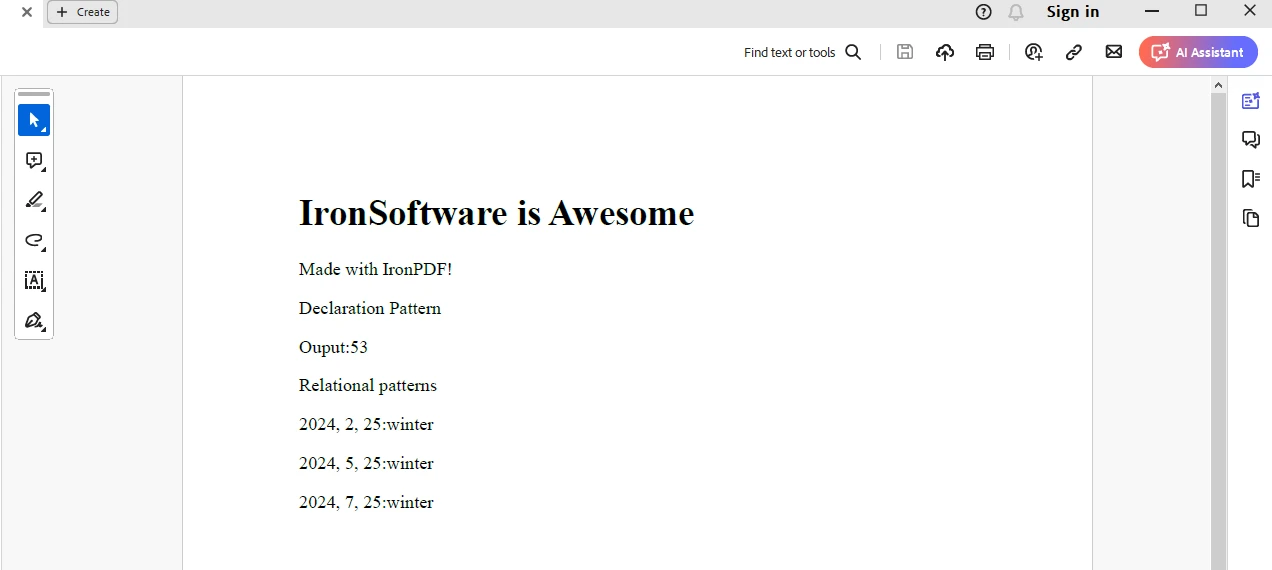
コードの詳細
ここでは、IronPDF の ChromePdfRenderer クラス を使用して HTML 文字列を PDF ドキュメントに保存しています。 出力は"output.pdf"ドキュメントに保存されます。
試用ライセンス
IronPDFは試用ライセンスを通じて利用可能で、IronPDFライセンスページから取得できます。 ライセンスキーをメールに届けるためにメールIDを提供してください。
"IronPdf.LicenseKey": "<Your Key>""IronPdf.LicenseKey": "<Your Key>""IronPdf.LicenseKey" = "<Your Key>"ライセンスキーを上記のように appsettings.json ファイルに配置してください。
結論
C#のパターンマッチング式は、条件文、型チェック、オブジェクトの分解を簡潔で読みやすい方法で記述する強力で柔軟な方法を提供します。 パターンマッチングを利用することで、開発者はコードの明確さと保守性を向上させ、ボイラープレートと冗長性を減らすことができます。 型チェック、スイッチステートメントまたはデコンストラクションにかかわらず、パターンマッチング式はC#の幅広いプログラミングタスクに取り組むための多用途のツールセットを提供します。
結論として、パターンマッチング式を習得することは、C#プログラミングスキルを大幅に向上させ、よりクリーンで表現力豊かなコードを書くことができ、理解しやすく保守しやすくなります。 IronPDFのHTMLからPDFへの生成能力についても取り上げ、PDFドキュメントを生成するために活用できます。
よくある質問
コードの読みやすさを向上させるために C# でパターンマッチングをどのように使用できますか?
C# のパターンマッチングを使用すると、開発者はより簡潔で表現豊かなコードを書くことができ、条件文をより明確で理解しやすくします。これにより、コードブロックの複雑さを軽減することで、読みやすさと保守性が向上します。
C# で利用可能なパターンマッチング式にはどのような種類がありますか?
C# は is 式、switch ステートメント、および switch 式など、さまざまなパターンマッチング式をサポートしています。各タイプは、式を評価し、マッチングパターンに基づいてコードを実行するための異なる方法を提供します。
C# を使用して PDF ドキュメントを生成するにはどうすればよいですか?
IronPDF という Iron Software のライブラリを使用すると、C# で PDF ドキュメントを生成できます。HTML コンテンツを PDF に変換でき、NuGet を介して簡単にインストールでき、幅広い PDF 生成機能を提供します。
C# パターンマッチングにおける宣言と型のパターンとは何ですか?
C# の宣言と型のパターンは、式の実行時の型が指定された型と一致するかどうかをチェックし、一致が成功した場合に新しいローカル変数を宣言することを可能にし、型安全な操作を促進します。
C# の定数パターンはどのように機能しますか?
C# の定数パターンは、整数や文字列のような特定の定数値と式が等しいかどうかをチェックし、一致した場合は特定のロジックを実行して、直接的な定数値比較を可能にします。
C# の関係パターンの目的は何ですか?
C# の関係パターンは、<、>、<=、>= のような関係演算子を使用して定数と式を比較することを可能にします。これは、コード内で簡潔な範囲チェックを実装するのに役立ちます。
C# で論理パターンをどのように適用できますか?
C# の論理パターンは、and、or、not や他の論理演算子を使用して他のパターンを組み合わせ、複数の基準を同時に評価できる複雑なパターンマッチング条件を可能にします。
C# のディスカードパターンとは何で、いつ使用されますか?
C# のディスカードパターンは、_ で表され、null を含む任意の式と一致し、switch 式などの特定の値を無視する必要がある状況で一般的に使用されます。
C# でプロパティパターンをどのように利用できますか?
C# のプロパティパターンは、開発者がオブジェクトのプロパティやフィールドをネストされたパターンと一致させることを可能にし、オブジェクトの構造を深くチェックしながら、明確で簡潔なコードを維持する方法を提供します。










 無料で始めましょう
 無料で始めましょう
 無料ライブデモを予約
















