




已更新 2026年4月23日
在 .NET 中用 Microsoft.Extensions.AI 簡化 LLM 整合
AI 正在改變軟體開發,但將大型語言模型 (LLM) 整合到 .NET 中一直很複雜。利用 IronPdf.AI 將 AI 整合推向更遠,為 .NET 應用程式帶來由 OpenAI 驅動的 PDF 解析、資料擷取和內容總結。
閱讀更多

C#中的模式匹配是一項強大的功能,首次在C# 7.0中引入,之後在隨後的版本中進一步擴展。 它允許開發者在處理條件語句、型別檢查和物件解構時,撰寫更為簡潔和富於表現力的程式碼。
模式匹配表達式提供了一種靈活和直觀的方法,以比對值與模式並執行相應的程式碼塊。 在本文中,我們將探討C#中模式匹配表達式的複雜性,包含語法、使用案例和程式碼範例。 本文結尾,我們還將稍微探討來自Iron Software的IronPDF PDF生成庫,以便在C#應用程式中動態生成PDF文件。
C#程式碼中的模式匹配具有許多優勢:
以下表達式支持模式匹配:
is 表達式switch 語句switch 表達式以下模式可用於與構造匹配:
聲明和型別模式是在C#中檢查表達式運行時型別與給定型別相容性的基本工具。 通過聲明模式,您可以同時檢查相容性並聲明新的局部變數。 請考慮以下範例:
object greeting = "Iron Software is Awesome!";
if (greeting is string message)
{
    Console.WriteLine(message.ToLower());  // output: iron software is awesome!
}Dim greeting As Object = "Iron Software is Awesome!"
Dim tempVar As Boolean = TypeOf greeting Is String
Dim message As String = If(tempVar, DirectCast(greeting, String), Nothing)
If tempVar Then
Console.WriteLine(message.ToLower()) ' output: iron software is awesome!
End If在此,聲明模式確保如果表達式message,從而啟用後續操作。
當以下任何一種情況成立時,聲明模式就有效:
T。T。T的可空值型別。T的裝箱或拆箱轉換。請考慮以下演示上述情況的範例:
int? nullableX = 8;
int y = 45;
object boxedy = y;
if (nullableX is int a && boxedy is int b)
{
    Console.WriteLine(a + b);  // output: 53
}Dim nullableX? As Integer = 8
Dim y As Integer = 45
Dim boxedy As Object = y
Dim tempVar As Boolean = TypeOf boxedy Is Integer
Dim b As Integer = If(tempVar, DirectCast(boxedy, Integer), Nothing)
Dim tempVar2 As Boolean = TypeOf nullableX Is Integer
Dim a As Integer = If(tempVar2, CInt(nullableX), Nothing)
If tempVar2 AndAlso tempVar Then
Console.WriteLine(a + b) ' output: 53
End If在此,int。
當您只需要檢查表達式的型別而不需要聲明新的變數時,您可以使用丟棄_,如下例所示:
public static decimal CalculateToll(Vehicle vehicle) => vehicle switch
{
    Bus _ => 4.00m,
    Motor _ => 8.50m,
    null => throw new ArgumentNullException(nameof(vehicle)),
    _ => throw new ArgumentException("Unknown type of a vehicle", nameof(vehicle)),
};'INSTANT VB TODO TASK: The following 'switch expression' was not converted by Instant VB:
'public static decimal CalculateToll(Vehicle vehicle) => vehicle switch
'{
' Bus _ => 4.00m,
' Motor _ => 8.50m,
' null => throw new ArgumentNullException(nameof(vehicle)),
' _ => throw new ArgumentException("Unknown type of a vehicle", nameof(vehicle)),
'};在這段程式碼片段中,Vehicle匹配的型別的佔位符。
聲明和型別模式都確保表達式在模式匹配之前是非空的。 您可以使用否定的空常量模式檢查非空,如下所示:
if (inputVal is not null)
{
    // ...
}If inputVal IsNot Nothing Then
' ...
End If此否定確保inputVal在進行進一步操作之前不是空值。
通過在C#程式碼中利用聲明和型別模式,您可以提高可讀性,減少程式碼行數,更有效地表達算法。 這些模式提供了一種簡潔而富有表現力的方法來處理基於型別的邏輯,提高您的程式碼庫的可維護性。
常量模式用於驗證表達式結果是否符合特定常量值。 請考慮以下範例:
public static decimal GetGroupTicketPrice(int visitorCount) => visitorCount switch
{
1 => 2.0m,
2 => 10.0m,
3 => 25.0m,
4 => 60.0m,
0 => 0.0m,
_ => throw new ArgumentException($"Not supported number of visitors: {visitorCount}", nameof(visitorCount)),
};Dim tempVar As Decimal
Select Case visitorCount
Case 1
tempVar = 2.0D
Case 2
tempVar = 10.0D
Case 3
tempVar = 25.0D
Case 4
tempVar = 60.0D
Case 0
tempVar = 0.0D
Case Else
'INSTANT VB TODO TASK: Throw expressions are not converted by Instant VB:
'ORIGINAL LINE: tempVar = throw new ArgumentException(string.Format("Not supported number of visitors: {0}", visitorCount), nameof(visitorCount));
tempVar = throw New ArgumentException($"Not supported number of visitors: {visitorCount}", NameOf(visitorCount))
End Select
'INSTANT VB TODO TASK: Local functions are not converted by Instant VB:
'public static decimal GetGroupTicketPrice(int visitorCount)
'{
' Return tempVar;
'}在此,常量模式檢查visitorCount是否符合指定的任何常量值並返回相應的票價。
在常量模式中,您可以使用各種型別的常量表達式,例如:
false)。null.型別ReadOnlySpan<char>的表達式可以匹配常量字串。
要檢查null,請使用如下的常量模式:
if (inputVal is null)
{
return;
}If inputVal Is Nothing Then
Return
End If在此,模式確保inputVal在進行進一步操作之前是空值。
您還可以使用否定的空常量模式來確認非空值:
if (inputVal is not null)
{
    // ...
}
If inputVal IsNot Nothing Then
' ...
End If此模式驗證inputVal不是空的,允許安全地執行後續操作。
通過在C#程式碼中加入常量模式,您可以有效處理需要匹配特定常量值的情況,從而提高程式碼的清晰度和可維護性。
關係模式提供了一種將表達式結果與常量比較的方法。 請考慮以下範例:
Console.WriteLine(Classify(20));  // output: Too high
Console.WriteLine(Classify(double.NaN));  // output: Unknown
Console.WriteLine(Classify(4));  // output: Acceptable

static string Classify(double measurement) => measurement switch
{
    < -4.0 => "Too low",
    > 10.0 => "Too high",
    double.NaN => "Unknown",
    _ => "Acceptable",
};Console.WriteLine(Classify(20)) ' output: Too high
Console.WriteLine(Classify(Double.NaN)) ' output: Unknown
Console.WriteLine(Classify(4)) ' output: Acceptable
'INSTANT VB TODO TASK: The following 'switch expression' was not converted by Instant VB:
'static string Classify(double measurement) => measurement switch
'{
' < -4.0 => "Too low",
' > 10.0 => "Too high",
' double.NaN => "Unknown",
' _ => "Acceptable",
'};在此,關係模式將measurement與特定的閾值進行比較以確定其分類。
關係模式的右側必須是常量表達式,可能是整數、浮點數、enum型別。 可以在左側使用>=運算符。
若要匹配某範圍內的表達式結果,可以使用連接的"和"模式,如下所示:
Console.WriteLine(GetCalendarSeason(new DateTime(2024, 3, 12)));  // output: spring
Console.WriteLine(GetCalendarSeason(new DateTime(2024, 7, 12)));  // output: summer
Console.WriteLine(GetCalendarSeason(new DateTime(2024, 2, 12)));  // output: winter

static string GetCalendarSeason(DateTime date) => date.Month switch
{
    >= 3 and < 6 => "spring",
    >= 6 and < 9 => "summer",
    >= 9 and < 12 => "autumn",
    12 or (>= 1 and <3) => "winter",
    _ => throw new ArgumentOutOfRangeException(nameof(date), $"Date with unexpected month: {date.Month}."),
};Console.WriteLine(GetCalendarSeason(New DateTime(2024, 3, 12))) ' output: spring
Console.WriteLine(GetCalendarSeason(New DateTime(2024, 7, 12))) ' output: summer
Console.WriteLine(GetCalendarSeason(New DateTime(2024, 2, 12))) ' output: winter
'INSTANT VB TODO TASK: The following 'switch expression' was not converted by Instant VB:
'static string GetCalendarSeason(DateTime date) => date.Month switch
'{
' >= 3 and < 6 => "spring",
' >= 6 and < 9 => "summer",
' >= 9 and < 12 => "autumn",
' 12 or (>= 1 and <3) => "winter",
' _ => throw new ArgumentOutOfRangeException(nameof(date), $"Date with unexpected month: {date.Month}."),
'};此摘錄描述了如何利用連接的"和"模式根據月份落在特定範圍內來確定日曆季節。 它還提到關係模式提供了一種簡潔而富有表現力的方式來將表達式結果與常量進行比較,從而提高程式碼的清晰度和可維護性。
丟棄模式由null。 請參考以下範例:
Console.WriteLine(GetDiscountInPercent(DayOfWeek.Friday));  // output: 5.0
Console.WriteLine(GetDiscountInPercent(null));  // output: 0.0
Console.WriteLine(GetDiscountInPercent((DayOfWeek)10));  // output: 0.0

static decimal GetDiscountInPercent(DayOfWeek? dayOfWeek) => dayOfWeek switch
{
    DayOfWeek.Monday => 0.5m,
    DayOfWeek.Tuesday => 12.5m,
    DayOfWeek.Wednesday => 7.5m,
    DayOfWeek.Thursday => 12.5m,
    DayOfWeek.Friday => 5.0m,
    DayOfWeek.Saturday => 2.5m,
    DayOfWeek.Sunday => 2.0m,
    _ => 0.0m,
};Console.WriteLine(GetDiscountInPercent(DayOfWeek.Friday)) ' output: 5.0
Console.WriteLine(GetDiscountInPercent(Nothing)) ' output: 0.0
Console.WriteLine(GetDiscountInPercent(CType(10, DayOfWeek))) ' output: 0.0
Dim tempVar As Decimal
Select Case dayOfWeek
Case DayOfWeek.Monday
tempVar = 0.5D
Case DayOfWeek.Tuesday
tempVar = 12.5D
Case DayOfWeek.Wednesday
tempVar = 7.5D
Case DayOfWeek.Thursday
tempVar = 12.5D
Case DayOfWeek.Friday
tempVar = 5.0D
Case DayOfWeek.Saturday
tempVar = 2.5D
Case DayOfWeek.Sunday
tempVar = 2.0D
Case Else
tempVar = 0.0D
End Select
'INSTANT VB TODO TASK: Local functions are not converted by Instant VB:
'static decimal GetDiscountInPercent(System.Nullable(Of DayOfWeek) dayOfWeek)
'{
' Return tempVar;
'}在上述丟棄模式範例中,它處理所有可能的輸入值。 一周中的所有天數都得到管理,並提供了預設值。 借此,處理了所有可能的值。 丟棄模式不能作為switch語句中的模式使用。 在此類情況下,可以將var _,以匹配任何表達式。 然而,在switch表達式中允許使用丟棄模式。 欲了解更多詳情,請參閱功能提案說明中的丟棄模式部分。
C#中的邏輯模式提供了強大的模式匹配工具,包括否定、連接和分離,這使得匹配條件更加靈活和富有表現力。
not模式)否定模式由not表示,當否定模式不匹配表達式時匹配一個表達式。 這對於檢查表達式是否為非空特別有用,如下所示:
if (input is not null)
{
    // ...
}If input IsNot Nothing Then
' ...
End If在此,如果input不是空值,則執行程式碼塊。
and模式)使用and關鍵字的連接模式,當兩個模式都匹配表達式時匹配一個表達式。 這允許結合多個條件,如以下範例所示:
Console.WriteLine(Classify(13));    // output: High
Console.WriteLine(Classify(-100));  // output: Too low
Console.WriteLine(Classify(5.7));   // output: Acceptable

static string Classify(double measurement) => measurement switch
{
    < -40.0 => "Too low",
    >= -40.0 and < 0 => "Low",
    >= 0 and < 10.0 => "Acceptable",
    >= 10.0 and < 20.0 => "High",
    >= 20.0 => "Too high",
    double.NaN => "Unknown",
};Console.WriteLine(Classify(13)) ' output: High
Console.WriteLine(Classify(-100)) ' output: Too low
Console.WriteLine(Classify(5.7)) ' output: Acceptable
'INSTANT VB TODO TASK: The following 'switch expression' was not converted by Instant VB:
'static string Classify(double measurement) => measurement switch
'{
' < -40.0 => "Too low",
' >= -40.0 and < 0 => "Low",
' >= 0 and < 10.0 => "Acceptable",
' >= 10.0 and < 20.0 => "High",
' >= 20.0 => "Too high",
' double.NaN => "Unknown",
'};在此範例中,measurement根據其值範圍進行分類。
or模式)使用or關鍵字的分離模式,當其中一個模式匹配表達式時匹配一個表達式。 這允許處理多個可能的條件,如下所示:
Console.WriteLine(GetCalendarSeason(new DateTime(2021, 1, 19)));  // output: winter
Console.WriteLine(GetCalendarSeason(new DateTime(2021, 10, 9)));  // output: autumn
Console.WriteLine(GetCalendarSeason(new DateTime(2021, 5, 11)));  // output: spring

static string GetCalendarSeason(DateTime date) => date.Month switch
{
    3 or 4 or 5 => "spring",
    6 or 7 or 8 => "summer",
    9 or 10 or 11 => "autumn",
    12 or 1 or 2 => "winter",
    _ => throw new ArgumentOutOfRangeException(nameof(date), $"Date with unexpected month: {date.Month}."),
};Console.WriteLine(GetCalendarSeason(New DateTime(2021, 1, 19))) ' output: winter
Console.WriteLine(GetCalendarSeason(New DateTime(2021, 10, 9))) ' output: autumn
Console.WriteLine(GetCalendarSeason(New DateTime(2021, 5, 11))) ' output: spring
Dim tempVar As String
Select Case [date].Month
Case 3, 4, 5
tempVar = "spring"
Case 6, 7, 8
tempVar = "summer"
Case 9, 10, 11
tempVar = "autumn"
Case 12, 1, 2
tempVar = "winter"
Case Else
'INSTANT VB TODO TASK: Throw expressions are not converted by Instant VB:
'ORIGINAL LINE: tempVar = throw new ArgumentOutOfRangeException(nameof(date), string.Format("Date with unexpected month: {0}.", date.Month));
tempVar = throw New ArgumentOutOfRangeException(NameOf([date]), $"Date with unexpected month: {[date].Month}.")
End Select
'INSTANT VB TODO TASK: Local functions are not converted by Instant VB:
'static string GetCalendarSeason(DateTime @date)
'{
' Return tempVar;
'}在此,根據提供日期的月份確定日曆季節。
這些模式組合器可以反复使用以建立更復雜和精確的匹配條件,增強您的程式碼的靈活性和可讀性。
屬性模式使能夠將表達式的屬性或字段與巢狀模式匹配。 以下程式碼片段中可以看到一個例子:
static bool IsConferenceDay(DateTime date) => date is { Year: 2020, Month: 5, Day: 19 or 20 or 21 };Shared Function IsConferenceDay(ByVal [date] As DateTime) As Boolean
'INSTANT VB TODO TASK: The following 'is' operator pattern is not converted by Instant VB:
Return [date] is { Year: 2020, Month: 5, Day: 19 [or] 20 [or] 21 }
End Function在此,屬性模式確保提供的日期對應於指定的會議日之一。
您還可以在屬性模式中加入運行時型別檢查和變數聲明,如下所示:
static string TakeFive(object input) => input switch
{
    string { Length: >= 5 } s => s.Substring(0, 5),
    string s => s,
    ICollection<char> { Count: >= 5 } symbols => new string(symbols.Take(5).ToArray()),
    ICollection<char> symbols => new string(symbols.ToArray()),
    null => throw new ArgumentNullException(nameof(input)),
    _ => throw new ArgumentException("Unsupported input type."),
};'INSTANT VB TODO TASK: The following 'switch expression' was not converted by Instant VB:
'static string TakeFive(object input) => input switch
'{
' string { Length: >= 5 } s => s.Substring(0, 5),
' string s => s,
' ICollection<char> { Count: >= 5 } symbols => new string(symbols.Take(5).ToArray()),
' ICollection<char> symbols => new string(symbols.ToArray()),
' null => throw new ArgumentNullException(nameof(input)),
' _ => throw new ArgumentException("Unsupported input type."),
'};在此,屬性模式用於處理字串和字元集合,確保根據其屬性進行適當處理。
在C#中,位置模式允許解構表達式結果並將結果值與相應的巢狀模式匹配。 例如:
public readonly struct Point
{
    public int X { get; }
    public int Y { get; }
    public Point(int x, int y) => (X, Y) = (x, y);
    public void Deconstruct(out int x, out int y) => (x, y) = (X, Y);
}

static string Classify(Point point) => point switch
{
    (0, 0) => "Origin",
    (1, 0) => "Positive X basis end",
    (0, 1) => "Positive Y basis end",
    _ => "Just a point",
};'INSTANT VB WARNING: VB has no equivalent to the C# readonly struct:
'ORIGINAL LINE: public readonly struct Point
Public Structure Point
Public ReadOnly Property X() As Integer
Public ReadOnly Property Y() As Integer
Public Sub New(ByVal x As Integer, ByVal y As Integer)
'INSTANT VB TODO TASK: VB has no equivalent to the C# deconstruction assignments:
(X, Y) = (x, y)
End Sub
Public Sub Deconstruct(<System.Runtime.InteropServices.Out()> ByRef x As Integer, <System.Runtime.InteropServices.Out()> ByRef y As Integer)
'INSTANT VB TODO TASK: VB has no equivalent to the C# deconstruction assignments:
(x, y) = (X, Y)
End Sub
End Structure
'INSTANT VB TODO TASK: The following 'switch expression' was not converted by Instant VB:
'static string Classify(Point point) => point switch
'{
' (0, 0) => "Origin",
' (1, 0) => "Positive X basis end",
' (0, 1) => "Positive Y basis end",
' _ => "Just a point",
'};在此範例中,位置模式用於根據其座標分類點。
此外,您可以在屬性模式中引用巢狀的屬性或字段,稱為擴展屬性模式,首次在C# 10中引入:
static bool IsAnyEndOnXAxis(Segment segment) =>
segment is { Start.Y: 0 } or { End.Y: 0 };Shared Function IsAnyEndOnXAxis(ByVal segment As Segment) As Boolean
'INSTANT VB TODO TASK: The following 'is' operator pattern is not converted by Instant VB:
Return segment is { Start.Y: 0 } [or] { [End].Y: 0 }
End Function此功能增強了屬性模式的靈活性,允許直接存取巢狀屬性。
這些模式提供了強大的機制來處理復雜的資料結構,並改進了程式碼的可讀性和表達性。
Var模式可讓您匹配任何型別。 這在捕獲布林表達式中的中間結果或需要在switch情況中的多次檢查時尤其有用。
以下是一個範例,展示了在布林表達式中使用Var模式:
static bool IsAcceptable(int id, int absLimit) =>
    SimulateDataFetch(id) is var results
    && results.Min() >= -absLimit
    && results.Max() <= absLimit;

static int [] SimulateDataFetch(int id)
{
    var rand = new Random();
    return Enumerable
               .Range(start: 0, count: 5)
               .Select(s => rand.Next(minValue: -10, maxValue: 11))
               .ToArray();
}Shared Function IsAcceptable(ByVal id As Integer, ByVal absLimit As Integer) As Boolean
Dim tempVar As Boolean = TypeOf SimulateDataFetch(id) Is var
Dim results = If(tempVar, CType(SimulateDataFetch(id), var), Nothing)
Return tempVar AndAlso results.Min() >= -absLimit AndAlso results.Max() <= absLimit
End Function
Shared Function SimulateDataFetch(ByVal id As Integer) As Integer()
Dim rand = New Random()
Return Enumerable.Range(start:= 0, count:= 5).Select(Function(s) rand.Next(minValue:= -10, maxValue:= 11)).ToArray()
End Function在此範例中,results中,允許根據其屬性進行後續計算。
此外,Var模式可以在switch表達式或語句中使用,以使程式碼更簡潔且更可讀。 以下是一個在switch情況守衛中使用Var模式的範例:
public record Point(int X, int Y);

static Point Transform(Point point) => point switch
{
    var (x, y) when x < y => new Point(-x, y),
    var (x, y) when x > y => new Point(x, -y),
    var (x, y) => new Point(x, y),
};

static void TestTransform()
{
    Console.WriteLine(Transform(new Point(1, 2)));  // output: Point { X = -1, Y = 2 }
    Console.WriteLine(Transform(new Point(5, 2)));  // output: Point { X = 5, Y = -2 }
}'INSTANT VB TODO TASK: C# 'records' are not converted by Instant VB:
'public record Point(int X, int Y)
'INSTANT VB TODO TASK: The following 'switch expression' was not converted by Instant VB:
'static Point Transform(Point point) => point switch
'{
' var (x, y) when x < y => new Point(-x, y),
' var (x, y) when x > y => new Point(x, -y),
' var (x, y) => new Point(x, y),
'};
Shared Sub TestTransform()
Console.WriteLine(Transform(New Point(1, 2))) ' output: Point { X = -1, Y = 2 }
Console.WriteLine(Transform(New Point(5, 2))) ' output: Point { X = 5, Y = -2 }
End Sub在此範例中,Var模式(x, y)捕獲點的坐標,允許根據其值進行不同的轉換。
在Var模式中,所聲明變數的型別是從被匹配的表達式的編譯時型別推斷出的。
Var模式提供了一種便捷的方法來處理各種場景,其中表達式的具體型別預先未知,從而提高程式碼的清晰度和靈活性。
IronPDF Document Rendering是來自Iron Software的庫,專注於PDF文件生成。 首先的步驟是從NuGet Package管理器或Visual Studio Package Manager中安裝此庫。
# To install from the NuGet Package Manager Console
Install-Package IronPdf下圖顯示了如何從Visual Studio 安裝指南中安裝。

在以下程式碼中,我們將看到如何生成一個簡單的PDF文件:
using IronPdf;

namespace IronPatterns
{
    class Program
    {
        static void Main()
        {
            Console.WriteLine("-----------Iron Software-------------");
            var renderer = new ChromePdfRenderer(); // var pattern
            var content = " <h1> Iron Software is Awesome </h1> Made with IronPDF!";

            // Declaration Pattern
            int? nullableX = 8;
            int y = 45;
            object boxedy = y;
            content += "<p>Declaration Pattern</p>";
            if (nullableX is int a && boxedy is int b)
            {
                Console.WriteLine(a + b); // output: 53
                content += $"<p>Output: {(a + b)}</p>";
            }

            // Relational patterns
            content += "<p>Relational patterns</p>";
            var season1 = GetCalendarSeason(new DateTime(2024, 2, 25));
            Console.WriteLine(season1);
            content += $"<p>2024, 2, 25: {season1}</p>";
            var season2 = GetCalendarSeason(new DateTime(2024, 5, 25));
            Console.WriteLine(season2);
            content += $"<p>2024, 5, 25: {season2}</p>";
            var season3 = GetCalendarSeason(new DateTime(2024, 7, 25));
            Console.WriteLine(season3);
            content += $"<p>2024, 7, 25: {season3}</p>";

            var pdf = renderer.RenderHtmlAsPdf(content);
            pdf.SaveAs("output.pdf"); // Saves our PdfDocument object as a PDF
        }

        static string GetCalendarSeason(DateTime date) => date.Month switch
        {
            >= 3 and < 6 => "spring",
            >= 6 and < 9 => "summer",
            >= 9 and < 12 => "autumn",
            12 or (>= 1 and < 3) => "winter",
            _ => throw new ArgumentOutOfRangeException(nameof(date), $"Date with unexpected month: {date.Month}."),
        };
    }
}Imports IronPdf
Namespace IronPatterns
Friend Class Program
Shared Sub Main()
Console.WriteLine("-----------Iron Software-------------")
Dim renderer = New ChromePdfRenderer() ' var pattern
Dim content = " <h1> Iron Software is Awesome </h1> Made with IronPDF!"
' Declaration Pattern
Dim nullableX? As Integer = 8
Dim y As Integer = 45
Dim boxedy As Object = y
content &= "<p>Declaration Pattern</p>"
Dim tempVar As Boolean = TypeOf boxedy Is Integer
Dim b As Integer = If(tempVar, DirectCast(boxedy, Integer), Nothing)
Dim tempVar2 As Boolean = TypeOf nullableX Is Integer
Dim a As Integer = If(tempVar2, CInt(nullableX), Nothing)
If tempVar2 AndAlso tempVar Then
Console.WriteLine(a + b) ' output: 53
content &= $"<p>Output: {(a + b)}</p>"
End If
' Relational patterns
content &= "<p>Relational patterns</p>"
Dim season1 = GetCalendarSeason(New DateTime(2024, 2, 25))
Console.WriteLine(season1)
content &= $"<p>2024, 2, 25: {season1}</p>"
Dim season2 = GetCalendarSeason(New DateTime(2024, 5, 25))
Console.WriteLine(season2)
content &= $"<p>2024, 5, 25: {season2}</p>"
Dim season3 = GetCalendarSeason(New DateTime(2024, 7, 25))
Console.WriteLine(season3)
content &= $"<p>2024, 7, 25: {season3}</p>"
Dim pdf = renderer.RenderHtmlAsPdf(content)
pdf.SaveAs("output.pdf") ' Saves our PdfDocument object as a PDF
End Sub
'INSTANT VB TODO TASK: The following 'switch expression' was not converted by Instant VB:
' static string GetCalendarSeason(DateTime date) => date.Month switch
' {
' >= 3 and < 6 => "spring",
' >= 6 and < 9 => "summer",
' >= 9 and < 12 => "autumn",
' 12 or (>= 1 and < 3) => "winter",
' _ => throw new ArgumentOutOfRangeException(nameof(date), $"Date with unexpected month: {date.Month}."),
' };
End Class
End Namespace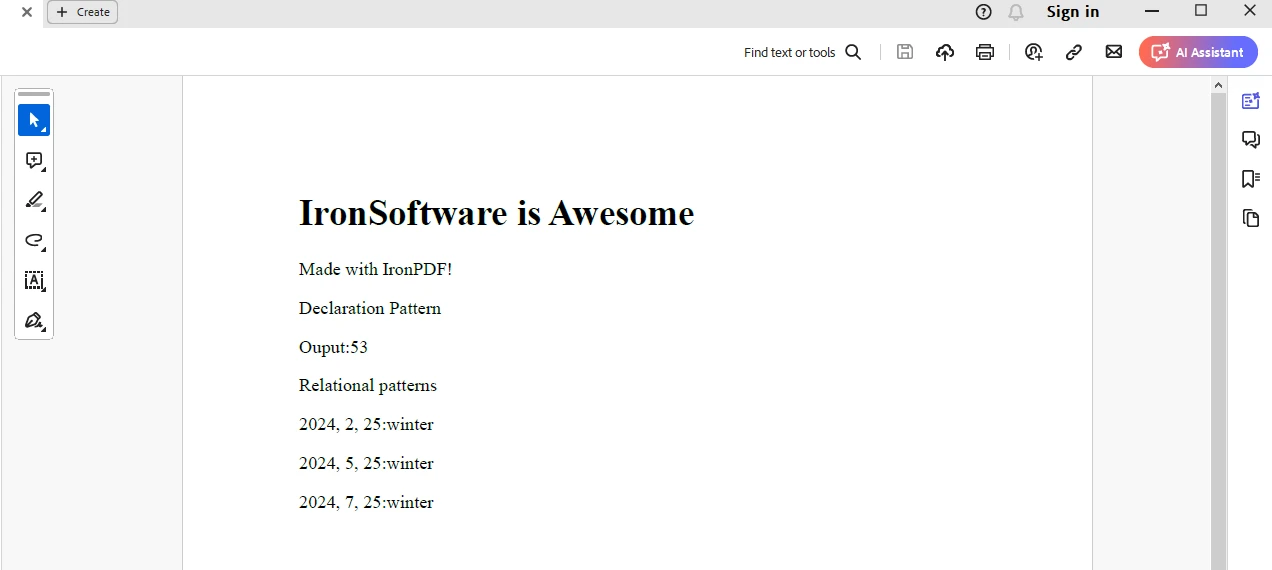
此處我們使用IronPDF的ChromePdfRenderer類來將HTML字串保存為PDF文件。 輸出保存到"output.pdf"文件中。
IronPDF可與從IronPDF授權頁面獲得的試用授權一起使用。 提供電子郵件地址以生成授權密鑰並發送至您的郵箱。
"IronPdf.LicenseKey": "<Your Key>""IronPdf.LicenseKey" = "<Your Key>"將授權密鑰放置在appsettings.json文件中,如上所示。
C#中的模式匹配表達式提供了一種強大而靈活的方式以精簡且易於理解的方法來寫條件語句、型別檢查和物件解構。 通過利用模式匹配,開發者可以提高程式碼的清晰度和可維護性,同時減少樣板程式碼和冗餘。 無論是型別檢查、switch語句還是解構,模式匹配表達式都為解決C#中各種編程任務提供了一套多用途的工具。
總之,精通模式匹配表達式可以極大地提高您的C#編程技能,使您能夠撰寫更清晰、更富有表現力的程式碼,且更易於理解和維護。 我們還涵蓋了IronPDF的HTML轉PDF生成能力,可以用於生成PDF文件。

Jacob Mellor是Iron Software的首席技術官,一位在C# PDF技術上開創先河的遠見工程師。作為Iron Software核心程式碼庫的原開發者,他從創立以來就一直在塑造公司的產品架構,與首席執行官Cameron Rimington一起將公司轉變為服務於NASA、特斯拉和全球政府公司的50多名人員的公司。



IronPDF 是 IRONSUITE 的一部分
10 款適用於辦公室文件的 .NET API 產品

當您需要您的PDF看起來像HTML一樣快速。












