


C# Span(開発者向けの動作方法)

Span は、System 名前空間の Span 構造体の一部として C# 7.2 で導入された型です。 これは任意のメモリの連続した領域を表現するために設計されています。 管理されているヒープのような配列やコレクションとは異なり、Span はスタックメモリやそれが指すメモリ領域の所有権を持ちません。 それどころか、既存のメモリブロック上の軽量なビューを提供します。 この特性により、追加のオーバーヘッドを発生させることなく、効率的にメモリバッファを操作する必要があるシナリオにおいて特に強力です。 この記事の後半では、Iron Software の IronPDF ライブラリ の紹介も見ていきます。
Span の主な特徴
1. メモリ管理
C# における Span は、従来のヒープ割り当てに頼ることなく、メモリを直接操作することを可能にします。 既存の配列や他のメモリソースからメモリのスライスを作成する方法を提供し、追加のメモリコピーを排除します。
2. ゼロコピー抽象
C# の Span の際立った特徴の一つは、ゼロコピーの抽象化です。 データを重複させる代わりに、Span は既存のメモリを効率的に参照する方法を提供します。 これは、大量のデータをコピーすることが現実的ではないか、コストがかかりすぎるシナリオで特に有益です。
3. ポインタのような操作
C# は伝統的にハイレベルで安全な言語ですが、Span により、C または C++ などの言語でポインタを扱うことに似た低レベルなメモリ操作が導入されます。 開発者は、安全性と C# の管理された性質を犠牲にすることなく、ポインタのような操作を行うことができます。
4. 不変の性質
低レベルのメモリアクセスが可能であるにもかかわらず、C# の Span は不変です。 これは、メモリの操作が可能である一方で、意図しない変更を防止することによって安全性を保証します。
例
using System;

class Program
{
    static void Main()
    {
        int[] array = { 1, 2, 3, 4, 5 };

        // Create a span that points to the entire array
        Span<int> span = array;

        // Modify the data using the span
        span[2] = 10;

        // Print the modified array
        foreach (var item in array)
        {
            Console.WriteLine(item);
        }
    }
}
using System;
class Program
{
static void Main()
{
int[] array = { 1, 2, 3, 4, 5 };
// Create a span that points to the entire array
Span<int> span = array;
// Modify the data using the span
span[2] = 10;
// Print the modified array
foreach (var item in array)
{
Console.WriteLine(item);
}
}
}Imports System
Friend Class Program
Shared Sub Main()
Dim array() As Integer = { 1, 2, 3, 4, 5 }
' Create a span that points to the entire array
Dim span As Span(Of Integer) = array
' Modify the data using the span
span(2) = 10
' Print the modified array
For Each item In array
Console.WriteLine(item)
Next item
End Sub
End ClassReadOnlySpan
Spanは可変で、基になるデータの変更を許可しますが、ReadOnlySpanはメモリの不変ビューです。 連続したメモリ領域への読み取り専用インターフェイスを提供し、データの読み取りのみが必要で修正が不要なシナリオに適しています。
ここではいくつかの重要なポイントを紹介します。
1. 読み取り専用ビュー
その名の通り、ReadOnlySpanを使用すると、メモリブロックの読み取り専用ビューを作成できます。 これは、ReadOnlySpanを介して要素を変更できないことを意味します。
2. メモリ表現
Spanと同様に、ReadOnlySpanもポイントするメモリを所有していません。 既存のメモリに言及し、配列、スタック割り当てメモリ、またはネイティブメモリを指すことができます。
3. パフォーマンスの利点
Spanと同様に、ReadOnlySpanは、特に大量のデータを扱う場合に、従来のコレクションタイプに比べてより良いパフォーマンスを提供できます。これにより、コピーの必要が減ります。
4. 境界チェックなし
Spanと同様に、ReadOnlySpanも境界チェックを行いません。 基礎となるメモリの境界内に操作が留まるようにする責任は開発者にあります。
5. 配列スライスとの使用
ReadOnlySpanはスライシングをサポートし、元のメモリの部分を参照するサブスパンを作成できます。
例
using System;

class Program
{
    static void Main()
    {
        int[] array = { 1, 2, 3, 4, 5 };

        // Create a read-only span that points to the entire array
        ReadOnlySpan<int> readOnlySpan = array;

        // Access and print the data through the read-only span
        foreach (var item in readOnlySpan)
        {
            Console.WriteLine(item);
        }

        // Note: The following line would result in a compilation error since readOnlySpan is read-only.
        // readOnlySpan[2] = 10;
    }
}
using System;
class Program
{
static void Main()
{
int[] array = { 1, 2, 3, 4, 5 };
// Create a read-only span that points to the entire array
ReadOnlySpan<int> readOnlySpan = array;
// Access and print the data through the read-only span
foreach (var item in readOnlySpan)
{
Console.WriteLine(item);
}
// Note: The following line would result in a compilation error since readOnlySpan is read-only.
// readOnlySpan[2] = 10;
}
}Imports System
Friend Class Program
Shared Sub Main()
Dim array() As Integer = { 1, 2, 3, 4, 5 }
' Create a read-only span that points to the entire array
Dim readOnlySpan As ReadOnlySpan(Of Integer) = array
' Access and print the data through the read-only span
For Each item In readOnlySpan
Console.WriteLine(item)
Next item
' Note: The following line would result in a compilation error since readOnlySpan is read-only.
' readOnlySpan[2] = 10;
End Sub
End ClassReadOnlySpan を作成して操作するさまざまな方法があります。 以下はいくつかの例です。
1. 文字列から ReadOnlySpan を作成する
string msg = "Hello, World!";
ReadOnlySpan<char> span1 = msg.AsSpan();
// Read-only manipulation
char firstChar = span1[0];
Console.WriteLine(firstChar); // Outputs: H
string msg = "Hello, World!";
ReadOnlySpan<char> span1 = msg.AsSpan();
// Read-only manipulation
char firstChar = span1[0];
Console.WriteLine(firstChar); // Outputs: HDim msg As String = "Hello, World!"
Dim span1 As ReadOnlySpan(Of Char) = msg.AsSpan()
' Read-only manipulation
Dim firstChar As Char = span1(0)
Console.WriteLine(firstChar) ' Outputs: H2. 部分文字列で作業する
ReadOnlySpan<char> に対して Slice を使用します
// Example usage of Slice method on ReadOnlySpan<char>
ReadOnlySpan<char> spanFromString = "Sample String".AsSpan();
ReadOnlySpan<char> substringSpan = spanFromString.Slice(7, 6); // Extracts 'String'
// Example usage of Slice method on ReadOnlySpan<char>
ReadOnlySpan<char> spanFromString = "Sample String".AsSpan();
ReadOnlySpan<char> substringSpan = spanFromString.Slice(7, 6); // Extracts 'String'' Example usage of Slice method on ReadOnlySpan<char>
Dim spanFromString As ReadOnlySpan(Of Char) = "Sample String".AsSpan()
Dim substringSpan As ReadOnlySpan(Of Char) = spanFromString.Slice(7, 6) ' Extracts 'String'3. 部分文字列をメソッドに渡す
ReadOnlySpan<char> をメソッドのパラメータとして渡します。
void ProcessSubstringfromReadOnlySpan(ReadOnlySpan<char> substring)
{
    // Perform operations on the substring
}

// Usage
ReadOnlySpan<char> spanFromString = "Sample String".AsSpan();
ProcessSubstringfromReadOnlySpan(spanFromString.Slice(7, 6));
void ProcessSubstringfromReadOnlySpan(ReadOnlySpan<char> substring)
{
// Perform operations on the substring
}
// Usage
ReadOnlySpan<char> spanFromString = "Sample String".AsSpan();
ProcessSubstringfromReadOnlySpan(spanFromString.Slice(7, 6));Private Sub ProcessSubstringfromReadOnlySpan(ByVal substring As ReadOnlySpan(Of Char))
' Perform operations on the substring
End Sub
' Usage
Private spanFromString As ReadOnlySpan(Of Char) = "Sample String".AsSpan()
ProcessSubstringfromReadOnlySpan(spanFromString.Slice(7, 6))4. 文字列内で検索する
文字列内を検索するための ReadOnlySpan<char> は IndexOf() を使用します。
ReadOnlySpan<char> stringSpan = "Hello, World!".AsSpan();
int index = stringSpan.IndexOf('W');
Console.WriteLine(index); // Outputs: 7
ReadOnlySpan<char> stringSpan = "Hello, World!".AsSpan();
int index = stringSpan.IndexOf('W');
Console.WriteLine(index); // Outputs: 7Dim stringSpan As ReadOnlySpan(Of Char) = "Hello, World!".AsSpan()
Dim index As Integer = stringSpan.IndexOf("W"c)
Console.WriteLine(index) ' Outputs: 75. メモリマップファイルの使用
ReadOnlySpan<char> はメモリマップファイルでより効率的です。
using System;
using System.IO.MemoryMappedFiles;

class Program
{
    static void ProcessData(ReadOnlySpan<byte> data)
    {
        // Process data directly from the memory-mapped file
    }

    static void Main()
    {
        using (var memmf = MemoryMappedFile.CreateFromFile("data.bin"))
        {
            using (var accessor = memmf.CreateViewAccessor())
            {
                byte[] buffer = new byte[accessor.Capacity];
                accessor.ReadArray(0, buffer, 0, buffer.Length);

                ReadOnlySpan<byte> dataSpan = new ReadOnlySpan<byte>(buffer);
                ProcessData(dataSpan);
            }
        }
    }
}
using System;
using System.IO.MemoryMappedFiles;
class Program
{
static void ProcessData(ReadOnlySpan<byte> data)
{
// Process data directly from the memory-mapped file
}
static void Main()
{
using (var memmf = MemoryMappedFile.CreateFromFile("data.bin"))
{
using (var accessor = memmf.CreateViewAccessor())
{
byte[] buffer = new byte[accessor.Capacity];
accessor.ReadArray(0, buffer, 0, buffer.Length);
ReadOnlySpan<byte> dataSpan = new ReadOnlySpan<byte>(buffer);
ProcessData(dataSpan);
}
}
}
}Imports System
Imports System.IO.MemoryMappedFiles
Friend Class Program
Private Shared Sub ProcessData(ByVal data As ReadOnlySpan(Of Byte))
' Process data directly from the memory-mapped file
End Sub
Shared Sub Main()
Using memmf = MemoryMappedFile.CreateFromFile("data.bin")
Using accessor = memmf.CreateViewAccessor()
Dim buffer(accessor.Capacity - 1) As Byte
accessor.ReadArray(0, buffer, 0, buffer.Length)
Dim dataSpan As New ReadOnlySpan(Of Byte)(buffer)
ProcessData(dataSpan)
End Using
End Using
End Sub
End Class6. 効率的な文字列操作
ReadOnlySpan<char> は効率的な文字列操作に使用できます。
Span<char> newSpan = new char[6];
ReadOnlySpan<char> spanFromString = "Sample String".AsSpan().Slice(7, 6);
spanFromString.CopyTo(newSpan);
Console.WriteLine(new string(newSpan)); // Outputs: String
Span<char> newSpan = new char[6];
ReadOnlySpan<char> spanFromString = "Sample String".AsSpan().Slice(7, 6);
spanFromString.CopyTo(newSpan);
Console.WriteLine(new string(newSpan)); // Outputs: StringDim newSpan As Span(Of Char) = New Char(5){}
Dim spanFromString As ReadOnlySpan(Of Char) = "Sample String".AsSpan().Slice(7, 6)
spanFromString.CopyTo(newSpan)
Console.WriteLine(New String(newSpan)) ' Outputs: String7. API への部分文字列の渡し
文字スパンで動作する外部ライブラリや API を使用する際。
void ExternalApiMethod(ReadOnlySpan<char> data)
{
    // Call the external API with the character span
}

// Usage
ReadOnlySpan<char> spanFromString = "Sample String".AsSpan();
ExternalApiMethod(spanFromString.Slice(7, 6));
void ExternalApiMethod(ReadOnlySpan<char> data)
{
// Call the external API with the character span
}
// Usage
ReadOnlySpan<char> spanFromString = "Sample String".AsSpan();
ExternalApiMethod(spanFromString.Slice(7, 6));Private Sub ExternalApiMethod(ByVal data As ReadOnlySpan(Of Char))
' Call the external API with the character span
End Sub
' Usage
Private spanFromString As ReadOnlySpan(Of Char) = "Sample String".AsSpan()
ExternalApiMethod(spanFromString.Slice(7, 6))ReadOnlySpan<char> は、特にメモリ割り当てやコピーを最小限に抑える必要があるシナリオで、文字列をより効率的に処理する方法を提供します。 パフォーマンス クリティカルなコードを最適化するための強力なツールであり、大量の文字列データを扱う場合に特に有益です。
Span の制限事項
C# の Span は多くの利点を持つ強力な機能ですが、特に連続メモリと非連続メモリの文脈において特定の制限や考慮事項があります。 これらの制限を探ってみましょう:
1. 連続メモリバッファ
1.1 自動メモリ管理なし
Span は指しているメモリを管理しません。 これは、基になる管理メモリが解放されるか、スコープ外になると、Spanの使用が未定義の動作や潜在的なクラッシュを引き起こすことを意味します。 開発者は、Spanを使用する際に基になるメモリが有効であることを確認する必要があります。
1.2 ガベージコレクションなし
Spanはメモリを所有しないため、ガーベジコレクションの対象にはなりません。 したがって、スタックに割り当てられたメモリや、Span自体よりも短いライフタイムを持つメモリを扱う際には注意が必要です。
1.3 境界チェックは無効
SpanとReadOnlySpanはデフォルトで境界チェックを行いません。 使用する際には無効なメモリアクセスを避けるために慎重に行う必要があります。 開発者は、Spanに対する操作が基になるメモリの境界内に収まっていることを手動で確認する必要があります。
1.4 非連続メモリのサポートなし
Spanは連続メモリで動作するように設計されています。 不連続メモリを持っている場合や、より複雑なデータ構造を表す必要がある場合、Spanは最も適切な選択肢ではないかもしれません。
1.5 サポートされていない操作もある
Spanはスライシング、インデックス作成、反復などの一般的な操作を多くサポートしていますが、すべての操作がサポートされているわけではありません。 For example, you cannot resize a Span, and certain operations that involve changing the length of the underlying memory are not allowed.
1.6 限られたプラットフォーム互換性
While Span is part of the .NET Standard and .NET Core, it may not be available on all platforms or environments. It is crucial to ensure that your target platform supports Span if you plan to use it in your code.
2. 非連続メモリバッファ
2.1非連続メモリに対する限定されたサポート
ReadOnlySpan is primarily designed to work seamlessly with contiguous memory blocks or buffers. 非連続メモリバッファやメモリにギャップのある構造が関与するシナリオには最適ではないかもしれません。
2.2 構造上の制限
Certain data structures or scenarios that rely on non-contiguous memory may not align well with ReadOnlySpan. For instance, data structures like linked lists or graph structures might not be well-suited due to the contiguous memory requirement of ReadOnlySpan.
2.3 複雑なポインタ操作
In situations involving non-contiguous memory, particularly those requiring intricate pointer arithmetic, ReadOnlySpan might not offer the same low-level control and flexibility as raw pointers in languages like C++. そのような場合、生のポインタでunsafeコードを利用することが適切かもしれません。
2.4 一部の API における直接サポートの欠如
Similar to contiguous memory, it's important to note that not all APIs or libraries may directly support non-contiguous memory represented by ReadOnlySpan. そのようなシナリオに適応するためには、追加の中間ステップや変換が必要になるかもしれません。
Span とアンマネージドメモリ
C# では、Span を効果的に使用してアンマネージドメモリでメモリ関連の操作を制御された効率的な方法で実行できます。 アンマネージドメモリとは、.NET ランタイムのガベージコレクタによって管理されないメモリを指し、通常はネイティブメモリの割り当てや解放を伴います。 C# でアンマネージドメモリで Span をどのように利用できるかを紹介します。
アンマネージドメモリの割り当て
アンマネージドメモリを割り当てるには、System.Runtime.InteropServices.MemoryMarshal クラスを使用できます。 Marshal.AllocHGlobal メソッドはメモリを割り当て、割り当てられたブロックへのポインタを返します。 割り当てられたメモリまたはメモリアドレスは unmanagedMemory ポインタに保持され、読み書きアクセスが可能になります。 連続したメモリ領域へ簡単にアクセスできます。
using System;
using System.Runtime.InteropServices;

class Program
{
    static void Main()
    {
        const int bufferSize = 100;
        IntPtr unmanagedMemory = Marshal.AllocHGlobal(bufferSize);

        // Create a Span from the unmanaged memory
        Span<byte> span = new Span<byte>(unmanagedMemory.ToPointer(), bufferSize);

        // Use the Span as needed...

        // Don't forget to free the unmanaged memory when done
        Marshal.FreeHGlobal(unmanagedMemory);
    }
}
using System;
using System.Runtime.InteropServices;
class Program
{
static void Main()
{
const int bufferSize = 100;
IntPtr unmanagedMemory = Marshal.AllocHGlobal(bufferSize);
// Create a Span from the unmanaged memory
Span<byte> span = new Span<byte>(unmanagedMemory.ToPointer(), bufferSize);
// Use the Span as needed...
// Don't forget to free the unmanaged memory when done
Marshal.FreeHGlobal(unmanagedMemory);
}
}Imports System
Imports System.Runtime.InteropServices
Friend Class Program
Shared Sub Main()
Const bufferSize As Integer = 100
Dim unmanagedMemory As IntPtr = Marshal.AllocHGlobal(bufferSize)
' Create a Span from the unmanaged memory
Dim span As New Span(Of Byte)(unmanagedMemory.ToPointer(), bufferSize)
' Use the Span as needed...
' Don't forget to free the unmanaged memory when done
Marshal.FreeHGlobal(unmanagedMemory)
End Sub
End Class上記のソースコードでは、Marshal.AllocHGlobal を使用して非管理メモリのブロックを割り当て、非管理メモリから得たポインタを使用して Span<byte> を作成します。 これにより、慣れ親しんだ Span API を使用してアンマネージドメモリを操作することができます。 アンマネージドメモリを扱う際には、メモリの割り当てと解放を適切に管理する責任があることに注意が必要です。
アンマネージドメモリとのデータのコピー
Span は、ToArray のようなメソッドを提供しており、管理メモリと非管理メモリの間で効率的にデータをコピーすることができます。
using System;
using System.Runtime.InteropServices;

class Program
{
    static void Main()
    {
        // Managed array to copy data from
        int[] sourceArray = { 1, 2, 3, 4, 5 };

        // Allocate unmanaged memory for the destination data
        IntPtr destinationPointer = Marshal.AllocHGlobal(sourceArray.Length * sizeof(int));
        try
        {
            // Create a Span<int> from the source array
            Span<int> sourceSpan = sourceArray;

            // Create a Span<int> from the allocated unmanaged memory
            Span<int> destinationSpan = new Span<int>(destinationPointer.ToPointer(), sourceArray.Length);

            // Copy data from the source Span<int> to the destination Span<int>
            sourceSpan.CopyTo(destinationSpan);

            // Print the values in the destination memory
            Console.WriteLine("Values in the destination memory:");
            foreach (var value in destinationSpan)
            {
                Console.Write($"{value} ");
            }
        }
        finally
        {
            // Deallocate the unmanaged memory when done
            Marshal.FreeHGlobal(destinationPointer);
        }
    }
}
using System;
using System.Runtime.InteropServices;
class Program
{
static void Main()
{
// Managed array to copy data from
int[] sourceArray = { 1, 2, 3, 4, 5 };
// Allocate unmanaged memory for the destination data
IntPtr destinationPointer = Marshal.AllocHGlobal(sourceArray.Length * sizeof(int));
try
{
// Create a Span<int> from the source array
Span<int> sourceSpan = sourceArray;
// Create a Span<int> from the allocated unmanaged memory
Span<int> destinationSpan = new Span<int>(destinationPointer.ToPointer(), sourceArray.Length);
// Copy data from the source Span<int> to the destination Span<int>
sourceSpan.CopyTo(destinationSpan);
// Print the values in the destination memory
Console.WriteLine("Values in the destination memory:");
foreach (var value in destinationSpan)
{
Console.Write($"{value} ");
}
}
finally
{
// Deallocate the unmanaged memory when done
Marshal.FreeHGlobal(destinationPointer);
}
}
}Imports System
Imports System.Runtime.InteropServices
Friend Class Program
Shared Sub Main()
' Managed array to copy data from
Dim sourceArray() As Integer = { 1, 2, 3, 4, 5 }
' Allocate unmanaged memory for the destination data
Dim destinationPointer As IntPtr = Marshal.AllocHGlobal(sourceArray.Length * Len(New Integer()))
Try
' Create a Span<int> from the source array
Dim sourceSpan As Span(Of Integer) = sourceArray
' Create a Span<int> from the allocated unmanaged memory
Dim destinationSpan As New Span(Of Integer)(destinationPointer.ToPointer(), sourceArray.Length)
' Copy data from the source Span<int> to the destination Span<int>
sourceSpan.CopyTo(destinationSpan)
' Print the values in the destination memory
Console.WriteLine("Values in the destination memory:")
For Each value In destinationSpan
Console.Write($"{value} ")
Next value
Finally
' Deallocate the unmanaged memory when done
Marshal.FreeHGlobal(destinationPointer)
End Try
End Sub
End Classこの例では:
Marshal.AllocHGlobalは、宛先データのために非管理メモリを割り当てます。new Span<int>(destinationPointer.ToPointer(), sourceArray.Length)は、割り当てられた非管理メモリからSpan<int>を作成します。sourceSpan.CopyTo(destinationSpan)メソッドは、管理配列から非管理メモリへデータをコピーします。- コピー操作を検証するために宛先メモリの値が印刷されます。
- 完了したら、非管理メモリを解放するために
Marshal.FreeHGlobal(destinationPointer)メソッドが使用されます。
アンセーフコードの使用
アンマネージドメモリを扱う際には、ポインタを使用したアンセーフコードを使用することもできます。 このような場合、Unsafe.AsPointer() メソッドを使用して Span からポインタを取得できます。
using System;
using System.Runtime.InteropServices;
using System.Runtime.CompilerServices;

class Program
{
    static void Main()
    {
        const int bufferSize = 100;
        IntPtr unmanagedMemory = Marshal.AllocHGlobal(bufferSize);

        // Create a Span from the unmanaged memory
        Span<byte> span = new Span<byte>(unmanagedMemory.ToPointer(), bufferSize);

        // Use unsafe code to work with pointers
        unsafe
        {
            byte* pointer = (byte*)Unsafe.AsPointer(ref MemoryMarshal.GetReference(span));
            // Use the pointer as needed...
        }

        // Don't forget to free the unmanaged memory when done
        Marshal.FreeHGlobal(unmanagedMemory);
    }
}
using System;
using System.Runtime.InteropServices;
using System.Runtime.CompilerServices;
class Program
{
static void Main()
{
const int bufferSize = 100;
IntPtr unmanagedMemory = Marshal.AllocHGlobal(bufferSize);
// Create a Span from the unmanaged memory
Span<byte> span = new Span<byte>(unmanagedMemory.ToPointer(), bufferSize);
// Use unsafe code to work with pointers
unsafe
{
byte* pointer = (byte*)Unsafe.AsPointer(ref MemoryMarshal.GetReference(span));
// Use the pointer as needed...
}
// Don't forget to free the unmanaged memory when done
Marshal.FreeHGlobal(unmanagedMemory);
}
}Imports System
Imports System.Runtime.InteropServices
Imports System.Runtime.CompilerServices
Friend Class Program
Shared Sub Main()
Const bufferSize As Integer = 100
Dim unmanagedMemory As IntPtr = Marshal.AllocHGlobal(bufferSize)
' Create a Span from the unmanaged memory
Dim span As New Span(Of Byte)(unmanagedMemory.ToPointer(), bufferSize)
' Use unsafe code to work with pointers
'INSTANT VB TODO TASK: C# 'unsafe' code is not converted by Instant VB:
' unsafe
' {
' byte* pointer = (byte*)Unsafe.AsPointer(ref MemoryMarshal.GetReference(span));
' ' Use the pointer as needed...
' }
' Don't forget to free the unmanaged memory when done
Marshal.FreeHGlobal(unmanagedMemory)
End Sub
End Classこの例では、Unsafe.AsPointer メソッドを使用して Span からポインタを取得します。 これにより、ポインタを直接操作する際にアンセーフコードを利用することができます。
アンマネージドメモリを扱う場合、適切にメモリを管理してメモリリークを避けることが重要です。 常に適切なメソッド(例えば、Marshal.FreeHGlobal())を使用して非管理メモリを解放してください。 加えて、アンセーフコードを使用する際は注意を払い、不適切に扱うと潜在的なセキュリティリスクが生じる可能性があることに留意してください。
Span と非同期メソッド呼び出し
C# の非同期メソッド呼び出しと組み合わせて Span を使用することは、特に大量のデータや I/O 操作を扱う際に強力な組み合わせです。 目的は、データを効率的にコピーせずに非同期操作を処理することです。 非同期のシナリオでどのように Span を活用できるかを見てみましょう:
1. 非同期 I/O操作:
When dealing with asynchronous I/O operations, such as reading or writing data to a stream, you can use Memory or Span to efficiently work with the data without creating additional buffers.
using System;
using System.IO;
using System.Threading.Tasks;

class Program
{
    static async Task ProcessDataAsync(Stream stream)
    {
        const int bufferSize = 4096;
        byte[] buffer = new byte[bufferSize];
        while (true)
        {
            int bytesRead = await stream.ReadAsync(buffer.AsMemory());
            if (bytesRead == 0)
                break;

            // Process the data using Span without unnecessary copying
            ProcessData(buffer.AsSpan(0, bytesRead));
        }
    }

    static void ProcessData(Span<byte> data)
    {
        // Perform operations on the data
    }
}
using System;
using System.IO;
using System.Threading.Tasks;
class Program
{
static async Task ProcessDataAsync(Stream stream)
{
const int bufferSize = 4096;
byte[] buffer = new byte[bufferSize];
while (true)
{
int bytesRead = await stream.ReadAsync(buffer.AsMemory());
if (bytesRead == 0)
break;
// Process the data using Span without unnecessary copying
ProcessData(buffer.AsSpan(0, bytesRead));
}
}
static void ProcessData(Span<byte> data)
{
// Perform operations on the data
}
}Imports System
Imports System.IO
Imports System.Threading.Tasks
Friend Class Program
Private Shared Async Function ProcessDataAsync(ByVal stream As Stream) As Task
Const bufferSize As Integer = 4096
Dim buffer(bufferSize - 1) As Byte
Do
Dim bytesRead As Integer = Await stream.ReadAsync(buffer.AsMemory())
If bytesRead = 0 Then
Exit Do
End If
' Process the data using Span without unnecessary copying
ProcessData(buffer.AsSpan(0, bytesRead))
Loop
End Function
Private Shared Sub ProcessData(ByVal data As Span(Of Byte))
' Perform operations on the data
End Sub
End Classこの例では、ReadAsync メソッドはストリームからバッファへのデータを非同期に読み取ります。 ProcessData メソッドは、別のバッファにコピーすることなく、Span<byte> から直接データを処理します。
2. 非同期ファイル操作:
I/O 操作と同様に、非同期ファイル操作を扱う際には、データを追加でコピーせずに効率的に処理するために Span を使用できます。
using System;
using System.IO;
using System.Threading.Tasks;

class Program
{
    static async Task ProcessFileAsync(string filePath)
    {
        const int bufferSize = 4096;
        using (FileStream fileStream = new FileStream(filePath, FileMode.Open, FileAccess.Read))
        {
            byte[] buffer = new byte[bufferSize];
            while (true)
            {
                int bytesRead = await fileStream.ReadAsync(buffer.AsMemory());
                if (bytesRead == 0)
                    break;

                // Process the data using Span without unnecessary copying
                ProcessData(buffer.AsSpan(0, bytesRead));
            }
        }
    }

    static void ProcessData(Span<byte> data)
    {
        // Perform operations on the data
    }
}
using System;
using System.IO;
using System.Threading.Tasks;
class Program
{
static async Task ProcessFileAsync(string filePath)
{
const int bufferSize = 4096;
using (FileStream fileStream = new FileStream(filePath, FileMode.Open, FileAccess.Read))
{
byte[] buffer = new byte[bufferSize];
while (true)
{
int bytesRead = await fileStream.ReadAsync(buffer.AsMemory());
if (bytesRead == 0)
break;
// Process the data using Span without unnecessary copying
ProcessData(buffer.AsSpan(0, bytesRead));
}
}
}
static void ProcessData(Span<byte> data)
{
// Perform operations on the data
}
}Imports System
Imports System.IO
Imports System.Threading.Tasks
Friend Class Program
Private Shared Async Function ProcessFileAsync(ByVal filePath As String) As Task
Const bufferSize As Integer = 4096
Using fileStream As New FileStream(filePath, FileMode.Open, FileAccess.Read)
Dim buffer(bufferSize - 1) As Byte
Do
Dim bytesRead As Integer = Await fileStream.ReadAsync(buffer.AsMemory())
If bytesRead = 0 Then
Exit Do
End If
' Process the data using Span without unnecessary copying
ProcessData(buffer.AsSpan(0, bytesRead))
Loop
End Using
End Function
Private Shared Sub ProcessData(ByVal data As Span(Of Byte))
' Perform operations on the data
End Sub
End Classここでは、ReadAsync メソッドはファイルストリームからバッファにデータを読み取り、ProcessData メソッドは Span<byte> から直接データを処理します。
3. 非同期タスクの処理:
When working with asynchronous tasks that produce or consume data, you can use Memory or Span to avoid unnecessary copying.
using System;
using System.Linq;
using System.Threading.Tasks;

class Program
{
    static async Task<int> ProcessDataAsync(int[] data)
    {
        // Asynchronous processing of data
        await Task.Delay(1000);
        // Returning the length of the processed data
        return data.Length;
    }

    static async Task Main()
    {
        int[] inputData = Enumerable.Range(1, 1000).ToArray();

        // Process the data asynchronously without copying
        int processedLength = await ProcessDataAsync(inputData.AsMemory());
        Console.WriteLine($"Processed data length: {processedLength}");
    }
}
using System;
using System.Linq;
using System.Threading.Tasks;
class Program
{
static async Task<int> ProcessDataAsync(int[] data)
{
// Asynchronous processing of data
await Task.Delay(1000);
// Returning the length of the processed data
return data.Length;
}
static async Task Main()
{
int[] inputData = Enumerable.Range(1, 1000).ToArray();
// Process the data asynchronously without copying
int processedLength = await ProcessDataAsync(inputData.AsMemory());
Console.WriteLine($"Processed data length: {processedLength}");
}
}Imports System
Imports System.Linq
Imports System.Threading.Tasks
Friend Class Program
Private Shared Async Function ProcessDataAsync(ByVal data() As Integer) As Task(Of Integer)
' Asynchronous processing of data
Await Task.Delay(1000)
' Returning the length of the processed data
Return data.Length
End Function
Shared Async Function Main() As Task
Dim inputData() As Integer = Enumerable.Range(1, 1000).ToArray()
' Process the data asynchronously without copying
Dim processedLength As Integer = Await ProcessDataAsync(inputData.AsMemory())
Console.WriteLine($"Processed data length: {processedLength}")
End Function
End Classこの例では、ProcessDataAsync メソッドはデータを非同期に処理し、追加のコピーを必要とせずに処理されたデータの長さを返します。
IronPDFの紹介
IronPDF ライブラリ概要 は、Iron Software による最新の C# PDF ライブラリであり、C# コードを使用して動的に美しい PDF ドキュメントを生成するために使用できます。 IronPDF は、HTML からの PDF 生成、HTML コンテンツの PDF への変換、PDF ファイルの結合や分割など、さまざまな機能を提供します。
IronPDF の主な機能は、レイアウトとスタイルを維持する HTML から PDF への機能 です。 Web コンテンツから PDF を生成できるため、レポート、請求書、ドキュメントに最適です。 このツールは、HTML ファイル、URL、および HTML 文字列を PDF ファイルに変換することをサポートします。
using IronPdf;

class Program
{
    static void Main(string[] args)
    {
        var renderer = new ChromePdfRenderer();

        // 1. Convert HTML String to PDF
        var htmlContent = "<h1>Hello, IronPDF!</h1><p>This is a PDF from an HTML string.</p>";
        var pdfFromHtmlString = renderer.RenderHtmlAsPdf(htmlContent);
        pdfFromHtmlString.SaveAs("HTMLStringToPDF.pdf");

        // 2. Convert HTML File to PDF
        var htmlFilePath = "path_to_your_html_file.html"; // Specify the path to your HTML file
        var pdfFromHtmlFile = renderer.RenderHtmlFileAsPdf(htmlFilePath);
        pdfFromHtmlFile.SaveAs("HTMLFileToPDF.pdf");

        // 3. Convert URL to PDF
        var url = "http://ironpdf.com"; // Specify the URL
        var pdfFromUrl = renderer.RenderUrlAsPdf(url);
        pdfFromUrl.SaveAs("URLToPDF.pdf");
    }
}
using IronPdf;
class Program
{
static void Main(string[] args)
{
var renderer = new ChromePdfRenderer();
// 1. Convert HTML String to PDF
var htmlContent = "<h1>Hello, IronPDF!</h1><p>This is a PDF from an HTML string.</p>";
var pdfFromHtmlString = renderer.RenderHtmlAsPdf(htmlContent);
pdfFromHtmlString.SaveAs("HTMLStringToPDF.pdf");
// 2. Convert HTML File to PDF
var htmlFilePath = "path_to_your_html_file.html"; // Specify the path to your HTML file
var pdfFromHtmlFile = renderer.RenderHtmlFileAsPdf(htmlFilePath);
pdfFromHtmlFile.SaveAs("HTMLFileToPDF.pdf");
// 3. Convert URL to PDF
var url = "http://ironpdf.com"; // Specify the URL
var pdfFromUrl = renderer.RenderUrlAsPdf(url);
pdfFromUrl.SaveAs("URLToPDF.pdf");
}
}Imports IronPdf
Friend Class Program
Shared Sub Main(ByVal args() As String)
Dim renderer = New ChromePdfRenderer()
' 1. Convert HTML String to PDF
Dim htmlContent = "<h1>Hello, IronPDF!</h1><p>This is a PDF from an HTML string.</p>"
Dim pdfFromHtmlString = renderer.RenderHtmlAsPdf(htmlContent)
pdfFromHtmlString.SaveAs("HTMLStringToPDF.pdf")
' 2. Convert HTML File to PDF
Dim htmlFilePath = "path_to_your_html_file.html" ' Specify the path to your HTML file
Dim pdfFromHtmlFile = renderer.RenderHtmlFileAsPdf(htmlFilePath)
pdfFromHtmlFile.SaveAs("HTMLFileToPDF.pdf")
' 3. Convert URL to PDF
Dim url = "http://ironpdf.com" ' Specify the URL
Dim pdfFromUrl = renderer.RenderUrlAsPdf(url)
pdfFromUrl.SaveAs("URLToPDF.pdf")
End Sub
End Classインストール
IronPDF は、NuGet パッケージ マネージャーからの IronPDF 用の NuGet パッケージマネージャー コンソールまたは Visual Studio パッケージ マネージャーを使用してインストールできます。
dotnet add package IronPdf
// Or
Install-Package IronPdf

using System;
using IronPdf;

class Program
{
    static void Main()
    {
        Console.WriteLine("Generating PDF using IronPDF.");
        var displayFirstName = "<p>First Name is Joe</p>".AsSpan();
        var displayLastName = "<p>Last Name is Doe</p>".AsSpan();
        var displayAddress = "<p>12th Main, 7Th Cross, New York</p>".AsSpan();
        var start = "<html><body>".AsSpan();
        var end = "</body></html>".AsSpan();
        var content = string.Concat(start.ToString(), displayFirstName.ToString(), displayLastName.ToString(), displayAddress.ToString(), end.ToString());
        var pdfDocument = new ChromePdfRenderer();
        pdfDocument.RenderHtmlAsPdf(content).SaveAs("span.pdf");
    }
}
using System;
using IronPdf;
class Program
{
static void Main()
{
Console.WriteLine("Generating PDF using IronPDF.");
var displayFirstName = "<p>First Name is Joe</p>".AsSpan();
var displayLastName = "<p>Last Name is Doe</p>".AsSpan();
var displayAddress = "<p>12th Main, 7Th Cross, New York</p>".AsSpan();
var start = "<html><body>".AsSpan();
var end = "</body></html>".AsSpan();
var content = string.Concat(start.ToString(), displayFirstName.ToString(), displayLastName.ToString(), displayAddress.ToString(), end.ToString());
var pdfDocument = new ChromePdfRenderer();
pdfDocument.RenderHtmlAsPdf(content).SaveAs("span.pdf");
}
}Imports System
Imports IronPdf
Friend Class Program
Shared Sub Main()
Console.WriteLine("Generating PDF using IronPDF.")
Dim displayFirstName = "<p>First Name is Joe</p>".AsSpan()
Dim displayLastName = "<p>Last Name is Doe</p>".AsSpan()
Dim displayAddress = "<p>12th Main, 7Th Cross, New York</p>".AsSpan()
Dim start = "<html><body>".AsSpan()
Dim [end] = "</body></html>".AsSpan()
Dim content = String.Concat(start.ToString(), displayFirstName.ToString(), displayLastName.ToString(), displayAddress.ToString(), [end].ToString())
Dim pdfDocument = New ChromePdfRenderer()
pdfDocument.RenderHtmlAsPdf(content).SaveAs("span.pdf")
End Sub
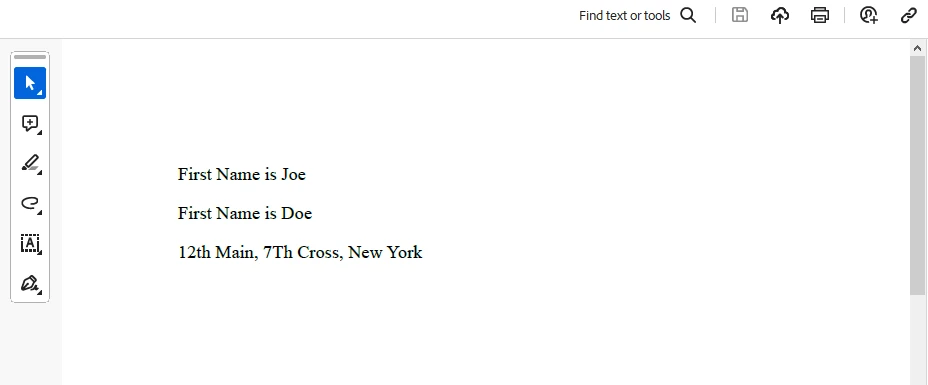
End Classこの例では、Span と IronPDF を使用して PDF ドキュメントを生成しています。
出力:

生成されたPDF:
ライセンス (無料トライアル利用可能)
IronPDF のライセンス情報。 このキーはappsettings.jsonに配置する必要があります。
"IronPdf.LicenseKey": "your license key"トライアルライセンスを取得するには、メールアドレスを提供してください。
結論
Span in C# provides a powerful and efficient way to work with memory, offering benefits in terms of performance and flexibility. その所有しない性質と連続性は、メモリの割り当てとコピーを最小化することが重要なシナリオに特に適しています。 Span を活用することにより、開発者は文字列操作から高性能な数値処理に至る様々なアプリケーションでより良いパフォーマンスを達成できます。 By understanding its features and considering its limitations, developers can leverage Span for various memory manipulation tasks safely and efficiently. IronPDF ライブラリ概要 と共に、それはawaitとyieldの境界なしに素晴らしいPDFドキュメントを生成するために使用することができます。
IronPDFのクイックスタート ドキュメント ページ をご覧ください。
よくある質問
C# の Span とは何で、なぜ重要なのですか?
Span は、C# 7.2 で導入されたメモリの連続領域を表す型です。これは、開発者がヒープの割り当てオーバーヘッドを伴わずに低レベルのメモリ操作を効率的に実行できるため、重要です。これにより C# の安全性とパフォーマンスを維持します。
Span は C# におけるメモリ操作を最適化するためにどのように機能しますか?
Span は、メモリ上にゼロコピーの抽象を提供することにより、データを複製せずに既存のメモリブロックを参照できるようにし、メモリ操作を最適化します。これにより、大量のデータを扱うアプリケーションで特にパフォーマンスが向上します。
Span と ReadOnlySpan の違いは何ですか?
Span はメモリの変更可能なビューを提供し、修正を許可しますが、ReadOnlySpan は読み取り専用のビューを提供します。ReadOnlySpan は、データが変更されないべきときに使用し、データ整合性を確保しながら同様のパフォーマンス上の利点を提供します。
Can Span be used with unmanaged memory in C#?
はい、Span は、非管理メモリへのポインタからスパンを作成することで非管理メモリで使用できます。Marshal.AllocHGlobal や Marshal.FreeHGlobal のようなメソッドを使用して、適切に割り当て・解放されることを保証しながらメモリを直接操作できます。
IronPDF は PDF 生成のために Span とどのように統合されますか?
IronPDF は Span と連携して動的に PDF を生成でき、メモリを効率的に管理し不必要な割り当てを回避します。この統合により、開発者はパフォーマンスが向上したウェブコンテンツから PDF 文書を作成できます。
Span をメモリ管理に使用する際の制約は何ですか?
Span を使用する際の制約には、連続メモリの必要性、メモリ管理やガベージコレクションの自動化の欠如、および非連続メモリのサポートが含まれます。開発者はメモリの有効性と境界を手動で確認する必要があります。
C# で PDF 操作のために IronPDF をどのようにインストールしますか?
IronPDF は、NuGet パッケージマネージャーを使用して C# プロジェクトにインストールできます。dotnet add package IronPDF や Install-Package IronPDF のようなコマンドを使用してプロジェクトに追加します。
文字列操作に Span を使用する利点は何ですか?
Span は、メモリの割り当てとコピーを最小限に抑えることで、効率的な文字列操作を可能にします。これは、大量の文字列データを処理するパフォーマンスクリティカルなコードに特に有益です。
IronPDF の試用版はありますか?
はい、IronPDF はトライアルライセンスを提供しており、メールアドレスを提供することで入手可能です。ライセンスキーはライブラリを使用するためにappsettings.jsonファイルに配置する必要があります。
Span は非同期メソッド呼び出しで使用できますか?
はい、Span は非同期メソッド呼び出しで効率的にデータを処理し、不要なコピーをせずに使用できます。これは特に I/O 操作やファイル処理で役立ち、Memory または Span を利用します。










 無料で始めましょう
 無料で始めましょう
 無料ライブデモを予約
















