


C# Span (개발자를 위한 작동 방식)

Span은 C# 7.2에 소개된 유형으로, System 네임스페이스의 Span 구조체의 일부입니다. 이는 임의 메모리의 연속 영역을 나타내도록 설계되었습니다. 관리 힙과 같은 배열이나 컬렉션과 달리, Span은 포인팅하는 스택 메모리나 메모리 영역을 소유하지 않습니다; 대신, 기존 메모리 블록을 가볍게 볼 수 있도록 해줍니다. 이러한 특징은 Span이 추가적인 오버헤드와 안전하지 않은 코드 시나리오를 초래하지 않고 메모리 버퍼를 효율적으로 다룰 필요가 있는 시나리오에서 특히 강력하게 만듭니다. 이후 이 기사에서는 Iron Software에서 제공하는 IronPDF 라이브러리의 소개를 살펴볼 것입니다.
Span의 주요 특징
1. 메모리 관리
C#에서 Span은 개발자가 전통적인 힙 할당에 의존하지 않고 직접 메모리를 다룰 수 있게 해 줍니다. 기존 배열이나 기타 메모리 소스로부터 메모리 조각을 생성하는 방법을 제공하여 추가 메모리 복사의 필요성을 제거합니다.
2. 제로-카피 추상화
C# Span의 주목할 만한 기능 중 하나는 제로-카피 추상화입니다. 데이터를 복제하는 대신, Span은 기존 메모리를 효율적으로 참조할 수 있는 방법을 제공합니다. 이는 대량의 데이터를 복사하는 것이 비합리적이거나 비용이 너무 큰 시나리오에 특히 유익합니다.
3. 포인터와 유사한 연산
전통적으로 C#은 고수준의 안전한 언어였지만, Span은 C나 C++ 같은 언어에서 포인터를 다루는 것과 유사한 저수준 메모리 조작을 도입합니다. 개발자는 C#의 안전성과 관리된 특성을 포기하지 않고 포인터와 유사한 연산을 수행할 수 있습니다.
4. 불변의 특성
저수준 메모리 접근 능력에도 불구하고, C# Span은 불변입니다. 이는 메모리 조작을 허용하면서도 의도하지 않은 수정을 방지하여 안전성을 강화한다는 것을 의미합니다.
예
using System;

class Program
{
    static void Main()
    {
        int[] array = { 1, 2, 3, 4, 5 };

        // Create a span that points to the entire array
        Span<int> span = array;

        // Modify the data using the span
        span[2] = 10;

        // Print the modified array
        foreach (var item in array)
        {
            Console.WriteLine(item);
        }
    }
}
using System;
class Program
{
static void Main()
{
int[] array = { 1, 2, 3, 4, 5 };
// Create a span that points to the entire array
Span<int> span = array;
// Modify the data using the span
span[2] = 10;
// Print the modified array
foreach (var item in array)
{
Console.WriteLine(item);
}
}
}Imports System
Friend Class Program
Shared Sub Main()
Dim array() As Integer = { 1, 2, 3, 4, 5 }
' Create a span that points to the entire array
Dim span As Span(Of Integer) = array
' Modify the data using the span
span(2) = 10
' Print the modified array
For Each item In array
Console.WriteLine(item)
Next item
End Sub
End ClassReadOnlySpan
Span은 변할 수 있고 기본 데이터를 수정할 수 있는 반면, ReadOnlySpan은 메모리의 변경할 수 없는 뷰를 제공합니다. 이는 연속적인 메모리 영역에 대한 읽기 전용 인터페이스를 제공하여 데이터를 수정할 필요 없이 읽는 경우에 적합합니다.
다음은 몇 가지 주요 사항입니다.
1. 읽기 전용 뷰
이름에서 알 수 있듯이, ReadOnlySpan은 메모리 블록의 읽기 전용 뷰를 생성할 수 있게 해줍니다. 이는 ReadOnlySpan를 통해 요소를 수정할 수 없음을 의미합니다.
2. 메모리 표현
Span처럼, ReadOnlySpan은 지시하는 메모리를 소유하지 않습니다. 이는 기존 메모리를 참조하며, 배열, 스택에 할당된 메모리 또는 네이티브 메모리를 가리킬 수 있습니다.
3. 성능 이점
Span처럼, ReadOnlySpan은 특히 대량의 데이터 작업을 할 때 복사의 필요성을 줄여줌으로써 기존의 컬렉션 타입에 비해 더 나은 성능을 제공할 수 있습니다.
4. 경계 검사 없음
Span처럼, ReadOnlySpan는 경계 검사를 수행하지 않습니다. 개발자는 기저 메모리의 경계 내에 작업이 머물도록 보장해야 합니다.
5. 배열 슬라이싱 사용
ReadOnlySpan는 슬라이싱을 지원하여 원래 메모리의 일부를 참조하는 하위 스팬을 생성할 수 있습니다.
예
using System;

class Program
{
    static void Main()
    {
        int[] array = { 1, 2, 3, 4, 5 };

        // Create a read-only span that points to the entire array
        ReadOnlySpan<int> readOnlySpan = array;

        // Access and print the data through the read-only span
        foreach (var item in readOnlySpan)
        {
            Console.WriteLine(item);
        }

        // Note: The following line would result in a compilation error since readOnlySpan is read-only.
        // readOnlySpan[2] = 10;
    }
}
using System;
class Program
{
static void Main()
{
int[] array = { 1, 2, 3, 4, 5 };
// Create a read-only span that points to the entire array
ReadOnlySpan<int> readOnlySpan = array;
// Access and print the data through the read-only span
foreach (var item in readOnlySpan)
{
Console.WriteLine(item);
}
// Note: The following line would result in a compilation error since readOnlySpan is read-only.
// readOnlySpan[2] = 10;
}
}Imports System
Friend Class Program
Shared Sub Main()
Dim array() As Integer = { 1, 2, 3, 4, 5 }
' Create a read-only span that points to the entire array
Dim readOnlySpan As ReadOnlySpan(Of Integer) = array
' Access and print the data through the read-only span
For Each item In readOnlySpan
Console.WriteLine(item)
Next item
' Note: The following line would result in a compilation error since readOnlySpan is read-only.
' readOnlySpan[2] = 10;
End Sub
End ClassReadOnlySpan을 생성하고 작업하는 방법은 여러 가지가 있습니다. 다음은 몇 가지 예입니다.
1. 문자열에서 ReadOnlySpan 생성
string msg = "Hello, World!";
ReadOnlySpan<char> span1 = msg.AsSpan();
// Read-only manipulation
char firstChar = span1[0];
Console.WriteLine(firstChar); // Outputs: H
string msg = "Hello, World!";
ReadOnlySpan<char> span1 = msg.AsSpan();
// Read-only manipulation
char firstChar = span1[0];
Console.WriteLine(firstChar); // Outputs: HDim msg As String = "Hello, World!"
Dim span1 As ReadOnlySpan(Of Char) = msg.AsSpan()
' Read-only manipulation
Dim firstChar As Char = span1(0)
Console.WriteLine(firstChar) ' Outputs: H2. 하위 문자열 작업
ReadOnlySpanSlice을 사용하세요.
// Example usage of Slice method on ReadOnlySpan<char>
ReadOnlySpan<char> spanFromString = "Sample String".AsSpan();
ReadOnlySpan<char> substringSpan = spanFromString.Slice(7, 6); // Extracts 'String'
// Example usage of Slice method on ReadOnlySpan<char>
ReadOnlySpan<char> spanFromString = "Sample String".AsSpan();
ReadOnlySpan<char> substringSpan = spanFromString.Slice(7, 6); // Extracts 'String'' Example usage of Slice method on ReadOnlySpan<char>
Dim spanFromString As ReadOnlySpan(Of Char) = "Sample String".AsSpan()
Dim substringSpan As ReadOnlySpan(Of Char) = spanFromString.Slice(7, 6) ' Extracts 'String'3. 메소드에 하위 문자열 전달
ReadOnlySpan
void ProcessSubstringfromReadOnlySpan(ReadOnlySpan<char> substring)
{
    // Perform operations on the substring
}

// Usage
ReadOnlySpan<char> spanFromString = "Sample String".AsSpan();
ProcessSubstringfromReadOnlySpan(spanFromString.Slice(7, 6));
void ProcessSubstringfromReadOnlySpan(ReadOnlySpan<char> substring)
{
// Perform operations on the substring
}
// Usage
ReadOnlySpan<char> spanFromString = "Sample String".AsSpan();
ProcessSubstringfromReadOnlySpan(spanFromString.Slice(7, 6));Private Sub ProcessSubstringfromReadOnlySpan(ByVal substring As ReadOnlySpan(Of Char))
' Perform operations on the substring
End Sub
' Usage
Private spanFromString As ReadOnlySpan(Of Char) = "Sample String".AsSpan()
ProcessSubstringfromReadOnlySpan(spanFromString.Slice(7, 6))4. 문자열 내에서 검색
문자열 내에서 검색할 때 ReadOnlySpanIndexOf()을 사용하세요.
ReadOnlySpan<char> stringSpan = "Hello, World!".AsSpan();
int index = stringSpan.IndexOf('W');
Console.WriteLine(index); // Outputs: 7
ReadOnlySpan<char> stringSpan = "Hello, World!".AsSpan();
int index = stringSpan.IndexOf('W');
Console.WriteLine(index); // Outputs: 7Dim stringSpan As ReadOnlySpan(Of Char) = "Hello, World!".AsSpan()
Dim index As Integer = stringSpan.IndexOf("W"c)
Console.WriteLine(index) ' Outputs: 75. 메모리 매핑 파일 사용
ReadOnlySpan
using System;
using System.IO.MemoryMappedFiles;

class Program
{
    static void ProcessData(ReadOnlySpan<byte> data)
    {
        // Process data directly from the memory-mapped file
    }

    static void Main()
    {
        using (var memmf = MemoryMappedFile.CreateFromFile("data.bin"))
        {
            using (var accessor = memmf.CreateViewAccessor())
            {
                byte[] buffer = new byte[accessor.Capacity];
                accessor.ReadArray(0, buffer, 0, buffer.Length);

                ReadOnlySpan<byte> dataSpan = new ReadOnlySpan<byte>(buffer);
                ProcessData(dataSpan);
            }
        }
    }
}
using System;
using System.IO.MemoryMappedFiles;
class Program
{
static void ProcessData(ReadOnlySpan<byte> data)
{
// Process data directly from the memory-mapped file
}
static void Main()
{
using (var memmf = MemoryMappedFile.CreateFromFile("data.bin"))
{
using (var accessor = memmf.CreateViewAccessor())
{
byte[] buffer = new byte[accessor.Capacity];
accessor.ReadArray(0, buffer, 0, buffer.Length);
ReadOnlySpan<byte> dataSpan = new ReadOnlySpan<byte>(buffer);
ProcessData(dataSpan);
}
}
}
}Imports System
Imports System.IO.MemoryMappedFiles
Friend Class Program
Private Shared Sub ProcessData(ByVal data As ReadOnlySpan(Of Byte))
' Process data directly from the memory-mapped file
End Sub
Shared Sub Main()
Using memmf = MemoryMappedFile.CreateFromFile("data.bin")
Using accessor = memmf.CreateViewAccessor()
Dim buffer(accessor.Capacity - 1) As Byte
accessor.ReadArray(0, buffer, 0, buffer.Length)
Dim dataSpan As New ReadOnlySpan(Of Byte)(buffer)
ProcessData(dataSpan)
End Using
End Using
End Sub
End Class6. 효율적인 문자열 조작
ReadOnlySpan
Span<char> newSpan = new char[6];
ReadOnlySpan<char> spanFromString = "Sample String".AsSpan().Slice(7, 6);
spanFromString.CopyTo(newSpan);
Console.WriteLine(new string(newSpan)); // Outputs: String
Span<char> newSpan = new char[6];
ReadOnlySpan<char> spanFromString = "Sample String".AsSpan().Slice(7, 6);
spanFromString.CopyTo(newSpan);
Console.WriteLine(new string(newSpan)); // Outputs: StringDim newSpan As Span(Of Char) = New Char(5){}
Dim spanFromString As ReadOnlySpan(Of Char) = "Sample String".AsSpan().Slice(7, 6)
spanFromString.CopyTo(newSpan)
Console.WriteLine(New String(newSpan)) ' Outputs: String7. API에 하위 문자열 전달
문자 스팬을 다루는 외부 라이브러리나 API와 작업할 때.
void ExternalApiMethod(ReadOnlySpan<char> data)
{
    // Call the external API with the character span
}

// Usage
ReadOnlySpan<char> spanFromString = "Sample String".AsSpan();
ExternalApiMethod(spanFromString.Slice(7, 6));
void ExternalApiMethod(ReadOnlySpan<char> data)
{
// Call the external API with the character span
}
// Usage
ReadOnlySpan<char> spanFromString = "Sample String".AsSpan();
ExternalApiMethod(spanFromString.Slice(7, 6));Private Sub ExternalApiMethod(ByVal data As ReadOnlySpan(Of Char))
' Call the external API with the character span
End Sub
' Usage
Private spanFromString As ReadOnlySpan(Of Char) = "Sample String".AsSpan()
ExternalApiMethod(spanFromString.Slice(7, 6))ReadOnlySpan
Span의 제한사항
C#의 Span은 수많은 장점을 지닌 강력한 기능이지만, 연속 및 비연속 메모리의 맥락에서 특정 제한과 고려 사항이 있습니다. 이러한 제한을 탐구해 봅시다:
1. 연속 메모리 버퍼
1.1 자동 메모리 관리 없음
Span은 지시하는 메모리를 관리하지 않습니다. 이는 기본 관리 메모리가 해제되거나 범위를 벗어날 경우, Span를 사용하면 정의되지 않은 동작이나 잠재적인 충돌을 초래할 수 있음을 의미합니다. 개발자는 Span를 사용할 때 기본 메모리가 여전히 유효한지 확인해야 합니다.
1.2 가비지 수집 없음
Span가 메모리를 소유하지 않으므로 가비지 수집의 대상이 아닙니다. 따라서 Span 자체보다 수명이 짧은 스택 할당 메모리나 메모리를 사용할 때 주의해야 합니다.
1.3 경계 검사 비활성화됨
Span와 ReadOnlySpan는 기본적으로 경계 검사를 수행하지 않습니다. 이는 주의 깊게 사용하지 않으면 잘못된 메모리 위치를 접근할 수 있게 합니다. 개발자는 Span의 연산이 기본 메모리의 경계를 초과하지 않는지 수동으로 확인해야 합니다.
1.4 비연속 메모리에 대한 지원 없음
Span는 연속적인 메모리와 함께 작동하도록 설계되었습니다. 연속적이지 않은 메모리나 더 복잡한 데이터 구조를 표현해야 하는 경우, Span가 가장 적절한 선택이 아닐 수 있습니다.
1.5 모든 작업이 지원되는 것은 아님
Span는 슬라이싱, 인덱싱, 반복과 같은 많은 일반적인 연산을 지원하지만, 모든 연산을 지원하는 것은 아닙니다. 예를 들어, Span의 크기를 조정할 수 없으며, 기본 메모리의 길이를 변경하는 연산은 허용되지 않습니다.
1.6 제한된 플랫폼 호환성
Span는 .NET Standard와 .NET Core의 일부로, 모든 플랫폼이나 환경에서 사용할 수 있는 것은 아닙니다. 코드에서 Span를 사용할 계획이라면 대상 플랫폼이 Span를 지원하는지 확인하는 것이 중요합니다.
2. 비연속 메모리 버퍼
2.1 비연속 메모리에 대한 제한된 지원
ReadOnlySpan는 주로 연속적인 메모리 블록이나 버퍼와 원활하게 작동하도록 설계되었습니다. 비연속 메모리 버퍼나 메모리에 갭이 있는 구조가 관련된 시나리오에는 가장 적합한 선택이 아닐 수 있습니다.
2.2 구조적 제한
연속적이지 않은 메모리에 의존하는 특정 데이터 구조나 시나리오가 ReadOnlySpan와 적합하지 않을 수 있습니다. 예를 들어, 연결 리스트나 그래프 구조와 같은 데이터 구조는 ReadOnlySpan의 연속 메모리 요구 조건 때문에 적절하지 않을 수 있습니다.
2.3 복잡한 포인터 연산
특히 복잡한 포인터 산술을 요구하는 연속적이지 않은 메모리와 관련된 상황에서는 ReadOnlySpan가 C++와 같은 언어의 원시 포인터만큼 낮은 수준의 제어와 유연성을 제공하지 않을 수 있습니다. 이러한 경우, 포인터를 사용하는 비안전 코드가 더 적절할 수 있습니다.
2.4 일부 API에서 직접 지원 부족
연속적인 메모리처럼, ReadOnlySpan로 표현된 비연속 메모리를 직접 지원하지 않는 API나 라이브러리가 있을 수 있음을 주의해야 합니다. 이러한 시나리오에 적응하려면 추가적인 중간 단계나 호환성을 보장하기 위한 변환이 필요할 수 있습니다.
Span과 비관리 메모리
C#에서 Span을 비관리 메모리와 함께 사용하여 통제되고 효율적인 방식으로 메모리 관련 작업을 수행할 수 있습니다. 비관리 메모리는 .NET 런타임의 가비지 수집기에 의해 관리되지 않는 메모리를 의미하며, 종종 네이티브 메모리 할당 및 해제를 사용합니다. C#에서 비관리 메모리와 함께 Span을 활용하는 방법은 다음과 같습니다.
비관리 메모리 할당
비관리 메모리를 할당하기 위해 System.Runtime.InteropServices.MemoryMarshal 클래스를 사용할 수 있습니다. Marshal.AllocHGlobal 메서드는 메모리를 할당하고 할당된 블록에 대한 포인터를 반환합니다. 할당된 메모리 또는 메모리 주소는 비관리 메모리 포인터에 저장되며 읽기-쓰기 접근이 가능합니다. 연속적인 메모리 영역은 쉽게 접근할 수 있습니다.
using System;
using System.Runtime.InteropServices;

class Program
{
    static void Main()
    {
        const int bufferSize = 100;
        IntPtr unmanagedMemory = Marshal.AllocHGlobal(bufferSize);

        // Create a Span from the unmanaged memory
        Span<byte> span = new Span<byte>(unmanagedMemory.ToPointer(), bufferSize);

        // Use the Span as needed...

        // Don't forget to free the unmanaged memory when done
        Marshal.FreeHGlobal(unmanagedMemory);
    }
}
using System;
using System.Runtime.InteropServices;
class Program
{
static void Main()
{
const int bufferSize = 100;
IntPtr unmanagedMemory = Marshal.AllocHGlobal(bufferSize);
// Create a Span from the unmanaged memory
Span<byte> span = new Span<byte>(unmanagedMemory.ToPointer(), bufferSize);
// Use the Span as needed...
// Don't forget to free the unmanaged memory when done
Marshal.FreeHGlobal(unmanagedMemory);
}
}Imports System
Imports System.Runtime.InteropServices
Friend Class Program
Shared Sub Main()
Const bufferSize As Integer = 100
Dim unmanagedMemory As IntPtr = Marshal.AllocHGlobal(bufferSize)
' Create a Span from the unmanaged memory
Dim span As New Span(Of Byte)(unmanagedMemory.ToPointer(), bufferSize)
' Use the Span as needed...
' Don't forget to free the unmanaged memory when done
Marshal.FreeHGlobal(unmanagedMemory)
End Sub
End Class위의 소스 코드에서 Marshal.AllocHGlobal을 사용하여 비관리 메모리 블록을 할당한 다음, 비관리 메모리에서 얻은 포인터를 사용하여 Span<byte>를 생성합니다. 이를 통해 친숙한 Span API를 사용하여 비관리 메모리로 작업할 수 있습니다. 비관리 메모리로 작업할 때는 메모리 할당 및 해제를 관리하는 책임이 있다는 점에 유의해야 합니다.
비관리 메모리에 데이터 복사
Span은 Slice, CopyTo, ToArray과 같은 메서드를 제공하여 관리 및 비관리 메모리 간의 데이터를 효율적으로 복사할 수 있습니다.
using System;
using System.Runtime.InteropServices;

class Program
{
    static void Main()
    {
        // Managed array to copy data from
        int[] sourceArray = { 1, 2, 3, 4, 5 };

        // Allocate unmanaged memory for the destination data
        IntPtr destinationPointer = Marshal.AllocHGlobal(sourceArray.Length * sizeof(int));
        try
        {
            // Create a Span<int> from the source array
            Span<int> sourceSpan = sourceArray;

            // Create a Span<int> from the allocated unmanaged memory
            Span<int> destinationSpan = new Span<int>(destinationPointer.ToPointer(), sourceArray.Length);

            // Copy data from the source Span<int> to the destination Span<int>
            sourceSpan.CopyTo(destinationSpan);

            // Print the values in the destination memory
            Console.WriteLine("Values in the destination memory:");
            foreach (var value in destinationSpan)
            {
                Console.Write($"{value} ");
            }
        }
        finally
        {
            // Deallocate the unmanaged memory when done
            Marshal.FreeHGlobal(destinationPointer);
        }
    }
}
using System;
using System.Runtime.InteropServices;
class Program
{
static void Main()
{
// Managed array to copy data from
int[] sourceArray = { 1, 2, 3, 4, 5 };
// Allocate unmanaged memory for the destination data
IntPtr destinationPointer = Marshal.AllocHGlobal(sourceArray.Length * sizeof(int));
try
{
// Create a Span<int> from the source array
Span<int> sourceSpan = sourceArray;
// Create a Span<int> from the allocated unmanaged memory
Span<int> destinationSpan = new Span<int>(destinationPointer.ToPointer(), sourceArray.Length);
// Copy data from the source Span<int> to the destination Span<int>
sourceSpan.CopyTo(destinationSpan);
// Print the values in the destination memory
Console.WriteLine("Values in the destination memory:");
foreach (var value in destinationSpan)
{
Console.Write($"{value} ");
}
}
finally
{
// Deallocate the unmanaged memory when done
Marshal.FreeHGlobal(destinationPointer);
}
}
}Imports System
Imports System.Runtime.InteropServices
Friend Class Program
Shared Sub Main()
' Managed array to copy data from
Dim sourceArray() As Integer = { 1, 2, 3, 4, 5 }
' Allocate unmanaged memory for the destination data
Dim destinationPointer As IntPtr = Marshal.AllocHGlobal(sourceArray.Length * Len(New Integer()))
Try
' Create a Span<int> from the source array
Dim sourceSpan As Span(Of Integer) = sourceArray
' Create a Span<int> from the allocated unmanaged memory
Dim destinationSpan As New Span(Of Integer)(destinationPointer.ToPointer(), sourceArray.Length)
' Copy data from the source Span<int> to the destination Span<int>
sourceSpan.CopyTo(destinationSpan)
' Print the values in the destination memory
Console.WriteLine("Values in the destination memory:")
For Each value In destinationSpan
Console.Write($"{value} ")
Next value
Finally
' Deallocate the unmanaged memory when done
Marshal.FreeHGlobal(destinationPointer)
End Try
End Sub
End Class이 예시에서는 다음과 같습니다.
Marshal.AllocHGlobal은 목적지 데이터를 위한 비관리 메모리를 할당합니다.new Span<int>(destinationPointer.ToPointer(), sourceArray.Length)은 할당된 비관리 메모리에서Span<int>을 생성합니다.sourceSpan.CopyTo(destinationSpan)메서드는 관리 배열에서 비관리 메모리로 데이터를 복사합니다.- 대상 메모리의 값은 복사 작업을 확인하기 위해 출력됩니다.
- 완료하면
Marshal.FreeHGlobal(destinationPointer)메서드를 사용하여 비관리 메모리를 해제합니다.
안전하지 않은 코드 사용
관리되지 않는 메모리를 다룰 때 포인터를 사용하여 안전하지 않은 코드를 사용할 수도 있습니다. 이러한 경우 Unsafe.AsPointer() 메서드를 사용하여 Span에서 포인터를 얻을 수 있습니다.
using System;
using System.Runtime.InteropServices;
using System.Runtime.CompilerServices;

class Program
{
    static void Main()
    {
        const int bufferSize = 100;
        IntPtr unmanagedMemory = Marshal.AllocHGlobal(bufferSize);

        // Create a Span from the unmanaged memory
        Span<byte> span = new Span<byte>(unmanagedMemory.ToPointer(), bufferSize);

        // Use unsafe code to work with pointers
        unsafe
        {
            byte* pointer = (byte*)Unsafe.AsPointer(ref MemoryMarshal.GetReference(span));
            // Use the pointer as needed...
        }

        // Don't forget to free the unmanaged memory when done
        Marshal.FreeHGlobal(unmanagedMemory);
    }
}
using System;
using System.Runtime.InteropServices;
using System.Runtime.CompilerServices;
class Program
{
static void Main()
{
const int bufferSize = 100;
IntPtr unmanagedMemory = Marshal.AllocHGlobal(bufferSize);
// Create a Span from the unmanaged memory
Span<byte> span = new Span<byte>(unmanagedMemory.ToPointer(), bufferSize);
// Use unsafe code to work with pointers
unsafe
{
byte* pointer = (byte*)Unsafe.AsPointer(ref MemoryMarshal.GetReference(span));
// Use the pointer as needed...
}
// Don't forget to free the unmanaged memory when done
Marshal.FreeHGlobal(unmanagedMemory);
}
}Imports System
Imports System.Runtime.InteropServices
Imports System.Runtime.CompilerServices
Friend Class Program
Shared Sub Main()
Const bufferSize As Integer = 100
Dim unmanagedMemory As IntPtr = Marshal.AllocHGlobal(bufferSize)
' Create a Span from the unmanaged memory
Dim span As New Span(Of Byte)(unmanagedMemory.ToPointer(), bufferSize)
' Use unsafe code to work with pointers
'INSTANT VB TODO TASK: C# 'unsafe' code is not converted by Instant VB:
' unsafe
' {
' byte* pointer = (byte*)Unsafe.AsPointer(ref MemoryMarshal.GetReference(span));
' ' Use the pointer as needed...
' }
' Don't forget to free the unmanaged memory when done
Marshal.FreeHGlobal(unmanagedMemory)
End Sub
End Class이 예제에서는 Unsafe.AsPointer 메서드를 사용하여 Span에서 포인터를 얻습니다. 이렇게 하면 포인터를 직접 처리할 때 안전하지 않은 코드를 사용할 수 있습니다.
관리되지 않는 메모리 작업 시 메모리 유출을 방지하려면 적절하게 할당 및 해제를 관리하는 것이 중요합니다. 항상 Marshal.FreeHGlobal()와 같은 적절한 메서드를 사용하여 비관리 메모리를 해제하세요. 또한, 안전하지 않은 코드를 사용할 때는 주의해야 하며, 제대로 처리되지 않으면 잠재적인 보안 위험을 초래할 수 있습니다.
Span 및 비동기 메서드 호출
C#에서 Span을 비동기 메서드 호출과 결합하여 사용하는 것은 특히 대량의 데이터나 입출력 작업을 처리할 때 강력한 조합입니다. 목표는 데이터를 불필요하게 복사하지 않고 효율적으로 비동기 작업을 처리하는 것입니다. 비동기 시나리오에서 Span을 어떻게 활용할 수 있는지 탐구해봅시다:
1. 비동기 I/O 작업:
스트림에 데이터를 읽거나 쓰는 것과 같은 비동기 I/O 작업을 처리할 때 추가 버퍼를 생성하지 않고도 데이터를 효율적으로 처리하기 위해 Memory 또는 Span를 사용할 수 있습니다.
using System;
using System.IO;
using System.Threading.Tasks;

class Program
{
    static async Task ProcessDataAsync(Stream stream)
    {
        const int bufferSize = 4096;
        byte[] buffer = new byte[bufferSize];
        while (true)
        {
            int bytesRead = await stream.ReadAsync(buffer.AsMemory());
            if (bytesRead == 0)
                break;

            // Process the data using Span without unnecessary copying
            ProcessData(buffer.AsSpan(0, bytesRead));
        }
    }

    static void ProcessData(Span<byte> data)
    {
        // Perform operations on the data
    }
}
using System;
using System.IO;
using System.Threading.Tasks;
class Program
{
static async Task ProcessDataAsync(Stream stream)
{
const int bufferSize = 4096;
byte[] buffer = new byte[bufferSize];
while (true)
{
int bytesRead = await stream.ReadAsync(buffer.AsMemory());
if (bytesRead == 0)
break;
// Process the data using Span without unnecessary copying
ProcessData(buffer.AsSpan(0, bytesRead));
}
}
static void ProcessData(Span<byte> data)
{
// Perform operations on the data
}
}Imports System
Imports System.IO
Imports System.Threading.Tasks
Friend Class Program
Private Shared Async Function ProcessDataAsync(ByVal stream As Stream) As Task
Const bufferSize As Integer = 4096
Dim buffer(bufferSize - 1) As Byte
Do
Dim bytesRead As Integer = Await stream.ReadAsync(buffer.AsMemory())
If bytesRead = 0 Then
Exit Do
End If
' Process the data using Span without unnecessary copying
ProcessData(buffer.AsSpan(0, bytesRead))
Loop
End Function
Private Shared Sub ProcessData(ByVal data As Span(Of Byte))
' Perform operations on the data
End Sub
End Class이 예제에서는 ReadAsync 메서드를 사용하여 스트림에서 버퍼로 데이터를 비동기적으로 읽습니다. ProcessData 메서드는 데이터를 다른 버퍼로 복사하지 않고 Span
2. 비동기 파일 작업:
I/O 작업과 비슷하게, 비동기 파일 작업을 수행할 때, 추가 복사 없이 데이터를 효율적으로 처리하기 위해 Span을 사용할 수 있습니다.
using System;
using System.IO;
using System.Threading.Tasks;

class Program
{
    static async Task ProcessFileAsync(string filePath)
    {
        const int bufferSize = 4096;
        using (FileStream fileStream = new FileStream(filePath, FileMode.Open, FileAccess.Read))
        {
            byte[] buffer = new byte[bufferSize];
            while (true)
            {
                int bytesRead = await fileStream.ReadAsync(buffer.AsMemory());
                if (bytesRead == 0)
                    break;

                // Process the data using Span without unnecessary copying
                ProcessData(buffer.AsSpan(0, bytesRead));
            }
        }
    }

    static void ProcessData(Span<byte> data)
    {
        // Perform operations on the data
    }
}
using System;
using System.IO;
using System.Threading.Tasks;
class Program
{
static async Task ProcessFileAsync(string filePath)
{
const int bufferSize = 4096;
using (FileStream fileStream = new FileStream(filePath, FileMode.Open, FileAccess.Read))
{
byte[] buffer = new byte[bufferSize];
while (true)
{
int bytesRead = await fileStream.ReadAsync(buffer.AsMemory());
if (bytesRead == 0)
break;
// Process the data using Span without unnecessary copying
ProcessData(buffer.AsSpan(0, bytesRead));
}
}
}
static void ProcessData(Span<byte> data)
{
// Perform operations on the data
}
}Imports System
Imports System.IO
Imports System.Threading.Tasks
Friend Class Program
Private Shared Async Function ProcessFileAsync(ByVal filePath As String) As Task
Const bufferSize As Integer = 4096
Using fileStream As New FileStream(filePath, FileMode.Open, FileAccess.Read)
Dim buffer(bufferSize - 1) As Byte
Do
Dim bytesRead As Integer = Await fileStream.ReadAsync(buffer.AsMemory())
If bytesRead = 0 Then
Exit Do
End If
' Process the data using Span without unnecessary copying
ProcessData(buffer.AsSpan(0, bytesRead))
Loop
End Using
End Function
Private Shared Sub ProcessData(ByVal data As Span(Of Byte))
' Perform operations on the data
End Sub
End Class여기에서는 ReadAsync 메서드가 파일 스트림에서 버퍼로 데이터를 읽고, ProcessData 메서드는 데이터를 Span
3. 비동기 작업 처리:
데이터를 생성하거나 소비하는 비동기 작업을 수행할 때 불필요한 복사를 피하기 위해 Memory 또는 Span를 사용할 수 있습니다.
using System;
using System.Linq;
using System.Threading.Tasks;

class Program
{
    static async Task<int> ProcessDataAsync(int[] data)
    {
        // Asynchronous processing of data
        await Task.Delay(1000);
        // Returning the length of the processed data
        return data.Length;
    }

    static async Task Main()
    {
        int[] inputData = Enumerable.Range(1, 1000).ToArray();

        // Process the data asynchronously without copying
        int processedLength = await ProcessDataAsync(inputData.AsMemory());
        Console.WriteLine($"Processed data length: {processedLength}");
    }
}
using System;
using System.Linq;
using System.Threading.Tasks;
class Program
{
static async Task<int> ProcessDataAsync(int[] data)
{
// Asynchronous processing of data
await Task.Delay(1000);
// Returning the length of the processed data
return data.Length;
}
static async Task Main()
{
int[] inputData = Enumerable.Range(1, 1000).ToArray();
// Process the data asynchronously without copying
int processedLength = await ProcessDataAsync(inputData.AsMemory());
Console.WriteLine($"Processed data length: {processedLength}");
}
}Imports System
Imports System.Linq
Imports System.Threading.Tasks
Friend Class Program
Private Shared Async Function ProcessDataAsync(ByVal data() As Integer) As Task(Of Integer)
' Asynchronous processing of data
Await Task.Delay(1000)
' Returning the length of the processed data
Return data.Length
End Function
Shared Async Function Main() As Task
Dim inputData() As Integer = Enumerable.Range(1, 1000).ToArray()
' Process the data asynchronously without copying
Dim processedLength As Integer = Await ProcessDataAsync(inputData.AsMemory())
Console.WriteLine($"Processed data length: {processedLength}")
End Function
End Class이 예제에서는 ProcessDataAsync 메서드가 데이터를 비동기적으로 처리하고 추가 복사 없이 처리된 데이터의 길이를 반환합니다.
IronPDF 소개합니다
IronPDF 라이브러리 개요는 Iron Software에서 제공하는 최신 C# PDF 라이브러리로, C# 코드를 사용하여 동적으로 아름다운 PDF 문서를 생성할 수 있습니다. IronPDF는 HTML에서 PDF 생성, HTML 콘텐츠를 PDF로 변환, PDF 파일 병합 또는 분할 등의 다양한 기능을 제공합니다.
IronPDF의 주요 기능은 HTML을 PDF로 변환하는 기능으로, 레이아웃과 스타일을 유지합니다. 웹 콘텐츠에서 PDF를 생성할 수 있어 보고서, 청구서, 문서화에 적합합니다. 이 도구는 HTML 파일, URL, HTML 문자열을 PDF 파일로 변환하는 것을 지원합니다.
using IronPdf;

class Program
{
    static void Main(string[] args)
    {
        var renderer = new ChromePdfRenderer();

        // 1. Convert HTML String to PDF
        var htmlContent = "<h1>Hello, IronPDF!</h1><p>This is a PDF from an HTML string.</p>";
        var pdfFromHtmlString = renderer.RenderHtmlAsPdf(htmlContent);
        pdfFromHtmlString.SaveAs("HTMLStringToPDF.pdf");

        // 2. Convert HTML File to PDF
        var htmlFilePath = "path_to_your_html_file.html"; // Specify the path to your HTML file
        var pdfFromHtmlFile = renderer.RenderHtmlFileAsPdf(htmlFilePath);
        pdfFromHtmlFile.SaveAs("HTMLFileToPDF.pdf");

        // 3. Convert URL to PDF
        var url = "http://ironpdf.com"; // Specify the URL
        var pdfFromUrl = renderer.RenderUrlAsPdf(url);
        pdfFromUrl.SaveAs("URLToPDF.pdf");
    }
}
using IronPdf;
class Program
{
static void Main(string[] args)
{
var renderer = new ChromePdfRenderer();
// 1. Convert HTML String to PDF
var htmlContent = "<h1>Hello, IronPDF!</h1><p>This is a PDF from an HTML string.</p>";
var pdfFromHtmlString = renderer.RenderHtmlAsPdf(htmlContent);
pdfFromHtmlString.SaveAs("HTMLStringToPDF.pdf");
// 2. Convert HTML File to PDF
var htmlFilePath = "path_to_your_html_file.html"; // Specify the path to your HTML file
var pdfFromHtmlFile = renderer.RenderHtmlFileAsPdf(htmlFilePath);
pdfFromHtmlFile.SaveAs("HTMLFileToPDF.pdf");
// 3. Convert URL to PDF
var url = "http://ironpdf.com"; // Specify the URL
var pdfFromUrl = renderer.RenderUrlAsPdf(url);
pdfFromUrl.SaveAs("URLToPDF.pdf");
}
}Imports IronPdf
Friend Class Program
Shared Sub Main(ByVal args() As String)
Dim renderer = New ChromePdfRenderer()
' 1. Convert HTML String to PDF
Dim htmlContent = "<h1>Hello, IronPDF!</h1><p>This is a PDF from an HTML string.</p>"
Dim pdfFromHtmlString = renderer.RenderHtmlAsPdf(htmlContent)
pdfFromHtmlString.SaveAs("HTMLStringToPDF.pdf")
' 2. Convert HTML File to PDF
Dim htmlFilePath = "path_to_your_html_file.html" ' Specify the path to your HTML file
Dim pdfFromHtmlFile = renderer.RenderHtmlFileAsPdf(htmlFilePath)
pdfFromHtmlFile.SaveAs("HTMLFileToPDF.pdf")
' 3. Convert URL to PDF
Dim url = "http://ironpdf.com" ' Specify the URL
Dim pdfFromUrl = renderer.RenderUrlAsPdf(url)
pdfFromUrl.SaveAs("URLToPDF.pdf")
End Sub
End Class설치
IronPDF는 NuGet 패키지 관리자 콘솔 또는 Visual Studio 패키지 관리자를 사용하여 설치할 수 있습니다.
dotnet add package IronPdf
// Or
Install-Package IronPdf

using System;
using IronPdf;

class Program
{
    static void Main()
    {
        Console.WriteLine("Generating PDF using IronPDF.");
        var displayFirstName = "<p>First Name is Joe</p>".AsSpan();
        var displayLastName = "<p>Last Name is Doe</p>".AsSpan();
        var displayAddress = "<p>12th Main, 7Th Cross, New York</p>".AsSpan();
        var start = "<html><body>".AsSpan();
        var end = "</body></html>".AsSpan();
        var content = string.Concat(start.ToString(), displayFirstName.ToString(), displayLastName.ToString(), displayAddress.ToString(), end.ToString());
        var pdfDocument = new ChromePdfRenderer();
        pdfDocument.RenderHtmlAsPdf(content).SaveAs("span.pdf");
    }
}
using System;
using IronPdf;
class Program
{
static void Main()
{
Console.WriteLine("Generating PDF using IronPDF.");
var displayFirstName = "<p>First Name is Joe</p>".AsSpan();
var displayLastName = "<p>Last Name is Doe</p>".AsSpan();
var displayAddress = "<p>12th Main, 7Th Cross, New York</p>".AsSpan();
var start = "<html><body>".AsSpan();
var end = "</body></html>".AsSpan();
var content = string.Concat(start.ToString(), displayFirstName.ToString(), displayLastName.ToString(), displayAddress.ToString(), end.ToString());
var pdfDocument = new ChromePdfRenderer();
pdfDocument.RenderHtmlAsPdf(content).SaveAs("span.pdf");
}
}Imports System
Imports IronPdf
Friend Class Program
Shared Sub Main()
Console.WriteLine("Generating PDF using IronPDF.")
Dim displayFirstName = "<p>First Name is Joe</p>".AsSpan()
Dim displayLastName = "<p>Last Name is Doe</p>".AsSpan()
Dim displayAddress = "<p>12th Main, 7Th Cross, New York</p>".AsSpan()
Dim start = "<html><body>".AsSpan()
Dim [end] = "</body></html>".AsSpan()
Dim content = String.Concat(start.ToString(), displayFirstName.ToString(), displayLastName.ToString(), displayAddress.ToString(), [end].ToString())
Dim pdfDocument = New ChromePdfRenderer()
pdfDocument.RenderHtmlAsPdf(content).SaveAs("span.pdf")
End Sub
End Class이 예제에서는 Span과 IronPDF를 사용하여 PDF 문서를 생성하고 있습니다.
산출:
C# Span (개발자를 위한 작동 방식): 그림 2 - 
생성된 PDF:
C# Span (개발자를 위한 작동 방식): 그림 3 - 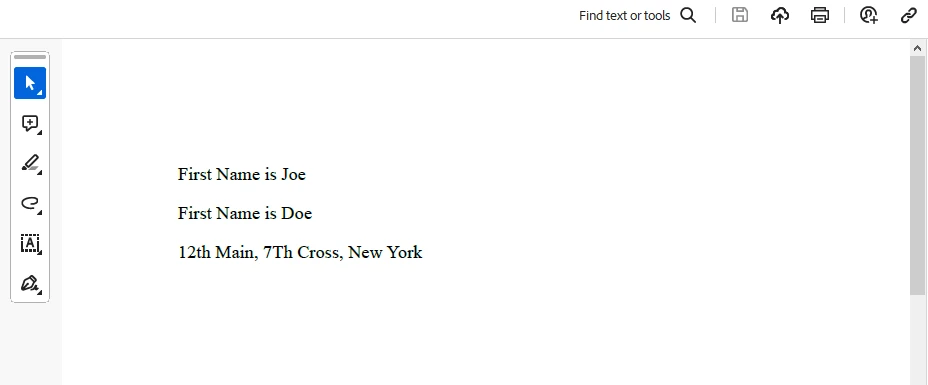
라이센스 (무료 체험 가능)
IronPDF 라이선스 정보. 이 키는 appsettings.json에 배치해야 합니다.
"IronPdf.LicenseKey": "your license key"체험판 라이센스를 받으려면 이메일을 제공하세요.
결론
C#의 Span는 메모리를 효율적으로 작업할 수 있는 강력한 방법을 제공하며, 성능과 유연성 측면에서 이점을 제공합니다. 소유하지 않는 연속적인 특성으로 인해, 메모리 할당 및 복사를 최소화해야 하는 시나리오에 특히 적합합니다. Span을 활용함으로써 문자열 조작에서부터 고성능의 수치 처리에 이르는 다양한 애플리케이션에서 더 나은 성능을 얻을 수 있습니다. 그 기능을 이해하고 한계를 고려하여, 개발자는 다양한 메모리 조작 작업에 대해 Span를 안전하고 효율적으로 활용할 수 있습니다. IronPDF 라이브러리 개요와 함께, await와 yield 경계를 피하여 훌륭한 PDF 문서를 생성할 수 있습니다.
IronPDF의 빠른 시작 문서 페이지를 방문하세요.
자주 묻는 질문
C#에서 Span란 무엇이며 왜 중요한가?
Span는 C# 7.2에 도입된 타입으로, 연속된 메모리 영역을 나타냅니다. 이는 힙 할당의 오버헤드 없이 낮은 수준의 메모리 작업을 효율적으로 수행할 수 있게 해주기 때문에 중요합니다. C#의 안전성과 성능을 유지하면서 말이죠.
Span는 C#에서 메모리 조작을 어떻게 최적화하는가?
Span는 메모리에 대한 제로-카피 추상화를 제공하여 데이터를 복제하지 않고 기존 메모리 블록에 대한 참조를 허용함으로써 메모리 조작을 최적화합니다. 이는 특히 많은 데이터를 처리하는 응용 프로그램에서 성능 향상을 가져옵니다.
Span와 ReadOnlySpan의 차이점은 무엇인가?
Span는 메모리의 변경 가능한 뷰를 제공하여 수정이 가능하지만, ReadOnlySpan는 읽기 전용 뷰를 제공합니다. ReadOnlySpan는 데이터가 수정되지 않아야 할 때 사용되며, 데이터 무결성을 보장하면서 유사한 성능 이점을 제공합니다.
C#에서 Span를 비관리 메모리와 함께 사용할 수 있는가?
네, Span는 비관리 메모리에 대한 포인터로부터 스팬을 생성하여 비관리 메모리와 함께 사용할 수 있습니다. 이것은 Marshal.AllocHGlobal과 Marshal.FreeHGlobal와 같은 메서드를 사용하여 메모리가 적절히 할당 및 해제되는 동안 메모리를 직접 조작할 수 있게 해줍니다.
IronPDF는 PDF 생성에 Span와 어떻게 통합되는가?
IronPDF는 메모리를 효율적으로 관리하고 불필요한 할당을 피하여 PDF를 동적으로 생성하기 위해 Span와 함께 작동할 수 있습니다. 이러한 통합은 웹 콘텐츠로부터 PDF 문서를 생성하는 동안 성능을 향상시킬 수 있습니다.
Span를 사용한 메모리 관리의 제한사항은 무엇인가?
Span를 사용하는 제한사항으로는 연속된 메모리가 필요하고 자동 메모리 관리 및 가비지 컬렉션이 없으며 비연속 메모리를 지원하지 않는 점이 포함됩니다. 개발자는 메모리의 유효성과 경계를 수동으로 확인해야 합니다.
C#에서 PDF 조작을 위해 IronPDF를 어떻게 설치하나요?
IronPDF는 NuGet 패키지 관리자를 사용하여 C# 프로젝트에 설치할 수 있습니다. dotnet add package IronPdf 또는 Install-Package IronPdf와 같은 명령을 사용하여 프로젝트에 추가하십시오.
문자열 조작에 Span를 사용하는 이점은 무엇인가?
Span는 메모리 할당과 복사를 최소화함으로써 효율적인 문자열 조작을 가능하게 합니다. 이는 특히 대량의 문자열 데이터를 처리하는 성능-중요 코드에 유익합니다.
IronPDF의 평가판이 있나요?
네, IronPDF는 체험판 라이선스를 제공하며 이메일을 제공하여 얻을 수 있습니다. 체험판 라이선스 키는 라이브러리를 사용하기 위해 appsettings.json 파일에 배치해야 합니다.
비동기 메서드 호출에서 Span를 사용할 수 있는가?
네, 불필요한 복사 없이 데이터를 효율적으로 처리하기 위해 비동기 메서드 호출에서 Span를 사용할 수 있습니다. 이는 I/O 작업과 파일 처리에서 유용하며 Memory나 Span을 활용합니다.










 무료로 시작하세요
 무료로 시작하세요
 무료 라이브 데모 예약하기





 신용카드나 계정 생성은 필요하지 않습니다.










