


C# This (開発者向けの仕組み)

C#には特別な重要性を持つ特定のキーワードがあり、それがthisキーワードです。 このキーワードは、それが使用されている現在のクラスのインスタンスを参照します。 特に、クラスレベルの変数と、同じ名前を共有するメソッドのパラメータを区別するために使用できます。 例えば、インスタンス変数とメソッドパラメータが同じ名前の場合、thisは非常に便利です!
このキーワードの基礎知識
例えば、nameのようなパブリックインスタンス変数を持つことがあります。 メソッド内でこれらのインスタンス変数に値を代入したい場合、よくある問題につまずくかもしれません。
C#のドキュメントにあるthisキーワードを使いましょう! パブリッククラスthisキーワードは、名前が一致するインスタンス変数とメソッドパラメータを区別するために使用されます。
public class Employee
{
    private int id;
    private string name;

    public void Display(int id, string name)
    {
        // Use `this.id` to refer to the instance variable,
        // and `id` for the method parameter.
        this.id = id;
        this.name = name;
    }
}
public class Employee
{
private int id;
private string name;
public void Display(int id, string name)
{
// Use `this.id` to refer to the instance variable,
// and `id` for the method parameter.
this.id = id;
this.name = name;
}
}Public Class Employee
Private id As Integer
Private name As String
Public Sub Display(ByVal id As Integer, ByVal name As String)
' Use `this.id` to refer to the instance variable,
' and `id` for the method parameter.
Me.id = id
Me.name = name
End Sub
End Classこの場合、idはメソッドパラメータです。
コンストラクタオーバーロードにおけるthisキーワード
thisキーワードを利用することで、同じクラス内でコンストラクタオーバーロードが強力なテクニックになります。 クラスに異なるパラメータを持つ複数のコンストラクタがある場合、thisキーワードはあるコンストラクタが他のコンストラクタを呼び出すことで、冗長なコードを排除できます。
パラメータ付きコンストラクタでthisを使用した次の例を考えてみましょう:
public class Student
{
    private string name;
    private int id;

    public Student() : this("Default", 0)
    {
        // Default constructor delegates to the parameterized constructor
        // with "Default" as the name and 0 as the id.
    }

    public Student(string name, int id)
    {
        // Assign the parameters to the instance variables
        this.name = name;
        this.id = id;
    }
}
public class Student
{
private string name;
private int id;
public Student() : this("Default", 0)
{
// Default constructor delegates to the parameterized constructor
// with "Default" as the name and 0 as the id.
}
public Student(string name, int id)
{
// Assign the parameters to the instance variables
this.name = name;
this.id = id;
}
}Public Class Student
Private name As String
Private id As Integer
Public Sub New()
Me.New("Default", 0)
' Default constructor delegates to the parameterized constructor
' with "Default" as the name and 0 as the id.
End Sub
Public Sub New(ByVal name As String, ByVal id As Integer)
' Assign the parameters to the instance variables
Me.name = name
Me.id = id
End Sub
End Classパラメータなしのコンストラクタでは、0をIDとして設定します。
拡張メソッドにおけるthisの探求
C#の拡張メソッドは、元の型を変更することなく、既存の型にメソッドを追加する方法を提供します。 ここでthisキーワードが効果を発揮します。 これは、拡張メソッドのパラメータリストで、拡張される型を参照するために使用されます。
次の拡張メソッドの例を考えてみましょう:
public static class StringExtensions
{
    // This extension method can be called on any string instance
    public static bool IsNullOrEmpty(this string str)
    {
        return string.IsNullOrEmpty(str);
    }
}
public static class StringExtensions
{
// This extension method can be called on any string instance
public static bool IsNullOrEmpty(this string str)
{
return string.IsNullOrEmpty(str);
}
}Public Module StringExtensions
' This extension method can be called on any string instance
<System.Runtime.CompilerServices.Extension> _
Public Function IsNullOrEmpty(ByVal str As String) As Boolean
Return String.IsNullOrEmpty(str)
End Function
End Moduleここでは、this string strがC#に、これは文字列型の拡張メソッドであることを知らせます。 これで、if(myString.IsNullOrEmpty())のように任意の文字列オブジェクトでこのメソッドを使用できます。
インデクサーにおけるthis
インデクサーの定義にもthisキーワードを使用できます。 インデクサは、配列のようにクラスのインスタンスにインデックスを付けることができます。 これは、インデックスのような記法を使用してオブジェクト内のデータにアクセスするのに役立ちます。 インデクサーでは、int indexである配列インデックスが続きます。
以下は、インデクサーの基本的な例です:
public class Test
{
    private int[] array = new int[100];

    // Define an indexer for the class
    public int this[int index]
    {
        get { return array[index]; }
        set { array[index] = value; }
    }
}
public class Test
{
private int[] array = new int[100];
// Define an indexer for the class
public int this[int index]
{
get { return array[index]; }
set { array[index] = value; }
}
}Public Class Test
Private array(99) As Integer
' Define an indexer for the class
Default Public Property Item(ByVal index As Integer) As Integer
Get
Return array(index)
End Get
Set(ByVal value As Integer)
array(index) = value
End Set
End Property
End Classこのクラスarrayインスタンスフィールドの値を取得または設定するために使用できます。
thisと静的メンバー
thisについて気を付けなければならないことの1つは、静的メンバーやメソッドを参照するためには使用できないことです。 これはthisが現在のインスタンスを指すためであり、静的メンバーはクラス自体に属し、クラスのインスタンスには属しないためです。
public class Program
{
    public static void Main(string[] args)
    {
        // Can't use `this` here, because 'Main' is a static method.
    }
}
public class Program
{
public static void Main(string[] args)
{
// Can't use `this` here, because 'Main' is a static method.
}
}Public Class Program
Public Shared Sub Main(ByVal args() As String)
' Can't use `this` here, because 'Main' is a static method.
End Sub
End Classですので、覚えておいてください、thisはインスタンス用であり、クラスレベルまたは静的メンバー用ではありません!
thisキーワードとプロパティ
インスタンス変数やメソッドパラメータ同様に、thisキーワードもプロパティとともに使用できます。 C#では、プロパティは、プライベートフィールドの値を読み書きまたは計算するための柔軟なメカニズムを提供するメンバです。 プロパティは、あたかもパブリック・データ・メンバであるかのように使用できますが、実際にはアクセッサと呼ばれる特別なメソッドです。
プロパティ内でthisを使用した簡単な例を見てみましょう:
public class Employee
{
    private string name;

    public string Name
    {
        get { return this.name; }
        set { this.name = value; } // Use `this` to refer to the instance variable
    }
}
public class Employee
{
private string name;
public string Name
{
get { return this.name; }
set { this.name = value; } // Use `this` to refer to the instance variable
}
}Public Class Employee
'INSTANT VB NOTE: The field name was renamed since Visual Basic does not allow fields to have the same name as other class members:
Private name_Conflict As String
Public Property Name() As String
Get
Return Me.name_Conflict
End Get
Set(ByVal value As String)
Me.name_Conflict = value
End Set ' Use `this` to refer to the instance variable
End Property
End Class上記のクラスでは、nameを参照するために使われています。
thisとデリゲートの探求
thisが登場するもう一つの場所はデリゲートです。 C#のデリゲートは、C#やC++の関数ポインタに似ています。 メソッドへの参照を保持する参照型変数です。 デリゲートメソッドも、拡張メソッドと同様に、thisを使って現在のインスタンスにアクセスできます。
thisを使用したデリゲートの例を示します:
public delegate void DisplayDelegate();

public class Student
{
    public int Id { get; set; }
    public string Name { get; set; }

    public void Display()
    {
        // `this.DisplayDetails` refers to the method instance of the current object.
        DisplayDelegate displayDelegate = new DisplayDelegate(this.DisplayDetails);
        displayDelegate();
    }

    private void DisplayDetails()
    {
        Console.WriteLine("ID: " + Id + ", Name: " + Name);
    }
}
public delegate void DisplayDelegate();
public class Student
{
public int Id { get; set; }
public string Name { get; set; }
public void Display()
{
// `this.DisplayDetails` refers to the method instance of the current object.
DisplayDelegate displayDelegate = new DisplayDelegate(this.DisplayDetails);
displayDelegate();
}
private void DisplayDetails()
{
Console.WriteLine("ID: " + Id + ", Name: " + Name);
}
}Public Delegate Sub DisplayDelegate()
Public Class Student
Public Property Id() As Integer
Public Property Name() As String
Public Sub Display()
' `this.DisplayDetails` refers to the method instance of the current object.
Dim displayDelegate As New DisplayDelegate(AddressOf Me.DisplayDetails)
displayDelegate()
End Sub
Private Sub DisplayDetails()
Console.WriteLine("ID: " & Id & ", Name: " & Name)
End Sub
End Class学生クラスでは、DisplayDetailsメソッドを参照する新しいデリゲートインスタンスを作成します。
IronPDFとthisキーワードの実装
IronPDFという強力な.NETライブラリと共にthisキーワードを使用する例を探ってみましょう。
PDFファイルに対して様々な操作を行うためにIronPDFライブラリを使用するPDFHandlerというクラスを考えましょう:
using IronPdf;

public class PDFHandler
{
    private string path;

    public PDFHandler(string path)
    {
        this.path = path;
    }

    public void GeneratePDF(string content)
    {
        // Creating a renderer to convert HTML content to PDF
        var Renderer = new IronPdf.ChromePdfRenderer();
        var PDF = Renderer.RenderHtmlAsPdf(content);

        // Save the generated PDF to the path specified by the current instance
        PDF.SaveAs(this.path);
    }
}
using IronPdf;
public class PDFHandler
{
private string path;
public PDFHandler(string path)
{
this.path = path;
}
public void GeneratePDF(string content)
{
// Creating a renderer to convert HTML content to PDF
var Renderer = new IronPdf.ChromePdfRenderer();
var PDF = Renderer.RenderHtmlAsPdf(content);
// Save the generated PDF to the path specified by the current instance
PDF.SaveAs(this.path);
}
}Imports IronPdf
Public Class PDFHandler
Private path As String
Public Sub New(ByVal path As String)
Me.path = path
End Sub
Public Sub GeneratePDF(ByVal content As String)
' Creating a renderer to convert HTML content to PDF
Dim Renderer = New IronPdf.ChromePdfRenderer()
Dim PDF = Renderer.RenderHtmlAsPdf(content)
' Save the generated PDF to the path specified by the current instance
PDF.SaveAs(Me.path)
End Sub
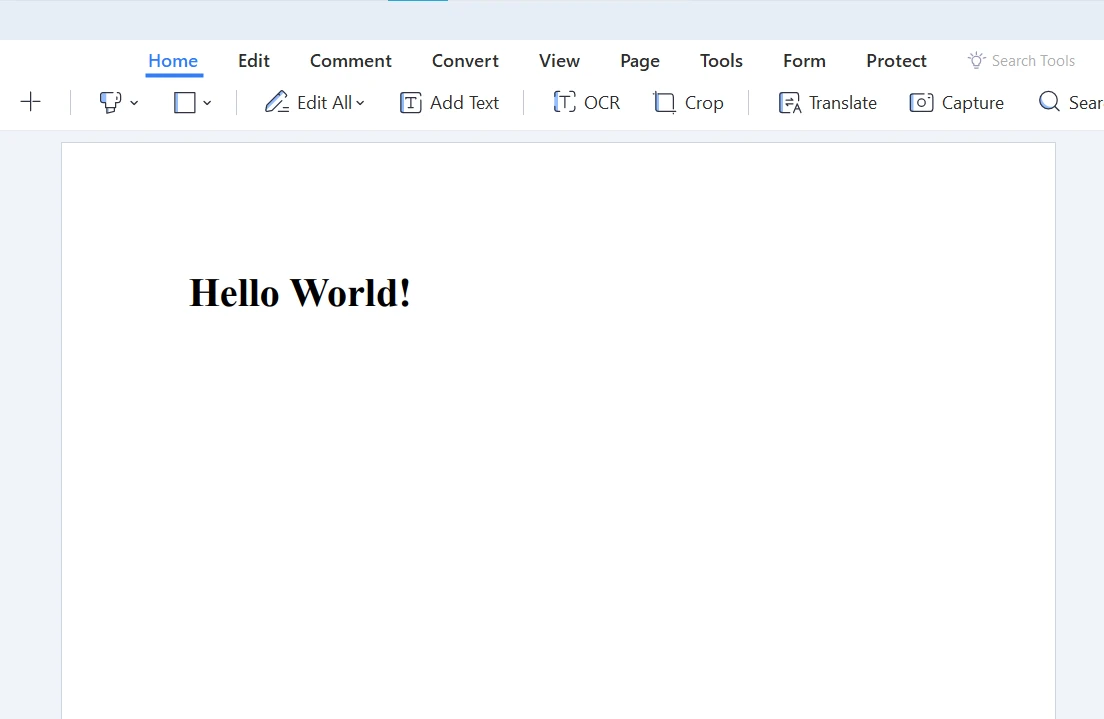
End Classこのpathフィールドを参照するために使用されます。 このフィールドは、生成されたPDFを指定されたパスに保存するために使用されます。
pathを利用できるようにします:
class Program
{
    static void Main(string[] args)
    {
        // Initialize PDFHandler with a specified file path
        PDFHandler pdfHandler = new PDFHandler("C:\\ThisKeyword.pdf");
        pdfHandler.GeneratePDF("Hello World!");
    }
}
class Program
{
static void Main(string[] args)
{
// Initialize PDFHandler with a specified file path
PDFHandler pdfHandler = new PDFHandler("C:\\ThisKeyword.pdf");
pdfHandler.GeneratePDF("Hello World!");
}
}Friend Class Program
Shared Sub Main(ByVal args() As String)
' Initialize PDFHandler with a specified file path
Dim pdfHandler As New PDFHandler("C:\ThisKeyword.pdf")
pdfHandler.GeneratePDF("Hello World!")
End Sub
End Classここでthisは、特にIronPDFのようなライブラリを扱う際に、コードをより読みやすく理解しやすくします。
結論
これまでのところで、C#のthisキーワードについて良い理解が得られたはずです。その用途は、シンプルなインスタンス変数からコンストラクタ、拡張メソッド、プロパティ、デリゲート、匿名メソッド、さらにはIronPDFのような人気のライブラリを使用する複雑なコンテキストまで広範囲にわたります。
IronPDFは無料トライアルを提供しています。 それを続けることにした場合、ライセンスは$liteLicenseから始まります。 IronPDFはあなたのC#開発ツールキットに加える価値があり、アプリケーションでPDFファイルを扱うタスクを簡素化します。
よくある質問
C#で「this」キーワードがクラス変数とメソッドパラメータをどのように区別できるか?
C#の「this」キーワードは現在のクラスインスタンスを参照するために使用され、同じ名前を共有するクラスレベルの変数とメソッドパラメータを区別できます。これは特にメソッド内の命名の競合を避けるのに役立ちます。
コンストラクタのオーバーロードにおける「this」の重要性は何か?
コンストラクタのオーバーロードでは、『this』を使用して同じクラス内の他のコンストラクタを呼び出せます。これにより、既存のコンストラクタロジックを再利用し、冗長なコードを減らし、一貫性と保守性を確保できます。
C#で拡張メソッドの使用を『this』がどのように促進するか?
拡張メソッドのメソッドパラメータリストでは、『this』キーワードを使用して拡張される型を示します。これにより、開発者は既存の型のソースコードを変更することなく新しいメソッドを追加でき、機能をシームレスに拡張できます。
インデクサーでの『this』の使用方法は?
C#では、『this』はインデクサーとともに使用され、クラスインスタンスを配列のような表記法でアクセスできるプロパティを定義します。これにより、オブジェクト内のデータアクセスの読みやすさと使いやすさが向上します。
なぜ静的メンバーにはC#で「this」を使用できないのか?
『this』キーワードはクラスのインスタンスメンバーを参照しますが、静的メンバーは特定のインスタンスではなく、クラス自体に属します。そのため、「this」は静的メンバーまたはメソッドを参照するためには使用できません。
C#クラスで「this」キーワードがプロパティアクセスをどのように強化するか?
プロパティのgetおよびsetアクセサ内で、『this』キーワードを使用して、現在のクラスインスタンスのプライベートフィールドを参照できます。これにより、操作がクラス自身のフィールドで行われることを明示的に示し、コードの明確さが向上します。
委任のコンテキストでの『this』の役割は何か?
委託のコンテキストでは、『this』により、委任が現在のオブジェクトのメソッドインスタンスを参照できるようになります。これは、イベントハンドリングやコールバックにおいて柔軟性を提供するために、委任を通じてインスタンスメソッドを呼び出すのに重要です。
IronPDFライブラリを使用する際に、「this」がコードの読みやすさをどのように向上させるか?
IronPDFライブラリを使用する場合、「this」はファイルパスなどのインスタンス変数を明確に示すことで、コードをより読みやすくできます。これは、PDFファイルの生成や保存などの操作を行う際に、コードの明確さと保守性を高めるのに特に有用です。










 無料で始めましょう
 無料で始めましょう
 無料ライブデモを予約
















