




更新日 2026年4月23日
Microsoft.Extensions.AIを使用した .NET での LLM 統合の簡素化
AI はソフトウェア開発を変革していますが、.NET への大規模言語モデル (LLM) の統合はこれまで複雑でした。IronPdf.AI を使用して AI 統合をさらに進め、OpenAI を活用した PDF 解析、データ抽出、およびコンテンツの要約を .NET アプリケーションにもたらします。
詳しく読む

データ型の変換はプログラミングの基本概念であり、C#でプログラミングする際には最も一般的なタスクの一つとして、数値の文字列表現を整数に変換することが挙げられます。 このプロセスは、ユーザー入力や外部ソースからのデータを計算やその他の操作のために数値形式に変換する必要がある多くのアプリケーションで有用です。
このチュートリアルでは、C#で提供されている文字列を整数に変換するさまざまな方法を探ります。 また、IronPDFライブラリのホームページも探索します。
C#では、Int32.Parseメソッドは、文字列を整数に変換するための標準的なツールです。 これらの関数は、入力文字列の数値を解釈し、それを整数に変換するように設計されています。 ただし、これらのメソッドは文字列が正しい形式でない場合には例外を投げることがあり、これらのツールを使用する上で例外処理が重要な側面となります。
Int32.Parseメソッドの使用Int32.Parseメソッドは有効な数値文字列を直接整数に変換します。 このメソッドは文字列が有効な数値形式でなければならず、 そうでなければ、FormatExceptionをスローします。 文字列が有効な数値であることが確かめられている場合に、このメソッドはシンプルです。 例えば:
public static string inputString = "123";
public static int result = int.Parse(inputString);
Console.WriteLine(result);Public Shared inputString As String = "123"
Public Shared result As Integer = Integer.Parse(inputString)
Console.WriteLine(result)上記のコードでは、ArgumentNullExceptionが発生します。
Convert.ToInt32メソッドの使用文字列を整数に変換する別の方法はConvert.ToInt32です。 このメソッドはInt32.Parseに似ていますが、もう少し柔軟性を提供します。 それはnullおよび空の文字列を例外を投げずにゼロのデフォルト値を返すことで処理します。 それを使う方法は次の通りです:
public static string inputString = null;
public static int result = Convert.ToInt32(inputString);
Console.WriteLine(result);Public Shared inputString As String = Nothing
Public Shared result As Integer = Convert.ToInt32(inputString)
Console.WriteLine(result)このメソッドはinputStringを例外をスローせずに0に変換するため、不適切に初期化された可能性のある変数に対してより安全です。
Int32.TryParseを用いた高度な技術特に信頼できないユーザー入力を処理する際に、変換プロセスをより良く制御するために、Int32.TryParseが推奨される方法です。 このメソッドは数値文字列の解析を試み、文字列を整数に変換するTryParseメソッドが成功したかどうかを示すブール値を返します。 それは変換された整数を返すためにoutパラメータを使用します。
Int32.TryParseの使用例こちらがInt32.TryParseメソッドを使用して文字列入力を安全に整数に変換し、無効な入力文字列を丁寧に処理する方法です。
string inputString = "abc123";
int num;
bool conversionSucceeded = int.TryParse(inputString, out num);
if (conversionSucceeded)
{
    Console.WriteLine("Successfully parsed: " + num);
}
else
{
    Console.WriteLine("Conversion failed. Provided string is not a valid integer.");
}Dim inputString As String = "abc123"
Dim num As Integer = Nothing
Dim conversionSucceeded As Boolean = Integer.TryParse(inputString, num)
If conversionSucceeded Then
Console.WriteLine("Successfully parsed: " & num)
Else
Console.WriteLine("Conversion failed. Provided string is not a valid integer.")
End Ifこの例では、inputStringは有効な整数ではないからです。 outパラメータ0のままであり、プログラムは例外をスローすることなくユーザーに変換失敗を知らせます。
IronPDF概要セクションは、.NETフレームワークを使用する開発者向けにPDF操作を簡素化するよう設計された強力なC#ライブラリです。 それはHTML、CSS、JavaScript、および画像から直接PDFドキュメントを作成、編集、管理することができます。 IronPDFの主な機能はHTMLコンテンツを直接PDFに変換する能力です。
これにはウェブページ全体やHTML文字列の変換を含み、非常に柔軟です。 IronPDFは強力でありながら統合が簡単であり、さまざまな開発環境をサポートします。
これは、文字列を整数にパースしそれをPDFに表示するためにIronPDFによるPDF生成とC#コードを組み合わせた単純な例です。 この例では、数値文字列を整数に変換し、その整数をIronPDFを使用してPDFドキュメントに印刷することを想定しています。
using IronPdf;
using System;

class Program
{
    static void Main(string[] args)
    {
        // License your IronPdf installation
        License.LicenseKey = "Your-License-Key";

        // Create a new PDF document
        var pdf = new ChromePdfRenderer();

        // Sample string that represents an integer
        string numberString = "12345";

        // Attempt to parse the string into an integer
        int number;
        bool result = Int32.TryParse(numberString, out number);
        if (result)
        {
            // Create HTML content including the parsed number
            string htmlContent = $"<h1>The number is: {number}</h1>";

            // Generate a PDF from the HTML string
            var document = pdf.RenderHtmlAsPdf(htmlContent);

            // Save the PDF to a file
            document.SaveAs("Output.pdf");
            Console.WriteLine("PDF generated successfully with the number included.");
        }
        else
        {
            Console.WriteLine("The string could not be parsed into an integer.");
        }
    }
}Imports IronPdf
Imports System
Friend Class Program
Shared Sub Main(ByVal args() As String)
' License your IronPdf installation
License.LicenseKey = "Your-License-Key"
' Create a new PDF document
Dim pdf = New ChromePdfRenderer()
' Sample string that represents an integer
Dim numberString As String = "12345"
' Attempt to parse the string into an integer
Dim number As Integer = Nothing
Dim result As Boolean = Int32.TryParse(numberString, number)
If result Then
' Create HTML content including the parsed number
Dim htmlContent As String = $"<h1>The number is: {number}</h1>"
' Generate a PDF from the HTML string
Dim document = pdf.RenderHtmlAsPdf(htmlContent)
' Save the PDF to a file
document.SaveAs("Output.pdf")
Console.WriteLine("PDF generated successfully with the number included.")
Else
Console.WriteLine("The string could not be parsed into an integer.")
End If
End Sub
End Class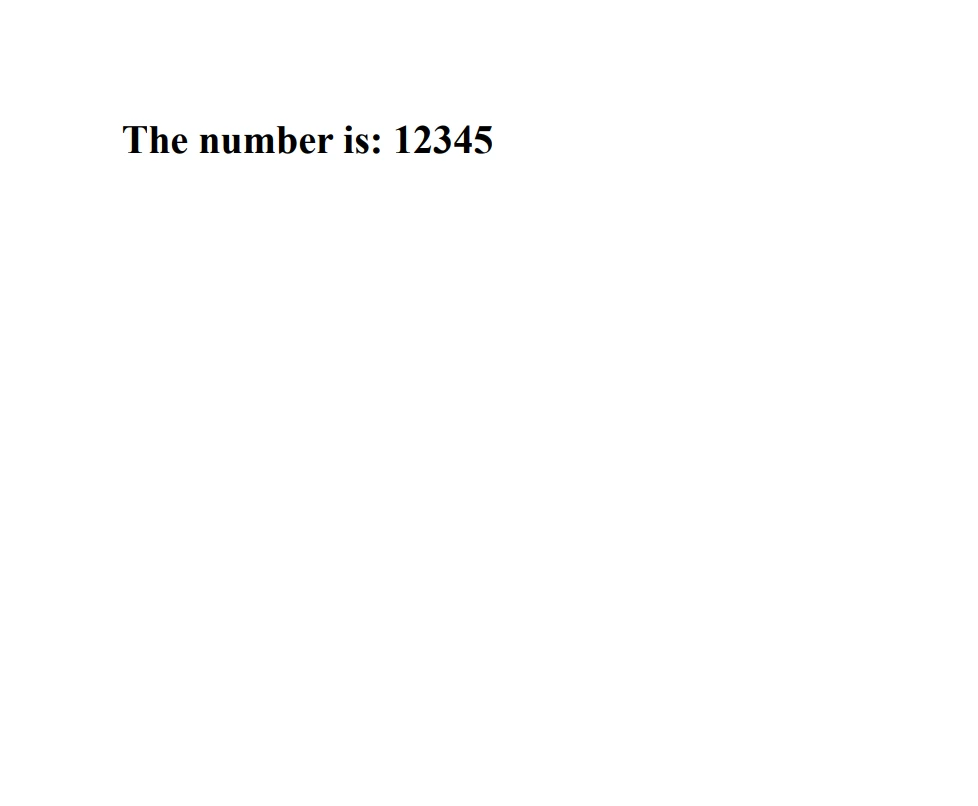
文字列を整数に変換することは、特にユーザーや外部ソースからのデータ入力を扱う際に、C#プログラミングでは一般的に要求されることです。 TryParseメソッドの違いを理解することは、堅牢でエラーに強いコードを書くために不可欠です。
これらの方法を効果的に使用することで、さまざまな入力形式に対応し、無効なデータに対して柔軟に対応することができます。 IronPDFの無料トライアルライセンスを試して、購入前にその機能を探ってください。 長期的にIronPDFをプロジェクトに統合したいと考えている方には、IronPDFライセンスオプションは$999から始まります。

ジェイコブ・メラーはIron Softwareの最高技術責任者(CTO)であり、C# PDFテクノロジーを開拓する先見的なエンジニアです。Iron Softwareのコアコードベースを支えるオリジナル開発者として、彼は創業以来、会社の製品アーキテクチャを形成し、CEOのCameron Rimingtonとともに、会社をNASA、Tesla、および世界的な政府機関にサービスを提供する50人以上の会社に変えました。1999年にロンドンで最初のソフトウェアビジネスを開業し、2005年に最初 for .NETコンポーネントを作成した後、Microsoftのエコシステム全体で複雑な問題を解決することを専門としました。



IronPDF はIRONSUITEの一部です
オフィス文書向けの.NET API製品10個

PDFがHTMLのように見える必要があるとき、迅速に。












