


Azure 테이블 (개발자를 위한 작동 방식)

방대한 클라우드 컴퓨팅 환경에서 데이터 저장소는 현대 애플리케이션의 아키텍처와 확장성을 형성하는 데 중요한 역할을 합니다. Azure Table Storage는 Microsoft Azure에서 제공하는 완전히 관리되는 NoSQL 데이터 저장소로, 개발자에게 클라우드에서 구조화된 데이터를 저장할 수 있는 다용도 솔루션을 제공합니다. Azure Table Storage의 기능, 사용 사례 및 이점을 탐색하는 여정을 시작해 봅시다.
Azure Table Storage 이해하기
Azure Table Storage는 구조화된 데이터를 스키마 없이 저장할 수 있는 클라우드 기반 NoSQL 데이터베이스 서비스입니다. Azure Tables는 각 개체가 파티션 키 및 행 키로 고유하게 식별되는 키-값 쌍 기반의 데이터 모델을 제공합니다. 이 설계는 데이터의 효율적인 쿼리 및 검색을 가능하게 하여, 대량 데이터 세트에 빠르게 액세스해야 하는 시나리오에 적합합니다.
구조화된 데이터를 관리하기 위해 Azure Table Storage 또는 관계형 데이터베이스 중 하나를 선택하려고 할 때, 대량의 데이터 세트를 처리할 수 있는 Azure Table Storage의 능력과 Azure 생태계와의 통합은 개발자의 도구 키트에 Azure Table Storage를 포함시키기에 유용합니다.
주요 기능 및 역량
-
스키마 없는 디자인: 전통적인 관계형 데이터베이스와 달리, Azure Table Storage는 데이터에 스키마를 적용하지 않습니다. 이러한 유연성은 개발자가 같은 테이블 내에서 다양한 구조의 개체를 저장할 수 있게 하여, 민첩한 개발을 촉진하고 진화하는 데이터 요구 사항을 수용하게 합니다.
-
확장성 및 성능: Azure Table Storage는 확장성을 위해 설계되어 대량의 데이터를 쉽게 처리할 수 있습니다. 증가하는 작업 부하를 수용하기 위해 자동으로 확장되며 예측 가능한 성능을 제공하여, 고처리를 요하는 응용 프로그램 및 저지연 데이터 액세스가 필요한 시나리오에 적합합니다.
-
파티셔닝 및 로드 밸런싱: Azure Table Storage의 데이터는 파티션 키에 따라 파티셔닝되어, 여러 저장소 노드에 효율적으로 데이터를 배포할 수 있게 합니다. 이 파티셔닝 전략은 수평 확장성과 로드 밸런싱을 가능하게 하여 최적의 성능과 자원 활용을 보장합니다.
-
보조 인덱스: Azure Table Storage는 주로 파티션 키와 행 키를 사용하여 데이터를 검색하지만, 복합 키와 쿼리 프로젝션을 사용하여 보조 인덱스를 지원합니다. 이 기능은 개발자가 보조 속성을 기반으로 데이터를 필터링하고 효율적인 범위 쿼리를 수행할 수 있게 하여, 데이터 액세스 패턴의 유연성을 향상시킵니다.
- Azure 생태계와의 통합: Azure Table Storage는 Azure Functions, Azure Cosmos DB, Azure Logic Apps 등 다른 Azure 서비스와 원활하게 통합되어, 개발자가 손쉽게 끝에서 끝까지 솔루션을 구축할 수 있게 합니다. 서버리스 함수를 사용하여 데이터 스트림을 처리하거나 고급 분석 도구로 데이터를 분석하는 등의 작업에 있어, Azure Table Storage는 확장 가능하고 견고한 응용 프로그램을 만들 수 있는 기본 구성 요소 역할을 합니다.
사용 사례
Azure Table Storage는 다양한 산업의 다양한 사용 사례에 적합합니다, 예를 들어:
-
사물 인터넷 (IoT): Azure Table Storage는 IoT 디바이스에서 수집한 원격 측정 데이터를 저장하는 데 적합하여, 실시간 데이터 수집, 분석 및 시각화를 가능하게 합니다. 확장 가능성과 성능은 IoT 배포에서 생성되는 막대한 양의 데이터를 처리하는 데 이상적입니다.
-
컨텐츠 관리: 블로그, 기사 및 사용자가 생성한 컨텐츠와 같은 컨텐츠 메타데이터의 구조화된 저장소가 필요한 애플리케이션에, Azure Table Storage는 비용 효율적이며 확장 가능한 솔루션을 제공합니다. 스키마 없는 디자인은 컨텐츠 구조의 변화에 따라 유연한 스키마 진화를 허용합니다.
-
세션 상태 관리: Azure Table Storage는 웹 애플리케이션에 대해 세션 상태 데이터를 저장하여, 분산되고 확장 가능한 세션 관리 솔루션을 제공합니다. 세션 상태를 Azure Table Storage로 오프로드 함으로써, 개발자는 부하를 분산하는 환경에서 개선된 확장성, 장애 허용성 및 세션 선호성을 달성할 수 있습니다.
- 분산 시스템: 분산 시스템 아키텍처에서, Azure Table Storage는 공유 상태 유지 및 구성 요소 간 조정을 위한 기본 데이터 저장소 역할을 합니다. 파티셔닝 및 확장성 기능은 분산 캐싱, 구성 관리 및 마이크로서비스 간 조정이 요구되는 시나리오에 적합합니다.
IronPDF 소개
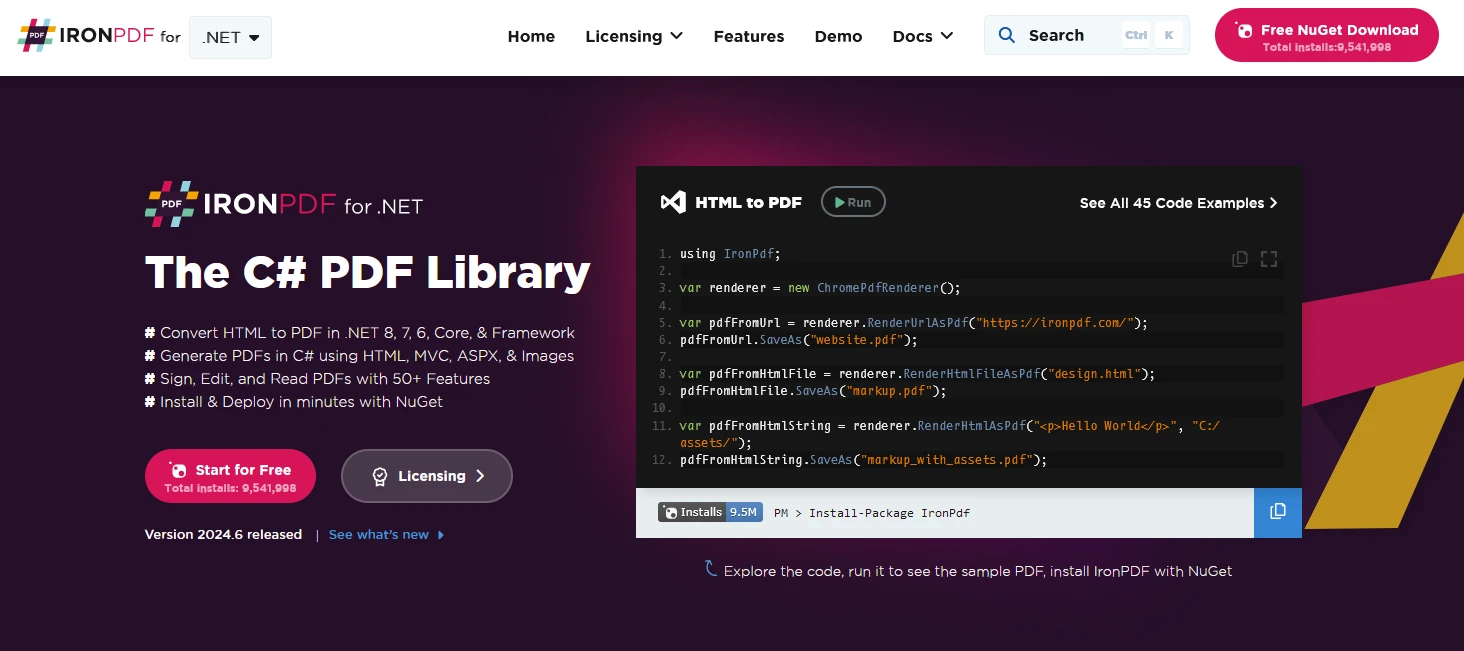
IronPDF는 .NET 프로젝트에서 PDF 문서를 생성, 관리, 및 내용을 추출할 수 있는 C# PDF 라이브러리입니다. 다음은 몇 가지 주요 기능입니다:
-
HTML을 PDF로 변환:
- HTML, CSS, 및 JavaScript 콘텐츠를 PDF 문서로 변환합니다.
- 픽셀 완벽한 PDF를 위한 Chrome 렌더링 엔진.
- URL, HTML 파일, 또는 HTML 문자열을 입력으로 PDF 생성.
-
이미지 및 콘텐츠 변환:
- 이미지를 PDF로 변환 및 그 반대.
- 기존 PDF 문서에서 텍스트 및 이미지 추출.
- JPG, PNG 등 다양한 이미지 포맷 지원.
-
편집 및 조작:
- PDF의 속성, 보안, 권한 설정.
- 디지털 서명 추가.
- 메타데이터 및 수정 기록 편집.
- 크로스 플랫폼 지원:
- .NET Core (8, 7, 6, 5, 3.1 이상), .NET Standard (2.0 이상), .NET Framework (4.6.2 이상)와 호환.
- Windows, Linux, macOS와 호환.
- 손쉬운 설치를 위해 NuGet에서 사용 가능.
IronPDF 및 Azure Tables를 사용한 PDF 문서 생성
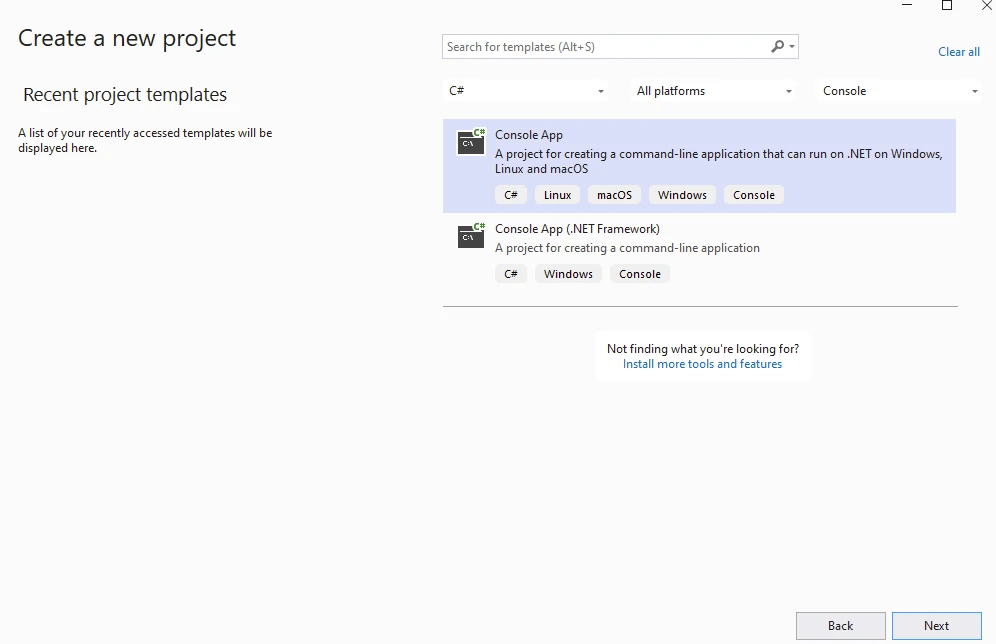
시작하려면 아래와 같이 Visual Studio를 사용하여 콘솔 애플리케이션을 생성하세요:
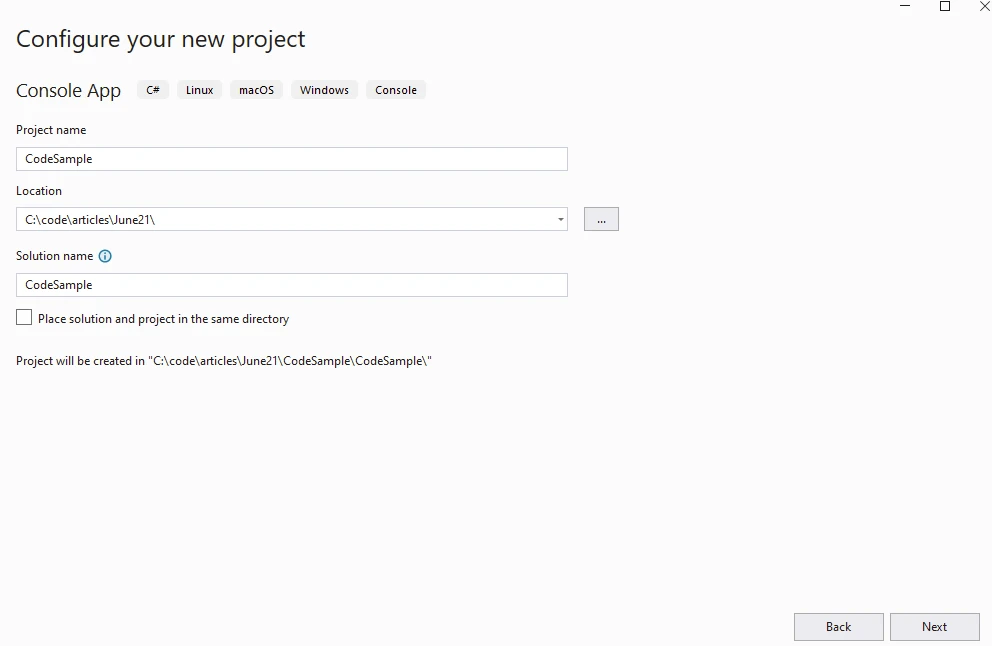
프로젝트 이름 제공:
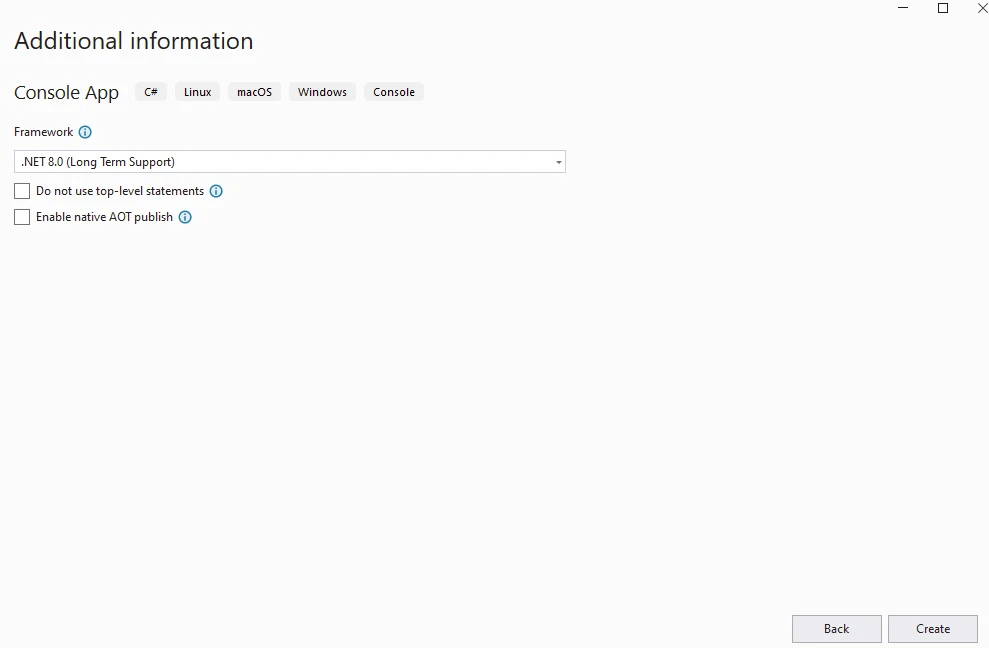
.NET 버전 제공:
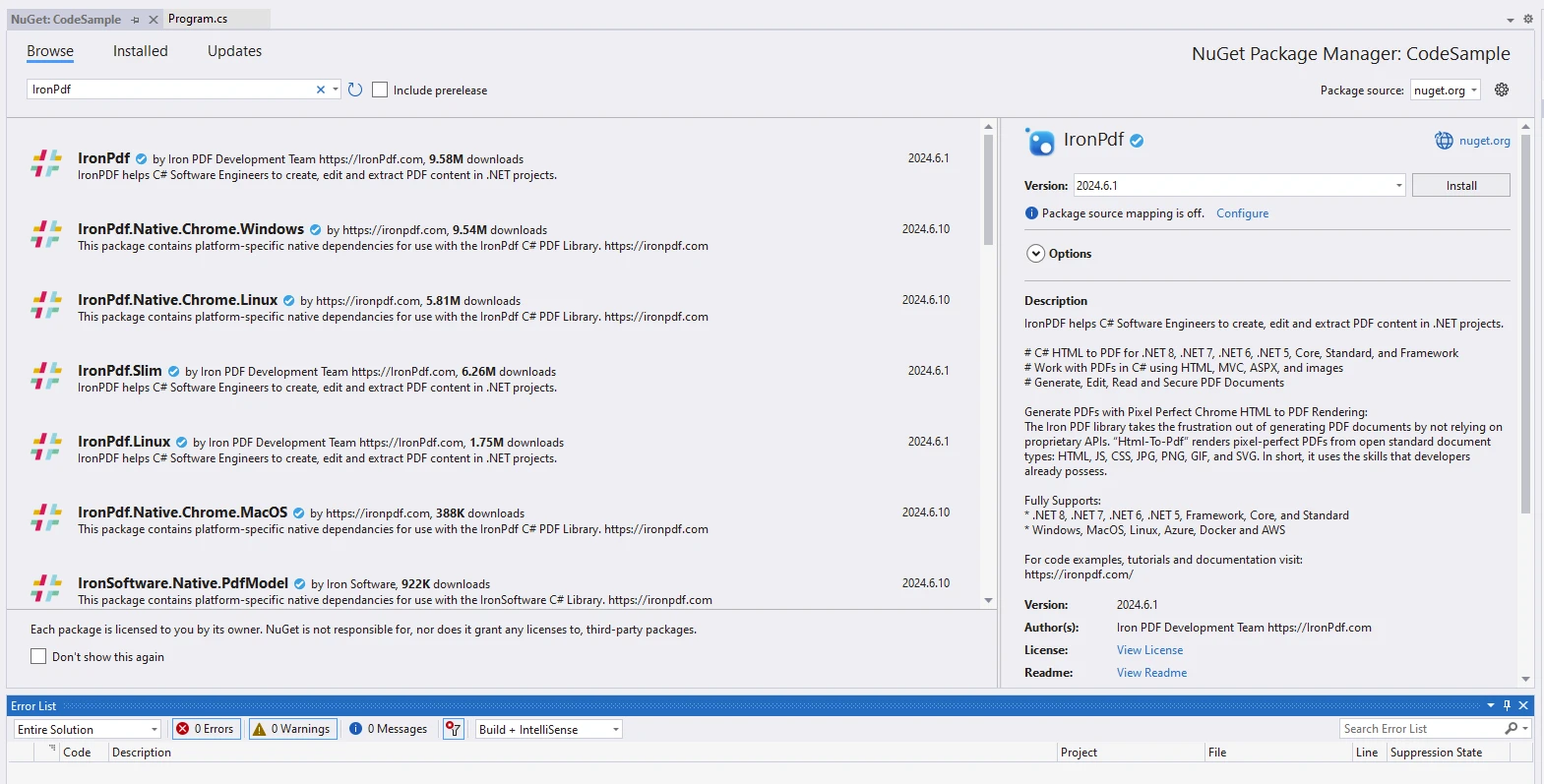
NuGet 패키지 관리자에서 IronPDF 패키지를 설치하세요:
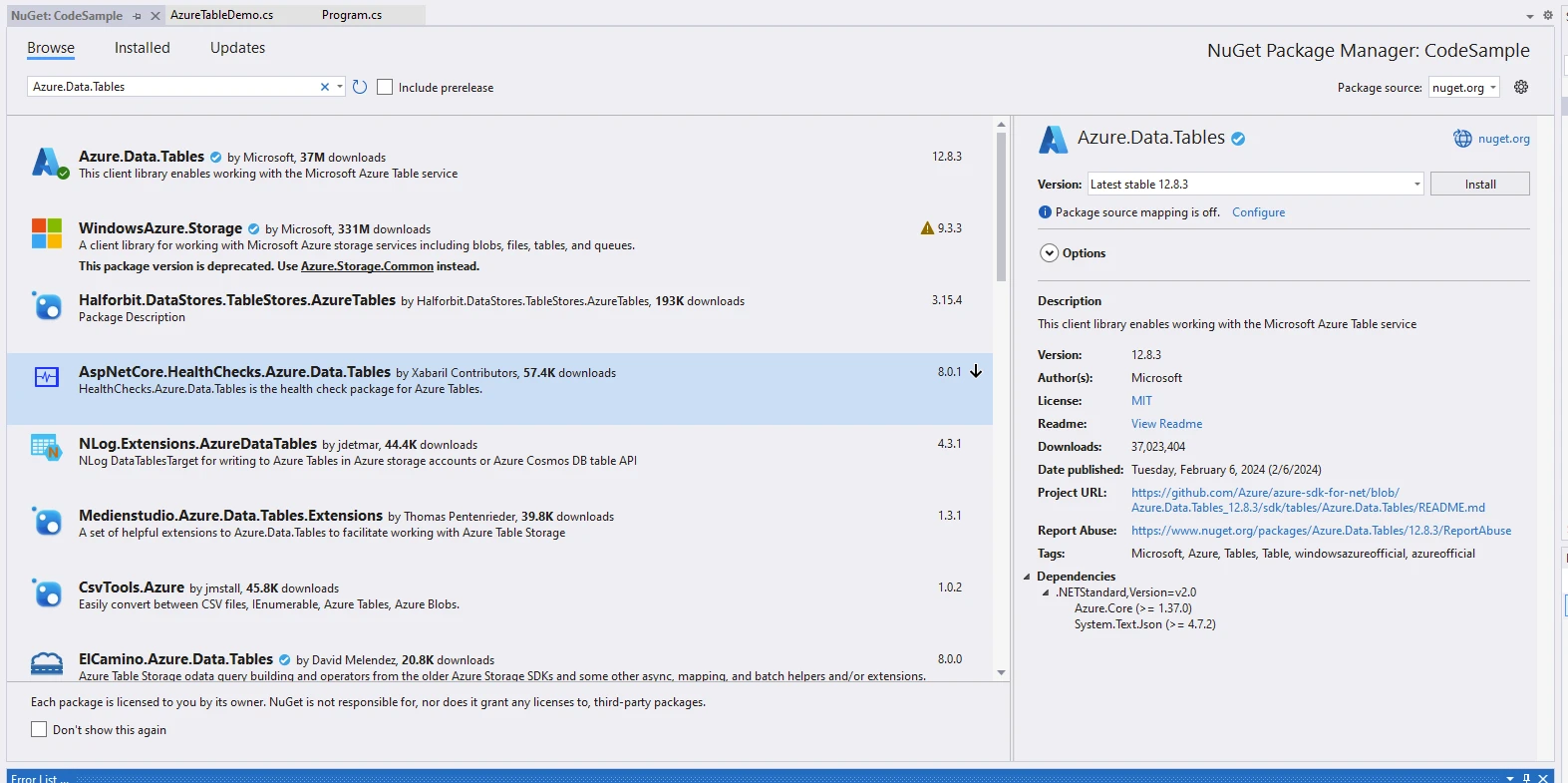
Azure Tables 라이브러리에 접근하기 위해, NuGet 패키지 관리자에서 찾을 수 있는 Azure Tables 클라이언트 라이브러리인 Azure.Data.Tables를 사용할 것입니다. Azure Table Service 클라이언트는 Azure Table Storage와 상호 작용하기 위한 기능을 제공합니다.
Azure Tables를 시작하려면 Azure Storage 계정을 생성하세요:
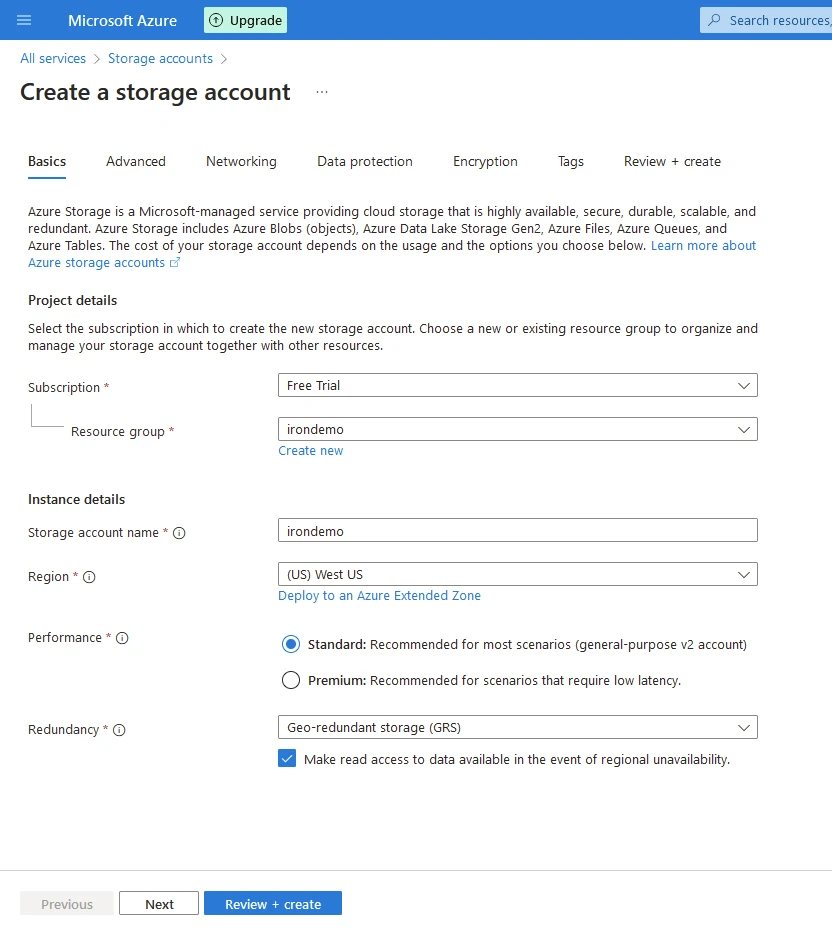
검토 및 생성 클릭. Azure Tables를 사용하여 PDF 문서를 생성하기 위해 아래 코드를 프로그램에 입력하세요.
using Azure;
using Azure.Data.Tables;
using Azure.Data.Tables.Models;
using IronPdf;
using System;
using System.Linq;
using System.Threading.Tasks;

namespace CodeSample
{
    public static class AzureTableDemo
    {
        public static async Task Execute()
        {
            var tableName = "IronDemo";
            var connectionString = "DefaultEndpointsProtocol=https;AccountName=irondemo;AccountKey=9Pe6LJlkjA721VgWvSuRCMk+WJR5/kFoyPtR1ewjRsNbGJNJOmWYhCB32fakANmWeAcfyIg++iHl+AStDNYlGw==;EndpointSuffix=core.windows.net";
            Console.WriteLine("Demo IronPDF with Azure.Data.Tables");

            // Enable web security for PDF rendering
            Installation.EnableWebSecurity = true;

            // Instantiate PDF renderer
            var renderer = new ChromePdfRenderer();

            // HTML content for the PDF
            var content = "<h1>Demo IronPDF with Azure.Data.Tables</h1>";

            // Create a TableServiceClient using the connection string
            content += "<h2>Create TableServiceClient</h2>";
            var serviceClient = new TableServiceClient(connectionString);
            content += "<p>var serviceClient = new TableServiceClient(connectionString);</p>";

            // Create the table if it does not exist
            content += "<h2>Create Table</h2>";
            TableItem table = await serviceClient.CreateTableIfNotExistsAsync(tableName);
            Console.WriteLine($"Created table: {table.Name}.");
            content += $"<p>Created table: {table.Name}.</p>";

            // Placeholder for delete table logic
            content += "<h2>Deletes If Required</h2>";
            // serviceClient.DeleteTable(tableName);
            content += "<p>serviceClient.DeleteTable(tableName);</p>";

            // Get a client reference to interact with the table
            content += "<h2>Get Table Client</h2>";
            var tableClient = serviceClient.GetTableClient(tableName);
            content += "<p>var tableClient = serviceClient.GetTableClient(tableName);</p>";

            // Define and add a new entity to the table
            content += "<h2>Add Table Entity</h2>";
            var tableEntity = new TableEntity { { "Book", "Awesome IronPDF Package" }, { "Price", 5.00 }, { "Quantity", 21 } };
            tableEntity.PartitionKey = tableEntity["Book"].ToString();
            tableEntity.RowKey = tableEntity["Price"].ToString();
            content += "<p>new TableEntity() { { \"Book\", \"Awesome IronPDF Package\" }, { \"Price\", 5.00 }, { \"Quantity\", 21 } }</p>";

            content += $"<p>tableEntity.PartitionKey = {tableEntity["Book"]}</p>";
            content += $"<p>tableEntity.RowKey = {tableEntity["Price"]}</p>";

            Console.WriteLine($"{tableEntity.RowKey}: {tableEntity["Book"]} costs ${tableEntity.GetDouble("Price")}.");
            content += $"<p>{tableEntity.RowKey}: {tableEntity["Book"]} costs ${tableEntity.GetDouble("Price")}</p>";

            // Add the entity to the table
            tableClient.AddEntity(tableEntity);
            content += "<p>Entity added.</p>";

            // Query the table
            content += "<h2>Query Table</h2>";
            Pageable<TableEntity> queryResultsFilter = tableClient.Query<TableEntity>(filter: $"PartitionKey eq '{tableEntity.PartitionKey}'");
            content += "<p>Using tableClient.Query<TableEntity></p>";

            // Iterate and display queried entities
            foreach (TableEntity qEntity in queryResultsFilter)
            {
                content += $"<p>{qEntity.GetString("Book")}: {qEntity.GetDouble("Price")}</p>";
                Console.WriteLine($"{qEntity.GetString("Book")}: {qEntity.GetDouble("Price")}");
            }
            Console.WriteLine($"The query returned {queryResultsFilter.Count()} entities.");
            content += $"<p>The query returned {queryResultsFilter.Count()} entities.</p>";

            // Render HTML content as PDF
            var pdf = renderer.RenderHtmlAsPdf(content);

            // Save the PDF to a file
            pdf.SaveAs("AwesomeAzureDataTables.pdf");
        }
    }
}
using Azure;
using Azure.Data.Tables;
using Azure.Data.Tables.Models;
using IronPdf;
using System;
using System.Linq;
using System.Threading.Tasks;
namespace CodeSample
{
public static class AzureTableDemo
{
public static async Task Execute()
{
var tableName = "IronDemo";
var connectionString = "DefaultEndpointsProtocol=https;AccountName=irondemo;AccountKey=9Pe6LJlkjA721VgWvSuRCMk+WJR5/kFoyPtR1ewjRsNbGJNJOmWYhCB32fakANmWeAcfyIg++iHl+AStDNYlGw==;EndpointSuffix=core.windows.net";
Console.WriteLine("Demo IronPDF with Azure.Data.Tables");
// Enable web security for PDF rendering
Installation.EnableWebSecurity = true;
// Instantiate PDF renderer
var renderer = new ChromePdfRenderer();
// HTML content for the PDF
var content = "<h1>Demo IronPDF with Azure.Data.Tables</h1>";
// Create a TableServiceClient using the connection string
content += "<h2>Create TableServiceClient</h2>";
var serviceClient = new TableServiceClient(connectionString);
content += "<p>var serviceClient = new TableServiceClient(connectionString);</p>";
// Create the table if it does not exist
content += "<h2>Create Table</h2>";
TableItem table = await serviceClient.CreateTableIfNotExistsAsync(tableName);
Console.WriteLine($"Created table: {table.Name}.");
content += $"<p>Created table: {table.Name}.</p>";
// Placeholder for delete table logic
content += "<h2>Deletes If Required</h2>";
// serviceClient.DeleteTable(tableName);
content += "<p>serviceClient.DeleteTable(tableName);</p>";
// Get a client reference to interact with the table
content += "<h2>Get Table Client</h2>";
var tableClient = serviceClient.GetTableClient(tableName);
content += "<p>var tableClient = serviceClient.GetTableClient(tableName);</p>";
// Define and add a new entity to the table
content += "<h2>Add Table Entity</h2>";
var tableEntity = new TableEntity { { "Book", "Awesome IronPDF Package" }, { "Price", 5.00 }, { "Quantity", 21 } };
tableEntity.PartitionKey = tableEntity["Book"].ToString();
tableEntity.RowKey = tableEntity["Price"].ToString();
content += "<p>new TableEntity() { { \"Book\", \"Awesome IronPDF Package\" }, { \"Price\", 5.00 }, { \"Quantity\", 21 } }</p>";
content += $"<p>tableEntity.PartitionKey = {tableEntity["Book"]}</p>";
content += $"<p>tableEntity.RowKey = {tableEntity["Price"]}</p>";
Console.WriteLine($"{tableEntity.RowKey}: {tableEntity["Book"]} costs ${tableEntity.GetDouble("Price")}.");
content += $"<p>{tableEntity.RowKey}: {tableEntity["Book"]} costs ${tableEntity.GetDouble("Price")}</p>";
// Add the entity to the table
tableClient.AddEntity(tableEntity);
content += "<p>Entity added.</p>";
// Query the table
content += "<h2>Query Table</h2>";
Pageable<TableEntity> queryResultsFilter = tableClient.Query<TableEntity>(filter: $"PartitionKey eq '{tableEntity.PartitionKey}'");
content += "<p>Using tableClient.Query<TableEntity></p>";
// Iterate and display queried entities
foreach (TableEntity qEntity in queryResultsFilter)
{
content += $"<p>{qEntity.GetString("Book")}: {qEntity.GetDouble("Price")}</p>";
Console.WriteLine($"{qEntity.GetString("Book")}: {qEntity.GetDouble("Price")}");
}
Console.WriteLine($"The query returned {queryResultsFilter.Count()} entities.");
content += $"<p>The query returned {queryResultsFilter.Count()} entities.</p>";
// Render HTML content as PDF
var pdf = renderer.RenderHtmlAsPdf(content);
// Save the PDF to a file
pdf.SaveAs("AwesomeAzureDataTables.pdf");
}
}
}Imports Azure
Imports Azure.Data.Tables
Imports Azure.Data.Tables.Models
Imports IronPdf
Imports System
Imports System.Linq
Imports System.Threading.Tasks
Namespace CodeSample
Public Module AzureTableDemo
Public Async Function Execute() As Task
Dim tableName = "IronDemo"
Dim connectionString = "DefaultEndpointsProtocol=https;AccountName=irondemo;AccountKey=9Pe6LJlkjA721VgWvSuRCMk+WJR5/kFoyPtR1ewjRsNbGJNJOmWYhCB32fakANmWeAcfyIg++iHl+AStDNYlGw==;EndpointSuffix=core.windows.net"
Console.WriteLine("Demo IronPDF with Azure.Data.Tables")
' Enable web security for PDF rendering
Installation.EnableWebSecurity = True
' Instantiate PDF renderer
Dim renderer = New ChromePdfRenderer()
' HTML content for the PDF
Dim content = "<h1>Demo IronPDF with Azure.Data.Tables</h1>"
' Create a TableServiceClient using the connection string
content &= "<h2>Create TableServiceClient</h2>"
Dim serviceClient = New TableServiceClient(connectionString)
content &= "<p>var serviceClient = new TableServiceClient(connectionString);</p>"
' Create the table if it does not exist
content &= "<h2>Create Table</h2>"
Dim table As TableItem = Await serviceClient.CreateTableIfNotExistsAsync(tableName)
Console.WriteLine($"Created table: {table.Name}.")
content &= $"<p>Created table: {table.Name}.</p>"
' Placeholder for delete table logic
content &= "<h2>Deletes If Required</h2>"
' serviceClient.DeleteTable(tableName);
content &= "<p>serviceClient.DeleteTable(tableName);</p>"
' Get a client reference to interact with the table
content &= "<h2>Get Table Client</h2>"
Dim tableClient = serviceClient.GetTableClient(tableName)
content &= "<p>var tableClient = serviceClient.GetTableClient(tableName);</p>"
' Define and add a new entity to the table
content &= "<h2>Add Table Entity</h2>"
Dim tableEntity As New TableEntity From {
{ "Book", "Awesome IronPDF Package" },
{ "Price", 5.00 },
{ "Quantity", 21 }
}
tableEntity.PartitionKey = tableEntity("Book").ToString()
tableEntity.RowKey = tableEntity("Price").ToString()
content &= "<p>new TableEntity() { { ""Book"", ""Awesome IronPDF Package"" }, { ""Price"", 5.00 }, { ""Quantity"", 21 } }</p>"
content &= $"<p>tableEntity.PartitionKey = {tableEntity("Book")}</p>"
content &= $"<p>tableEntity.RowKey = {tableEntity("Price")}</p>"
Console.WriteLine($"{tableEntity.RowKey}: {tableEntity("Book")} costs ${tableEntity.GetDouble("Price")}.")
content &= $"<p>{tableEntity.RowKey}: {tableEntity("Book")} costs ${tableEntity.GetDouble("Price")}</p>"
' Add the entity to the table
tableClient.AddEntity(tableEntity)
content &= "<p>Entity added.</p>"
' Query the table
content &= "<h2>Query Table</h2>"
Dim queryResultsFilter As Pageable(Of TableEntity) = tableClient.Query(Of TableEntity)(filter:= $"PartitionKey eq '{tableEntity.PartitionKey}'")
content &= "<p>Using tableClient.Query<TableEntity></p>"
' Iterate and display queried entities
For Each qEntity As TableEntity In queryResultsFilter
content &= $"<p>{qEntity.GetString("Book")}: {qEntity.GetDouble("Price")}</p>"
Console.WriteLine($"{qEntity.GetString("Book")}: {qEntity.GetDouble("Price")}")
Next qEntity
Console.WriteLine($"The query returned {queryResultsFilter.Count()} entities.")
content &= $"<p>The query returned {queryResultsFilter.Count()} entities.</p>"
' Render HTML content as PDF
Dim pdf = renderer.RenderHtmlAsPdf(content)
' Save the PDF to a file
pdf.SaveAs("AwesomeAzureDataTables.pdf")
End Function
End Module
End Namespace코드 설명
이 코드는 Azure Table Storage와 상호작용하고 IronPDF를 사용하여 PDF를 생성하는 방법을 보여줍니다:
-
Azure Table Storage 상호작용:
- Azure SDK .NET용 (Azure.Data.Tables)을 사용하여 Azure Table Storage에 연결합니다.
- 그런 다음 "IronDemo"라는 테이블이 존재하는지 확인합니다; 없다면, 생성합니다.
- "Book", "Price", "Quantity"와 같은 속성을 지정하여 테이블에 새 엔티티(데이터베이스 행과 유사)를 추가합니다.
- 필터 조건에 따라 엔티티를 검색하기 위해 테이블 쿼리.
- IronPDF를 사용한 PDF 생성:
- IronPDF의 ChromePdfRenderer를 사용하여 HTML 콘텐츠를 PDF 파일로 렌더링합니다.
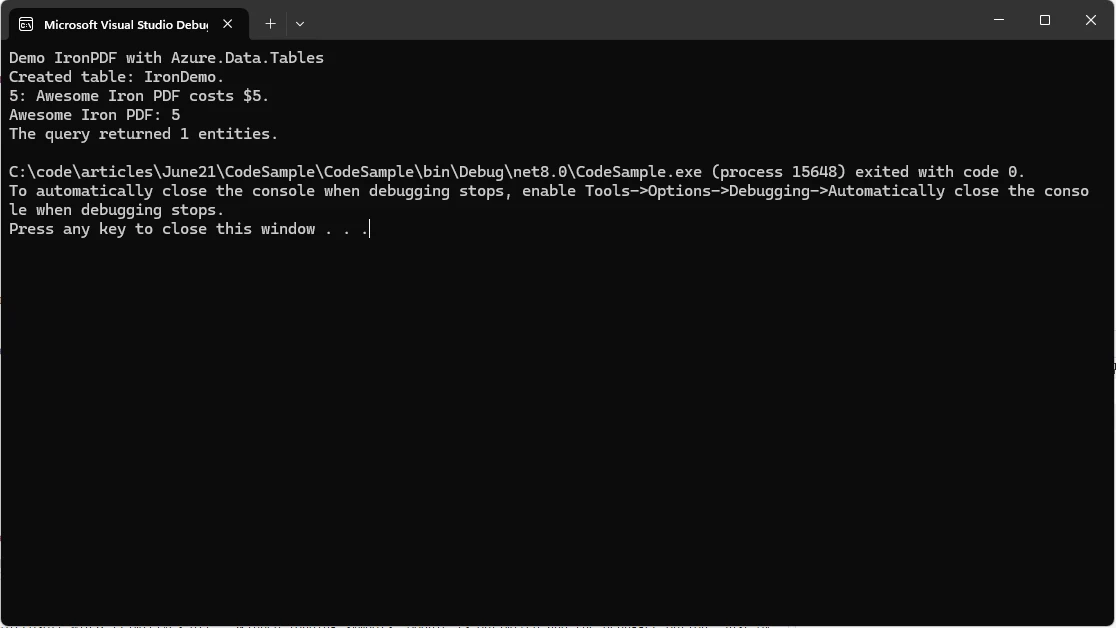
- Azure Table Storage 작업에 관한 세부 정보를 포함하는 동적 HTML 콘텐츠로부터 PDF를 생성합니다.
IronPDF 라이선스
IronPDF 패키지는 작동에 라이센스가 필요합니다. 애플리케이션 시작 시 패키지를 액세스하기 전에 아래 코드를 추가하세요
IronPdf.License.LicenseKey = "IRONPDF-KEY";IronPdf.License.LicenseKey = "IRONPDF-KEY";Imports IronPdf
IronPdf.License.LicenseKey = "IRONPDF-KEY"체험판 라이센스는 여기에서 가능합니다.
결론
Azure Table Storage는 개발자에게 클라우드에서 확장 가능하고 유연하며 비용 효율적인 데이터 저장소 솔루션을 제공하기 위한 Microsoft의 헌신을 입증합니다. 스키마 없는 설계, 수평 확장성 및 Azure 생태계와의 원활한 통합을 통해 Azure Table Storage는 개발자가 현대 비즈니스 환경의 동적 요구에 적응할 수 있는 탄력 있고 민첩한 애플리케이션을 구축할 수 있도록 합니다.
IoT 데이터 스트림 관리, 콘텐츠 메타데이터 저장 또는 분산 시스템 조정을 포함하여 Azure Table Storage는 클라우드 네이티브 애플리케이션의 잠재력을 극대화하기 위한 다재다능한 플랫폼을 제공합니다. 조직이 디지털 혁신 이니셔티브를 수용하고 클라우드로 마이그레이션함에 따라, Azure Table Storage는 현대 데이터 저장소 아키텍처의 핵심 요소로 남아 혁신을 주도하고 점점 더 데이터 중심의 세계에서 비즈니스가 번창할 수 있도록 합니다.
IronPDF는 프로그래밍으로 PDF 문서를 생성하고 조작하는 데 사용되는 .NET 라이브러리입니다. 개발자가 HTML, ASPX 페이지, 이미지 및 텍스트를 PDF 파일로 변환할 수 있게 해줍니다. 주요 기능은 HTML에서 PDF로의 변환, PDF 편집 및 다양한 .NET 환경에 대한 지원을 포함하여 .NET 애플리케이션 내에서 PDF 문서를 생성하고 처리할 수 있는 다재다능한 도구입니다.
자주 묻는 질문
C#을 사용하여 HTML 콘텐츠를 PDF로 어떻게 변환할 수 있나요?
C#에서 IronPDF 라이브러리를 사용하여 HTML 콘텐츠를 PDF로 변환할 수 있습니다. 라이브러리는 RenderHtmlAsPdf와 같은 메서드를 제공하여 HTML 문자열이나 파일을 PDF 문서로 변환합니다.
Azure Table Storage에서 파티셔닝은 어떤 역할을 하나요?
Azure Table Storage에서 파티셔닝은 데이터를 다양한 노드에 분산하여 로드 밸런싱과 확장을 향상시킵니다. 파티션 키를 사용하여 스토리지 클러스터 전반에서 데이터를 효율적으로 관리합니다.
Azure Table Storage를 문서 생성을 위한 C# PDF 라이브러리와 통합할 수 있나요?
네, Azure Table Storage를 IronPDF와 같은 C# PDF 라이브러리와 통합하여 문서를 생성할 수 있습니다. 이 통합은 Azure Table Storage에서 데이터를 가져와 IronPDF를 사용하여 PDF 형식으로 렌더링할 수 있게 해줍니다.
클라우드 데이터베이스에서 스키마 없는 저장소를 사용하는 이점은 무엇인가요?
Azure Table Storage가 제공하는 스키마 없는 저장소는 데이터 설계의 유연성을 제공합니다. 이는 동일한 테이블 내에서 다양한 데이터 구조를 허용하여 민첩한 개발과 진화하는 데이터 모델에 대한 적응력을 제공합니다.
Azure Table Storage가 IoT 데이터 관리를 어떻게 지원하나요?
Azure Table Storage는 IoT 데이터 관리를 위해 원격 측정 데이터에 대한 확장 가능하고 효율적인 저장소를 제공합니다. 스키마 없는 디자인과 확장 능력으로 대량의 IoT 데이터를 관리하는 데 이상적입니다.
프로덕션 환경에서 C# PDF 라이브러리를 사용하려면 라이선스가 필요한가요?
네, IronPDF와 같은 C# PDF 라이브러리를 프로덕션 환경에서 사용하려면 라이선스가 필요합니다. 체험판 라이선스는 기능을 구매 전에 탐색할 수 있도록 체험 목적으로 제공됩니다.
Azure Table Storage가 어떻게 효율적인 데이터 쿼리를 보장하나요?
Azure Table Storage는 파티션 및 행 키를 사용한 키-값 쌍 모델을 사용하여 데이터 쿼리 및 검색을 최적화합니다. 이 설계는 대량 데이터 세트에 대한 효율적인 접근을 가능하게 합니다.
Azure Table Storage의 일반적인 애플리케이션은 무엇인가요?
Azure Table Storage의 일반적인 애플리케이션에는 콘텐츠 관리용 메타데이터 저장, 웹 애플리케이션의 세션 상태 관리, 분산 시스템의 공유 상태 조정이 포함됩니다.










 무료로 시작하세요
 무료로 시작하세요
 무료 라이브 데모 예약하기





 신용카드나 계정 생성은 필요하지 않습니다.










