


C# Null Conditional Operator (개발자를 위한 작동 방식)

C# Null 조건부 연산자는 코드에서 널 값을 처리하는 데 있어 더 간결하고 안전한 방법을 제공합니다. 이 연산자의 매력은 널 검사 작업을 간소화하여 코드를 더 깔끔하고 가독성 있게 만드는 데 있습니다.
해당null 조건 연산자의 작동 방식, 그 이점, 그리고 프로젝트에서 어떻게 활용할 수 있는지에 대해 자세히 알아보겠습니다. IronPDF 및 그것의 사용 사례IronPDF와 사용 사례와 Null 조건 연산자와의 사용 사례도 탐색할 것입니다.
Null 조건부 연산자란?
엘비스 프레슬리의 헤어스타일(?.)과 유사하여 '엘비스 연산자'라고 종종 불리는 널 조건부 연산자를 사용하면 객체가 null이 아닐 때에만 멤버 액세스 또는 메소드 호출을 수행할 수 있습니다.
객체가 null이면, 이 연산자는 null 참조 예외를 던지지 않고 null을 반환합니다. 이 연산자는 잠재적으로 null인 객체의 멤버에 안전하게 액세스하기 위해 필요한 코드 양을 크게 줄여주어 개발자들에게는 혁신적인 도구입니다.
Null 조건부 연산자의 기본
널 조건부 연산자를 이해하기 위해 public class Employee 예제를 고려해보십시오. 이 클래스는 public string FirstName 및 public string LastName과 같은 속성을 가지고 있을 수 있습니다. 기존의 C# 코드에서는 잠재적으로 null인 Employee 객체의 속성에 액세스할 때 예외를 피하기 위해 명시적인 null 검사가 필요합니다:
if (employee != null)
{
    var name = employee.FirstName;
}
if (employee != null)
{
var name = employee.FirstName;
}If employee IsNot Nothing Then
Dim name = employee.FirstName
End If하지만, null 조건부 연산자를 사용하면 이를 한 줄로 간소화할 수 있습니다:
var name = employee?.FirstName;var name = employee?.FirstName;Dim name = employee?.FirstName만약 employee가 null이 아니면, name 변수는 employee.FirstName의 값을 받습니다. 만약 employee가 null이면, name은 null로 설정됩니다. 이 한 줄의 코드는 명시적인 null 검사 여러 줄을 우아하게 대체합니다.
널 병합 연산자와 결합하기
널 조건부 연산자는 널 병합 할당 연산자 (??=)와 결합될 때 더욱 강력해집니다. 널 병합 연산자는 표현식이 널로 평가되는 경우 기본값을 지정할 수 있게 합니다.
예를 들어, name 변수가 널 대신 기본값으로 "Unknown"을 가지도록 보장하고자 한다면:
var name = employee?.FirstName ?? "Unknown";var name = employee?.FirstName ?? "Unknown";Dim name = If(employee?.FirstName, "Unknown")이 코드는 employee가 널인지 체크하고, employee.FirstName이 널이라면 name에 "Unknown"을 할당합니다. 이 코드는 하나의 연산에서 널 값을 세련되게 처리하여, 코드가 얼마나 간결하고 효과적으로 변할 수 있는지 보여줍니다.
C#은 널러블 타입을 도입하여 변수들이 자신의 기반 타입의 널이 아닌 값이나 널을 가질 수 있도록 합니다.
고급 사용: 널 조건부와 컬렉션
컬렉션을 다룰 때 널 조건부 연산자를 사용하여 널 참조 예외의 위험 없이 요소에 접근할 수 있습니다. 직원의 목록이 있고 첫 번째 요소의 이름을 안전하게 접근하고자 한다고 가정하겠습니다. 연산자를 대괄호와 함께 사용할 수 있습니다:
var firstName = employees?[0]?.FirstName ?? "Unknown";var firstName = employees?[0]?.FirstName ?? "Unknown";Dim firstName = If(employees?(0)?.FirstName, "Unknown")이 코드 줄은 스레드 안전성을 가지며, 다른 스레드가 널 체크 후에 employees를 널로 변경하더라도 첫 번째 요소에 접근하기 전에 코드가 충돌하지 않도록 보장합니다. 널러블 타입을 다룰 때, 널러블 타입과 연관된 널이 아닌 타입인 기반 값 타입을 이해하는 것이 중요합니다.
스레드 안전성과 널 조건부 연산자
널 조건부 연산자를 사용할 때는 스레드 안전성 기능의 미묘한 점 중 하나입니다. 이 연산자를 사용하면 표현식의 평가는 스레드 안전성을 가집니다. 이는 다른 스레드에 의해 수정될 수 있는 공유 리소스에 접근하는 경우 잠재적인 경쟁 상태를 방지할 수 있음을 의미합니다.
하지만 연산자 자체는 수행하는 작업에 대해 스레드 안전성을 가질지라도, 코드를 전체 블록이나 연산 순서 전체에 대해 스레드 안전성을 보장하지는 않습니다.
실용적인 예제
이벤트를 발생시킬 수 있는 객체가 있는 보다 실용적인 예제를 고려해 보겠습니다. 전통적인 C#에서는 널 참조 예외를 피하기 위해 이벤트를 호출하기 전에 이벤트 핸들러가 널인지 체크했습니다:
if (PropertyChanged != null)
{
    PropertyChanged(this, new PropertyChangedEventArgs(name));
}
if (PropertyChanged != null)
{
PropertyChanged(this, new PropertyChangedEventArgs(name));
}If PropertyChanged IsNot Nothing Then
PropertyChanged(Me, New PropertyChangedEventArgs(name))
End If널 조건부 연산자로 이 작업을 다음과 같이 단순화할 수 있습니다:
PropertyChanged?.Invoke(this, new PropertyChangedEventArgs(name));PropertyChanged?.Invoke(this, new PropertyChangedEventArgs(name));If PropertyChanged IsNot Nothing Then
PropertyChanged.Invoke(Me, New PropertyChangedEventArgs(name))
End If이 간결한 코드는 동일한 결과를 더 읽기 쉽고 안전한 방식으로 달성합니다. 명시적으로 null을 반환하고자 할 때는 return null; 문을 사용할 수 있습니다. ?. 연산자는 PropertyChanged가 널이면 연산을 단축 처리하여 예외를 방지합니다. 여기 전체 코드가 있습니다:
using System.ComponentModel;

// Define a Person class that implements the INotifyPropertyChanged interface
public class Person : INotifyPropertyChanged
{
    private string name;

    // Event that is raised when a property changes
    public event PropertyChangedEventHandler PropertyChanged;

    // Property for the person's name with a getter and setter
    public string Name
    {
        get { return name; }
        set
        {
            if (name != value)
            {
                name = value;
                OnPropertyChanged(nameof(Name)); // Notify that the property has changed
            }
        }
    }

    // Method to invoke the PropertyChanged event safely using the null conditional operator
    protected virtual void OnPropertyChanged(string propertyName)
    {
        PropertyChanged?.Invoke(this, new PropertyChangedEventArgs(propertyName));
    }
}

class Program
{
    static void Main(string[] args)
    {
        // Create a new Person instance and subscribe to the PropertyChanged event
        Person person = new Person();
        person.PropertyChanged += (sender, e) =>
        {
            Console.WriteLine($"{e.PropertyName} property has changed.");
        };

        // Change the person's name, triggering the PropertyChanged event
        person.Name = "Iron Software";
    }
}
using System.ComponentModel;
// Define a Person class that implements the INotifyPropertyChanged interface
public class Person : INotifyPropertyChanged
{
private string name;
// Event that is raised when a property changes
public event PropertyChangedEventHandler PropertyChanged;
// Property for the person's name with a getter and setter
public string Name
{
get { return name; }
set
{
if (name != value)
{
name = value;
OnPropertyChanged(nameof(Name)); // Notify that the property has changed
}
}
}
// Method to invoke the PropertyChanged event safely using the null conditional operator
protected virtual void OnPropertyChanged(string propertyName)
{
PropertyChanged?.Invoke(this, new PropertyChangedEventArgs(propertyName));
}
}
class Program
{
static void Main(string[] args)
{
// Create a new Person instance and subscribe to the PropertyChanged event
Person person = new Person();
person.PropertyChanged += (sender, e) =>
{
Console.WriteLine($"{e.PropertyName} property has changed.");
};
// Change the person's name, triggering the PropertyChanged event
person.Name = "Iron Software";
}
}Imports System.ComponentModel
' Define a Person class that implements the INotifyPropertyChanged interface
Public Class Person
Implements INotifyPropertyChanged
'INSTANT VB NOTE: The field name was renamed since Visual Basic does not allow fields to have the same name as other class members:
Private name_Conflict As String
' Event that is raised when a property changes
Public Event PropertyChanged As PropertyChangedEventHandler Implements INotifyPropertyChanged.PropertyChanged
' Property for the person's name with a getter and setter
Public Property Name() As String
Get
Return name_Conflict
End Get
Set(ByVal value As String)
If name_Conflict <> value Then
name_Conflict = value
OnPropertyChanged(NameOf(Name)) ' Notify that the property has changed
End If
End Set
End Property
' Method to invoke the PropertyChanged event safely using the null conditional operator
Protected Overridable Sub OnPropertyChanged(ByVal propertyName As String)
RaiseEvent PropertyChanged(Me, New PropertyChangedEventArgs(propertyName))
End Sub
End Class
Friend Class Program
Shared Sub Main(ByVal args() As String)
' Create a new Person instance and subscribe to the PropertyChanged event
Dim person As New Person()
AddHandler person.PropertyChanged, Sub(sender, e)
Console.WriteLine($"{e.PropertyName} property has changed.")
End Sub
' Change the person's name, triggering the PropertyChanged event
person.Name = "Iron Software"
End Sub
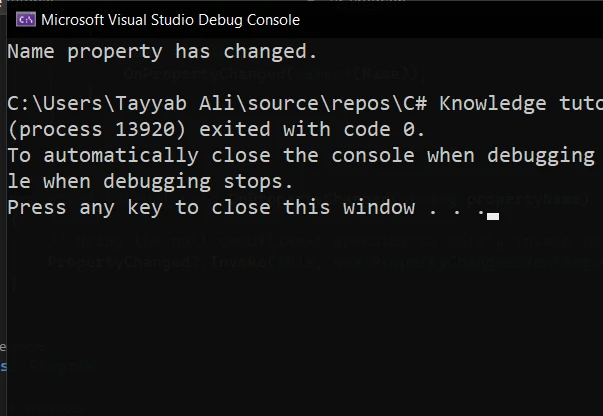
End Class다음은 코드 실행 결과입니다.
C# 프로젝트에서 IronPDF 소개
IronPDF는 C# 개발자에게 다재다능한 라이브러리로, .NET 애플리케이션 내에서 PDF 콘텐츠를 생성, 편집 및 추출할 수 있습니다. 이 라이브러리는 사용의 용이성과 PDF 기능을 모든 .NET 프로젝트에 매끄럽게 통합할 수 있는 능력 때문에 돋보입니다.
IronPDF의 최고 기능은 HTML을 PDF로 변환하는 것으로, 전체 레이아웃과 스타일을 보존합니다. 이는 보고서, 청구서 및 문서 등을 웹 콘텐츠에서 PDF로 생성하는 데 좋은 솔루션입니다. HTML 파일, URL 및 HTML 문자열에서 PDF 파일로의 변환을 지원합니다.
using IronPdf;

class Program
{
    static void Main(string[] args)
    {
        var renderer = new ChromePdfRenderer();

        // 1. Convert HTML String to PDF
        var htmlContent = "<h1>Hello, IronPDF!</h1><p>This is a PDF from an HTML string.</p>";
        var pdfFromHtmlString = renderer.RenderHtmlAsPdf(htmlContent);
        pdfFromHtmlString.SaveAs("HTMLStringToPDF.pdf");

        // 2. Convert HTML File to PDF
        var htmlFilePath = "path_to_your_html_file.html"; // Specify the path to your HTML file
        var pdfFromHtmlFile = renderer.RenderHtmlFileAsPdf(htmlFilePath);
        pdfFromHtmlFile.SaveAs("HTMLFileToPDF.pdf");

        // 3. Convert URL to PDF
        var url = "http://ironpdf.com"; // Specify the URL
        var pdfFromUrl = renderer.RenderUrlAsPdf(url);
        pdfFromUrl.SaveAs("URLToPDF.pdf");
    }
}
using IronPdf;
class Program
{
static void Main(string[] args)
{
var renderer = new ChromePdfRenderer();
// 1. Convert HTML String to PDF
var htmlContent = "<h1>Hello, IronPDF!</h1><p>This is a PDF from an HTML string.</p>";
var pdfFromHtmlString = renderer.RenderHtmlAsPdf(htmlContent);
pdfFromHtmlString.SaveAs("HTMLStringToPDF.pdf");
// 2. Convert HTML File to PDF
var htmlFilePath = "path_to_your_html_file.html"; // Specify the path to your HTML file
var pdfFromHtmlFile = renderer.RenderHtmlFileAsPdf(htmlFilePath);
pdfFromHtmlFile.SaveAs("HTMLFileToPDF.pdf");
// 3. Convert URL to PDF
var url = "http://ironpdf.com"; // Specify the URL
var pdfFromUrl = renderer.RenderUrlAsPdf(url);
pdfFromUrl.SaveAs("URLToPDF.pdf");
}
}Imports IronPdf
Friend Class Program
Shared Sub Main(ByVal args() As String)
Dim renderer = New ChromePdfRenderer()
' 1. Convert HTML String to PDF
Dim htmlContent = "<h1>Hello, IronPDF!</h1><p>This is a PDF from an HTML string.</p>"
Dim pdfFromHtmlString = renderer.RenderHtmlAsPdf(htmlContent)
pdfFromHtmlString.SaveAs("HTMLStringToPDF.pdf")
' 2. Convert HTML File to PDF
Dim htmlFilePath = "path_to_your_html_file.html" ' Specify the path to your HTML file
Dim pdfFromHtmlFile = renderer.RenderHtmlFileAsPdf(htmlFilePath)
pdfFromHtmlFile.SaveAs("HTMLFileToPDF.pdf")
' 3. Convert URL to PDF
Dim url = "http://ironpdf.com" ' Specify the URL
Dim pdfFromUrl = renderer.RenderUrlAsPdf(url)
pdfFromUrl.SaveAs("URLToPDF.pdf")
End Sub
End Class리포트, 청구서, 또는 PDF 형식의 어떤 문서를 생성하든 IronPDF는 이 작업들을 효율적으로 수행할 수 있는 포괄적인 도구 세트를 제공합니다.
널 조건부 연산자와 IronPDF 통합
널 조건부 연산자와 함께 IronPDF를 프로젝트에 통합하여 PDF를 처리하면 애플리케이션의 견고성을 크게 향상시킬 수 있습니다. 이 조합은 널 일 수도 있는 PDF 콘텐츠를 다루거나 널 값으로 이어질 수 있는 작업을 수행할 때 특히 유용합니다.
IronPDF를 사용하여 HTML 콘텐츠에서 PDF 문서를 생성하는 간단한 예제를 살펴보겠습니다. 이후 널 조건부 연산자를 사용하여 문서의 속성을 안전하게 접근하고, 널 값을 우아하게 다루는 방법을 보여줄 것입니다.
IronPDF 설치 중
먼저 프로젝트에 IronPDF를 추가해야 합니다. NuGet 패키지 관리자를 통해 할 수 있습니다:
Install-Package IronPdf
이제 다음 코드를 Program.cs 파일에 작성하세요:
using IronPdf;
using System;

public class PdfGenerator
{
    public static void CreatePdf(string htmlContent, string outputPath)
    {
        // Instantiate the HtmlToPdf converter
        var renderer = new IronPdf.ChromePdfRenderer();

        // Generate a PDF document from HTML content
        var pdfDocument = renderer.RenderHtmlAsPdf(htmlContent);

        // Use the null conditional operator to safely access the document's properties
        var pageCount = pdfDocument?.PageCount ?? 0;

        // Check if the PDF was generated successfully and has pages
        if (pageCount > 0)
        {
            // Save the PDF document to the specified output path
            pdfDocument.SaveAs(outputPath);
            Console.WriteLine($"PDF created successfully with {pageCount} pages.");
        }
        else
        {
            // Handle cases where the PDF generation fails or returns null
            Console.WriteLine("Failed to create PDF or the document is empty.");
        }
    }

    public static void Main(string[] args)
    {
        // Define the HTML content for the PDF document
        string htmlContent = @"
            <html>
            <head>
                <title>Test PDF</title>
            </head>
            <body>
                <h1>Hello, IronPDF!</h1>
                <p>This is a simple PDF document generated from HTML using IronPDF.</p>
            </body>
            </html>";

        // Specify the path where the PDF document will be saved
        // Ensure this directory exists on your machine or adjust the path accordingly
        string filePath = @"F:\GeneratedPDF.pdf";

        // Call the method to generate and save the PDF document
        CreatePdf(htmlContent, filePath);

        // Wait for user input before closing the console window
        Console.WriteLine("Press any key to exit...");
        Console.ReadKey();
    }
}
using IronPdf;
using System;
public class PdfGenerator
{
public static void CreatePdf(string htmlContent, string outputPath)
{
// Instantiate the HtmlToPdf converter
var renderer = new IronPdf.ChromePdfRenderer();
// Generate a PDF document from HTML content
var pdfDocument = renderer.RenderHtmlAsPdf(htmlContent);
// Use the null conditional operator to safely access the document's properties
var pageCount = pdfDocument?.PageCount ?? 0;
// Check if the PDF was generated successfully and has pages
if (pageCount > 0)
{
// Save the PDF document to the specified output path
pdfDocument.SaveAs(outputPath);
Console.WriteLine($"PDF created successfully with {pageCount} pages.");
}
else
{
// Handle cases where the PDF generation fails or returns null
Console.WriteLine("Failed to create PDF or the document is empty.");
}
}
public static void Main(string[] args)
{
// Define the HTML content for the PDF document
string htmlContent = @"
<html>
<head>
<title>Test PDF</title>
</head>
<body>
<h1>Hello, IronPDF!</h1>
<p>This is a simple PDF document generated from HTML using IronPDF.</p>
</body>
</html>";
// Specify the path where the PDF document will be saved
// Ensure this directory exists on your machine or adjust the path accordingly
string filePath = @"F:\GeneratedPDF.pdf";
// Call the method to generate and save the PDF document
CreatePdf(htmlContent, filePath);
// Wait for user input before closing the console window
Console.WriteLine("Press any key to exit...");
Console.ReadKey();
}
}Imports IronPdf
Imports System
Public Class PdfGenerator
Public Shared Sub CreatePdf(ByVal htmlContent As String, ByVal outputPath As String)
' Instantiate the HtmlToPdf converter
Dim renderer = New IronPdf.ChromePdfRenderer()
' Generate a PDF document from HTML content
Dim pdfDocument = renderer.RenderHtmlAsPdf(htmlContent)
' Use the null conditional operator to safely access the document's properties
Dim pageCount = If(pdfDocument?.PageCount, 0)
' Check if the PDF was generated successfully and has pages
If pageCount > 0 Then
' Save the PDF document to the specified output path
pdfDocument.SaveAs(outputPath)
Console.WriteLine($"PDF created successfully with {pageCount} pages.")
Else
' Handle cases where the PDF generation fails or returns null
Console.WriteLine("Failed to create PDF or the document is empty.")
End If
End Sub
Public Shared Sub Main(ByVal args() As String)
' Define the HTML content for the PDF document
Dim htmlContent As String = "
<html>
<head>
<title>Test PDF</title>
</head>
<body>
<h1>Hello, IronPDF!</h1>
<p>This is a simple PDF document generated from HTML using IronPDF.</p>
</body>
</html>"
' Specify the path where the PDF document will be saved
' Ensure this directory exists on your machine or adjust the path accordingly
Dim filePath As String = "F:\GeneratedPDF.pdf"
' Call the method to generate and save the PDF document
CreatePdf(htmlContent, filePath)
' Wait for user input before closing the console window
Console.WriteLine("Press any key to exit...")
Console.ReadKey()
End Sub
End Class산출
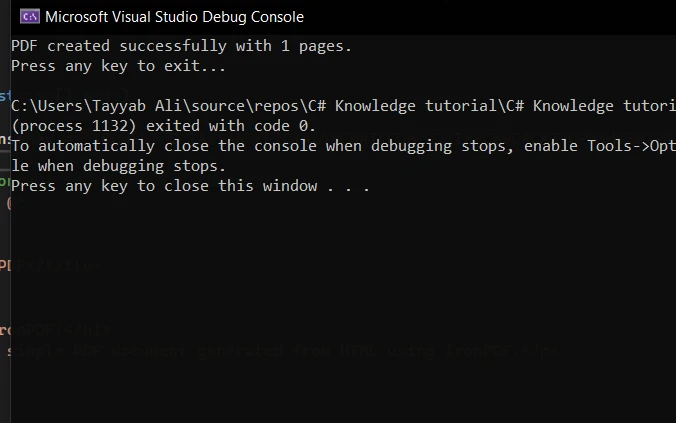
프로그램을 실행했을 때의 콘솔 출력은 다음과 같습니다:
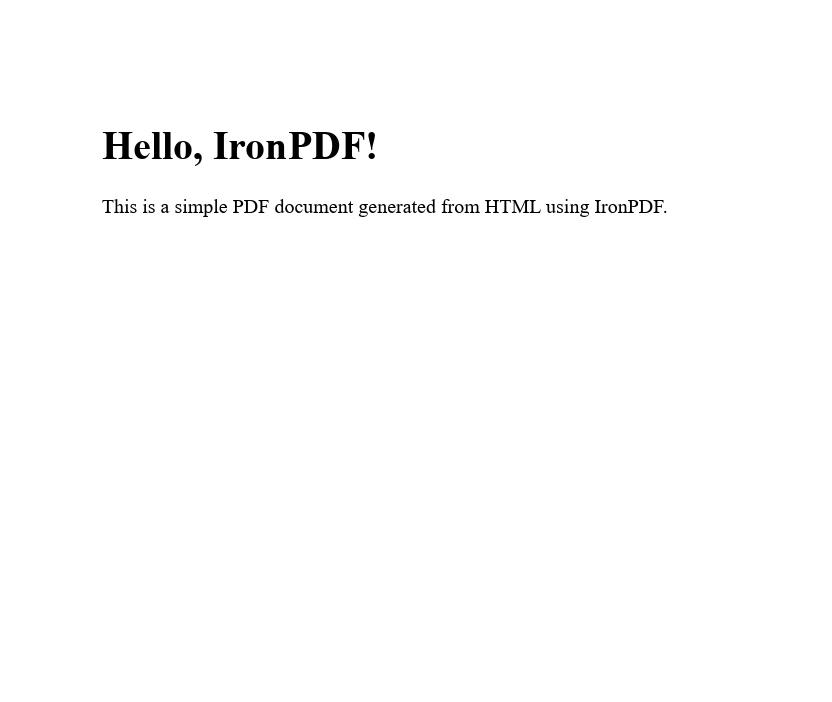
그리고 프로그램이 생성한 PDF는 다음과 같습니다:
결론
C# 프로젝트에서 널 조건부 연산자와 IronPDF를 통합하면 PDF 처리 작업을 크게 간소화하면서, 널 참조 예외로부터 코드를 안전하게 보호할 수 있습니다. 이 예제는 강력한 PDF 라이브러리와 현대적인 C# 언어 기능 간의 협력 관계를 보여줘서 더 깨끗하고 유지 보수가 쉬운 코드를 작성할 수 있게 해줍니다.
이 도구들을 효과적으로 사용하는 열쇠는 그 기능을 이해하고 귀하의 프로젝트에 신중하게 적용하는 데 있습니다.
IronPDF는 개발자에게 풀 지원과 업데이트를 제공하는 체험판을 무료로 제공합니다. 처음에는 lite 라이선스가 포함됩니다.
자주 묻는 질문
C# Null 조건부 연산자는 무엇입니까?
C# Null 조건부 연산자는 '엘비스 연산자'로도 알려져 있으며, 객체가 null이 아닐 때만 멤버나 메서드에 접근할 수 있게 하여 null 참조 예외를 방지하고 null 값 처리를 간소화합니다.
C# Null 조건부 연산자는 코드 가독성을 어떻게 향상시킵니까?
명시적 null 확인의 수를 줄임으로써, C# Null 조건부 연산자는 코드를 더 깨끗하고 읽기 쉽게 만들어주며, 개발자가 null 유효성 검사보다 핵심 논리에 집중할 수 있게 합니다.
Null 조건부 연산자는 Null 병합 연산자와 함께 사용할 수 있습니까?
네, Null 조건부 연산자는 Null 병합 연산자(??)와 결합하여 표현식이 null로 평가될 때 기본 값을 제공하여 코드의 견고성과 안전성을 향상시킵니다.
Null 조건부 연산자는 스레드 안전성에 어떻게 영향을 줍니까?
스레드 안전성을 향상시켜 다중 스레드 애플리케이션에서 null 참조 예외의 위험 없이 공유 리소스에 안전하게 접근할 수 있게 합니다.
널 조건부 연산자의 실질적인 사용 예는 무엇인가요?
실질적인 사용 예로는 PropertyChanged?.Invoke와 같은 구문을 사용하여 이벤트 처리를 단순화하고, 널 참조 예외의 위험 없이 컬렉션의 요소에 안전하게 접근하는 것이 포함됩니다.
C#에서 IronPDF를 사용하여 HTML을 PDF로 변환하는 방법은?
IronPDF는 C#에서 RenderHtmlAsPdf와 같은 메서드를 사용하여 HTML 문자열을 PDF로 변환하거나, RenderHtmlFileAsPdf를 사용하여 HTML 파일을 변환할 수 있으며, 스타일을 보존합니다.
IronPDF를 사용한 PDF 생성에서 널 조건부 연산자의 역할은 무엇인가요?
널 조건부 연산자는 IronPDF를 사용한 PDF 생성 시 PDF 문서 속성에 안전하게 접근할 수 있도록 하여, 과정 중 널 값을 처리하는 데 개선된 방식을 제공합니다.
.NET 프로젝트에서 IronPDF를 설치하는 방법은?
IronPDF는 NuGet 패키지 매니저를 통해 명령어 Install-Package IronPdf를 사용하여 .NET 프로젝트에 설치할 수 있습니다.
C# 개발에서 널 조건부 연산자가 제공하는 이점은 무엇인가요?
널 조건부 연산자는 코드 복잡성을 줄이고, 널 참조 예외를 방지하며, 코드 유지 보수성을 향상시키므로 C# 개발자에게 매우 유용한 도구입니다.
C#에서 널러블 타입과 함께 IronPDF를 사용할 수 있나요?
네, IronPDF는 C#에서 널 조건부 연산자를 사용하여 PDF 작업 시 널 값을 원활하게 처리함으로써 널러블 타입과 통합될 수 있습니다.










 무료로 시작하세요
 무료로 시작하세요
 무료 라이브 데모 예약하기





 신용카드나 계정 생성은 필요하지 않습니다.










