


C# Null Şartlı Operatörü (Geliştiriciler İçin Nasıl Çalışır)

C# Null Koşullu operatörü, kodunuzda null değerleri ele almanın daha özlü ve güvenli bir yolunu sunar. Bu operatörün güzelliği, null kontrollerini basitleştirerek kodunuzu daha temiz ve okunabilir hale getirmesindedir.
Şimdi null koşullu operatörünün nasıl çalıştığını, faydalarını ve projelerinizde nasıl kullanabileceğinizi detaylara inerek inceleyelim. IronPDF ve kullanım senaryoları ile Null koşullu operatörünün kullanım senaryosunu da keşfedeceğiz.
Null Koşullu Operatör nedir?
Null koşullu operatör, genellikle Elvis Presley's saç stiline benzerliğinden dolayı "Elvis operatörü" olarak adlandırılan (?.), yalnızca bir nesne null olmadığında üye erişimi veya yöntem çağrısı yapmanıza izin verir.
Eğer nesne null ise, işlem bir null referans istisnası atmak yerine null döner. Bu operatör, geliştiriciler için oyun değiştiricidir, çünkü potansiyel olarak null nesnelerin üyelerine güvenli bir şekilde erişmek için gereken kod miktarını önemli ölçüde azaltır.
Null Koşullu Operatörlerin Temelleri
Null koşullu operatörü anlamak için public class Employee örneğini düşünün. Bu sınıfın, public string FirstName ve public string LastName gibi özellikleri olabilir. Geleneksel C# kodunda, potansiyel olarak null olan bir Employee nesnesinin bir özelliğine erişmek, istisnalardan kaçınmak için açık null kontrolleri gerektirir:
if (employee != null)
{
    var name = employee.FirstName;
}
if (employee != null)
{
var name = employee.FirstName;
}If employee IsNot Nothing Then
Dim name = employee.FirstName
End IfAncak, null koşullu operatörüyle, bunu tek bir satıra basitleştirebilirsiniz:
var name = employee?.FirstName;var name = employee?.FirstName;Dim name = employee?.FirstNameEğer çalışan null değilse, isim değişkeni, çalışan.FirstName değerini alır. Eğer çalışan null ise, isim null olarak ayarlanır. Bu tek satır kod, açık null kontrollerini zarifçe değiştirmektedir.
Null Birleşim Operatörleri ile Birleştirme
Null koşullu operatörü, null birleşim atama operatörü (??=) ile birleştirildiğinde daha da güçlü hale gelir. Null birleşim operatörü, bir ifadenin null değerine dönüşmesi durumunda varsayılan bir değer belirtmenize olanak tanır.
Örneğin, isim değişkeninin null yerine "Bilinmeyen" varsayılan bir değere sahip olmasını sağlamak istiyorsanız, şu şekilde yazabilirsiniz:
var name = employee?.FirstName ?? "Unknown";var name = employee?.FirstName ?? "Unknown";Dim name = If(employee?.FirstName, "Unknown")Bu kod, çalışan null ise, çalışan.FirstName null ise "Bilinmeyen" değerini isim'e atar. Bu, null değerleri tek seferde zarifçe ele alır, kodunuzun ne kadar kısa ve etkin olabileceğini gösterir.
C#, değişkenlerin kendi temel türlerinin veya null'un null-değerini almasına izin veren null-değer türlerini tanıttı.
Gelişmiş Kullanım: Null Koşullu ve Koleksiyonlar
Koleksiyonlarla çalışırken, null koşullu operatör, bir referansın null olup olmadığını kontrol etme riski olmadan bir elemana erişmek için kullanılabilir. Bir çalışan listesine sahip olduğunuzu ve ilk elemanın adını güvenli bir şekilde erişmek istediğinizi varsayalım. Operatörü köşeli parantezlerle kullanabilirsiniz:
var firstName = employees?[0]?.FirstName ?? "Unknown";var firstName = employees?[0]?.FirstName ?? "Unknown";Dim firstName = If(employees?(0)?.FirstName, "Unknown")Bu satır kod, thread güvenliğidir, yani eğer başka bir thread null kontrol sonrası ancak ilk elemana erişmeden önce çalışanlar ı null yaparsa, kodunuz çökmez. Nullable türleri ile çalışırken, temel değer türünü anlamak önemlidir, bu da nullable türle ilişkili olan null olmayan değer türüdür.
Thread Güvenliği ve Null Koşullu Operatör
Null koşullu operatörü kullanmanın inceliklerinden biri, thread güvenliği özelliğidir. Bu operatörü kullandığınızda, ifadenin değerlendirilmesi thread güvenlidir. Bu, paylaşılan bir kaynağa erişiyorsanız, null koşullu operatör kullanarak potansiyel yarış koşullarını önleyebileceğiniz anlamına gelir.
Ancak, operatörün kendisinin gerçekleştirdiği işlem için thread güvenli olmasına rağmen, tüm kod bloğunuz veya işlemlerinizin sırasını garanti etmediğini anlamak önemlidir.
Pratik Örnek
Bir olay yükseltebilecek bir nesneniz olduğu daha pratik bir örneği düşünelim. Geleneksel C#'ta, null bir başını önlemek için olay işleyici null olup olmadığını kontrol edersiniz:
if (PropertyChanged != null)
{
    PropertyChanged(this, new PropertyChangedEventArgs(name));
}
if (PropertyChanged != null)
{
PropertyChanged(this, new PropertyChangedEventArgs(name));
}If PropertyChanged IsNot Nothing Then
PropertyChanged(Me, New PropertyChangedEventArgs(name))
End IfNull koşullu operatörüyle bu şu şekilde basitleştirilebilir:
PropertyChanged?.Invoke(this, new PropertyChangedEventArgs(name));PropertyChanged?.Invoke(this, new PropertyChangedEventArgs(name));If PropertyChanged IsNot Nothing Then
PropertyChanged.Invoke(Me, New PropertyChangedEventArgs(name))
End IfBu kısa kod, aynı sonucu daha okunabilir ve güvenli bir şekilde elde eder. null değerini açıkça döndürmek istediğiniz senaryolarda, basitçe return null; ifadesini kullanabilirsiniz. ?. operatörü, PropertyChanged null ise işlemi kısarak bir istisnayı önler. İşte tam kod:
using System.ComponentModel;

// Define a Person class that implements the INotifyPropertyChanged interface
public class Person : INotifyPropertyChanged
{
    private string name;

    // Event that is raised when a property changes
    public event PropertyChangedEventHandler PropertyChanged;

    // Property for the person's name with a getter and setter
    public string Name
    {
        get { return name; }
        set
        {
            if (name != value)
            {
                name = value;
                OnPropertyChanged(nameof(Name)); // Notify that the property has changed
            }
        }
    }

    // Method to invoke the PropertyChanged event safely using the null conditional operator
    protected virtual void OnPropertyChanged(string propertyName)
    {
        PropertyChanged?.Invoke(this, new PropertyChangedEventArgs(propertyName));
    }
}

class Program
{
    static void Main(string[] args)
    {
        // Create a new Person instance and subscribe to the PropertyChanged event
        Person person = new Person();
        person.PropertyChanged += (sender, e) =>
        {
            Console.WriteLine($"{e.PropertyName} property has changed.");
        };

        // Change the person's name, triggering the PropertyChanged event
        person.Name = "Iron Software";
    }
}
using System.ComponentModel;
// Define a Person class that implements the INotifyPropertyChanged interface
public class Person : INotifyPropertyChanged
{
private string name;
// Event that is raised when a property changes
public event PropertyChangedEventHandler PropertyChanged;
// Property for the person's name with a getter and setter
public string Name
{
get { return name; }
set
{
if (name != value)
{
name = value;
OnPropertyChanged(nameof(Name)); // Notify that the property has changed
}
}
}
// Method to invoke the PropertyChanged event safely using the null conditional operator
protected virtual void OnPropertyChanged(string propertyName)
{
PropertyChanged?.Invoke(this, new PropertyChangedEventArgs(propertyName));
}
}
class Program
{
static void Main(string[] args)
{
// Create a new Person instance and subscribe to the PropertyChanged event
Person person = new Person();
person.PropertyChanged += (sender, e) =>
{
Console.WriteLine($"{e.PropertyName} property has changed.");
};
// Change the person's name, triggering the PropertyChanged event
person.Name = "Iron Software";
}
}Imports System.ComponentModel
' Define a Person class that implements the INotifyPropertyChanged interface
Public Class Person
Implements INotifyPropertyChanged
'INSTANT VB NOTE: The field name was renamed since Visual Basic does not allow fields to have the same name as other class members:
Private name_Conflict As String
' Event that is raised when a property changes
Public Event PropertyChanged As PropertyChangedEventHandler Implements INotifyPropertyChanged.PropertyChanged
' Property for the person's name with a getter and setter
Public Property Name() As String
Get
Return name_Conflict
End Get
Set(ByVal value As String)
If name_Conflict <> value Then
name_Conflict = value
OnPropertyChanged(NameOf(Name)) ' Notify that the property has changed
End If
End Set
End Property
' Method to invoke the PropertyChanged event safely using the null conditional operator
Protected Overridable Sub OnPropertyChanged(ByVal propertyName As String)
RaiseEvent PropertyChanged(Me, New PropertyChangedEventArgs(propertyName))
End Sub
End Class
Friend Class Program
Shared Sub Main(ByVal args() As String)
' Create a new Person instance and subscribe to the PropertyChanged event
Dim person As New Person()
AddHandler person.PropertyChanged, Sub(sender, e)
Console.WriteLine($"{e.PropertyName} property has changed.")
End Sub
' Change the person's name, triggering the PropertyChanged event
person.Name = "Iron Software"
End Sub
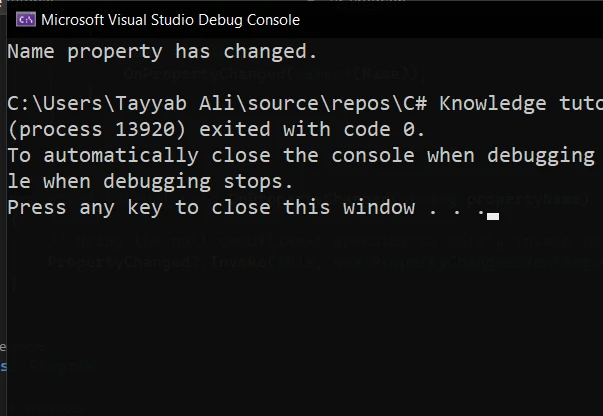
End ClassKodun çıktısı burada:
C# Projelerinde IronPDF'ye Giriş
IronPDF, C# geliştiricileri için, .NET uygulamaları içinde PDF içeriği oluşturmanıza, düzenlemenize ve çıkarmanıza olanak sağlayan çok yönlü bir kütüphanedir. Bu kütüphane, kullanım kolaylığı ve PDF işlevlerini herhangi bir .NET projesine sorunsuz bir şekilde entegre etme yeteneği ile öne çıkmaktadır.
IronPDF'in en iyi özelliği, HTML'den PDF'ye, tam stil koruma, tam düzen ve stil korumasıdır. Web içeriğinden PDF üretmek için, raporlar, faturalar ve dokümantasyon dahil olmak üzere harika bir çözümdür. HTML dosyalarını, URL'leri ve HTML dizelerini PDF dosyalarına dönüştürmeyi destekler.
using IronPdf;

class Program
{
    static void Main(string[] args)
    {
        var renderer = new ChromePdfRenderer();

        // 1. Convert HTML String to PDF
        var htmlContent = "<h1>Hello, IronPDF!</h1><p>This is a PDF from an HTML string.</p>";
        var pdfFromHtmlString = renderer.RenderHtmlAsPdf(htmlContent);
        pdfFromHtmlString.SaveAs("HTMLStringToPDF.pdf");

        // 2. Convert HTML File to PDF
        var htmlFilePath = "path_to_your_html_file.html"; // Specify the path to your HTML file
        var pdfFromHtmlFile = renderer.RenderHtmlFileAsPdf(htmlFilePath);
        pdfFromHtmlFile.SaveAs("HTMLFileToPDF.pdf");

        // 3. Convert URL to PDF
        var url = "http://ironpdf.com"; // Specify the URL
        var pdfFromUrl = renderer.RenderUrlAsPdf(url);
        pdfFromUrl.SaveAs("URLToPDF.pdf");
    }
}
using IronPdf;
class Program
{
static void Main(string[] args)
{
var renderer = new ChromePdfRenderer();
// 1. Convert HTML String to PDF
var htmlContent = "<h1>Hello, IronPDF!</h1><p>This is a PDF from an HTML string.</p>";
var pdfFromHtmlString = renderer.RenderHtmlAsPdf(htmlContent);
pdfFromHtmlString.SaveAs("HTMLStringToPDF.pdf");
// 2. Convert HTML File to PDF
var htmlFilePath = "path_to_your_html_file.html"; // Specify the path to your HTML file
var pdfFromHtmlFile = renderer.RenderHtmlFileAsPdf(htmlFilePath);
pdfFromHtmlFile.SaveAs("HTMLFileToPDF.pdf");
// 3. Convert URL to PDF
var url = "http://ironpdf.com"; // Specify the URL
var pdfFromUrl = renderer.RenderUrlAsPdf(url);
pdfFromUrl.SaveAs("URLToPDF.pdf");
}
}Imports IronPdf
Friend Class Program
Shared Sub Main(ByVal args() As String)
Dim renderer = New ChromePdfRenderer()
' 1. Convert HTML String to PDF
Dim htmlContent = "<h1>Hello, IronPDF!</h1><p>This is a PDF from an HTML string.</p>"
Dim pdfFromHtmlString = renderer.RenderHtmlAsPdf(htmlContent)
pdfFromHtmlString.SaveAs("HTMLStringToPDF.pdf")
' 2. Convert HTML File to PDF
Dim htmlFilePath = "path_to_your_html_file.html" ' Specify the path to your HTML file
Dim pdfFromHtmlFile = renderer.RenderHtmlFileAsPdf(htmlFilePath)
pdfFromHtmlFile.SaveAs("HTMLFileToPDF.pdf")
' 3. Convert URL to PDF
Dim url = "http://ironpdf.com" ' Specify the URL
Dim pdfFromUrl = renderer.RenderUrlAsPdf(url)
pdfFromUrl.SaveAs("URLToPDF.pdf")
End Sub
End Classİster raporlar, ister faturalar ya da herhangi bir belgenizi PDF formatında üretiyor olun, IronPDF, bu görevleri verimli bir şekilde gerçekleştirmek için kapsamlı bir araç seti sağlar.
Null Koşullu Operatörlerle IronPDF Entegrasyonu
IronPDF'i, null koşullu operatörlerle birlikte proje içerisine entegre etmek, uygulamanızın sağlamlığını önemli ölçüde artırabilir. Bu kombinasyon, özellikle null olabilecek PDF içeriğiyle veya potansiyel olarak null değeriyle sonuçlanabilecek işlemlerle uğraşırken faydalıdır.
IronPDF kullanarak HTML içeriğinden bir PDF belgesi oluşturacağımız basit bir örneği inceleyelim. Ardından, belge özelliklerine güvenli bir şekilde erişmek için null koşullu operatörü kullanarak null değerleri zarif bir şekilde nasıl ele alabileceğimizi göstereceğiz.
IronPDF Yükleme
Öncelikle, IronPDF'i projenize eklemeniz gerekiyor. Bunu NuGet Paket Yöneticisi aracılığıyla yapabilirsiniz:
Install-Package IronPdf
Şimdi aşağıdaki kodu Program.cs dosyasına yazın:
using IronPdf;
using System;

public class PdfGenerator
{
    public static void CreatePdf(string htmlContent, string outputPath)
    {
        // Instantiate the HtmlToPdf converter
        var renderer = new IronPdf.ChromePdfRenderer();

        // Generate a PDF document from HTML content
        var pdfDocument = renderer.RenderHtmlAsPdf(htmlContent);

        // Use the null conditional operator to safely access the document's properties
        var pageCount = pdfDocument?.PageCount ?? 0;

        // Check if the PDF was generated successfully and has pages
        if (pageCount > 0)
        {
            // Save the PDF document to the specified output path
            pdfDocument.SaveAs(outputPath);
            Console.WriteLine($"PDF created successfully with {pageCount} pages.");
        }
        else
        {
            // Handle cases where the PDF generation fails or returns null
            Console.WriteLine("Failed to create PDF or the document is empty.");
        }
    }

    public static void Main(string[] args)
    {
        // Define the HTML content for the PDF document
        string htmlContent = @"
            <html>
            <head>
                <title>Test PDF</title>
            </head>
            <body>
                <h1>Hello, IronPDF!</h1>
                <p>This is a simple PDF document generated from HTML using IronPDF.</p>
            </body>
            </html>";

        // Specify the path where the PDF document will be saved
        // Ensure this directory exists on your machine or adjust the path accordingly
        string filePath = @"F:\GeneratedPDF.pdf";

        // Call the method to generate and save the PDF document
        CreatePdf(htmlContent, filePath);

        // Wait for user input before closing the console window
        Console.WriteLine("Press any key to exit...");
        Console.ReadKey();
    }
}
using IronPdf;
using System;
public class PdfGenerator
{
public static void CreatePdf(string htmlContent, string outputPath)
{
// Instantiate the HtmlToPdf converter
var renderer = new IronPdf.ChromePdfRenderer();
// Generate a PDF document from HTML content
var pdfDocument = renderer.RenderHtmlAsPdf(htmlContent);
// Use the null conditional operator to safely access the document's properties
var pageCount = pdfDocument?.PageCount ?? 0;
// Check if the PDF was generated successfully and has pages
if (pageCount > 0)
{
// Save the PDF document to the specified output path
pdfDocument.SaveAs(outputPath);
Console.WriteLine($"PDF created successfully with {pageCount} pages.");
}
else
{
// Handle cases where the PDF generation fails or returns null
Console.WriteLine("Failed to create PDF or the document is empty.");
}
}
public static void Main(string[] args)
{
// Define the HTML content for the PDF document
string htmlContent = @"
<html>
<head>
<title>Test PDF</title>
</head>
<body>
<h1>Hello, IronPDF!</h1>
<p>This is a simple PDF document generated from HTML using IronPDF.</p>
</body>
</html>";
// Specify the path where the PDF document will be saved
// Ensure this directory exists on your machine or adjust the path accordingly
string filePath = @"F:\GeneratedPDF.pdf";
// Call the method to generate and save the PDF document
CreatePdf(htmlContent, filePath);
// Wait for user input before closing the console window
Console.WriteLine("Press any key to exit...");
Console.ReadKey();
}
}Imports IronPdf
Imports System
Public Class PdfGenerator
Public Shared Sub CreatePdf(ByVal htmlContent As String, ByVal outputPath As String)
' Instantiate the HtmlToPdf converter
Dim renderer = New IronPdf.ChromePdfRenderer()
' Generate a PDF document from HTML content
Dim pdfDocument = renderer.RenderHtmlAsPdf(htmlContent)
' Use the null conditional operator to safely access the document's properties
Dim pageCount = If(pdfDocument?.PageCount, 0)
' Check if the PDF was generated successfully and has pages
If pageCount > 0 Then
' Save the PDF document to the specified output path
pdfDocument.SaveAs(outputPath)
Console.WriteLine($"PDF created successfully with {pageCount} pages.")
Else
' Handle cases where the PDF generation fails or returns null
Console.WriteLine("Failed to create PDF or the document is empty.")
End If
End Sub
Public Shared Sub Main(ByVal args() As String)
' Define the HTML content for the PDF document
Dim htmlContent As String = "
<html>
<head>
<title>Test PDF</title>
</head>
<body>
<h1>Hello, IronPDF!</h1>
<p>This is a simple PDF document generated from HTML using IronPDF.</p>
</body>
</html>"
' Specify the path where the PDF document will be saved
' Ensure this directory exists on your machine or adjust the path accordingly
Dim filePath As String = "F:\GeneratedPDF.pdf"
' Call the method to generate and save the PDF document
CreatePdf(htmlContent, filePath)
' Wait for user input before closing the console window
Console.WriteLine("Press any key to exit...")
Console.ReadKey()
End Sub
End ClassÇıktı
Programı çalıştırdığınızda konsoldaki çıktı:
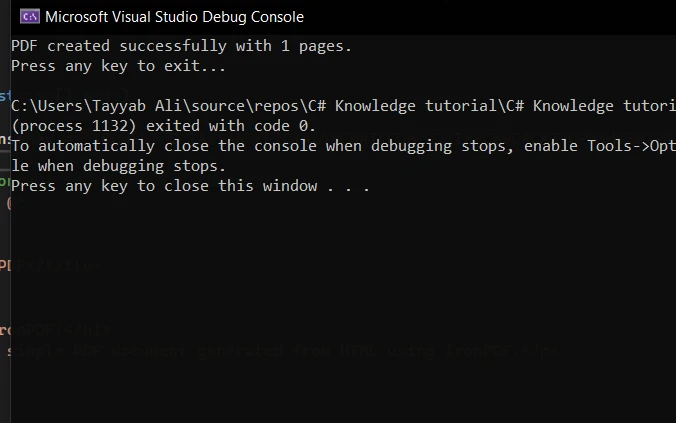
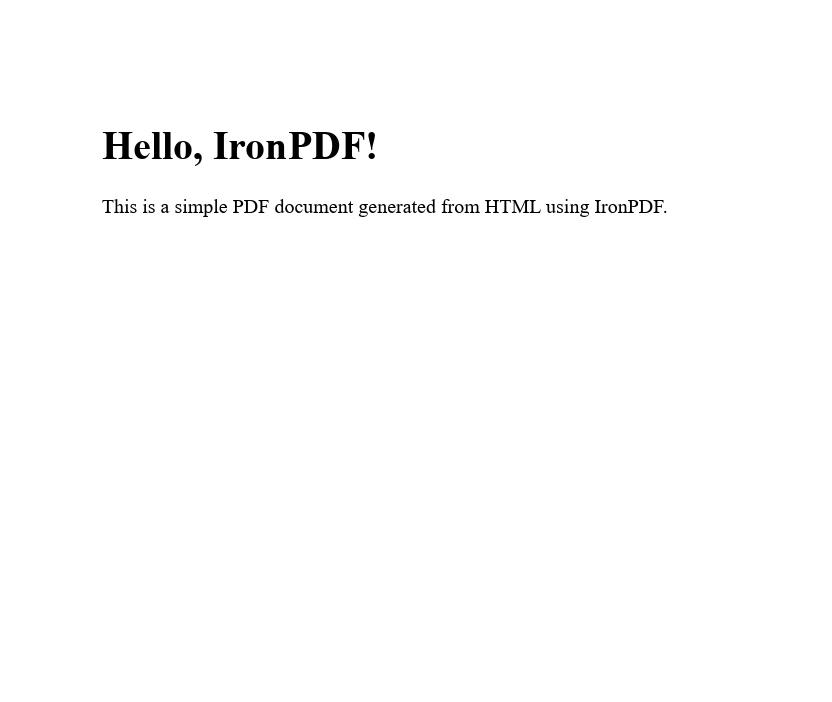
Ve bu, program tarafından üretilen PDF:
Sonuç
C# projelerinizde IronPDF'i null koşullu operatörlerle entegre etmek, PDF işleme görevlerinizi önemli ölçüde kolaylaştırabilir ve kodunuzu null referans istisnalarından güvende tutar. Bu örnek, güçlü bir PDF kütüphanesi ile modern C# dil özellikleri arasındaki sinerjiyi gösterdi, daha temiz, daha sürdürülebilir kod yazmanıza olanak tanıdı.
Bu araçları etkili bir şekilde kullanmanın anahtarı, yeteneklerini anlamaktan ve projelerinizde dikkatli bir şekilde uygulamaktan geçer.
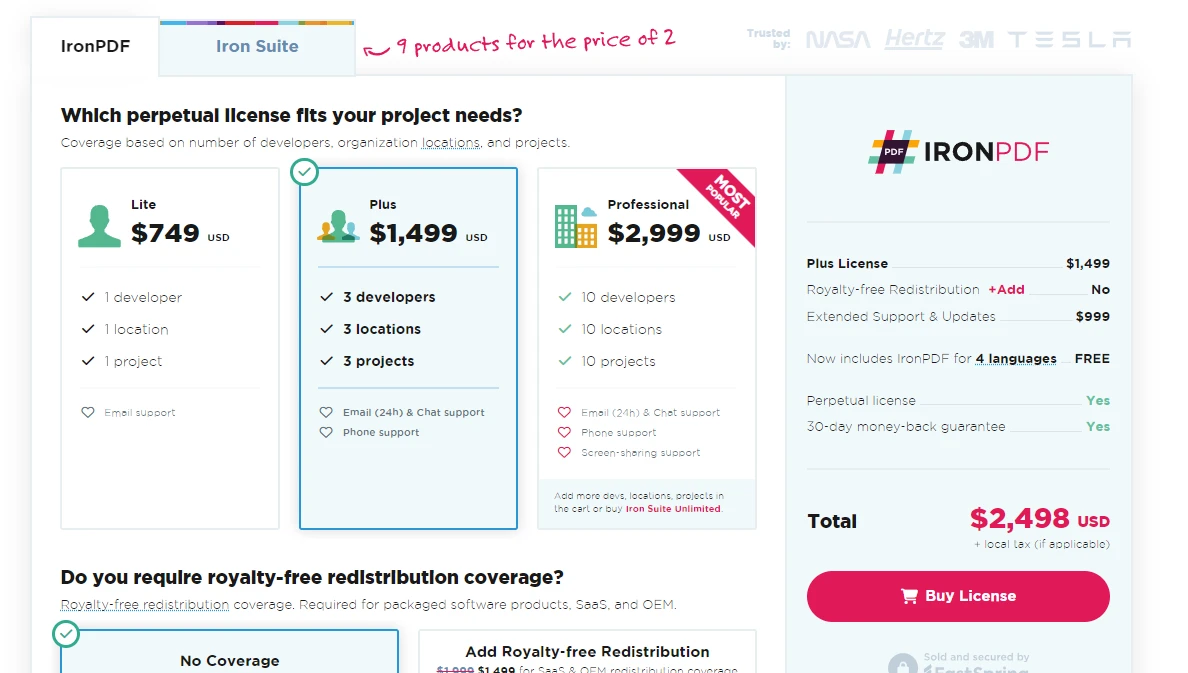
IronPDF, geliştiricilere, bir lite lisans ile başlayarak, tam destek ve güncellemeler sunan bir deneme teklifi sağlar.
Sıkça Sorulan Sorular
C# Null Koşullu Operatörü nedir?
C# Null Koşullu Operatörü, 'Elvis operatörü' (?.) olarak da bilinir ve geliştiricilerin yalnızca nesne null değilse üyeleri veya yöntemleri erişmelerine olanak tanır. Bu operatör, null referans hatalarını önleyerek null değer işleme sürecini daha verimli hale getirir.
C# Null Koşullu Operatörü kod okunabilirliğini nasıl artırabilir?
C# Null Koşullu Operatörü, gerekli açık null kontrollerinin sayısını azaltarak kodu daha temiz ve daha okunabilir hale getirir, geliştiricilerin null doğrulamaları yerine temel mantığa odaklanmalarını sağlar.
Null Koşullu Operatör, Null Birleştiricisi Operatörü ile birlikte kullanılabilir mi?
Evet, Null Koşullu Operatör, bir ifadenin null olduğu durumda varsayılan bir değer sağlamak için Null Birleştiricisi Operatörü (??) ile birleştirilebilir. Bu, kodun sağlamlığını ve güvenliğini artırır.
Null Koşullu Operatör, iş parçacığı güvenliğini nasıl etkiler?
Çoklu iş parçacıklı uygulamalarla çalışırken null referans hatası riski olmaksızın paylaşılan kaynaklara güvenli erişim sağlayarak iş parçacığı güvenliğini artırır.
Null Koşullu Operatörün bazı pratik uygulamaları nelerdir?
Pratik uygulamalar arasında PropertyChanged?.Invoke gibi sözdizimi kullanarak etkinlik yönetimini basitleştirme ve null referans hatası riski olmaksızın koleksiyonlardaki elemanlara güvenli erişim yer alır.
IronPDF, C#'de HTML'yi PDF'ye dönüştürmek için nasıl kullanılabilir?
IronPDF, HTML zincirleri için RenderHtmlAsPdf veya HTML dosyaları için RenderHtmlFileAsPdf gibi yöntemler kullanarak C#'de HTML'yi PDF'ye dönüştürebilir; stil korumayı sağlar.
Null Koşullu Operatörün IronPDF ile PDF oluşturma sürecindeki rolü nedir?
IronPDF ile PDF oluştururken Null Koşullu Operatör, PDF döküman özelliklerine güvenli erişim sağlamak için kullanılabilir, null değerlerin süreç sırasında etkin bir şekilde işlenmesini iyileştirir.
IronPDF, bir .NET projesine nasıl yüklenir?
IronPDF, NuGet Paket Yöneticisini kullanarak bir .NET projesine Install-Package IronPdf komutuyla yüklenebilir.
Null Koşullu Operatör, C# geliştirmesinde ne gibi avantajlar sunar?
Null Koşullu Operatör, kod karmaşıklığını azaltır, null referans hatalarını önler ve kod bakımını iyileştirir, bu da onu C# geliştiricileri için değerli bir araç haline getirir.
IronPDF, C#'de nullable türlerle kullanılabilir mi?
Evet, IronPDF, pdf işlemleri sırasında null değerlerin nazikçe ele alınması için Null Koşullu Operatörü kullanılarak C#'de nullable türlerle entegre edilebilir.










 Ücretsiz Başlayın
 Ücretsiz Başlayın
 Ücretsiz Canlı Demo Rezervasyonu





 Kredi kartı veya hesap oluşturma gerektirmez










