




已更新 2026年4月23日
在 .NET 中用 Microsoft.Extensions.AI 簡化 LLM 整合
AI 正在改變軟體開發,但將大型語言模型 (LLM) 整合到 .NET 中一直很複雜。利用 IronPdf.AI 將 AI 整合推向更遠,為 .NET 應用程式帶來由 OpenAI 驅動的 PDF 解析、資料擷取和內容總結。
閱讀更多

C# 空條件運算子提供了一種更簡潔且安全的方式來處理程式碼中的空值。 這個運算子的美麗之處在於它能夠簡化空值檢查,使得您的程式碼更乾淨且易於閱讀。
讓我們深入了解 null 條件運算子 的工作原理、優點,以及如何在您的專案中使用它。 我們還將探索 IronPDF及其用例 和其與 Null 條件運算子的應用案例。
空條件運算子,經常被稱為 "Elvis 運算子",因為形狀類似於 Elvis Presley 的髮型 (?.),使您能夠僅在物件不是空的情況下進行行為存取或方法調用。
如果物件為空,此操作將返回 null 而不是拋出空引用異常。 這個運算子對開發者來說是一個改變遊戲規則的工具,因為它顯著減少了安全地存取潛在空物件的成員所需的程式碼數量。
要理解空條件運算子,請考慮 public class Employee 的例子。 這個類可能有一些屬性,例如 public string FirstName 和 public string LastName。 在傳統的 C# 程式碼中,為了避免異常,存取可能為 null 的 Employee 物件的屬性需要顯式的空值檢查:
if (employee != null)
{
    var name = employee.FirstName;
}If employee IsNot Nothing Then
Dim name = employee.FirstName
End If但是,使用空條件運算子,您可以將這一過程簡化為一行:
var name = employee?.FirstName;Dim name = employee?.FirstName如果 employee 不為 null,那麼 name 變數將接收 employee.FirstName 的值。 如果 employee 為 null,那麼 name 將被設定為 null。 這行程式碼優雅地取代了多行的明確空值檢查。
當與 空合併賦值運算子 (??=) 結合使用時,空條件運算子變得更強大。 空合併運算子使您能夠指定一個預設值,以防表達式求值為 null。
例如,如果您希望 name 變數具有預設的 "Unknown" 值而不是 null,您可以寫:
var name = employee?.FirstName ?? "Unknown";Dim name = If(employee?.FirstName, "Unknown")這段程式碼檢查 employee 是否為空,然後如果 employee.FirstName 為空就將 "Unknown" 賦予 name。 它優雅地在一個操作中處理空值,展示了程式碼可以變得多麼簡潔和有效。
C# 引入了可空型別,允許變數持有其基礎型別的非空值或空。
在處理集合時,可以使用空條件運算子來存取元素,而不會有空引用異常的風險。 假設您有一個員工列表,想要安全地存取第一個元素的名字。 您可以使用方括號與運算子結合:
var firstName = employees?[0]?.FirstName ?? "Unknown";Dim firstName = If(employees?(0)?.FirstName, "Unknown")這行程式碼是執行緒安全的,這意味著如果在空值檢查之後但在存取第一個元素之前,有另一個執行緒將 employees 變為 null,您的程式碼不會崩潰。 在處理可空型別時,重要的是要了解它們的基礎值型別,這是與可空型別相關聯的非可空型別。
使用空條件運算子的一個微妙之處在於它的執行緒安全特性。 當使用此運算子時,表達式的評估是執行緒安全的。 這意味著如果您正在存取可能被另一個執行緒修改的共享資源,則使用空條件運算子可以防止潛在的競賽條件。
然而,重要的是要了解,儘管運算子本身對其執行的操作是執行緒安全的,但它不保證整個程式碼塊或一系列操作的執行緒安全。
讓我們考慮一個更實用的例子,您有一個可能引發事件的物件。 在傳統的 C# 中,您會檢查事件處理程式是否為空,以避免觸發事件時引發空引用異常:
if (PropertyChanged != null)
{
    PropertyChanged(this, new PropertyChangedEventArgs(name));
}If PropertyChanged IsNot Nothing Then
PropertyChanged(Me, New PropertyChangedEventArgs(name))
End If使用空條件運算子,這可以簡化為:
PropertyChanged?.Invoke(this, new PropertyChangedEventArgs(name));If PropertyChanged IsNot Nothing Then
PropertyChanged.Invoke(Me, New PropertyChangedEventArgs(name))
End If這個簡潔的程式碼達到了相同的結果,但更易讀且安全。 在需要明確返回 null 的情況下,您可以直接使用 return null; 語句。 ?. 運算子會在 PropertyChanged 為空時短路操作,從而防止異常。 這是完整的程式碼:
using System.ComponentModel;

// Define a Person class that implements the INotifyPropertyChanged interface
public class Person : INotifyPropertyChanged
{
    private string name;

    // Event that is raised when a property changes
    public event PropertyChangedEventHandler PropertyChanged;

    // Property for the person's name with a getter and setter
    public string Name
    {
        get { return name; }
        set
        {
            if (name != value)
            {
                name = value;
                OnPropertyChanged(nameof(Name)); // Notify that the property has changed
            }
        }
    }

    // Method to invoke the PropertyChanged event safely using the null conditional operator
    protected virtual void OnPropertyChanged(string propertyName)
    {
        PropertyChanged?.Invoke(this, new PropertyChangedEventArgs(propertyName));
    }
}

class Program
{
    static void Main(string[] args)
    {
        // Create a new Person instance and subscribe to the PropertyChanged event
        Person person = new Person();
        person.PropertyChanged += (sender, e) =>
        {
            Console.WriteLine($"{e.PropertyName} property has changed.");
        };

        // Change the person's name, triggering the PropertyChanged event
        person.Name = "Iron Software";
    }
}Imports System.ComponentModel
' Define a Person class that implements the INotifyPropertyChanged interface
Public Class Person
Implements INotifyPropertyChanged
'INSTANT VB NOTE: The field name was renamed since Visual Basic does not allow fields to have the same name as other class members:
Private name_Conflict As String
' Event that is raised when a property changes
Public Event PropertyChanged As PropertyChangedEventHandler Implements INotifyPropertyChanged.PropertyChanged
' Property for the person's name with a getter and setter
Public Property Name() As String
Get
Return name_Conflict
End Get
Set(ByVal value As String)
If name_Conflict <> value Then
name_Conflict = value
OnPropertyChanged(NameOf(Name)) ' Notify that the property has changed
End If
End Set
End Property
' Method to invoke the PropertyChanged event safely using the null conditional operator
Protected Overridable Sub OnPropertyChanged(ByVal propertyName As String)
RaiseEvent PropertyChanged(Me, New PropertyChangedEventArgs(propertyName))
End Sub
End Class
Friend Class Program
Shared Sub Main(ByVal args() As String)
' Create a new Person instance and subscribe to the PropertyChanged event
Dim person As New Person()
AddHandler person.PropertyChanged, Sub(sender, e)
Console.WriteLine($"{e.PropertyName} property has changed.")
End Sub
' Change the person's name, triggering the PropertyChanged event
person.Name = "Iron Software"
End Sub
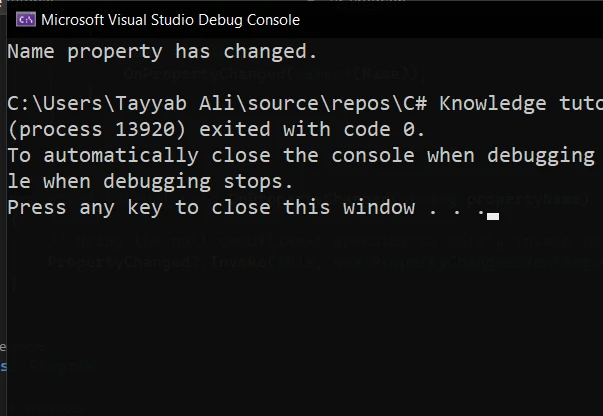
End Class這是該程式碼的輸出:
IronPDF 是一個功能強大的 C# 開發人員程式庫,允許您在 .NET 應用程式中建立、編輯和擷取 PDF 內容。 該程式庫因其易用性和能夠無縫整合 PDF 功能到任何 .NET 專案中而備受矚目。
IronPDF 的主要特點是將HTML 轉換為 PDF,並完全保留樣式。 這是從網頁內容產生 PDF 的絕佳解決方案,適用於報告、發票和文件。 它支持從 HTML 文件、URL 和 HTML 字串轉換為 PDF 文件。
using IronPdf;

class Program
{
    static void Main(string[] args)
    {
        var renderer = new ChromePdfRenderer();

        // 1. Convert HTML String to PDF
        var htmlContent = "<h1>Hello, IronPDF!</h1><p>This is a PDF from an HTML string.</p>";
        var pdfFromHtmlString = renderer.RenderHtmlAsPdf(htmlContent);
        pdfFromHtmlString.SaveAs("HTMLStringToPDF.pdf");

        // 2. Convert HTML File to PDF
        var htmlFilePath = "path_to_your_html_file.html"; // Specify the path to your HTML file
        var pdfFromHtmlFile = renderer.RenderHtmlFileAsPdf(htmlFilePath);
        pdfFromHtmlFile.SaveAs("HTMLFileToPDF.pdf");

        // 3. Convert URL to PDF
        var url = "http://ironpdf.com"; // Specify the URL
        var pdfFromUrl = renderer.RenderUrlAsPdf(url);
        pdfFromUrl.SaveAs("URLToPDF.pdf");
    }
}Imports IronPdf
Module Program
Sub Main(args As String())
Dim renderer = New ChromePdfRenderer()
' 1. Convert HTML String to PDF
Dim htmlContent = "<h1>Hello, IronPDF!</h1><p>This is a PDF from an HTML string.</p>"
Dim pdfFromHtmlString = renderer.RenderHtmlAsPdf(htmlContent)
pdfFromHtmlString.SaveAs("HTMLStringToPDF.pdf")
' 2. Convert HTML File to PDF
Dim htmlFilePath = "path_to_your_html_file.html" ' Specify the path to your HTML file
Dim pdfFromHtmlFile = renderer.RenderHtmlFileAsPdf(htmlFilePath)
pdfFromHtmlFile.SaveAs("HTMLFileToPDF.pdf")
' 3. Convert URL to PDF
Dim url = "http://ironpdf.com" ' Specify the URL
Dim pdfFromUrl = renderer.RenderUrlAsPdf(url)
pdfFromUrl.SaveAs("URLToPDF.pdf")
End Sub
End Module無論您是在生成報告、發票,或任何 PDF 格式的文件,IronPDF 提供了一套全面的工具來高效地完成這些任務。
將 IronPDF 整合到您的專案中以處理 PDF 並與空條件運算子結合使用,可以顯著提高應用程式的健壯性。 這種結合在處理可能為空的 PDF 內容或執行可能導致空值的操作時特別有用。
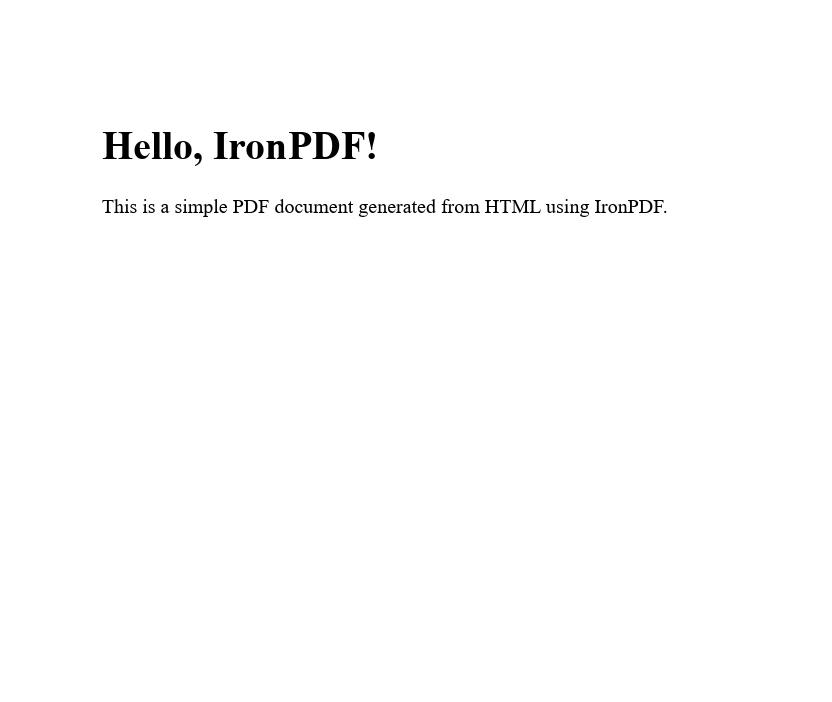
讓我們探討一個簡單的例子,其中我們使用 IronPDF 將 HTML 內容生成 PDF 文件。 然後我們將使用空條件運算子安全地存取文件的屬性,說明如何優雅地處理空值。
首先,您需要將 IronPDF 新增到您的專案中。 您可以通過 NuGet 套件管理器來完成:
現在將以下程式碼寫入 Program.cs 文件中:
using IronPdf;
using System;

public class PdfGenerator
{
    public static void CreatePdf(string htmlContent, string outputPath)
    {
        // Instantiate the HtmlToPdf converter
        var renderer = new IronPdf.ChromePdfRenderer();

        // Generate a PDF document from HTML content
        var pdfDocument = renderer.RenderHtmlAsPdf(htmlContent);

        // Use the null conditional operator to safely access the document's properties
        var pageCount = pdfDocument?.PageCount ?? 0;

        // Check if the PDF was generated successfully and has pages
        if (pageCount > 0)
        {
            // Save the PDF document to the specified output path
            pdfDocument.SaveAs(outputPath);
            Console.WriteLine($"PDF created successfully with {pageCount} pages.");
        }
        else
        {
            // Handle cases where the PDF generation fails or returns null
            Console.WriteLine("Failed to create PDF or the document is empty.");
        }
    }

    public static void Main(string[] args)
    {
        // Define the HTML content for the PDF document
        string htmlContent = @"
            <html>
            <head>
                <title>Test PDF</title>
            </head>
            <body>
                <h1>Hello, IronPDF!</h1>
                <p>This is a simple PDF document generated from HTML using IronPDF.</p>
            </body>
            </html>";

        // Specify the path where the PDF document will be saved
        // Ensure this directory exists on your machine or adjust the path accordingly
        string filePath = @"F:\GeneratedPDF.pdf";

        // Call the method to generate and save the PDF document
        CreatePdf(htmlContent, filePath);

        // Wait for user input before closing the console window
        Console.WriteLine("Press any key to exit...");
        Console.ReadKey();
    }
}Imports IronPdf
Imports System
Public Class PdfGenerator
Public Shared Sub CreatePdf(ByVal htmlContent As String, ByVal outputPath As String)
' Instantiate the HtmlToPdf converter
Dim renderer = New IronPdf.ChromePdfRenderer()
' Generate a PDF document from HTML content
Dim pdfDocument = renderer.RenderHtmlAsPdf(htmlContent)
' Use the null conditional operator to safely access the document's properties
Dim pageCount = If(pdfDocument?.PageCount, 0)
' Check if the PDF was generated successfully and has pages
If pageCount > 0 Then
' Save the PDF document to the specified output path
pdfDocument.SaveAs(outputPath)
Console.WriteLine($"PDF created successfully with {pageCount} pages.")
Else
' Handle cases where the PDF generation fails or returns null
Console.WriteLine("Failed to create PDF or the document is empty.")
End If
End Sub
Public Shared Sub Main(ByVal args() As String)
' Define the HTML content for the PDF document
Dim htmlContent As String = "
<html>
<head>
<title>Test PDF</title>
</head>
<body>
<h1>Hello, IronPDF!</h1>
<p>This is a simple PDF document generated from HTML using IronPDF.</p>
</body>
</html>"
' Specify the path where the PDF document will be saved
' Ensure this directory exists on your machine or adjust the path accordingly
Dim filePath As String = "F:\GeneratedPDF.pdf"
' Call the method to generate and save the PDF document
CreatePdf(htmlContent, filePath)
' Wait for user input before closing the console window
Console.WriteLine("Press any key to exit...")
Console.ReadKey()
End Sub
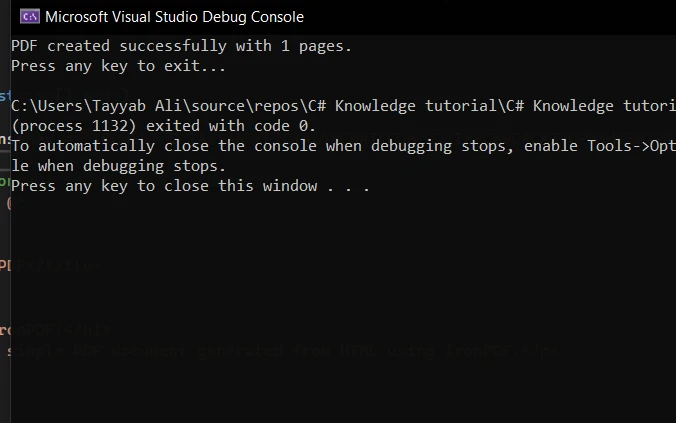
End Class這是您運行程式時的主控台輸出:
這是該程式生成的 PDF:
在您的 C# 專案中整合 IronPDF 與空條件運算子,可以大幅簡化您的 PDF 處理任務,同時確保您的程式碼不會發生空引用異常。 這個例子展示了强大的 PDF 程式庫與現代的 C# 語言特性之間的協同效應,使您可以編寫更乾淨、更容易維護的程式碼。
請記住,有效使用這些工具的關鍵在於了解它們的功能,並在專案中明智地應用它們。
IronPDF 為開發人員提供免費的試用,提供全面的支持和更新,起步於輕量版授權。

Jacob Mellor是Iron Software的首席技術官,一位在C# PDF技術上開創先河的遠見工程師。作為Iron Software核心程式碼庫的原開發者,他從創立以來就一直在塑造公司的產品架構,與首席執行官Cameron Rimington一起將公司轉變為服務於NASA、特斯拉和全球政府公司的50多名人員的公司。



IronPDF 是 IRONSUITE 的一部分
10 款適用於辦公室文件的 .NET API 產品

當您需要您的PDF看起來像HTML一樣快速。












