


C# null 가능 유형 (개발자를 위한 작동 방식)

C# 작업 시, 특히 참조 형식에 대해 null 값을 자주 처리해야 합니다. C#의 Nullable 유형은 값 유형에 대해 정의되지 않거나 결여된 값을 나타내는 방법을 제공합니다. 이 가이드는 C# nullable 유형의 기본 사항, 실제 사용법, 다양한 시나리오에서의 작동 방식을 다룹니다. 기사 후반부에서는 IronPDF도 탐구할 것입니다.
Nullable Types in C
기본적으로, C#의 값 유형(int, bool, DateTime 등)은 null 값을 할당할 수 없습니다. 이 제한을 해결하기 위해 C#은 nullable 값 유형을 도입하여, 값 유형에 null을 할당할 수 있도록 합니다. nullable 유형은 유효한 값의 부재를 나타내야 할 때 특히 유용합니다.
Nullable 유형 선언하기
C#에서 nullable 유형을 선언하려면 다음 구문을 사용합니다:
// Declare a nullable integer
int? nullableInt = null;
// Declare a nullable integer
int? nullableInt = null;' Declare a nullable integer
Dim nullableInt? As Integer = Nothing여기에서, int? 는 Nullable<int> 의 줄임말입니다. nullableInt 변수는 int 값이나 null을 저장할 수 있습니다.
null 확인하기
널러블 타입 변수가 값을 가지는지 확인하려면 HasValue 속성을 사용하거나 변수와 null을 직접 비교할 수 있습니다. 아래와 같이:
if (nullableInt.HasValue)
{
    // If nullableInt has a value, print it
    Console.WriteLine("Value: " + nullableInt.Value);
}
else
{
    // If nullableInt does not have a value, print a message
    Console.WriteLine("No value assigned.");
}
if (nullableInt.HasValue)
{
// If nullableInt has a value, print it
Console.WriteLine("Value: " + nullableInt.Value);
}
else
{
// If nullableInt does not have a value, print a message
Console.WriteLine("No value assigned.");
}If nullableInt.HasValue Then
' If nullableInt has a value, print it
Console.WriteLine("Value: " & nullableInt.Value)
Else
' If nullableInt does not have a value, print a message
Console.WriteLine("No value assigned.")
End If또한 nullable 유형이 null인 경우 기본값을 제공하는 null 병합 연산자(??)를 사용할 수 있습니다.
// Assign 0 if nullableInt is null
int result = nullableInt ?? 0;
Console.WriteLine("Result: " + result);
// Assign 0 if nullableInt is null
int result = nullableInt ?? 0;
Console.WriteLine("Result: " + result);' Assign 0 if nullableInt is null
Dim result As Integer = If(nullableInt, 0)
Console.WriteLine("Result: " & result)만약 nullableInt 가 null이면, result 에 기본값 0이 할당됩니다.
Nullable 값 유형 vs Nullable 참조 유형
C#에서 값 유형(int, bool, double 등)은 참조 유형(string, object 등)과 다릅니다. Nullable 값 유형은 값 유형이 null을 나타낼 수 있도록 하며, Nullable 참조 유형은 참조 유형이 기본적으로 null이 아닐 수 있도록 하여 null 참조 예외의 위험을 줄입니다.
Nullable 값 유형
Nullable 값 유형은 값 유형이 null 값을 가질 수 있도록 합니다. 널러블 값 타입을 선언하려면 데이터 타입 뒤에 물음표 ? 를 붙이십시오:
// Declare a nullable double
double? nullableDouble = null;
// Declare a nullable double
double? nullableDouble = null;' Declare a nullable double
Dim nullableDouble? As Double = Nothing이 예제에서, nullableDouble 는 double 값이나 null을 저장할 수 있습니다.
Nullable 참조 유형
널러블 참조 타입은 C# 8.0에서 도입되었습니다. 프로젝트 수준에서 널러블 참조 타입을 활성화하거나 코드 파일의 시작 부분에 #nullable enable 지시문을 추가하여 활성화할 수 있습니다. 널러블 참조 타입이 활성화되면 참조 타입은 ? 를 사용해 명시적으로 널러블로 표시해야 하며, 이를 통해 null 참조로 인한 런타임 예외를 방지할 수 있습니다.
#nullable enable
// Declare a nullable string
string? nullableString = null;
#nullable enable
// Declare a nullable string
string? nullableString = null;'INSTANT VB TODO TASK: There is no equivalent to #nullable in VB:
'#nullable enable
' Declare a nullable string
'INSTANT VB WARNING: Nullable reference types have no equivalent in VB:
'ORIGINAL LINE: string? nullableString = null;
Dim nullableString As String = Nothing여기에서, nullableString 는 null을 허용합니다. 만약 ? 없이 비널러블 참조 타입을 선언하면, 컴파일러는 잠재적 null 할당을 감지할 경우 경고를 생성할 것입니다.
Nullable 참조 유형 활성화하기
프로젝트에서 널러블 참조 타입을 전역적으로 활성화하려면, .csproj 파일에 다음 줄을 추가하십시오:
<Nullable>enable</Nullable><Nullable>enable</Nullable>활성화되면, 컴파일러는 참조 유형을 기본적으로 null이 아닌 것으로 취급합니다. 이 기능은 런타임이 아닌 컴파일 시간에 null 참조 문제를 잡는 데 특히 유용합니다.
실용적인 예제들
nullable 유형에 대한 이해를 강화하기 위해 몇 가지 실용적인 예제를 살펴보겠습니다.
예제 1: 값 유형과의 Nullable 유형
이 예에서는 int와 함께 nullable 유형을 사용할 것입니다:
class Program
{
    static void Main(string[] args)
    {
        int? nullableInt = null;
        // Use null coalescing operator to assign a default value
        int b = nullableInt ?? 10;
        Console.WriteLine("b: " + b);
        if (nullableInt.HasValue)
        {
            // nullableInt has a value
            Console.WriteLine("nullableInt has value: " + nullableInt.Value);
        }
        else
        {
            // nullableInt is null
            Console.WriteLine("nullableInt is null");
        }
    }
}
class Program
{
static void Main(string[] args)
{
int? nullableInt = null;
// Use null coalescing operator to assign a default value
int b = nullableInt ?? 10;
Console.WriteLine("b: " + b);
if (nullableInt.HasValue)
{
// nullableInt has a value
Console.WriteLine("nullableInt has value: " + nullableInt.Value);
}
else
{
// nullableInt is null
Console.WriteLine("nullableInt is null");
}
}
}Friend Class Program
Shared Sub Main(ByVal args() As String)
Dim nullableInt? As Integer = Nothing
' Use null coalescing operator to assign a default value
Dim b As Integer = If(nullableInt, 10)
Console.WriteLine("b: " & b)
If nullableInt.HasValue Then
' nullableInt has a value
Console.WriteLine("nullableInt has value: " & nullableInt.Value)
Else
' nullableInt is null
Console.WriteLine("nullableInt is null")
End If
End Sub
End Class여기에서, nullableInt 는 int의 널러블 타입 변수입니다. 만약 nullableInt 가 null이면, 널 병합 연산자 덕분에 b 는 값 10을 얻습니다. 그렇지 않으면, b 는 nullableInt 값으로 설정됩니다.
예제 2: Nullable 참조 유형
이제 nullable 참조 유형의 작동 방식을 보겠습니다:
#nullable enable
class Program
{
    static void Main()
    {
        string? nullableString = null;
        string nonNullableString = "Hello";
        // Use null coalescing operator to provide a default value for length
        Console.WriteLine(nullableString?.Length ?? 0);
        Console.WriteLine(nonNullableString.Length);
    }
}
#nullable enable
class Program
{
static void Main()
{
string? nullableString = null;
string nonNullableString = "Hello";
// Use null coalescing operator to provide a default value for length
Console.WriteLine(nullableString?.Length ?? 0);
Console.WriteLine(nonNullableString.Length);
}
}'INSTANT VB TODO TASK: There is no equivalent to #nullable in VB:
'#nullable enable
Friend Class Program
Shared Sub Main()
'INSTANT VB WARNING: Nullable reference types have no equivalent in VB:
'ORIGINAL LINE: string? nullableString = null;
Dim nullableString As String = Nothing
Dim nonNullableString As String = "Hello"
' Use null coalescing operator to provide a default value for length
Console.WriteLine(If(nullableString?.Length, 0))
Console.WriteLine(nonNullableString.Length)
End Sub
End Class위 코드에서, nullableString 는 null이 될 수 있으며, 널 병합 연산자는 이에 대비하여 문자열의 길이가 기본값 0이 되도록 합니다.
예제 3: 중첩 Nullable 유형
C#에서는 중첩 nullable 유형을 선언할 수 있습니다. 예를 들면:
// Redundant, but syntactically valid
int? nestedNullableInt = null;
// Redundant, but syntactically valid
int? nestedNullableInt = null;' Redundant, but syntactically valid
Dim nestedNullableInt? As Integer = Nothing중첩 nullable 유형이 다소 불필요하게 보일 수도 있지만, C#에서는 문법적으로 유효합니다. 하지만 실제로 중첩 nullable 유형은 추가적인 기능을 제공하지 않으며 거의 사용되지 않습니다.
Null 병합 연산자 (??)
Null 병합 연산자(??)는 nullable 유형이 null일 때 기본값을 제공하는 데 자주 사용됩니다. 이 연산자는 명시적인 if-else 검사를 피함으로써 코드를 간소화합니다.
int? nullableValue = null;
// Assign -1 if nullableValue is null
int defaultValue = nullableValue ?? -1;
int? nullableValue = null;
// Assign -1 if nullableValue is null
int defaultValue = nullableValue ?? -1;Dim nullableValue? As Integer = Nothing
' Assign -1 if nullableValue is null
Dim defaultValue As Integer = If(nullableValue, -1)이 예제에서 nullableValue 가 null이면, defaultValue 에 -1이 할당됩니다. 그렇지 않으면, defaultValue 는 nullableValue 값을 갖게 됩니다.
컴파일 타임 오류 및 Nullable 유형
Nullable 참조 유형이 활성화된 상태에서, C#은 null 할당과 관련된 잠재적 문제를 감지할 때 경고와 오류를 컴파일 중에 생성합니다. 이 컴파일 타임 오류는 문제를 초기에 잡도록 도와주어 코드를 더 견고하게 만듭니다.
다음 예를 생각해 보세요.
string? nullableString = null;
// This will produce a compiler warning because nullableString may be null
string nonNullableString = nullableString;
string? nullableString = null;
// This will produce a compiler warning because nullableString may be null
string nonNullableString = nullableString;'INSTANT VB WARNING: Nullable reference types have no equivalent in VB:
'ORIGINAL LINE: string? nullableString = null;
Dim nullableString As String = Nothing
' This will produce a compiler warning because nullableString may be null
Dim nonNullableString As String = nullableString이 경우, nullableString 를 nonNullableString 에 할당하면 nullableString 가 null일 수 있기 때문에 컴파일러 경고가 발생하며, 비널러블 타입에 할당하면 런타임 예외를 초래할 수 있습니다.
IronPDF와 함께 Nullable 유형 사용하기
IronPDF는 .NET 애플리케이션에서 PDF 파일을 직접 생성하고 수정하며 조작할 수 있도록 도와주는 C# PDF 라이브러리입니다. HTML을 PDF로 변환하거나 보고서를 생성하거나 복잡한 문서 구조를 처리할 수 있습니다.
Nullable 유형은 불완전한 재무 데이터를 가진 회계사를 위한 PDF를 생성할 때와 같은 동적 보고서 생성 시나리오에 특히 유용합니다. Nullable 유형을 사용하여 선택적 필드를 관리하고 예외를 방지하며 기본값을 제공할 수 있습니다.
using IronPdf;
class Program
{
    static void Main(string[] args)
    {
        int? optionalIncome = null;  // Nullable type for optional income
        string? clientName = "Iron Dev";  // Nullable reference type for client name
        var renderer = new ChromePdfRenderer();
        string htmlContent = $@"
            <h1>Financial Report</h1>
            <p>Client Name: {clientName ?? "Unknown"}</p>
            <p>Income: {optionalIncome?.ToString() ?? "Data not available"}</p>";
        // Render the HTML to a PDF
        var pdf = renderer.RenderHtmlAsPdf(htmlContent);
        // Save the PDF to disk
        pdf.SaveAs("FinancialReport.pdf");
        Console.WriteLine("PDF Generated Successfully.");
    }
}
using IronPdf;
class Program
{
static void Main(string[] args)
{
int? optionalIncome = null; // Nullable type for optional income
string? clientName = "Iron Dev"; // Nullable reference type for client name
var renderer = new ChromePdfRenderer();
string htmlContent = $@"
<h1>Financial Report</h1>
<p>Client Name: {clientName ?? "Unknown"}</p>
<p>Income: {optionalIncome?.ToString() ?? "Data not available"}</p>";
// Render the HTML to a PDF
var pdf = renderer.RenderHtmlAsPdf(htmlContent);
// Save the PDF to disk
pdf.SaveAs("FinancialReport.pdf");
Console.WriteLine("PDF Generated Successfully.");
}
}Imports IronPdf
Friend Class Program
Shared Sub Main(ByVal args() As String)
Dim optionalIncome? As Integer = Nothing ' Nullable type for optional income
'INSTANT VB WARNING: Nullable reference types have no equivalent in VB:
'ORIGINAL LINE: string? clientName = "Iron Dev";
Dim clientName As String = "Iron Dev" ' Nullable reference type for client name
Dim renderer = New ChromePdfRenderer()
Dim htmlContent As String = $"
<h1>Financial Report</h1>
<p>Client Name: {If(clientName, "Unknown")}</p>ignoreignore<p>Income: {If(optionalIncome?.ToString(), "Data not available")}</p>"
' Render the HTML to a PDF
Dim pdf = renderer.RenderHtmlAsPdf(htmlContent)
' Save the PDF to disk
pdf.SaveAs("FinancialReport.pdf")
Console.WriteLine("PDF Generated Successfully.")
End Sub
End Class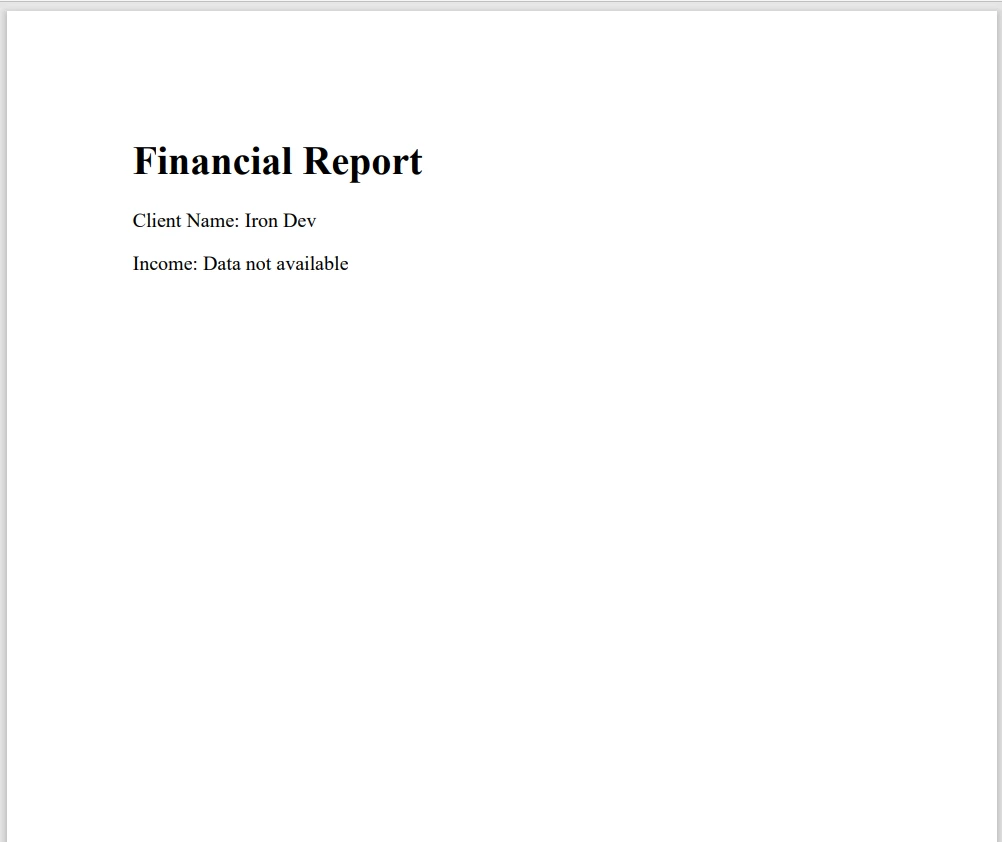
이 코드에서는 널러블 타입 (int? 및 string?)을 사용하여 누락된 데이터를 안전하게 처리합니다. 널 병합 연산자(??)는 데이터가 누락된 경우 PDF에서 기본값이 사용되도록 보장합니다.
결론
C#의 Nullable 유형은 값 유형과 참조 유형 모두에서 null 값을 처리하는 강력한 도구입니다. Nullable 유형을 사용하면 null 참조 예외를 피하고 코드의 견고성을 향상시킬 수 있습니다. 새 프로젝트에서 Nullable 참조 유형을 활성화하여 컴파일 시간 오류 검사의 이점을 누리고, Nullable 유형을 다룰 때 코드를 단순화하기 위해 널 병합 연산자(??)를 사용하십시오.
IronPDF는 약속하기 전에 기능을 탐색할 수 있도록 무료 체험판을 제공합니다. 선불 비용 없이 개발 과정에 어떻게 적합한지 확인할 수 있습니다. 한 번 진행할 준비가 되면, 라이선스는 $999 부터 시작합니다.
자주 묻는 질문
널러블 타입을 동적 PDF 생성에서 어떻게 활용할 수 있습니까?
널러블 타입은 IronPDF와 같은 라이브러리를 사용하여 선택적 필드를 안전하게 표현할 수 있게 하여 동적 PDF 생성에서 중요할 수 있습니다. 이는 누락된 데이터를 적절히 처리하고 필요한 경우 기본 값을 제공하도록 보장합니다.
C#에서 널러블 타입을 선언할 때의 구문은 무엇인가요?
C#에서 널러블 타입을 선언하려면 자료형에 물음표 '?'를 추가합니다. 예를 들어 널러블 정수를 선언하려면 int? nullableInt = null;과 같이 작성합니다.
널러블 타입이 C#에서 생성된 보고서의 강건성에 영향을 미칠 수 있나요?
네, 널러블 타입을 사용하면 값이 없는 선택적 필드가 오류를 발생시키지 않도록 하여 생성된 보고서의 강건성을 향상시킬 수 있습니다. IronPDF와 같은 라이브러리는 이러한 조건을 효과적으로 관리하기 위해 널러블 타입을 활용할 수 있습니다.
널러블 참조 타입이 런타임 오류를 방지하는 데 어떻게 도움이 되나요?
C# 8.0에 도입된 널러블 참조 타입은 참조 타입이 기본적으로 널이 아닐 수 있도록 하여 런타임 오류를 방지하는 데 도움이 됩니다. 이는 널 참조 예외의 위험을 줄이고 컴파일 중 잠재적인 문제를 조기에 감지할 수 있도록 합니다.
널러블 타입을 관리하는 데 널 병합 연산자의 역할은 무엇인가요?
널 병합 연산자 ??는 널러블 타입이 널일 때 기본값을 제공함으로써 널러블 타입을 관리하는 데 사용됩니다. 이는 코드를 단순화하고 명시적인 if-else 체크를 피하는 데 도움이 됩니다.
C#에서 nullable 형식이 값을 가지고 있는지 확인하려면 어떻게 하나요?
nullable 형식이 값이 있는지 여부는 HasValue 속성을 사용하거나 변수를 null과 직접 비교하여 C#에서 확인할 수 있습니다.
C# 애플리케이션에서 nullable 타입을 사용하는 일반적인 시나리오는 무엇인가요?
널러블 타입은 데이터가 불완전하거나 선택적일 수 있는 상황, 예를 들어 양식 입력, 구성 설정, 또는 널 값을 허용하는 데이터베이스와 인터페이스할 때 자주 사용됩니다. IronPDF 같은 라이브러리를 사용한 동적 보고서 생성에서 특히 유용합니다.
널 수 있는 참조 타입을 활성화하면 C# 프로젝트 컴파일에 어떤 영향을 미치나요?
C# 프로젝트에서 nullable 참조 유형을 활성화하면 잠재적인 null 참조 문제에 대해 컴파일 시간 경고와 오류가 발생하여 문제를 조기에 발견하고 더 견고한 코드 개발을 촉진합니다.










 무료로 시작하세요
 무료로 시작하세요
 무료 라이브 데모 예약하기





 신용카드나 계정 생성은 필요하지 않습니다.










