




已更新 2026年4月23日
在 .NET 中用 Microsoft.Extensions.AI 簡化 LLM 整合
AI 正在改變軟體開發,但將大型語言模型 (LLM) 整合到 .NET 中一直很複雜。利用 IronPdf.AI 將 AI 整合推向更遠,為 .NET 應用程式帶來由 OpenAI 驅動的 PDF 解析、資料擷取和內容總結。
閱讀更多

當使用C#編程時,您經常需要處理null值,尤其是引用型別。C#中的nullable型別提供了一種方法來表示值型別的未定義或不存在的值。本指南涵蓋了C# nullable型別的基本要點,其實際用途,以及在不同情況下它們的工作原理。 在本文的後半部分,我們還將探討IronPDF。
預設情況下,C#中的值型別(例如 int, bool, DateTime)不能賦予 null 值。 為了應對這一限制,C# 引入了nullable 值型別,允許將 null 賦予值型別。nullable 型別在需要表示有效值的缺失時特別有用。
要在 C# 中宣告可空型別,您可以使用以下語法:
// Declare a nullable integer
int? nullableInt = null;' Declare a nullable integer
Dim nullableInt? As Integer = Nothing在此,int? 是 Nullable<int> 的簡寫。 nullableInt 變數可以容納 int 值或 null。
要檢查 nullable 型別變數是否具有值,您可以使用 HasValue 屬性,或直接比較變數與 null,如下所示:
if (nullableInt.HasValue)
{
    // If nullableInt has a value, print it
    Console.WriteLine("Value: " + nullableInt.Value);
}
else
{
    // If nullableInt does not have a value, print a message
    Console.WriteLine("No value assigned.");
}If nullableInt.HasValue Then
' If nullableInt has a value, print it
Console.WriteLine("Value: " & nullableInt.Value)
Else
' If nullableInt does not have a value, print a message
Console.WriteLine("No value assigned.")
End If此外,您也可以使用 null 合併運算符(??)來在 nullable 型別為 null 時提供預設值:
// Assign 0 if nullableInt is null
int result = nullableInt ?? 0;
Console.WriteLine("Result: " + result);' Assign 0 if nullableInt is null
Dim result As Integer = If(nullableInt, 0)
Console.WriteLine("Result: " & result)如果 nullableInt 為 null,result 將被分配預設值 0。
在 C# 中,值型別(例如 int, bool 和 double)與引用型別(例如 string, object)不同。 nullable 值型別允許值型別表示 null,而 nullable 引用型別允許引用型別預設為非 nullable,從而減少空引用異常的風險。
nullable 值型別允許值型別取 null 值。 要宣告 nullable 值型別,請在資料型別後面加上問號 ? :
// Declare a nullable double
double? nullableDouble = null;' Declare a nullable double
Dim nullableDouble? As Double = Nothing在此範例中,nullableDouble 可以容納 double 值或 null。
nullable 引用型別是在 C# 8.0 中引入的。您可以在專案級別啟用 nullable 引用型別,或者在程式碼文件開頭新增 #nullable enable 指令。啟用 nullable 引用型別後,必須明確將引用型別標記為 nullable,使用 ?,以幫助避免由於 null 引用導致的潛在運行時異常。
#nullable enable
// Declare a nullable string
string? nullableString = null;'INSTANT VB TODO TASK: There is no equivalent to #nullable in VB:
'#nullable enable
' Declare a nullable string
'INSTANT VB WARNING: Nullable reference types have no equivalent in VB:
'ORIGINAL LINE: string? nullableString = null;
Dim nullableString As String = Nothing在此,nullableString 被允許為 null。 如果您在未加入 ? 的情況下宣告一個非 nullable 引用型別,編譯器將在檢測到潛在的 null 賦值時產生警告。
要在專案中全域啟用 nullable 引用型別,請將以下行新增到您的 .csproj 文件中:
<Nullable>enable</Nullable>啟用後,編譯器將預設情況下將引用型別視為非 nullable。 此功能特別有助於在編譯時捕獲 null 引用問題,而不是在運行時捕獲。
讓我們探索一些實際範例以鞏固您對 nullable 型別的理解。
在此範例中,我們將使用 int 的 nullable 型別:
class Program
{
    static void Main(string[] args)
    {
        int? nullableInt = null;
        // Use null coalescing operator to assign a default value
        int b = nullableInt ?? 10;
        Console.WriteLine("b: " + b);
        if (nullableInt.HasValue)
        {
            // nullableInt has a value
            Console.WriteLine("nullableInt has value: " + nullableInt.Value);
        }
        else
        {
            // nullableInt is null
            Console.WriteLine("nullableInt is null");
        }
    }
}Friend Class Program
Shared Sub Main(ByVal args() As String)
Dim nullableInt? As Integer = Nothing
' Use null coalescing operator to assign a default value
Dim b As Integer = If(nullableInt, 10)
Console.WriteLine("b: " & b)
If nullableInt.HasValue Then
' nullableInt has a value
Console.WriteLine("nullableInt has value: " & nullableInt.Value)
Else
' nullableInt is null
Console.WriteLine("nullableInt is null")
End If
End Sub
End Class在此,nullableInt 是 int 的 nullable 型別變數。 如果 nullableInt 為 null,b 因為 null 合併運算符而獲得值10。 否則,b 取 nullableInt 的值。
現在,讓我們看看 nullable 引用型別如何運作:
#nullable enable
class Program
{
    static void Main()
    {
        string? nullableString = null;
        string nonNullableString = "Hello";
        // Use null coalescing operator to provide a default value for length
        Console.WriteLine(nullableString?.Length ?? 0);
        Console.WriteLine(nonNullableString.Length);
    }
}'INSTANT VB TODO TASK: There is no equivalent to #nullable in VB:
'#nullable enable
Friend Class Program
Shared Sub Main()
'INSTANT VB WARNING: Nullable reference types have no equivalent in VB:
'ORIGINAL LINE: string? nullableString = null;
Dim nullableString As String = Nothing
Dim nonNullableString As String = "Hello"
' Use null coalescing operator to provide a default value for length
Console.WriteLine(If(nullableString?.Length, 0))
Console.WriteLine(nonNullableString.Length)
End Sub
End Class在上述程式碼中,nullableString 可以為 null,且 null 合併運算符確保如果它為 null,則字串的長度將預設為 0。
C# 允許宣告巢狀的 nullable 型別。例如:
// Redundant, but syntactically valid
int? nestedNullableInt = null;' Redundant, but syntactically valid
Dim nestedNullableInt? As Integer = Nothing雖然巢狀的 nullable 型別看似多餘,但它們在 C# 中是語法上有效的。 然而,在實踐中,巢狀的 nullable 型別並沒有提供任何額外的功能,而且很少使用。
null 合併運算符(??)經常與 nullable 型別一起使用,以在 nullable 型別為 null 時提供預設值。 此運算符通過避免顯式的 if-else 檢查來簡化程式碼。
int? nullableValue = null;
// Assign -1 if nullableValue is null
int defaultValue = nullableValue ?? -1;Dim nullableValue? As Integer = Nothing
' Assign -1 if nullableValue is null
Dim defaultValue As Integer = If(nullableValue, -1)在此範例中,如果 nullableValue 為 null,defaultValue 將賦值為 -1。否則,defaultValue 將取 nullableValue 的值。
啟用 nullable 引用型別後,C# 在編譯時會產生警告和錯誤,以檢測到可能的 null 賦值問題。 這些編譯時錯誤有助於早期發現問題,使您的程式碼更堅固。
請考慮以下範例:
string? nullableString = null;
// This will produce a compiler warning because nullableString may be null
string nonNullableString = nullableString;'INSTANT VB WARNING: Nullable reference types have no equivalent in VB:
'ORIGINAL LINE: string? nullableString = null;
Dim nullableString As String = Nothing
' This will produce a compiler warning because nullableString may be null
Dim nonNullableString As String = nullableString在此情形下,將 nullableString 賦給 nonNullableString 會導致編譯器警告,因為 nullableString 可能為 null,將其賦給非 nullable 型別可能導致運行時異常。
** IronPDF ** 是一個 C# PDF 程式庫,旨在幫助開發人員從 .NET 應用程式直接建立、編輯和操作 PDF 文件。 您可以 將HTML轉換為PDF,生成報告,甚至處理複雜的文件結構。
在動態報告生成場景中,使用 nullable 型別尤其有用,例如當您為會計師生成包含不完整財務資料的 PDF 時。 通過使用可空型別,您可以管理可選字段,避免異常,並提供預設值。
using IronPdf;
class Program
{
    static void Main(string[] args)
    {
        int? optionalIncome = null;  // Nullable type for optional income
        string? clientName = "Iron Dev";  // Nullable reference type for client name
        var renderer = new ChromePdfRenderer();
        string htmlContent = $@"
            <h1>Financial Report</h1>
            <p>Client Name: {clientName ?? "Unknown"}</p>
            <p>Income: {optionalIncome?.ToString() ?? "Data not available"}</p>";
        // Render the HTML to a PDF
        var pdf = renderer.RenderHtmlAsPdf(htmlContent);
        // Save the PDF to disk
        pdf.SaveAs("FinancialReport.pdf");
        Console.WriteLine("PDF Generated Successfully.");
    }
}Imports IronPdf
Friend Class Program
Shared Sub Main(ByVal args() As String)
Dim optionalIncome? As Integer = Nothing ' Nullable type for optional income
'INSTANT VB WARNING: Nullable reference types have no equivalent in VB:
'ORIGINAL LINE: string? clientName = "Iron Dev";
Dim clientName As String = "Iron Dev" ' Nullable reference type for client name
Dim renderer = New ChromePdfRenderer()
Dim htmlContent As String = $"
<h1>Financial Report</h1>
<p>Client Name: {If(clientName, "Unknown")}</p>ignoreignore<p>Income: {If(optionalIncome?.ToString(), "Data not available")}</p>"
' Render the HTML to a PDF
Dim pdf = renderer.RenderHtmlAsPdf(htmlContent)
' Save the PDF to disk
pdf.SaveAs("FinancialReport.pdf")
Console.WriteLine("PDF Generated Successfully.")
End Sub
End Class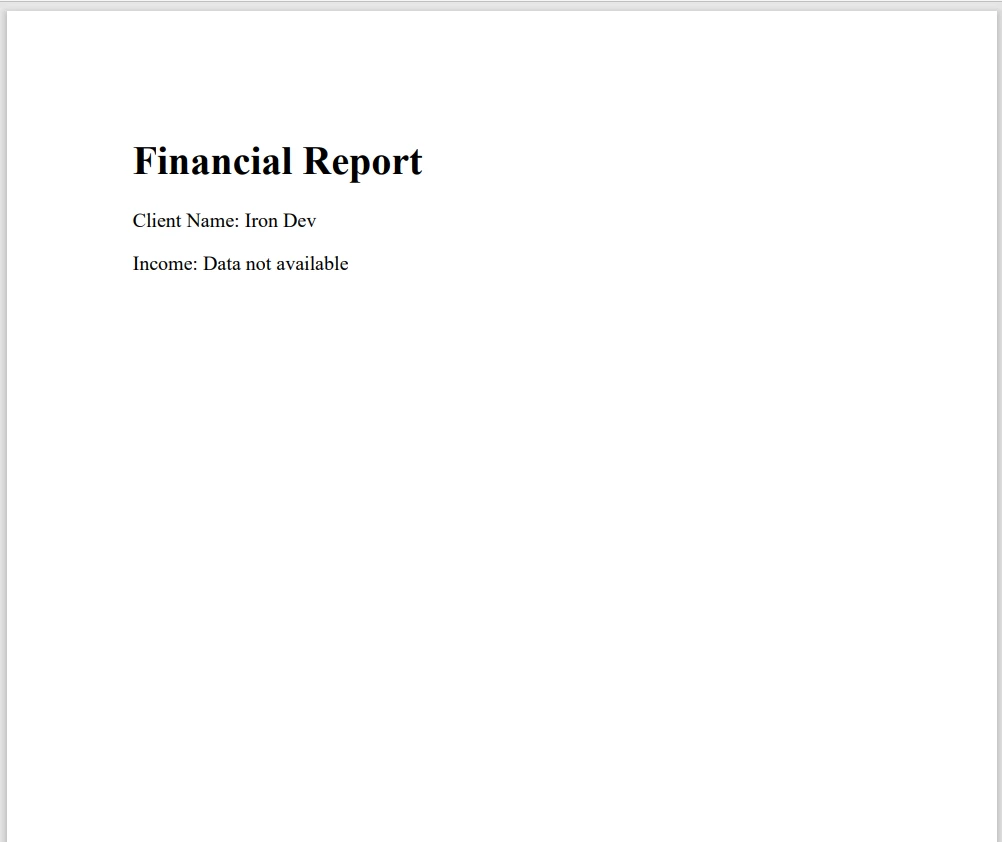
在此程式碼中,使用了 nullable 型別 (int? 和 string?) 來安全處理缺失的資料。 null 合併運算符(??)確保如果任何資料丟失,則PDF中使用的是預設值。
C# 中的可空型別是處理值型別和引用型別中的 null 值的強大工具。通過使用可空型別,您可以避免空引用異常並提高程式碼的穩健性。 請記得在新專案中啟用 nullable 引用型別,以受益於編譯時錯誤檢查,並在處理 nullable 型別時使用 null 合併運算符(??)來簡化您的程式碼。
IronPDF 提供免費試用,幫助您在做出承諾前探索其功能。 沒有前期成本,您可以嘗試看看它如何融入您的開發過程。 一旦您準備好前進,許可證從 $999 開始。

Jacob Mellor是Iron Software的首席技術官,一位在C# PDF技術上開創先河的遠見工程師。作為Iron Software核心程式碼庫的原開發者,他從創立以來就一直在塑造公司的產品架構,與首席執行官Cameron Rimington一起將公司轉變為服務於NASA、特斯拉和全球政府公司的50多名人員的公司。



IronPDF 是 IRONSUITE 的一部分
10 款適用於辦公室文件的 .NET API 產品

當您需要您的PDF看起來像HTML一樣快速。












