




업데이트됨 2026년 4월 23일
.NET에서 Microsoft.Extensions.AI로 LLM 통합 간소화
AI는 소프트웨어 개발을 변혁하고 있으나, 대규모 언어 모델(LLM)을 .NET에 통합하는 것은 지금까지 복잡했습니다. 현대에는 OpenAI 기반 PDF 파싱, 데이터 추출 및 콘텐츠 요약을 .NET 애플리케이션에 가져오는 IronPdf.AI로 AI 통합을 더욱 확장하세요.
더 읽어보기

소프트웨어 개발 세계에서 C#은 개발자에게 다양한 기능을 제공하는 다재다능하고 강력한 프로그래밍 언어입니다.
그런 특징 중 특히 유연성과 동적성을 위한 반사가 돋보입니다. C#의 반사는 개발자가 런타임 동안 형식의 메타데이터를 검사하고 상호작용할 수 있게 합니다. 이 기능은 새로운 가능성의 차원을 열어, 개발자가 더 유연하고 확장 가능하며 견고한 애플리케이션을 생성할 수 있게 해줍니다.
이 기사에서는 C# 반사의 복잡성을 살펴보고, 주요 개념, 사용 사례 및 모범 사례를 탐구할 것입니다. 또한 IronPDF의 PdfDocument 객체의 반사 정보를 찾을 것입니다.
반사는 프로그램이 런타임에 구조 및 동작을 검사하고 조작할 수 있게 하는 메커니즘입니다. C#에서는 이를 System.Reflection 네임스페이스를 통해 달성할 수 있으며, 이는 메타데이터와 상호작용하고, 형식에 대한 정보를 얻고, 심지어 동적으로 인스턴스를 생성하는 클래스와 메서드를 제공합니다.
C# 반사의 핵심에는 .NET 런타임의 형식을 나타내는 Type 클래스가 있습니다. 이 클래스는 모든 공개 메서드, 속성, 필드, 이벤트 및 메서드 매개 변수에 대한 풍부한 정보를 제공합니다.
여러 메서드를 사용하여 주어진 형식의 Type 객체를 얻을 수 있는데, 예를 들어 typeof() 연산자나 객체의 GetType() 메서드를 호출하여 얻을 수 있습니다.
using System;

class Program
{
    static void Main()
    {
        // Using typeof to get Type information for string
        Type stringType = typeof(string);
        Console.WriteLine("Information about the string type:");
        Console.WriteLine($"Type Name: {stringType.Name}");
        Console.WriteLine($"Full Name: {stringType.FullName}");
        Console.WriteLine($"Assembly Qualified Name: {stringType.AssemblyQualifiedName}");
    }
}Imports System
Friend Class Program
Shared Sub Main()
' Using typeof to get Type information for string
Dim stringType As Type = GetType(String)
Console.WriteLine("Information about the string type:")
Console.WriteLine($"Type Name: {stringType.Name}")
Console.WriteLine($"Full Name: {stringType.FullName}")
Console.WriteLine($"Assembly Qualified Name: {stringType.AssemblyQualifiedName}")
End Sub
End Class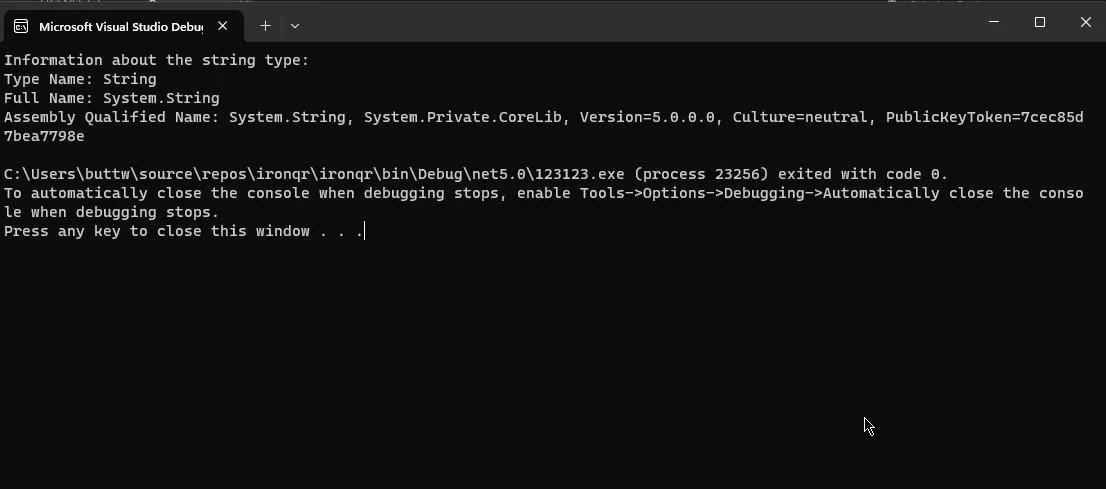
.NET의 어셈블리는 배포 및 버전 관리의 단위입니다. System.Reflection 네임스페이스의 Assembly 클래스는 어셈블리를 로드하고 설명하며 어셈블리 정보를 동적으로 검사하는 메서드를 제공합니다.
현재 실행 중인 어셈블리의 인스턴스나 참조된 어셈블리 인스턴스에 대한 Assembly 객체를 얻을 수 있습니다.
using System;
using System.Reflection;

class Program
{
    static void Main()
    {
        // Example 1: Get information about the executing assembly
        Assembly executingAssembly = Assembly.GetExecutingAssembly();
        Console.WriteLine("Information about the executing assembly:");
        DisplayAssemblyInfo(executingAssembly);

        // Example 2: Load the mscorlib assembly
        Assembly mscorlibAssembly = Assembly.Load("mscorlib");
        Console.WriteLine("\nInformation about the mscorlib assembly:");
        DisplayAssemblyInfo(mscorlibAssembly);
    }

    static void DisplayAssemblyInfo(Assembly assembly)
    {
        Console.WriteLine($"Assembly Name: {assembly.GetName().Name}");
        Console.WriteLine($"Full Name: {assembly.FullName}");
        Console.WriteLine($"Location: {assembly.Location}");
        Console.WriteLine("\nModules:");

        foreach (var module in assembly.GetModules())
        {
            Console.WriteLine($"- {module.Name}");
        }

        Console.WriteLine(new string('-', 30));
    }
}Imports Microsoft.VisualBasic
Imports System
Imports System.Reflection
Friend Class Program
Shared Sub Main()
' Example 1: Get information about the executing assembly
Dim executingAssembly As System.Reflection.Assembly = System.Reflection.Assembly.GetExecutingAssembly()
Console.WriteLine("Information about the executing assembly:")
DisplayAssemblyInfo(executingAssembly)
' Example 2: Load the mscorlib assembly
Dim mscorlibAssembly As System.Reflection.Assembly = System.Reflection.Assembly.Load("mscorlib")
Console.WriteLine(vbLf & "Information about the mscorlib assembly:")
DisplayAssemblyInfo(mscorlibAssembly)
End Sub
Private Shared Sub DisplayAssemblyInfo(ByVal assembly As System.Reflection.Assembly)
Console.WriteLine($"Assembly Name: {assembly.GetName().Name}")
Console.WriteLine($"Full Name: {assembly.FullName}")
Console.WriteLine($"Location: {assembly.Location}")
Console.WriteLine(vbLf & "Modules:")
For Each [module] In assembly.GetModules()
Console.WriteLine($"- {[module].Name}")
Next [module]
Console.WriteLine(New String("-"c, 30))
End Sub
End Class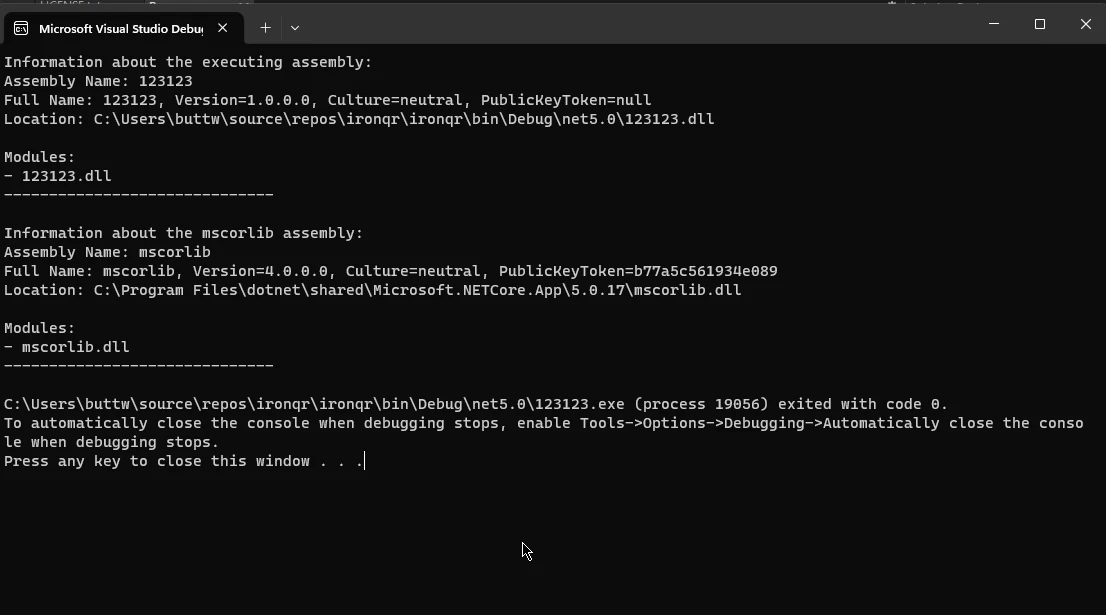
이 클래스들은 각각 공개 멤버, 메서드, 속성, 필드 및 이벤트를 나타냅니다. 이들은 이러한 멤버에 대한 정보, 예를 들어 이름, 형식, 접근성 등을 노출합니다.
이 클래스의 인스턴스에 접근하려면 Type 클래스를 통해 얻을 수 있습니다.
using System;
using System.Reflection;

class MyClass
{
    public void MyMethod() { }
    public int MyProperty { get; set; }
    public string myField;
    public event EventHandler MyEvent;
}

class Program
{
    static void Main()
    {
        // Get MethodInfo for MyMethod
        MethodInfo methodInfo = typeof(MyClass).GetMethod("MyMethod");
        Console.WriteLine($"Method Name: {methodInfo.Name}");

        // Get PropertyInfo for MyProperty
        PropertyInfo propertyInfo = typeof(MyClass).GetProperty("MyProperty");
        Console.WriteLine($"Property Name: {propertyInfo.Name}");

        // Get FieldInfo for myField
        FieldInfo fieldInfo = typeof(MyClass).GetField("myField");
        Console.WriteLine($"Field Name: {fieldInfo.Name}");

        // Get EventInfo for MyEvent
        EventInfo eventInfo = typeof(MyClass).GetEvent("MyEvent");
        Console.WriteLine($"Event Name: {eventInfo.Name}");
    }
}Imports System
Imports System.Reflection
Friend Class [MyClass]
Public Sub MyMethod()
End Sub
Public Property MyProperty() As Integer
Public myField As String
Public Event MyEvent As EventHandler
End Class
Friend Class Program
Shared Sub Main()
' Get MethodInfo for MyMethod
Dim methodInfo As MethodInfo = GetType([MyClass]).GetMethod("MyMethod")
Console.WriteLine($"Method Name: {methodInfo.Name}")
' Get PropertyInfo for MyProperty
Dim propertyInfo As PropertyInfo = GetType([MyClass]).GetProperty("MyProperty")
Console.WriteLine($"Property Name: {propertyInfo.Name}")
' Get FieldInfo for myField
Dim fieldInfo As FieldInfo = GetType([MyClass]).GetField("myField")
Console.WriteLine($"Field Name: {fieldInfo.Name}")
' Get EventInfo for MyEvent
Dim eventInfo As EventInfo = GetType([MyClass]).GetEvent("MyEvent")
Console.WriteLine($"Event Name: {eventInfo.Name}")
End Sub
End Class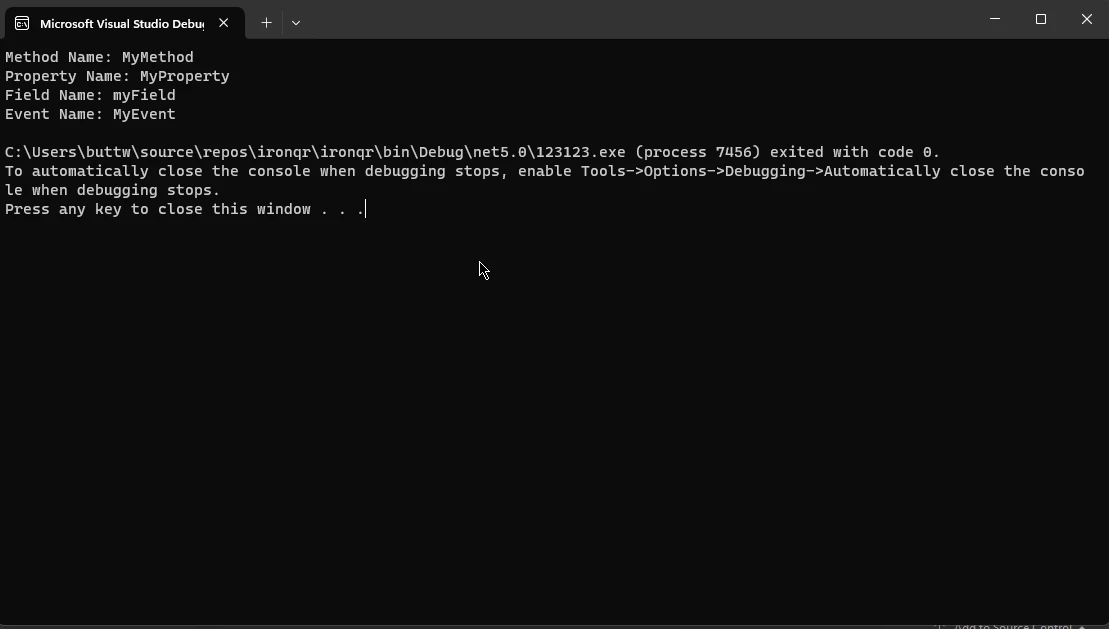
IronPDF - 공식 웹사이트는 .NET 애플리케이션에서 PDF 문서를 다루기 위한 종합적인 기능을 제공하는 강력한 C# 라이브러리입니다. 개발자는 간단하고 직관적인 API를 사용하여 PDF 파일과 같은 기존 객체에서 쉽게 데이터를 생성, 조작 및 추출할 수 있습니다.
IronPDF의 주목할만한 기능 중 하나는 기존 C# 프로젝트와 원활하게 통합될 수 있는 능력으로, PDF 생성 및 조작 기능을 추가하기에 매우 적합한 선택입니다.
IronPDF의 몇 가지 주요 기능은 다음과 같습니다:
이제 IronPDF와 함께 C# 반사를 사용하는 방법을 자세한 코드 예제에서 살펴보겠습니다.
이 간단한 예제에서, 우리는 C# 반사를 사용하여 IronPDF PDF문서 객체에 대한 정보를 얻을 것입니다.
프로젝트에 IronPDF NuGet 패키지를 설치했는지 확인하십시오. NuGet 패키지 관리자 콘솔을 사용하여 이렇게 할 수 있습니다:
using IronPdf;
using System;
using System.Reflection;

class Program
{
    static void Main()
    {
        // Get the Type object representing PdfDocument
        Type pdfDocumentType = typeof(PdfDocument);

        // Display basic information about the PdfDocument type
        Console.WriteLine("Information about the PdfDocument type:");
        Console.WriteLine($"Type Name: {pdfDocumentType.Name}");
        Console.WriteLine($"Full Name: {pdfDocumentType.FullName}");
        Console.WriteLine($"Assembly Qualified Name: {pdfDocumentType.AssemblyQualifiedName}");
        Console.WriteLine("\nMembers:");

        // Iterate over all members and display their information
        foreach (var memberInfo in pdfDocumentType.GetMembers())
        {
            Console.WriteLine($"{memberInfo.MemberType} {memberInfo.Name}");
        }
    }
}Imports IronPdf
Imports System
Imports System.Reflection
Module Program
Sub Main()
' Get the Type object representing PdfDocument
Dim pdfDocumentType As Type = GetType(PdfDocument)
' Display basic information about the PdfDocument type
Console.WriteLine("Information about the PdfDocument type:")
Console.WriteLine($"Type Name: {pdfDocumentType.Name}")
Console.WriteLine($"Full Name: {pdfDocumentType.FullName}")
Console.WriteLine($"Assembly Qualified Name: {pdfDocumentType.AssemblyQualifiedName}")
Console.WriteLine(vbCrLf & "Members:")
' Iterate over all members and display their information
For Each memberInfo In pdfDocumentType.GetMembers()
Console.WriteLine($"{memberInfo.MemberType} {memberInfo.Name}")
Next
End Sub
End Module제공된 C# 코드는 IronPDF 라이브러리의 PdfDocument 유형에 대한 정보를 얻기 위해 리플렉션을 활용합니다. 처음에는 typeof(PdfDocument) 표현식을 사용하여 PdfDocument 유형을 나타내는 Type 객체를 검색합니다.
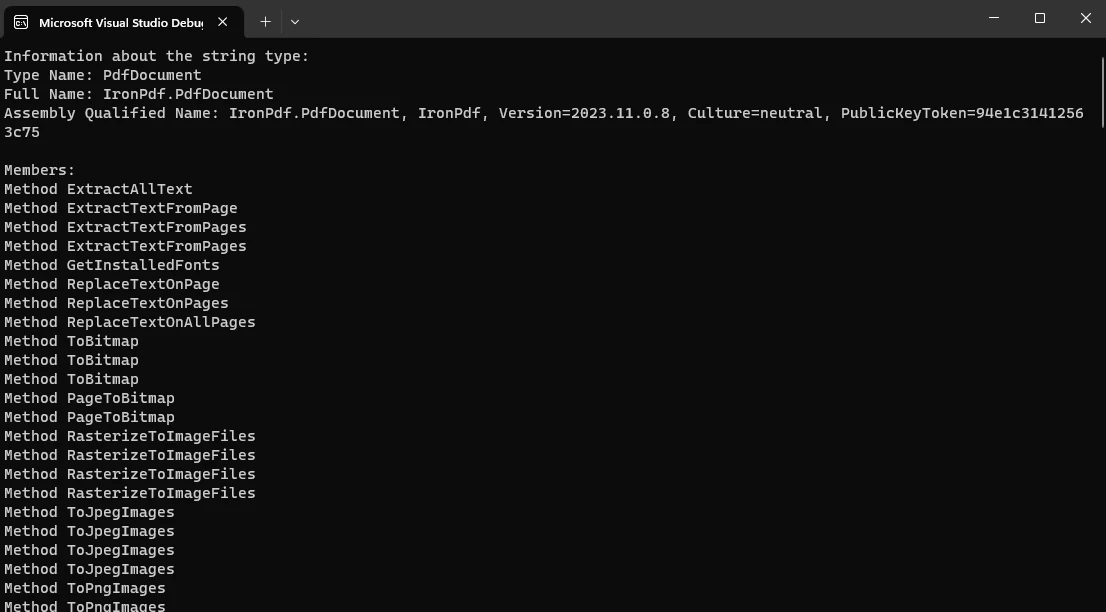
그 후, 얻은 Type 객체의 다양한 속성이 콘솔에 출력되며, 여기에는 유형 이름, 전체 이름, 어셈블리 자격 이름이 포함됩니다.
추가적으로, 코드는 foreach 루프를 활용하여 PdfDocument 유형의 멤버를 반복하며, 각 멤버의 유형과 이름과 같은 정보를 출력합니다.
이 접근 방식은 실행 시간 동안 객체의 구조와 메타데이터를 동적으로 검사하기 위해 리플렉션을 사용하는 것을 보여주며, IronPDF 라이브러리의 PdfDocument 클래스의 구성과 모든 공용 멤버에 대한 통찰력을 제공합니다.
산출:
C# 리플렉션은 런타임 시 유형의 구조를 동적으로 검사하고 조작할 수 있게 해주는 강력한 메커니즘입니다.
본 기사에서는 C# 리플렉션과 관련된 주요 개념, 사용 사례, 모범 사례를 탐구하여 유연하고 확장 가능한 애플리케이션을 만드는 데 있어 그 중요성을 강조했습니다.
또한, 강력한 PDF 조작 라이브러리인 IronPDF의 통합은 PdfDocument 유형에 대한 정보를 동적으로 얻는 데 있어 C# 리플렉션의 다재다능함을 더 잘 보여줍니다.
개발자들이 이런 기능을 활용함에 따라, 변화하는 요구 사항과 상황에 맞추어 애플리케이션을 조정할 수 있는 유연성을 얻으며, C#의 동적 특성과 IronPDF와 같은 라이브러리가 문서 처리 기능을 향상시키는 귀중한 공헌을 보여줍니다.
IronPDF는 많은 튜토리얼을 포함하는 잘 문서화된 라이브러리입니다. 튜토리얼을 보려면 IronPDF 튜토리얼 문서를 방문하여 개발자가 그 기능에 대해 배울 수 있는 더 큰 기회를 제공합니다.

제이콥 멜러는 Iron Software의 최고 기술 책임자(CTO)이자 C# PDF 기술을 개척한 선구적인 엔지니어입니다. Iron Software의 핵심 코드베이스를 최초로 개발한 그는 창립 초기부터 회사의 제품 아키텍처를 설계해 왔으며, CEO인 캐머런 리밍턴과 함께 회사를 NASA, 테슬라, 그리고 전 세계 정부 기관에 서비스를 제공하는 50명 이상의 직원을 보유한 기업으로 성장시켰습니다.



IronPDF는 IRON SUITE 의 일부입니다.
10개의 .NET API 제품, 당신의 사무 문서를 위해

PDF 파일을 HTML처럼 빠르게 변환해야 할 때.


