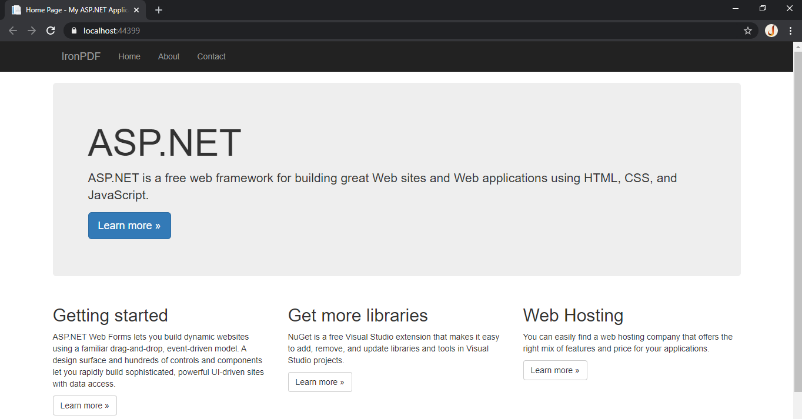
IRONPDF 사용 ASPX를 PDF로 변환 커티스 차우 업데이트됨:8월 20, 2025 다운로드 IronPDF NuGet 다운로드 DLL 다운로드 윈도우 설치 프로그램 무료 체험 시작하기 LLM용 사본 LLM용 사본 LLM용 마크다운 형식으로 페이지를 복사하세요 ChatGPT에서 열기 ChatGPT에 이 페이지에 대해 문의하세요 제미니에서 열기 제미니에게 이 페이지에 대해 문의하세요 Grok에서 열기 Grok에게 이 페이지에 대해 문의하세요 혼란 속에서 열기 Perplexity에게 이 페이지에 대해 문의하세요 공유하다 페이스북에 공유하기 트위터에 공유하기 LinkedIn에 공유하기 URL 복사 이메일로 기사 보내기 Developers often use ASP.NET (ASPX) websites to generate dynamic PDF files such as forms, receipts, or managerial reports for customers to download. While this process can be complicated, the IronPDF library can demonstrate how to convert ASPX to PDF in just one line. ## Convert ASPX File to PDF Install the IronPDF C# PDF Library Convert ASPX to PDF with 1 line of code Compare the website to PDF render output example Step 1 1. Install the IronPDF C# Library First, let's access the free development C# Library for converting ASPX files to PDF. You can download the IronPDF Package or access via NuGet. Install as usual into your Visual Studio project. # Install the IronPDF package via NuGet nuget install IronPdf # Install the IronPDF package via NuGet nuget install IronPdf SHELL How to Tutorial 2. Convert ASPX to PDF ### Convert Now that you have IronPDF, you'll see that it has the functionality for HTML conversion as well as ASPX to PDF generation. We keep it simple, just one line of code, so engineers at any level are able to use it. We can convert ASPX pages to either our own developed webpage or any website which is developed on ASP.NET. Let's see an example. We'll use the method RenderThisPageAsPdf() to cleanly convert the current page to PDF without any issues. // Import necessary namespaces using System; using System.Web.UI; using IronPdf; namespace aspxtopdf { public partial class SiteMaster : MasterPage { // The Page_Load event is triggered when the page is loaded protected void Page_Load(object sender, EventArgs e) { // Use IronPDF to render the current ASPX page as a PDF AspxToPdf.RenderThisPageAsPdf(); } } } // Import necessary namespaces using System; using System.Web.UI; using IronPdf; namespace aspxtopdf { public partial class SiteMaster : MasterPage { // The Page_Load event is triggered when the page is loaded protected void Page_Load(object sender, EventArgs e) { // Use IronPDF to render the current ASPX page as a PDF AspxToPdf.RenderThisPageAsPdf(); } } } $vbLabelText $csharpLabel IronPDF offers developers methods to render PDF documents into images and extract text and content from PDFs. Additionally, IronPDF is also capable of rendering charts in PDFs, adding barcodes using the IronBarcode library, enhancing security with passwords and applying watermarks programmatically. 3. View Rendered Output Using C#, IronPDF offers an option to automate and create PDF documents. In this example, this dummy ASPX website is used to convert the ASPX file to PDF. You can directly compare the output file and see how closely the PDF result matches the original website. This kind of high-quality rendering is unique to IronPDF and especially valuable when working with clients. ### ~ ASPX Website~ ### ~ Converted PDF~ Library Quick Access ### Access the API Reference Access the full documentation and functions for IronPDF. Access the API Reference 자주 묻는 질문 C#에서 ASPX 파일을 PDF로 변환하려면 어떻게 해야 하나요? IronPDF 라이브러리의 RenderThisPageAsPdf() 메서드를 사용하여 ASPX 파일을 PDF로 효율적으로 변환할 수 있습니다. 이 메서드를 사용하면 최소한의 코드로 원활하게 변환할 수 있습니다. ASPX를 PDF로 변환하기 위한 IronPDF 라이브러리를 설치하는 절차는 어떻게 되나요? IronPDF 라이브러리를 설치하려면 패키지 관리자 콘솔에서 nuget install IronPdf 명령을 실행하여 Visual Studio에서 NuGet을 사용합니다. IronPDF는 모든 ASP.NET 웹사이트를 PDF 문서로 변환할 수 있나요? 예, IronPDF는 직접 개발한 웹사이트나 기존 ASPX 페이지를 포함한 모든 ASP.NET 웹사이트를 PDF 문서로 변환할 수 있습니다. IronPDF는 PDF 출력이 원본 ASPX 페이지와 일치하도록 어떻게 보장하나요? IronPDF의 렌더링 기능은 생성된 PDF가 원본 ASPX 페이지와 거의 일치하여 레이아웃과 콘텐츠를 정확하게 보존하도록 보장합니다. IronPDF는 ASPX를 PDF로 변환하는 기능 외에 어떤 추가 기능을 제공하나요? ASPX를 PDF로 변환하는 것 외에도 IronPDF는 PDF를 이미지로 렌더링, 텍스트 추출, 비밀번호로 보안 강화, 워터마크 추가, 바코드 통합과 같은 기능을 제공합니다. IronPDF에 대한 API 참조는 어디에서 찾을 수 있나요? IronPDF API 참조는 'https://ironpdf.com/object-reference/api/IronPdf.html'에서 개발자를 위한 자세한 문서를 제공합니다. IronPDF를 사용하여 변환된 PDF를 비밀번호로 보호할 수 있나요? 예, IronPDF를 사용하면 변환 과정에서 비밀번호를 설정하고 기타 보안 기능을 적용하여 PDF의 보안을 강화할 수 있습니다. IronPDF를 사용하여 ASPX 페이지의 PDF 출력을 보려면 어떻게 해야 하나요? IronPDF를 사용하여 ASPX 페이지를 PDF로 변환한 후에는 모든 표준 PDF 뷰어를 사용하여 PDF 출력을 확인하여 콘텐츠가 정확하게 렌더링되는지 확인할 수 있습니다. IronPDF는 PDF 문서를 이미지로 렌더링할 수 있나요? 예, IronPDF는 PDF 문서를 이미지로 렌더링하는 기능을 제공하여 다양한 디스플레이 또는 처리 요구에 맞게 페이지를 변환할 수 있습니다. IronPDF는 PDF 문서에 바코드 추가를 지원하나요? IronPDF는 IronBarcode와 통합되어 PDF 문서에 바코드 추가를 지원하여 PDF 출력물의 기능과 유용성을 향상시킵니다. IronPDF는 ASPX에서 PDF로의 변환을 위해 .NET 10과 완벽하게 호환되나요? 예 - IronPDF는 .NET 10과 완벽하게 호환됩니다. ASP.NET 웹 양식(ASPX), 웹 양식 URL 렌더링, 웹 프로젝트를 지원하며 모든 기능이 .NET 10에서 원활하게 작동합니다. 이전 버전에서와 마찬가지로 .NET 10 프로젝트에서 AspxToPdf.RenderThisPageAsPdf()와 같은 메서드를 사용할 수 있습니다. IronPDF는 .NET 9, 8, 7, 6 등과 함께 .NET 10을 지원하는 것으로 명시적으로 나열되어 있습니다(출처: IronPDF의 .NET 기술 페이지). 커티스 차우 지금 바로 엔지니어링 팀과 채팅하세요 기술 문서 작성자 커티스 차우는 칼턴 대학교에서 컴퓨터 과학 학사 학위를 취득했으며, Node.js, TypeScript, JavaScript, React를 전문으로 하는 프론트엔드 개발자입니다. 직관적이고 미적으로 뛰어난 사용자 인터페이스를 만드는 데 열정을 가진 그는 최신 프레임워크를 활용하고, 잘 구성되고 시각적으로 매력적인 매뉴얼을 제작하는 것을 즐깁니다. 커티스는 개발 분야 외에도 사물 인터넷(IoT)에 깊은 관심을 가지고 있으며, 하드웨어와 소프트웨어를 통합하는 혁신적인 방법을 연구합니다. 여가 시간에는 게임을 즐기거나 디스코드 봇을 만들면서 기술에 대한 애정과 창의성을 결합합니다. 관련 기사 업데이트됨 1월 22, 2026 How to Create PDF Documents in .NET with IronPDF: Complete Guide Discover effective methods to create PDF files in C# for developers. Enhance your coding skills and streamline your projects. Read the article now! 더 읽어보기 업데이트됨 1월 21, 2026 How to Merge PDF Files in VB.NET: Complete Tutorial Merge PDF VB NET with IronPDF. Learn to combine multiple PDF files into one document using simple VB.NET code. Step-by-step examples included. 더 읽어보기 업데이트됨 1월 21, 2026 C# PDFWriter Tutorial: Create PDF Documents in .NET Learn to create PDFs efficiently using C# PDFWriter with this step-by-step guide for developers. Read the article to enhance your skills today! 더 읽어보기 How to Combine Images Into One PDF.NET Core PDF Library

업데이트됨 1월 22, 2026 How to Create PDF Documents in .NET with IronPDF: Complete Guide Discover effective methods to create PDF files in C# for developers. Enhance your coding skills and streamline your projects. Read the article now! 더 읽어보기
업데이트됨 1월 21, 2026 How to Merge PDF Files in VB.NET: Complete Tutorial Merge PDF VB NET with IronPDF. Learn to combine multiple PDF files into one document using simple VB.NET code. Step-by-step examples included. 더 읽어보기
업데이트됨 1월 21, 2026 C# PDFWriter Tutorial: Create PDF Documents in .NET Learn to create PDFs efficiently using C# PDFWriter with this step-by-step guide for developers. Read the article to enhance your skills today! 더 읽어보기