




업데이트됨 2026년 9월 4일
월별 계정 명세서를 PDF 문서로 생성하기
개발자는 IronPDF C# PDF 라이브러리를 사용하여 외부 서비스에 의존하지 않고도 .NET 프로젝트 내에서 HTML을 신뢰할 수 있는 PDF 파일로 변환할 수 있습니다.
더 읽어보기

PDF 문서 내에서 페이지를 이동시키거나 두 문서 간에 페이지를 전송하는 것은 보고서를 정리하거나 월간 뉴스레터를 조립하거나 배달 전에 여러 섹션으로 구성된 파일을 재구성할 때 자주 필요한 작업입니다. IronPDF를 사용하면 전체 작업이 몇 줄의 C# 코드로 완료됩니다.
이 글은 네 가지 실용적인 시나리오를 안내합니다: 문서 내에서 단일 페이지를 새 위치로 이동하는 것, 여러 페이지를 한 번에 재정렬하는 것, 두 개의 PDF 파일 간에 페이지를 전송하는 것, 그리고 이러한 작업 흐름을 가능하게 하는 일반적인 사용 사례를 이해하는 것. 각 시나리오에는 작동하는 코드 예제와 결과를 보여주는 출력 이미지가 포함되어 있습니다.
무료 체험판 시작하기 아래의 예시를 따라 해보세요.
NuGet 패키지 관리자 콘솔 또는 .NET CLI를 사용하여 IronPDF를 .NET 프로젝트에 추가하십시오. 패키지는 .NET Standard 2.0을 대상으로 하며 .NET Framework 4.6.2+, .NET Core, 및 .NET 8과 .NET 10을 포함한 모든 최신 .NET 버전에서 실행됩니다.
설치 후, C# 파일의 맨 위에 using IronPdf;을 추가하세요. 유효한 라이선스 키가 전체 상업적 사용을 해제합니다. a 무료 체험판 라이선스는 평가 및 개발을 포함합니다. API를 호출하기 전에 키를 한 번 설정하세요:
IronPdf.License.LicenseKey = "YOUR-LICENSE-KEY";IronPdf.License.LicenseKey = "YOUR-LICENSE-KEY"패키지가 참조되고 라이선스가 구성되면 이 기사에 있는 모든 예제는 수정 없이 컴파일되고 실행됩니다. IronPDF NuGet 패키지는 모든 필수 종속성을 자동으로 설치합니다; Windows, Linux, 또는 macOS에서 추가적인 네이티브 바이너리나 런타임 설정이 필요하지 않습니다.
IronPDF를 사용하여 PDF 문서 내에서 페이지를 이동하는 것은 세 단계로 구성됩니다: 대상 페이지를 복사하고, 새로운 위치에 삽입한 다음, 원본을 제거합니다. PdfDocument 클래스는 이 작업의 각 부분을 처리하기 위해 CopyPage, InsertPdf 및 RemovePage를 제공합니다.
다음 코드는 문서의 마지막 페이지를 시작으로 이동하는 방법을 보여줍니다:
using IronPdf;

// Load the PDF document from the file system
var pdf = PdfDocument.FromFile("report.pdf");

// Get the zero-based index of the last page
int lastPageIndex = pdf.PageCount - 1;

// Copy the last page into a standalone PdfDocument
var pageToCopy = pdf.CopyPage(lastPageIndex);

// Insert the copied page at position 0 (the first page slot)
pdf.InsertPdf(pageToCopy, 0);

// The original last page has shifted down by one; remove it
pdf.RemovePage(lastPageIndex + 1);

// Save the reordered document to a new file
pdf.SaveAs("report-reorganized.pdf");Imports IronPdf
' Load the PDF document from the file system
Dim pdf = PdfDocument.FromFile("report.pdf")
' Get the zero-based index of the last page
Dim lastPageIndex As Integer = pdf.PageCount - 1
' Copy the last page into a standalone PdfDocument
Dim pageToCopy = pdf.CopyPage(lastPageIndex)
' Insert the copied page at position 0 (the first page slot)
pdf.InsertPdf(pageToCopy, 0)
' The original last page has shifted down by one; remove it
pdf.RemovePage(lastPageIndex + 1)
' Save the reordered document to a new file
pdf.SaveAs("report-reorganized.pdf")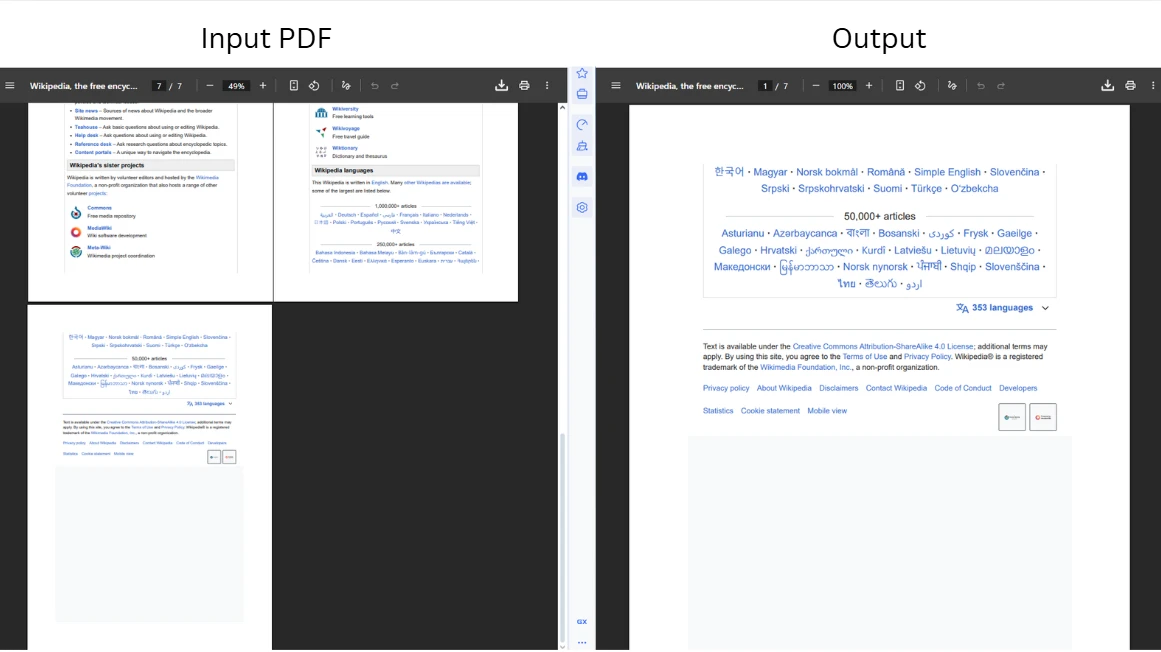
코드는 PDF 파일을 로드하고 마지막 페이지를 0부터 시작하는 인덱스 기준으로 추출하기 위해 CopyPage를 호출합니다. IronPDF는 API 전반에 걸쳐 0부터 시작하는 페이지 번호를 사용하므로, 첫 번째 페이지의 인덱스는 0이고, 마지막 페이지는 PageCount - 1입니다. 복사본을 위치 0에 삽입한 후, 원래 페이지는 색인 순서에서 한 위치 아래로 이동합니다; 제거 호출에서는 lastPageIndex 대신 lastPageIndex + 1을 타겟으로 함으로써 이를 고려합니다. 범위를 벗어난 인덱스를 전달하면 ArgumentOutOfRangeException이 발생하므로, 모서리 위치에 작업하기 전에 항상 페이지 수를 확인하세요.
각각의 복사 및 삭제 작업에 대한 더 깊은 이해를 원하신다면, PDF 페이지 추가, 복사 및 삭제 가이드에서 각 방법을 자세히 다루고 있습니다.
삽입이 이후의 모든 페이지 인덱스를 하나씩 위로 이동시키기 때문에, 원래 페이지는 복사 및 삽입 후 예상보다 하나 더 먼 위치에 있게 됩니다. pdf.RemovePage(lastPageIndex + 1) 패턴이 이 전환을 포착합니다. 문서 중간에서 페이지를 이동할 때도 동일한 원칙이 적용됩니다. 삽입 지점 뒤에 위치하고 있었던 인덱스 N의 페이지는 그 앞에 복사본이 삽입되면 인덱스 N+1에 위치하게 됩니다.
저장 전에 인덱스 계산을 검증하면, 특히 문서 길이가 다양한 배치 파이프라인에서 조용한 정렬 오류를 방지할 수 있습니다. 각 작업 전에 pdf.PageCount에 대해 빠르게 확인하는 것은 문서 크기와 관계없이 논리를 올바르게 유지합니다.
여러 페이지를 다시 배치해야 할 때에는 CopyPages가 특정 페이지 집합을 한 번의 호출로 추출합니다. 이 메서드는 0부터 시작하는 페이지 인덱스 목록을 수락하고, 지정된 순서대로 페이지만 포함하는 새로운 PdfDocument를 반환합니다. 이 접근 방식은 보고서의 마지막으로 연속된 부록 페이지 블록을 이동하거나 요약 페이지 세트를 앞쪽으로 가져오는 시나리오에 적합합니다.
using IronPdf;
using System.Collections.Generic;

// Load the quarterly report
var pdf = PdfDocument.FromFile("quarterly-report.pdf");

// Copy pages at indexes 1 and 2 (the second and third pages)
var selectedPages = pdf.CopyPages(new List<int> { 1, 2 });

// Append the copied pages to the end of the original document
var result = PdfDocument.Merge(pdf, selectedPages);

// Remove the originals at their former positions (now indexes 1 and 2)
result.RemovePages(new List<int> { 1, 2 });

// Write the reordered result to a new path
result.SaveAs("quarterly-report-reordered.pdf");Imports IronPdf
Imports System.Collections.Generic
' Load the quarterly report
Dim pdf = PdfDocument.FromFile("quarterly-report.pdf")
' Copy pages at indexes 1 and 2 (the second and third pages)
Dim selectedPages = pdf.CopyPages(New List(Of Integer) From {1, 2})
' Append the copied pages to the end of the original document
Dim result = PdfDocument.Merge(pdf, selectedPages)
' Remove the originals at their former positions (now indexes 1 and 2)
result.RemovePages(New List(Of Integer) From {1, 2})
' Write the reordered result to a new path
result.SaveAs("quarterly-report-reordered.pdf")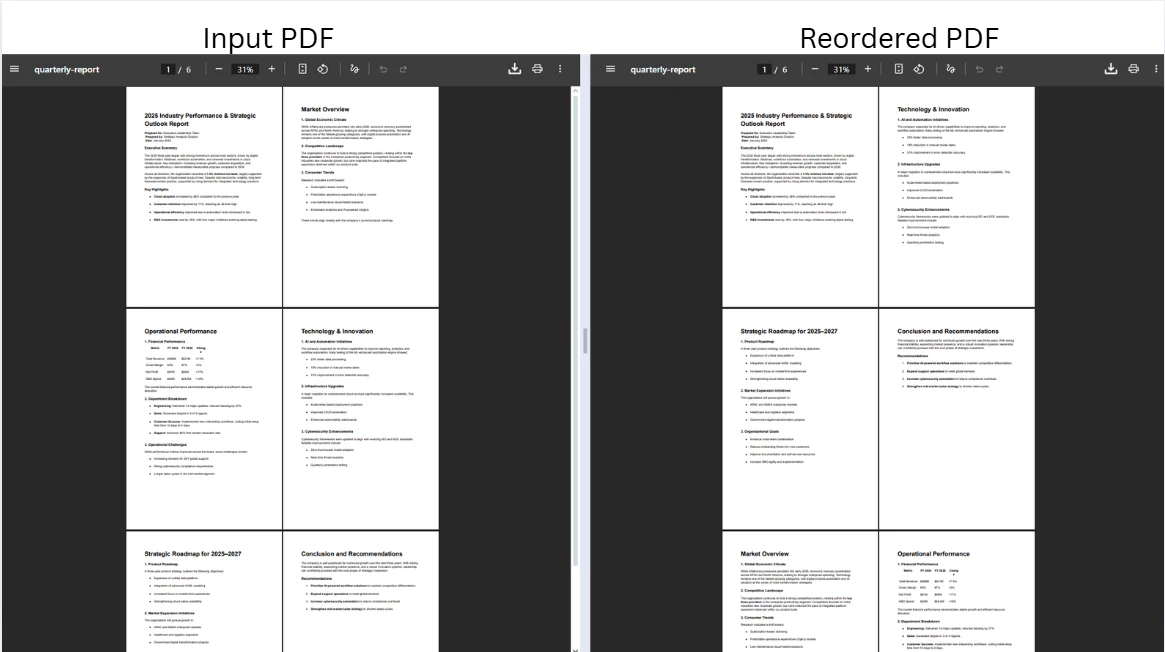
코드는 원본 문서에서 두 페이지를 복사하고 PdfDocument.Merge을 사용하여 끝에 병합한 후, 원본을 제거하여 재정렬을 완료합니다. Merge 메서드는 원본 문서 다음에 추출한 페이지를 순차적으로 결합하는 새로운 PdfDocument 객체를 반환합니다. 이제 중복된 원본을 제거하면 최종 문서가 불필요한 내용을 제외하고 의도한 순서로 남게 됩니다.
RemovePages 메서드는 0부터 시작하는 인덱스 목록을 수락하고, 지정된 모든 페이지를 한 번에 제거합니다. 여러 페이지를 제거할 때에는 루프 내에서 RemovePage를 호출하는 대신, 하나의 호출로 모든 인덱스를 제공하세요. 각 개별 제거는 남은 인덱스를 이동시켜 오차 항목 오류를 일으킬 수 있습니다.
PDF 병합 또는 분할 튜토리얼은 페이지 범위에 따라 분할하는 것을 포함하여 문서를 결합하고 나누는 추가 전략을 다루고 있습니다.
CopyPages은 IEnumerable<int>을 수락하여 비연속적인 페이지도 자연스럽게 지원됩니다. 첫 번째, 네 번째 및 여덟 번째 페이지를 그 순서대로 단일 문서에 복사하려면 new List<int> { 0, 3, 7 }을 전달하세요. 색인 목록은 정렬될 필요가 없으며, 출력 순서에 대한 완전한 제어권을 제공합니다. 이러한 유연성은 여러 장에 걸쳐 있는 보고서에서 경영 요약 페이지만 골라내는 것처럼 긴 소스 파일에서 특정 페이지를 모아 맞춤형 문서를 작성할 때 유용합니다.
문서의 부분 집합을 이동하는 것이 아니라 전체를 재정렬하는 것이 목적이라면 모든 페이지 위치를 원하는 순서로 나열하는 인덱스 배열을 생성하고 이를 CopyPages에 전달하여 하나의 작업으로 재정렬된 문서를 만듭니다. Rearrange Pages in PDF C# tutorial에서는 이 전체 문서 재정렬 패턴에 대해 깊이 있게 다룹니다.
한 PDF 문서에서 다른 문서로 페이지를 전송하는 것은 두 개의 별도 PdfDocument 인스턴스에 걸쳐 동일한 복사-삽입 패턴을 적용합니다. 여러 원본 파일의 내용을 통합할 때 표준 접근 방식입니다: 예를 들어, 승인된 페이지를 초안에서 최종 계약 문서로 이동합니다.
using IronPdf;

// Load the source and destination documents
var sourceDoc = PdfDocument.FromFile("source-document.pdf");
var destinationDoc = PdfDocument.FromFile("destination-document.pdf");

// Extract the first page (index 0) from the source document
var pageToMove = sourceDoc.CopyPage(0);

// Insert the extracted page at position 2 in the destination (third page slot)
destinationDoc.InsertPdf(pageToMove, 2);

// Save the updated destination document
destinationDoc.SaveAs("destination-document-updated.pdf");

// Remove the transferred page from the source and save separately
sourceDoc.RemovePage(0);
sourceDoc.SaveAs("source-document-updated.pdf");Imports IronPdf
' Load the source and destination documents
Dim sourceDoc = PdfDocument.FromFile("source-document.pdf")
Dim destinationDoc = PdfDocument.FromFile("destination-document.pdf")
' Extract the first page (index 0) from the source document
Dim pageToMove = sourceDoc.CopyPage(0)
' Insert the extracted page at position 2 in the destination (third page slot)
destinationDoc.InsertPdf(pageToMove, 2)
' Save the updated destination document
destinationDoc.SaveAs("destination-document-updated.pdf")
' Remove the transferred page from the source and save separately
sourceDoc.RemovePage(0)
sourceDoc.SaveAs("source-document-updated.pdf")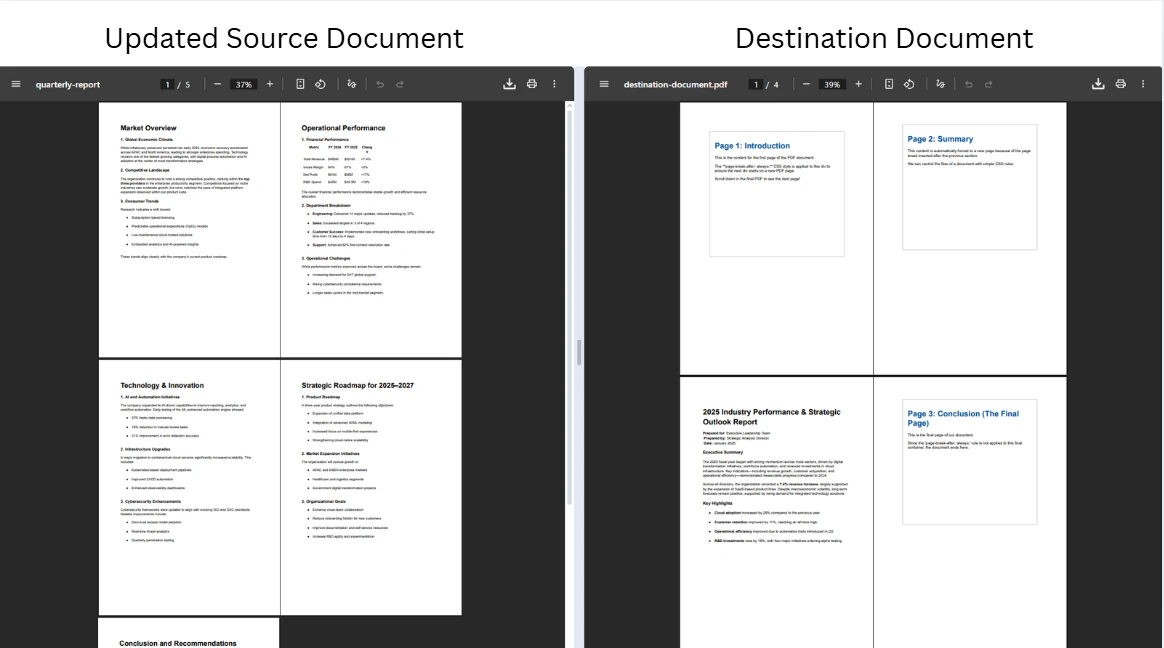
코드는 두 문서를 독립적으로 로드하고, CopyPage을 사용하여 소스에서 페이지를 복사하고, 지정된 인덱스에 InsertPdf을 사용하여 대상에 삽입합니다. 소스와 대상은 서로 다른 경로에 별도의 파일로 저장되어, 작업 중에 하나가 다른 하나를 덮어쓰지 않도록 합니다. 대상을 먼저 저장하고 소스를 두 번째로 저장하는 것은 안전합니다. 왜냐하면 CopyPage이 독립적인 복사본을 생성하기 때문입니다. 소스 문서는 RemovePage이 호출될 때까지 수정되지 않습니다.
SaveAs 두 호출은 파일 시스템에 쓰기를 하지만, IronPDF는 BinaryData 및 Stream 출력 메서드를 통한 메모리 내 워크플로우도 지원합니다. 이는 수정된 PDF를 디스크에 쓰지 않고 HTTP 응답으로 반환해야 하는 웹 애플리케이션에 유용합니다. Transform PDF Pages guide에서는 추가적인 메모리 내 조작 패턴에 대해 다룹니다.
페이지가 CopyPage으로 복사될 때, IronPDF는 페이지의 텍스트, 이미지, 양식 필드 및 렌더링 속성을 포함한 시각적 내용을 보존합니다. 이동된 페이지만 참조하는 아웃라인(북마크)은 복사본과 함께 이동하지만, 여러 페이지를 참조하는 문서 간 북마크 계층 구조는 자동으로 업데이트되지 않습니다. 복잡한 북마크 트리를 가진 문서의 경우, 페이지를 이동한 후 내부 탐색 링크가 올바른 목적지를 가리키는지 PDF 리더기에서 출력을 확인하십시오.
페이지 레이어에 직접 포함된 주석 및 양식 필드 데이터는 복사 작업을 통해 보존됩니다. 소스 문서가 내부 링크에 명명된 목적지를 사용하는 경우, 복사된 페이지에서 이 목적지들이 이름을 유지하지만, 다른 부분의 링크는 이러한 목적지가 대상 문서의 카탈로그에 등록되지 않는 한 이를 해결하지 못합니다.
개발자들은 다양한 실제 시나리오에서 PDF 페이지를 이동하고 재정렬해야 합니다. PDF 사양에 정의된 PDF 페이지 모델은 문서의 페이지 트리에서 각 페이지를 독립된 객체로 나타냅니다. 그렇기 때문에 단일 페이지에 대한 복사-삽입-제거 작업은 문서 길이에 상관없이 항상 유효합니다. 패턴을 이해하면 다양한 입력 구조를 처리하는 문서 처리 파이프라인을 설계하는 데 도움이 됩니다.
| 시나리오 | 일반적인 작업 | IronPDF 메서드 |
|---|---|---|
| 월간 뉴스레터 작성 | 표지 페이지 또는 목차를 앞으로 이동 | CopyPage, InsertPdf, RemovePage |
| 보고서 생성 | 요약 페이지를 재배치하거나 섹션 구분자를 삽입 | 페이지 복사, 병합, 페이지 삭제 |
| 문서 통합 | 여러 소스 파일에서 선택된 페이지를 하나의 출력으로 추출 | CopyPage, InsertPdf, SaveAs |
| 아카이브 재조직 | 참조 파일용으로 연대기 또는 범주별 페이지를 재정렬 | 페이지 복사, 병합, 페이지 삭제 |
| 계약 준비 | 승인 또는 서명 페이지를 필요한 위치로 이동 | CopyPage, InsertPdf, RemovePage |
페이지 조작 이상의 기능을 위해, IronPDF는 동일한 파이프라인에서 문서 작업 전체를 지원합니다. 헤더 및 풋터 추가, 워터마크 적용, 및 디지털 서명 추가가 동일한 PdfDocument API를 통해 제공되므로 최종 저장 전에 여러 변환을 연결할 수 있습니다. IronPDF 기능 페이지에서는 제공되는 모든 기능을 개괄적으로 설명합니다.
페이지 위치가 문서 내용에 의해 결정되는 자동화 시나리오(특정 섹션을 발견한 후 승인 페이지를 삽입하는 경우)에서는 Edit PDF Files tutorial에서 페이지 재정렬과 결합할 수 있는 텍스트 검색 및 콘텐츠 기반 조작 기술을 다룹니다.
IronPDF에서의 페이지 조작은 메모리 내 문서 표현에서 작동하므로, 성능은 문서 크기와 적용된 작업 수에 따라 확장됩니다. 대용량 PDF의 경우, 처리 효율성을 유지하는 몇 가지 패턴이 있습니다.
최소한으로 필요한 페이지 수로 작업하면 메모리 오버헤드를 줄일 수 있습니다. 500페이지 문서를 로드해서 두 페이지를 이동하는 대신, 먼저 CopyPages로 문서를 섹션으로 나누고, 작은 집합에서 재정렬을 수행한 다음 Merge로 재조립 합니다. Split PDF Pages example은 이 분해 및 재조립 패턴을 보여줍니다.
여러 문서에 걸쳐 페이지를 이동하는 배치 처리 파이프라인의 경우, 각 저장 후에 PdfDocument 인스턴스를 삭제하여 메모리를 신속하게 해제하세요. PdfDocument은 IDisposable을 구현하므로, 각 인스턴스를 using 문 안에 감싸면 파이프라인 중간에 예외가 발생하더라도 확정적인 정리가 보장됩니다.
using IronPdf;

// Use 'using' declarations to ensure deterministic disposal
using var source = PdfDocument.FromFile("source-large.pdf");
using var destination = PdfDocument.FromFile("destination-large.pdf");

var pageToTransfer = source.CopyPage(0);
destination.InsertPdf(pageToTransfer, 0);

destination.SaveAs("destination-updated.pdf");
source.RemovePage(0);
source.SaveAs("source-updated.pdf");Imports IronPdf
' Use 'Using' blocks to ensure deterministic disposal
Using source = PdfDocument.FromFile("source-large.pdf")
Using destination = PdfDocument.FromFile("destination-large.pdf")
Dim pageToTransfer = source.CopyPage(0)
destination.InsertPdf(pageToTransfer, 0)
destination.SaveAs("destination-updated.pdf")
source.RemovePage(0)
source.SaveAs("source-updated.pdf")
End Using
End Using여기서의 using 선언은 PdfDocument 객체 두 개가 SaveAs 호출 완료 후에 폐기되도록 하여, 기본 메모리 버퍼를 즉시 해방합니다. 이 패턴은 특히 많은 요청이 같은 서버에서 문서를 동시에 처리할 수 있는 ASP.NET Core 응용 프로그램에서 매우 중요합니다. 메모리 안전한 문서 처리에 대한 추가 API 세부 정보는 IronPDF API Reference를 참조하세요.
C#에서 PDF 페이지를 이동하고 재정렬 하려면, 복사-삽입-제거 순서대로 적용되는 세 개의 IronPDF 메서드: CopyPage, InsertPdf, 및 RemovePage가 필요합니다. 같은 패턴이 한 문서 내에서 한 페이지를 이동하는 것에서 여러 파일에 걸쳐 페이지 묶음을 전송하는 것까지 확장됩니다. IronPDF는 동일한 API로 VB.NET에서도 작동하며, 페이지 조작 메서드는 .NET 8 및 .NET 10을 포함한 모든 지원되는 .NET 플랫폼에서 사용할 수 있습니다.
관련 기능을 탐색하려면 Add, Copy & Delete PDF Pages guide가 모든 페이지 수준 메서드를 깊이 있게 다룹니다. 페이지 색인 배열을 사용한 전체 문서 재정렬을 위해서는 Rearrange Pages in PDF C# article에서 해당 접근 방식을 안내합니다.
프로젝트에 PDF 페이지 조작 기능을 추가할 준비가 되었습니까? 무료 체험판을 시작하여 개발 중 IronPDF의 모든 기능에 액세스하거나 라이선스를 구매하여 오늘 프로덕션에 배포하세요.

커티스 차우는 칼턴 대학교에서 컴퓨터 과학 학사 학위를 취득했으며, Node.js, TypeScript, JavaScript, React를 전문으로 하는 프론트엔드 개발자입니다. 직관적이고 미적으로 뛰어난 사용자 인터페이스를 만드는 데 열정을 가진 그는 최신 프레임워크를 활용하고, 잘 구성되고 시각적으로 매력적인 매뉴얼을 제작하는 것을 즐깁니다.



IronPDF는 IRON SUITE 의 일부입니다.
10개의 .NET API 제품, 당신의 사무 문서를 위해

PDF 파일을 HTML처럼 빠르게 변환해야 할 때.


